Blog

Learn About Our Meetup

5000+ Members

MEETUPS

LEARN, CONNECT, SHARE

Join our meetup, learn, connect, share, and get to know your Toronto AI community. 

JOB POSTINGS

INDEED POSTINGS

Browse through the latest deep learning, ai, machine learning postings from Indeed for the GTA.

CONTACT

CONNECT WITH US

Are you looking to sponsor space, be a speaker, or volunteer, feel free to give us a shout.

Category: Global

RecSim: A Configurable Simulation Platform for Recommender Systems

Significant advances in machine learning, speech recognition, and language technologies are rapidly transforming the way in which recommender systems engage with users. As a result, collaborative interactive recommenders (CIRs) recommender systems that engage in a deliberate sequence of interactions with a user to best meet that user’s needs have emerged as a tangible goal for online services.

Despite this, the deployment of CIRs has been limited by challenges in developing algorithms and models that reflect the qualitative characteristics of sequential user interaction. Reinforcement learning (RL) is the de facto standard ML approach for addressing sequential decision problems, and as such is a natural paradigm for modeling and optimizing sequential interaction in recommender systems. However, it remains under-investigated and under-utilized for use in CIRs in both research and practice. One major impediment is the lack of general-purpose simulation platforms for sequential recommender settings, whereas simulation has been one of the primary means for developing and evaluating RL algorithms in real-world applications like robotics.

To address this, we have developed RᴇᴄSɪᴍ (available here), a configurable platform for authoring simulation environments to facilitate the study of RL algorithms in recommender systems (and CIRs in particular). RᴇᴄSɪᴍ allows both researchers and practitioners to test the limits of existing RL methods in synthetic recommender settings. RecSim’s aim is to support simulations that mirror specific aspects of user behavior found in real recommender systems and serve as a controlled environment for developing, evaluating and comparing recommender models and algorithms, especially RL systems designed for sequential user-system interaction.

As an open-source platform, RᴇᴄSɪᴍ: (i) facilitates research at the intersection of RL and recommender systems; (ii) encourages reproducibility and model-sharing; (iii) aids the recommender-systems practitioner, interested in applying RL to rapidly test and refine models and algorithms in simulation, before incurring the potential cost (e.g., time, user impact) of live experiments; and (iv) serves as a resource for academic-industry collaboration through the release of “realistic” stylized models of user behavior without revealing user data or sensitive industry strategies.

Reinforcement Learning and Recommendation Systems
One challenge in applying RL to recommenders is that most recommender research is developed and evaluated using static datasets that do not reflect the sequential, repeated interaction a recommender has with its users. Even those with temporal extent, such as MovieLens 1M, do not (easily) support predictions about the long-term performance of novel recommender policies that differ significantly from those used to collect the data, as many of the factors that impact user choice are not recorded within the data. This makes the evaluation of even basic RL algorithms very difficult, especially when it comes to reasoning about the long-term consequences of some new recommendation policy — research shows changes in policy can have long-term, cumulative impact on user behavior. The ability to model such user behaviors in a simulated environment, and devise and test new recommendation algorithms, including those using RL, can greatly accelerate the research and development cycle for such problems.

Overview of RᴇᴄSɪᴍ
RᴇᴄSɪᴍ simulates a recommender agent’s interaction with an environment consisting of a user model, a document model and a user choice model. The agent interacts with the environment by recommending sets or lists of documents (known as slates) to users, and has access to observable features of simulated individual users and documents to make recommendations. The user model samples users from a distribution over (configurable) user features (e.g., latent features, like interests or satisfaction; observable features, like user demographic; and behavioral features, such as visit frequency or time budget). The document model samples items from a prior distribution over document features, both latent (e.g., quality) and observable (e.g., length, popularity). This prior, as all other components of RᴇᴄSɪᴍ, can be specified by the simulation developer, possibly informed (or learned) from application data.

The level of observability for both user and document features is customizable. When the agent recommends documents to a user, the response is determined by a user-choice model, which can access observable document features and all user features. Other aspects of a user’s response (e.g., time spent engaging with the recommendation) can depend on latent document features, such as document topic or quality. Once a document is consumed, the user state undergoes a transition through a configurable user transition model, since user satisfaction or interests might change.

We note that RᴇᴄSɪᴍ provides the ability to easily author specific aspects of user behavior of interest to the researcher or practitioner, while ignoring others. This can provide the critical ability to focus on modeling and algorithmic techniques designed for novel phenomena of interest (as we illustrate in two applications below). This type of abstraction is often critical to scientific modeling. Consequently, high-fidelity simulation of all elements of user behavior is not an explicit goal of RᴇᴄSɪᴍ. That said, we expect that it may also serve as a platform that supports “sim-to-real” transfer in certain cases (see below).

Data Flow through components of RᴇᴄSɪᴍ. Colors represent different model components — user and user-choice models (green), document model (blue), and the recommender agent (red).

Applications
We have used RᴇᴄSɪᴍ to investigate several key research problems that arise in the use of RL in recommender systems. For example, slate recommendations can result in RL problems, since the parameter space for action grows exponentially with slate size, posing challenges for exploration, generalization and action optimization. We used RᴇᴄSɪᴍ to develop a novel decomposition technique that exploits simple, widely applicable assumptions about user choice behavior to tractably compute Q-values of entire recommendation slates. In particular, RᴇᴄSɪᴍ was used to test a number of experimental hypotheses, such as algorithm performance and robustness to different assumptions about user behavior.

Future Work
While RᴇᴄSɪᴍ provides ample opportunity for researchers and practitioners to probe and question assumptions made by RL/recommender algorithms in stylized environments, we are developing several important extensions. These include: (i) methodologies to fit stylized user models to usage logs to partially address the “sim-to-real” gap; (ii) the development of natural APIs using TensorFlow’s probabilistic APIs to facilitate model specification and learning, as well as scaling up simulation and inference algorithms using accelerators and distributed execution; and (iii) the extension to full-factor, mixed-mode interaction models that will be the hallmark of modern CIRs — e.g., language-based dialogue, preference elicitation, explanations, etc.

Our hope is that RᴇᴄSɪᴍ will serve as a valuable resource that bridges the gap between recommender systems and RL research — the use cases above are examples of how it can be used in this fashion. We also plan to pursue it as a platform to support academic-industry collaborations, through the sharing of stylized models of user behavior that, at suitable levels of abstraction, reflect a degree of realism that can drive useful model and algorithm development.

Further details of the RᴇᴄSɪᴍ framework can be found in the white paper, while code and colabs/tutorials are available here.

Acknowledgements
We thank our collaborators and early adopters of RᴇᴄSɪᴍ, including the other members of the RᴇᴄSɪᴍ team: Eugene Ie, Vihan Jain, Sanmit Narvekar, Jing Wang, Rui Wu and Craig Boutilier.

Subtitling videos accurately and easily with CaptionHub and AWS

This is a guest post from James Jameson, the Commercial Lead at CaptionHub. CaptionHub is a London-based company that focuses on video captioning and subtitling production for enterprise organizations.

While the act of captioning—that is, taking video files and making sure the text on the screen reflects what’s being said accurately and is timed appropriately—seems simple at the outset, there is more complexity than meets the eye.

When we embarked on building CaptionHub in 2015, we were a design agency producing video effects and commercials for clients, including a massive tech company in California. They wanted us to localize their video—to their high standards, of course—and do it on the tight schedule of a global consumer tech release.

To meet our client’s needs, we found ourselves building a new software tool to manage linguists, provide collaborative subtitling, and make subtitles frame-accurate. To speed up the process, we then added AI called Natural Captions Technology, an algorithmic approach to natural language processing that reflects the natural language of humans.

From this starting point, we recognized the ubiquitous needs for a solution like what we had created. We broadened the types of media we handled from simply marketing or internal communications assets to high-value global output ready for any viewer or listener worldwide.

With CaptionHub today, we take recorded video and create perfect subtitles, fast. We generate subtitles using automatic speech recognition to massively speed up the first cut. Then, we make sure that subtitles are timed perfectly (“frame-accurate,” in our lingo), on the belief that subtitling should be a seamless part of the production workflow. We also provide automated and human-enabled translation to localize video for any audience. Now, with the help of AWS, we can do that for live video streams and on-demand video.

With AWS, we can provide an enterprise localization platform for the most demanding of our clients, regardless of their use case. AWS technology spans our servers and low-level infrastructure decisions up to the engines we choose for speech recognition, machine translation, and the sharp-end value points that delight our customers.

On the artificial intelligence and machine learning side, we use Amazon Translate and Amazon Transcribe for smooth, real-time captioning across dozens of languages. AWS has been a crucial inspiration for our newest offerings.

We use a variety of other AWS services that are critical to our infrastructure and application architecture. AWS Elemental MediaPackage handles output streams from CaptionHub live, combining captions and video/audio, while AWS Elemental MediaLive handles the input streams for CaptionHub live. While all of this is orchestrated in perfect harmony, we use Amazon CloudWatch to monitor our AWS infrastructure.

With this AWS-based setup, we’re unstoppable. We’re able to scale up and down however and whenever we need to. AWS has allowed us to vastly accelerate our mission to help organizations localize their media.

Our customers have reported huge savings in workflow time, up to an 800% increase in production for captions and subtitles using automatic speech recognition, which takes advantage of the same tech behind Alexa. That amounts to a significant financial return, even for the world’s largest and best-funded production and marketing departments.

We live in a world that communicates with video. When our clients’ production values, combined with their potential to reach audiences, quite literally define their brand, it’s no wonder they want to maintain that winning edge. With CaptionHub’s captioning solutions, made possible by AWS, we can ensure that organizations reach audiences in their language, quickly and perfectly, on any device, wherever they are.

Expanding Universe for HPC, NVIDIA CEO Brings GPU Acceleration to Arm

Broadening support for GPU-accelerated supercomputing to a fast-growing new platform, NVIDIA founder and CEO Jensen Huang Monday introduced a reference design for building GPU-accelerated Arm servers, with wide industry backing.

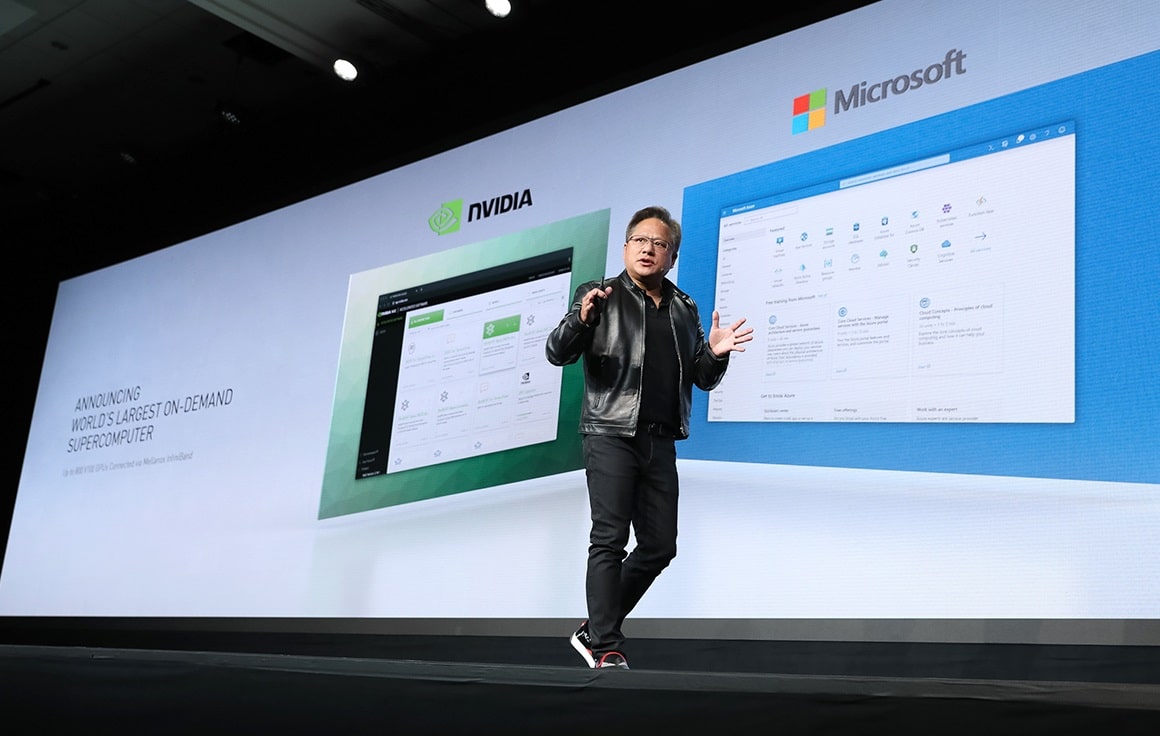
Huang — speaking Monday at the SC19 supercomputing show in Denver — also announced that Microsoft has built NDv2, a “supersized instance” that’s the world’s largest GPU-accelerated cloud-based supercomputer — a supercomputer in the cloud — on its Azure cloud-computing platform.

He additionally unveiled NVIDIA Magnum IO, a suite of GPU-accelerated I/O and storage software to eliminate data transfer bottlenecks for AI, data science and HPC workloads.

In a two-hour talk, Huang wove together these announcements with an update on developments from around the industry, setting out a sweeping vision of how high performance computing is expanding out in all directions.

HPC Universe Expanding in All Directions

“The HPC universe is expanding in every single direction at the same time,” Huang told a standing-room only crowd of some 1,400 researchers and technologists at the start of the world’s biggest supercomputing event. “HPC is literally everywhere today. It’s in supercomputing centers, in the cloud, at the edge.”

Driving that expansion are factors such as streaming HPC from massive sensor arrays; using edge computing to do more sophisticated filtering; running HPC in the cloud; and using AI to accelerate HPC.

“All of these are undergoing tremendous change,” Huang said.

Putting an exclamation mark on his talk, Huang debuted the world’s largest interactive volume visualization: An effort with NASA to simulate a Mars landing in which a craft the size of a two-story condominium traveling at 12,000 miles an hour screeches safely to a halt in just seven minutes. And it sticks the landing.

Huang said the simulation enables 150 terabytes of data, equivalent to 125,000 DVDs, to be flown through at random access. “To do that, we’ll have a supercomputing analytics instrument that sits next to a supercomputer.”

Expanding the Universe for HPC

Kicking off his talk, Huang detailed how accelerated computing powers the work of today’s computational scientists, whom he calls the da Vincis of our time.

The first AI supercomputers already power scientific research into phenomena as diverse as fusion energy and gravitational waves, Huang explained.

Accelerated computing, meanwhile, powers exascale systems tackling some of the world’s most challenging problems.

They include efforts to identify extreme weather patterns at Lawrence Berkeley National Lab … Research into the genomics of opioid addiction at Oak Ridge National Laboratory … Nuclear waste remediation efforts led by LBNL, the Pacific Northwest National Lab and Brown University at the Hanford site … And cancer-detection research led by Oak Ridge National Laboratory and the State University of New York at Stony Brook.

At the same time, AI is being put to work across an ever-broader array of industries. Earlier this month, the U.S. Post Office, the world’s largest delivery service — which processes nearly 500 million pieces of mail a day — announced it’s adopting end-to-end AI technology from NVIDIA.

“It’s the perfect application for a streaming AI computer,” Huang said.

And last month, in partnership with Ericsson, Microsoft, Red Hat and others, Huang revealed that NVIDIA is powering AI at the edge of enterprise and 5G telco networks with the NVIDIA EGX Edge Supercomputing platform.

Next up for HPC: harnessing vast numbers of software-defined sensors to relay data to programmable edge computers, which in turn pass on the most interesting data to supercomputers able to wring insights out of oceans of real-time data.

Arm in Arm: GPU-Acceleration Speeds Emerging HPC Architecture

Monday’s news marks a milestone for the Arm community. The processor architecture — ubiquitous in smartphones and IoT devices — has long been the world’s most popular. Arm has more than 100 billion computing devices and will cross the trillion mark in the coming years, Huang predicted.

NVIDIA’s moving fast to bring HPC tools of all kinds to this thriving ecosystem.

“We’ve been working with the industry, all of you, and the industry has really been fantastic, everybody is jumping on,” Huang said, adding that 30 applications are already up and running. “This is going to be a great ecosystem — basically everything that runs in HPC should run on any CPU as well.”

World-leading supercomputing centers have already begun testing GPU-accelerated Arm-based computing systems, Huang said. This includes Oak Ridge and Sandia National Laboratories, in the United States; the University of Bristol, in the United Kingdom; and Riken, in Japan.

NVIDIA’s reference design for GPU-accelerated Arm servers — comprising both hardware and software building blocks — has already won support from key players in HPC and Arm ecosystems, Huang said.

In the Arm ecosystem, NVIDIA is teaming with Arm, Ampere, Fujitsu and Marvell. NVIDIA is also working with Cray, a Hewlett Packard Enterprise company, and HPE. A wide range of HPC software companies are already using NVIDIA CUDA-X libraries to bring their GPU-enabled management and monitoring tools to the Arm ecosystem.

The reference platform’s debut follows NVIDIA’s announcement earlier this year that it will bring its CUDA-X software platform to Arm. Fulfilling this promise, NVIDIA is previewing its Arm-compatible software developer kit — available for download now — consisting of NVIDIA CUDA-X libraries and development tools for accelerated computing.

Microsoft Brings GPU-Powered Supercomputer to Azure

“This puts a supercomputer in the hands of every scientist in the world,” Huang said he announced NDv2, a GPU-powered supercomputer now available on Microsoft Azure.

Giving HPC researchers and others instant access to unprecedented amounts of GPU computing power, Huang announced NDv2, a GPU-powered supercomputer now available on Microsoft Azure that ranks among the world’s fastest.

“Now you can open up an instance, you grab one of the stacks … in the container, you launch it, on Azure, and you’re doing science,” Huang said. “It’s really quite fantastic.”

Built to handle the most demanding AI and HPC applications, the Azure NDv2 instance can scale up to 800 NVIDIA V100 Tensor Core GPUs interconnected with Mellanox InfiniBand.

For the first time, researchers and others can rent an entire AI supercomputer on demand, matching the capabilities of large-scale, on-premise supercomputers that can take months to deploy.

AI researchers needing fast solutions can quickly spin up multiple Azure NDv2 instances and train complex conversational AI models in just hours, Huang explained.

For example, Microsoft and NVIDIA engineers used 64 NDv2 instances on a pre-release version of the cluster to train BERT, a popular conversational AI model, in roughly three hours.

Magnum IO Software

Helping AI researchers and data scientists move data in minutes, rather than hours, Huang introduced the NVIDIA Magnum IO software suite.

A standing-room only crowd of some 1,400 researchers and technologists came to hear NVIDIA’s keynote at the start of SC19, the world’s top supercomputing event.

Delivering up to 20x faster data processing for multi-server, multi-GPU computing nodes, Mangum IO eliminates a key bottleneck faced by those carrying out complex financial analysis, climate modeling and other high-performance workloads.

“This is an area that is going to be rich with innovation, and we are going to be putting a lot of energy into helping you move information in and out of the system,” Huang said.

A key feature of Magnum IO is NVIDIA GPUDirect Storage, which provides a direct data path between GPU memory and storage, enabling data to bypass CPUs and travel unencumbered on “open highways” offered by GPUs, storage and networking devices.

NVIDIA developed Magnum in close collaboration with industry leaders in networking and storage, including DataDirect Networks, Excelero, IBM, Mellanox and WekaIO.

The post Expanding Universe for HPC, NVIDIA CEO Brings GPU Acceleration to Arm appeared first on The Official NVIDIA Blog.

NVIDIA and Partners Bring AI Supercomputing to Enterprises

Academia, hyperscalers and scientific researchers have been big beneficiaries of high performance computing and AI infrastructure. Yet businesses have largely been on the outside looking in.

No longer. NVIDIA DGX SuperPOD provides businesses a proven design formula for building and running enterprise-grade AI infrastructure with extreme scale. The reference architecture gives businesses a prescription to follow to avoid exhaustive, protracted design and deployment cycles and capital budget overruns.

Today, at SC19, we’re taking DGX SuperPOD a step further. It’s available as a consumable solution that now integrates with the leading names in data center IT — including DDN, IBM, Mellanox and NetApp — and is fulfilled through a network of qualified resellers. We’re also working with ScaleMatrix to bring self-contained data centers in a cabinet to the enterprise.

The Rise of the Supercomputing Enterprise

AI is an accelerant for gaining competitive advantage. It can open new markets and even address a business’s existential threats. Formerly untrainable models for use cases like natural language processing become solvable with massive infrastructure scale.

But leading-edge AI demands leadership-class infrastructure — and DGX SuperPOD offers extreme-scale multi-node training of even the most complex models, like BERT for conversational AI.

It consolidates often siloed pockets of AI and machine learning development into a centralized shared infrastructure, bringing together data science talent so projects can quickly go from concept to production at scale.

And it maximizes resource efficiency, avoiding stranded, underutilized assets and increasing a business’s return on its infrastructure investments.

Data Center Leaders Support NVIDIA DGX SuperPOD 

Several of our partners have completed the testing and validation of DGX SuperPOD in combination with their high-performance storage offerings and the Mellanox InfiniBand and Ethernet terabit-speed network fabric.

DGX SuperPOD with IBM Spectrum Storage

“Deploying faster with confidence is only one way our clients are realizing the benefits of the DGX SuperPOD reference architecture with IBM Storage,” said Douglas O’Flaherty, director of IBM Storage Product Marketing. “With comprehensive data pipeline support, they can start with an all-NVMe ESS 3000 flash solution and adapt quickly. With the software-defined flexibility of IBM Spectrum Scale, the DGX SuperPOD design easily scales, extends to public cloud, or integrates IBM Cloud Object Storage and IBM Spectrum Discover. Supported by the expertise of our business partners, we enhance data science productivity and organizational adoption of AI.”

DGX SuperPOD with DDN Storage

“Meeting the massive demands of emerging large-scale AI initiatives requires compute, networking and storage infrastructure that exceeds architectures historically available to most commercial organizations,” said James Coomer, senior vice president of products at DDN. “Through DDN’s extensive development work and testing with NVIDIA and their DGX SuperPOD, we have demonstrated that it is now possible to shorten supercomputing-like deployments from weeks to days and deliver infrastructure and capabilities that are also rock solid and easy to manage, monitor and support. When combined with DDN’s A3I data management solutions, NVIDIA DGX SuperPOD creates a real competitive advantage for customers looking to deploy AI at scale.”

DGX SuperPOD with NetApp

“Industries are gaining competitive advantage with high performance computing and AI infrastructure, but many are still hesitant to take the leap due to the time and cost of deployment,” said Robin Huber, vice president of E-Series at NetApp. “With the proven NVIDIA DGX SuperPOD design built on top of the award-winning NetApp EF600 all-flash array, customers can move past their hesitation and will be able to accelerate their time to value and insight while controlling their deployment costs.”

NVIDIA has built a global network of partners who’ve been qualified to sell and deploy DGX SuperPOD infrastructure:

  • In North America: Worldwide Technologies
  • In Europe, the Middle East and Africa: ATOS
  • In Asia: LTK and Azwell
  • In Japan: GDEP

To get started, read our solution brief and then reach out to your preferred DGX SuperPOD partner.

Scaling Supercomputing Infrastructure — Without a Data Center

Many organizations that need to scale supercomputing simply don’t have access to a data center that’s optimized for the unique demands of AI and HPC infrastructure. We’re partnering with ScaleMatrix, a DGX Ready Data Center Program partner, to bring self-contained data centers in a rack to the enterprise.

In addition to colocation services for DGX infrastructure, ScaleMatrix offers its Dynamic Density Control cabinet technology, which enables businesses to bypass the constraints of data center facilities. This lets enterprises deploy DGX POD and SuperPOD environments almost anywhere while delivering the power and technology of a state-of-the-art data center.

With self-contained cooling, fire suppression, various security options, shock mounting, extreme environment support and more, the DDC solution offered through our partner Microway removes the dependency on having a traditional data center for AI infrastructure.

Learn more about this offering here.

The post NVIDIA and Partners Bring AI Supercomputing to Enterprises appeared first on The Official NVIDIA Blog.

Exploring images on social media using Amazon Rekognition and Amazon Athena

If you’re like most companies, you wish to better understand your customers and your brand image. You’d like to track the success of your marketing campaigns, and the topics of interest—or frustration—for your customers. Social media promises to be a rich source of this kind of information, and many companies are beginning to collect, aggregate, and analyze the information from platforms like Twitter.

However, more and more social media conversations center around images and video; on one recent project, approximately 30% of all tweets collected included one or more images. These images contain relevant information that is not readily accessible without analysis.

About this blog post
Time to complete 1 hour
Cost to complete ~ $5 (at publication time, depending on terms used)
Learning level Intermediate (200)
AWS services Amazon Rekognition
Amazon Athena
Amazon Kinesis Data Firehose
Amazon S3
AWS Lambda

Overview of solution

The following diagram shows the solution components and how the images and extracted data flows through them.

These components are available through an AWS CloudFormation template.

  1. Twitter Search API collects Tweets.
  2. Amazon Kinesis Data Firehose dispatches the tweets to store in an Amazon S3
  3. The creation of an S3 object in the designated bucket folder triggers a Lambda function.
  4. The Lambda sends each tweet text to Amazon Comprehend to detect sentiment (positive or negative), entity (real-world objects such as people, places, and commercial items), and to precise references to measures such as dates and quantities. For more information, see DetectSentiment and DetectEntity in the Amazon Comprehend Developer Guide.
  5. The Lambda checks each tweet for media of type ‘photo’ in the tweet’s extended_entities If the photo has either a .JPG or .PNG extension, the Lambda calls the following Amazon Rekognition APIs for each image:
    • Detect_labels, to identify objects such as Person, Pedestrian, Vehicle, and Car in the image.
    • Detect_moderation_labels, to determine if an image or stored video contains unsafe content, such as explicit adult content or violent content.
    • If the detect_labels API returns a Text label, detect_text extracts lines, words, or letters found in the image.
    • If the detect_labels API returns a Person label, the Lambda calls the following:
      • detect_faces, to detect faces and analyze them for features such as sunglasses, beards, and mustaches.
      • recognize_celebrities, to detect as many celebrities as possible in different settings, cosmetic makeup, and other conditions.

      The results from all calls for a single image are combined into a single JSON record. For more information about these APIs, see Actions in the Amazon Rekognition Developer Guide.

  6. The results of the Lambda go to Kinesis Data Firehose. Kinesis Data Firehose batches the records and writes them to a designated S3 bucket and folder.
  7. You can use Amazon Athena to build tables and views over the S3 datasets, then catalogue these definitions in the AWS Glue Data Catalog. The table and view definitions make it much easier to query the complex JSON objects contained in these S3 datasets.
  8. After the processed tweets land in S3, you can query the data with Athena.
  9. You can also use Amazon QuickSight to visualize the data, or Amazon SageMaker or Amazon EMR to process the data further. For more information, see Build a social media dashboard using machine learning and BI services. This post uses Athena.

Prerequisites

This walkthrough has the following prerequisites:

  • An AWS account.
  • An app on Twitter. To create an app, see the Apps section of the Twitter Development website.
    • Create a consumer key (API key), consumer secret key (API secret), access token, and access token secret. The solution uses them as parameters in the AWS CloudFormation stack.

Walkthrough

This post walks you through the following steps:

  • Launching the provided AWS CloudFormation template and collecting tweets.
  • Checking that the stack created datasets on S3.
  • Creating views over the datasets using Athena.
  • Exploring the data.

S3 stores the raw tweets and the Amazon Comprehend and Amazon Rekognition outputs in JSON format. You can use Athena table and view definitions to flatten the complex JSON produced and extract your desired fields. This approach makes the data easier to access and understand.

Launching the AWS CloudFormation template

This post provides an AWS CloudFormation template that creates all the ingestion components that appear in the previous diagram, except for the S3 notification for Lambda (the dotted blue line in the diagram).

  1. In the AWS Management Console, launch the AWS CloudFormation Template.

    This launches the AWS CloudFormation stack automatically into the us-east-1 Region.

  2. In the post Build a social media dashboard using machine learning and BI services, in the section “Build this architecture yourself,” follow the steps outlined, with the following changes:
    • Use the Launch Stack link from this post.
    • If the AWS Glue database socialanalyticsblog already exists (for example, if you completed the walkthrough from the previous post), change the name of the database when launching the AWS CloudFormation stack, and use the new database name for the rest of this solution.
    • For Twitter Languages, use ‘en’ (English) only. This post removed the Amazon Comprehend Translate capability for simplicity and to reduce cost.
    • Skip the section “Setting up S3 Notification – Call Amazon Translate/Comprehend from new Tweets.” This occurs automatically when launching the AWS CloudFormation stack by the “Add Trigger” Lambda function.
    • Stop at the section “Create the Athena Tables” and complete the following instructions in this post instead.

You can modify which terms to pull from the Twitter streaming API to be those relevant for your company and your customers. This post used several Amazon-related terms.

This implementation makes two Amazon Comprehend calls and up to five Amazon Rekognition calls per tweet. The cost of running this implementation is directly proportional to the number of tweets you collect. If you’d like to modify the terms to something that may retrieve tens or hundreds of tweets a second, for efficiency and for cost management, consider performing batch calls or using AWS Glue with triggers to perform batch processing versus stream processing.

Checking the S3 files

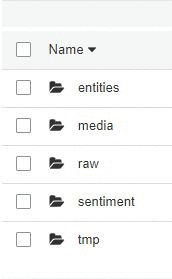
After the stack has been running for approximately five minutes, datasets start appearing in the S3 bucket (rTweetsBucket) that the AWS CloudFormation template created. Each dataset is represented as the following files sitting in a separate directory in S3:

  • Raw – The raw tweets as received from Twitter.
  • Media – The output from calling the Amazon Rekognition APIs.
  • Entities – The results of Amazon Comprehend entity analysis.
  • Sentiment – The results of Amazon Comprehend sentiment analysis.

See the following screenshot of the directory:
For the entity and sentiment tables, see Build a social media dashboard using machine learning and BI services.

When you have enough data to explore (which depends on how popular your selected terms are and how frequently they have images), you can stop the Twitter stream producer, and stop or terminate the Amazon EC2 instance. This stops your charges from Amazon Comprehend, Amazon Rekognition, and EC2.

Creating the Athena views

The next step is manually creating the Athena database and tables. For more information, see Getting Started in the Athena User Guide.

This is a great place to use AWS Glue crawling features in your data lake architectures. The crawlers automatically discover the data format and data types of your different datasets that live in S3 (as well as relational databases and data warehouses). For more information, see Defining Crawlers.

  1. In the Athena console, in Query Editor, access the file sql.The AWS CloudFormation stack created the database and tables for you automatically.
  2. Load the view create statements into the Athena query editor one by one, and execute.This step creates the views over the tables.

Compared to the prior post, the media_rekognition table and the views are new. The tweets table has a new extended_entities column for images and video metadata. The definitions of the other tables remain the same.

Your Athena database should look similar to the following screenshot. There are four tables, one for each of the datasets on S3. There are also three views, combining and exposing details from the media_rekognition table:

  • Celeb_view focuses on the results of the recognize_celebrities API
  • Media_image_labels_query focuses on the results from the detect_labels API
  • Media_image_labels_face_query focuses on the results from the detect_faces API

Explore the table and view definitions. The JSON objects are complex, and these definitions show a variety of uses for querying nested objects and arrays with complex types. Now many of the queries can be relatively simple, thanks to the underlying table and view definitions encapsulating the complexity of the underlying JSON. For more information, see Querying Arrays with Complex Types and Nested Structures.

Exploring the results

This section describes three use cases for this data and provides SQL to extract similar data. Because your search terms and timeframe are different from those in this post, your results will differ. This post used a set of Amazon-related terms. The tweet collector ran for approximately six weeks and collected approximately 9.5M tweets. From the tweets, there were approximately 0.5M photos, about 5% of the tweets. This number is low compared to some other sets of business-related search terms, where approximately 30% of tweets contained photos.

This post reviews for four image use cases:

  1. Buzz
  2. Labels and faces
  3. Suspect content
  4. Exploring celebrities

Buzz

Major topic areas represented by the links associated with the tweets often provide a good complement to the tweet language content topics surfaced via natural language processing. For more information, see Build a social media dashboard using machine learning and BI services.

The first query is which websites the tweets linked to. The following code shows the top domain names linked from the tweets:

SELECT lower(url_extract_host(url.expanded_url)) AS domain,
         count(*) AS count
FROM 
    (SELECT *
    FROM "tweets"
    CROSS JOIN UNNEST (entities.urls) t (url))
GROUP BY  1
ORDER BY  2 DESC 
LIMIT 10;

The following screenshot shows the top 10 domains returned:

Links to Amazon websites are frequent, and several different properties are named, such as amazon.com, amazon.co.uk, and goodreads.com.

Further exploration shows that many of these links are to product pages on the Amazon website. It’s easy to recognize these links because they have /dp/ (for detail page) in the link. You can get a list of those links, the images they contain, and the first line of text in the image (if there is any), with the following query:

SELECT tweetid,
         user_name,
         media_url,
         element_at(textdetections,1).detectedtext AS first_line,
         expanded_url,
         tweet_urls."text"
FROM 
    (SELECT id,
         user.name AS user_name,
         text,
         entities,
         url.expanded_url as expanded_url
    FROM tweets
    CROSS JOIN UNNEST (entities.urls) t (url)) tweet_urls
JOIN 
    (SELECT media_url,
         tweetid,
         image_labels.textdetections AS textdetections
    FROM media_rekognition) rk
    ON rk.tweetid = tweet_urls.id
WHERE lower(url_extract_host(expanded_url)) IN ('www.amazon.com', 'amazon.com', 'www.amazon.com.uk', 'amzn.to')
        AND NOT position('/dp/' IN url_extract_path(expanded_url)) = 0 -- url links to a product
LIMIT 50;

The following screenshot shows some of the records returned by this query. The first_line column shows the results returned by the detect_text API for the image URL in the media_url column.
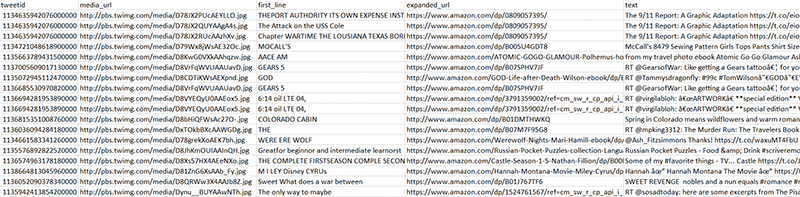
Many of the images do contain text. You can also identify the products the tweet linked to; many of the tweets are product advertisements by sellers, using images that relate directly to their product.

Labels and faces

You can also get a sense of the visual content of the images by looking at the results of calling the Amazon Rekognition detect_labels API. The following query finds the most common objects found in the photos:

SELECT label_name,
         COUNT(*) AS count
FROM media_image_labels_query
GROUP BY  label_name
ORDER BY COUNT(*) desc
LIMIT 50; 

The following screenshot shows the results of that request. The most popular label by far is Human or Person, with Text, Advertisement, and Poster coming soon after. Novel is further down the list. This result reflects the most popular product being tweeted about on the Amazon website—books.

You can explore the faces further by looking at the results of the detect_faces API. That API returns details for each face in the image, including the gender, age range, face position, whether the person is wearing sunglasses or has a mustache, and the expression(s) on their face. Each of these features also has a confidence level associated with it. For more information, see DetectFaces in the Amazon Rekognition Developer Guide.

The view media_image_labels_face_query unnests many of these features from the complex JSON object returned by the API call, making the fields easy to access.

You can explore the view definition for media_image_labels_face_query, including the use of the reduce operator on the array of (emotion,confidence) pairs that Amazon Rekognition returned to identify and return the expression category with the highest confidence score associated with it, and associate the name top_emotion with it. See the following code:

reduce(facedetails.emotions, element_at(facedetails.emotions, 1), (s_emotion, emotion) -> IF((emotion.confidence > s_emotion.confidence), emotion, s_emotion), (s) -> s) top_emotion

You can then use the exposed field, top_emotion. See the following code:

SELECT top_emotion.type AS emotion ,
         top_emotion.confidence AS emotion_confidence ,
         milfq.* ,   
         "user".id AS user_id ,
         "user".screen_name ,
         "user".name AS user_name ,
        url.expanded_url AS url
FROM media_image_labels_face_query milfq
INNER JOIN tweets
    ON tweets.id = tweetid, UNNEST(entities.urls) t (url)
WHERE position('.amazon.' IN url.expanded_url) > 0;

The following screenshot shows columns from the middle of this extensive query, including glasses, age range, and where the edges of this face are positioned. This last detail is useful when multiple faces are present in a single image, to distinguish between the faces.

You can look at the top expressions found on these faces with the following code:

SELECT top_emotion.type AS emotion,
         COUNT(*) AS "count"
FROM media_image_labels_face_query milfq
WHERE top_emotion.confidence > 50
GROUP BY top_emotion.type
ORDER BY 2 desc; 

The following screenshot of the query results shows that CALM is the clear winner, followed by HAPPY. Oddly, there are far fewer confused than disgusted expressions.

Suspect content

A topic of frequent concern is whether there is content in the tweets, or the associated images, that should be moderated. One of the Amazon Rekognition APIs called by the Lambda for each image is moderation_labels, which returns labels denoting the category of content found, if any. For more information, see Detecting Unsafe Content.

The following code finds tweets with suspect images. Twitter also provides a possibly_sensitive flag based solely on the tweet text.

SELECT tweetid,
    possibly_sensitive, 
transform(image_labels.moderationlabels, ml -> ml.name) AS moderationlabels, 
"mediaid", "media_url" , 
tweets.text, 
"url"."expanded_url" AS url , 
    (CASE WHEN ("substr"("tweets"."text", 1, 2) = 'RT') THEN
    true
    ELSE false END) "isretweet"
FROM media_rekognition
INNER JOIN tweets
    ON ("tweets"."id" = "tweetid"), UNNEST("entities"."urls") t (url)
WHERE cardinality(image_labels.moderationlabels) > 0
        OR possibly_sensitive = True;

The following screenshot shows the first few results. For many of these entries, the tweet text or the image may contain sensitive content, but not necessarily both. Including both criteria provides additional safety.

Note the use of the transform construct in the preceding query to map over the JSON array of moderation labels that Amazon Rekognition returned. This construct lets you transform the original content of the moderationlabels object (in the following array) into a list containing only the name field:

[{confidence=52.257442474365234, name=Revealing Clothes, parentname=Suggestive}, {confidence=52.257442474365234, name=Suggestive, parentname=}]  

You can filter this query to focus on specific types of unsafe content by filtering on specific moderation labels. For more information, see Detecting Unsafe Content.

A lot of these tweets have product links embedded in the URL. URLs for the Amazon.com website have a pattern to them: any URL with /dp/ in it is a link to a product page. You could use that to identify the products that may have explicit content associated with them.

Exploring celebrities

One of the Amazon Rekognition APIs that the Lambda called for each image was recognize_celebrity. For more information, see Recognizing Celebrities in an Image.

The following code helps determine which celebrities appear most frequently in the dataset:

SELECT name as celebrity,
         COUNT (*) as count
FROM celeb_view
GROUP BY  name
ORDER BY  COUNT (*) desc;

The result counts instances of celebrity recognitions, and counts an image with multiple celebrities multiple times.

For example, assume there is a celebrity with the label JohnDoe. To explore their images further, use the following query. This query finds the images associated with tweets in which JohnDoe appeared in the text or the image.

SELECT cv.media_url,
         COUNT (*) AS count ,
         detectedtext
FROM celeb_view cv
LEFT JOIN      -- left join to catch cases with no text 
    (SELECT tweetid,
         mediaid,
         textdetection.detectedtext AS detectedtext
    FROM media_rekognition , UNNEST(image_labels.textdetections) t (textdetection)
    WHERE (textdetection.type = 'LINE'
            AND textdetection.id = 0) -- get the first line of text
    ) mr
    ON ( cv.mediaid = mr.mediaid
        AND cv.tweetid = mr.tweetid )
WHERE ( ( NOT position('johndoe' IN lower(tweettext)) = 0 ) -- JohnDoe IN text
        OR ( (NOT position('johndoe' IN lower(name)) = 0) -- JohnDoe IN image
AND matchconfidence > 75) )  -- with pretty good confidence
GROUP BY  cv.media_url, detectedtext
ORDER BY  COUNT(*) DESC;

The recognize_celebrity API matches each image to the closest-appearing celebrity. It returns that celebrity’s name and related information, along with a confidence score. At times, the result can be misleading; for example, if a face is turned away, or when the person is wearing sunglasses, they can be difficult to identify correctly. In other instances, the API may choose an image model because of their similarity to a celebrity. It may be beneficial to combine this query with logic using the face_details response, to check for glasses or for face position.

Cleaning up

To avoid incurring future charges, delete the AWS CloudFormation stack, and the contents of the S3 bucket created.

Conclusion

This post showed how to start exploring what your customers are saying about you on social media using images. The queries in this post are just the beginning of what’s possible. To better understand the totality of the conversations your customers are having, you can combine the capabilities from this post with the results of running natural language processing against the tweets.

This entire processing, analytics, and machine learning pipeline—starting with Kinesis Data Firehose, using Amazon Comprehend to perform sentiment analysis, Amazon Rekognition to analyze photographs, and Athena to query the data—is possible without spinning up any servers.

This post added advanced machine learning (ML) services to the Twitter collection pipeline, through some simple calls within Lambda. The solution also saved all the data to S3 and demonstrated how to query the complex JSON objects using some elegant SQL constructs. You could do further analytics on the data using Amazon EMR, Amazon SageMaker, Amazon ES, or other AWS services. You are limited only by your imagination.


About the authors

Dr. Veronika Megler is Principal Consultant, Data Science, Big Data & Analytics, for AWS Professional Services. She holds a PhD in Computer Science, with a focus on scientific data search. She specializes in technology adoption, helping companies use new technologies to solve new problems and to solve old problems more efficiently and effectively.


Chris Ghyzel is a Data Engineer for AWS Professional Services. Currently, he is working with customers to integrate machine learning solutions on AWS into their production pipelines. 


What’s the Difference Between Single-, Double-, Multi- and Mixed-Precision Computing?

There are a few different ways to think about pi. As apple, pumpkin and key lime … or as the different ways to represent the mathematical constant of ℼ, 3.14159, or, in binary, a long line of ones and zeroes.

An irrational number, pi has decimal digits that go on forever without repeating. So when doing calculations with pi, both humans and computers must pick how many decimal digits to include before truncating or rounding the number.

In grade school, one might do the math by hand, stopping at 3.14. A high schooler’s graphing calculator might go to 10 decimal places — using a higher level of detail to express the same number. In computer science, that’s called precision. Rather than decimals, it’s usually measured in bits, or binary digits.

For complex scientific simulations, developers have long relied on high-precision math to understand events like the Big Bang or to predict the interaction of millions of atoms.

Having more bits or decimal places to represent each number gives scientists the flexibility to represent a larger range of values, with room for a fluctuating number of digits on either side of the decimal point during the course of a computation. With this range, they can run precise calculations for the largest galaxies and the smallest particles.

But the higher precision level a machine uses, the more computational resources, data transfer and memory storage it requires. It costs more and it consumes more power.

Since not every workload requires high precision, AI and HPC researchers can benefit by mixing and matching different levels of precision. NVIDIA Tensor Core GPUs support multi- and mixed-precision techniques, allowing developers to optimize computational resources and speed up the training of AI applications and those apps’ inferencing capabilities.

Difference Between Single-Precision, Double-Precision and Half-Precision Floating-Point Format 

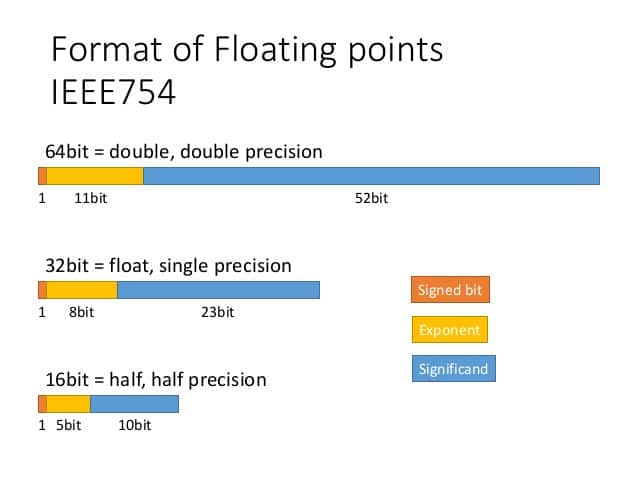
The IEEE Standard for Floating-Point Arithmetic is the common convention for representing numbers in binary on computers. In double-precision format, each number takes up 64 bits. Single-precision format uses 32 bits, while half-precision is just 16 bits.

To see how this works, let’s return to pi. In traditional scientific notation, pi is written as 3.14 x 100. But computers store that information in binary as a floating-point, a series of ones and zeroes that represent a number and its corresponding exponent, in this case 1.1001001 x 21.

In single-precision, 32-bit format, one bit is used to tell whether the number is positive or negative. Eight bits are reserved for the exponent, which (because it’s binary) is 2 raised to some power. The remaining 23 bits are used to represent the digits that make up the number, called the significand.

Double precision instead reserves 11 bits for the exponent and 52 bits for the significand, dramatically expanding the range and size of numbers it can represent. Half precision takes an even smaller slice of the pie, with just five for bits for the exponent and 10 for the significand.

Here’s what pi looks like at each precision level:

Difference Between Multi-Precision and Mixed-Precision Computing 

Multi-precision computing means using processors that are capable of calculating at different precisions — using double precision when needed, and relying on half- or single-precision arithmetic for other parts of the application.

Mixed-precision, also known as transprecision, computing instead uses different precision levels within a single operation to achieve computational efficiency without sacrificing accuracy.

In mixed precision, calculations start with half-precision values for rapid matrix math. But as the numbers are computed, the machine stores the result at a higher precision. For instance, if multiplying two 16-bit matrices together, the answer is 32 bits in size.

With this method, by the time the application gets to the end of a calculation, the accumulated answers are comparable in accuracy to running the whole thing in double-precision arithmetic.

This technique can accelerate traditional double-precision applications by up to 25x, while shrinking the memory, runtime and power consumption required to run them. It can be used for AI and simulation HPC workloads.

As mixed-precision arithmetic grew in popularity for modern supercomputing applications, HPC luminary Jack Dongarra outlined a new benchmark, HPL-ML, to estimate the performance of supercomputers on mixed-precision calculations. When NVIDIA ran HPL-ML computations in a test run on Summit, the fastest supercomputer in the world, the system achieved unprecedented performance levels of nearly 445 petaflops, almost 3x faster than its official performance on the TOP500 ranking of supercomputers.

How to Get Started with Mixed-Precision Computing

NVIDIA Volta and Turing GPUs feature Tensor Cores, which are built to simplify and accelerate multi- and mixed-precision computing. And with just a few lines of code, developers can enable the automatic mixed-precision feature in the TensorFlow, PyTorch and MXNet deep learning frameworks. The tool gives researchers speedups of up to 3x for AI training.

The NGC catalog of GPU-accelerated software also includes iterative refinement solver and cuTensor libraries that make it easy to deploy mixed-precision applications for HPC.

For more information, check out our developer resources on training with mixed precision.

What Is Mixed-Precision Used for?

Researchers and companies rely on the mixed-precision capabilities of NVIDIA GPUs to power scientific simulation, AI and natural language processing workloads. A few examples:

Earth Sciences

  • Researchers from the University of Tokyo, Oak Ridge National Laboratory and the Swiss National Supercomputing Center used AI and mixed-precision techniques for earthquake simulation. Using a 3D simulation of the city of Tokyo, the scientists modeled how a seismic wave would impact hard soil, soft soil, above-ground buildings, underground malls and subway systems. They achieved a 25x speedup with their new model, which ran on the Summit supercomputer and used a combination of double-, single- and half-precision calculations.
  • A Gordon Bell prize-winning team from Lawrence Berkeley National Laboratory used AI to identify extreme weather patterns from high-resolution climate simulations, helping scientists analyze how extreme weather is likely to change in the future. Using the mixed-precision capabilities of NVIDIA V100 Tensor Core GPUs on Summit, they achieved performance of 1.13 exaflops.

Medical Research and Healthcare

  • San Francisco-based Fathom, a member of the NVIDIA Inception virtual accelerator program, is using mixed-precision computing on NVIDIA V100 Tensor Core GPUs to speed up training of its deep learning algorithms, which automate medical coding. The startup works with many of the largest medical coding operations in the U.S., turning doctors’ typed notes into alphanumeric codes that represent every diagnosis and procedure insurance providers and patients are billed for.
  • Researchers at Oak Ridge National Laboratory were awarded the Gordon Bell prize for their groundbreaking work on opioid addiction, which leveraged mixed-precision techniques to achieve a peak throughput of 2.31 exaops. The research analyzes genetic variations within a population, identifying gene patterns that contribute to complex traits.

Nuclear Energy

  • Nuclear fusion reactions are highly unstable and tricky for scientists to sustain for more than a few seconds. Another team at Oak Ridge is simulating these reactions to give physicists more information about the variables at play within the reactor. Using mixed-precision capabilities of Tensor Core GPUs, the team was able to accelerate their simulations by 3.5x.

The post What’s the Difference Between Single-, Double-, Multi- and Mixed-Precision Computing? appeared first on The Official NVIDIA Blog.

Adding AI to your applications with ready-to-use models from AWS Marketplace

Machine learning (ML) lets enterprises unlock the true potential of their data, automate decisions, and transform their business processes to deliver exponential value to their customers. To help you take advantage of ML, Amazon SageMaker provides the ability to build, train, and deploy ML models quickly.

Until recently, if you used Amazon SageMaker, you could either choose optimized algorithms offered in Amazon SageMaker or bring your own algorithms and models. AWS Marketplace for Machine Learning increases the selection of ML algorithms and models. You can choose from hundreds of free or paid algorithms and model packages across a broad range of categories, including:

In this post, you learn how to deploy and perform inference on the Face Anonymizer model package from the AWS Marketplace for Machine Learning.

Overview

Model packages in AWS Marketplace are pre-trained machine learning models that can be used to perform batch as well as real-time inference. Because these model packages are pre-trained, you don’t have to worry about any of the following tasks:

  • Gathering training data
  • Writing an algorithm for training a model
  • Performing hyperparameter-optimization
  • Training a model and getting it ready for production

Not having to do these steps saves you much time and money spent writing algorithms, finding datasets, feature engineering, and training and tuning the model.

Algorithms and model packages from AWS Marketplace integrate seamlessly with Amazon SageMaker. To interact with them, you can use the AWS Management Console, the low-level Amazon SageMaker API, or the Amazon SageMaker Python SDK. You can use model packages to either stand up an Amazon SageMaker endpoint for performing real-time inference or run a batch transform job.

Amazon SageMaker provides a secure environment to use your data with third-party software. You are recommended to follow principle of least privilege and ensure that IAM permissions are locked down for your resources.

To be able to try this blogpost successfully, you would need appropriate IAM permissions. For Amazon SageMaker IAM permissions and best practices to be followed, see documentation. For more information how to secure your machine learning workloads, watch an online tech talk on Building Secure Machine Learning Environments Using Amazon SageMaker. The service helps you secure your data in multiple ways::

  • Amazon SageMaker performs static and dynamic scans of all the algorithms and model packages for vulnerabilities to ensure data security.
  • Amazon SageMaker encrypts algorithm and model artifacts and other system artifacts in transit and at rest.
  • Requests to the Amazon SageMaker API and the console are made over a secure (HTTPS over TLS) connection.
  • Amazon SageMaker requires IAM credentials to access resources and data on your deployment, thus preventing the seller’s access to your data.
  • Amazon SageMaker isolates the deployed algorithm/model artifacts from internet access to secure your data. For more information, see Training and Inference Containers Run in Internet-Free Mode.

Walkthrough

There are many different reasons why you may want to blur faces for the reasons of ensuring anonymity and privacy.  As a developer, you want to add intelligence to your automation process without having to worry about training a model.

After searching for pre-trained ML models on the internet, you come across AWS Marketplace for Machine Learning. A Search for the keyword “face” results in a list of algorithms. You decide to try the Face Anonymizer model package by Figure Eight.

Before you deploy the model, you need to review the AWS Marketplace listing to understand the I/O interface of the model package and its pricing information. Open the listing and review the product overview, pricing, highlights, usage information, instance types with which the listing is compatible, and additional resources. To deploy the model, your AWS account must have a subscription to it.

Subscribe to the model package

On the listing page, choose Continue to Subscribe. Review the End User license agreement and software pricing and once your organization agrees to the same, Accept offer button needs to be clicked.

    • For AWS Marketplace IAM permissions,  see “Rule 1 Only those users who are authorized to accept a EULA on behalf of your organization should be allowed to procure (or subscribe to) a product in Marketplace” from my other blog post, Securing access to AMIs in AWS Marketplace.

Create a deployable model

After subscription to the listing has been made from your AWS account, you can deploy the model package:

  1. Open configure your software page for Face Anonymizer. Leave Fulfillment method as Amazon SageMaker and Software Version as Version 1. For Region, choose us-east-2. At the bottom of the page is Product ARN, which is required only if you deploy the model using the API. Because you are deploying Amazon SageMaker Endpoint using the console, you can ignore it.
  2. Choose View in SageMaker.
  3. Select the Face Anonymizer listing and then choose Create endpoint.
  4. Under Model settings section, specify the following parameters and then choose NEXT:
    1. Specify face-anonymizer for Model name.
    2. For IAM role, select an IAM role that has necessary IAM permissions.

    You just used a pre-trained model package from AWS Marketplace to create a deployable model. A deployable model has an IAM role associated with it while the model package is a static entity and does not have an IAM role associated with it. Next, you deploy the model to perform inference.

Deploy the model

  1. On the Create Endpoint page, configure the following fields:
    1. For Endpoint name & Endpoint configuration name, choose face-anonymizer.
    2. Under Production variants, choose Edit.
  2. In the Edit Production Variant dialog box, configure the following fields:
    1. For instance type, select ml.c5.xlarge (the Face Anonymizer listing is compatible with ml.c5.xlarge as the instance type)
    2. Choose Save.
  3. Review the information as shown in the following screenshot and choose Create endpoint configuration.
  4. Choose Submit to create the endpoint.

Perform inference on the model

Each model package from AWS Marketplace has a specific input format, which is in its listing, in the Usage Information section. For example, the listing for Face Anonymizer states that the input must be base64-encoded and the payload sent for prediction should be in the following format:

Payload: 
{
	"instances": [{
		"image": {
			"b64": "BASE_64_ENCODED_IMAGE_CONTENTS"
		}
	}]
}

For this post, use the following image with the file name volunteers.jpg to perform anonymization.

The following section contains commands you can use from terminal to prepare data and to perform inference.

Perform base64-encoding

Since the payload required needs to be base64 encoded to perform real-time inference, you must first encode the image.

Linux command

encoded_string=$(base64 volunteers.jpg)

Windows – PowerShell commands

$base64string = [Convert]::ToBase64String([IO.File]::ReadAllBytes('./volunteers.jpg'))

Prepare payload

Use following commands to prepare the payload and write it to a file.

Linux commands

payload="{"instances": [{"image": {"b64": "$encoded_string"}}]}"
echo $payload >input.json

Windows – PowerShell commands

$payload=-join('{"instances": [{"image": {"b64": "' ,$base64string,'"}}]}')

$Utf8NoBomEncoding = New-Object System.Text.UTF8Encoding $False

 [System.IO.File]::WriteAllLines('./input.json', $payload, $Utf8NoBomEncoding)

Now that the payload is ready, you can either perform a batch inference or a real-time inference.

Perform real-time inference

To perform real-time inference, execute the following command using the AWS CLI. For more information, see Installing the AWS CLI and Configuring the AWS CLI.

aws sagemaker-runtime invoke-endpoint --endpoint-name face-anonymizer --body fileb://input.json --content-type "application/json" --region us-east-2 output.json.out

After you execute the command, the output is available in the output.json.out file.

Perform batch inference

To perform a batch inference:

  1. Sign in to the AWS Management Console. Then you can either identify an Amazon S3 bucket to use, or create an S3 bucket in the same Region in which you deployed the model earlier.
  2. Upload the input.json file to the S3 bucket.
  3. To copy the path of the file, select the file and choose Copy Path.
  4. In the Amazon SageMaker console, choose Batch Transform Jobs, Create Batch Transform Job.
  5. Specify the following information and choose Create Job.
    1. For Job name, enter face-anonymization.
    2. For Model name, enter face-anonymizer.
    3. For Instance type, select c5.xlarge.
    4. For Instance-count, enter 1.
    5. Under Input data configuration, for S3 location, specify the S3 path that you copied. It should look like the following pattern:
      s3://<your-bucket-name>/input.json 

    6. For Content type, enter application/json.
    7. For Output data configuration, specify the appropriate S3 output path. It should look like this:
      s3://<your-bucket-name>/output

  1. A message appears stating that a batch transform job was successfully created. After the status of the job changes to Completed, open the batch transform job, under Output data configuration, select output data path, and then download the output file with name json.out.

Extract and visualize the output

Now that the output is available, you can extract it using the commands in the following chart and visualize the output.

Linux command

cat output.json.out | jq -r '.predictions[0].image.b64' | base64 --decode >output.jpg

Windows – PowerShell commands

$jsondata = Get-Content -Raw -Path 'output.json.out' | ConvertFrom-Json

$bytes = [Convert]::FromBase64String($jsondata.predictions.image.b64)

[IO.File]::WriteAllBytes('output.jpg', $bytes)

In the output.jpg image, you can see that the ML model identified and anonymized the faces in the image.

You successfully performed a real-time inference on a model created from a third-party model package from AWS Marketplace.

Cleaning up

Delete the endpoint and the endpoint configuration so that your account is no longer charged.

  1. To delete the endpoint:
    1. In the Amazon SageMaker console, choose Endpoints.
    2. Select the endpoint with the name face-anonymizer and choose Actions, Delete.
  2. To delete the endpoint configuration:
    1. In the Amazon SageMaker console, choose Endpoint configuration.
    2. Select the endpoint configuration with the name face-anonymizer and choose Actions, Delete.
  3. To delete the model;
    1. In the Amazon SageMaker console, choose Models.
    2. Select the model with the name face-anonymizer and choose Actions, Delete.
  4. If you subscribed to the listing simply to try the example in this post, you can unsubscribe to the listing. On the Your software subscriptions page, choose Cancel Subscription for the Face Anonymizer listing.

Deploy a model and perform real-time and batch inference using a Jupyter notebook

This post demonstrated how to use the Amazon SageMaker console to stand up an Amazon SageMaker endpoint and use the AWS CLI to perform inference. If you prefer to try a model package using a Jupyter notebook, use the following steps:

  1. Create an Amazon SageMaker notebook instance.
  2. In the Amazon SageMaker console, under Notebook instances, in the Actions column for the notebook instance that you just created, choose Open Jupyter.
  3. In the notebook, choose SageMaker Examples.
  4. Under AWS Marketplace, choose Use for the “Using_ModelPackage_Arn_From_AWS_Marketplace.ipynb” sample notebook available, and then follow the notebook. Use Shift+Enter to run each cell.

Pricing

AWS Marketplace contains the following pricing for model packages:

  • Free (no software pricing)
  • Free-trial (no software pricing for a limited trial period)
  • Paid

Apart from infrastructure costs, the Free-trial and Paid model packages have software pricing applicable for real-time Amazon SageMaker inference and Amazon SageMaker batch transform. You can find this information on the AWS Marketplace listing page in the Pricing Information section. Software pricing for third-party model packages may vary based on Region, instance type, and inference type.

Conclusion

This post took you through a use case and provided step-by-step instructions to start performing predictions on ML models created from third-party model packages from AWS Marketplace.

In addition to third-party model packages, AWS Marketplace also contains algorithms. These can be used to train a custom ML model by creating a training job or a hyperparameter tuning job. With third-party algorithms, you can choose from a variety of out-of-the-box algorithms. By reducing the time-to-deploy by eliminating algorithm development efforts, you can focus on training and tuning the model using your own data. For more information, see Amazon SageMaker Resources in AWS Marketplace and Using AWS Marketplace for machine learning workloads.

If you are interested in selling an ML algorithm or a pre-trained model package, see Sell Amazon SageMaker Algorithms and Model Packages. You can also reach out to aws-mp-bd-ml@amazon.com. To see how algorithms and model packages can be packaged for listing in AWS Marketplace for Machine Learning, follow the creating_marketplace_products sample Jupyter notebook.

For a deep-dive demo of AWS Marketplace for machine learning, see the AWS online tech talk Accelerate Machine Learning Projects with Hundreds of Algorithms and Models in AWS Marketplace.

For a practical application that uses pre-trained machine learning models, see the Amazon re:Mars session on Accelerating Machine Learning Projects.


About the Authors

Kanchan Waikar is a Senior Solutions Architect at Amazon Web Services with AWS Marketplace for machine learning group. She has over 13 years of experience building, architecting, and managing, NLP, and software development projects. She has a masters degree in computer science(data science major) and she enjoys helping customers build solutions backed by AI/ML based AWS services and partner solutions.


New Solutions for Quantum Gravity with TensorFlow

Recent strides in machine learning (ML) research have led to the development of tools useful for research problems well beyond the realm for which they were designed. The value of these tools when applied to topics ranging from teaching robots how to throw to predicting the olfactory properties of molecules is now beginning to be realized. Inspired by advances such as these, we undertook the challenge of applying TensorFlow, a computing platform normally used for ML, to advance the understanding of fundamental physics.

Perhaps the biggest open problem in fundamental theoretical physics may be that our current understanding of quantum mechanics only includes three of the four fundamental forces — the electromagnetic, strong, and weak forces. There is currently no complete quantum theory that also includes the force of gravitation, while still matching experimental observations, i.e., an accurate model of quantum gravity.

One promising approach to a unified model that includes quantum gravity, which has survived many mathematical consistency checks, is called M-Theory, or “The Theory formerly known as Strings,” introduced in 1995 by Edward Witten. In the everyday world, we all experience four dimensions—three spatial dimensions (x, y, and z), plus time (t). M-Theory predicts that, at very short lengths, the Universe is described, instead, by eleven dimensions. But, as one can imagine, establishing the connection between the four-dimensional world that we observe and the 11-dimensional world predicted by M-theory is exceedingly difficult to solve analytically. In fact, it might require analytic manipulation of equations having more terms than there are electrons in the Universe.

This summer, we published an article in the Journal of High Energy Physics where we introduced novel ways to address such problems through creative use of ML technology. Using simplifications enabled by TensorFlow, we managed to bring the total number of known (stable or unstable) equilibrium solutions for one particular type of M-Theory spacetime geometries to 194, including a new and tachyon-free four-dimensional model universe. The geometries that we studied are special in that they are still (barely) accessible with exact calculations that do not require neglecting potentially important terms. We have also released a short instructive Google colab as well as a more powerful Python library for use in related research.

Applying TensorFlow to M-Theory
This work is predicated on a key observation that a mixed numerical and analytic approach can be more powerful than a purely analytical method. Instead of attempting to find analytic solutions with brute force, we use a numerical approach that leverages TensorFlow for the initial search for solutions to the model. This then yields hypotheses on which specific combinations can be tested and analyzed with stringent mathematical methods, ultimately proving the actual existence of a conjectured solution. This represents a novel methodology for making further progress in theoretical physics.

Conclusion
We hope that these results will be an important step in interpreting M-theory, and demonstrate how the research community can use new ML tools, such as TensorFlow, to approach other similarly complex problems. We are already applying the newly discovered methods in further theoretical physics research.

Acknowledgements
This research was conducted by Iulia M. Comşa, Moritz Firsching, and Thomas Fischbacher. Additional thanks go to Jyrki Alakuijala, Rahul Sukthankar, and Jay Yagnik for encouragement and support.

At SC19, GPU Accelerators Power Supercomputers to AI and Exascale

The Mile High City plays host next week to SC19, where GPUs will be key ingredients for computational science in some of the world’s most powerful supercomputers.

The race to AI and to exascale performance will be much of the buzz at the annual supercomputing event this year. For both, experts are relying on GPU accelerators.

In a special address Monday at 3pm MT, NVIDIA founder and Chief Executive Officer Jensen Huang will help kick off the conference. (Watch a mobile-friendly livestream here.) He’ll provide an in-depth look at the latest innovations in GPUs and how they’re transforming computational science and AI.

Modeling Brains, Earthquakes and More

A handful of demos at NVIDIA’s booth will give attendees a closeup look at how GPUs are pushing the envelope in science. NVIDIA Quadro RTX GPUs will host a visualization of an earthquake, and NVIDIA V100 Tensor Core GPUs will show a simulation of a human brain at nanometer-level resolution.

Ten partners will demo offerings using NVIDIA GPUs — ASRock Rack, Bright Computing, Boston, BOXX, Colfax, KISTI, Microway, One Stop Systems, Penguin Computing and Silicon Mechanics.

Huang’s overview is one of the first of many sessions on how GPUs can supercharge high performance computing with deep learning.

SC19 is host to three technical tracks, two panels and three invited talks that touch on AI or GPUs. For example, in one invited talk, a director from the Pacific Northwest National Laboratory will describe six top research directions to increase the impact of machine learning on scientific problems.

In another invited talk, the assistant director for AI at the White House Office of Science and Technology Policy will share the administration’s priorities in AI and HPC. She’ll detail the American AI Initiative the U.S. President announced in February.

Deep Dives in Deep Learning

A group of experts will give a deep dive Monday morning on how to tool high-performance computers for deep learning. They include senior engineers, scientists and researchers from Fraunhofer Institute, NVIDIA and Oak Ridge National Lab.

“Today we see excitement with machine learning being applied to many areas in computational science,” said Jack Dongarra, a professor at the University of Tennessee and one of three experts who maintain the TOP500 list of the world’s largest supercomputers. “As we go forward, I expect artificial intelligence to play an ever more important role in science.”

Back at NVIDIA’s in-booth theater, Marc Hamilton, vice president of solutions architecture and engineering, will kick off a slate of more than a dozen speakers, including talks from Mellanox on fast networking.

Other speakers will give updates on NVIDIA’s partnership to accelerate Arm-based supercomputers and on OpenACC, a parallel-programming model used on more than 200 applications. In a separate session Tuesday afternoon, Duncan Poole, the president of OpenACC, and a strategic partnership manager for NVIDIA, will host a birds-of-a-feather session on OpenACC.

Tracking the Race to Exascale

Meanwhile, many eyes are fixed on the exascale finish line for supercomputers able to calculate more than a quintillion floating-point operations per second or 1018 FLOPS. Getting to exascale, like breaking the petascale barrier in 2008, is a milestone in supercomputing that has recently galvanized the industry.

Arguably, the exascale era has already begun. Today’s most powerful supercomputer, the Summit system at Oak Ridge National Laboratory, has racked up a handful of exascale milestones. The 27,648 NVIDIA V100 Tensor Core GPUs in Summit can drive 3.3 exaflops of mixed-precision horsepower on AI tasks.

Harnessing some of that oomph, government and academic researchers shared the 2018 Gordon Bell Prize for using AI to determine the genetic roots of being susceptible to opioid addiction and chronic pain. Their work on one of America’s most pressing epidemics pushed the GPUs on Summit to 2.36 exaflops.

NVIDIA GPUs are now used in 125 of the TOP500 systems worldwide. Beyond Summit, they include the world’s second, sixth, eighth and 10th most muscular systems. Over the last several years, designers have increasingly relied on GPU accelerators to propel these big-iron beasts to new performance heights.

For more on NVIDIA events at SC19, check out our event page.

The post At SC19, GPU Accelerators Power Supercomputers to AI and Exascale appeared first on The Official NVIDIA Blog.

Eni Doubles Up on GPUs for 52 Petaflops Supercomputer

Italy energy company Eni is upgrading its supercomputer with another helping of NVIDIA GPUs aimed at making it the most powerful industrial system in the world.

The news comes a little more than two weeks before SC19, the annual supercomputing event in North America. Growing adoption of GPUs as accelerators for the world’s toughest high performance computing and AI jobs will be among the hot topics at the event.

The new Eni system, dubbed HPC5, will use 7,280 NVIDIA V100 GPUs capable of delivering 52 petaflops of peak double-precision floating point performance. That’s nearly triple the performance of its previous 18 petaflops system that used 3,200 NVIDIA P100 GPUs.

When HPC5 is deployed in early 2020, Eni will have at its disposal 70 petaflops including existing systems also installed in its Green Data Center in Ferrera Erbognone, outside of Milan. The figure would put it head and shoulders above any other industrial company on the current TOP500 list of the world’s most powerful computers.

The new system will consist of 1,820 Dell EMC PowerEdge C4140 servers, each with four NVIDIA V100 GPUs and two Intel CPUs. A Mellanox InfiniBand HDR network running at 200 Gb/s will link the servers.

Green Data Center Uses Solar Power

Eni will use its expanded computing muscle to gather and analyze data across its operations. It will enhance its monitoring of oil fields, subsurface imaging and reservoir simulation and accelerate R&D in non-fossil energy sources. The data center itself is designed to be energy efficient, powered in part by a nearby solar plant.

“Our investment to strengthen our supercomputer infrastructure and to develop proprietary technologies is a crucial part of the digital transformation of Eni,” said Chief Executive Officer Claudio Descalzi in a press statement. The new system’s advanced parallel architecture and hybrid programming model will allow Eni to process seismic imagery faster, using more sophisticated algorithms.

Eni was among the first movers to adopt GPUs as accelerators. NVIDIA GPUs are now used in 125 of the fastest systems worldwide, according to the latest TOP500 list. They include the world’s most powerful system, the Summit supercomputer, as well as four others in the top 10.

Over the last several years, designers have increasingly relied on NVIDIA GPU accelerators to propel these beasts to new performance heights.

The SC19 event will be host to three paper tracks, two panels and three invited talks that touch on AI or GPUs. In one invited talk, a director from the Pacific Northwest National Laboratory will describe six top research directions to increase the impact of machine learning on scientific problems.

In another, the assistant director for AI at the White House Office of Science and Technology Policy will share the administration’s priorities in AI and HPC. She’ll detail the American AI Initiative announced in February.

The post Eni Doubles Up on GPUs for 52 Petaflops Supercomputer appeared first on The Official NVIDIA Blog.