Blog

Learn About Our Meetup

5000+ Members

MEETUPS

LEARN, CONNECT, SHARE

Join our meetup, learn, connect, share, and get to know your Toronto AI community. 

JOB POSTINGS

INDEED POSTINGS

Browse through the latest deep learning, ai, machine learning postings from Indeed for the GTA.

CONTACT

CONNECT WITH US

Are you looking to sponsor space, be a speaker, or volunteer, feel free to give us a shout.

Category: Global

Amazon Transcribe now supports speech-to-text in 31 languages

We recently announced that Amazon Transcribe now supports transcription for audio and video for 7 additional languages including Gulf Arabic, Swiss German, Hebrew, Japanese, Malay, Telugu, and Turkish languages.  Using Amazon Transcribe, customers can now take advantage of 31 supported languages for transcription use cases such as improving customer service, captioning and subtitling, meeting accessibility requirements, and cataloging audio archives.

Using Amazon Transcribe

Amazon Transcribe is an easy-to-use automatic speech recognition (ASR) service that makes it easy to analyze audio files and convert those into text that includes enrichment such as speaker identification, timestamp generation, punctuation, and formatting. With the recent announcement, customers can now transcribe audio from even more languages.

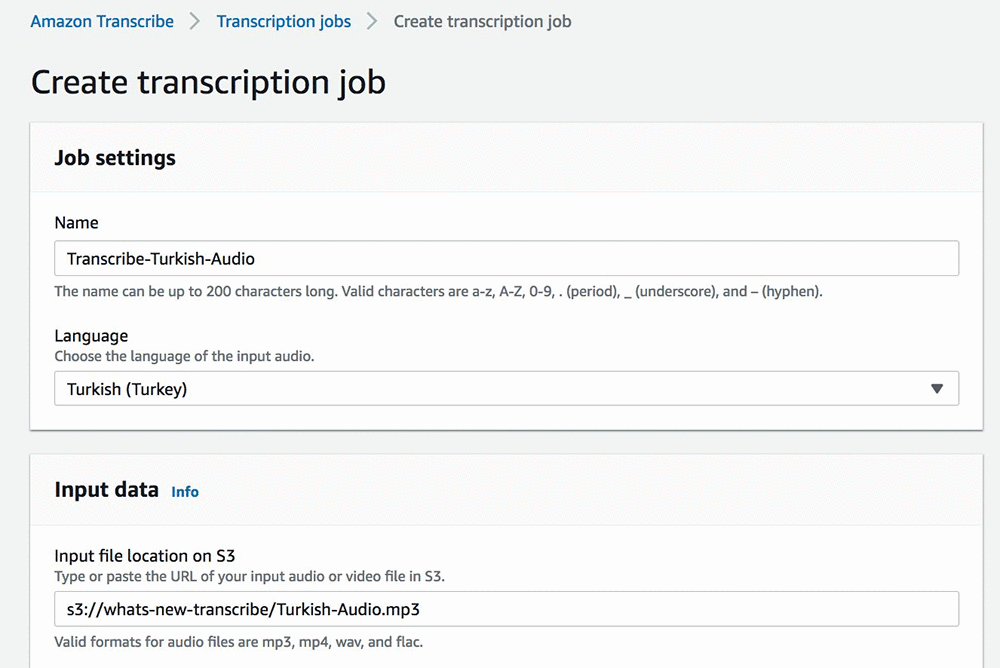
Using the AWS Management Console, let’s check out one of the latest languages in action. Amazon Transcribe allows users to transcribe streaming audio or perform asynchronous transcription.  For this, we will create a job for asynchronous transcription using an audio file stored in Amazon S3 as input.

Upon completion of the job, the audio-to-text transcription is provided in the response.   For those of us that don’t know Turkish, you can then run your transcribed text through the Amazon Translate service to translate the transcribed text into your preferred language.

In the example above, we are using the console to create the transcription job; however, customers can also programmatically submit transcription jobs using the Amazon Transcribe APIs.   The APIs are available in the AWS SDKs.  The example below demonstrates invoking the Amazon Transcribe APIs through the AWS CLI:

Start Transcription Job

$ aws transcribe start-transcription-job --transcription-job-name Transcribe-Turkish-Audio-CLI --language-code tr-TR --media MediaFileUri=s3://whats-new-transcribe/Turkish-Audio.mp3 --media-format mp3 --region us-east-1
{
    "TranscriptionJob": {
        "TranscriptionJobName": "Transcribe-Turkish-Audio-CLI", 
        "LanguageCode": "tr-TR", 
        "TranscriptionJobStatus": "IN_PROGRESS", 
        "Media": {
            "MediaFileUri": "s3://whats-new-transcribe/Turkish-Audio.mp3"
        }, 
        "CreationTime": 1574392674.948, 
        "MediaFormat": "mp3"
    }
}

Get Information about Transcription Job

$ aws transcribe get-transcription-job --transcription-job-name Transcribe-Turkish-Audio-CLI --region us-east-1
{
    "TranscriptionJob": {
        "TranscriptionJobName": "Transcribe-Turkish-Audio-CLI", 
        "LanguageCode": "tr-TR", 
        "MediaSampleRateHertz": 22050, 
        "TranscriptionJobStatus": "COMPLETED", 
        "Settings": {
            "ChannelIdentification": false
        }, 
        "Media": {
            "MediaFileUri": "s3://whats-new-transcribe/Turkish-Audio.mp3"
        }, 
        "CreationTime": 1574392674.948, 
        "CompletionTime": 1574392772.813, 
        "MediaFormat": "mp3", 
        "Transcript": {
            "TranscriptFileUri": "https://s3.amazonaws.com/aws-transcribe-us-east-1-prod/"
        }
    }
}

Because we did not explicitly specify a bucket to direct transcription output to, the transcription result is provided via a presigned URL that provides secure access to that transcription.  Using the TranscriptFileUri returned on output, we can view/parse that JSON object returned for the transcript text returned.

The transcribed text can then be used for a variety of use cases such as input into Amazon Comprehend for identification of key phrases and key entities such as names, organization names, or as input into Amazon Translate as shown above for translation into one or more languages.

Amazon Transcribe and Amazon Translate for multilingual subtitles

The combined capability of using Amazon Transcribe and Amazon Translate allows customers to quickly transcribe audio as well as convert it into multiple target languages for meeting globalization requirements as well as use cases such as extended global reach on videos or adding subtitles to training videos for your organization.  These capabilities can be extended into multilingual subtitles for videos and podcasts. Providing these capabilities allows users to extend global reach by including more language options for broader audiences.

AWS Architecture provides a quick start solution and deployment guide customers can leverage for Live Streaming with Automated Multi-Language Subtitling.   This real-time subtitling solution for live streaming video generates multi-language subtitles for live streaming videos using Amazon Transcribe for audio-to-text and Amazon Translate for language translation.

Available Now!

These new languages are available today in all Regions where Amazon Transcribe is available. The free tier offers 60 minutes per month for the first 12 months, starting from your first transcription request.

We’re looking forward to your feedback! Please post it to the AWS Forum for Amazon Transcribe, or send it to your usual AWS Support contacts.


About the author

Shelbee Eigenbrode is a solutions architect at Amazon Web Services (AWS). Her current areas of depth include DevOps combined with machine learning and artificial intelligence. She’s been in technology for 22 years, spanning multiple roles and technologies. In her spare time she enjoys reading, spending time with her family, friends and her fur family (aka. dogs).


Engage listeners with Amazon Polly’s Conversational speaking style voices

All voices are unique, yet speakers tend to adjust their delivery, or speaking style, according to their context and audience. Before Amazon Polly used Neural Text-to-Speech technology (NTTS) to build voices, TTS (Standard Text-to-Speech) voices couldn’t change their speech patterns to match any particular speaking style. When Amazon Polly introduced NTTS, Newscaster voices were launched as the first speaking style.

Matthew and Joanna, two of the US English voices in the Amazon Polly portfolio, are now also available in a Conversational speaking style, which simulates the speech patterns of a friendly conversation. Similar to how people learn to talk as a children, TTS voices acquire intonation patterns from natural speech data, then try to reproduce synthesized utterances in similar manners. Amazon Polly’s NTTS technology, a neural network-based machine learning model, makes this learning possible. It is capable of picking up nuances in various speaking styles and applying them when synthesizing text into speech.

Pillo Health is a startup that uses Amazon Polly to voice their in-home devices. Paige Baeder, Pillo Health’s product manager, says, “Pillo Health serves individuals who manage chronic conditions in the comfort of their home. Maintaining our community’s trust starts with each daily interaction. The Conversational version of Amazon Polly’s Joanna voice provides clarity and expression that inspires trust and is easy to understand, allowing us to connect with our users through a voice that brings Pillo (our in-home companion device) persona to life. Making the decision to switch to Joanna in Amazon Polly was easy—it was the top pick amongst all of our voice testers.”

Unlike traditional synthesis approaches that rely heavily on constructed rules, NTTS builds its own model based on given training data. Dynamic intonation and expressiveness used to be obstacles because linguistic rules could not cover them, but now they are the key to voices sounding natural in NTTS. The system needs to recognize the diversity in speech, in order to mimic it when generating speech. In the studio, Amazon Polly’s voice talents record in an engaging tone, as they would when they engage in normal day-to-day conversation. A few characteristics of natural speech include reduced syllables, pitch change, pausing, and contractions. The recording script for training data is carefully designed based on common utterances, which helps deliver natural speech data.

The Conversational speaking style feature generally makes neural voices sound more friendly and expressive. For example, listen to the following audio sample from Matthew in the Conversational speaking style, as compared to the neutral neural style (speaking-style free):

Neutral sample (Matthew)

Listen now

Voiced by Amazon Polly

Conversational sample (Matthew)

Listen now

Voiced by Amazon Polly

In the Conversational speech sample, the word “sorry” is emphasized with a slight pause and a stress, which sounds more empathetic in this given situation. The question also sounds more friendly in the Conversational version, providing a better user experience.

Here’s Joanna introducing the Conversational style:

Neutral sample (Joanna)

Listen now

Voiced by Amazon Polly

Conversational sample (Joanna)

Listen now

Voiced by Amazon Polly

To synthesize the Conversational style, make sure to enclose the input with the following SSML tag and set the text type to ssml in the command line:

<speak>
<amazon:domain name="conversational">
We are excited to share that Matthew and Joanna, the US English voices available in Polly, sound more natural thanks to the conversational style.
</amazon:domain>
</speak>
$ aws polly start-speech-synthesis-task
       --voice-id Joanna --engine neural
       --text file://s3.ssml --text-type ssml
       --output-s3-bucket-name "polly-conversational-synth" --output-format mp3
       --query "SynthesisTask.TaskId"
       "14e73ba4-ec52-4811-b597-9b07a368c213"
$ wget https://polly-conversational-synth.s3.amazonaws.com/14e73ba4-ec52-4811-b597-9b07a368c213.mp3 -O joanna-conversational.mp3

You can trigger the Conversational speaking style with US English voices Matthew and Joanna within the Amazon Polly console, AWS CLI, or SDK. The feature is currently available in US East (N. Virginia), US West (Oregon), and EU (Ireland) Regions. For more information, see What Is Amazon Polly?


About the author

Chiao-ting Fang is a TTS language engineer for Amazon text-to-speech. She enjoys applying her linguistic knowledge at work to build better, more natural-sounding voices. She loves languages, traveling, and star-gazing.


Announcing Amazon Rekognition Custom Labels

Today, Amazon Web Services (AWS) announced Amazon Rekognition Custom Labels, a new feature of Amazon Rekognition that enables customers to build their own specialized machine learning (ML) based image analysis capabilities to detect unique objects and scenes integral to their specific use case. For example, customers using Amazon Rekognition to detect machine parts from images can now train a model with a small set of labeled images to detect “turbochargers” and “torque converters” without needing any ML expertise. Instead of having to train a model from scratch, which requires specialized machine learning expertise and millions of high-quality labeled images, customers can now use Amazon Rekognition Custom Labels to achieve state-of-the-art performance for their unique image analysis needs.

To better understand Amazon Rekognition Custom Labels, let’s walk through an example of how you can use this new feature of the service.

An auto repair shop uses Amazon Rekognition Label detection (objects and scenes) to analyze and sort machine parts in their inventory. For all these images, Amazon Rekognition successfully returns “machine parts”.

Using Amazon Rekognition Custom Labels, the customer can train their own custom model to identify specific machine parts, such as turbocharger, torque converter, etc. To start, the customer collects as few as 10 sample images for each specific machine part that they would like to identify.

Using the service console, customer can upload and label these images.

No machine learning expertise is required at this stage. Customers are guided through each step of the process within the console.

Once the dataset is ready and fully labeled, customers can put Amazon Rekognition Custom Labels to work with just one click. Amazon Rekognition automatically chooses the most effective machine learning techniques for each use case.

On completion of training, customers can access visualizations to see how each model is performing and get suggestions of how to further improve their model.

In our example, the auto repair shop can now start analyzing images to detect specific machine parts by their names, automating inventory management, by using a fully managed easy-to-use API built for large-scale image processing.

Amazon Rekognition Object and Scene detection returns “Machine Parts”, while Amazon Rekognition Custom Labels trained with a few labeled images returns “Turbocharger”, “Torque Converter”, and “Crankshaft”.

Now let’s look at how customers like the NFL and Vidmob are using Amazon Custom Labels.

  • NFL Media, part of the National Football League, manages an exponentially-growing library of videos and images that is difficult to search for relevant content such team logos, pylons, or foam fingers with traditional methods. Amazon Rekognition Custom Labels makes that easier, says Brad Boim, NFL Senior Director of Post Production and Asset Management.

“By using the new feature in Amazon Rekognition, Custom Labels, we are able to automatically generate metadata tags tailored to specific use cases for our business and provide searchable facets for our content creation teams. This significantly improves the speed in which we can search for content and, more importantly, it enables us to automatically tag elements that required manual efforts before. These tools allow our production teams to leverage this data directly and provides enhanced products to our customers across all of our media platforms.”

  • VidMob is a marketing creative platform that provides an end-to-end technology solution for all of a brand’s creative needs with a single integrated platform combining first-of-a-kind creative analytics with best-in-class creative production to transform marketing effectiveness. Alex Collmer, VidMob CEO says,

“With the introduction of Amazon Rekognition Custom Labels, marketers will be equipped with advanced capabilities within our Agile Creative Studio, enabling them to build and train the specific products (custom labels) that they care about within their ads, at scale, within minutes. Using VidMob’s integration of Amazon Rekognition, customers have historically been able to identify common objects but now the new ability for custom labels will make our platform even more targeted for every business. With a lift of 150% in creative performance and 30% reduction in human analyst time, this will extend their ability to measure their creative performance using VidMob’s Agile Creative Studio.”

AWS customers can now easily train high-quality custom vision models with a reasonably small set of labeled images. Doing this requires no ML experience, and with only a few lines of code customers can access Amazon Rekognition’s easy-to-use fully managed Custom Labels API that can process tens of thousands of images stored in Amazon S3 in an hour.

Amazon Rekognition Custom Labels will be generally available on December 3, 2019. Click here to be notified when the service becomes available. To learn more, visit https://aws.amazon.com/rekognition/custom-labels-features/.


About the author

Anushri Mainthia is the Senior Product Manager on the Amazon Rekognition team and product lead for Amazon Rekognition Custom Labels. Outside of work, Anushri loves to cook, explore Seattle and video-chat with her nephew.


Read ‘em and Reap: 6 Success Factors for AI Startups

Now that data is the new oil, AI software startups are sprouting across the tech terrain like pumpjacks in Texas. A whopping $80 billion in venture capital is fueling as many as 12,000 new companies.

Only a few will tap a gusher. Those who do, experts say, will practice six key success factors.

  1. Master your domain
  2. Gather big data fast
  3. See (a little) ahead of the market
  4. Make a better screwdriver
  5. Scale across the clouds
  6. Stay flexible

Some of the biggest wins will come from startups with AI apps that “turn an existing provider on its head by figuring out a new approach for call centers, healthcare or whatever it is,” said Rajeev Madhavan who manages a $300 million fund at Clear Ventures, nurturing nine AI startups.

1. Master Your Domain

Madhavan sold his electronic design automation startup Magma Design in 2012 to Synopsys for $523 million. His first stop on the way to becoming a VC was to take Andrew Ng’s Stanford course in AI.

“For a brief period in Silicon Valley every startup’s pitch would just throw in jargon on AI, but most of them were just doing collaborative filtering,” he said. “The app companies we look for have to be heavy on AI, but success comes down to how good a startup is in its domain space,” he added.

Chris Rowen agrees. The veteran entrepreneur who in 2013 sold his startup Tensilica to Cadence Design for $380 million considers domain expertise the top criteria for an AI software startup’s success.

Rowen’s latest startup, BabbleLabs, uses AI to filter noise from speech in real time. “At the root of it, I’m doing something analogous to what I’ve done in much of my career — work on really hard real-time computing problems that apply to mass markets,” Rowen said.

Overall, “deep learning is still at the stage where people are having challenges understanding which problems can be handled with this technique. The companies that recognize a vertical-market need and deliver a solution for it have a bigger chance of getting early traction. Over time, there will be more broad, horizontal opportunities,” he added.

Jeff Herbst nurtures more than 5,000 AI startups under the NVIDIA Inception program that fuels entrepreneurs with access to its technology and market connections. But the AI tag is just shorthand.

In a way, it’s like a rerun of The Invasion of the DotComs. “We call them AI companies today, but they are all in specialized markets — in the not-so-distant future, every company will be an AI company,” said Herbst, vice president of business development at NVIDIA.

Today’s AI software landscape looks like a barbell to Herbst. Lots of activity by a handful of cloud-computing giants at one end and a bazillion startups at the other.

2. Get Big Data Fast

Collecting enough bits to fill a data lake is perhaps the hardest challenge for an AI startup.

Among NVIDIA’s Inception startups, Zebra Medical Vision uses AI on medical images to make faster, smarter diagnoses. To get the data it needed, it partnered both with Israel’s largest healthcare provider as well as Intermountain Healthcare, which manages 215 clinics and 24 hospitals in the U.S.

“We understood data was the most important asset we needed to secure, so we invested a lot in the first two years of the startup not only in data but also in developing all kinds of algorithms in parallel,” said Eyal Toledano, co-founder and CTO of Zebra. “To find one good clinical solution, you have to go through many candidates.”

Getting access to 20 years of digital data from top drawer healthcare organizations “took a lot of convincing” both from Zebra’s chief executive and Toledano.

“My contribution was showing how security, compliance and anonymity could be done. There was a lot of education and co-development so they would release the data and we could do research that could contribute back to their patient population in return,” he added.

It’s working. To date Zebra has raised $50 million, received FDA approvals on three products with two more pending “and a few other submissions are on the way,” he said.

Toledano also gave kudos to NVIDIA’s Inception program.

“We had many opportunities to examine new technologies before they became widely used. We saw the difference in applying new GPUs to current processes, and looked at inference in the hospital with GPUs to improve the user experience, especially in time-critical applications,” he said.

“We also got some good know-how and ideas to improve our own infrastructure with training and infrastructure libraries to build projects. We tried quite a lot of the NVIDIA technologies and some were really amazing and fruitful, and we adopted a DGX server and decreased our development and training time substantially in many evaluations,” he added.

Six Steps to AI Startup Gold

Success Factor Call to Action Startups Using It
Master your domain Have deep expertise in your target application BabbleLabs
Gather big data fast Tap partners, customers to gather data and refine models Zebra Medical Vision, Scale
See (a little) ahead of the market Find solutions to customer pain points before rivals see them FASTDATA.io, Netflix
Make a better screwdriver Create tools that simplify the work of data scientists Scale, Dataiku
Scale across the clouds Support private and multiple public cloud services Robin.io
Stay flexible Follow changing customer pain points to novel solutions Keyhole Corp.

Another Inception startup, Scale, which provides training and validation data for self-driving cars and other platforms, got on board with Toyota and Lyft. “Working with more people makes your algorithms smarter, and then more people want to work with you — you get into a cycle of success,” said Herbst.

Reflektion, one of Madhavan’s startups, now has a database of 200 million unique shoppers, the third largest retail database after Amazon and Walmart. It started with zero. Getting big took three years and a few great partners.

Rowen’s BabbleLabs applied a little creativity and elbow grease to get a lot of data cheaply and fast. It siphoned speech data from free sources as diverse as YouTube and the Library of Congress. When it needed specialized data, it activated a network of global contractors “quite economically,” he said.

“You can find low-cost, low-quality data sources, then use algorithms to filter and curate the data. Controlling the amount of noise associated with the speech helped simplify training.” he added.

“In AI, access to data no one else has is the big win,” said Herbst. “The world has a lot of open source frameworks and tools, but a lot of the differentiation comes from proprietary access to the data that does the programming,” he added.

When seeking data-rich customers and partners “the fastest way to get in the door is knowing what their pain points are,” said Alen Capalik, founder of FASTDATA.io.

Work in high-frequency trading on Wall Street taught Capalik the value of GPUs. When he came up with an idea for using them to ingest real-time data fast for any application, he sought out Herbst at NVIDIA in 2017.

“He almost immediately wrote me a check for $1.5 million,” Capalik said.

3. See (a Little) Ahead of the Market

Today, FASTDATA.io is poised for a Series A financing round to fuel its recently released PlasmaENGINE, which already has two customers and over 20 more in the pipeline. “I think we are 12-18 months ahead of the market, which is a great spot to be in,” said Capalik, whose product can process as much data as 100 Spark instances.

That wasn’t the position Capalik found himself in his last time out. His cybersecurity startup — GoSecure, formerly CounterTack — pioneered the idea of end-point threat detection as much as six years before it caught on.

“People told me I was crazy. Palo Alto Networks and FireEye were doing perimeter security, and users thought they’d never install agents again because they slowed systems down. So, we struggled for a while and had to educate the market a lot,” he said.

Education and awareness are the kinds of jobs established corporations tackle. For startups, being visionary is like Steve Jobs unveiling an iPhone — “show them what they didn’t know they wanted,” he said.

“Netflix went after video streaming before there was enough bandwidth or end points — they skated to where the puck was going,” said Herbst.

4. Make a Better Screwdriver

AI holds opportunities for arms dealers, too — the kind who sell the software tools data scientists use to tighten down the screws on their neural networks.

The current Swiss Army knife of AI is the workbench. It’s a software platform for developing and deploying machine-learning models in today’s DevOps IT environment.

Jupyter notebooks could be seen as a sort of two-blade model you get for free as open source. Giants such as AWS, IBM and Microsoft and dozens of startups such as H20.ai and Dataiku are rolling out versions with more forks, corkscrews and toothpicks.

Despite all the players and a fast-moving market, there are still opportunities here, said James Kobielus, a lead analyst for AI and data science at Wikibon. Start as a plug-in for a popular workbench, he suggested.

Startups can write modules to support emerging frameworks and languages, or a mod to help a workbench tap into the AI goodness embedded in the latest smartphones. Alternatively, you can automate streaming operations or render logic automatically into code, the former IBM data-science evangelist advised.

If workbenches aren’t for you, try robotic process automation, another emerging category trying to make AI easier for more people to use. “You can clean up if you can democratize RPA for makers and kids — that’s exciting,” Kobielus said.

There’s a wide-open opportunity for tools that cram neural nets into the kilobytes of memory on devices such as smart speakers, appliances and even thermostats, BabbleLabs’ Rowen said. His company aims to run its speech models on some of the world’s smallest microcontrollers.

“We need compilers that take trained models and do quantization, model compression and optimized model generation to fit into the skinny memory of embedded systems — nothing solves this problem yet,” he said.

5. Expand Across the Clouds

The playing field is very competitive with more startups than ever because it’s easier than ever to start a company, said Herbst, who worked closely with entrepreneurs as a corporate and IP attorney even before he joined NVIDIA 18 years ago.

All you need to get started today is an idea, a laptop, a cup of coffee and a cloud-computing account. “All the infrastructure is a service now,” he said.

But if you get lucky and scale, that one cloud-computing account can become a bottleneck and your biggest cost after payroll.

“That’s a good problem to have, but to hit breakeven and make it easier for customers, you need your software running on any cloud,” said Madhavan.

The need is so striking, he wound up funding a startup to address it. Robin.io is an expert in stateful and stateless workloads, helping companies become cloud-agnostic. “We have been extremely successful with 5G telcos going cloud native and embracing containers,” he said.

6. Stay Flexible as a Yogi

Few startups wind up where they thought they were going. Apple planned to make desktop computers, Amazon aimed to sell books online.

Over time “they pivot one way or another. They go in with a problem to solve, but as they talk to customers the smart ones learn from those interactions how to re-target or tailor themselves,” said Herbst, who gives an example from his pre-AI days

Keyhole Corp. wanted to provide 3D mapping services initially for real estate agents and other professionals. Its first product was distributed on CDs

As a veteran of early search startup AltaVista, “I thought this startup belonged more to a Yahoo! or some other internet company. I realized it was not a professional but a major consumer app,” said Herbst, who was happy to fund them as one of NVIDIA’s first investments outside gaming.

In time, Google agreed with Herbst and acquired the company. Keyhole’s technology became part of the underpinnings of Google Maps and Google Earth.

“They had a nice exit, their people went on to have rock-star careers at Google, and I believe were among the original creators of Pokemon Go,” he said.

The lesson is simple: Follow good directions — like the six success factors for AI software startups — and there’s no telling where you may end up.

The post Read ‘em and Reap: 6 Success Factors for AI Startups appeared first on The Official NVIDIA Blog.
Designing conversational experiences with sentiment analysis in Amazon Lex

To have an effective conversation, it is important to understand the sentiment and respond appropriately. In a customer service call, a simple acknowledgment when talking to an unhappy customer might be helpful, such as, “Sorry to hear you are having trouble.” Understanding sentiment is also useful in determining when you need to hand over the call to a human agent for additional support.

To achieve such a conversational flow with a bot, you have to detect the sentiment expressed by the user and react appropriately. Previously, you had to build a custom integration by using Comprehend APIs. As of this writing, you can determine the sentiment natively in Amazon Lex.  This post demonstrates how to use user sentiment to manage conversation flow better.  We will describe the steps to build a bot, add logic to update response based on user sentiment and configure hand over to an agent.

Building a bot

We will use the following conversation to model a bot:

User: When is my package arriving? It’s so late.

Agent: Apologies for the inconvenience. Can I get your tracking number?

User: 21132.

Agent: Got it. It should be delivered to your home address on Nov 27th.

User: Great, thanks.

Now, let’s build an Amazon Lex bot with intents to track delivery status and change delivery date. The CheckDeliveryStatus intent elicits tracking number information and responds with the delivery date. The ChangeDeliveryDate intent updates the delivery to a new date. In this post, we maintain a database with the tracking number and delivery date. You can use an AWS Lambda function to update the delivery date.

To enable sentiment analysis in the bot, complete the following steps:

  1. On the Amazon Lex console, click on the bot
  2. Under Settings, choose General
  3. For Sentiment Analysis, choose Yes
  4. Click on Build to create a new build

Adding logic to modify response

Now that you set up the bot, add logic to respond to the user’s sentiment. The dialog code hook in the CheckDeliveryStatus examines the sentiment score. If the score for negative sentiment is above a certain threshold, you can inject an acknowledgment such as “Apologies for the inconvenience” when prompting for the tracking number. See the following Lambda code snippet:  

if (negativeSentimentVal > RESPONSE_THRESHOLD) {
    callback(
        intentHandler.elicitSlot(
            intentRequest.sessionAttributes,
            intentRequest.currentIntent.name,
            intentRequest.slots, "trackingNumber",
            intentHandler.constructMessage("Apologies for the inconvenience. What is your order id?" )
            )
        );
}

The following event is passed to the Lambda function:

{
    "messageVersion": "1.0",
    "invocationSource": "DialogCodeHook",
    "userId": "xxx",
    "sessionAttributes": {},
    "requestAttributes": null,
    "bot": {
        "name": "DeliveryBot",
        "alias": "$LATEST",
        "version": "$LATEST"
    },
    "outputDialogMode": "Text",
    "currentIntent": {
        "name": "CheckDeliveryStatus",
        "slots": {
            "trackingNumber": null
        },
        "slotDetails": {
            "trackingNumber": "trackingNumber"
        },
        "confirmationStatus": "None"
    },
    "inputTranscript": "When is my package arriving? It’s so late.",
    "recentIntentSummaryView": null,
    "sentimentResponse": {
        "sentimentLabel": "NEGATIVE",
        "sentimentScore": "{
            Positive: 0.005262882,
            Negative: 0.6347739,
            Neutral: 0.35993648,
            Mixed: 2.6722797E-5
        }"
    }
}

You can also perform analytics across multiple conversations by keeping track of the aggregated score at the conversation level. This post maintains a database with an entry for each intent. You can store the aggregate of the sentiment scores for each intent per conversation in the table, and use this information to get insights into how specific intents are performing. You can also track overall sentiment at a user or bot level.

Configuring the handover

Lastly, let us review the configuration for hand over to an agent. You could trigger this path if the user sentiment is very negative: “Where’s my delivery? This is so frustrating.”

Use an Amazon Connect contact flow to perform the handover. You can set a higher threshold to initiate the handover. Add an AgentHandover intent to the bot definition.  Trigger the AgentHandover intent in the dialog code hook Lambda if the negative sentiment is above the threshold. The following screenshot shows the contact flow in Amazon Connect:

The following Lambda code snippet triggers the handover to an agent:

if (negativeSentimentVal > AGENT_HANDOVER_THRESHOLD) {
    callback(
        intentHandler.confirmIntent(
            intentRequest.sessionAttributes,
            "AgentHandover",
            intentRequest.slots,
            intentHandler.constructMessage("Apologies for the inconvenience. Would you like to speak to an agent?" )
            )
    );
}

Conclusion

This post demonstrated how you can understand user sentiment and enhance conversation flow. You can also perform analytics on sentiment information or hand over the call to a human agent. For more information about incorporating these techniques into your bots, please see the documentation.


About the authors

Anubhav Mishra is a Product Manager with AWS. He spends his time understanding customers and designing product experiences to address their business challenges.


Kevin Cho works as a Software Development Engineer at Amazon AI. He works on simplifying and improving the Lex user experience. Outside of work he can be found discovering new food around Seattle or playing basketball with friends and family.


Real-time music recommendations for new users with Amazon SageMaker

This is a guest post from Matt Fielder and Jordan Rosenblum at iHeartRadio. In their own words, “iHeartRadio is a streaming audio service that reaches tens of millions of users every month and registers many tens of thousands more every day.”

Personalization is an important part of the user experience, and we aspire to give useful recommendations as early in the user lifecycle as possible. Music suggestions that are surfaced directly after registration let our users know that we can quickly adapt to their tastes and reduce the likelihood of churn. But how do we personalize content to a user that doesn’t yet have any listening history?

This post describes how we leverage the information a user provides at registration to create a personalized experience in real-time. While a new user does not have any listening history, they do typically select a handful of genre preferences and indicate some of their demographic information during the onboarding process. We first show an analysis of these attributes that reveals useful patterns we use for personalization. Next, we describe a model that uses this data to predict the best music for each new user. Finally, we demonstrate how we serve these predictions as recommendations in real-time using Amazon SageMaker immediately after registration, which leads to a significant improvement in user engagement in an A/B test.

New user listening patterns

Before building our model, we wanted to determine if there were any interesting patterns in the data that might indicate that there is something to learn.

Our first hypothesis was that users of different demographic backgrounds would tend to prefer different types of music. For example, perhaps a 50-year-old male is more likely to listen to Classic Rock than a 25-year-old female, all else being equal. If there is any truth to this on average, we may not need to wait for a user to accrue listening history in order to generate useful recommendations — we could simply use the genre preferences and demographic information the user provided at registration.

To perform the analysis, we focused on listening behavior two months after a user registered and compared it with the information given by the user during registration. This two-month gap ensures we focus on active users who have explored our offerings. We should have a pretty good idea of what the user likes by this point in time. It also ensures that most of the noise from initial onboarding and marketing has subsided.

The following diagram shows the timeline of a user’s listening behavior from onboarding until two months after registration.

We then compared distributions of listening across genres of our new male users vs. our new female users. The results confirm our hypothesis that there are patterns in music preferences that correlate with demographic information. For example, you’ll notice that Sports and News & Talk are more popular with males. Using this data is likely to improve our recommendations, especially for users that don’t yet have listening history.

The following graph summarizes user gender as it relates to preferred genres.

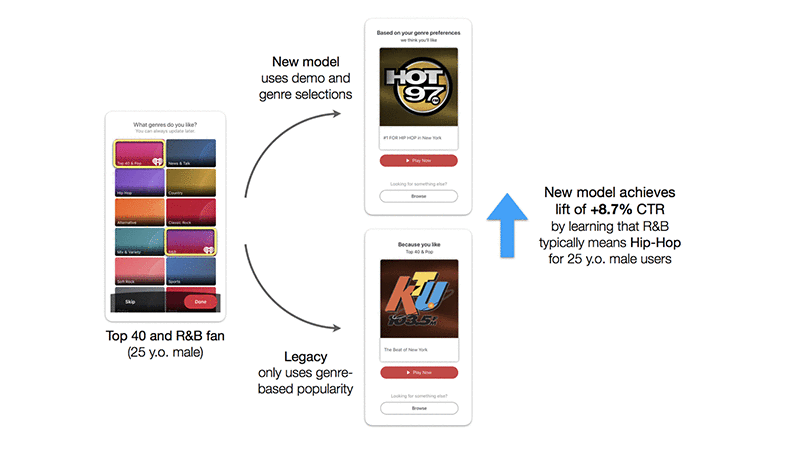
Our second hypothesis was that users with similar tastes might express what genres they’re looking for differently. Moreover, iHeartRadio might have a slightly different definition of a genre as compared to how our users perceive that genre. This indeed seemed to be the case for certain genres. For example, we noticed that many users told us they like R&B music when in fact they listened to what we classify internally as Hip Hop. This is more a function of genres being somewhat subjective, in which different users have different definitions for the same genre.

Predicting genres

Now that we had some initial analytical evidence that demographics and genre preferences are useful in predicting new user behavior, we set out to build and test a model. We hoped that a model could systematically learn how demographic background and genre preferences relate to listening behavior. If successful, we could use the model to surface the correct genre-based content when a new user onboards to our platform.

As in the analysis phase, we defined a successful prediction as the ability to surface content the user would have naturally engaged with two months after signing up. As a result, users that go into the training data for our model are active listeners that have had the time to explore the offerings in our app. Thus, the target variable is the top genre a user listens to two months after registration, and the features are the user’s demographic attributes and combination of genres selected during registration.

As in most modeling exercises, we started with the most basic modeling technique, which in this case was multi-label logistic regression. We analyzed a sampling of the feature coefficients from the trained model and their relationship with subsequent listening in the following heat map. The non-demographic model features are the multi-hot encoding of genres that the user selected during onboarding. The brighter the square (i.e. larger weight), the more correlated a model feature is with the genre the user listens to in the second month after registration.

Sure enough, we were able to identify some initial patterns. First, we found that on the whole, when a user selects only 1 genre, they end up listening to that genre. However, for users who select certain genres such as Kids & Family, Mix & Variety, or R&B, the trend is more muted. Second, it’s interesting to note that when looking at age, our model learns that younger users tend to prefer Top 40 & Pop and Alternative whereas older users prefer International, Jazz, News & Talk, Oldies, and Public Radio. Third, we were fascinated by the fact the model could learn that users who select classical music also tend to listen to World, Public Radio, and International genres.

Although useful to explore how our features relate to listening behavior, logistic regression has several drawbacks. Perhaps most importantly, it does not naturally handle the case in which users select more than one genre, because interactions in a linear model are implicitly additive. In other words, it can’t weigh the interactions across genre selections appropriately. For us, this is a major issue because users that do reveal their genre preferences typically select more than one; on average users select around four genres.

We explored a few more advanced techniques such as tree-based models and feed-forward neural networks that would make up for the shortcomings of logistic regression. We found that tree-based methods gave us the best results while also having limited complexity as compared to the neural networks we built. They also gave us meaningful lifts as compared to logistic regression and were less prone to overfitting the training set. In the end, we decided on using LightGBM given its speed, ability to prevent overfitting, and superior performance.

We were excited to see that the offline metrics of our model were significantly better than our simple baseline. The baseline recommendation for a user is the most popular genre that they selected, regardless of their demographic membership, which is how our live content carousels have worked in the app historically. We found that sending new users three genre-based model recommendations capture their actual preferred genre 77% of the time, based on historical offline data. This corresponds to a 15% lift as compared to the baseline.

Surfacing predictions in real-time

Now that we have a model that seems to work, how do we surface these predictions in real-time? Historically at iHeartRadio, most of our models had been trained and scored in batch (e.g. daily or weekly) using Airflow and served from a key-value database like Amazon DynamoDB. In this case, however, our new user recommendations only provide value if we score and serve them in real-time. Immediately after the user registers, we have to be ready to serve appropriate genre-based predictions to the user based on registration information that of course we don’t know in advance. If we wait until the next day to serve these recommendations, it’s too late. That’s where Amazon SageMaker comes in.

Amazon SageMaker allows us to host real-time model endpoints that can surface predictions for users immediately after registration. It also offers convenient model training functionality. It allows for a few options to deploy models, ranging from using an existing built-in algorithm container (such as random forest or XGBoost), using pre-built container images, extending a pre-built container image, or building a custom container image. We decided to go with the last option of packaging our own algorithm into a custom image. This gave us the most flexibility because, as of this writing, a built-in algorithm container for LightGBM does not exist. Therefore, we packaged our own custom scoring code and built a Docker image that was pushed to Amazon Elastic Container Registry (Amazon ECR) for use in model scoring.

We masked the Amazon SageMaker endpoint behind an Amazon API Gateway so external clients could ping it for recommendations, while leaving the Amazon SageMaker backend secure in a private network. The API Gateway passes the parameter values to an AWS Lambda function, which in turn parses the values and sends them to the Amazon SageMaker endpoint for a model response. Amazon SageMaker also allows for automatic scaling of model scoring instances based on the volume of traffic. All we need to define is the desired number of requests per second for each instance and a maximum number of instances to scale up to. This makes it easy to roll-out the use of our endpoint to any variety of use-cases throughout iHeartRadio. In the 10 days we ran the test, our endpoint had 0 invocation errors and an average model latency of around 5 milliseconds.

For more information about Amazon SageMaker, see Using Your Own Algorithms or Models with Amazon SageMaker, Amazon SageMaker Bring Your Own Algorithm Example, and Call an Amazon SageMaker model endpoint using Amazon API Gateway and AWS Lambda.

Online results

We showed above that our model performed well in offline tests, but we also had to put it to the test in our production app. We tested it by using our model hosted on Amazon SageMaker to recommend a relevant radio station to our new users in the form of an in-app-message directly after registration. We compared this model to business rules that would simply recommend the most popular radio station that was classified into one of the user-selected genres. We ran the A/B test for 10 days with an even split between the groups. The group of users hit with our model predictions had an 8.7% higher click-through rate to the radio station! And of the users who did click, radio listening time was just as strong.

The following diagram shows the real-time predictions result in an 8.7% lift in CTR over the baseline and an example of what the A/B testing groups would have looked like.

Next steps and future work

We’ve shown that new users respond to the relevant content served by our genre prediction model hosted on an Amazon SageMaker endpoint. In our initial proof-of-concept, we introduced the treatment to only a portion of our new registrants. Next steps include expanding this test to a larger user-base and surfacing these recommendations by default in our content carousels for new users with little to no listening history. We also hope to expand the use of these types of models and real-time predictions to other personalization use-cases, such as the ordering of various content carousels and tiles throughout our app. Lastly, we are continuing to explore technologies that allow for seamlessly serving model predictions in real-time including Amazon SageMaker as described in this post as well as others such as FastAPI.

Thanks go out to the Data Science and Data Engineering teams for their support throughout testing the Amazon SageMaker POC and helpful feedback on the post, especially Brett Vintch and Ravi Theja Mudunuru. This post is also available from iHeartMedia on Medium.


About the authors

Matt Fielder is the EVP Engineering at iHeartRadio

Jordan Rosenblum is a Senior Data Scientist at iHeartRadio Digital

Speaking the Same Language: How Oracle’s Conversational AI Serves Customers

At Oracle, customer service chatbots use conversational AI to respond to consumers with more speed and complexity.

Suhas Uliyar, vice president for product management for digital assistance and AI at Oracle, stopped by to talk to AI Podcast host Noah Kravitz about how the newest wave of conversational AI can keep up with the nuances of human conversation.

Many chatbots frustrate consumers because of their static nature. Asking a question or using the wrong keyword confuses the bot and prompts it to start over or make the wrong selection.

Uliyar says that Oracle’s digital assistant uses a sequence-to-sequence algorithm to understand the intricacies of human speech, and react to unexpected responses.

Their chatbots can “switch the context, keep the memory, give you the response and then you can carry on with the conversation that you had. That makes it natural, because we as humans fire off on different tangents at any given moment.”

Key Points From This Episode:

  • The contextual questions that often occur in normal conversation stump single-intent systems, but the most recent iteration is capable of answering simple questions quickly and remembering customers.
  • The next stage in conversational AI, Uliyar believes, will allow bots to learn about users in order to give them recommendations or take action for them.
  • Learn more about Oracle’s digital assistant for enterprise applications and visit Uliyar’s Twitter.

Tweetable

“If machine learning is the rocket that’s going to take us to the next level, then data is the rocket fuel.” — Suhas Uliyar [15:59]

You Might Also Like

Charter Boosts Customer Service with AI

Jared Ritter, the senior director of wireless engineering at Charter Communications, describes their innovative approach to data collection on customer feedback. Rather than retroactively accessing the data to fix problems, Charter uses AI to evaluate data constantly to predict issues and address them as early as possible.

Using Deep Learning to Improve the Hands-Free, Voice Experience

What would the future of intelligent devices look like if we could bounce from using Amazon’s Alexa to order a new book to Google Assistant to schedule our next appointment, all in one conversation? Xuchen Yao, the founder of AI startup KITT.AI, discusses the toolkit that his company has created to achieve a “hands-free” experience.

AI-Based Virtualitics Demystifies Data Science with VR

Aakash Indurkha, head of machine learning projects at AI-based analytics platform Virtualitics, explains how the company is bringing creativity to data science using immersive visualization. Their software bridges the gap created by a lack of formal training to help inexperienced users identify anomalies on their own, and gives experts the technology to demonstrate their complex calculations.

Make Our Podcast Better

Have a few minutes to spare? Fill out this short listener survey. Your answers will help us make a better podcast.

The post Speaking the Same Language: How Oracle’s Conversational AI Serves Customers appeared first on The Official NVIDIA Blog.

Chaining Amazon SageMaker Ground Truth jobs to label progressively

Amazon SageMaker Ground Truth helps you build highly accurate training datasets for machine learning. It can reduce your labeling costs by up to 70% using automatic labeling.

This blog post explains the Amazon SageMaker Ground Truth chaining feature with a few examples and its potential in labeling your datasets. Chaining reduces time and cost significantly as Amazon SageMaker Ground Truth determines the objects that are already labeled and optimizes the data for automated data labeling mode. As a prerequisite, you might want to check the post “Creating hierarchical label taxonomies using Amazon SageMaker Ground Truth” that shows how to achieve multi-step hierarchical labeling and the documentation on how to use the augmented manifest functionality.

Chaining a labeling job

Chaining can help in the following scenarios:

  • Partially completed labeling job – A labeling job in which you have an input manifest that already contains few labels and the rest are to be labeled.
  • Failed labeling job – A labeling job in which you generated a few labels successfully and the rest of the labels either failed or expired.
  • Stopped labeling job – A labeling job that a user stopped, which may have generated a few labels before stopping.

The chaining feature allows you to reuse these previous labels and get the remaining labels coherently. For more information, see Chaining labeling jobs.

Chaining uses the output from a previous job as the input for a subsequent job.

The following are the artifacts used to bootstrap the new chained labeling job:

  1. LabelAttributeName
  2. Output manifest file contents from the previous labeling job
  3. The model, if available

If you are starting a job from the Amazon Sagemaker Ground Truth console, by default, the LabelingJob name is used as the LabelAttributeName. For more information, see LabelAttributeName.

If you are chaining a partially completed job, the console uses the LabelAttributeName of the parent job to decide which object is already labeled and which is not, so that only unlabeled or previously failed objects are sent for labeling. You can override this behavior by providing a different LabelAttributeName, in which case the previous labels aren’t counted and a new labeling job sends all the data for labeling. This post describes this process in more detail later.

If you are using the API or SDK, you need to properly configure these fields, which this post describes later.

When you enable automated data labeling, Amazon Sagemaker Ground Truth uses LabelAttributeName to decide which existing labels to use to start automated data labeling mode and see if you are eligible to train early. You can reap the maximum benefit of machine learning with existing labels; it reduces the cost of labeling tasks because you use existing labels instead of sending them to human labelers again.

Solution overview

The following diagram shows the workflow of this solution.

Step 1: Building the initial unlabeled dataset

Step 2: Launching a labeling job and stopping it (To simulate stopping/Failed status)

Step 3: Chaining your first job

Step 1: Building the initial unlabeled dataset

The first step is to build the initial unlabeled dataset. For more information about this process, see Step 1 in Creating hierarchical label taxonomies using Amazon SageMaker Ground Truth.

This post uses the CBCL StreetScenes dataset, which contains approximately 3547 images. The full dataset is approximately 2 GB; you may choose to upload some or all of the dataset to S3 for labeling. Complete the following steps:

  1. Download the zip file.
  2. Extract the .zip archive to a folder. By default, the folder is Output.
  3. Create a small sample dataset to work with, or use the entire dataset.

For more information about creating an input manifest, see Step 2 in Creating hierarchical label taxonomies using Amazon SageMaker Ground Truth.

The lines in the manifest appear as the following code:

{"source-ref":"s3://bucket_name/datasets/streetscenes/SSDB00001.JPG"}
{"source-ref":"s3://bucket_name/datasets/streetscenes/SSDB00006.JPG"}
{"source-ref":"s3://bucket_name/datasets/streetscenes/SSDB00016.JPG"}
... ...

Step 2: Launching a labeling job and stopping it

From the console, start a labeling job using the Image classification task type to classify pictures as a vehicle, traffic signal, or pedestrian. Use the previously created manifest file as the input and Streetscenes-Job1 as the job name. For more information about starting a labeling job, see Amazon SageMaker Ground Truth – Build Highly Accurate Datasets and Reduce Labeling Costs by up to 70%.

To simulate the stopped or failed state, this post manually stopped the job after 1000 labels.

The output of the labeling job is written to an augmented manifest with the corresponding label augmented in each of the JSON lines in the manifest. Some of these have labels and some do not. See the following code:

1. {
  "source-ref": "s3://bucket_name/datasets/streetscenes/SSDB00001.JPG",
  "Streetscenes-Job1": 0,
  "Streetscenes-Job1-metadata": {
    "confidence": 0.95,
    "job-name": "labeling-job/streetscenes-job1",
    "class-name": "vehicles",
    "human-annotated": "yes",
    "creation-date": "2019-04-09T21:13:37.730999",
    "type": "groundtruth/image-classification"
  }
}
2. {"source-ref":"s3://bucket_name/datasets/streetscenes/SSDB00002.JPG"}
3. {
  "source-ref": "s3://bucket_name/datasets/streetscenes/SSDB00003.JPG",
  "Streetscenes-Job1": 1,
  "Streetscenes-Job1-metadata": {
    "confidence": 0.95,
    "job-name": "labeling-job/streetscenes-job1",
    "class-name": "traffic signals",
    "human-annotated": "yes",
    "creation-date": "2019-04-09T21:25:51.111094",
    "type": "groundtruth/image-classification"
  }
}
4. {"source-ref":"s3://bucket_name/datasets/streetscenes/SSDB00004.JPG"}
5. {"source-ref":"s3://bucket_name/datasets/streetscenes/SSDB00005.JPG"}
6. {"source-ref":"s3://bucket_name/datasets/streetscenes/SSDB00006.JPG"}
7. {"source-ref":"s3://bucket_name/datasets/streetscenes/SSDB00007.JPG"}
8. {
  "source-ref": "s3://bucket_name/datasets/streetscenes/SSDB00008.JPG",
  "Streetscenes-Job1": 0,
  "Streetscenes-Job1-metadata": {
    "confidence": 0.95,
    "job-name": "labeling-job/streetscenes-job1",
    "class-name": "vehicles",
    "human-annotated": "yes",
    "creation-date": "2019-04-09T21:28:54.752427",
    "type": "groundtruth/image-classification"
  }
}
...
...
...

For more information about the format for different modalities, see Output Data.

Step 3: Chaining your first job

You can now chain Streetscenes-Job1. In Labeling jobs, from the Actions dropdown, choose Chain.

The console pre-populates the input dataset location as it fetches the output manifest from the previous stopped job. The label attribute name remains the same as the previous job.

After the job starts, the console shows the counter as 1000, which reflects the data already labeled.

After the job is complete, all labels are generated.

The following code is from the output manifest. All the lines in the output manifest have labels

1. {
  "source-ref": "s3://bucket_name/datasets/streetscenes/SSDB00006.JPG",
  "Streetscenes-Job1": 3,
  "Streetscenes-Job1-metadata": {
    "confidence": 0.59,
    "job-name": "labeling-job/streetscenes-job1-chain",
    "class-name": "None",
    "human-annotated": "yes",
    "creation-date": "2019-04-10T01:37:07.663801",
    "type": "groundtruth/image-classification"
  }
}

2. {
  "source-ref": "s3://bucket_name/datasets/streetscenes/SSDB00007.JPG",
  "Streetscenes-Job1": 0,
  "Streetscenes-Job1-metadata": {
    "job-name": "labeling-job/streetscenes-job1-chain",
    "confidence": 0.99,
    "class-name": "vehicles",
    "type": "groundtruth/image-classification",
    "creation-date": "2019-04-10T01:23:05.309990",
    "human-annotated": "no"
  }
}

...

Chaining in a series

The previous scenarios only showed one level of chaining. Chaining is a powerful feature in which you can feed the output of one job as input to another.

Scenarios for chaining

The following table shows some of the scenarios with which you can experiment with chaining. AL indicates that automated data labeling mode is enabled. Non-AL indicates that automated data labeling mode is not enabled. For more information, see Annotate data for less with Amazon SageMaker Ground Truth and automated data labeling.

Parent labeling job Chained labeling lob Details
1 Non-AL Non-AL You started a labeling job in Non-AL mode and it failed or stopped before labeling all the objects. You want to resume the job in Non-AL mode to label the remaining unlabeled objects by a human.
2 Non-AL AL You started a labeling job in Non-AL mode and it failed or stopped before labeling all the objects. You want to resume the job in AL mode to label the remaining unlabeled objects automatically based on the existing labels.
3 AL Non-AL You started a labeling job in AL mode and it failed or stopped before labeling all the objects. You want to resume the job in Non-AL mode to label the remaining unlabeled objects by a human.
4 AL AL You started a labeling job in AL mode and it failed or stopped before labeling all the objects. You want to resume the job in AL mode to label the remaining unlabeled objects automatically based on the existing labels or pre-trained models.
5 Third-Party labels Non-AL You acquired some labels through other sources (Amazon SageMaker Ground Truth or a third party) and have a manifest with labeled objects and unlabeled data. You want to start a new job in Non-AL mode to label the remaining unlabeled objects automatically based on the existing labels.
6 Third-Party labels AL You acquired some labels through other sources (Amazon SageMaker Ground Truth or a third party) and have a manifest with labeled objects and unlabeled data. You want to start a new job in AL mode to label the remaining unlabeled objects automatically based on the existing labels.

In some of these scenarios, if you are in AL mode and the job stops after a model is generated, the subsequent AL job uses the model from the first step, which reduces training time. For more information, see Amazon SageMaker Ground Truth: Using a Pre-Trained Model for Faster Data Labeling.

Additionally, if enough pre-labeled objects are available, you can bootstrap these labels to be the training set for your automated labeling loop. This method saves on time and cost by not fetching labels from human annotators.

Using third-party labels

This section elaborates on the final two scenarios in the previous table. You can bring in third-party labels as long as it adheres to the Amazon Sagemaker Ground Truth label format. For more information, see Output Data.

For example, assume you have a job in which the manifest has 989/3450 third-party labels. You can start the labeling job with the following code, which contains third-party labels:

{
  "source-ref": "s3://bucket-name/datasets/streetscenes/SSDB03295.JPG",
  "third-party-label": 0,
  "third-party-label-metadata": {
    "confidence": 0.95,
    "job-name": "labeling-job/third-party-label",
    "class-name": "vehicles",
    "human-annotated": "yes",
    "creation-date": "2019-04-09T21:25:51.110794",
    "type": "groundtruth/image-classification"
  }
}
...

After the job starts, it automatically updates the counter.

Time and cost savings

Chaining offers many time- and cost-saving benefits.

Firstly, objects that are already labeled aren’t processed again. Additionally, if automated data labeling is enabled, auto labeling is attempted as soon as possible. If your data is already partially labeled, a validation set is collected by sending work to a human workforce, after which you can bootstrap the partially labeled input data to be the training set, and Amazon Sagemaker Ground Truth performs automated labeling depending on the number of existing labels. This expedites the automated data labeling process; training starts sooner and reduces the training job’s overall time.

Furthermore, skipping labeled objects reduces costs. Training costs are also reduced by using the ML model generated from your existing data.

Chaining using the API

You can also use the API or AWS CLI to do chaining. For more information, see create-labeling-job.

If you have a failed job and want to resume it, you need to enter the same create-labeling-job information as the failed job, with the same LabelAttributeName as the previous job, and use the output manifest file as the input in your chained job.

Similarly, if you want to chain the job for labeling all the objects with a different kind of label, you need to use a different LabelAttributeName than the one in the previous labeling job.

The following code is an example CLI for chaining:

>> aws sagemaker create-labeling-job --labeling-job-name "Streetscenes-Job1-chain" --label-attribute-name "Streetscenes-Job1" --input-config DataSource={S3DataSource={ManifestS3Uri="s3://<bucket_name>/streetscenes/output/Streetscenes-Job1/manifests/output/output.manifest"}},DataAttributes={ContentClassifiers=["FreeOfPersonallyIdentifiableInformation"]} --output-config S3OutputPath="s3://<bucket_name>/streetscenes/output/Streetscenes-Job1-chain/" --role-arn "arn:aws:iam::accountID:role/<rolename>" --label-category-config-s3-uri "s3://<path_to_label_category_file>/labelcategory.json" --stopping-conditions MaxPercentageOfInputDatasetLabeled=100 --human-task-config WorkteamArn="arn:aws:sagemaker:region:394669845002:workteam/public-crowd/default",UiConfig={UiTemplateS3Uri="s3://<bucket_name>/template.liquid"},PreHumanTaskLambdaArn="arn:aws:lambda:us-west-2:081040173940:function:PRE-ImageMultiClass",TaskKeywords="Images","classification",TaskTitle="Image Categorization",TaskDescription="Categorize images into specific classes",NumberOfHumanWorkersPerDataObject=3,TaskTimeLimitInSeconds=300,TaskAvailabilityLifetimeInSeconds=21600,MaxConcurrentTaskCount=1000,AnnotationConsolidationConfig={AnnotationConsolidationLambdaArn="arn:aws:lambda:us-west-2:081040173940:function:ACS-ImageMultiClass"}

This code uses the same label attribute name (label-attribute-name) as the first job, Streetscenes-Job1.

Conclusion

This post demonstrated how the Amazon SageMaker Ground Truth chaining feature offers time-saving and cost-reduction benefits. This is a very powerful feature and this post merely scratches the surface of what Amazon SageMaker Ground Truth chaining can do. Let us know what you think in the comments. You can get started with Amazon Sagemaker Ground Truth by visiting Getting Started page in the documentation.


About the authors

Priyanka Gopalakrishna is a software engineer at Amazon AI. She works on building scalable solutions using distributed systems for machine learning. In her spare time, she loves to hike, catch up on things related to space sciences or read good old strips of Calvin and Hobbes.


Zahid Rahman is a SDE in AWS AI where he builds large scale distributed systems to solve complex machine learning problems . He is primarily focused on innovating technologies that can ‘Divide and Conquer’ Big Data problem.

NVIDIA and Microsoft Team Up to Aid AI Startups

NVIDIA and Microsoft are teaming up to provide the world’s most innovative young companies with access to their respective accelerator programs for AI startups.

Members of NVIDIA Inception and Microsoft for Startups can now receive all the benefits of both programs — including technology, training, go-to-market support and NVIDIA GPU credits in the Azure cloud — to continue growing and solving some of the world’s most complex problems.

The announcement was made at Slush, a startup event taking place this week in Helsinki.

With a variety of tools, technology and resources — including NVIDIA GPU cloud instances on Azure — AI startups can move into production and deployment faster.

NVIDIA and Microsoft will evaluate what startups in the joint program need, and how NVIDIA Inception and Microsoft for Startups can help them achieve their goals.

NVIDIA Inception members are eligible for the following benefits from Microsoft for Startups:

  • Free access to specific Microsoft technologies suited to every startup’s needs, including up to $120,000 in free credits in the Azure cloud
  • Go-to-market resources to help startups sell alongside Microsoft’s global sales channels

Microsoft for Startups members can access the following benefits from NVIDIA Inception:

  • Technology expertise on implementing GPU applications and hardware
  • Free access to NVIDIA Deep Learning Institute online courses, such as “Fundamentals of Deep Learning for Computer Vision” and “Accelerating Data Science”
  • Unlimited access to DevTalk, a forum for technical inquiries and community engagement
  • Go-to-market assistance and hardware discounts across the NVIDIA portfolio, from NVIDIA DGX AI systems to NVIDIA Jetson embedded computing platforms

Microsoft for Startups is a global program designed to support startups as they create and expand their companies. Since its launch in 2018, thousands of startups have applied and are active in the program. Microsoft for Startups members are on course to drive $1 billion in pipeline opportunity by the end of 2020.

NVIDIA Inception is a virtual accelerator program that supports startups harnessing GPUs for AI and data science applications during critical stages of product development, prototyping and deployment. Since its launch in 2016, the program has expanded to over 5,000 companies.

The post NVIDIA and Microsoft Team Up to Aid AI Startups appeared first on The Official NVIDIA Blog.