Blog

Learn About Our Meetup

5000+ Members

MEETUPS

LEARN, CONNECT, SHARE

Join our meetup, learn, connect, share, and get to know your Toronto AI community. 

JOB POSTINGS

INDEED POSTINGS

Browse through the latest deep learning, ai, machine learning postings from Indeed for the GTA.

CONTACT

CONNECT WITH US

Are you looking to sponsor space, be a speaker, or volunteer, feel free to give us a shout.

Category: Global

How AI Is Helping Care for an Aging Population

Forty percent of nursing home residents fall at least once a year, with one in five of these spills resulting in fractures or hospital stays.

Falling isn’t the only risk for eldercare residents. Those who are non- or partially mobile often suffer pressure ulcers, commonly known as bed sores, from not moving enough in their beds.

The risk of falls and ulcers dramatically increases in nursing homes that are short staffed. With staff stretched thin, their attention is divided across many rooms, many beds and many residents.

TeiaCare, based in Milan, Italy, wants to give caregivers a helping hand and ensure that nursing home residents get the attention they need, when they need it. The company offers the first digital assistant for long-term care that uses intelligent video analytics to make sure carers are alerted when their help is needed the most.

An aging population brings increasing demand for resources such as access to nursing homes. And the population of our planet is aging dramatically. In 2017, the UN estimates there were nearly a billion people aged 60 or over — about 13 percent of the global population, a proportion that is expected to soar.

However, the number of needed caregivers isn’t keeping up. By 2020, when nearly 20 percent of Europe’s population will be over 65, an estimated 800,000 more caregivers will be needed.

Putting Patient Care First

To reduce the risk of falls and bed sores, TeiaCare’s digital assistant, which consists of an optical sensor connected to a processor, is mounted onto ceilings. The processor uses a series of computer vision and deep learning algorithms, accelerated by NVIDIA GPUs, to analyze the visual data captured.

None of the video data is saved or stored. Instead, the system identifies specific movements and resting positions in real time.

The system then sends alerts directly to carers when attention needs to be given to a patient — perhaps they have fallen out of bed or have spent too long on one side and are at risk of developing an ulcer.

Each bed is tagged according to the patient’s individual requirements.

As well as real-time alerts, the system generates customized reports, giving staff an insight into patient movements, how long they’re spending in and out of bed, and allowing them to identify any areas for improving patient care.

Caregivers also see improvements to their working conditions — they know that they’ll be alerted if something happens to a resident and can take appropriate action. This means less stress for them and improved working efficiency.

For the facility owners, introducing the digital assistant means fewer liabilities, better quality of service and improved efficiency metrics.

And families enjoy better peace of mind by knowing that any falls will be immediately identified and their relatives will get the help they need.

Improving Patient Care Further

TeiaCare is now expanding its assistant to monitor other behavioral and physiological traits.

Activity tracking will help improve the care of residents with dementia or Alzheimer’s disease as they tend to suffer from wandering. By monitoring patient movements, staff can ensure that their safety is not put at risk.

The company is also developing algorithms to monitor patients’ heart and breathing rates, using the same optical sensor-based system. This non-invasive way of monitoring resident vital signs could help ensure their comfort, prevent health deterioration and give families peace of mind.

TeiaCare is a member of the NVIDIA Inception virtual accelerator, which provides marketing and technology support to AI startups.

Image credit: sabinevanerp 

The post How AI Is Helping Care for an Aging Population appeared first on The Official NVIDIA Blog.

Speed up training on Amazon SageMaker using Amazon EFS or Amazon FSx for Lustre file systems

Amazon SageMaker provides a fully-managed service for data science and machine learning workflows. One of the most important capabilities of Amazon SageMaker is its ability to run fully-managed training jobs to train machine learning models. Visit the service console to train machine learning models yourself on Amazon SageMaker.

Now, you can speed up your training job runs by training machine learning models from data stored in Amazon Elastic File System (EFS) or Amazon FSx for Lustre. Amazon EFS provides a simple, scalable, elastic file system for Linux-based workloads for use with AWS Cloud services and on-premises resources. Amazon FSx for Lustre is a high-performance file system optimized for workloads, such as machine learning, analytics, and high performance computing.

Training machine learning models requires providing the training datasets to the training job. When using Amazon Simple Storage Service (S3) as the training datasource in file input mode, all training data is downloaded from Amazon S3 to the EBS volumes attached to the training instances at the start of the training job. A distributed file system such as Amazon EFS or FSx for Lustre can speed up machine learning training by eliminating the need for this download step.

In this blog post, we go over the benefits of training your models using a file system, provide information to help you choose a file system, and show you how to get started.

Choosing a file system for training models on SageMaker

When considering whether you should train your machine learning models from a file system the first thing to consider is: where does your training data reside now?

If your training data is already in Amazon S3 and your needs do not dictate a faster training time for your training jobs, you can get started with Amazon SageMaker with no need for data movement. However, if you need faster startup and training times we recommend that you take advantage of Amazon SageMaker’s integration with Amazon FSx for Lustre file system, which can speed up your training jobs by serving as a high-speed cache.

The first time you run a training job, if Amazon FSx for Lustre is linked to Amazon S3, it automatically loads data from Amazon S3 and makes it available to Amazon SageMaker at hundreds of gigabytes per second and submillisecond latencies. Additionally, subsequent iterations of your training job will have instant access to the data in Amazon FSx. Because of this, Amazon FSx has the most benefit to training jobs that have several iterations requiring multiple downloads from Amazon S3, or in workflows where training jobs must be run several times using different training algorithms or parameters to see which gives the best result.

If your training data is already in an Amazon EFS file system, we recommend choosing Amazon EFS as the file system data source. This choice has the benefit of directly launching your training jobs from the data in Amazon EFS with no data movement required, resulting in faster training start times. This is often the case in environments where data scientists have home directories in Amazon EFS, and are quickly iterating on their models by bringing in new data, sharing data with colleagues, and experimenting with which fields or labels to include. For example, a data scientist can use a Jupyter notebook to do initial cleansing on a training set, launch a training job from Amazon SageMaker, then use their notebook to drop a column and re-launch the training job, comparing the resulting models to see which works better.

Getting started with Amazon FSx for training on Amazon SageMaker

  1. Note your training data Amazon S3 bucket and path.
  2. Launch an Amazon FSx file system with the desired size and throughput, and reference the training data Amazon S3 bucket and path. Once created, note your file system id.
  3. Now, go to the Amazon SageMaker console and open the Training jobs page to create the training job, associate VPC subnets, security groups, and provide the file system as the data source for training.
  4. Create your training job:
    1. Provide the ARN for the IAM role with the required access control and permissions policy. Refer to AmazonSageMakerFullAccess for details.
    2. Specify a VPC that your training jobs and file system have access to. Also, verify that your security groups allow Lustre traffic over port 988 to control access to the training dataset stored in the file system. For more details, refer to Getting started with Amazon FSx.
    3. Choose file system as the data source and properly reference your file system id, path, and format.
  5. Launch your training job.

Getting started with Amazon EFS for training on Amazon SageMaker

  1. Put your training data in its own directory in Amazon EFS.
  2. Now go to the Amazon SageMaker console and open the Training jobs page to create the training job, associate VPC subnets, security groups, and provide the file system as the data source for training.
  3. Create your training job:
    1. Provide the IAM role ARN for the IAM role with the required access control and permissions policy
    2. Specify a VPC that your training jobs and file system have access to. Also, verify that your security groups allow NFS traffic over port 2049 to control access to the training dataset stored in the file system.
    3. Choose file system as the data source and properly reference your file system id, path, and format.
  4. Launch your training job.

After your training job completes, you can view the status history of the training job to observe the faster download time when using a file system data source.

Summary

With the addition of Amazon EFS and Amazon FSx for Lustre as data sources for training machine learning models in Amazon SageMaker, you now have greater flexibility to choose a data source that is suited to your use case. In this blog post, we used a file system data source to train machine learning models, resulting in faster training start times by eliminating the data download step.

Go here to start training machine learning models yourself on Amazon SageMaker or refer to our sample notebook to train a liner learner model using a file system data source to learn more.


About the Authors

Vidhi Kastuar is a Sr. Product Manager for Amazon SageMaker, focusing on making machine learning and artificial intelligence simple, easy to use and scalable for all users and businesses. Prior to AWS, Vidhi was Director of Product Management at Veritas Technologies. For fun outside work, Vidhi loves to sketch and paint, work as a career coach, and spend time with his family and friends.


Will Ochandarena is a Principal Product Manager on the Amazon Elastic File System team, focusing on helping customers use EFS to modernize their application architectures. Prior to AWS, Will was Senior Director of Product Management at MapR.


Speed up training on Amazon SageMaker using Amazon FSx for Lustre and Amazon EFS file systems

Amazon SageMaker provides a fully-managed service for data science and machine learning workflows. One of the most important capabilities of Amazon SageMaker is its ability to run fully-managed training jobs to train machine learning models. Visit the service console to train machine learning models yourself on Amazon SageMaker.

Now you can speed up your training job runs by training machine learning models from data stored in Amazon FSx for Lustre or Amazon Elastic File System (EFS). Amazon FSx for Lustre provides a high performance file system optimized for workloads, such as machine learning, analytics and high performance computing. Amazon EFS provides a simple, scalable, elastic file system for Linux-based workloads for use with AWS Cloud services and on-premises resources.

Training machine learning models requires providing the training datasets to the training job. Until now, when using Amazon S3 as the training data source in File input mode, all training data had to be downloaded from Amazon S3 to the EBS volumes attached to the training instances at the start of the training job. A distributed file system such as Amazon FSx for Lustre or EFS can speed up machine learning training by eliminating the need for this download step.

In this blog, we will go over the benefits of training your models using a file system, provide information to help you choose a file system, and show you how to get started.

Choosing a file system for training models on SageMaker

When considering whether you should train your machine learning models from a file system the first thing to consider is: where does your training data reside now?

If your training data is already in Amazon S3 and your needs do not dictate a faster training time for your training jobs, you can get started with Amazon SageMaker with no need for data movement. However, if you need faster startup and training times we recommend that you take advantage of Amazon SageMaker’s integration with Amazon FSx for Lustre file system, which can speed up your training jobs by serving as a high-speed cache.

The first time you run a training job, if Amazon FSx for Lustre is linked to Amazon S3, it automatically loads data from Amazon S3 and makes it available to Amazon SageMaker at hundreds of gigabytes per second and submillisecond latencies. Additionally, subsequent iterations of your training job will have instant access to the data in Amazon FSx. Because of this, Amazon FSx has the most benefit to training jobs that have several iterations requiring multiple downloads from Amazon S3, or in workflows where training jobs must be run several times using different training algorithms or parameters to see which gives the best result.

If your training data is already in an Amazon EFS file system, we recommend choosing Amazon EFS as the file system data source. This choice has the benefit of directly launching your training jobs from the data in Amazon EFS with no data movement required, resulting in faster training start times. This is often the case in environments where data scientists have home directories in Amazon EFS, and are quickly iterating on their models by bringing in new data, sharing data with colleagues, and experimenting with which fields or labels to include. For example, a data scientist can use a Jupyter notebook to do initial cleansing on a training set, launch a training job from Amazon SageMaker, then use their notebook to drop a column and re-launch the training job, comparing the resulting models to see which works better.

Getting started with Amazon FSx for training on Amazon SageMaker

  1. Note your training data Amazon S3 bucket and path.
  2. Launch an Amazon FSx file system with the desired size and throughput, and reference the training data Amazon S3 bucket and path. Once created, note your file system id.
  3. Now, go to the Amazon SageMaker console and open the Training jobs page to create the training job, associate VPC subnets, security groups, and provide the file system as the data source for training.
  4. Create your training job:
    1. Provide the ARN for the IAM role with the required access control and permissions policy. Refer to AmazonSageMakerFullAccess for details.
    2. Specify a VPC that your training jobs and file system have access to. Also, verify that your security groups allow Lustre traffic over port 988 to control access to the training dataset stored in the file system. For more details, refer to Getting started with Amazon FSx.
    3. Choose file system as the data source and properly reference your file system id, path, and format.
  5. Launch your training job.

Getting started with Amazon EFS for training on Amazon SageMaker

  1. Put your training data in its own directory in Amazon EFS.
  2. Now go to the Amazon SageMaker console and open the Training jobs page to create the training job, associate VPC subnets, security groups, and provide the file system as the data source for training.
  3. Create your training job:
    1. Provide the IAM role ARN for the IAM role with the required access control and permissions policy
    2. Specify a VPC that your training jobs and file system have access to. Also, verify that your security groups allow NFS traffic over port 2049 to control access to the training dataset stored in the file system.
    3. Choose file system as the data source and properly reference your file system id, path, and format.
  4. Launch your training job.

After your training job completes, you can view the status history of the training job to observe the faster download time when using a file system data source.

Summary

With the addition of Amazon EFS and Amazon FSx for Lustre as data sources for training machine learning models in Amazon SageMaker, you now have greater flexibility to choose a data source that is suited to your use case. In this blog post, we used a file system data source to train machine learning models, resulting in faster training start times by eliminating the data download step.

Go here to start training machine learning models yourself on Amazon SageMaker or refer to our sample notebook to train a liner learner model using a file system data source to learn more.


About the Authors

Vidhi Kastuar is a Sr. Product Manager for Amazon SageMaker, focusing on making machine learning and artificial intelligence simple, easy to use and scalable for all users and businesses. Prior to AWS, Vidhi was Director of Product Management at Veritas Technologies. For fun outside work, Vidhi loves to sketch and paint, work as a career coach, and spend time with his family and friends.


Will Ochandarena is a Principal Product Manager on the Amazon Elastic File System team, focusing on helping customers use EFS to modernize their application architectures. Prior to AWS, Will was Senior Director of Product Management at MapR.


Keeping an AI on Damage: Startup Automates Vehicle Condition Inspections

Anyone familiar with a fender bender knows that the rigmarole of getting a damage estimate is ready for the wrecking yard.

A startup wants to change that.

Ravin is using AI to help automate the process of vehicle inspections and reduce headaches for car rental agencies, car dealers, insurers and all of these companies’ customers.

Based in Haifa, Israel, and London, Ravin applies computer vision and AI to vehicle damage detection and assessment. It has obvious applications such as rental car pickups and returns.

With its app, people can circle a vehicle to take a video and be done. AI does the rest: It calculates the cost of repairs based on the vehicle and damages it identifies.

Ravin co-founders Eliron Ekstein and Roman Sandler formed the company to harness AI to alleviate the problems of tracking damages for car rental businesses and dealerships.

The startup came about as a digital business unit spinout of oil giant Shell. Earlier this year, the founders secured $4 million in seed funding led by Pico Venture Partners and with participation from the Dutch energy giant.

Automated Inspections

Today’s advanced vehicle damage assessment can require a person to take photos up close from multiple angles and another person at an office to assess the damage from the pictures.

There’s an easier way, says Ekstein, the company’s CEO. “We ask the user to walk around the car with a mobile phone (running a video app), or drive through a set of CCTV cameras. We pick up the damages ourselves automatically, and we classify and estimate it for the insurer or fleet owner to make a decision,” he said.

Ravin’s app enables a quick video to be converted into dozens of images around a car and then run through its algorithms in AWS powered by NVIDIA GPUs for damage detection, he said.

The startup’s neural networks were trained on NVIDIA GPUs running in workstations. “We used hundreds of thousands of images to train the models,” said Sandler, the company’s CTO.

Rental Applications

For fleet operators, Ravin can set up fixed camera systems to capture photos of inbound vehicles, automating the process of damage assessments.

Rental company Avis has been using Ravin’s system at Heathrow Airport in London.

“They use it to inspect cars for damage when customers come back, which helps them charge only the right people for the right damage,” said Ekstein.

Ravin’s system can help fleet operators manage their risk on damaged vehicles as well as more quickly move cars to repairs for a faster turnaround to get them back in use, he said.

“We can shorten the lead time to repair and help understand the true cost to repair it,” said Ekstein.

The post Keeping an AI on Damage: Startup Automates Vehicle Condition Inspections appeared first on The Official NVIDIA Blog.

Exploring Weight Agnostic Neural Networks

When training a neural network to accomplish a given task, be it image classification or reinforcement learning, one typically refines a set of weights associated with each connection within the network. Another approach to creating successful neural networks that has shown substantial progress is neural architecture search, which constructs neural network architectures out of hand-engineered components such as convolutional network components or transformer blocks. It has been shown that neural network architectures built with these components, such as deep convolutional networks, have strong inductive biases for image processing tasks, and can even perform them when their weights are randomly initialized. While neural architecture search produces new ways of arranging hand-engineered components with known inductive biases for the task domain at hand, there has been little progress in the automated discovery of new neural network architectures with such inductive biases, for various task domains.

We can look at analogies to these useful components in examples of nature vs. nurture. Just as certain precocial species in biology—who possess anti-predator behaviors from the moment of birth—can perform complex motor and sensory tasks without learning, perhaps we can construct network architectures that can perform well without training. Of course, these natural (and by analogy, artificial) neural networks are further improved through training, but their ability to perform even without learning shows that they contain biases that make them well-suited to their task.

In “Weight Agnostic Neural Networks” (WANN), we present a first step toward searching specifically for networks with these biases: neural net architectures that can already perform various tasks, even when they use a random shared weight. Our motivation in this work is to question to what extent neural network architectures alone, without learning any weight parameters, can encode solutions for a given task. By exploring such neural network architectures, we present agents that can already perform well in their environment without the need to learn weight parameters. Furthermore, in order to spur progress in this field community, we have also open-sourced the code to reproduce our WANN experiments for the broader research community.

Left: A hand-engineered, fully-connected deep neural network with 2760 weight connections. Using a learning algorithm, we can solve for the set of 2760 weight parameters so that this network can perform the BipedalWalker-v2 task. Right: A weight agnostic neural network architecture with 44 connections that can perform the same Bipedal Walker task. Unlike the fully-connected network, this WANN can still perform the task without the need to train the weight parameters of each connection. In fact, to simplify the training, the WANN is designed to perform when the values of each weight connection are identical, or shared, and it will even function if this shared weight parameter is randomly sampled.

Finding WANNs
We start with a population of minimal neural network architecture candidates, each with very few connections only, and use a well-established topology search algorithm (NEAT), to evolve the architectures by adding single connections and single nodes one by one. The key idea behind WANNs is to search for architectures by de-emphasizing weights. Unlike traditional neural architecture search methods, where all of the weight parameters of new architectures need to be trained using a learning algorithm, we take a simpler and more efficient approach. Here, during the search, all candidate architectures are first assigned a single shared weight value at each iteration, and then optimized to perform well over a wide range of shared weight values.

Operators for searching the space of network topologies
Left: A minimal network topology, with input and outputs only partially connected.
Middle: Networks are altered in one of three ways:
(1) Insert Node: a new node is inserted by splitting an existing connection.
(2) Add Connection: a new connection is added by connecting two previously unconnected nodes.
(3) Change Activation: the activation function of a hidden node is reassigned.
Right: Possible activation functions (linear, step, sin, cosine, Gaussian, tanh, sigmoid, inverse, absolute value, ReLU)

In addition to exploring a range of weight agnostic neural networks, it is important to also look for network architectures that are only as complex as they need to be. We accomplish this by optimizing for both the performance of the networks and their complexity simultaneously, using techniques drawn from multi-objective optimization.

Overview of Weight Agnostic Neural Network Search and corresponding operators for searching the space of network topologies.

Training WANN Architectures
Unlike traditional networks, we can easily train the WANN by simply finding the best single shared weight parameter that maximizes its performance. In the example below, we see that our architecture works (to some extent) for a swing-up cartpole task using constant weights:

A WANN performing a Cartpole Swing-up task at various different weight parameters, and also using fine-tuned weight parameters.

As we see in the above figure, while WANNs can perform its task using range of shared weight parameters, the performance is still not comparable to a network that learns weights for each individual connection, as normally done in network training. If we want to further improve its performance, we can use the WANN architecture, and the best shared weight as a starting point to fine-tune the weights of each individual connection using a learning algorithm, like how we would normally train any neural network. Using the weight agnostic property of the network architecture as a starting point, and fine-tuning its performance via learning, may help provide insightful analogies to how animals learn.

Through the use of multi-objective optimization for both performance and network simplicity, our method found a simple WANN for a Car Racing from pixels task that works well without explicitly training for the weights of the network.

The ability for a network architecture to function using only random weights offers other advantages too. For instance, by using copies of the same WANN architecture, but where each copy of the WANN is assigned a different distinct weight value, we can create an ensemble of multiple distinct models for the same task. This ensemble generally achieves better performance than a single model. We illustrate this with an example of an MNIST classifier evolved to work with random weights:

An MNIST classifier evolved to work with random weights.

While a conventional network with random initialization will achieve ~10% accuracy on MNIST, this particular network architecture uses random weights and when applied to MNIST achieves an accuracy much better than chance (> 80%). When an ensemble of WANNs is used, each of which assigned with a different shared weight, the accuracy increases to > 90%.

Even without ensemble methods, collapsing the number of weight values in a network to one allows the network to be rapidly tuned. The ability to quickly fine-tune weights might be useful in continual lifelong learning, where agents acquire, adapt, and transfer skills throughout their lifespan. This makes WANNs particularly well positioned to exploit the Baldwin effect, the evolutionary pressure that rewards individuals predisposed to learn useful behaviors, without being trapped in the computationally expensive trap of ‘learning to learn’.

Conclusion
We hope that this work can serve as a stepping stone to help discover novel fundamental neural network components such as the convolutional network, whose discovery and application have been instrumental to the incredible progress made in deep learning. The computational resources available to the research community have grown significantly since the time convolutional neural networks were discovered. If we are devoting such resources to automated discovery and hope to achieve more than incremental improvements in network architectures, we believe it is also worth searching for with new building blocks, not just their arrangements.

If you are interested to learn more about this work, we invite readers to read our interactive article (or pdf version of the paper for offline reading). In addition to open sourcing these experiments to the research community, we have also released a general Python implementation of NEAT called PrettyNEAT to help interested readers to explore the exciting area of neural network evolution from first principles.

Serving deep learning at Curalate with Apache MXNet, AWS Lambda, and Amazon Elastic Inference

This is a guest blog post by Jesse Brizzi, a computer vision research engineer at Curalate.

At Curalate, we’re always coming up with new ways to use deep learning and computer vision to find and leverage user-generated content (UGC) and activate influencers. Some of these applications, like Intelligent Product Tagging, require deep learning models to process images as quickly as possible. Other deep learning models must ingest hundreds of millions of images per month to generate useful signals and serve content to clients.

As a startup, Curalate had to find a way to do all of this at scale in a high-performance, cost-effective manner. Over the years, we’ve used every type of cloud infrastructure that AWS has to offer in order to host our deep learning models. In the process, we learned a lot about serving deep learning models in production and at scale.

In this post, I discuss the important factors that Curalate considered when designing our deep learning infrastructure, how API/service types prioritize these factors, and, most importantly, how various AWS products meet these requirements in the end.

Problem overview

Let’s say you have a trained MXNet model that you want to serve in your AWS Cloud infrastructure. How do you build it, and what solutions and architecture do you choose?

At Curalate, we’ve been working on an answer to this question for years. As a startup, we’ve always had to adapt quickly and try new options as they become available. We also roll our own code when building our deep learning services. Doing so allows for greater control and lets us work in our programming language of choice. 

In this post, I focus purely on the hardware options for deep learning services. If you’re also looking for model-serving solutions, there are options available from Amazon SageMaker.

The following are some questions we ask ourselves:

  • What type of service/API are we designing?
    • Is it user-facing and real-time, or is it an offline data pipeline processing service?
  • How does each AWS hardware serving option differ?
    • Performance characteristics
      • How fast can you run inputs through the model?
    • Ease of development
      • How difficult is it to engineer and code the service logic?
    • Stability
      • How is the hardware going to affect service stability?
    • Cost
      • How cost effective is one hardware option over the others?

GPU solutions

GPUs probably seem like the obvious solution. Developments in the field of machine learning are closely intertwined with GPU processing power. GPUs are the reason that true “deep” learning is possible in the first place.

GPUs have played a role in every one of our deep learning services. They are fast enough to power our user-facing apps and keep up with our image data pipeline.

AWS offers many GPU solutions in Amazon EC2, ranging from cost-effective g3s.xlarge instances to powerful (and expensive) p3dn.24xlarge instances.

Instance type CPU memory CPU cores GPUs GPU type GPU memory On-Demand cost
g3s.xlarge 30.5 GiB 4 vCPUs 1 Tesla M60 8 GiB $0.750 hourly
p2.xlarge 61.0 GiB 4 vCPUs 1 Tesla K80 12 GiB $0.900 hourly
g3.4xlarge 122.0 GiB 16 vCPUs 1 Tesla M60 8 GiB $1.140 hourly
g3.8xlarge 244.0 GiB 32 vCPUs 2 Tesla M60 16 GiB $2.280 hourly
p3.2xlarge 61.0 GiB 8 vCPUs 1 Tesla V100 16 GiB $3.060 hourly
g3.16xlarge 488.0 GiB 64 vCPUs 4 Tesla M60 32 GiB $4.560 hourly
p2.8xlarge 488.0 GiB 32 vCPUs 8 Tesla K80 96 GiB $7.200 hourly
p3.8xlarge 244.0 GiB 32 vCPUs 4 Tesla V100 64 GiB $12.240 hourly
p2.16xlarge 768.0 GiB 64 vCPUs 16 Tesla K80 192 GiB $14.400 hourly
p3.16xlarge 488.0 GiB 64 vCPUs 8 Tesla V100 128 GiB $24.480 hourly
p3dn.24xlarge 768.0 GiB 96 vCPUs 8 Tesla V100 256 GiB $31.212 hourly

As of August 2019*

There are plenty of GPU, CPU, and memory resource options from which to choose. Out of all of the AWS hardware options, GPUs offer the fastest model runtimes per input and provide memory options sizeable enough to support your large models and batch sizes. For instance, memory can be as large as 32 GB for the instances that use Nvidia V100 GPUs.

However, GPUs are also the most expensive option. Even the cheapest GPU could cost you $547 per month in On-Demand Instance costs. When you start scaling up your service, these costs add up. Even the smallest GPU instances pack a lot of compute resources into a single unit, and they are more expensive as a result. There are no micro, medium, or even large EC2 GPU options.

Consequently, it can be inefficient to scale your resources. Adding another GPU instance can cause you to go from being under-provisioned and falling slightly behind to massively over-provisioned, which is a waste of resources. It’s also an inefficient way to provide redundancy for your services. Running a minimum of two instances brings your base costs to over $1,000. For most service loads, you likely will not even come close to fully using those two instances.

In addition to runtime costs, the development costs and challenges are what you would expect from creating a deep learning–based service. If you are rolling your own code and not using a model server like MMS, you have to manage access to your GPU from all the incoming parallel requests. This can be a bit challenging, as you can only fit a few models on your GPU at one time.

Even then, running inputs simultaneously through multiple models can lead to suboptimal performance and cause stability issues. In fact, at Curalate, we only send one request at a time to any of the models on the GPU.

In addition, we use computer vision models. Consequently, we have to handle the downloading and preprocessing of input images. When you have hundreds of images coming in per second, it’s important to build memory and resource management considerations into your code to prevent your services from being overwhelmed.

Setting up AWS with GPUs is fairly trivial if you have previous experience setting up Elastic Load Balancing, Auto Scaling groups, or EC2 instances for other applications. The only difference is that you must ensure that your AMIs have the necessary Nvidia CUDA and cuDNN libraries installed for the code and MXNet to use. Beyond that consideration, you implement it on AWS just like any other cloud service or API.

Amazon Elastic Inference accelerator solution

What are these new Elastic Inference accelerators? They’re low-cost, GPU-powered accelerators that you can attach to an EC2 or Amazon SageMaker instance. AWS offers Elastic Inference accelerators from 4 GB all the way down to 1 GB of GPU memory. This is a fantastic development, as it solves the inefficiencies and scaling problems associated with using dedicated GPU instances.

Accelerator type FP32 throughput (TFLOPS) FP16 throughput (TFLOPS) Memory (GB)
eia1.medium 1 8 1
eia1.large 2 16 2
eia1.xlarge 4 32 4

You can precisely pair the optimal Elastic Inference accelerator for your application with the optimal EC2 instance for the compute resources that it needs. Such pairing allows you to, for example, use 16 CPU cores to host a large service that uses a small model in a 1 GB GPU. This also means that you can scale with finer granularity and avoid drastically over-provisioning your services. For scaling to your needs, a cluster of c5.large + eia.medium instances is much more efficient than a cluster of g3s.xlarge instances.

Using the Elastic Inference accelerators with MXNet currently requires the use of a closed fork of the Python API or Scala API published by AWS and MXNet. These forks and other API languages will eventually merge with the open-source master branch of MXNet. You can load your MXNet model into the context of Elastic Inference accelerators, as with the GPU or CPU contexts. Consequently, the development experience is similar to developing deep learning services on a GPU-equipped EC2 instance. The same engineering challenges are there, and the overall code base and infrastructure should be nearly identical to the GPU-equipped options.

Thanks to the new Elastic Inference accelerators and access to an MXNet EIA fork in our API language of choice, Curalate has been able to bring our GPU usage down to zero. We moved all of our services that previously used EC2 GPU instances to various combinations of eia.medium/large accelerators and c5.large/xlarge EC2 instances. We made this change based on specific service needs, requiring few to no code changes.

Setting up the infrastructure was a little more difficult, given that the Elastic Inference accelerators are fairly new and did not interact well with some of our cloud management tooling. However, if you know your way around the AWS Management Console, the cost savings are worth dealing with any challenges you may encounter during setup. After switching over, we’re saving between 35% and 65% on hosting costs, depending on the service.

The overall model and service processing latency has been just as fast as, or faster than, the previous EC2 GPU instances that we were using. Having access to the newer-generation C5 EC2 instances have made for significant improvements in network and CPU performance. The Elastic Inference accelerators themselves are just like any other AWS service that you can connect to over the network.

Compared to local GPU hardware, using Elastic Inference accelerators can lead to possible issues and potentially introduce more overhead. That said, the increased stability has proven highly beneficial and has been equal to what we would expect out of any other AWS service.

AWS Lambda solution

You might think that because a single AWS Lambda function lacks a GPU and has tiny compute resources, it would be a poor choice for deep learning. While it’s true that Lambda functions are the slowest option available for running deep learning models on AWS, they offer many other advantages when working with serverless infrastructure.

When you break down the logic of your deep learning service into a single Lambda function for a single request, things become much simpler—even performant. You can forget all about the resource handling needed for the parallel requests coming into your model. Instead, a single Lambda function loads its own instance of your deep learning models, prepares the single input that comes in, then computes the output of the model and returns the result.

As long as traffic is high enough, the Lambda instance is kept alive to reuse for the next request. Keeping the instance alive stores the model in memory, meaning that the next request only has to prep and compute the new input. Doing so greatly simplifies the procedure and makes it much easier to deploy a deep learning service on Lambda.

In terms of performance, each Lambda function is only working with up to 3 GB of memory and one or two vCPUs. Per-input latency is slower than a GPU but is largely acceptable for most applications.

However, the performance advantage that Lambda offers lies in its ability to automatically scale widely with the number of concurrent calls you can make to your Lambda functions. Each request always takes roughly the same amount of time. If you can make 50, 100, or even 500 parallel requests (all returning in the same amount of time), your overall throughput can easily surpass GPU instances with even the largest input batches.

These scaling characteristics also come with efficient cost-saving characteristics and stability. Lambda is serverless, so you only pay for the compute time and resources that you actually use. You’re never forced to waste money on unused resources, and you can accurately estimate your data pipeline processing costs based on the number of expected service requests.

In terms of stability, the parallel instances that run your functions are cycled often as they scale up and down. This means that there’s less of a chance that your service could be taken down by something like native library instability or a memory leak. If one of your Lambda function instances does go down, you have plenty of others still running that can handle the load.

Because of all of these advantages, we’ve been using Lambda to host a number of our deep learning models. It’s a great fit for some of our lower volume, data-pipeline services, and it’s perfect for trying out new beta applications with new models. The cost of developing a new service is low, and the cost of hosting a model is next to nothing because of the lower service traffic requirements present in beta.

Cost threshold

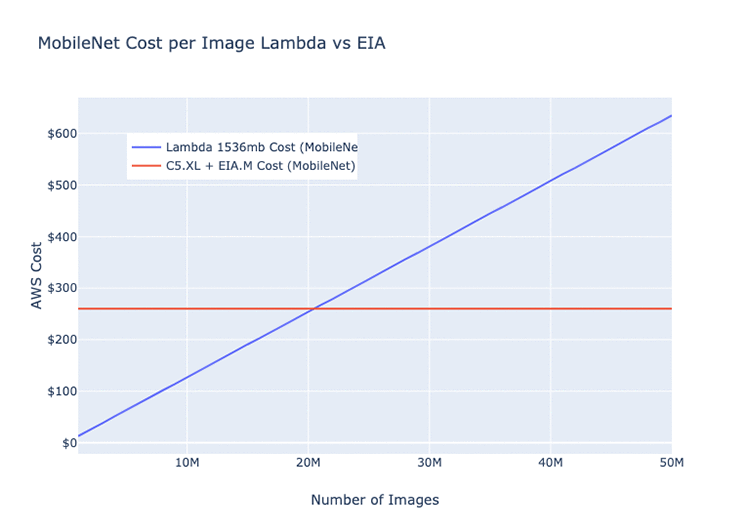
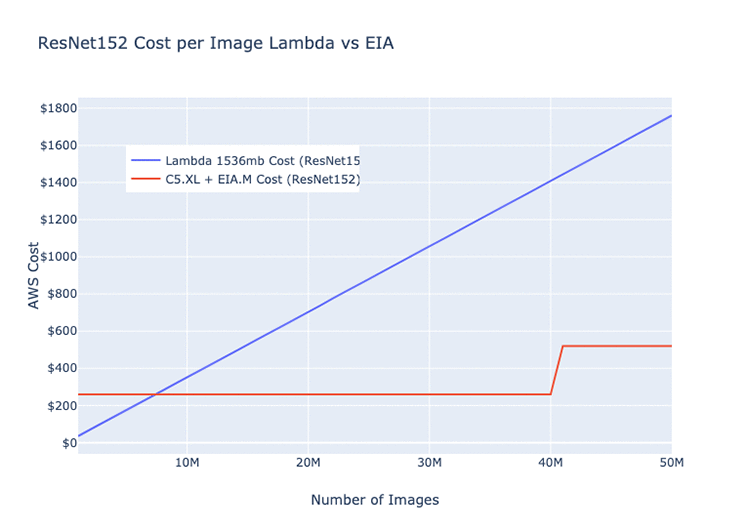
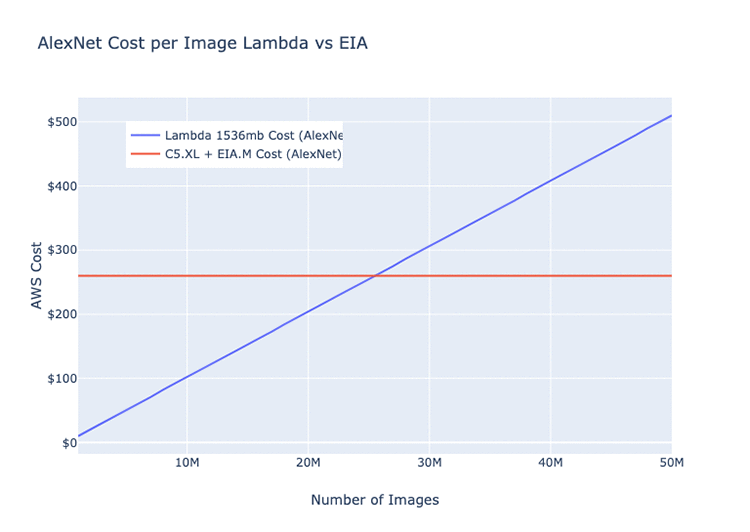
The following graphs display our nominal performance of images through a single Elastic Inference accelerator-hosted model per month. They include the average runtime and cost of the same model on Lambda (ResNet 152, AlexNet, and MobileNet architectures).

The graphs should give you a rough idea of the circumstances during which it’s more efficient to run on Lambda than the Elastic Inference accelerators, and vice versa. These values are all dependent on your network architecture.

Given the differences in model depth and the overall number of parameters, certain model architectures can run more efficiently on GPUs or Lambda than others. The following three examples are all basic image classification models. The monthly cost estimate for the EC2 instance is for a c5.xlarge + eia.medium = $220.82.

As an example, for the ResNet152 model, the crossover point is around 7,500,000 images per month, after which the C5 + EIA option becomes more cost-effective. We estimate that after you pass the bump at 40,000,000, you would require a second instance to meet demand and handle traffic spikes. If the load was perfectly distributed across the month, that rate would come out to about 15 images per second.  Assuming you are trying to run as cheaply as possible, one instance could easily handle this with plenty of headroom, but real-world service traffic is rarely uniform.

Realistically, for this type of load, our C5 + Elastic Inference accelerator clusters automatically scale anywhere from 2 to 6 instances. That’s dependent on the current load on our processing streams for any single model—the largest of which processes ~250,000,000 images per month.
Conclusion

To power all of our deep learning applications and services on AWS, Curalate uses a combination of AWS Lambda and Elastic Inference accelerators.

In our production environment, if the app or service is user-facing and requires low latency, we power it with an Elastic Inference accelerator-equipped EC2 instance. We have seen hosting cost savings of 35-65% compared to GPU instances, depending on the service using the accelerators.

If we’re looking to do offline data-pipeline processing, we first deploy our models to Lambda functions. It’s best to do so while traffic is below a certain threshold or while we’re trying something new. After that specific data pipeline reaches a certain level, we find that it’s more cost-effective to move the model back onto a cluster of Elastic Inference accelerator-equipped EC2 instances. These clusters smoothly and efficiently handle streams of hundreds of millions of deep learning model requests per month.


About the author

Jesse Brizzi is a Computer Vision Research Engineer at Curalate where he focuses on solving problems with machine learning and serving them at scale. In his spare time, he likes powerlifting, gaming, transportation memes, and eating at international McDonald’s. Follow his work at www.jessebrizzi.com.


Bi-Tempered Logistic Loss for Training Neural Nets with Noisy Data

The quality of models produced by machine learning (ML) algorithms directly depends on the quality of the training data, but real world datasets typically contain some amount of noise that introduces challenges for ML models. Noise in the dataset can take several forms from corrupted examples (e.g., lens flare in an image of a cat) to mislabelled examples from when the data was collected (e.g., an image of cat mislabelled as a flerken).

The ability of an ML model to deal with noisy training data depends in great part on the loss function used in the training process. For classification tasks, the standard loss function used for training is the logistic loss. However, this particular loss function falls short when handling noisy training examples due to two unfortunate properties:

  1. Outliers far away can dominate the overall loss: The logistic loss function is sensitive to outliers. This is because the loss function value grows without bound as the mislabelled examples (outliers) are far away from the decision boundary. Thus, a single bad example that is located far away from the decision boundary can penalize the training process to the extent that the final trained model learns to compensate for it by stretching the decision boundary and potentially sacrificing the remaining good examples. This “large-margin” noise issue is illustrated in the left panel of the figure below.
  2. Mislabeled examples nearby can stretch the decision boundary: The output of the neural network is a vector of activation values, which reflects the margin between the example and the decision boundary for each class. The softmax transfer function is used to convert the activation values into probabilities that an example will belong to each class. As the tail of this transfer function for the logistic loss decays exponentially fast, the training process will tend to stretch the boundary closer to a mislabeled example in order to compensate for its small margin. Consequently, the generalization performance of the network will immediately deteriorate, even with a low level of label noise (right panel below).
We visualize the decision surface of a 2-layered neural network as it is trained for binary classification. Blue and orange dots represent the examples from the two classes. The network is trained with logistic loss under two types of noisy conditions: (left) large-margin noise and (right) small-margin-noise.

We tackle these two problems in a recent paper by introducing a “bi-tempered” generalization of the logistic loss endowed with two tunable parameters that handle those situations well, which we call “temperatures”—t1, which characterizes boundedness, and t2 for tail-heaviness (i.e. the rate of decline in the tail of the transfer function). These properties are illustrated below. Setting both t1 and t2 to 1.0 recovers the logistic loss function. Setting t1 lower than 1.0 increases the boundedness and setting t2 greater than 1.0 makes for a heavier-tailed transfer function. We also introduce this interactive visualization which allows you to visualize the neural network training process with the bi-tempered logistic loss.

Left: Boundedness of the loss function. When t1 is between 0 and 1, exclusive, only a finite amount of loss is incurred for each example, even if they are mislabeled. Shown is t1 = 0.8. Right: Tail-heaviness of the transfer function. The heavy-tailed transfer function applies when t2 = > 1.0 and assigns higher probability for the same amount of activation, thus preventing the boundary from drawing closer to the noisy example. Shown is t2 = 2.0.

To demonstrate the effect of each temperature, we train a two-layer feed-forward neural network for a binary classification problem on a synthetic dataset that contains a circle of points from the first class, and a concentric ring of points from the second class. You can try this yourself on your browser with our interactive visualization. We use the standard logistic loss function, which can be recovered by setting both temperatures equal to 1.0, as well as our bi-tempered logistic loss for training the network. We then demonstrate the effects of each loss function for a clean dataset, a dataset with small-margin noise, large-margin noise, and a dataset with random noise.

Logistic vs. bi-tempered logistic loss: (a) noise-free labels, (b) small-margin label noise, (c) large-margin label noise, and (d) random label noise. The temperature values (t1, t2) for the tempered loss are shown above each figure. We find that for each situation, the decision boundary recovered by training with the bi-tempered logistic loss function is better than before.

Noise Free Case:
We show the results of training the model on the noise-free dataset in column (a), using the logistic loss (top) and the bi-tempered logistic loss (bottom). The white line shows the decision boundary for each model. The values of (t1, t2), the temperatures in the bi-tempered loss function, are shown below each column of the figure. Notice that for this choice of temperatures, the loss is bounded and the transfer function is tail-heavy. As can be seen, both losses produce good decision boundaries that successfully separates the two classes.

Small-Margin Noise:
To illustrate the effect of tail-heaviness of the probabilities, we artificially corrupt a random subset of the examples that are near the decision boundary, that is, we flip the labels of these points to the opposite class. The results of training the networks on data with small-margin noise using the logistic loss as well as the bi-tempered loss is shown in column (b).

As can be seen, the logistic loss, due to the lightness of the softmax tail, stretches the boundary closer to the noisy points to compensate for their low probabilities. On the other hand, the bi-tempered loss using only the tail-heavy probability transfer function by adjusting t2 can successfully avoid the noisy examples. This can be explained by the heavier tail of the tempered exponential function, which assigns reasonably high probability values (and thus, keeps the loss value small) while maintaining the decision boundary away from the noisy examples.

Large-Margin Noise:
Next, we evaluate the performance of the two loss functions for handling large-margin noisy examples. In (c), we randomly corrupt a subset of the examples that are located far away from the decision boundary, the outer side of the ring as well as points near the center).

For this case, we only use the boundedness property of the bi-tempered loss, while keeping the softmax probabilities the same as the logistic loss. The unboundedness of the logistic loss causes the decision boundary to expand towards the noisy points to reduce their loss values. On the other hand, the bounded bi-tempered loss, bounded by adjusting t1, incurs a finite amount of loss for each noisy example. As a result, the bi-tempered loss can avoid these noisy examples and maintain a good decision boundary.

Random Noise:
Finally, we investigate the effect of random noise in the training data on the two loss functions. Note that random noise comprises both small-margin and large-margin noisy examples. Thus, we use both boundedness and tail-heaviness properties of the bi-tempered loss function by setting the temperatures to (t1, t2) = (0.2, 4.0).

As can be seen from the results in the last column, (d), the logistic loss is highly affected by the noisy examples and clearly fails to converge to a good decision boundary. On the other hand, the bi-tempered can recover a decision boundary that is almost identical to the noise-free case.

Conclusion
In this work we constructed a bounded, tempered loss function that can handle large-margin outliers and introduced heavy-tailedness in our new tempered softmax function, which can handle small-margin mislabeled examples. Using our bi-tempered logistic loss, we achieve excellent empirical performance on training neural networks on a number of large standard datasets (please see our paper for full details). Note that the state-of-the-art neural networks have been optimized along with a large variety of variables such as: architecture, transfer function, choice of optimizer, and label smoothing to name just a few. Our method introduces two additional tunable variables, namely (t1, t2). We believe that with a systematic “joint optimization” of all commonly tried variables, significant further improvements can be achieved in conjunction with our loss function. This is of course a more long-term goal. We also plan to explore the idea of annealing the temperature parameters over the training process.

Acknowledgements:
This blogpost reflects work with our co-authors Manfred Warmuth, Visiting Researcher and Tomer Koren, Senior Research Scientist, Google Research. Preprint of our paper is available here, which contains theoretical analysis of the loss function and empirical results on standard datasets at scale.

AI, Shoulders, Knees and Toes: Startup Builds Deep Learning Tools for Orthopedic Surgeons

Traditional open surgeries require large incisions that provide doctors a broad view of the area they’re operating on. But surgeons are increasingly opting for minimally invasive techniques that rely instead on live video feeds from tiny cameras, which provide a more limited view past much smaller incisions.

The benefits for patients are clear: less blood loss, less pain and faster recovery times.

However, minimally invasive procedures are more technically demanding for surgeons since they must operate with a narrow field of view and use small instruments that require fine manipulation skills.

To give surgeons an assist, Kaliber Labs, a San Francisco-based startup, is developing AI models to interpret these video feeds in real time.

The company’s deep learning models recognize and measure aspects of a patient’s anatomy and pathology, as well as display key information and treatment recommendations on operating room video monitors.

“A surgery consists of a series of steps,” said Ray Rahman, founder and CEO of Kaliber Labs, a member of the NVIDIA Inception virtual accelerator program. “We’re going through the entire process to provide surgeons AI guidance that decreases their cognitive load, improves accuracy and reduces uncertainty.”

The startup is also developing a deep learning model that annotates surgical video after procedures to provide better communication and transparency with patients.

Its AI models — developed using the Keras, PyTorch and TensorFlow deep learning frameworks — are trained and tested on NVIDIA RTX GPUs featuring Tensor Cores, shrinking training times by more than 5x.

To develop tools that process real-time video input in the operating room, Kaliber Labs uses the JetPack SDK and NVIDIA Jetson TX2 AI computing device for inference at the edge. The team plans for its deployed product to run on the NVIDIA Jetson AGX Xavier, enabling the low latency required for real-time processing.

Keeping an AI on Operating Rooms

orthopedic surgery in progress
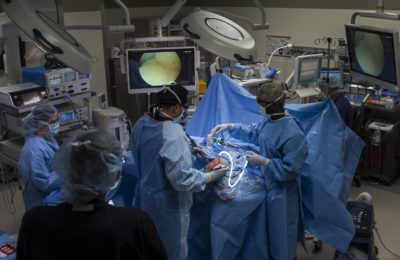
During a minimally invasive orthopedic procedure, surgeons rely on video monitors to view the area they’re operating on. (U.S. Air Force photo/Airman 1st Class Kevin Tanenbaum)

Kaliber Labs’ current suite of AI tools are focused on orthopedic surgery — covering shoulder, knee, hip and wrist procedures. Arthroscopy, or minimally invasive joint surgery, is the most common orthopedic operation, used to treat many disorders and sports injuries.

At the start of a procedure, the Kaliber Labs’ deep learning tools use the video feed to identify what kind of surgery is taking place and which camera view is being used. Then, AI models specific to the relevant procedure type come into play for real-time guidance.

Surgeons begin with an initial assessment of the patient’s anatomy and pathology before picking a course of action for the operation. The startup’s models aid in this process, combining with computer vision algorithms to recognize and measure, for example, a 20 percent bone defect of the shoulder socket, or glenoid cavity, during the procedure.

Such real-time quantitative analyses provide orthopedic surgeons with greater objectivity and an extra layer of insight as they make intraoperative decisions.

So far, Kaliber Labs has finished developing its shoulder surgery algorithms and is working on its models for knee and hip procedures. Its deep learning tools are trained on thousands of hours of actual surgery videos, which are first processed by an AI algorithm that scrubs the footage to delete any personally identifiable information about patients and surgeons.

The startup recently signed an agreement with a major medical device company to build a Jetson Xavier-powered AI edge machine that integrates with operating room equipment to provide intraoperative guidance. To work in real time during a surgical procedure, Rahman says a GPU at the edge is essential.

“We run a cascade of models for detecting anatomy and pathology, and various measurement algorithms,” he said. “Since we’re doing real-time video inference, our inference has to occur in less than 30 milliseconds in order to avoid perceived lag by the surgeons.”

The NVIDIA Jetson platform enables edge computing with a combination of high GPU compute performance and low power usage. Kaliber Labs chose the Jetson Xavier embedded module due to its small footprint and wide range of options for systems integration, Rahman said.

Running on Jetson Xavier, the startup’s CNN binary classification model — optimized for inference using NVIDIA TensorRT software — has a latency rate of just 1.5 milliseconds.

For the Record: Analyzing Surgical Video Post-Op 

After an operation, patients typically receive a short debrief from their surgeon, who shares key snapshots from the surgery. These photos or video segments have limited value to patients because, to the untrained eye, it’s hard to get a sense of what’s taking place in the procedure without context and labels of the anatomy.

“Patients and their families want to know what the surgeons did, what they saw during the procedure,” Rahman said, “but nobody has time to manually annotate a whole video. That would take hours and days, and it’d be prohibitively expensive.”

Kaliber Labs is developing a set of AI models that analyzes and labels the surgical video with descriptions of each step in the procedure. Providing patients with annotated footage of a surgery could be useful to those curious about their operation, and improve transparency about what took place during the surgery.

This kind of operative record could also facilitate accurate medical coding and efficient billing.

Main image shows an orthopedic surgeon performing ACL surgery. (U.S. Air Force photo/Airman 1st Class Kevin Tanenbaum)

The post AI, Shoulders, Knees and Toes: Startup Builds Deep Learning Tools for Orthopedic Surgeons appeared first on The Official NVIDIA Blog.

How AI Is Helping Protect Taiwan’s Endangered Leopard Cats

There’s no mistaking why the leopard cat of Taiwan got its name. While only about the size of domestic felines, it sports a beautiful, flower-spotted pattern on its fur.

There’s also no debate about why the leopard cat, the only remaining native wild cat species in Taiwan, is on the edge of extinction.

Fewer than 500 of the leopard cats live in a natural habitat that overlaps with many development projects in the central regions of the island. In an otherwise rural area, the cats are often victims of roadkill due to increased traffic.

To preserve leopard cat populations, the Taiwanese government, animal protection organizations, researchers and AI experts have been working together to save the species.

DT42, a Taiwan-based deep learning startup, and a research team led by Ya-Yu Chiang, assistant professor of mechanical engineering at National Chung Hsing University (NCHU), are collaborating on an AI project initiated by Taiwan’s Directorate General of Highways to detect leopard cats when they near roads and keep them out of harm’s way, reducing roadkills.

Spotting Roadside Leopard Cats

One of the primary challenges of conserving the leopard cat in Taiwan stems from a lack of resources and network infrastructure in the field. Building the network required for cloud-based AI detection isn’t feasible in the animal’s rural habitat.

Traffic signs meant to warn drivers to be cautious of wildlife are in place, but haven’t reduced the number of wildlife collisions. Edge AI systems could provide a more effective way to warn drivers of nearby leopard cats.

DT42, a member of the NVIDIA Inception program, developed a user-friendly, GPU-powered cloud platform through Amazon Web Services to help NCHU researchers train an AI model that identifies leopard cats. Deployed on NVIDIA Jetson TX2 edge devices, the image recognition model can detect leopard cats at wildlife hotspots.

When one of the devices spots a feline getting too close to the road, it sets off a mechanical warning. The alert system plays sounds designed to keep the animals away from passing cars. Additionally, flashing lights on the road also attract the attention of the animals to prevent them from getting on the road.

“After considering all the factors — size, heat dissipation, price, device stability and flexibility — the Jetson TX2 was the best hardware choice on which to deploy our AI model,” said Tammy Yang, DT42’s founder and CEO. “For training, the GPU resources in the AWS cloud platform are easy to use, allowing anyone to upload leopard cat images to help train and refine the neural networks and improve recognition accuracy.”

The company optimized its algorithms for inference at the edge using the NVIDIA Jetson TX2, shrinking the time to detect fast-moving leopard cats to less than half a second. A short response time is critical to spot the animals and sound the alarm before one runs into the road.

Continuing the Conservation Conversation

The average leopard cat roadkill rate from 2015 to 2018 was about one feline killed a month. In the three months since the AI system was deployed in a test area in central Taiwan, there’s been just one leopard cat-related collision — and the animal survived. Earlier this month, the system marked its first recorded instance of deterring a crossing.

Based on these initial results, NCHU researchers and the Taiwanese government hope to roll out additional AI-powered developments.

“Following the success of the leopard cat project, we are going to broaden the monitoring field, and are in discussions with the government to initiate new projects to continuously support leopard cat preservation,” said Chiang.

The researchers also plan to expand the project to other wildlife, including the endangered Chinese ferret-badger and masked palm civet.

“We are devoted to using deep learning to make contributions to the world,” Yang said. “We’re looking forward to seeing more people and organizations joining meaningful conservation projects like this.”

The leopard cat protection project was recently featured in a broadcast by the Taiwan Public Television Service, attracting the government’s attention and sparking discussions about the need for leopard cat conservation laws.

The post How AI Is Helping Protect Taiwan’s Endangered Leopard Cats appeared first on The Official NVIDIA Blog.

Making daily dinner easy with Deliveroo meals and Amazon Rekognition

When Software Engineer Florian Thomas describes Deliveroo, he is talking about a rapidly growing, highly in-demand company. Everyone must eat, after all, and Deliveroo is, in his words, “on a mission to transform the way you order food.”  Specifically, Deliveroo’s business is partnering with restaurants to bring customers their favorite eats, right to their doorsteps.

Deliveroo started in 2013 when Will Shu, the company’s founder and CEO, moved to London. He discovered a city full of great restaurants, but to his dismay, few of them delivered food. He made it his personal mission to bring the best local restaurants directly to people’s doors. Now, Deliveroo’s team is 2,000 strong and operates across not only the UK but also in 14 other global markets, including Australia, the United Arab Emirates, Hong Kong, and most of Europe.

As they’ve grown, Deliveroo has always kept customers at the center. Delivering their chosen meals in a convenient and timely way is not all that Deliveroo has to offer, though. They’re equally timely, responsive, and creative if something has gone awry with a customer’s order (such as a spilled item). Their service portal allows customers to share an image-based report of the issue.

“We’ve learned that, when things go wrong, customers don’t just want to tell us, they want to show us,” remarked Thomas. In addition to enabling the customer care team to provide a solution for each customer, these images are shared with Deliveroo’s restaurant partners to help them continue to improve customers’ experiences.

What Thomas and his team soon realized, though, was that not all of the images that customers uploaded were appropriate. To protect the customer care team from having to sift through any inappropriate images, Deliveroo uses Amazon Rekognition. This easy-to-use content moderation solution has become integral to Deliveroo’s customer care flow, as hundreds of photos per week (about 1.7% of all images submitted) are rejected.

“With Amazon Rekognition, we’re able to quickly and accurately process all those photos in real time, which helps us serve our customers promptly when real issues have arisen. That also lets us free our agents’ time so they can focus on the customer problems that matter,” Thomas explained. “Amazon Rekognition allows our agents to safely respond to important customer issues in a timely manner and ensures that legitimate customer claims are handled automatically.”

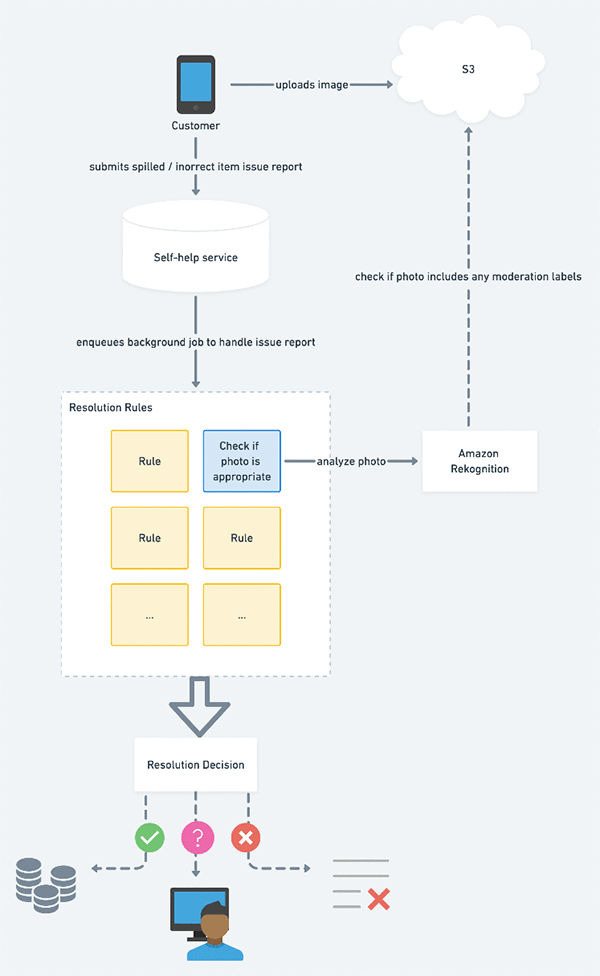
The choice to use Amazon Rekognition was a natural one for Deliveroo, as the company has been using AWS for a long time. The team originally selected AWS because of their trust in the service. Now, they use Amazon Simple Storage Service (Amazon S3) to store the photos that go into the customer service queue, which streamlines their flow into analysis with Amazon Rekognition. This flow is pictured in the diagram. In addition, the Deliveroo customer care team is using Amazon DynamoDB and AWS Lambda to achieve resolutions faster, as well as Amazon Aurora to manage customer issues.

Going forward, Deliveroo’s customer care team plans to use additional AWS machine learning services, such as Amazon Comprehend, to personalize the post-order care experience for each Deliveroo customer. “We’re hungry for what’s next,” Thomas said laughingly.


About the Author

Marisa Messina is on the AWS ML marketing team, where her job includes identifying the most innovative AWS-using customers and showcasing their inspiring stories. Prior to AWS, she worked on consumer-facing hardware and then university-facing cloud offerings at Microsoft. Outside of work, she enjoys exploring the Pacific Northwest hiking trails, cooking without recipes, and dancing in the rain.