Blog

Learn About Our Meetup

5000+ Members

MEETUPS

LEARN, CONNECT, SHARE

Join our meetup, learn, connect, share, and get to know your Toronto AI community. 

JOB POSTINGS

INDEED POSTINGS

Browse through the latest deep learning, ai, machine learning postings from Indeed for the GTA.

CONTACT

CONNECT WITH US

Are you looking to sponsor space, be a speaker, or volunteer, feel free to give us a shout.

Category: Global

Israel’s Holocaust Museum Embracing AI to Help Visitors Draw Insights from its Vast Archives

Yad Vashem, the world’s preeminent Holocaust memorial center, is dedicated to keeping alive for future generations the memory of the 6 million Jews who perished at the hands of the German Nazis and their collaborators.

But its World Holocaust Remembrance Center — a source for documentation used by scholars worldwide — is overwhelmed with difficult-to-find digital media documenting the lives of victims and survivors.

The Jerusalem-based organization is turning to AI to help identify, organize and link photos and other historical documents amid its ocean of data, for easier discovery. That’s because the documentation, gathered over decades of submissions and discoveries, and now almost fully digitized, is a source for Holocaust scholars globally.

A destination for a million visitors each year — six U.S. presidents have visited the site — Yad Vashem has archives that include unique, searing video testimonies, short films, photos, personal written accounts, Nazi documentation, and audio files. In addition to remembering Hitler’s victims, it pays tribute to the non-Jews who put their lives at risk trying to save them.

People worldwide last week recognized Holocaust Remembrance Day.

Twice the Data of Library of Congress

Its 800 million digital assets — which comprise over 4 petabytes of data (more than twice that held by the U.S. Library of Congress) — make it a daunting challenge for the institution to keep up with indexing this history for researchers, let alone reach a younger generation.

Using deep neural networks, Yad Vashem’s team can let image-recognition algorithms help index and categorize its digital history. This could lead to finding new connections and stories on Holocaust victims, according to Michael Lieber, chief information officer at Yad Vashem.

Lieber is optimistic that AI will help better identify resources to tell stories of Holocaust victims and survivors on its social media accounts. That could help keep it in touch with younger audiences, he said.

He’s also hopeful that researchers may use deep learning in ways to surface new historical information that couldn’t otherwise be discovered.

“We are among the first institutions in the world dealing with cultural heritage that decided to have a digital copy of everything because that is the way to get to a much wider audience globally,” said Lieber.

Improving Search for Family History

Many individuals visit Yad Vashem to research what happened to grandparents and great grandparents and piece together their family history. The problem is that the collection of digitized data, which could double in years to come, is difficult to search.

Yad Vashem’s technology team aims to change that by tapping into deep learning driven by high performance computing.

It plans to harness the supercomputing power of the NVIDIA DGX-1 AI system to help organize and augment its history using deep learning. DGX-1 offers the power of hundreds of CPU-based servers in a single system capable of over a petaFLOP of AI computing power.

The DGX-1 puts Yad Vashem alongside the world’s most innovative organizations deploying AI to address their challenges, said Yuval Mazor, senior solutions architect at NVIDIA.

“They get tangible benefits from the application of AI,” he said. “For example, Yad Vashem can use video analytics for understanding and predicting museum traffic and the impact of individual exhibits, as well as for extracting deep insights from the wealth of historical data,” he said. “These can help Yad Vashem in its primary mission, which is to reach and educate as many people as possible.”

Unsupervised learning holds the promise for trained neural networks to create meta-tags for digital artifacts, allowing deep learning to connect the dots on all kinds of information, Lieber said.

“If you manage to locate a prison card in the Mauthausen camp, the system will know that it is an inmate card,” he said. “It will direct you to the relevant data fields and documents, and you will be able to locate and identify types of documents and provide additional information without human intervention.”

The alternative would be to have legions of people label hundreds of millions of digital media assets and continue to keep track and make updates on databases.

NVIDIA research and development staff in Israel is partnering with Yad Vashem on the effort.

The post Israel’s Holocaust Museum Embracing AI to Help Visitors Draw Insights from its Vast Archives appeared first on The Official NVIDIA Blog.

More ways to compete and win in the AWS DeepRacer League and two new champions!

It’s been a busy week for the AWS DeepRacer League. The world’s first global autonomous racing league allows machine learning developers of all skill levels to get hands-on with machine learning in a fun and exciting way.

On April 29 2019, the virtual circuit of the AWS DeepRacer League opened. The virtual circuit allows racers to compete from anywhere in the world by using the AWS DeepRacer console. Developers can put their skills to the test by competing in the Virtual Circuit World Tour, on virtual tracks inspired by famous raceways that will be revealed each month. They will race for prizes and glory, and a chance to win an expenses-paid trip to the AWS DeepRacer Championship Cup at re:Invent 2019. The first racetrack on the virtual world tour is inspired by the famous raceway in Silverstone, UK, named the London Loop. It’s open for racing until May 31, with developers from all parts of the globe already posting great lap times. Get racing today for a chance to win the AWS DeepRacer League Virtual Circuit!

Winners at the Sydney summit

In addition to the virtual circuit, race seven on the AWS Summit calendar took place in Sydney, Australia. The AWS Summit in Sydney was a two-day extravaganza, bringing together the cloud community down under, to learn and get hands-on with AWS services. The AWS DeepRacer League had three tracks for racers to compete on for more than 48 hours. It didn’t disappoint as hundreds of racers took to the tracks to compete for the champion’s spot on the podium.

Matt Kerrison (Matt@GJI) took first place, traveling to Sydney with three other teammates to learn how GJI Group, a Brisbane-based design and communications company, can continue to innovate with the help of AWS. They had no idea that they would walk away with the AWS DeepRacer trophy and two of the three of them in the top 10.

The Sydney winner, Matt Kerrison, started in the virtual league quickly after it launched on April 29th, and attended the AWS DeepRacer workshop on day two of the AWS Summit. He continued to tune his model overnight, which scored him a winning lap time of 8.29 seconds, just 1 hour and 45 minutes before racing finished.

Sydney Summit Champion Matt Kerrison

Matt is now on his way to AWS re:Invent 2019 in Las Vegas, Nevada, to compete for the championship cup. In preparation, he and his colleagues plan to host hackathons to continue experimenting with, and building knowledge of AI and machine learning, as well as participate in the virtual league.

Same week, different city

On to Atlanta, Georgia, which rounded out the week. More developers raced live on the track and attended workshops to learn about machine learning.

Our top three racers in Atlanta had sub 10-second lap times. Amelia Hough-Ross, a deputy chief technology officer, is the first female to stand on the podium and one of the most determined. Amelia had scored a third-place position during the morning hours of racing. However, she was moved down to tenth during the day. She went away and trained her model for several hours, and with only a couple of hours of racing left, she came from behind to clinch the third place finish. She’s excited to try out the virtual league, where she can also compete to win her place in the finals at re:Invent 2019. She also wants to see what improvements she can make to her model for the upcoming US summits in June and July. Amelia can score even more points for a chance to advance.

The Atlanta summit podium: Kevin Byuen (8.71 seconds) Steven Lucovsky (9.01 seconds) Amelia Hough-Ross (9.78 seconds)

Our Atlanta winner was Kevin Byuen, the only developer in Atlanta to beat the 9-second barrier. For his winning time of 8.71 seconds, he took to the track four times. Kevin prepared for the event for more than a week and learned from the AWS DeepRacer community in order to build the winning reinforcement learning model.

The AWS DeepRacer League is in full swing. In case you missed it, the AWS DeepRacer League now has a 21st stop on the schedule before re:Invent, at the inaugural re:MARS event. This event pairs the best of what’s possible today with perspectives on the future of machine learning, automation, robotics, and space travel. Developers of all skill levels can start competing today and in as many races as they like. Accumulate points throughout the season to earn more chances to win and advance to the AWS DeepRacer Championship at re:Invent 2019.


About the Author

Alexandra Bush is a Senior Product Marketing Manager for AWS AI. She is passionate about how technology impacts the world around us and enjoys being able to help make it accessible to all. Out of the office she loves to run, travel and stay active in the outdoors with family and friends.


Build a custom data labeling workflow with Amazon SageMaker Ground Truth

Good machine learning models are built with large volumes of high-quality training data. But creating this kind of training data is expensive, complicated, and time-consuming. To help a model learn how to make the right decisions, you typically need a human to manually label the training data.

Amazon SageMaker Ground Truth provides labeling workflows for humans to work on image and text classification, object detection, and semantic segmentation labeling jobs. You can also build custom workflows to define the user interface (UI) for data labeling jobs. To help you get started, Amazon SageMaker provides custom templates for image, text, and audio data labeling jobs. These templates use the Amazon SageMaker Ground Truth crowd HTML elements, which simplify building data labeling UIs. You can also specify your own HTML for the UI.

You might want to build a custom workflow for the following reasons:

  • You have custom data labeling requirements.
  • Your input data is complex, with multiple elements (for example, images, text, or custom metadata) per task.
  • You want to prevent sending certain items to labelers when you create tasks.
  • You require custom logic to consolidate labeling output and improve accuracy.

Science conferences, like those sponsored by IEEE, receive thousands of abstracts that are manually reviewed. A typical abstract for a science paper includes the following information: Background, objectives, methods, results, limitations, and conclusions. Reviewing these sections or entities for thousands of abstracts can be burdensome.

What if there were a natural language processing (NLP) model that could help reviewers by automatically tagging all of the required entities? What if text labeling tools could extract entities from published abstracts?

Amazon Comprehend is Natural language processing (NLP) service that uses machine learning to find insights and relationships in text. But in this post, I walk you through building a custom text labeling workflow that extracts named entities from science paper abstracts to build a training dataset for a named entity recognition (NER) model. It will demonstrate how to easily bring your own existing Web templates to Amazon SageMaker Ground Truth.

Solution overview

To build a custom workflow, I used input images from the first page of 10 science papers courtesy of arxiv.org.

To extract text from the papers, I used the Amazon Textract SDK. I used another script to generate an augmented manifest, which I fed into Amazon SageMaker Ground Truth later. The scripts are located in this GitHub repository. You can use this augmented manifest to create the labeling job.

To build the custom UI, use the React framework and the WebStorm integrated development environment (IDE). You can use any framework and IDE.

Everything you need is available in a template.

How the custom web template works

This solution uses server-side AWS Lambda functions for pre-labeling and post-labeling processing. The following diagram shows the high-level workflow. Explanations follow.

  1. Build custom web template.
  2. Deploy pre-labeling task Lambda function to your AWS account.
  3. Deploy post-labeling consolidation task Lambda function to your AWS account.
  4. Create input manifest and upload to your Amazon S3 bucket.
  5. Create workforce team and add members to the team.
  6. Launch SageMaker Ground Truth labeling job with custom template from the Ground Truth console.
  7. After labeling job finishes, consolidated labels are persisted in Amazon S3 output location.

The custom template

To build the labeling UI that displays a .jpg image, text for annotation, a free-form text field for additional notes, and a yes/no element to classify the quality of the abstract, you create a single-page Web app using React. The static JavaScript and CSS files are hosted on Amazon S3 at s3://smgtannotation/web/static. If you are curious about how I built the web app, refer to the GitHub repository for instructions.

With this app, a worker performing labeling can annotate the abstracts by labeling selected text. The worker can choose the type of entity (Background, Objectives, Methods, Results, Conclusions, and Limitations) from a dropdown list, as shown in the following screenshot. The worker can also add notes and label the quality of the abstract.

You can use the template provided at this GitHub location while launching a Ground Truth job. I’ll walk through the custom HTML template that I built. If you choose to build your own template from the source, replace the generated JavaScript and CSS URLs as appropriate.

First, I added the crowd-htm-element.js script at the top of the template so you can use the crowd HTML elements.

<script src="https://assets.crowd.aws/crowd-html-elements.js"></script>

Then I added static CSS content.

<link rel="stylesheet" href="https://s3.amazonaws.com/smgtannotation/web/static/css/1.3fc3007b.chunk.css">
<link rel="stylesheet" href="https://s3.amazonaws.com/smgtannotation/web/static/css/main.9504782e.chunk.css">

I used the Liquid templating language to inject the text to annotate, the URL of the image document, and the associated metadata to the user interface.

In the following snippet, you can see a variable “task.input.taskObject” from the pre-labeling task AWS Lambda function between double curly brackets. The grant_read_access variable is an additional filter that takes an S3 URI and encodes it into a signed S3 HTTPs URL. For more information, see the Ground Truth documentation in the Amazon SageMaker Developer Guide.

<div id='document-text' style="display: none;">
  {{ task.input.text }}
</div>
<div id='document-image' style="display: none;">
  {{ task.input.taskObject | grant_read_access }}
</div>
<div id="metadata" style="display: none;">
  {{ task.input.metadata }}
</div>

I used the <crowd-form /> element, which submits the annotations to Amazon SageMaker Ground Truth. I also included an invisible <crowd-button /> element within the form, so that <crowd-form /> does not include one on its own buttons. This gives you flexibility to add a button at the end of form. Of course, if the app didn’t contain its own Submit button, I could just use the default <crowd-button /> provided by <crowd-form />.

<crowd-form>
    <input name="annotations" id="annotations" type="hidden">

     <!-- Prevent crowd-form from creating its own button -->
    <crowd-button form-action="submit" style="display: none;"></crowd-button>
</crowd-form>

<!-- Custom annotation user interface is rendered here -->
<div id="root"></div>

I used a JavaScript app to build the UI, instead of using a crowd HTML element. This is why I included a small script to integrate the app with <crowd-form />. Essentially, I make a Submit button submit the <crowd-form />, and inject whatever data I want to submit into the form.

<crowd-button id="submitButton">Submit</crowd-button>

<script>
    document.querySelector('crowd-form').onsubmit = function() {
        document.getElementById('annotations').value = JSON.stringify(JSON.parse(document.querySelector('pre').innerText));
    };

    document.getElementById('submitButton').onclick = function() {
        document.querySelector('crowd-form').submit();
    };
</script>

I added the JavaScript scripts for the React app at the end of the template.

<script src="https://s3.amazonaws.com/smgtannotation/web/static/js/1.3e5a6849.chunk.js"></script>
<script src="https://s3.amazonaws.com/smgtannotation/web/static/js/main.96e12312.chunk.js"></script>
<script src="https://s3.amazonaws.com/smgtannotation/web/static/js/runtime~main.229c360f.js"></script>

The input augmented manifest

The input data for the labeling job is a set of data objects that you send to your workforce for labeling. Each object in the input data is described in a manifest file. Each line in the manifest file is a valid JSON Lines object to be labeled and any other custom metadata. Each line is delimited by a standard line break.

The input data and manifest are stored in an S3 bucket. Each JSON line in the manifest has:

  • A source-ref JSON object that contains the S3 object URI for the image.
  • The text-file-s3-uri JSON object containing the S3 object URI for the text.
  • A metadata JSON object containing additional metadata.

For more information, see Input Data in the Amazon SageMaker Developer Guide.

{'source-ref': 's3://smgtannotation/raw-abstracts-jpgs/1801_00006.jpg', 'text-file-s3-uri': 's3://smgtannotation/text/1801_00006.jpg.csv', 'metadata': {'Author': 'Alejandro Rosalez', 'ISBN': '1-358-98355-0'}}
{'source-ref': 's3://smgtannotation/raw-abstracts-jpgs/1801_00015.jpg', 'text-file-s3-uri': 's3://smgtannotation/text/1801_00015.jpg.csv', 'metadata': {'Author': Mary Major', 'ISBN': '1-242-55362-2'}}

The pre-labeling task Lambda function

The custom labeling workflow provides a hook for the pre-labeling task Lambda function. Before a labeling task is sent to the worker, this Lambda function is invoked with a JSON-formatted request containing a manifest entry in the dataObject object.

The following is an example of a request that is sent to AWS Lambda:

{
 "version": "2018-10-06",
 "labelingJobArn": <labeling job ARN>,
 "dataObject": {
   "source-ref": "s3://smgtannotation/raw-abstracts-jpgs/1801_00015.jpg",
	"text-file-s3-uri": "s3://smgtannotation/text/1801_00015.jpg.csv",
	"metadata": {
	"Author": "Mary Major",
	"ISBN": "1-242-55362-2"
	}
  }
}

The pre-labeling Lambda function parses the JSON request to retrieve the dataObject key, retrieves the raw text from the S3 URI for the text-file-s3-uri object, and transforms it into the taskInput JSON format required by Amazon SageMaker Ground Truth as the response.

{
 'taskInput': {
   'taskObject': 's3://smgtannotation/raw-abstracts-jpgs/1801_00015.jpg',
   'metadata': {
	'Author': 'Mary Major',
	'ISBN': '1-242-55362-2',
	'text_file_s3_uri': 's3://smgtannotation/text/1801_00015.jpg.csv'
   },
   'text': <Raw Text>	},
   'isHumanAnnotationRequired': 'true'
} 

The post-labeling task Lambda function

When all workers complete the labeling task, Amazon SageMaker Ground Truth invokes the post-labeling Lambda function with a pointer to the dataset object and the workers’ annotations. This Lambda function is generally used for annotation consolidation. The request object looks similar to the following:

{
"version": "2018-10-06",
"labelingJobArn": "<labeling job ARN>",
"payload": {
"s3Uri": "‘<s3uri of annotation consolidation request>"
},
"labelAttributeName": "<labeling job name>",
"roleArn": "<Amazon SageMaker Ground Truth Role ARN>",
"outputConfig": "<output s3 prefix uri>"
}

The annotations are stored in a file designated by the s3uri in the payload object. The Lambda function retrieves the S3 object file to read the annotations. Each input annotation looks similar to the following:

[{'datasetObjectId': '0', 
  'dataObject': {'content': <input manifest task content>}, 
  'annotations': [{
	'workerId': <worker Id>, 
	'annotationData': {'content': <named entity annotations>}
	}]
}]

All of the fields from the custom UI form are contained in the content object.

The Lambda function then starts data consolidation to create a consolidated annotation manifest in the S3 bucket that was specified for output when the labeling job was configured. The following example includes the consolidated response in the content object:

{
  "source-ref": "s3://smgtannotation/raw-abstracts-jpgs/1801_00006.jpg",
  "text-file-s3-uri": "s3://smgtannotation/text/1801_00006.jpg.csv",
  "metadata": {
			"Author": "Alejandro Rosalez",
			"ISBN": "1-358-98355-0"
		  },
  "<labeling jobname": {
"annotationsFromAllWorkers": [{
	"workerId": "<internal worker id>",
	"annotationData": {
"content": "{"annotations":"{\"value\":[{\"start\":296,\"end..."}"
		}]
	},
  "custom-ner-job-23-metadata": {
	"type": "groundtruth/custom",
	"job-name": "<labeling jobname>",
	"human-annotated": "yes",
	"creation-date": "2019-04-18T20:24:18+0000"
		}
}
{… }

Deploy the pre-labeling and post-labeling task Lambda functions

Sign in to the AWS console and launch the AWS CloudFormation stack in the US East (N. Virginia) us-east-1 Region. This deploys the pre-labeling and post-labeling task Lambda functions.

It should take less than a couple of minutes to deploy the Lambda functions and create the required AWS Identity and Access Management (IAM) role.

Open the AWS CloudFormation console, and in the Outputs section, note the Amazon Resource Name (ARN) of the IAM role. You need it later.

Open the AWS Lambda console and navigate to the Functions page to see the Lambda functions.

Launch an Amazon SageMaker Ground Truth labeling job  

A workforce is a group of workers that you choose to label your dataset. With Amazon SageMaker Ground Truth, you can choose to use a public Amazon Mechanical Turk workforce, a vendor-managed workforce, or your own private workforce. For this labeling job, you use a private workforce.

Prerequisites

Before you create the labeling job, complete the following steps.

  1. Upload augmented manifest file to your S3 bucket in N. Virginia region
  2. A labeling job requires an IAM role that has the SageMakerFullAccess policy attached to it. If you don’t already have such a role, create one by following the steps in Launching the labeling job.
  3. Attach a trust policy to the IAM role. This policy gives the post-labeling Lambda function access to resources stored in Amazon S3.
    1. In a new browser tab, open the IAM console. In the navigation pane, choose Roles, and search for the IAM role that you created in Step 2 (the role name typically starts with AmazonSageMaker-ExecutionRole-). For Role name, choose the name.
    2. On the Summary page, choose Trust relationships, then choose Edit trust relationship to edit the trust policy.
    3. Replace the trust policy with the following policy. Replace <Lambda IAM Role ARN> with the role ARN that you copied from the AWS CloudFormation template output.
      {
        "Version": "2012-10-17",
        "Statement": [
          {
            "Effect": "Allow",
            "Principal": {
              "Service": "sagemaker.amazonaws.com"
            },
            "Action": "sts:AssumeRole"
          },
          {
            "Effect": "Allow",
            "Principal": {
              "AWS": "<Lambda IAM Role ARN>",
              "Service": "lambda.amazonaws.com"
            },
            "Action": "sts:AssumeRole"
          }
        ]
      }
      

    4. Click “Add inline policy” link to add AWS Lambda invocation policy to the role.
    5. In “Create Policy” page, on JSON tab, add following json policy and click “Review Policy”

      {
          "Version": "2012-10-17",
          "Statement": [
              {
                  "Sid": "VisualEditor0",
                  "Effect": "Allow",
                  "Action": "lambda:InvokeFunction",
                  "Resource": "*"
              }
          ]
      }

    6. On “Review Policy” page, enter Name as “LambdaInvocationPolicy” and click “Create Policy”

Launching the labeling job

  1. Open the Amazon SageMaker console and ensure N. Virginia Region is selected. In the Labeling jobs menu, choose Create labeling job to launch new labeling job.
  2. Enter the “Job name”, provide the input manifest S3 location (you have already uploaded the manifest to your S3 bucket during pre-requisite step 1), and provide output dataset s3 prefix location.Ensure that the input manifest and output dataset locations in Amazon S3 are in the same Region as the job that you are launching.Select the existing IAM Role with “SageMakerFullAccess” IAM policy attached or create a new Role if you don’t have one.
  3. If you have already added the Lambda trust policy to the IAM role for this post, skip this step. If not, open a browser in a new tab and perform the Step 3 in Prerequisites to attach a trust policy to the IAM role.
  4. For Task type, choose Custom, and choose Next.
  5. For Worker type, choose Private. If you already have created a work team, select it and go to the next step.If this is the first time you are launching a Ground Truth job with private work team, then enter a team name, add comma-separated email addresses of workers you want to invite, add an organization, and provide contact email for workers to contact you if needed.
  6. For Templates, choose Custom, and copy and paste the custom template.
  7. For Pre-labeling task Lambda function and Post-labeling task Lambda function, choose “gt-prelabel-task-lambda” and “gt-postlabel-task-lambda” using respective dropdown and then choose Submit.
  8. In a few minutes, your private workers can log in to the portal and start labeling.

Conclusion

This blog post showed how to build custom labeling workflows with Amazon SageMaker Ground Truth. The custom workflow preprocessed multiple input attributes from an augmented manifest, used a custom created labeling UI, and then consolidated individual worker annotations into a high fidelity set of labels. Custom workflows enable you to easily meet your own labeling business needs when tapping into public, private, or vendor labeling workforces.

If you have any comments or questions about this blog post, please use the comments section below. Happy labeling!

Related blog posts


About the Authors

Nitin Wagh is Sr. Business Development Manager for Amazon AI. He likes the opportunity to help customers understand Machine Learning and  power of Augmented AI in AWS cloud. In his spare time, he loves spending time with family in outdoors activities.


Hareesh Lakshmi Narayanan is a software development engineer working on Sagemaker GroundTruth. He is passionate about building software systems to solve real world problems.


Ted Lee is a Software Development Engineer for Amazon AI. His focus is helping machine learning and AI customers create user interfaces for human annotators.


Announcing Google-Landmarks-v2: An Improved Dataset for Landmark Recognition & Retrieval

Last year we released Google-Landmarks, the largest world-wide landmark recognition dataset available at that time. In order to foster advancements in research on instance-level recognition (recognizing specific instances of objects, e.g. distinguishing Niagara Falls from just any waterfall) and image retrieval (matching a specific object in an input image to all other instances of that object in a catalog of reference images), we also hosted two Kaggle challenges, Landmark Recognition 2018 and Landmark Retrieval 2018, in which more than 500 teams of researchers and machine learning (ML) enthusiasts participated. However, both instance recognition and image retrieval methods require ever larger datasets in both the number of images and the variety of landmarks in order to train better and more robust systems.

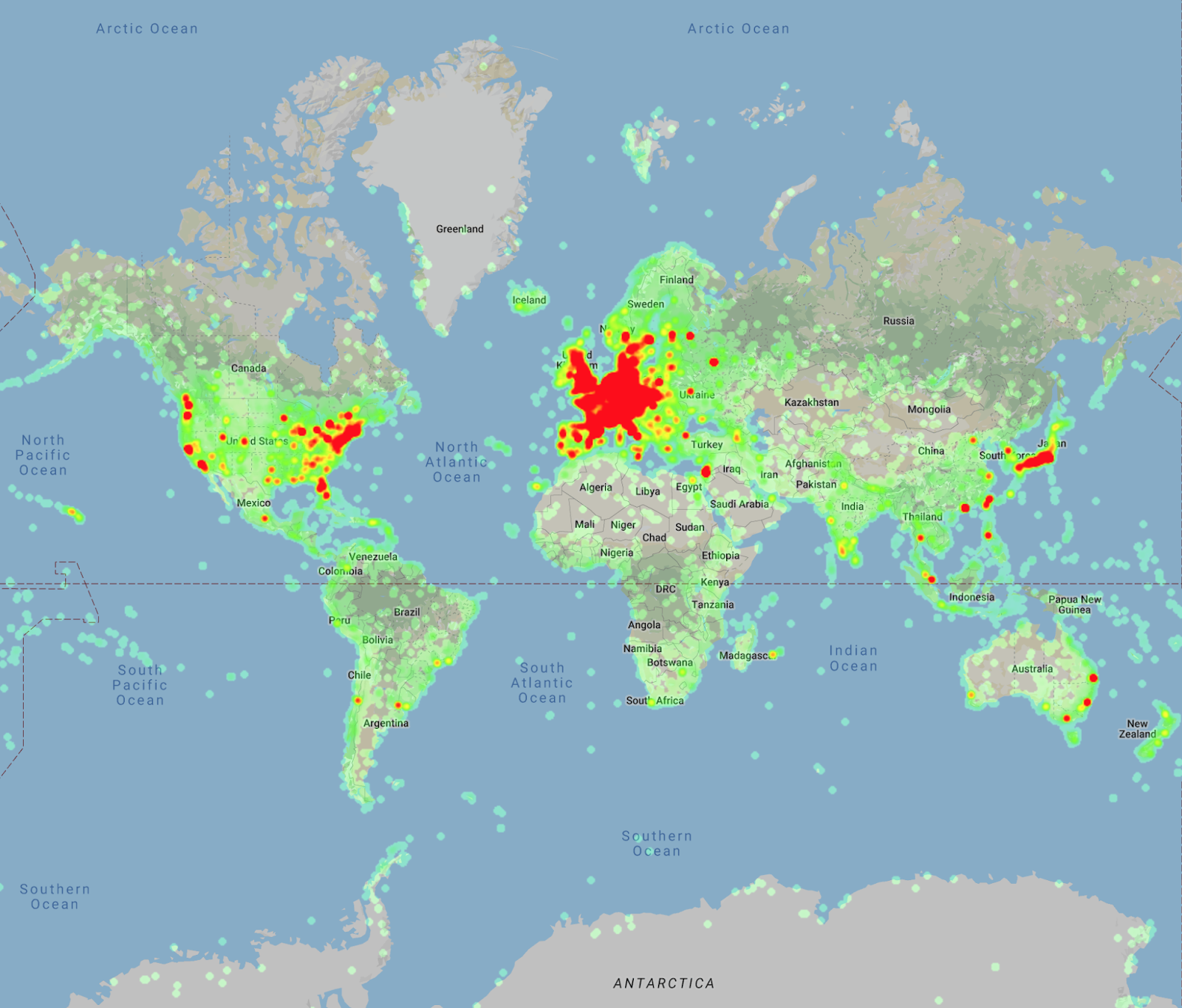
In support of this goal, this year we are releasing Google-Landmarks-v2, a completely new, even larger landmark recognition dataset that includes over 5 million images (2x that of the first release) of more than 200 thousand different landmarks (an increase of 7x). Due to the difference in scale, this dataset is much more diverse and creates even greater challenges for state-of-the-art instance recognition approaches. Based on this new dataset, we are also announcing two new Kaggle challenges—Landmark Recognition 2019 and Landmark Retrieval 2019—and releasing the source code and model for Detect-to-Retrieve, a novel image representation suitable for retrieval of specific object instances.

Heatmap of the landmark locations in Google-Landmarks-v2, which demonstrates the increase in the scale of the dataset and the improved geographic coverage compared to last year’s dataset.

Creating the Dataset
A particular problem in preparing Google-Landmarks-v2 was the generation of instance labels for the landmarks represented, since it is virtually impossible for annotators to recognize all of the hundreds of thousands of landmarks that could potentially be present in a given photo. Our solution to this problem was to crowdsource the landmark labeling through the efforts of a world-spanning community of hobby photographers, each familiar with the landmarks in their region.

Selection of images from Google-Landmarks-v2. Landmarks include (left to right, top to bottom) Neuschwanstein Castle, Golden Gate Bridge, Kiyomizu-dera, Burj khalifa, Great Sphinx of Giza, and Machu Picchu.

Another issue for research datasets is the requirement that images be shared freely and stored indefinitely, so that the dataset can be used to track the progress of research over a long period of time. As such, we sourced the Google-Landmarks-v2 images through Wikimedia Commons, capturing both world-famous and lesser-known, local landmarks while ensuring broad geographic coverage (thanks in part to Wiki Loves Monuments) and photos sourced from public institutions, including historical photographs that are valuable to test instance recognition over time.

The Kaggle Challenges
The goal of the Landmark Recognition 2019 challenge is to recognize a landmark presented in a query image, while the goal of Landmark Retrieval 2019 is to find all images showing that landmark. The challenges include cash prizes totaling $50,000 and the winning teams will be invited to present their methods at the Second Landmark Recognition Workshop at CVPR 2019.

Open Sourcing our Model
To foster research reproducibility and help push the field of instance recognition forward, we are also releasing open-source code for our new technique, called Detect-to-Retrieve (which will be presented as a paper in CVPR 2019). This new method leverages bounding boxes from an object detection model to give extra weight to image regions containing the class of interest, which significantly improves accuracy. The model we are releasing is trained on a subset of 86k images from the original Google-Landmarks dataset that were annotated with landmark bounding boxes. We are making these annotations available along with the original dataset here.

We invite researchers and ML enthusiasts to participate in the Landmark Recognition 2019 and Landmark Retrieval 2019 Kaggle challenges and to join the Second Landmark Recognition Workshop at CVPR 2019. We hope that this dataset will help advance the state-of-the-art in instance recognition and image retrieval. The data is being made available via the Common Visual Data Foundation.

Acknowledgments
The core contributors to this project are Andre Araujo, Bingyi Cao, Jack Sim and Tobias Weyand. We would like to thank our team members Daniel Kim, Emily Manoogian, Nicole Maffeo, and Hartwig Adam for their kind help. Thanks also to Marvin Teichmann and Menglong Zhu for their contribution to collecting the landmark bounding boxes and developing the Detect-to-Retrieve technique. We would like to thank Will Cukierski and Maggie Demkin for their help organizing the Kaggle challenge, Elan Hourticolon-Retzler, Yuan Gao, Qin Guo, Gang Huang, Yan Wang, Zhicheng Zheng for their help with data collection, Tsung-Yi Lin for his support with CVDF hosting, as well as our CVPR workshop co-organizers Bohyung Han, Shih-Fu Chang, Ondrej Chum, Torsten Sattler, Giorgos Tolias, and Xu Zhang. We have great appreciation for the Wikimedia Commons Community and their volunteer contributions to an invaluable photographic archive of the world’s cultural heritage. And finally, we’d like to thank the Common Visual Data Foundation for hosting the dataset.

As AI explodes in popularity, Microsoft aims to make adoption as simple as possible

Just a few years ago, artificial intelligence was largely relegated to universities and research labs, a charming computer science concept with little use in mainstream business. Today, AI is being integrated into everything from your refrigerator to your favorite workout app.

Lance Olson looks into a camera, standing in front of greenery
Lance Olson, director of program management for applied AI at Microsoft. Photo by Microsoft.

“It’s really exciting, because there’s a new breakthrough every month, or every week,” said Lance Olson, director of program management for applied AI at Microsoft. “Increasingly, the conversations are switching from discussing the art of the possible to getting to the next level of implementation on a specific project.”

Still, many companies are struggling to achieve their AI goals, as the supply of data scientists and AI experts has failed to keep up with surging demand. Creating AI models is difficult work. And then comes a struggle to get them into production – and keep them running. Data ages, much more quickly than code, making models less accurate as the world changes around us.

At its 2019 Microsoft Build conference, the company says it’s focused on helping all developers – even those without an AI or data science background – use its tools and services to deliver the big benefits that more and more customers expect.

“AI and machine learning can turn developers into heroes, for their ability to deliver really personalized, super-immersive experiences to customers,” said Wisam Hirzalla, director of operational databases and Blockchain product marketing at Microsoft. “We want to make it easy for any company to use the technology.”

Simplified and automated machine learning

Toward that end, Microsoft is announcing new capabilities for its cloud-based Azure Machine Learning service, with a goal of enabling developers and data professionals of any skill level to build advanced machine learning models.

We can think of AI practitioners in three categories, according to Bharat Sandhu, director of artificial intelligence at Microsoft. First, we have developers and data scientists who like to write code. They want to build machine learning models using tools and processes they already know. For them, Azure Machine Learning offers a “code first model,” where they can use the development tools they like.

A second group, including business domain experts, may know a lot about data, but they don’t know much about machine learning or code. For those customers, Azure Machine Learning’s automated machine learning experience is a “no code” option, accessible without having to write any code.

“A third category of people, who are learning machine learning concepts, they want to make their own models, but they are not coders. This could be IT professionals, or folks with background in statistics or mathematics,” Sandhu said. “For those customers, we’re offering a drag-and-drop experience to make models visually.”

Sandhu noted that no matter which way the machine learning models are created, they all use the same back end, meaning all the models can easily be integrated together.

Bharat Sandhu sitting at a table with arms folded, sitting in front a bright red background
Bharat Sandhu, director of product marketing for Microsoft Azure, at Microsoft’s office in Bellevue, Washington. Photo by Dan DeLong for Microsoft.

Interoperability

Of course, developers and data scientists have a number of platforms to choose from when they build AI models. To make sure companies can adopt AI advances as quickly as possible, Microsoft says it’s important to overcome platform mismatches, which can delay the rollout of those models into production.

One way Microsoft promotes interoperability among the various AI frameworks is a standard called ONNX Runtime, or Open Neural Network Exchange. This joint effort with other tech companies creates deployment models that work across multiple platforms.

That frees up developers and data scientists to use whatever framework and hardware target is best for them. And it frees up the operational team to focus on deploying and getting results, instead of having to translate as they move from one to the other.

At Build, Microsoft is announcing support for ONNX integration with leading hardware accelerators.

The company also is announcing that it is now an active contributor to the MLflow project, an open source platform for managing the machine learning lifecycle.

Azure Cognitive Services updates

More than 1.3 million developers, many without specific AI or data science skills, currently use Azure Cognitive Services to build intelligent apps that can see, hear, speak, understand and even begin to reason.

At Build, Microsoft is announcing a new category of Azure Cognitive Services called Decision, which gives specific recommendations to help people make decisions. This new category includes Personalizer, which uses a branch of AI called reinforcement learning to help technology glean knowledge from its own experiences and then offer informed recommendations.

“We are able to take reinforcement learning and ship it in a way that’s accessible to developers and doesn’t require a data scientist,” Olson said. “That will be very impactful for customers.”

At Build, the company is announcing many other updates to Azure Cognitive Services, including Ink Recognizer, which can learn to read handwriting, Form Recognizer, which identifies forms, and other new conversation transcription capabilities and other speech, vision and language advances.

A tourist couple gets directions from a man in a white shirt using a CM Translator device
Mobile app maker Cheetah Mobile built its hand-held CM Translator using Azure Cognitive Services to develop a speech system that provides rapid, high quality translations. Photo by Cheetah Mobile.

Just getting started

To date, Microsoft’s customers have created almost 400,000 digital agents through its Azure bot service, and more than 3,000 come on line each week. Companies of all sizes are looking to AI to give them a competitive edge.

That includes Cheetah Mobile, a leading mobile app maker building AI-enhanced hardware, including the hand-held CM Translator. Rather than developing the entire speech system from scratch, the company used Azure Cognitive Services, leveraging its text-to-speech API to provide rapid, high quality translations.

Jean Lozano stands in front of a blue background with his arms on his hips
MediaValet chief technology officer Jean Lozano. The digital asset management company relies on the security and privacy safeguards within Azure to reassure customers that the images it processes will be handled properly. Photo by MediaValet.

The development cost savings helped keep the device affordable, with no compromise in the natural speech flow.

Other companies say one of the chief benefits of using Azure data and AI tools is that they can take advantage of other attributes built into the tools. For example, the digital asset management company MediaValet relies on the security and privacy safeguards Azure provides to reassure customers that the images it processes will be handled properly.

“We’re not a big company, but we can actually play ball with big enterprise players, because we can leverage the information security and privacy attributes, the trust-ability of Azure,” said MediaValet chief technology officer Jean Lozano.

In the coming months and years, Microsoft expects more and more customers to start using AI, both because they see the business benefits and because the tools are more accessible.

“AI opens up so many possibilities. And the limits are very few, generally limited only by your imagination,” Olson said. “It doesn’t need to be overwhelming for people. We are getting to the point where we can now make AI accessible to a much broader set of customers.”

Related to AI news at Microsoft Build 2019:

The post As AI explodes in popularity, Microsoft aims to make adoption as simple as possible appeared first on The AI Blog.

Goodwill Farming: Startup Harvests AI to Reduce Herbicides

Jorge Heraud is an anomaly for a founder whose startup was recently acquired by a corporate giant: Instead of counting days to reap earn-outs, he’s sowing the company’s goodwill message.

That might have something to do with the mission. Blue River Technology, acquired by John Deere more than a year ago for $300 million, aims to reduce herbicide use in farms.

The effort has been a calling to like-minded talent in Silicon Valley who want to apply their technology know-how to more meaningful problems than the next hot app, said Heraud, who continues to serve as Blue River’s CEO.

“We’re using machine learning to make a positive impact on the world. We don’t see it as just a way of making a profit. It’s about solving problems that are worthy of solving — that attracts people to us,” he said.

Heraud and co-founder Lee Redden, who continues to serve as Blue River’s CTO, were attending Stanford University in 2011 when they decided to form the startup. Redden was pursuing graduate studies in computer vision and machine learning applied to robotics while Heraud was getting an executive MBA.

The duo’s work formed one of the early success stories of many for harnessing NVIDIA GPUs and computer vision to tackle complex industrial problems with big benefits to humanity.

“Growing food is one of the biggest and oldest industries — it doesn’t get bigger than that,” said Ryan Kottenstette, who invested in Blue River at Khosla Ventures.

Herbicide Spraying 2.0

As part of tractor giant John Deere, Blue River remains committed to herbicide reduction. The company is engaged in multiple pilots of its See & Spray smart agriculture technology.

Pulled behind tractors, its See & Spray machine is about 40 feet wide and covers 12 rows of crops. It has 30 mounted cameras to capture photos of plants every 50 milliseconds and process them through its on-board 25 Jetson AGX Xavier supercomputing modules.

As a tractor pulls at about 7 miles per hour, according to Blue River, the Jetson Xavier modules running Blue River’s image recognition algorithms need to decide whether images fed from the 30 cameras are a weed or crop plant quicker than the blink of an eye. That allows enough time for the See & Spray’s robotic sprayer — it features 200 precision sprayers — to zap each weed individually with herbicide.

“We use Jetson to run inference on our machine learning algorithms and to decide on the fly if a plant is a crop or a weed, and spray only the weeds,” Heraud said.

GPUs Fertilize AgTech

Blue River has trained its convolutional neural networks on more than a million images and its See & Spray pilot machines keep feeding new data as they get used.

Capturing as many possible varieties of weeds in different stages of growth is critical to training the neural nets, which are processed on a “server closet full of GPUs” as well as on hundreds of GPUs at AWS, said Heraud.

Using cloud GPU instances, Blue River has been able to train networks much faster. “We have been able to solve hard problems and train in minutes instead of hours. It’s pretty cool what new possibilities are coming out,” he said.

Among them, Jetson Xavier’s compact design has enabled Blue River to move away from using PCs equipped with GPUs on board tractors. John Deere has ruggedized the Jetson Xavier modules, which offer some protection from the heat and dust of farms.

Business and Environment

Herbicides are expensive. A farmer spending a quarter-million dollars a year on herbicides was able to reduce that expense by 80 percent, Heraud said.

Blue River’s See & Spray can take the place of conventional, or aerial spraying of herbicides, which blankets entire crops with chemicals, something most countries are trying to reduce.

See & Spray can reduce the world’s herbicide use by roughly 2.5 billion pounds, an 80 percent reduction, which could have huge environmental benefits.

“It’s a tremendous reduction in the amount of chemicals. I think it’s very aligned with what customers want,” said Heraud.


Image credit: Blue River

The post Goodwill Farming: Startup Harvests AI to Reduce Herbicides appeared first on The Official NVIDIA Blog.

Succeeding by Predicting Failure: AI Startup Using Factory-Based Sensors to Avert Shutdowns

In a world reliant on the power of machines, breakdowns can be problematic, sometimes catastrophic.

A system failure at an auto manufacturer can cost up to $1.3 million an hour. An offshore oil platform going offline can waste around $3.5 million a day.

But technical failures don’t just drain money. They also risk the safety of employees, put customer relations on the line and can threaten the environment.

To counter this, many firms implement predictive maintenance programs to detect equipment flaws before damage occurs. Traditional techniques rely on installing a large number of purpose-built sensors and measuring the performance of specific machines.

But this narrow, isolated view means that larger, holistic problems are often missed or root causes aren’t addressed. And this can lead to additional, preventable breakages further down the line.

Reliability Solutions is taking a different approach. The Krakow, Poland-based startup uses deep learning to derive insights from the huge amount of data already being collected by the myriad of sensors previously installed by their clients, on premise.

A member of the NVIDIA Inception program, Reliability Solutions is one of the first companies to take this approach and is already working with some big names, including energy provider Tauron and automakers Opel and Volkswagen.

Predicting Failure Efficiently and Effectively

Predictive maintenance aims to predict when equipment failure might occur in sufficient time to take preventative measures.

Reliability Solution’s approach to predictive maintenance uses deep neural networks powered by an NVIDIA Tesla P100 GPU cluster in the data center.

“By using deep learning, we can avoid the common pain points associated with traditional predictive maintenance models — high hardware costs, high engineering costs and long lead times,” explains Mateusz Marzec, CEO of Reliability Solutions. “With the power of NVIDIA GPUs, we can train our models, using terabytes of data, in a few hours.”

One of the largest energy companies in Europe turned to Reliability Solutions to build a predictive model that could detect the failure of a fluidized bed combustion boiler. These systems burn solid fuels to create energy at lower temperatures and with reduced sulfur emissions than would otherwise be possible.

As the entire network of boilers supply approximately 50 TWh of electricity to over 5.5 million customers per year, any downtime has extensive consequences.

Reliability Solutions developed a predictive model based on 700GB of historical data collected from sensors already installed at the plant. It also utilized a full description of the events that had impacted the boiler over a three-year period, from 2013-2015. This data was used to train a series of deep neural networks on a cluster of NVIDIA GPUs.

When validated against operating data for 2016, the system predicted all of the failures with an accuracy level of 100 percent — and without any false positives. Every breakdown of the fluidized bed boiler was anticipated from between 2.5 and 17 hours before the actual breakdown took place. This would’ve given maintenance teams sufficient time to stop the malfunction, or at least minimize the damage caused.

With the predictive maintenance module now fully incorporated, the company is making yearly savings of 4 million euros.

From Predictive to Prescriptive

Reliability Solutions is now turning its attention to developing prescriptive maintenance. This enables them to not only identify what will go wrong, and when, but to suggest a recommended course of action.

This approach also applies to companies looking to optimize the performance of their machinery, rather than fix issues. In these cases, the prescriptive model can propose steps that will save companies money or reduce their CO2 emissions, for example.

Reliability Solutions is already working with one of the biggest chemical companies in central Europe to minimize resource consumption and maximize output by optimizing the configuration of their installation.

The startup built a deep neural network-based metamodel of the chemical installation and then validated the configuration in real life. They found that the metamodel had a 90 percent accuracy rate.

Using the prescriptive model, Reliability Solutions was able to reduce the company’s hydrogen consumption by more than 2 percent, which will save the company millions of euros each year.

The post Succeeding by Predicting Failure: AI Startup Using Factory-Based Sensors to Avert Shutdowns appeared first on The Official NVIDIA Blog.

Amazon SageMaker Object2Vec adds new features that support automatic negative sampling and speed up training

Today, we introduce four new features of Amazon SageMaker Object2Vec: negative sampling, sparse gradient update, weight-sharing, and comparator operator customization. Amazon SageMaker Object2Vec is a general-purpose neural embedding algorithm. If you’re unfamiliar with Object2Vec, see the blog post Introduction to Amazon SageMaker Object2Vec, which provides a high-level overview of the algorithm with links to four notebook examples, one of which was added as part of this feature launch (Use Object2Vec to learn document embeddings). It also provides a link to the documentation page Object2Vec Algorithm, which provides further technical details. You can access these new features as the algorithm’s hyperparameters from the Amazon SageMaker console and using the high-level Amazon SageMaker Python API.

In this blog post we’ll discuss each of the following new features and show how it targets a customer pain point:

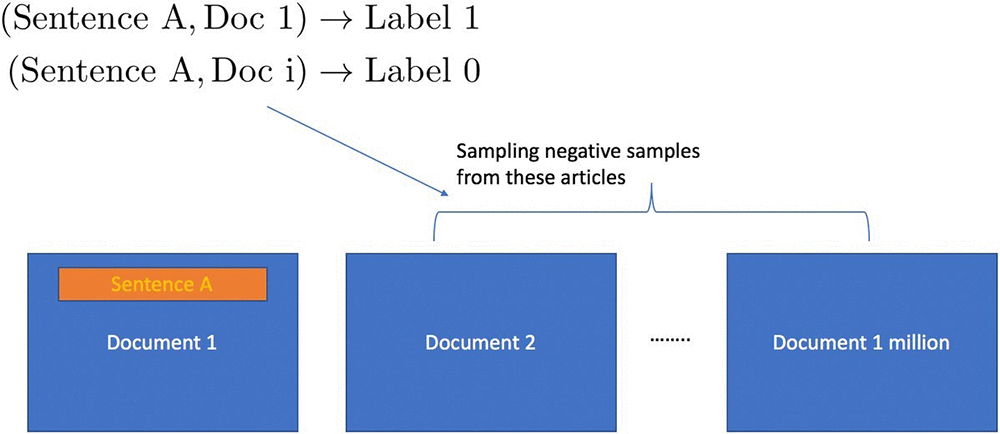
  1. Negative sampling: Previously, for use cases where only positively-labeled data are available (for example, the document embedding use case explained later in this post), customers need to implement negative sampling manually as part of data preprocessing. With the new negative sampling feature, Object2Vec automatically samples data that are unlikely observed and labels this data negative during training.
  2. Sparse gradient update: Previously, the algorithm’s training speed couldn’t scale to multiple GPUs and slowed down as the input vocabulary size became This is because by default, the MXNet optimizer calculates the full gradient even if most rows of the gradient are zero-valued, which not only causes unnecessary computation but also increases communication cost in a multi-GPU setup. Object2Vec with sparse gradient update speeds up single-GPU training without performance loss. In addition, the training speed can be further increased with multiple GPUs and is now independent of the vocabulary size.
  3. Weight sharing: Object2Vec has two encoders, each with its own token embedding layer, to encode data from two input For use cases where both sources are built on top of the same token-level units, it is common practice to jointly train the token embedding layers (known as weight-sharing in the deep learning community). The new weight sharing feature provides you with this option.
  4. Comparator operator customization: The comparator operator in the Object2Vec network architecture assembles the encoding vectors produced by the two encoders into Previously, this operator had been fixed, which may degrade the performance of the algorithm in some use cases (as we observed for document embedding; see Table 1). The new comparator_list parameter provides users with the flexibility to customize the comparator operator to their specific use case.

Accompanying this blog post is a new notebook example (Use Object2Vec to learn document embeddings) that demonstrates how to take advantage of all of the new features in a Document Embedding use-case. In this use case, a customer has a large collection of documents. Instead of storing these documents in their raw format or as sparse bag-of-words vectors, the customer wants to embed all documents in a common low-dimensional space, so that the semantic distances between these documents are preserved. Embedding documents this way has several useful applications, such as efficient nearest neighbor search, and as features in downstream tasks such as topical classification.

Negative sampling feature

Similar to the widely used Word2Vec algorithm for word embedding, a natural approach to document embedding is to preprocess documents as (sentence, context) pairs, where the sentence and its context come from the same document, such that the context is the entire document with the given sentence removed. The idea is to  train  encoders to  embed both sentences and their contexts into a low dimensional  space  such  that  their  mutual  similarity  is maximized,  since they belong to the same document and therefore should be semantically  related.  The learned encoder for the context can then be used to encode new documents into the same embedding space.  To train the encoders for sentences and documents, we also need negative (sentence, context) pairs so that the model can learn to discriminate between semantically similar and dissimilar pairs. It it’s easy to generate such negatives by pairing sentences with documents that they do not belong to. Since there are many more negative pairs than positives in naturally occurring data, we typically resort to random sampling techniques to achieve a balance between positive and negative pairs in the training data. The following figure shows how the positive pairs and negative pairs are generated from unlabeled data for the purpose of learning embeddings for documents (and sentences).

Typically, a user might be required to do the negative pair creation and sampling as a preprocessing step before training the algorithm. With the new negative_sampling_rate hyperparameter in Object2Vec, users only need to provide positively labeled data pairs, and the algorithm automatically generates and samples negative data internally during training. The value of the negative sampling rate represents the ratio of negative examples to positive examples desired by the user.

In the notebook, we set the negative_sampling_rate hyperparameter to be 3.

hyperparameters['negative_sampling_rate'] = 3

Running the notebook, the user can check from the training console output that the negative sampling is enabled and that the sampling rate is indeed 3.

In general, to determine the best negative_sampling_rate, users should try different values and choose the one that emits the best metric (e.g., cross-entropy for classification) on validation set.

Sparse gradient update

The new sparse gradient support takes advantage of the sparse input format of Object2Vec and speeds up the mini- batch gradient descent training by 2-20 times. Even larger speedup is observed with larger vocab_size.

In the notebook example, we turned on sparse gradient update by setting token_embedding_storage_type

hyperparameters['token_embedding_storage_type'] = 'row_sparse'

The user can check that sparse gradient is indeed turned on by looking at the parameter summarization table in the training console output.

The following table shows the training speeds up with sparse gradient update feature switched on, as a function of number of GPUs, on Amazon EC2 P2 instances (see here for more information about p2 instances). Another benefit of using sparse gradient update is that, in contrast to full gradient updates, increasing the vocabulary size does not affect the training speed.

Speed gain with sparse gradient update

num_gpus Throughput (samples/sec) with dense embedding Throughput with sparse embedding max_seq_len (in0/in1) Speedup X- times
1 1 5k 14k 50 2.8
2 2 2.7k 23k 50 8.5
3 3 2k 24k 50 10
4 4 2k 23k 50 10
5 8 1.1k 19k 50 20
6
7 1 1.1k 2k 500 2
8 2 1.5k 3.6k 500 2.4
9 4 1.6k 6k 500 3.75
10 6 1.3k 6.7k 500 5.15
11 8 1.1k 5.6k 500 5

Weight-sharing of embedding layer

 Object2Vec has two encoders. During training, the algorithm previously learned the input embeddings separately for each encoder. The new tied_token_embedding_weight hyperparameter gives the user the flexibility to share the token embedding layer for both encoders. In the document embedding use case, we have found better performance in the document embedding use case with weight-sharing.

In the notebook, we set the tied_token_embedding_weight hyperparameter to True:

hyperparameters['tied_token_embedding_weight'] = "true"

The user can check that weight-sharing feature is on by looking at the training console output:

Customization of comparator operator

 The comparator operator in Object2Vec architecture aggregates the outputs from two encoders. Previously, the comparator operator was fixed. The new comparator_list hyperparameter gives users the flexibility to customize their own comparator operator so that they can tune the algorithm towards optimal performance for their applications. The available binary operators are “hadamard” (element-wise product), “concat” (concatenation), and “abs_diff” (absolute difference). Users can mix and match any combination of the three or simply use one of them.

In the notebook, we customize comparator operator to use element-wise product only:

hyperparameters['comparator_list'] = "hadamard"

The user can check the comparator operator configuration by looking at the training console output:

The default comparator operator concatenates the result of all three operators. If users want to combine hadamard and abs_diff operators, then they simply need to write:

hyperparameters['comparator_list'] = "hadamard, abs_diff"

For different problems, we recommend that the user either use the default or find out the best combination using the validation set (or use cross-validation).

Experiment on document embedding and the retrieval downstream task

In the document embedding notebook, we train the Object2Vec model using simple pooled embedding based encoders for both sentences and documents on the training data created from unlabeled Wikipedia articles as described earlier. Since we have binary labeled data, we use the standard cross-entropy function as our training loss. We can evaluate the performance of the model using the same loss function or using accuracy on a binary labeled test data. The following table shows the effect of these features on these two metrics evaluated on a test set obtained from the same data creation process.

We see that when negative sampling and weight-sharing of embedding layer is switched on, and when we use a customized comparator operator (hadamard product), the model has improved test accuracy. When all of these features are combined together (last row of the table), the algorithm has the best performance as measured by accuracy and cross-entropy.

Test performance of combining new features on Wikipedia250k data


negative_sampling_rate


Weight sharing

Comparator operator Test accuracy (higher is better) Test cross entropy (lower is better)


1


Off


Off

Default (hadamard, concat, abs_diff)


0.167


23

2 3 Off Default 0.92 0.21
3 5 Off Default 0.92 0.19
4 Off On Default 0.167 23
5 3 On Default 0.93 0.18
6 5 On Default 0.936 0.17
7 Off On Customized (hadamard) 0.17 23
8 3 On Customized 0.93 0.18
9 5 On Customized 0.94 0.17

After training the model, we can use the encoders in Object2Vec to map new articles and sentences into a shared embedding space. Then we evaluate the quality of these embeddings with a downstream document retrieval task.

In the retrieval task, given a sentence query, the trained algorithm needs to find its best matching document (the ground-truth document is the one that contains it) from a pool of documents, where the pool contains 10,000 other non-ground-truth documents. We use two metrics hits@k and mean rank to evaluate the retrieval performance. Note that the ground-truth documents in the pool have the query sentence removed from them, otherwise the task would have been trivial.

  • hits@k: It calculates the fraction  of  queries where  its best-matching  (ground-truth) document is contained  in  top k retrieved documents by the algorithm
  • mean rank: It is the average rank of the best-matching documents, as determined by the algorithm, over all queries

We compare the performance of Object2Vec with the StarSpace algorithm on the document retrieval evaluation task, using a set of 250,000 Wikipedia documents. The experimental results displayed in the following table, show that Object2Vec significantly outperforms StarSpace on all metrics although both models use the same kind of encoders for sentences and documents.

Document retrieval evaluation

Algorithm hits@1 hits@10 hits@20 Mean rank (smaller the better)
1 StarSpace 21.98% 42.77% 50.55% 303.34
2 Object2Vec 26.40% 47.42% 53.83% 248.67


About the Authors

Cheng Tang is an Applied Scientist in the Verticals and Applications Group at AWS AI. Broadly interested in machine learning research and its applications to the natural language processing domain, Cheng finds great inspiration to be part of both research and industrialization of machine learning/deep learning algorithms, and she is thrilled to see them delivered to the customers.


Patrick Ng is a Software Development Engineer in the Verticals and Applications Group at AWS AI. He works on building scalable distributed machine learning algorithms, with focus in the area of deep neural networks and natural language processing.  Before Amazon, he obtained his PhD in Computer Science from the Cornell University and worked at startup companies building machine learning systems.



Ramesh Nallapati is a Principal Applied Scientist in the Verticals and Applications Group at AWS AI. He works on building novel deep neural networks at scale primarily in the natural language processing domain. He is very passionate about deep learning, and enjoys learning about latest developments in AI and is excited about contributing to this field to the best of his abilities.


Bing Xiang is a Principal Scientist and Head of Verticals and Applications Group at AWS AI. He leads a team of scientists and engineers working on deep learning, machine learning, and natural language processing for multiple AWS services.


ACKNOWLEDGEMENT

We would like to thank Sr. Principal Engineer Leo Dirac for his kind help and useful discussion.

Springing into Deep Learning: How AI Could Track Allergens on Every Block

As seasonal allergy sufferers will attest, the concentration of allergens in the air varies every few paces. A nearby blossoming tree or sudden gust of pollen-tinged wind can easily set off sneezing and watery eyes.

But concentrations of airborne allergens are reported city by city, at best.

A network of deep learning-powered devices could change that, enabling scientists to track pollen density block by block.

Researchers at the University of California, Los Angeles, have developed a portable AI device that identifies levels of five common allergens from pollen and mold spores with 94 percent accuracy, according to the team’s recent paper. That’s a 25 percent improvement over traditional machine learning methods.

Using NVIDIA GPUs for inference, the deep learning models can even be implemented in real time, said Aydogan Ozcan, associate director of the UCLA California NanoSystems Institute and senior author on the study. UCLA graduate student Yichen Wu is the paper’s first author.

Putting Traditional Sensing Methods Out to Pasture

Tiny biological particles including pollen, spores and microbes make their way into the human body with every breath. But it can be hard to tell just how many of these microscopic particles, called bioaerosols, are in a specific park or at a street corner.

Bioaerosols are typically collected by researchers using filters or spore traps, then stained and manually inspected in a laboratory — a half-century-old method that takes several hours to several days.

The UCLA researchers set out to improve that process by monitoring allergens directly in the field with a portable and cost-effective device, Ozcan said, “so that the time and labor cost involved in sending the sample, labeling and manual inspection can be avoided.”

Unlike traditional methods, their device automatically sucks in air, trapping it on a sticky surface illuminated by a laser. The laser creates a hologram of any particles, making the often-transparent allergens visible and capturable by an image sensor chip in the device.

The holographic image is then processed by two separate neural networks: one to clean up and crop the image to focus on the sections depicting biological particles, and another to classify the allergens.

Conventional machine learning algorithms achieve around 70 percent accuracy at classifying bioaerosols from holographic images. With deep learning, the researchers were able to boost that accuracy to an “unprecedented” 94 percent.

Using an NVIDIA GPU accelerates the training of the neural networks by hundreds of times, Wu said, and enables real-time testing, or inference.

A Blossoming Solution for Real-Time Analysis

While the version of the device described in the paper transmits the holograms to a remote server for the deep learning analysis, Wu said future versions of the device could have an embedded GPU to run AI models at the edge.

For scientists, the portable tool saves money and would enable them to gather data from distributed sensors at multiple locations, creating a real-time air-quality map with finer resolution. This map could be made available online to the general public — a useful tool as climate change makes allergy season longer and more severe.

Alternatively, the device itself — which weighs a little over a pound — could be used by individual allergy or asthma sufferers, allowing them to monitor the air quality around them anytime and access the data through a smartphone.

Since the device can be operated wirelessly, it also could be mounted on drones to monitor air quality in sites that are dangerous or difficult to access.

The researchers plan to expand the AI model to sense more classes of bioaerosols and other particles — and improve the physical device so it can conduct continuous sensing over several months.

The post Springing into Deep Learning: How AI Could Track Allergens on Every Block appeared first on The Official NVIDIA Blog.

Lights, Camera, AI: Cambridge Consultants Puts Deep Learning in Director’s Chair

AI is commonly associated with data. Less known is its artistic side — composing music scores, transforming doodles into photorealistic masterpieces, and dancing the night away.

Cambridge Consultants knows it well, having already demonstrated AI’s artistic prowess with Vincent AI, which turns your squiggles into art in one of seven styles resembling everything from moody J.M.W. Turner oil paintings to neon-hued pop art.

Last month, in collaboration with artist and animator Jo Lawrence, the U.K.-based consultancy brought a world first to the Collusion 2019 Showcase, an exhibition in Cambridge of interactive and immersive art exploring our relationship with new technologies.

Datacosm is an AI-driven animated film setting out our changing relationship with technology. What makes it special is that AI chooses the ending as the story unfolds based on the type of music played by a live pianist.

When Data Becomes Art

The Collusion 2019 Showcase celebrated the intersection of technology and art in a rare and thought-provoking manner.

Tasked with investigating the ever-intensifying and complex effects of emerging technology on culture and society, Lawrence and a select number of other artists set out to express their findings in their chosen medium.

Talking of how the film came to be, she explained, “Data can communicate, it can be grown, farmed, harvested, stored, distributed, consumed, corrupted and disseminated. Inspired, I developed ideas for a narrative animation exploring data-based themes using a combination of stop-motion animation of puppets and objects, pixilation and film.”

The result, Datacosm, tells the story of the movement of data from A to B, revealing the process of performing and making.

In the film, the top half of the screen shows the stage and animation as a combination of physical puppetry and digital production. The bottom half shows puppeteers working. Dividing the screen is a continuous block of code — bringing to the forefront the AI work being done behind the scenes.

AI developed by Cambridge Consultants — NVIDIA’s first deep learning service delivery partner in Europe — drove the final narrative of the film at the showcase, based on music supplied by a pianist.

As the music played, the AI identified the musical genre and changed the direction of the film by adding different layers of animation. Depending on what was played, one of four endings was shown.

AI Aficionado

The machine learning technology driving Datacosm, dubbed “the Aficionado,” can instantly identify a variety of music genres — from baroque and classical, to ragtime and jazz.

Trained using hundreds of hours of music on 16 NVIDIA GPUs, the Aficionado can even outperform humans and traditional coding in accurately identifying musical genres.

The project is just one of a number developed by Cambridge Consultants as part of its Digital Greenhouse initiative.

This purpose-built AI research facility is built around the NVIDIA DGX POD reference architecture with NetApp storage, known as ONTAP AI. It is designed for discovering, developing and testing machine learning approaches in a secure environment.

The cutting-edge research performed in the Digital Greenhouse is then used to solve the various challenges faced by Cambridge Consultants’ clients.

“Combining NVIDIA DGX POD with NetApp storage has enabled us to tackle the unprecedented demands on compute, storage, networking and facilities that these projects bring,” said Dominic Kelly, head of AI research at Cambridge Consultants, which employs a global team of over 850 engineers, designers and scientists. “The combination accelerates our AI research and provides the most efficient way of transferring technology from our lab to real deployments for our clients.

“The Collusion project has helped us explore innovative and highly sophisticated technologies, which hold world-changing potential and social impact. The project has been fascinating, helping us combine technical and artistic perspectives to create thought-provoking art that’s accessible to a broad audience,” Kelly added.


The post Lights, Camera, AI: Cambridge Consultants Puts Deep Learning in Director’s Chair appeared first on The Official NVIDIA Blog.