Blog

Learn About Our Meetup

5000+ Members

MEETUPS

LEARN, CONNECT, SHARE

Join our meetup, learn, connect, share, and get to know your Toronto AI community. 

JOB POSTINGS

INDEED POSTINGS

Browse through the latest deep learning, ai, machine learning postings from Indeed for the GTA.

CONTACT

CONNECT WITH US

Are you looking to sponsor space, be a speaker, or volunteer, feel free to give us a shout.

Category: Global

Simplifying the ‘AI-First’ World for Every Enterprise

At Pure Accelerate 2019, IT organizations learned how they can help their businesses bring AI development out of the shadows and into an “AI-first” mindset.

Most organizations and their IT leaders want to lean into embracing AI, positioning IT as an enabler rather than an inhibitor. This week, we announced important capabilities that will make it simpler for every enterprise to develop their best AI-powered applications faster — and deploy them in production at-scale sooner.

To get there, we’re making it easier for data scientists to develop models with greater iterative speed and, ultimately, maximum business impact. At the same time, we’re continuing to make it easier for organizations to access world-class AI-ready infrastructure facilities that ease and accelerate deployments. It’s a win-win for everyone involved in turning data into business insights at enterprise scale.

AI Data Hub

AI Data Hub is an end-to-end AI data pipeline — spanning initial exploration and prototyping to model training and inference — from Pure Storage that’s powered by NVIDIA GPUs, systems and software. By enabling accelerated movement of massive amounts of data through every phase of the development workflow, AI Data Hub can help organizations break down data storage silos associated with legacy architectures.

NVIDIA supercharges the AI Data Hub architecture, beginning with our RAPIDS suite of data science libraries built on CUDA-X AI, to deliver GPU-accelerated data ingest, manipulation and model training. AI Data Hub uses Pure Storage AIRI, built on NVIDIA DGX systems, to offer the fastest performance for training with multi-system scale. And it deploys effortlessly on NVIDIA T4 servers running inference.

AIRI-as-a-Service

In addition to streamlining AI development, Pure and NVIDIA are removing a fundamental implementation roadblock faced by many customers whose data centers aren’t AI-ready.

Extending the successful model introduced by the DGX-Ready Data Center Program, we’re partnering with Pure on the new AIRI-as-a-Service offering. This taps into a network of proven DGX colocation providers to offer a spectrum of services ranging from hosting customer-owned AIRI infrastructure to delivering AIRI-as-a-Service in a utility consumption model.

The offering will help customers of any size deploy AI infrastructure sooner by eliminating the burden of transforming their data centers to support the unique facilities demands of AI compute and affordably offering the capacity they need.

Learn more at the links below:

The post Simplifying the ‘AI-First’ World for Every Enterprise appeared first on The Official NVIDIA Blog.

Multiregion serverless distributed training with AWS Batch and Amazon SageMaker

Creating a global footprint and access to scale are one of the many best practices at AWS. By creating architectures that take advantage of that scale and also efficient data utilization (in both performance and cost), you can start to see how important access is at scale. For example, within autonomous vehicles (AV) development, data is geographically acquired local to the driving campaign. It is relevant and more efficient from a machine learning (ML) perspective to execute the compute pipeline in the same AWS Region as the generated data.

To elaborate further, say that your organization acquires 4K video data on a driving campaign in San Francisco, United States. In parallel, your colleagues acquire a driving campaign in Stuttgart, Germany. Both video campaigns can result in a few TBs of data per day. Ideally, you would transfer the data into Regions close to where you generated the data (in this case, us-west-1 and eu-central-1). If the workflow labels this data, then running the distributed training local to their respective Regions makes sense from a cost and performance standpoint while maintaining consistency in the hyperparameters used to train both datasets.

To get started with distributed training on AWS, use Amazon SageMaker, which provisions much of the undifferentiated heavy lifting required for distributed training (for example, optimized TensorFlow with Horovod). Additionally, its per-second billing provides efficient cost management. These benefits free up your focus for model development and deployment in a fully managed architecture.

Amazon SageMaker is an ecosystem of managed ML services to help with ground truth labeling, model training, hyperparameter optimization, and deployment. You can access these services using Jupyter notebooks, the AWS CLI, or the Amazon SageMaker Python SDK. Particularly with the SDK, you need little code change to initiate and distribute the ML workload.

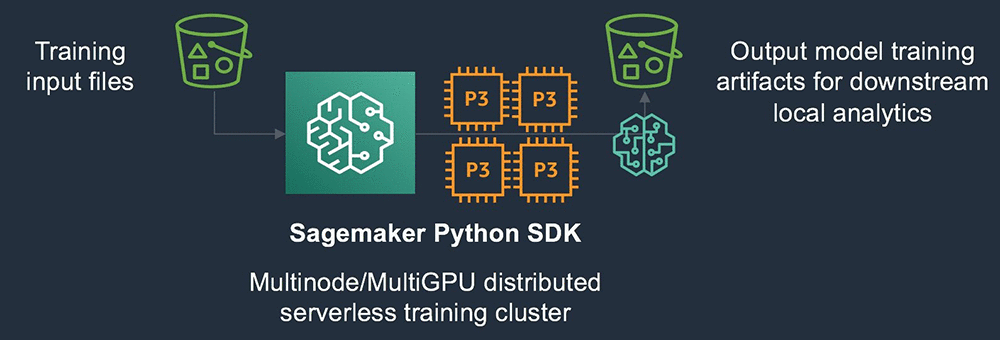
In the above architecture the S3 bucket serves as source for the training input files. The SageMaker Python SDK will instantiate the required compute resources and Docker image to run the model training sourcing the data from the S3. The output model artifacts are saved to an output S3 bucket.

Because the Amazon SageMaker Python SDK abstracts infrastructure deployment and is entirely API driven, you can orchestrate requests for training jobs via the SDK in scalable ways.

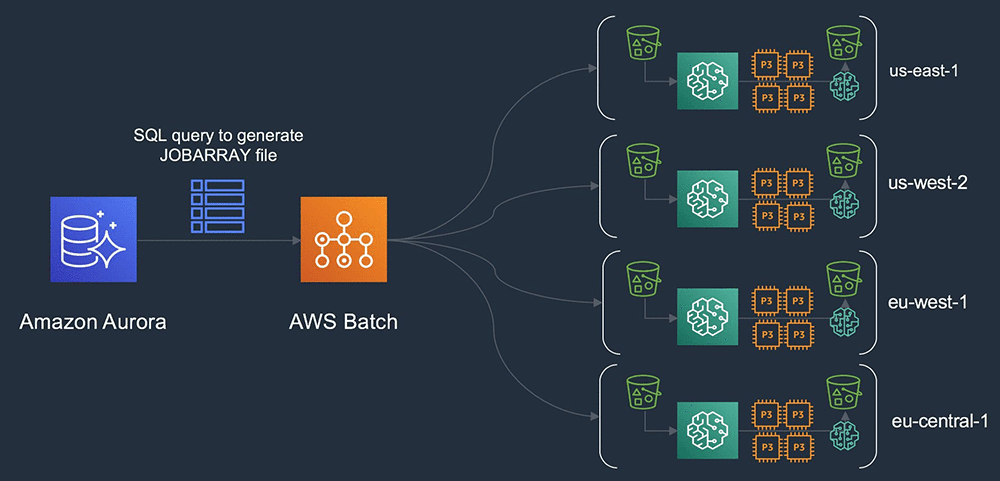
In the previous AV scenario, for example, you can trigger the input training data from the uploaded dataset, which you tracked in a relational way. You can couple this with AWS Batch, which offers a job array mechanism that can submit these distributed training jobs in a scalable way passing relevant hyperparameters at runtime. Consider the following example architecture.

In this above architecture a relational database is used to track, for example, AV campaign metadata globally. A SQL query can be generated which populates the JOBARRAY input file in AWS Batch. AWS Batch then orchestrates the instantiation of the grid of clusters that are executed globally across multiple AWS Regions.

You are standing up a grid of clusters, globally deployed, based on data in Amazon S3 that is  generated locally. Querying the metadata from a central database to organize the training inputs with access to capacity across all four Regions. You can include some additional relational joins, which select data for transitive copy based on the On-Demand or Spot price per Region and reservation capacity.

Deploying Amazon SageMaker

The example in this post runs the Imagenet2012/Resnet50 model, with the Imagenet2012 TF records replicated across Regions. For this advanced workflow, you must prepare two Docker images. One image is for calling the Amazon SageMaker SDK to prepare the job submission, and the second image is for running the Horovod-enabled TensorFlow 1.13 environment.

First, create an IAM role to call the Amazon SageMaker service and subsequent services to run the training. Then, create the dl-sagemaker.py script. This is the main call script into the Amazon SageMaker training API.

For instructions on building the Amazon SageMaker Script Mode Docker image, see the TensorFlow framework repo on GitHub, in aws/sagemaker-tensorflow-container. After it’s built, commit this image to each Region in which you plan to generate data.

The following example commits this to us-east-1 (Northern Virginia), us-west-2 (Oregon), eu-west-1 (Ireland), and eu-central-1 (Frankfurt). When support for TensorFlow 1.13 with Tensorpack is in the Amazon SageMaker Python SDK, this becomes an optional step. To simplify the deployment, keep the name of the Amazon ECR image the same throughout Regions.

For the main entry script to call the Amazon SageMaker SDK (dl-sagemaker.py), complete the following steps:

  1. Replace the entry:
    role = 'arn:aws:iam::<account-id>:role/sagemaker-sdk'

  2. Replace the image_name with the name of the Docker image that you created:
    import os
    from sagemaker.session import s3_input
    from sagemaker.tensorflow import TensorFlow
    
    role = 'arn:aws:iam::<account-id>:role/sagemaker-sdk'
    
    num_gpus = int(os.environ.get('GPUS_PER_HOST'))
    
    distributions={
    'mpi': {
    'enabled': True,
    'processes_per_host': num_gpus,
    'custom_mpi_options': '-mca btl_vader_single_copy_mechanism none -x HOROVOD_HIERARCHICAL_ALLREDUCE=1 -x HOROVOD_FUSION_THRESHOLD=16777216 -x NCCL_MIN_NRINGS=8 -x NCCL_LAUNCH_MODE=PARALLEL'
    }
    }
    
    def main(aws_region,s3_location):
    estimator = TensorFlow(
    train_instance_type='ml.p3.16xlarge',
    train_volume_size=100,
    train_instance_count=10,
    framework_version='1.12',
    py_version='py3',
    image_name="<account id>.dkr.ecr.%s.amazonaws.com/sage-py3-tf-hvd:latest"%aws_region,
    entry_point='sagemaker_entry.py',
    dependencies=['/Users/amrraga/git/github/deep-learning-models'],
    script_mode=True,
    role=role,
    distributions=distributions,
    base_job_name='dist-test',
    )
    estimator.fit(s3_location)
    
    if __name__ == '__main__':
    aws_region = os.environ.get('AWS_DEFAULT_REGION')
    s3_location = os.environ.get('S3_LOCATION')
    
    main(aws_region,s3_location)

The following code is for sagemaker_entry.py, the inner call to initiate the training script:

import subprocess
import os

if __name__ =='__main__':
    train_dir = os.environ.get('SM_CHANNEL_TRAIN')
    subprocess.call(['python','-W ignore', 'deep-learning-models/models/resnet/tensorflow/train_imagenet_resnet_hvd.py', 
            "—data_dir=%s"%train_dir, 
            '—num_epochs=90', 
            '-b=256', 
            '—lr_decay_mode=poly', 
            '—warmup_epochs=10', 
            '—clear_log'])

The following code is for sage_wrapper.sh, the overall wrapper for AWS Batch to download the array definition from S3 and initiate the global Amazon SageMaker API calls:

#!/bin/bash -xe
###################################
env
###################################
echo "DOWNLOADING SAGEMAKER MANIFEST ARRAY FILES..."
aws s3 cp $S3_ARRAY_FILE sage_array.txt
if [[ -z "${AWS_BATCH_JOB_ARRAY_INDEX}" ]]; then
   echo "NOT AN ARRAY JOB...EXITING"
   exit 1
else
   LINE=$((AWS_BATCH_JOB_ARRAY_INDEX + 1))
   SAGE_SYSTEM=$(sed -n ${LINE}p sage_array.txt)
   while IFS=, read -r f1 f2 f3; do
           export AWS_DEFAULT_REGION=${f1}
           export S3_LOCATION=${f2}
   done <<< $SAGE_SYSTEM
fi

GPUS_PER_HOST=8 python3 dl-sagemaker.py

echo "SAGEMAKER TRAINING COMPLETE"
exit 0

Lastly, the following code is for the Dockerfile, to build the batch orchestration image:

FROM amazonlinux:latest

### SAGEMAKER PYTHON SDK

RUN yum update -y
RUN amazon-linux-extras install epel
RUN yum install python3-pip git -y
RUN pip3 install tensorflow sagemaker awscli

### API SCRIPTS

RUN mkdir /api
ADD dl-sagemaker.py /api
ADD sagemaker_entry.py /api
ADD sage_wrapper.sh /api
RUN chmod +x /api/sage_wrapper.sh

### SAGEMAKER SDK DEPENDENCIES

RUN git clone https://github.com/aws-samples/deep-learning-models.git /api/deep-learning-models

Commit the built Docker image to ECR in the same Region as the Amazon SageMaker Python SDK. From this Region, you can deploy all your Amazon SageMaker distributed ML cluster-workers globally.

With AWS Batch, you don’t need any unique configurations to instantiate a compute environment. Because you are just using AWS Batch to launch the Amazon SageMaker APIs, the default settings are enough. Attach a job queue to the compute environment and create the job definition file with the following:

{
    "jobDefinitionName": "sagemaker-python-sdk-jobdef",
    "jobDefinitionArn": "arn:aws:batch:us-east-1:<accountid>:job-definition/sagemaker-python-sdk-jobdef:1",
    "revision": 1,
    "status": "ACTIVE",
    "type": "container",
    "parameters": {},
    "containerProperties": {
        "image": "<accountid>.dkr.ecr.us-east-1.amazonaws.com/batch/sagemaker-sdk:latest",
        "vcpus": 2,
        "memory": 2048,
        "command": [
            "/api/sage_wrapper.sh"
        ],
        "jobRoleArn": "arn:aws:iam::<accountid>:role/ecsTaskExecutionRole",
        "volumes": [],
        "environment": [
            {
                "name": "S3_ARRAY_FILE",
                "value": "s3://ragab-ml/"
            }
        ],
        "mountPoints": [],
        "ulimits": [],
        "resourceRequirements": []
    }
}

To import at job startup, upload an example JOBARRAY file to S3:

us-east-1,s3://ragab-ml/imagenet2012/tf-imagenet/resized
us-west-2,s3://ragab-ml-pdx/imagenet2012/tf-imagenet/resized
eu-west-1,s3://ragab-ml-dub/imagenet2012/tf-imagenet/resized
eu-central-1,s3://ragab-ml-fra/imagenet2012/tf-imagenet/resized

On the Jobs page, submit a job that changes the path of the S3_ARRAY_FILE. A job array starts up with each node dedicated to submitting and monitoring an ML training job in a separate Region. If you select a candidate Region where a job is running, you can see additional algorithms, instance metrics, and further log details.

One notable aspect of this deployment is that in the previous example, you launched a grid of clusters of 480 GPUs over four Regions, totaling 360,000 images/sec combined. This process improved time to results and optimized parameter scanning.

Conclusion

By implementing this architecture, you now have a scalable, performant, globally distributed ML training platform. In the AWS Batch script, you can lift any number of parameters into the array file to distribute the workload. For example, you can use not only different input training files, but also different hyperparameters, Docker container images, or even different algorithms, all deployed on a global scale.

Consider also that any backend, serverless distributed ML service can execute these workloads. For example, it is possible to replace the Amazon SageMaker components with Amazon EKS. Now go power up your ML workloads with a global footprint!

Open the Amazon SageMaker console to get started. If you have any questions, please leave them in the comments.


About the Author

Amr Ragab is a Business Development Manager in Accelerated Computing for AWS, devoted to helping customers run computational workloads at scale. In his spare time he likes traveling and finds ways to integrate technology into daily life.


Building a deep neural net–based surrogate function for global optimization using PyTorch on Amazon SageMaker

Optimization is the process of finding the minimum (or maximum) of a function that depends on some inputs, called design variables. Customer X has the following problem: They are about to release a new car model to be designed for maximum fuel efficiency. In reality, thousands of parameters that represent tuning parameters relating to the engine, transmission, suspension, and so on. The combinations result in varying fuel efficiency values.

However, for this post, assume that they want to measure this efficiency as the gallons of fuel burned per hour when traveling at a particular speed, all other parameters being constant. Therefore, the “function” to be minimized is “gallons of fuel burned per hour” and the design variable is “speed.” This one-dimensional optimization problem asks the question: “What speed should the car be driven at for burning the minimum amount of fuel per hour,” which is a greatly simplified version of the thousands of actual parameters to be considered.

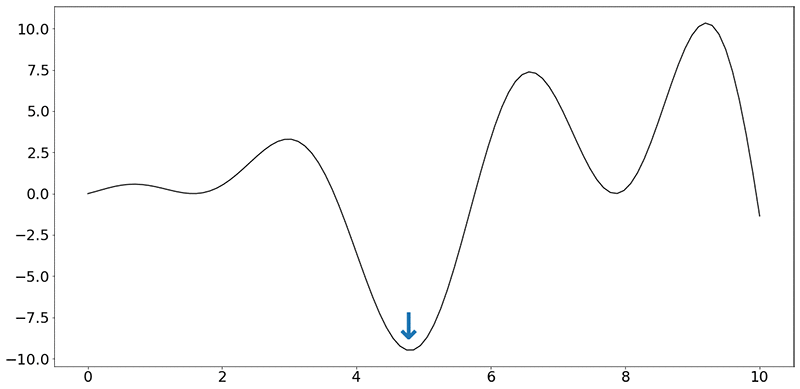
Assume that the objective function (f) looks like the following synthetic function:

f(x) = x⋅sin(x)+x⋅cos(2x)

Ignoring the units on the x and y axes, your task is to find the minimum of this function, indicated by the blue arrow. Even when dealing with a single dimension, it is impractical to run the car over every speed value (speed being a real number).

For this post, you have a budget of running 30 experiments, each “experiment” consisting of running the car on a test rig at that speed, measuring and collecting the average value of fuel burned per hour. This gives you 30 values of fuel burned, corresponding to 30 values of speeds, and nothing more. There is also no guarantee that there was an experiment conducted at the value of speed indicated by the minimum (blue arrow in the figure).

Each experiment can actually take hours to set up. Because it is impractical to do more than a certain number of such experiments, this type of function is called an expensive, black-box function. It’s expensive because the function takes time to return a value, and black-box as the experiments conducted can’t be written as mathematical expressions.

The entire field of optimization research is targeted towards creating algorithms to solve these kinds of problems. In this post, you use a neural network to approximate the function (f) above. This trained approximation of the function, also known as a “surrogate model,” can be used instead of actual experiments! If the trained model is a good approximation of the actual function, the model can be used to predict the fuel burned (output) for any value of speed (input).

Technical approach

For a sample Jupyter notebook that walks through all these steps, see Build a Deep Neural Global Optimizer.

Given the function (f), measure the value of the output given the values of various inputs. You create a simple, four-layer network, based on the recommendations in Scalable Bayesian Optimization Using Deep Neural Networks:

  1. Input layer (tanh activation)
  2. Hidden layer 1 (tanh activation)
  3. Hidden layer 2 (tanh activation)
  4. Output layer (ReLU activation)

In PyTorch, this can be written as follows:

def __init__(self, D_in, H, D, D_out):
    """
    In the constructor, instantiate two nn.Linear modules and assign them as
    member variables.
    """
    super(Net, self).__init__()
    self.inputlayer = nn.Linear(D_in, H)
    self.middle = nn.Linear(H, H)
    self.lasthiddenlayer = nn.Linear(H, D)
    self.outputlayer = nn.Linear(D, D_out)

Where D_in, H, D and D_out are used to define the parameter matrix sizes within the function.

You are also required to specify the activation function for each neuron, and how inputs are transformed in the forward pass:

def forward(self, x):
    """
    In the forward function, accept a variable of input data and return
    a variable of output data. Use modules defined in the constructor, as
    well as arbitrary operators on variables.
    """
    y_pred = self.outputlayer(self.PHI(x))
    return y_pred
    
def PHI(self, x):
    h_relu = self.inputlayer(x).tanh()
    for i in range(2):
        h_relu = self.middle(h_relu).tanh()
    phi = self.lasthiddenlayer(h_relu)
    return phi

In the train function, use Mean Squared Error as the loss function and use the Adam optimizer:

self.network = Net(features, self.H, self.D, 1) # here we suppose that D_out = 1
loss_fn = torch.nn.MSELoss(size_average=True)
optimizer = torch.optim.Adam(self.network.parameters(), lr=self.init_learning_rate)

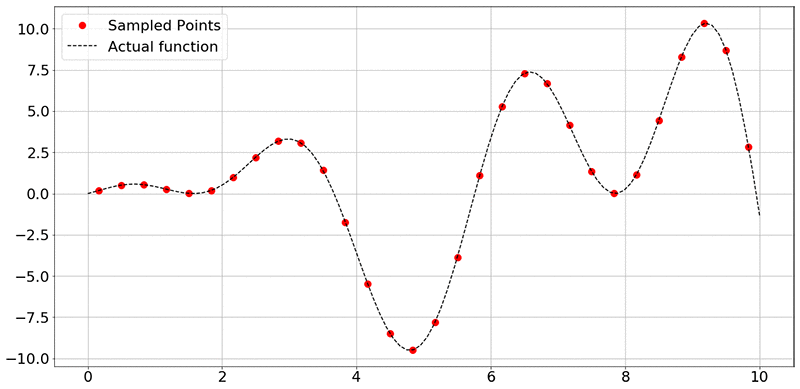
To collect data from the experiments, sample the function f(x) = x⋅sin(x)+x⋅cos(2x) at random points. In the figure below, the black dashed line represents all values of f(x) in that range of x (here, 0 to 10), and the red dots represent the 30 sampled points.

To reiterate, the goal of the network is to use the training data (x and y axis values corresponding to the sampled data points) to learn to approximate the function. Provided that the neural network has learned a good approximation of the original function f(x), you can use the trained model to predict the values of the outputs, given inputs, without running an expensive or a time-consuming experiment.

If you’re interested in the more technical details, see Scalable Bayesian Optimization Using Deep Neural Networks. In brief, a Bayesian linear regressor is added to the last hidden layer of a deep neural network. This results in adaptive basis regression, a well-established statistical technique that scales linearly in the number of observations. These “basis functions” are parameterized using the weights and biases of the deep neural network. Finally, the mean and variance of the prediction can then be calculated using the formulae (4) and (5) in the Scalable Bayesian Optimization paper. So, you are not only obtaining a function approximation, but also the uncertainty associated with the predicted points.

Given the small size of the input vector, you train the model on a notebook instance with the conda36_pytorch kernel. I highly encourage you to resort to distributed training using Amazon SageMaker rather than local training when appropriate. The following command starts the training process:

deepgaussian.train(DOE,yvalues)

In PyTorch, the training loop is implemented as follows:

for t in range(self.num_epochs):
    y_pred = self.network(self.X)
    loss = loss_fn(y_pred.view(-1), self.Y.view(-1))
    optimizer.zero_grad()
    loss.backward()
    optimizer.step()

Obtain the following output indicating that the network has been trained:

Optimization terminated successfully.
         Current function value: 6.652170
         Iterations: 49
         Function evaluations: 99

Finally, plot the surrogate model using a set of test values (xtest), as follows:

mean, var = deepgaussian.predict(x_test)
plt.figure(figsize=(20,10))
plt.rcParams.update({'font.size': 22})
plt.plot(DOE, yvalues, "ro",label='Sampled Points',markersize=10)
plt.plot(xtest[:,0], fvals, "k--", label = 'Actual function')
plt.plot(xtest[:,0], mean, "blue",label='Surrogate function')
plt.fill_between(xtest[:, 0], mean + np.sqrt(var), mean - np.sqrt(var), color="orange", alpha=0.4, label='+/- Variance')
plt.grid()
plt.legend()
plt.show()

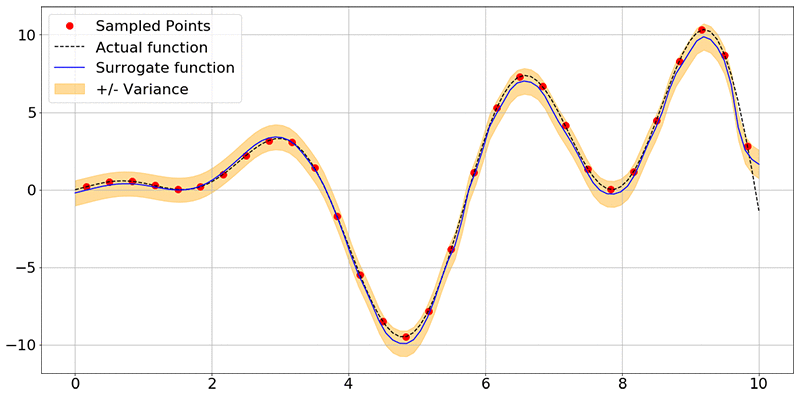
You obtain the following image:

As you can see, the network has learned the shape of the function f(x) accurately, and also associates some uncertainty with each point it used for prediction. Here, the blue lines are prediction means and the orange band is the uncertainty associated with each of the predictions.

Conclusion

At this point, the model can be used to predict any number of experimental output values within a confidence interval, without actually performing the experiment. What is more useful is using an optimization package to find the optimum input value that corresponds to the minimum f(x) value. To start, see the scipy.optimize or inspyred packages.

Lastly, this is a starter example that runs locally on a notebook instance. Get started now by launching the Amazon SageMaker console and exploring distributed training on Amazon Sagemaker. For large-scale optimization jobs, consider doing distributed training on Amazon SageMaker by submitting the PyTorch script to the Amazon SageMaker Pytorch estimator.


About the Author

Shreyas Subramanian is a AI/ML specialist Solutions Architect, and helps customers by using Machine Learning to solve their business challenges using the AWS platform.


Google at Interspeech 2019

This week, Graz, Austria hosts the 20th Annual Conference of the International Speech Communication Association (Interspeech 2019), one of the world‘s most extensive conferences on the research and engineering for spoken language processing. Over 2,000 experts in speech-related research fields gather to take part in oral presentations and poster sessions and to collaborate with streamed events across the globe.

As a Gold Sponsor of Interspeech 2019, we are excited to present 30 research publications, and demonstrate some of the impact speech technology has made in our products, from accessible, automatic video captioning to a more robust, reliable Google Assistant. If you’re attending Interspeech 2019, we hope that you’ll stop by the Google booth to meet our researchers and discuss projects and opportunities at Google that go into solving interesting problems for billions of people. Our researchers will also be on hand to discuss Google Cloud Text-to-Speech and Speech-to-text, demo Parrotron, and more. You can also learn more about the Google research being presented at Interspeech 2019 below (Google affiliations in blue).

Organizing Committee includes:
Michiel Bacchiani

Technical Program Committee includes:
Tara Sainath

Tutorials
Neural Machine Translation
Organizers include: Wolfgang Macherey, Yuan Cao

Accepted Publications
Building Large-Vocabulary ASR Systems for Languages Without Any Audio Training Data (link to appear soon)
Manasa Prasad, Daan van Esch, Sandy Ritchie, Jonas Fromseier Mortensen

Multi-Microphone Adaptive Noise Cancellation for Robust Hotword Detection (link to appear soon)
Yiteng Huang, Turaj Shabestary, Alexander Gruenstein, Li Wan

Direct Speech-to-Speech Translation with a Sequence-to-Sequence Model
Ye Jia, Ron Weiss, Fadi Biadsy, Wolfgang Macherey, Melvin Johnson, Zhifeng Chen, Yonghui Wu

Improving Keyword Spotting and Language Identification via Neural Architecture Search at Scale (link to appear soon)
Hanna Mazzawi, Javier Gonzalvo, Aleks Kracun, Prashant Sridhar, Niranjan Subrahmanya, Ignacio Lopez Moreno, Hyun Jin Park, Patrick Violette

Shallow-Fusion End-to-End Contextual Biasing (link to appear soon)
Ding Zhao, Tara Sainath, David Rybach, Pat Rondon, Deepti Bhatia, Bo Li, Ruoming Pang

VoiceFilter: Targeted Voice Separation by Speaker-Conditioned Spectrogram Masking
Quan Wang, Hannah Muckenhirn, Kevin Wilson, Prashant Sridhar, Zelin Wu, John Hershey, Rif Saurous, Ron Weiss, Ye Jia, Ignacio Lopez Moreno

SpecAugment: A Simple Data Augmentation Method for Automatic Speech Recognition
Daniel Park, William Chan, Yu Zhang, Chung-Cheng Chiu, Barret Zoph, Ekin Dogus Cubuk, Quoc Le

Two-Pass End-to-End Speech Recognition
Ruoming Pang, Tara Sainath, David Rybach, Yanzhang He, Rohit Prabhavalkar, Mirko Visontai, Qiao Liang, Trevor Strohman, Yonghui Wu, Ian McGraw, Chung-Cheng Chiu

On the Choice of Modeling Unit for Sequence-to-Sequence Speech Recognition
Kazuki Irie, Rohit Prabhavalkar, Anjuli Kannan, Antoine Bruguier, David Rybach, Patrick Nguyen

Contextual Recovery of Out-of-Lattice Named Entities in Automatic Speech Recognition (link to appear soon)
Jack Serrino, Leonid Velikovich, Petar Aleksic, Cyril Allauzen

Joint Speech Recognition and Speaker Diarization via Sequence Transduction
Laurent El Shafey, Hagen Soltau, Izhak Shafran

Personalizing ASR for Dysarthric and Accented Speech with Limited Data
Joel Shor, Dotan Emanuel, Oran Lang, Omry Tuval, Michael Brenner, Julie Cattiau, Fernando Vieira, Maeve McNally, Taylor Charbonneau, Melissa Nollstadt, Avinatan Hassidim, Yossi Matias

An Investigation Into On-Device Personalization of End-to-End Automatic Speech Recognition Models (link to appear soon)
Khe Chai Sim, Petr Zadrazil, Francoise Beaufays

Salient Speech Representations Based on Cloned Networks
Bastiaan Kleijn, Felicia Lim, Michael Chinen, Jan Skoglund

Cross-Lingual Consistency of Phonological Features: An Empirical Study (link to appear soon)
Cibu Johny, Alexander Gutkin, Martin Jansche

LibriTTS: A Corpus Derived from LibriSpeech for Text-to-Speech
Heiga Zen, Viet Dang, Robert Clark, Yu Zhang, Ron Weiss, Ye Jia, Zhifeng Chen, Yonghui Wu

Improving Performance of End-to-End ASR on Numeric Sequences
Cal Peyser, Hao Zhang, Tara Sainath, Zelin Wu

Developing Pronunciation Models in New Languages Faster by Exploiting Common Grapheme-to-Phoneme Correspondences Across Languages (link to appear soon)
Harry Bleyan, Sandy Ritchie, Jonas Fromseier Mortensen, Daan van Esch

Phoneme-Based Contextualization for Cross-Lingual Speech Recognition in End-to-End Models
Ke Hu, Antoine Bruguier, Tara Sainath, Rohit Prabhavalkar, Golan Pundak

Fréchet Audio Distance: A Reference-free Metric for Evaluating Music Enhancement Algorithms
Kevin Kilgour, Mauricio Zuluaga, Dominik Roblek, Matthew Sharifi

Learning to Speak Fluently in a Foreign Language: Multilingual Speech Synthesis and Cross-Language Voice Cloning
Yu Zhang, Ron Weiss, Heiga Zen, Yonghui Wu, Zhifeng Chen, RJ Skerry-Ryan, Ye Jia, Andrew Rosenberg, Bhuvana Ramabhadran

Sampling from Stochastic Finite Automata with Applications to CTC Decoding
Martin Jansche, Alexander Gutkin

Large-Scale Multilingual Speech Recognition with a Streaming End-to-End Model (link to appear soon)
Anjuli Kannan, Arindrima Datta, Tara Sainath, Eugene Weinstein, Bhuvana Ramabhadran, Yonghui Wu, Ankur Bapna, Zhifeng Chen, SeungJi Lee

A Real-Time Wideband Neural Vocoder at 1.6 kb/s Using LPCNet
Jean-Marc Valin, Jan Skoglund

Low-Dimensional Bottleneck Features for On-Device Continuous Speech Recognition
David Ramsay, Kevin Kilgour, Dominik Roblek, Matthew Sharif

Unified Verbalization for Speech Recognition & Synthesis Across Languages (link to appear soon)
Sandy Ritchie, Richard Sproat, Kyle Gorman, Daan van Esch, Christian Schallhart, Nikos Bampounis, Benoit Brard, Jonas Mortensen, Amelia Holt, Eoin Mahon

Better Morphology Prediction for Better Speech Systems (link to appear soon)
Dravyansh Sharma, Melissa Wilson, Antoine Bruguier

Dual Encoder Classifier Models as Constraints in Neural Text Normalization
Ajda Gokcen, Hao Zhang, Richard Sproat

Large-Scale Visual Speech Recognition
Brendan Shillingford, Yannis Assael, Matthew Hoffman, Thomas Paine, Cían Hughes, Utsav Prabhu, Hank Liao, Hasim Sak, Kanishka Rao, Lorrayne Bennett, Marie Mulville, Ben Coppin, Ben Laurie, Andrew Senior, Nando de Freitas

Parrotron: An End-to-End Speech-to-Speech Conversion Model and its Applications to Hearing-Impaired Speech and Speech Separation
Fadi Biadsy, Ron Weiss, Pedro Moreno, Dimitri Kanevsky, Ye Jia

NVIDIA Software Head Helps Transform Alma Mater into Leading AI Center with $34M Gift 

Three decades and hundreds of millions of lines of computer code after graduating from the Milwaukee School of Engineering, NVIDIA’s Dwight Diercks returned today to celebrate a donation that will put his alma mater at the forefront of AI undergraduate education.

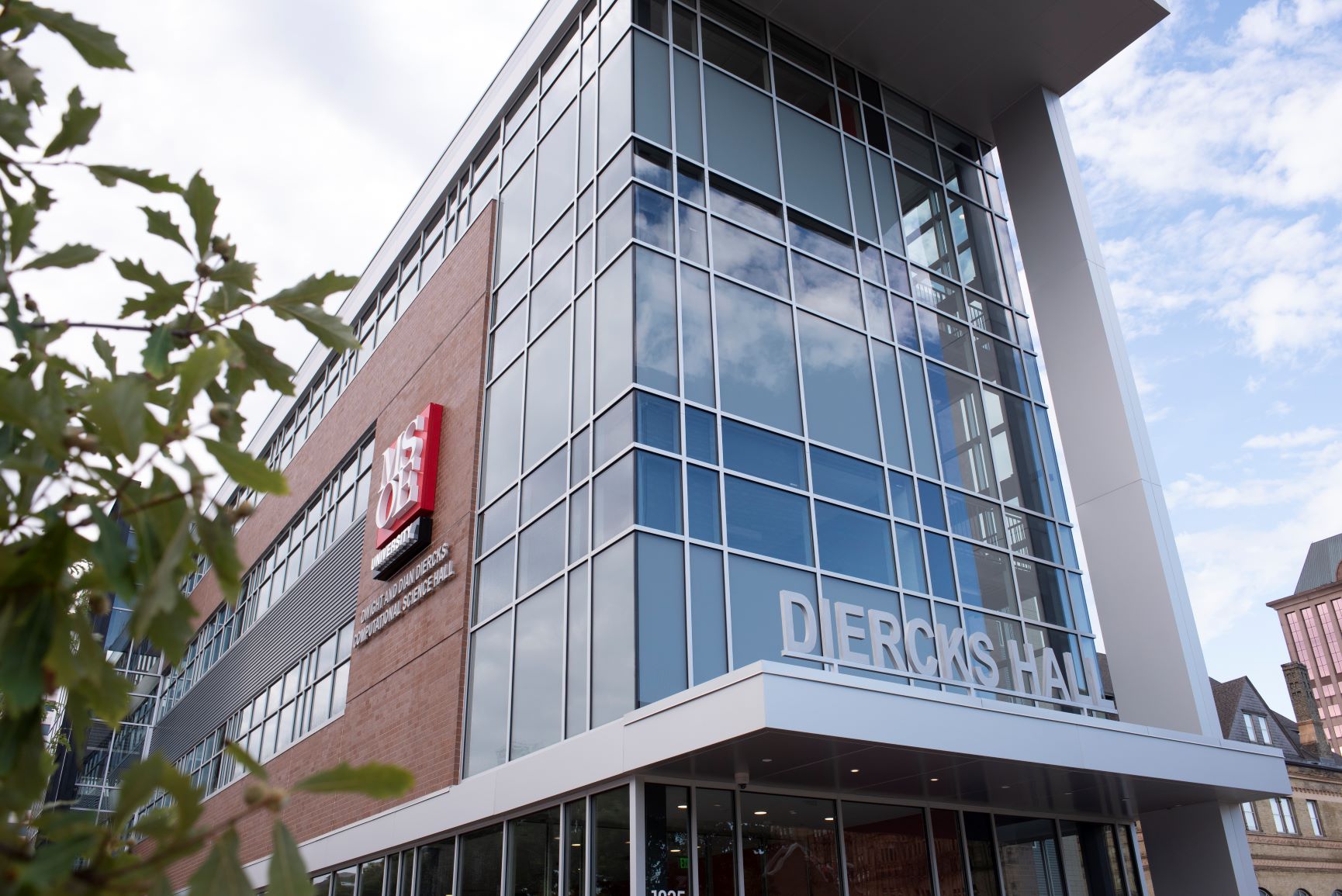
Exterior of Diercks Hall at MSOE
Diercks Hall at MSOE in Milwaukee.

Diercks, who grew up the son of a mailman, working on his family’s pig farm in Red Wing, Minnesota, came to NVIDIA as its 22nd employee. Today, he oversees a team of some 5,000 software engineers around the world who ship tens of millions of lines of code each month that help accelerate the world’s computing.

Diercks’ $34 million gift, the largest from an alum in MSOE’s 116-year history, is the keystone in the school’s efforts to infuse its engineering program with artificial intelligence. Two years ago, MSOE became one of the very few programs, together with Carnegie Mellon, to offer a computer science degree focused on AI.

As a result, at a time when many smaller schools wrestle with getting students in the door and financial pressures, MSOE is on a roll. Enrollment in computer science-related programs at the 2,800-student school — based in the heart of downtown Milwaukee, just a few blocks from the green parkland alongside Lake Michigan — is up 67 percent since the program was introduced. Other key admissions indicators are also up by strong double digits.

Speaking ahead of a ceremony to mark the donation, MSOE President John Walz said, “AI has very quickly become huge for us.” He noted that the new computer science program is already on pace to be the school’s second largest program and that the number of companies now recruiting there is approaching the number in its graduating class.

The Milwaukee School of Engineering’s new supercomputer is dubbed “Rosie.”

Central to MSOE’s focus on AI is the spanking new NVIDIA-powered AI supercomputer housed in a glass-walled area within the newly constructed four-story Diercks Hall. The system includes three NVIDIA DGX-1 pods, each with eight NVIDIA V100 Tensor Core GPUs, and 20 servers each with four NVIDIA T4 GPUs. The nodes are joined together by Mellanox networking fabric and share 200TB of network-attached storage.

Rare among supercomputers in higher education, the system —which provides 8.2 petaflops of deep learning performance — will be used for teaching undergrad classes.

Diercks, who made the donation with his wife, Dian, initiated the AI initiative because of the school’s highly practical, hands-on approach to teaching future engineers, leading them to spend more time in labs than classrooms. His own immersion in NVIDIA’s evolution in recent years into an AI powerhouse from its roots in computer gaming helped him encourage MSOE to reshape its approach around preparing students for the brave new age of artificial intelligence.

Dwight and Dian Diercks
Dwight and Dian Diercks.

“We knew MSOE needed a supercomputer and one that can expand to scale out for students and scale up for local industries and professors,” Diercks said. In an emotional speech, he thanked a high school teacher, MSOE professor and NVIDIA founder and CEO Jensen Huang for reinforcing what his parents taught him about the importance of hard work and continuous learning.

“You don’t ever take a day off learning,” he quoted his former math teacher, Ron Gray, as telling him when he tried to skip out on a test. The long-retired teacher shyly stood up in the back of the hall.

While MSOE students come to the school from across the Midwest, with a smattering from California and Texas, many choose to stay in the Milwaukee area. The largely deindustrialized city of German church spires — which a century ago represented American innovation, giving birth to the typewriter, steam shovel and motorcycle — is home to thriving companies like Northwestern Mutual, Harley-Davidson and Rockwell Automation that hire many grads.

While not widely recognized as tech companies, these regional giants collect oceans of data that need to be crunched using the latest tools of deep learning and data science.

Huang, who delivered a keynote after the ceremony, called AI the fourth industrial revolution that will sweep across the work of virtually every industry. MSOE’s new AI push and supercomputer will help it enable generations of computer scientists trained for tomorrow’s challenges.

“MSOE now has the single most important instrument of knowledge today,” Huang said, delivering the first address in the NVIDIA auditorium. “Without access to the correct instrument, you can’t access knowledge.”

Outside the auditorium, Kyle Rodrigues, a sophomore from suburban Chicago enrolled in the new computer science program, said it was AI that drew him to MSOE. He exclaimed how thrilled he was to get his hands on the supercomputer, which MSOE is christening “Rosie,” the term used for a half dozen pioneering women who worked in the 1940s programming the early ENIAC computer — and which was also the name of Dierck’s mother.

The post NVIDIA Software Head Helps Transform Alma Mater into Leading AI Center with $34M Gift  appeared first on The Official NVIDIA Blog.

Launching TensorFlow distributed training easily with Horovod or Parameter Servers in Amazon SageMaker

Amazon SageMaker supports all the popular deep learning frameworks, including TensorFlow. Over 85% of TensorFlow projects in the cloud run on AWS. Many of these projects already run in Amazon SageMaker. This is due to the many conveniences Amazon SageMaker provides for TensorFlow model hosting and training, including fully managed distributed training with Horovod and parameter servers.

Customers are increasingly interested in training models on large datasets, which can take a week or more. In these cases, you might be able to speed the process by distributing training on multiple machines or processes in a cluster. This post discusses how Amazon SageMaker helps you set up and launch distributed training with TensorFlow quickly, without the expense and difficulty of directly managing your training clusters.

Starting with TensorFlow version 1.11, you can use Amazon SageMaker prebuilt TensorFlow containers: Simply provide a Python training script, specify hyperparameters, and indicate your training hardware configuration. Amazon SageMaker does the rest, including spinning up a training cluster and tearing down the cluster when training ends. This feature is called “script mode.” Script mode currently supports two distributed training approaches out-of-the-box:

  • Option #1: TensorFlow’s native parameter server (TensorFlow versions 1.11 and above)
  • Option #2: Horovod (TensorFlow versions 1.12 and above)

In the following sections, we provide an overview of the steps required to enable these TensorFlow distributed training options in Amazon SageMaker script mode.

Option #1: Parameter servers

One common pattern in distributed training is to use one or more dedicated processes to collect gradients computed by “worker” processes, then aggregate them and distribute the updated gradients back to the workers in an asynchronous manner. These processes are known as parameter servers.

In a TensorFlow parameter server cluster in Amazon SageMaker script mode, each instance in the cluster runs one parameter server process and one worker process. Each parameter server communicates with all workers (“all-to-all”), as shown in the following diagram (from Meet Horovod: Uber’s Open Source Distributed Deep Learning Framework for TensorFlow):
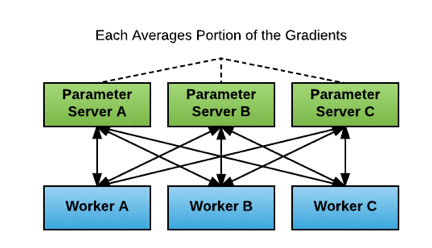
In Amazon SageMaker script mode, the implementation of parameter servers is asynchronous: each worker computes gradients and submits gradient updates to the parameter servers independently, without waiting for the other workers’ updates.

In practice, asynchronous updates usually don’t have an overly adverse impact. Workers that fall behind might submit stale gradients, which can negatively affect training convergence. Generally, this can be managed by reducing the learning rate. On the plus side, because there is no waiting for other workers, asynchronous updates can result in faster training.

If you use Amazon SageMaker script mode, you don’t have to set up and manage the parameter server cluster yourself. The Amazon SageMaker prebuilt TensorFlow container comes with a built-in script mode option for use with parameter servers. Using this option saves time and spares you the complexities of cluster management.

The following code example shows how to set up a parameter server cluster with script mode. Specify “parameter_server” as the value in the distributions parameter of an Amazon SageMaker TensorFlow Estimator object. Amazon SageMaker script mode then launches a parameter server thread on each instance in the training cluster and executes your training code in a separate worker thread on each instance. To run a distributed training job with multiple instances, set train_instance_count to a number larger than 1.

from sagemaker.tensorflow import TensorFlow

ps_instance_type = 'ml.p3.2xlarge'
ps_instance_count = 2

distributions = {'parameter_server': {
                    'enabled': True}
                }

hyperparameters = {'epochs': 60, 'batch-size' : 256}

estimator_ps = TensorFlow( base_job_name='ps-cifar10-tf',
                           source_dir='code',
                           entry_point='train_ps.py', 
                           role=role,
                           framework_version='1.13',
                           py_version='py3',
                           hyperparameters=hyperparameters,
                           train_instance_count=ps_instance_count, 
                           train_instance_type=ps_instance_type,
                           model_dir=model_dir,
                           distributions=distributions )

# start training; inputs can be in Amazon S3, Amazon EFS, or Amazon FSx for Lustre
estimator_ps.fit(inputs)

For an example of how to use parameter server-based distributed training with script mode, see our TensorFlow Distributed Training Options example on GitHub.

Option #2: Horovod

Horovod is an open source framework for distributed deep learning. It is available for use with TensorFlow and several other deep learning frameworks. As with parameter servers, Amazon SageMaker automates Horovod cluster setup and runs the appropriate commands to make sure that training goes smoothly without the need for you to manage clusters directly yourself.

Horovod’s cluster architecture differs from the parameter server architecture. Recall that the parameter server architecture uses the all-to-all communication model, where the amount of data sent is proportional to the number of processes. By contrast, Horovod uses Ring-AllReduce, where the amount of data sent is more nearly proportional to the number of cluster nodes, which can be more efficient when training with a cluster where each node has multiple GPUs (and thus multiple worker processes).

Additionally, whereas the parameter server update process described above is asynchronous, in Horovod updates are synchronous. After all processes have completed their calculations for the current batch, gradients calculated by each process circulate around the ring until every process has a complete set of gradients for the batch from all processes.

At that time, each process updates its local model weights, so every process has the same model weights before starting work on the next batch. The following diagram shows how Ring-AllReduce works (from Meet Horovod: Uber’s Open Source Distributed Deep Learning Framework for TensorFlow):

Horovod employs Message Passing Interface (MPI), a popular standard for managing communication between nodes in a high-performance cluster, and uses NVIDIA’s NCCL library for GPU-level communication.

The Horovod framework eliminates many of the difficulties of Ring-AllReduce cluster setup and works with several popular deep learning frameworks and APIs. For example, if you are using the popular Keras API, you can use either the reference Keras implementation or tf.keras directly with Horovod without converting to an intermediate API such as tf.Estimator.

In Amazon SageMaker script mode, Horovod is available for TensorFlow version 1.12 or newer. When you use Horovod in script mode, the Amazon SageMaker TensorFlow container sets up the MPI environment and executes the mpirun command to start jobs on the cluster nodes. To enable Horovod in script mode, you must change the Amazon SageMaker TensorFlow Estimator and your training script. To configure training with Horovod, specify the following fields in the distributions parameter of the Estimator:

  • enabled (bool): If set to True, MPI is set up and the mpirun command executes.
  • processes_per_host (int): Number of processes MPI should launch on each host. Set this flag for multi-GPU training.
  • custom_mpi_options (str): Any mpirun flags passed in this field are added to the mpirun command and executed by Amazon SageMaker for Horovod training.

The number of processes MPI launches on each host should not be greater than the available slots on the selected instance type.

For example, here’s how to create an Estimator object to launch Horovod distributed training on two hosts with one GPU/process each:

from sagemaker.tensorflow import TensorFlow

hvd_instance_type = 'ml.p3.2xlarge'
hvd_processes_per_host = 1
hvd_instance_count = 2

distributions = {'mpi': {
                    'enabled': True,
                    'processes_per_host': hvd_processes_per_host,
                    'custom_mpi_options': '-verbose --NCCL_DEBUG=INFO -x OMPI_MCA_btl_vader_single_copy_mechanism=none'
                        }
                }

hyperparameters = {'epochs': 60, 'batch-size' : 256}

estimator_hvd = TensorFlow(base_job_name='hvd-cifar10-tf',
                           source_dir='code',
                           entry_point='train_hvd.py', 
                           role=role,
                           framework_version='1.13',
                           py_version='py3',
                           hyperparameters=hyperparameters,
                           train_instance_count=hvd_instance_count, 
                           train_instance_type=hvd_instance_type,
                           distributions=distributions)

# start training; inputs can be in Amazon S3, Amazon EFS, or Amazon FSx for Lustre
estimator_hvd.fit(inputs)

Besides modifying the Estimator object, you also must make the following additions to the training script. You can make these changes conditional based on whether MPI is enabled.

  1. Run hvd.init().
  2. Pin a server GPU to be used by this process using config.gpu_options.visible_device_list. With the typical setup of one GPU per process, you can set this to local rank. In that case, the first process on the server allocates the first GPU, second process allocates the second GPU, and so forth.
  3. Scale the learning rate by number of workers. Effective batch size in synchronous distributed training should scale by the number of workers. An increase in learning rate compensates for the increased batch size.
  4. Wrap the optimizer in hvd.DistributedOptimizer. The distributed optimizer delegates gradient computation to the original optimizer, averages gradients using allreduce, and then applies those averaged gradients.
  5. Add the code hvd.BroadcastGlobalVariablesHook(0) to broadcast initial variable states from rank 0 to all other processes. This initial broadcast makes sure that all workers receive consistent initialization (with random weights or restored from a checkpoint) when training starts. Alternatively, if you’re not using MonitoredTrainingSession, you can execute the hvd.broadcast_global_variables op after global variables initialize.
  6. Modify your code to save checkpoints only on worker 0 to prevent other workers from corrupting them. To do this, pass checkpoint_dir=None to tf.train.MonitoredTrainingSession if hvd.rank() != 0.

Find more details about Horovod at the Horovod GitHub Repository. For an example of Horovod usage with script mode, see our TensorFlow Distributed Training Options example on GitHub.

Choosing a distributed training option

Before moving to distributed training in a cluster, make sure that you have first tried scaling up on a single machine with multiple GPUs. Communication between multiple GPUs on a single machine is faster than communicating across a network between multiple machines. For more details, see the AWS whitepaper Power Machine Learning at Scale.

If you must scale out to a cluster instead of scaling up with more GPUs within a single machine, the next consideration is whether to choose the parameter server option or Horovod. This choice partly depends on the version of TensorFlow that you are using.

  • For TensorFlow versions 1.11 and newer in Amazon SageMaker script mode, you can use parameter servers.
  • To use Horovod, you must use TensorFlow versions 1.12 or newer.

The following chart summarizes some general guidelines regarding performance for each option. These rules aren’t absolute, and ultimately, the best choice depends on the specific use case. Typically, the performance significantly depends on how long it takes to share gradient updates during training. In turn, this is affected by the model size, gradients size, GPU specifications, and network speed.

Better CPU performance Better GPU performance

Relatively long time to share gradients

(larger number of gradients / bigger model size)

Parameter server Parameter server, OR Horovod on a single instance with multi-GPUs

Relatively short time to share gradients

(smaller number of gradients / lesser model size)

Parameter server Horovod

Complexity is another consideration. Parameter servers are straightforward to use for one GPU per instance. However, to use multi-GPU instances, you must set up multiple towers, with each tower assigned to a different GPU. A “tower” is a function for computing inference and gradients for a single model replica, which in turn is a copy of a model training on a subset of the complete dataset. Towers involve a form of data parallelism. Horovod also employs data parallelism but abstracts away the implementation details.

Finally, cluster size makes a difference. Given larger clusters with many GPUs, parameter server all-to-all communication can overwhelm network bandwidth. Reduced scaling efficiency can result, among other adverse effects. In such situations, you might find Horovod a better option.

Additional considerations

The example code for this post consists of one large TFRecord file containing the CIFAR-10 dataset, which is relatively small. However, larger datasets might require that you shard the data into multiple files, particularly if Pipe Mode is used (see the second bullet following). Sharding may be accomplished by specifying an Amazon S3 data source as a manifest file or ShardedByS3Key. Also, Amazon SageMaker provides other ways to make distributed training more efficient for very large datasets:

  • VPC training: Performing Horovod training inside a VPC improves the network latency between nodes, leading to higher performance and stability of Horovod training jobs. To learn how to conduct distributed training within a VPC, see the example notebook Horovod Distributed Training with Amazon SageMaker TensorFlow script mode.
  • Pipe Mode: For large datasets, using Pipe Mode reduces startup and training times. Pipe Mode streams training data from Amazon S3 directly to the algorithm (as a Linux FIFO), without saving to disk. For details about using Pipe Mode with TensorFlow in Amazon SageMaker, see Training with Pipe Mode using PipeModeDataset.
  • Amazon FSx for Lustre and Amazon EFS: performance on large datasets in File Mode may be improved in some circumstances using either Amazon FSx for Lustre or Amazon EFS. For more details, please refer to the related blog post.

Conclusion

Amazon SageMaker provides multiple tools to make distributed training quicker and easier to use. If neither parameter server nor Horovod fit your needs, you can always provide another distributed training option using a Bring Your Own Container (BYOC) approach. Amazon SageMaker gives you the flexibility to mix and match the tools best suited for your use case and dataset.

To get started with Tensorflow distributed training in script mode, go to Amazon SageMaker console. Either create a new Amazon SageMaker notebook instance or open an existing one. Then, simply import the distributed training example referenced in this blog post, and compare and contrast the parameter server option and the Horovod option.


About the authors

Rama Thamman is R&D Manager on the AWS R&D and Innovation Solutions Architecture team. He works with customers to build scalable cloud and machine learning solutions on AWS.



Brent Rabowsky focuses on data science at AWS and uses his expertise to help AWS customers with their data science projects.
 

Using Deep Learning to Inform Differential Diagnoses of Skin Diseases

An estimated 1.9 billion people worldwide suffer from a skin condition at any given time, and due to a shortage of dermatologists, many cases are seen by general practitioners instead. In the United States alone, up to 37% of patients seen in the clinic have at least one skin complaint and more than half of those patients are seen by non-dermatologists. However, studies demonstrate a significant gap in the accuracy of skin condition diagnoses between general practitioners and dermatologists, with the accuracy of general practitioners between 24% and 70%, compared to 7796% for dermatologists. This can lead to suboptimal referrals, delays in care, and errors in diagnosis and treatment.

Existing strategies for non-dermatologists to improve diagnostic accuracy include the use of reference textbooks, online resources, and consultation with a colleague. Machine learning tools have also been developed with the aim of helping to improve diagnostic accuracy. Previous research has largely focused on early screening of skin cancer, in particular, whether a lesion is malignant or benign, or whether a lesion is melanoma. However, upwards of 90% of skin problems are not malignant, and addressing these more common conditions is also important to reduce the global burden of skin disease.

In “A Deep Learning System for Differential Diagnosis of Skin Diseases,” we developed a deep learning system (DLS) to address the most common skin conditions seen in primary care. Our results showed that a DLS can achieve an accuracy across 26 skin conditions that is on par with U.S. board-certified dermatologists, when presented with identical information about a patient case (images and metadata). This study highlights the potential of the DLS to augment the ability of general practitioners who did not have additional specialty training to accurately diagnose skin conditions.

DLS Design
Clinicians often face ambiguous cases for which there is no clear cut answer. For example, is this patient’s rash stasis dermatitis or cellulitis, or perhaps both superimposed? Rather than giving just one diagnosis, clinicians generate a differential diagnosis, which is a ranked list of possible diagnoses. A differential diagnosis frames the problem so that additional workup (laboratory tests, imaging, procedures, consultations) and treatments can be systematically applied until a diagnosis is confirmed. As such, a deep learning system (DLS) that produces a ranked list of possible skin conditions for a skin complaint closely mimics how clinicians think and is key to prompt triage, diagnosis and treatment for patients.

To render this prediction, the DLS processes inputs, including one or more clinical images of the skin abnormality and up to 45 types of metadata (self-reported components of the medical history such as age, sex, symptoms, etc.). For each case, multiple images were processed using the Inception-v4 neural network architecture and combined with feature-transformed metadata, for use in the classification layer. In our study, we developed and evaluated the DLS with 17,777 de-identified cases that were primarily referred from primary care clinics to a teledermatology service. Data from 2010-2017 were used for training and data from 2017-2018 for evaluation. During model training, the DLS leveraged over 50,000 differential diagnoses provided by over 40 dermatologists.

To evaluate the DLS’s accuracy, we compared it to a rigorous reference standard based on the diagnoses from three U.S. board-certified dermatologists. In total, dermatologists provided differential diagnoses for 3,756 cases (“Validation set A”), and these diagnoses were aggregated via a voting process to derive the ground truth labels. The DLS’s ranked list of skin conditions was compared with this dermatologist-derived differential diagnosis, achieving 71% and 93% top-1 and top-3 accuracies, respectively.

Schematic of the DLS and how the reference standard (ground truth) was derived via the voting of three board-certified dermatologists for each case in the validation set.

Comparison to Professional Evaluations
In this study, we also compared the accuracy of the DLS to that of three categories of clinicians on a subset of the validation A dataset (“Validation set B”): dermatologists, primary care physicians (PCPs), and nurse practitioners (NPs) — all chosen randomly and representing a range of experience, training, and diagnostic accuracy. Because typical differential diagnoses provided by clinicians only contain up to three diagnoses, we compared only the top three predictions by the DLS with the clinicians. The DLS achieved a top-3 diagnostic accuracy of 90% on the validation B dataset, which was comparable to dermatologists and substantially higher than primary care physicians (PCPs) and nurse practitioners (NPs)—75%, 60%, and 55%, respectively, for the 6 clinicians in each group. This high top-3 accuracy suggests that the DLS may help prompt clinicians (including dermatologists) to consider possibilities that were not originally in their differential diagnoses, thus improving diagnostic accuracy and condition management.

The DLS’s leading (top-1) differential diagnosis is substantially higher than PCPs and NPs, and on par with dermatologists. This accuracy increases substantially when we look at the DLS’s top-3 accuracy, suggesting that in the majority of cases the DLS’s ranked list of diagnoses contains the correct ground truth answer for the case.

Assessing Demographic Performance
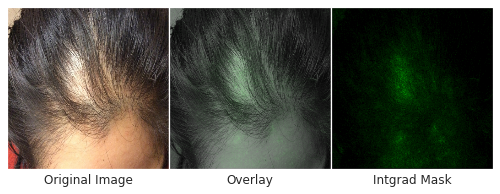
Skin type, in particular, is highly relevant to dermatology, where visual assessment of the skin itself is crucial to diagnosis. To evaluate potential bias towards skin type, we examined DLS performance based on the Fitzpatrick skin type, which is a scale that ranges from Type I (“pale white, always burns, never tans”) to Type VI (“darkest brown, never burns”). To ensure sufficient numbers of cases on which to draw convincing conclusions, we focused on skin types that represented at least 5% of the data — Fitzpatrick skin types II through IV. On these categories, the DLS’s accuracy was similar, with a top-1 accuracy ranging from 69-72%, and the top-3 accuracy from 91-94%. Encouragingly, the DLS also remained accurate in patient subgroups for which significant numbers (at least 5%) were present in the dataset based on other self-reported demographic information: age, sex, and race/ethnicities. As further qualitative analysis, we assessed via saliency (explanation) techniques that the DLS was reassuringly “focusing” on the abnormalities instead of on skin tone.

Left: An example of a case with hair loss that was challenging for non-specialists to arrive at the specific diagnosis, which is necessary for determining appropriate treatment. Right: An image with regions highlighted in green showing the areas that the DLS identified as important and used to make its prediction. Center: The combined image, which indicates that the DLS mostly focused on the area with hair loss to make this prediction, instead of on forehead skin color, for example, which may indicate potential bias.

Incorporating Multiple Data Types
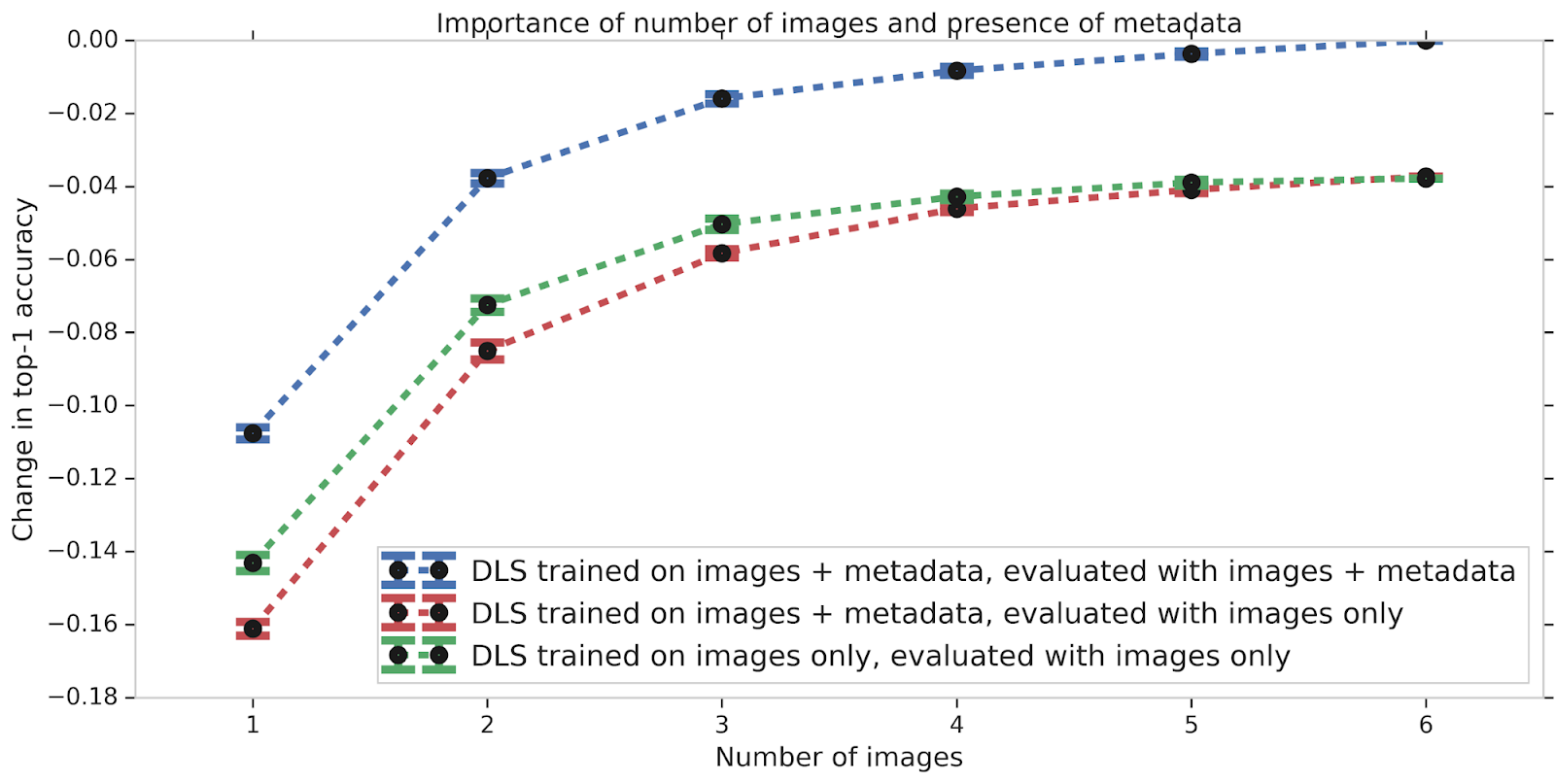
We also studied the effect of different types of input data on the DLS performance. Much like how having images from several angles can help a teledermatologist more accurately diagnose a skin condition, the accuracy of the DLS improves with increasing number of images. If metadata (e.g., the medical history) is missing, the model does not perform as well. This accuracy gap, which may occur in scenarios where no medical history is available, can be partially mitigated by training the DLS with only images. Nevertheless, this data suggests that providing the answers to a few questions about the skin condition can substantially improve the DLS accuracy.

The DLS performance improves when more images (blue line) or metadata (blue compared with red line) are present. In the absence of metadata as input, training a separate DLS using images alone leads to a marginal improvement compared to the current DLS (green line).

Future Work and Applications
Though these results are very promising, much work remains ahead. First, as reflective of real-world practice, the relative rarity of skin cancer such as melanoma in our dataset hindered our ability to train an accurate system to detect cancer. Related to this, the skin cancer labels in our dataset were not biopsy-proven, limiting the quality of the ground truth in this regard. Second, while our dataset did contain a variety of Fitzpatrick skin types, some skin types were too rare in this dataset to allow meaningful training or analysis. Finally, the validation dataset was from one teledermatology service. Though 17 primary care locations across two states were included, additional validation on cases from a wider geographical region will be critical. We believe these limitations can be addressed by including more cases of biopsy-proven skin cancers in the training and validation sets, and including cases representative of additional Fitzpatrick skin types and from other clinical centers.

The success of deep learning to inform the differential diagnosis of skin disease is highly encouraging of such a tool’s potential to assist clinicians. For example, such a DLS could help triage cases to guide prioritization for clinical care or could help non-dermatologists initiate dermatologic care more accurately and potentially improve access. Though significant work remains, we are excited for future efforts in examining the usefulness of such a system for clinicians. For research collaboration inquiries, please contact dermatology-research@google.com.

Acknowledgements
This work involved the efforts of a multidisciplinary team of software engineers, researchers, clinicians and cross functional contributors. Key contributors to this project include Yuan Liu, Ayush Jain, Clara Eng, David H. Way, Kang Lee, Peggy Bui, Kimberly Kanada, Guilherme de Oliveira Marinho, Jessica Gallegos, Sara Gabriele, Vishakha Gupta, Nalini Singh, Vivek Natarajan, Rainer Hofmann-Wellenhof, Greg S. Corrado, Lily H. Peng, Dale R. Webster, Dennis Ai, Susan Huang, Yun Liu, R. Carter Dunn and David Coz. The authors would like to acknowledge William Chen, Jessica Yoshimi, Xiang Ji and Quang Duong for software infrastructure support for data collection. Thanks also go to Genevieve Foti, Ken Su, T Saensuksopa, Devon Wang, Yi Gao and Linh Tran. Last but not least, this work would not have been possible without the participation of the dermatologists, primary care physicians, nurse practitioners who reviewed cases for this study, Sabina Bis who helped to establish the skin condition mapping and Amy Paller who provided feedback on the manuscript.

Cure for the Common Code: San Francisco Startup Uses AI to Automate Medical Coding

Doctors’ handwriting is notoriously difficult to read. Even more cryptic is medical coding — the process of turning a clinician’s notes into a set of alphanumeric codes representing every diagnosis and procedure.

Although this system is used in over 100 countries worldwide, accurate coding is of particular significance in the U.S., where medical codes form the basis for the bills doctors, clinics and hospitals issue to insurance providers and patients.

More than 150,000 codes are used in the U.S.’s adaptation of the International Classification of Diseases, a cataloging standard developed by the World Health Organization.

The diagnostic code for a pedestrian hit by a pickup truck? V03.10XA. Type 2 diabetes diagnosis? E11.9. There are also a set of procedural codes for everything a doctor might do, like put a cast on a patient’s broken right forearm (2W3CX2Z) or insert a pacemaker into a coronary vein (02H40NZ).

After every doctor’s appointment or procedure, a clinician’s summary of the interaction is converted into these codes. When done by humans, the turnaround time for medical chart coding — within a healthcare organization or at a private firm — is often two days or more. Natural language processing AI, accelerated by GPUs, can shrink that time to minutes or seconds.

San Francisco-based Fathom is developing deep learning tools to automate the painstaking medical coding process while increasing accuracy. The startup’s tools can help address the shortage of trained clinical coders, improve the speed and precision of billing, and allow human coders to focus on complex cases and follow-up queries.

“Sometimes you have to go back to the doctor to ask for clarification,” said Christopher Bockman, co-founder and chief technology officer of Fathom, a member of the NVIDIA Inception virtual accelerator program. “The longer that process takes, the harder it is for the doctor to remember what happened.”

Fathom uses NVIDIA P100 and V100 Tensor Core GPUs in Google Cloud for both training and inference of its deep learning algorithms. Founded in 2016, the company now works with several of the largest medical coding operations in the U.S., representing more than 200 million annual patient encounters. Its tools can reduce human time spent on medical coding by as much as 90 percent.

Deciphering the Doctor

At any doctor’s appointment, emergency room visit or surgical procedure, healthcare providers type up notes describing the interaction. While there are some standardized formats, these medical records differ by hospital, by type of appointment or procedure, and by whether the note is written during the patient interaction or after.

Medical coders make sense of this unstructured text, categorizing every test, treatment and procedure into a list of codes. Once coded, a healthcare provider’s billing department turns the reports into an invoice to collect payments from insurance providers and patients.

It’s a messy process — for a human or an AI. Human coders agree with each other less than two-thirds of the time in key scenarios, studies show. And research has found that half or more medical charts have coding errors.

“The challenge for us is these notes can vary quite a bit,” Bockman said. “There’s a push to standardize, but that tends to make the doctor’s job a lot harder. Human health is complex, so it’s hard to come up with a format that works for every case.”

Coding an AI that Codes

As a machine learning problem, medical coding shares elements of two kinds of tasks: multilabel classification and sequence-to-sequence NLP. An effective AI must understand the text in a doctor’s note and accurately tag it with a list of diagnoses and procedures organized in the right order for billing.

Fathom is tackling this challenge, aided by tools such as NVIDIA’s GPU-optimized version of BERT, a leading natural language understanding model. The team uses the TensorFlow deep learning framework and relies on the mixed-precision training provided by Tensor Cores to accelerate the large-scale processing of medical documents that vary widely in size.

Using NVIDIA GPUs for inference allows Fathom to easily scale up to process upwards of millions of healthcare encounters per hour.

“While lowering costs matter, the ability to instantly add the capacity of thousands of medical coders to their operations has been the game-changer for our clients,” said Andrew Lockhart, Fathom’s co-founder and CEO.

Relying on NVIDIA GPUs on Google Cloud helps the team ramp its usage up and down based on demand.

“We have very bursty needs,” Bockman said, referring to the team’s fluctuating computational workload. “Sometimes we might be trying to retrain different variants of the same large model, while other times we’re doing a lot of experimentation or just doing inference. We might need a single GPU or many dozens of them.”

The startup chose Google Cloud, Bockman said, in part because the data is encrypted by default — one of the requirements for compliance with HIPAA and SOC 2 privacy requirements.

While medical coding is the main activity done today with doctor’s notes, unlocking the information contained in these health records could enable a wide range of use cases beyond billing and reimbursement, Bockman says.

AI that quickly and accurately analyzes medical charts and appointment records at scale can help doctors spot patient illnesses that may otherwise have been missed, predict likely patient outcomes, suggest treatment options — and even identify promising patient candidates for clinical trials.

The post Cure for the Common Code: San Francisco Startup Uses AI to Automate Medical Coding appeared first on The Official NVIDIA Blog.

Learning Cross-Modal Temporal Representations from Unlabeled Videos

While people can easily recognize what activities are taking place in videos and anticipate what events may happen next, it is much more difficult for machines. Yet, increasingly, it is important for machines to understand the contents and dynamics of videos for applications, such as temporal localization, action detection and navigation for self-driving cars. In order to train neural networks to perform such tasks, it is common to use supervised training, in which the training data consists of videos that have been meticulously labeled by people on a frame-by-frame basis. Such annotations are hard to acquire at scale. Consequently, there is much interest in self-supervised learning, in which models are trained on various proxy tasks, and the supervision of those tasks naturally resides in the data itself.

In “VideoBERT: A Joint Model for Video and Language Representation Learning” (VideoBERT) and “Contrastive Bidirectional Transformer for Temporal Representation Learning” (CBT), we propose to learn temporal representations from unlabeled videos. The goal is to discover high-level semantic features that correspond to actions and events that unfold over longer time scales. To accomplish this, we exploit the key insight that human language has evolved words to describe high-level objects and events. In videos, speech tends to be temporally aligned with the visual signals, and can be extracted by using off-the-shelf automatic speech recognition (ASR) systems, and thus provides a natural source of self-supervision. Our model is an example of cross-modal learning, as it jointly utilizes the signals from visual and audio (speech) modalities during training.

Image frames and human speech from the same video locations are often semantically aligned. The alignment is non-exhaustive and sometimes noisy, which we hope to mitigate by pretraining on larger datasets. For the left example, the ASR output is, “Keep rolling tight and squeeze the air out to its side and you can kind of pull a little bit.”, where the actions are captured by speech but the objects are not. For the right example, the ASR output is, “This is where you need to be patient patient patient,” which is not related to the visual content at all.

A BERT Model for Videos
The first step of representation learning is to define a proxy task that leads the model to learn temporal dynamics and cross-modal semantic correspondence from long, unlabeled videos. To this end, we generalize the Bidirectional Encoder Representations from Transformers (BERT) model. The BERT model has shown state-of-the-art performance on various natural language processing tasks, by applying the Transformer architecture to encode long sequences, and pretraining on a corpus containing a large amount of text. BERT uses the cloze test as its proxy task, in which the BERT model is forced to predict missing words from context bidirectionally, instead of just predicting the next word in a sequence.

To do this, we generalize the BERT training objective, using image frames combined with the ASR sentence output at the same locations to compose cross-modal “sentences”. The image frames are converted into visual tokens with durations of 1.5 seconds, based on visual feature similarities. They are then concatenated with the ASR word tokens. We train the VideoBERT model to fill out the missing tokens from the visual-text sentences. Our hypothesis, which our experiments support, is that by pretraining on this proxy task, the model learns to reason about longer-range temporal dynamics (visual cloze) and high-level semantics (visual-text cloze).

Illustration of VideoBERT in the context of a video and text masked token prediction, or cloze, task. Bottom: visual and text (ASR) tokens from the same locations of videos are concatenated to form the inputs to VideoBERT. Some visual and text tokens are masked out. Middle: VideoBERT applies the Transformer architecture to jointly encode bidirectional visual-text context. Yellow and pink boxes correspond to the input and output embeddings, respectively. Top: the training objective is to recover the correct tokens for the masked locations.

Inspecting the VideoBERT Model
We trained VideoBERT on over one million instructional videos, such as cooking, gardening and vehicle repair. Once trained, one can inspect what the VideoBERT model learns on a number of tasks to verify that the output accurately reflects the video content. For example, text-to-video prediction can be used to automatically generate a set of instructions (such as a recipe) from video, yielding video segments (tokens) that reflect what is described at each step. In addition, video-to-video prediction can be used to visualize possible future content based on an initial video token.

Qualitative results from VideoBERT, pretrained on cooking videos. Top: Given some recipe text, we generate a sequence of visual tokens. Bottom: Given a visual token, we show the top three future tokens forecast by VideoBERT at different time scales. In this case, the model predicts that a bowl of flour and cocoa powder may be baked in an oven, and may become a brownie or cupcake. We visualize the visual tokens using the images from the training set closest to the tokens in feature space.

To verify if VideoBERT learns semantic correspondences between videos and text, we tested its “zero-shot” classification accuracy on a cooking video dataset in which neither the videos nor annotations were used during pre-training. To perform classification, the video tokens were concatenated with a template sentence “now let me show you how to [MASK] the [MASK]” and the predicted verb and noun tokens were extracted. The VideoBERT model matched the top-5 accuracy of a fully-supervised baseline, indicating that the model is able to perform competitively in this “zero-shot” setting.

Transfer Learning with Contrastive Bidirectional Transformers
While VideoBERT showed impressive results in learning how to automatically label and predict video content, we noticed that the visual tokens used by VideoBERT can lose fine-grained visual information, such as smaller objects and subtle motions. To explore this, we propose the Contrastive Bidirectional Transformers (CBT) model which removes this tokenization step, and further evaluated the quality of learned representations by transfer learning on downstream tasks. CBT applies a different loss function, the contrastive loss, in order to maximize the mutual information between the masked positions and the rest of cross-modal sentences. We evaluated the learned representations for a diverse set of tasks (e.g., action segmentation, action anticipation and video captioning) and on various video datasets. The CBT approach outperforms previous state-of-the-art by significant margins on most benchmarks. We observe that: (1) the cross-modal objective is important for transfer learning performance; (2) a bigger and more diverse pre-training set leads to better representations; (3) compared with baseline methods such as average pooling or LSTMs, the CBT model is much better at utilizing long temporal context.

Action anticipation accuracy with the CBT approach from untrimmed videos with 200 activity classes. We compare with AvgPool and LSTM, and report performance when the observation time is 15, 30, 45 and 72 seconds.

Conclusion & future work
Our results demonstrate the power of the BERT model for learning visual-linguistic and visual representations from unlabeled videos. We find that our models are not only useful for zero-shot action classification and recipe generation, but the learned temporal representations also transfer well to various downstream tasks, such as action anticipation. Future work includes learning low-level visual features jointly with long-term temporal representations, which enables better adaptation to the video context. Furthermore, we plan to expand the number of pre-training videos to be larger and more diverse.

Acknowledgements
The core team includes Chen Sun, Fabien Baradel, Austin Myers, Carl Vondrick, Kevin Murphy and Cordelia Schmid. We would like to thank Jack Hessel, Bo Pang, Radu Soricut, Baris Sumengen, Zhenhai Zhu, and the BERT team for sharing amazing tools that greatly facilitated our experiments. We also thank Justin Gilmer, Abhishek Kumar, Ben Poole, David Ross, and Rahul Sukthankar for helpful discussions.