Blog

Learn About Our Meetup

5000+ Members

MEETUPS

LEARN, CONNECT, SHARE

Join our meetup, learn, connect, share, and get to know your Toronto AI community. 

JOB POSTINGS

INDEED POSTINGS

Browse through the latest deep learning, ai, machine learning postings from Indeed for the GTA.

CONTACT

CONNECT WITH US

Are you looking to sponsor space, be a speaker, or volunteer, feel free to give us a shout.

Category: Global

AWS DeepRacer Scholarship Challenge from Udacity is now open for enrollment

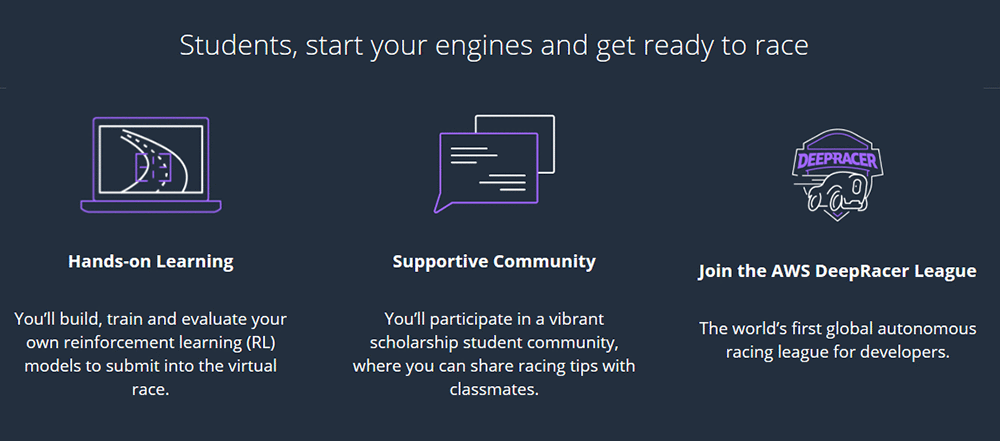
The race is on! Start your engines! The AWS DeepRacer Scholarship Challenge from Udacity is now open for enrollment.

As mentioned in our previous post, the AWS DeepRacer Scholarship Challenge program introduces you—no matter what your developer skill levels are—to essential machine learning (ML) concepts in a fun and engaging way. Each month, you put your skills to the test in the world’s first global autonomous racing league, the AWS DeepRacer League, and compete for top spots in each month’s unique race course.

Students that record the top lap times in August, September, and October 2019 qualify for one of 200 full scholarships to the Machine Learning Engineer nanodegree program, sponsored by Udacity.

What is AWS DeepRacer?

In November 2018, Jeff Barr announced the launch of AWS DeepRacer on the AWS News Blog as a new way to learn ML. With AWS DeepRacer, you have an opportunity to get hands-on with a fully autonomous 1/18th-scale race car driven by reinforcement learning (RL), a 3D-racing simulator, and a global racing league.

How does the AWS DeepRacer Scholarship Challenge work?

The program begins today, August 1, 2019 and runs through October 31, 2019. You can join the scholarship community at any point during these three months for free.

After enrollment, you go through the AWS DeepRacer: Driven by Reinforcement Learning course developed by AWS Training and Certification. The course consists of short, step-by-step modules (90 minutes in total). The modules prepare you to create, train, and fine-tune an RL model in the AWS DeepRacer 3D racing simulator.

After you complete the course, you can enter the AWS DeepRacer virtual league. The enrolled students who record the top lap times in August, September, and October 2019 qualify for one of 200 full scholarships to the Udacity Machine Learning Engineer nanodegree program.

Throughout the program and during each race, you have access to a supportive community to get pro tips from experts and exchange ideas with your classmates.

“Developers have a great opportunity here to follow a focused learning curriculum designed to get started in Reinforcement Learning”- “Sunil Mallya, principal deep learning scientist, ML Solution Labs AWS”

Expert tips and tricks

Now that you have enrolled and are racing, you may benefit from expert racing tricks to race to the top. In the pit stop, you learn great racing tips and access valuable tools like the log analysis tool. Also, there’s a hack you can use, developed by an AWS DeepRacer participant ARCC, for running the training jobs locally in a Docker container.

You can clone your previous model to train a better model. I know this sounds complicated but, if you clone a previously trained model as the starting point of a new round of training, you could improve the training efficiency. To do this, you can modify the hyper-parameters to make use of already learned knowledge. “- Law Mei Ching Pearly Jean, youngest AWS DeepRacer League competitor

The tips and tools help you submit a performant model for the challenge—eventually increasing your chance of topping the leaderboard and winning one of the 200 ML nanodegree scholarships from Udacity.

“The AWS DeepRacer League has become quite addictive as the competition is pretty intense. What’s great though is that even though everyone is trying to win, that hasn’t kept people from sharing what they have learned. There is a great community around this product and it’s cool to see the impact it’s having with helping people get introduced to the field of Machine Learning.” – Alex Schultz, machine learning software engineer

You can add more code to the AWS DeepRacer workshop repository on GitHub, and create more tools and tips for the community to make model development using RL easy and useful. To learn more about ML on AWS, see Get Started with Machine Learning – No PhD Required.

Next steps

Developers, register now! The first challenge starts August 1, 2019. For a program FAQ, see AWS DeepRacer Scholarship Challenge.


About the Author

Tara Shankar Jana is a Senior Product Marketing Manager for AWS Machine Learning. Currently he is working on building unique and scalable educational offerings for the aspiring ML developer communities- to help them expand their skills on ML. Outside of work he loves reading books, travelling and spending time with his family.


Financially empowering Generation Z with behavioral economics, banking, and AWS machine learning

This is a guest blog post by Dante Monaldo, co-founder and CTO of Pluto Money

Pluto Money, a San Francisco-based startup, is a free money management app that combines banking, behavioral economics, and machine learning (ML) to guide Generation Z towards their financial goals in college and beyond. We’re building the first mobile bank designed to serve the financial needs of Gen Z college students and grow with them beyond graduation.

The importance of establishing healthy financial habits early on is something that I and my co-founders Tim Yu and Susie Kim deeply believe in, having founded Pluto based on our own experiences. We apply financial rigor to our business in the same way. Using the cloud was a natural choice for us, as cloud services have lowered costs and brought flexibility previously unimaginable to rapidly growing companies.

We chose to use AWS as our primary cloud platform, from core compute to ML, because the AWS solutions are robust and work seamlessly together. Our team is growing, and—as is the case with many startups—we all wear many hats. As such, we rely on the AWS offerings to save us time while giving us an enterprise-grade tech stack to build on as we scale our team.

The heart of Pluto Money is our client API, which serves all requests originating from the Pluto Money mobile app. Written in Node.js, it runs on Amazon Elastic Compute Cloud (EC2) instances behind a Classic Load Balancer. This was architected before AWS released the Network Load Balancer and Application Load Balancer options. However, the Classic Load Balancer serves the same purpose for us as an Application Load Balancer, and we will likely migrate to it in the near future. The instances scale based on a combination of CPU utilization and the number of concurrent requests.

All persistent data—such as user accounts, saving goals and financial transactions—is stored in an encrypted MongoDB replica set. To minimize latency, many requests are pulled from a Redis cache that is stored locally on the NodeJS Amazon EC2 instances (because why make a 10 ms MongoDB request when a 1ms cache request will do?). The cache expires and refreshes periodically to protect against stale data.

Some calculation-intensive requests take longer to process and are not as time-sensitive as requests originating from the mobile app, such as communicating with a user’s bank when they have new transactions or re-training models on new financial data. We push these requests into an Amazon Simple Queue Service (SQS) and have a group of AWS Elastic Beanstalk workers chip away at the queue. This prevents any increase in calculation-intensive requests from slowing down the client API.

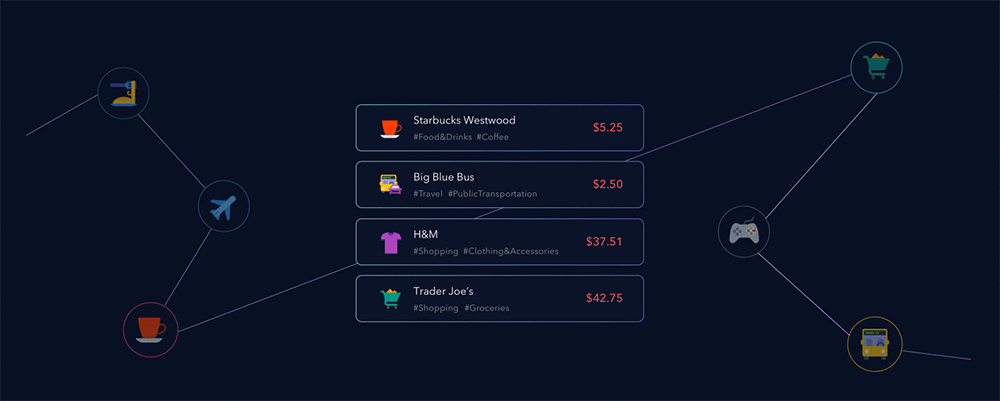
Of course, we use Amazon SageMaker to train, test, and deploy our ML models. One such model uses anonymized spending data from users that opt-in to compare their finances to similar peers—based on criteria set in their user profiles. For example: Sarah, a 21-year-old college student at UCLA, can see how her spending anonymously compares to other 21-year-old female UCLA students’ spending across different categories and merchants. This comparison provides important context for college students who are trying to better understand their own spending behavior.

Models are trained and tested in Jupyter notebooks on Amazon SageMaker, using both proprietary algorithms and the built-in algorithms that are available. We love that we can train and test ML models at scale the same way any data scientist does locally on their machine. When it comes time to deploy a model, that same data scientist can create an endpoint and provide the request and response parameters to an engineer on the team. This handoff is much more efficient than having the engineer go back and forth with the data scientist trying to understand the intricacies of the model. When revisions are needed, we point the requests (originating from the group of EC2 instances mentioned before) to the new endpoint. This allows us to have multiple endpoints live for testing in different sandbox and development environments. Moreover, when the model is revised, the engineer doesn’t need to know that anything changed, so long as the request and response parameters stayed the same. This workflow has allowed Pluto Money to iterate quickly with new datasets, an important requirement for building accurate ML models.

Since Pluto Money’s public beta launch in late 2017, we have helped tens of thousands of students across more than 1,500 college campuses save money and form better financial habits. And we are excited to continue to scale our technology with the support of AWS. Gen Z will account for 40% of U.S. consumer spending by 2020. We at Pluto Money are building the bank of the future for Gen Z—one that is radically aligned with their financial wellness more than anything else.

Creating magical listening experiences with BlueToad and Amazon Polly

This is a guest blog post by Paul DeHart, co-owner and CEO, BlueToad.

BlueToad, one of the leading global providers of digital content solutions, prioritizes innovation. Since 2017, we have enabled publishers (our customers) to provide audio versions of articles found in their digital magazines using Amazon Polly.

We see that novel content experiences engage today’s audience. In addition to the significant growth seen in mobile content engagement, audio has emerged as a preferred content consumption method. A 2019 Infinite Dial study found that U.S. consumers reported an average of 17 hours of listening a week. Nearly 40%+ of Americans now own smart speakers like Amazon Echo. Furthermore, the time that Americans spend commuting is on the rise and most vehicles can easily access and play audio from a mobile device. As a result, 90 million Americans said they listened to a podcast last month.

Given this trend towards audio, we at BlueToad developed a solution to help publishers easily turn any article into a listening experience using Amazon Polly. When a reader opens a digital edition on their phone, they can choose the audio icon on the story to begin listening. From a publisher perspective, this feature is simple to implement, as it only requires checking a box on the BlueToad platform. BlueToad and Amazon Polly do all the heavy lifting.

We selected Amazon Polly for this solution because of its ease of use as well as its unmatched performance. When first implementing audio solutions, we tested Amazon Polly and a few other voice services and we ultimately found that Polly was the most consistently accurate.

With Polly’s newly released Neural Text-to-Speech (NTTS) Newscaster style voice, we are able to help publishers engage their audiences with realistic listening experiences at the touch of a button. (Amazon Polly released NTTS and Newscaster speaking styles on July 30, 2019; check out the documentation.)

The diverse set of Polly voices helps our customers deliver captivating audio experiences to their audiences, including matching publications’ local languages and accents. We work with many international publications, such as Estetica Magazine, whose hair and fashion magazine publishes 26 international editions distributed in 60 different countries. To help international readers enjoy the magazine, we provide narrations in different languages using Amazon Polly, such as the French-speaking Polly voices Mathieu, Céline, and Léa.

BlueToad offers U.S.-based customer SUCCESS Magazine a wide array of valuable audio, mobile, and other solutions powered by AWS. SUCCESS Magazine’s audience is interested in personal and professional development, and the magazine aims to reach those self-starter individuals in convenient ways amid their inevitably busy lives. Amazon Polly’s voice solutions form a large part of the answer, enabling a seamlessly hands-free content consumption experience.

The owner and CEO of SUCCESS Magazine, Stuart Johnson, comments, “The trends increasingly show that consumers are gravitating towards audio content. With the exceedingly high-quality speech that Amazon Polly now offers, we’re even better equipped to deliver these exceptional listening experiences to our audience.”

We also help SUCCESS by providing a mobile-optimized experience for their written content, enabling readers to engage wherever they are. The results speak for themselves: Over three years (2016-2019), article engagement on mobile phones increased by nearly 300%.

From a technical perspective, our implementation is straightforward. Using the Amazon Polly APIs, we generate MP3 audio files as soon as a new article publishes on our platform. Then, we store the resulting files in Amazon Simple Storage Service (Amazon S3) buckets. To always maintain the best possible narration quality, we automatically discard older audio files by setting lifecycle policies on the Amazon S3 buckets, which prompts the narrations to be regenerated with the latest set of Polly updates included. We have found that the Amazon Polly listening quality is extremely high and only keeps getting better.

Going forward, we’re excited about the opportunities to continue delighting our customers and their customers with the latest advances in the media industry. Thanks to AWS and Amazon Polly, we’re already able to deliver a best-in-class solution for our customers. We’re primed to keep improving and pushing the boundaries of what’s possible.

AI-Based Virtualitics Demystifies Data Science with VR

The words “data science” often inspire feelings of dread or confusion.

But Virtualitics, an AI-based analytics platform, is bringing creativity and excitement to the field through machine learning and immersive visualization.

Head of Machine Learning Projects Aakash Indurkhya spoke with AI Podcast host Noah Kravitz about why combining AI and VR can be so useful.

“Just comparing two variables against each other is no longer good enough,” Indurkhya says.

Virtualitics, an AI-based analytics platform, is bringing creativity and excitement to the data analytics through machine learning and immersive visualization.

And as datasets grow, it is no longer intuitive what variables should be plotted against each other.

Even expert data scientists could take hours — or even weeks — trying to ascertain the most useful visualizations and models to make sense of the data.

Virtualitics Immersive Platform, or VIP, has a two-pronged approach to simplifying data science.

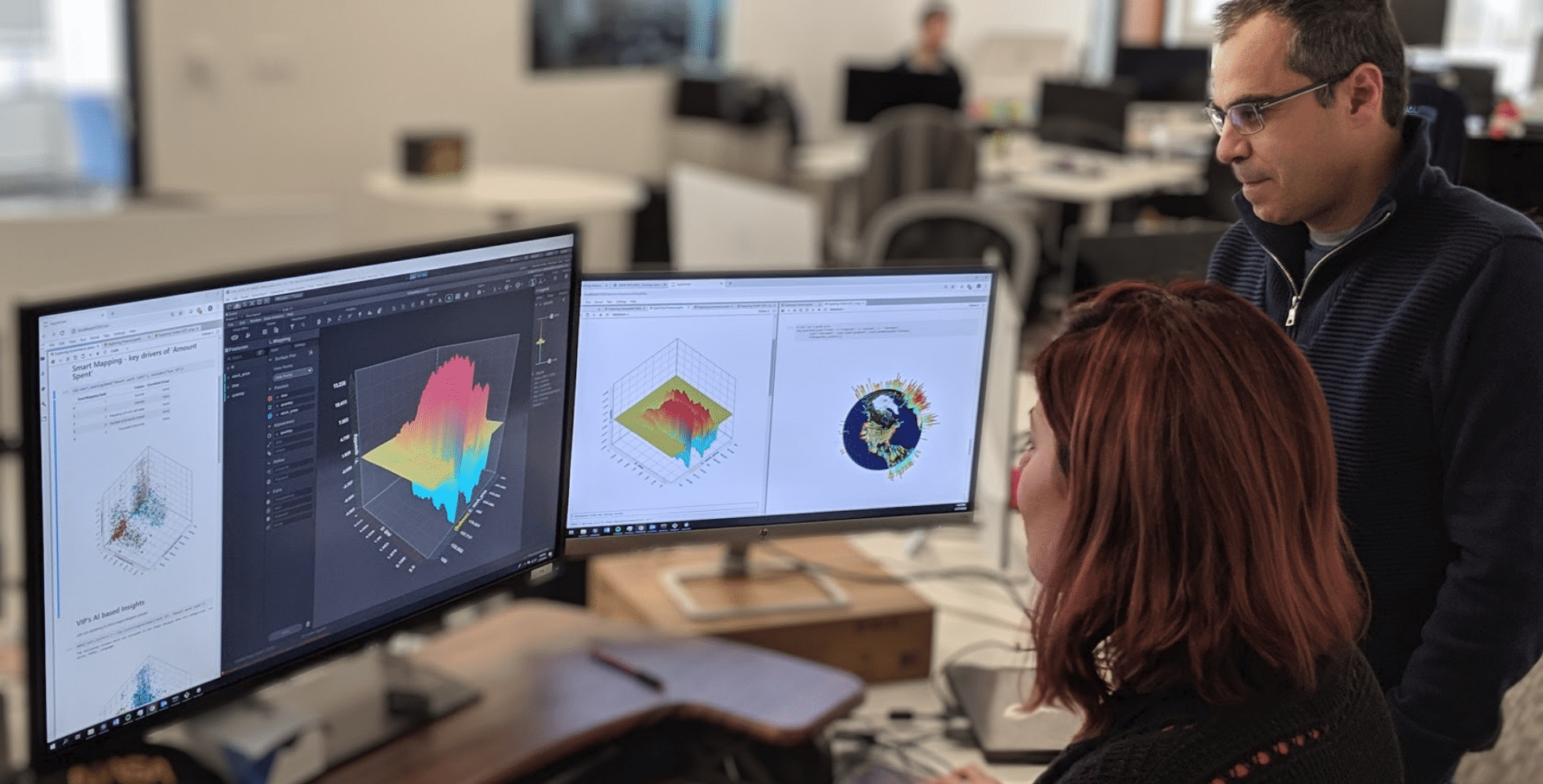
First, there are embedded machine learning routines, which includes a Smart Mapping tool that determines the best way of plotting data and identifies drivers of the client’s Key Performance Indicator — or KPI.

Indurkhya explains that, using AI, the software “immediately ranks your features in terms of which ones matter to your KPI and then also automatically generates a visualization so you can start looking at how those different combinations of features actually shape the relationship with the KPI.”

The second part of Virtualitics’ solution is their Shared Virtual Office, or SVO, in both Desktop and Virtual Reality. The technology is built on top of the Unity engine, and works with all major VR providers, such as Oculus and Windows MR devices.

VIP not only creates interactive and colorful visuals, but allows clients to have their own avatars through which they can, “like Iron Man,” collaboratively interact with their data.

For those who are less experienced with data science, this bridges the gap created by a lack of formal training, allowing them to identify clusters or detect anomalies on their own in a matter of seconds. And for expert data scientists, who deal with high demand and complex tasks, it gives them the technology to demonstrate to what they are doing to stakeholders.

In the future, Virtualitics will be working on visualizing networks, which are the common thread between technologies like IoT, blockchain, and social media.

“Network data is all around us but we lack intuitive and visual tools to properly make sense of them.” Indurkhya says, “With VR, we get the depth perception and interaction that’s lost when constrained to 2D screens. This is going to change how people think about networks.”

The applications go so far as improving disease classification, monitoring cybersecurity threats, and the identification of bad actors in social networks.

To learn more about Virtualitics, sign up for a demo, or watch their webinars, visit their website.

Help Make the AI Podcast Better

Have a few minutes to spare? It’d help us if you fill out this short listener survey.

Your answers will help us learn more about our audience, which will help us deliver podcasts that meet your needs, what we can do better, and what we’re doing right.

How to Tune into the AI Podcast

Our AI Podcast is available through iTunesCastbox, DoggCatcher, Google Play MusicOvercastPlayerFMPodbayPodBean, Pocket Casts, PodCruncher, PodKicker, Stitcher, Soundcloud and TuneIn.

If your favorite isn’t listed here, email us at aipodcast [at] nvidia [dot] com.


The post AI-Based Virtualitics Demystifies Data Science with VR appeared first on The Official NVIDIA Blog.

Breaking news: Amazon Polly’s Newscaster voice and more authentic speech, launching today

For a long time, it was only in science fiction that machines verbalized emotions. As of today, Amazon Polly is one step closer to changing that.

As we work on Amazon Polly, we’re constantly seeking to improve the voices. We hope you’ll agree that today’s announcement of not only Neural Text-to-Speech (NTTS) but also the Newscaster style is, well, newsworthy.

Hear the news from Polly:

Listen now 

Voiced by Amazon Polly

Synthesizing the newsperson style is innovative and unprecedented. And it brings great excitement in the media world and beyond.

Our earliest users include media giants like Gannett (whose USA Today is the most widely read US newspaper) and The Globe and Mail (the biggest newspaper in Canada), publishing leaders (whose customers, in turn, are news outlets) such as BlueToad and TIM Media, as well as organizations in education, healthcare, and gaming.

“We strive to innovate and bring our audiences news and content wherever they are. With more than 100 newsrooms across the country, it’s important for Gannett | USA TODAY NETWORK to produce audio content efficiently. Services like Amazon Polly and features like its Newscaster voice help us deliver breaking news and original reporting with increased speed and fidelity worthy of our brands,” says Gannett’s Scott Stein, Vice President of Content Ventures.

Greg Doufas, Chief Technical and Digital Officer at The Globe and Mail, concurs that the newest offerings with Amazon Polly are on the cutting edge. “Amazon Polly Newscaster enables us to provide our readers with more features to further their experience with our newspaper. This text-to-voice feature from AWS is miles ahead of anything we’ve heard to date.”

The early days of Amazon Polly are showing that readers enjoy engaging with Polly’s Newscaster voice. Paul DeHart, CEO of BlueToad, comments, “We focus on providing a robust and technologically advanced suite of digital solutions for our customers. When Amazon Polly’s new NTTS and Newscaster offerings came along, we immediately jumped on them, and we’ve already seen excitement among our own customer base. SUCCESS Magazine is particularly enthused about the new offerings.”

Stuart Johnson, Owner and CEO of SUCCESS, elaborates, “The trends increasingly show that consumers are gravitating towards audio content. With the exceedingly high quality speech that Polly now offers, we’re even better equipped to deliver these exceptional listening experiences to our audience.”

The team at Trinity Audio, a TIM Media brand that touts itself as “an audio content solution, providing publishers new ways to engage audiences,” is very animated about the announcements. “Who doesn’t want to listen to the news by an articulate reader who never says ‘um’?” asks Ron Jaworski, CEO of Trinity Audio.

Publishers such as Minute Media, a sports article and video provider, are enthusiastic about the new AWS offerings as well, which they work with Trinity Audio to leverage. Rich Routman, President & CRO of Minute Media, explains, “At Minute Media, we seek to partner with best-in-breed technology solutions, [and with AWS and Trinity], we have the technology to transition our scale in the written word to audio at scale and across multiple platforms, aligning ourselves further with this emerging platform for media consumption.”

News companies’ excitement about Amazon Polly’s latest advance are reflected by non-news sources as well. “We make voice-controlled games at Volley – games where players get to converse with other characters. We are constantly asking, ‘What new experiences can be possible with voice as an input?’ We can’t wait to start developing a game leveraging the Newscaster style, where our players get to engage with a brand new character in a fun and educational new way,” says James Wilsterman, Volley’s Founder and CTO.

Echoing that excitement is Encyclopedia Britannica. The widely read encyclopedia switched to online-only content in 2012, and its hundreds of thousands of articles can be read or listened to via its “Read to Me” feature voiced by Amazon Polly. Vice President Matt Dube comments, “When we think about our next steps and innovations, this high-caliber voice technology has been one of the missing pieces for us. We’re excited to use it as we continue innovating.” The team has several new efforts underway that utilize the rich spoken content to help their users deepen their knowledge.

And for CommonLit, a nonprofit ed-tech organization dedicated to ensuring that all students graduate high school with the reading and writing skills necessary to succeed in college and beyond, Polly’s solution is transformative. Each of the thousands of texts in CommonLit’s content library features a “Read Aloud” button, and the organization is importing new texts with Amazon Polly NTTS as the reading voice.

CommonLit CTO Geoff Harcourt says, “With the latest for Polly, we’re able to offer learners an experience that passes the Turing Test; our users would be hard-pressed to realize that the voice reading to them is not human.” The CommonLit team appreciates the support that this tool provides to struggling readers and English-language-learner (ELL) students, as “this helps students learn pronunciation, and provides a crucial scaffold for students with learning difficulties,” Harcourt adds.

Listen to learn about the Turing Test:

Listen now

Voiced by Amazon Polly

The technologies behind Amazon Polly are now starting to mimic the workings of the human brain, by leveraging a scientific advance called machine learning to build Neural Text-to-Speech systems (NTTS). Similar to the way human children learn to speak, these systems generate sounds, then improve their speech by listening to recorded natural speech and copying it. To build Polly’s NTTS system, Amazon researchers first taught the neural network the basics of how to speak by exposing it to a vast quantity of natural speech (the “training data” in technical terms). Over time, it learned how to reproduce those example utterances and, eventually, to generalize from them to produce new utterances. Because the network learned how to speak by example, the generated sounds are more lifelike than before. Now, Polly’s NTTS system enables it to easily learn the differences between speaking styles and rapidly adapt to new styles.

You can take Amazon Polly for a spin today by visiting https://aws.amazon.com/polly/features/.


About the Author

Robin Dautricourt is a Principal Product Manager for Amazon Text-to-Speech, and he leads product management for Amazon Polly. He enjoys innovating on behalf of customers, to launch features that will benefit their business needs and end users. He enjoys spending his free time with his wife and kids.


Running Amazon Elastic Inference Workloads on Amazon ECS

Amazon Elastic Inference (EI) is a new service launched at re:Invent 2018. Elastic Inference reduces the cost of running deep learning inference by up to 75% compared to using standalone GPU instances. Elastic Inference lets you attach accelerators to any Amazon SageMaker or Amazon EC2 instance type and run inference on TensorFlow, Apache MXNet, and ONNX models. Amazon ECS is a highly scalable, high-performance container orchestration service that supports Docker containers and allows you to run and scale containerized applications on AWS easily.

In this post, I describe how to accelerate deep learning inference workloads in Amazon ECS by using Elastic Inference. I also demonstrate how multiple containers, running potentially different workloads on the same ECS container instance, can share a single Elastic Inference accelerator. This sharing enables higher accelerator utilization.

As of February 4, 2019, ECS supports pinning GPUs to tasks. This works well for training workloads. However, for inference workloads, using Elastic Inference from ECS is more cost effective when those GPUs are not fully used.

For example, the following diagram shows a cost efficiency comparison of a p2/p3 instance type and a c5.large instance type with each type of Elastic Inference accelerator per 100K single-threaded inference calls (normalized by minimal cost):
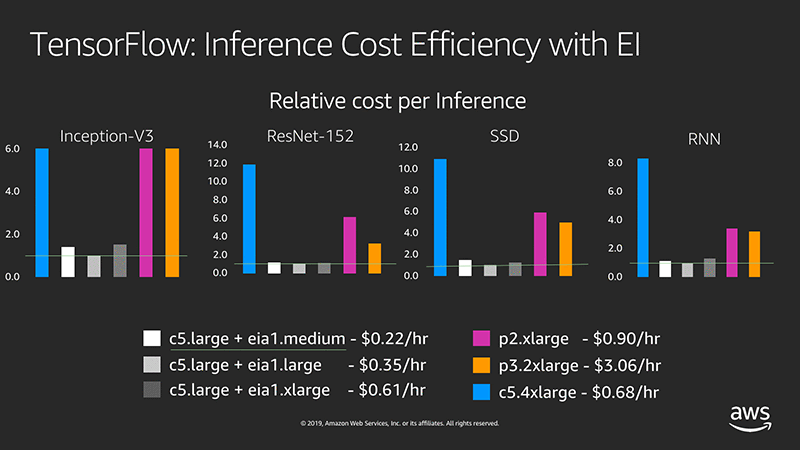
TensorFlow: Inference Cost Efficiency with EI
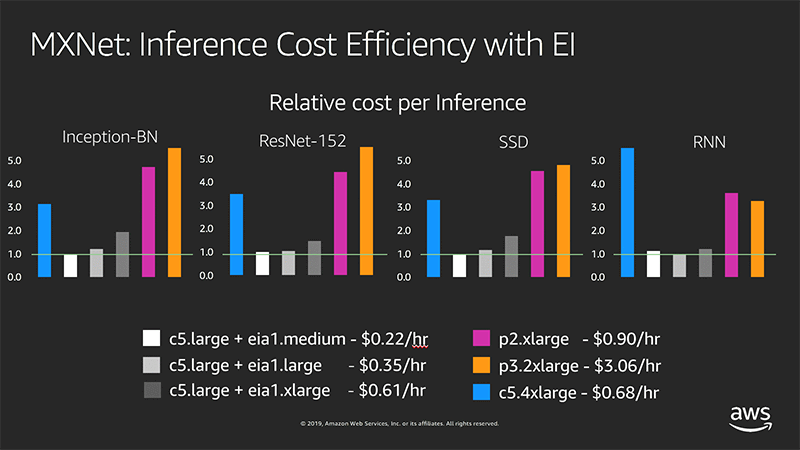
MXNet: Inference Cost Efficiency with EI

Using Elastic Inference on ECS

As an example, this post spins up TensorFlow ModelServer containers as part of an ECS task. You try to identify objects in a single image (the giraffe image that follows), using an SSD with ResNet-50 model, trained with a COCO dataset.

Next, you profile and compare the inference latencies of both a regular and an Elastic Inference–enabled TensorFlow ModelServer. Base your profiling setup on the Elastic Inference with TensorFlow Serving example. You can follow step-by-step instructions or launch an AWS CloudFormation stack with the same infrastructure as this post. Either way, you must be logged into your AWS account as an administrator. For AWS CloudFormation stack creation, choose Launch Stack and follow the instructions.

If Elastic Inference is not supported in the selected Availability Zone, delete and re-create the stack with a different zone. To launch the stack in a Region other than us-east-1, use the same template and template URL. Make sure to select the appropriate Region and Availability Zone.

After choosing Launch Stack, you can also examine the AWS CloudFormation template in detail in AWS CloudFormation Designer.

The AWS CloudFormation stack includes the following resources:

  • A VPC
  • A subnet
  • An Internet gateway
  • An Elastic Inference endpoint
  • IAM roles and policies
  • Security groups and rules
  • Two EC2 instances
    • One for running TensorFlow ModelServer containers (this instance has an Elastic Inference accelerator attached and works as an ECS container instance).
    • One for running a simple client application for making inference calls against the first instance.
  • An ECS task definition

After you create the AWS CloudFormation stack:

  • Go directly to the Running an Elastic Inference-enabled TensorFlow ModelServer task section in this post.
  • Skip Making inference calls.
  • Go directly to Verifying the results.

The second instance runs an example application as part of the bootstrap script.

Make sure to delete the stack once it is no longer needed.

Create an ecsInstanceRole to be used by the ECS container instance

In this step, you create an ecsInstanceRole role to be used by the ECS container instance through an associated instance profile.

In the IAM console, check if an ecsInstanceRole role exists. If the role does not exist, create a new role with the managed policy AmazonEC2ContainerServiceforEC2Role attached and name it ecsInstanceRole. Update its trust policy with the following code:

{
  "Version": "2008-10-17",
  "Statement": [
    {
      "Sid": "",
      "Effect": "Allow",
      "Principal": {
        "Service": "ec2.amazonaws.com"
      },
      "Action": "sts:AssumeRole"
    }
  ]
}

Setting up an ECS container instance for Elastic Inference

Your goal is to launch an ECS container instance with an Elastic Inference endpoint attached and with the following additional properties:

Launching the stack automates the setup process. To execute the steps manually, follow the instructions to set up an EC2 instance for Elastic Inference. Make the following changes to these procedures, for simplicity.

Because you plan to call Elastic Inference from ECS tasks, define a task role with relevant permissions. In the IAM console, create a new role with the following properties:

  • Trusted entity type: AWS service
  • Service to use this role: Elastic Container Service
  • Select your use case: Elastic Container Service Task
  • Name: ecs-ei-task-role

In the Attach permissions policies step, select the policy that you created in Set up an EC2 instance for Elastic Inference step. The policy’s content should look like the following example:

{
    "Statement": [
        {
            "Effect": "Allow",
            "Resource": "*",
            "Action": [
                "elastic-inference:Connect",
                "iam:List*",
                "iam:Get*",
                "ec2:Describe*",
                "ec2:Get*"
            ]
        }
    ],
    "Version": "2012-10-17"
}

Only the elastic-inference:Connect permission is required. The remaining permissions provide troubleshooting assistance. You can remove them for production setup.

To validate the role’s trust relationship, on the Trust Relationships tab, choose Show policy document. The policy should look like the following:

{
  "Version": "2012-10-17",
  "Statement": [
    {
      "Sid": "",
      "Effect": "Allow",
      "Principal": {
        "Service": "ecs-tasks.amazonaws.com"
      },
      "Action": "sts:AssumeRole"
    }
  ]
}

Creating an ECS task execution IAM role

Running on an ECS container instance, the ECS agent needs permissions to make ECS API calls on behalf of the task (for example, pulling container images from ECR). As a result, you must create an IAM role that captures the exact permissions needed. If you’ve created any ECS tasks before, you probably have created this or an equivalent role. For more information, see ECS Task Execution IAM Role.

If no such role exists, in the IAM console, choose Roles and create a new role with the following properties:

  • Trusted entity type: AWS service
  • Service to this role: Elastic Container Service
  • Select your use case: Elastic Container Service Task
  • Name: ecsTaskExecutionRole
  • Attached managed policy: AmazonECSTaskExecutionRolePolicy

Creating a task definition for both regular and Elastic Inference–enabled TensorFlow ModelServer containers

In this step, you create an ECS task definition comprising two containers:

  • One running TensorFlow ModelServer
  • One running an Elastic Inference-enabled TensorFlow ModelServer

Both containers use tensorflow-inference: 1.13-cpu-py27-ubuntu16.04 image (one of the newly released Deep Learning Containers Images). These images already have a regular TensorFlow ModelServer and all its library dependencies. Both containers retrieve and set up the relevant model.

Second container, downloads the Elastic Inference-enabled TensorFlow ModelServer binary. It also removes the ECS_CONTAINER_METADATA_URI environment variable setting to enable Elastic Inference endpoint metadata lookup from the ECS container instance’s metadata:

# install unzip
apt-get --assume-yes install unzip
# download and unzip the model
wget https://s3-us-west-2.amazonaws.com/aws-tf-serving-ei-example/ssd_resnet.zip -P /models/ssdresnet/
unzip -j /models/ssdresnet/ssd_resnet.zip -d /models/ssdresnet/1
# download and extract Elastic Inference enabled TensorFlow Serving
wget https://s3.amazonaws.com/amazonei-tensorflow/tensorflow-serving/v1.13/ubuntu/latest/tensorflow-serving-1-13-1-ubuntu-ei-1-1.tar.gz
tar xzvf tensorflow-serving-1-13-1-ubuntu-ei-1-1.tar.gz
# make the binary executable
chmod +x tensorflow-serving-1-13-1-ubuntu-ei-1-1/amazonei_tensorflow_model_server
# Unset the ECS_CONTAINER_METADATA_URI environment variable to force Elastic Inference endpoint metadata lookup from ECS container instance's metadata.
# Otherwise, Elastic Inference endpoint metadata would tried to be retrieved from container metadata, which would fail.   
env -u ECS_CONTAINER_METADATA_URI tensorflow-serving-1-13-1-ubuntu-ei-1-1/amazonei_tensorflow_model_server --port=${GRPC_PORT} --rest_api_port=${REST_PORT} --model_name=${MODEL_NAME} --model_base_path=${MODEL_BASE_PATH}/${MODEL_NAME}

For a regular production setup, I recommend creating a new image from the deep learning container image by turning relevant steps into Dockerfile RUN commands. For this post, you can skip that for simplicity’s sake.

First container downloads model and then, runs the unchanged /usr/bin/tf_serving_entrypoint.sh:

#!/bin/bash 

tensorflow_model_server --port=8500 --rest_api_port=8501 --model_name=${MODEL_NAME} --model_base_path=${MODEL_BASE_PATH}/${MODEL_NAME} "$@"

In the ECS console, under Task Definitions, choose Create New Task Definitions.

In the Select launch type compatibility dialog box, choose EC2.

In the Create new revision of Task Definition dialog box, scroll to the bottom of the page and choose Configure via JSON.

Paste the following definition into the space provided. Before saving, make sure to replace the two occurrences of <replace-with-your-account-id> with your AWS account ID.

{
    "executionRoleArn": "arn:aws:iam::<replace-with-your-account-id>:role/ecsTaskExecutionRole",
    "containerDefinitions": [
        {
            "entryPoint": [
                "bash",
                "-c",
                "apt-get --assume-yes install unzip; wget https://s3-us-west-2.amazonaws.com/aws-tf-serving-ei-example/ssd_resnet.zip -P ${MODEL_BASE_PATH}/${MODEL_NAME}/; unzip -j ${MODEL_BASE_PATH}/${MODEL_NAME}/ssd_resnet.zip -d ${MODEL_BASE_PATH}/${MODEL_NAME}/1/; /usr/bin/tf_serving_entrypoint.sh"
            ],
            "portMappings": [
                {
                    "hostPort": 8500,
                    "protocol": "tcp",
                    "containerPort": 8500
                },
                {
                    "hostPort": 8501,
                    "protocol": "tcp",
                    "containerPort": 8501
                }
            ],
            "cpu": 0,
            "environment": [
                {
                    "name": "KMP_SETTINGS",
                    "value": "0"
                },
                {
                    "name": "TENSORFLOW_INTRA_OP_PARALLELISM",
                    "value": "2"
                },
                {
                    "name": "MODEL_NAME",
                    "value": "ssdresnet"
                },
                {
                    "name": "KMP_AFFINITY",
                    "value": "granularity=fine,compact,1,0"
                },
                {
                    "name": "MODEL_BASE_PATH",
                    "value": "/models"
                },
                {
                    "name": "KMP_BLOCKTIME",
                    "value": "0"
                },
                {
                    "name": "TENSORFLOW_INTER_OP_PARALLELISM",
                    "value": "2"
                },
                {
                    "name": "OMP_NUM_THREADS",
                    "value": "1"
                }
            ],
            "mountPoints": [],
            "volumesFrom": [],
            "image": "763104351884.dkr.ecr.us-east-1.amazonaws.com/tensorflow-inference:1.13-cpu-py27-ubuntu16.04",
            "essential": true,
            "name": "ubuntu-tfs"
        },
        {
            "entryPoint": [
                "bash",
                "-c",
                "apt-get --assume-yes install unzip; wget https://s3-us-west-2.amazonaws.com/aws-tf-serving-ei-example/ssd_resnet.zip -P /models/ssdresnet/; unzip -j /models/ssdresnet/ssd_resnet.zip -d /models/ssdresnet/1; wget https://s3.amazonaws.com/amazonei-tensorflow/tensorflow-serving/v1.13/ubuntu/latest/tensorflow-serving-1-13-1-ubuntu-ei-1-1.tar.gz; tar xzvf tensorflow-serving-1-13-1-ubuntu-ei-1-1.tar.gz; chmod +x tensorflow-serving-1-13-1-ubuntu-ei-1-1/amazonei_tensorflow_model_server; env -u ECS_CONTAINER_METADATA_URI tensorflow-serving-1-13-1-ubuntu-ei-1-1/amazonei_tensorflow_model_server --port=${GRPC_PORT} --rest_api_port=${REST_PORT} --model_name=${MODEL_NAME} --model_base_path=${MODEL_BASE_PATH}/${MODEL_NAME}"
            ],
            "portMappings": [
                {
                    "hostPort": 9000,
                    "protocol": "tcp",
                    "containerPort": 9000
                },
                {
                    "hostPort": 9001,
                    "protocol": "tcp",
                    "containerPort": 9001
                }
            ],
            "cpu": 0,
            "environment": [
                {
                    "name": "GRPC_PORT",
                    "value": "9000"
                },
                {
                    "name": "REST_PORT",
                    "value": "9001"
                },
                {
                    "name": "MODEL_NAME",
                    "value": "ssdresnet"
                },
                {
                    "name": "MODEL_BASE_PATH",
                    "value": "/models"
                }
            ],
            "mountPoints": [],
            "volumesFrom": [],
            "image": "763104351884.dkr.ecr.us-east-1.amazonaws.com/tensorflow-inference:1.13-cpu-py27-ubuntu16.04",
            "essential": true,
            "name": "ubuntu-tfs-ei"
        }
    ],
    "memory": "2048",
    "taskRoleArn": "arn:aws:iam::<replace-with-your-account-id>:role/ecs-ei-task-role",
    "family": "ei-ecs-ubuntu-tfs-bridge-s3",
    "requiresCompatibilities": [
        "EC2"
    ],
    "networkMode": "bridge",
    "volumes": [],
    "placementConstraints": []
}

You could create an ECS service out of this task definition, but for the sake of this post, you need only run the task.

Running an Elastic Inference–enabled TensorFlow ModelServer task

Make sure to run the task defined in the previous section on the previously created ECS container instance. Register this instance to your default cluster.

In the ECS console, choose Clusters.

Confirm that your EC2 container instance appears in the ECS Instances tab.

Choose TasksRun new task.

For Launch type, select EC2, then pick previously created task (task created by CloudFormation template is named ei-ecs-blog-ubuntu-tfs-bridge) and choose Run Task.

Making inference calls

In this step, you create and run a simple client application to make multiple inference calls using the previously built infrastructure. You also launch an EC2 instance with Deep Learning AMI (DLAMI) on which to run the client application. The TensorFlow library that you use in this example requires the AVX2 instructions set.

Pick the c5.large instance type. Any of the latest generation x86-based EC2 instance types with sufficient memory are fine. The DLAMI provides preinstalled libraries on which TensorFlow relies. Also, because DLAMI is an HVM virtualization type AMI, you can take advantage of the AVX2 instruction set provided by c5.large.

Download labels and an example image to do the inference on:

curl -O https://raw.githubusercontent.com/amikelive/coco-labels/master/coco-labels-paper.txt
curl -O https://s3.amazonaws.com/amazonei/media/3giraffes.jpg

Create a local file named ssd_resnet_client.py, with the following content:

from __future__ import print_function
import grpc
import tensorflow as tf
from PIL import Image
import numpy as np
import time
import os
from tensorflow_serving.apis import predict_pb2
from tensorflow_serving.apis import prediction_service_pb2_grpc

tf.app.flags.DEFINE_string('server', 'localhost:8500',
                           'PredictionService host:port')
tf.app.flags.DEFINE_string('image', '', 'path to image in JPEG format') 
FLAGS = tf.app.flags.FLAGS

if(FLAGS.image == ''):
  print("Supply an Image using '--image [path/to/image]'")
  exit(1)

local_coco_classes_txt = "coco-labels-paper.txt"
 
# Setting default number of predictions
NUM_PREDICTIONS = 20

# Reading coco labels to a list 
with open(local_coco_classes_txt) as f:
  classes = ["No Class"] + [line.strip() for line in f.readlines()]

def main(_):
 
  channel = grpc.insecure_channel(FLAGS.server)
  stub = prediction_service_pb2_grpc.PredictionServiceStub(channel)
 
  with Image.open(FLAGS.image) as f:
    f.load()
    
    # Reading the test image given by the user 
    data = np.asarray(f)

    # Setting batch size to 1
    data = np.expand_dims(data, axis=0)

    # Creating a prediction request 
    request = predict_pb2.PredictRequest()
 
    # Setting the model spec name
    request.model_spec.name = 'ssdresnet'
 
    # Setting up the inputs and tensors from image data
    request.inputs['inputs'].CopyFrom(
        tf.contrib.util.make_tensor_proto(data, shape=data.shape))
 
    # Iterating over the predictions. The first inference request can take several seconds to complete

    durations = []

    for curpred in range(NUM_PREDICTIONS): 
      if(curpred == 0):
        print("The first inference request loads the model into the accelerator and can take several seconds to complete. Please standby!")

      # Start the timer 
      start = time.time()
 
      # This is where the inference actually happens 
      result = stub.Predict(request, 60.0)  # 60 secs timeout
      duration = time.time() - start
      durations.append(duration)
      print("Inference %d took %f seconds" % (curpred, duration))

    # Extracting results from output 
    outputs = result.outputs
    detection_classes = outputs["detection_classes"]

    # Creating an ndarray from the output TensorProto
    detection_classes = tf.make_ndarray(detection_classes)

    # Creating an ndarray from the detection_scores
    detection_scores = tf.make_ndarray(outputs['detection_scores'])
 
    # Getting the number of objects detected in the input image from the output of the predictor 
    num_detections = int(tf.make_ndarray(outputs["num_detections"])[0])
    print("%d detection[s]" % (num_detections))

    # Getting the class ids from the output and mapping the class ids to class names from the coco labels with associated detection score
    class_label_score = ["%s: %.2f" % (classes[int(detection_classes[0][index])], detection_scores[0][index]) 
                   for index in range(num_detections)]
    print("SSD Prediction is (label, probability): ", class_label_score)
    print("Latency:")
    for percentile in [95, 50]:
      print("p%d: %.2f seconds" % (percentile, np.percentile(durations, percentile, interpolation='lower')))
 
if __name__ == '__main__':
  tf.app.run()

Make sure to edit the ECS container instance’s security group to permit TCP traffic over ports 8500–8501 and 9000–9001 from the client instance IP address.

From the client instance, check connectivity and the status of the model:

SERVER_IP=<replace-with-ECS-container-instance-IP-address>
for PORT in 8501 9001
do
  curl -s http://${SERVER_IP}:${PORT}/v1/models/ssdresnet
done

Wait until you get two responses like the following:

{
 "model_version_status": [
  {
   "version": "1",
   "state": "AVAILABLE",
   "status": {
    "error_code": "OK",
    "error_message": ""
   }
  }
 ]
}

Then, proceed to run the client application:

source activate amazonei_tensorflow_p27
for PORT in 8500 9000
do
  python ssd_resnet_client.py --server=${SERVER_IP}:${PORT} --image 3giraffes.jpg
done

Verifying the results

The output should be similar to the following:

The first inference request loads the model into the accelerator and can take several seconds to complete. Please standby!
Inference 0 took 12.923095 seconds
Inference 1 took 1.363095 seconds
Inference 2 took 1.338855 seconds
Inference 3 took 1.311022 seconds
Inference 4 took 1.305457 seconds
Inference 5 took 1.303680 seconds
Inference 6 took 1.297357 seconds
Inference 7 took 1.302721 seconds
Inference 8 took 1.299495 seconds
Inference 9 took 1.293291 seconds
Inference 10 took 1.305852 seconds
Inference 11 took 1.292999 seconds
Inference 12 took 1.300874 seconds
Inference 13 took 1.300001 seconds
Inference 14 took 1.297276 seconds
Inference 15 took 1.297859 seconds
Inference 16 took 1.305029 seconds
Inference 17 took 1.315366 seconds
Inference 18 took 1.288984 seconds
Inference 19 took 1.289530 seconds
4 detection[s]
SSD Prediction is (label, probability):  ['giraffe: 0.84', 'giraffe: 0.74', 'giraffe: 0.68', 'giraffe: 0.50']
Latency:
p95: 1.36 seconds
p50: 1.30 seconds
The first inference request loads the model into the accelerator and can take several seconds to complete. Please standby!
Inference 0 took 14.081767 seconds
Inference 1 took 0.295794 seconds
Inference 2 took 0.293941 seconds
Inference 3 took 0.311396 seconds
Inference 4 took 0.291605 seconds
Inference 5 took 0.285228 seconds
Inference 6 took 0.226951 seconds
Inference 7 took 0.283834 seconds
Inference 8 took 0.290349 seconds
Inference 9 took 0.228826 seconds
Inference 10 took 0.284496 seconds
Inference 11 took 0.293179 seconds
Inference 12 took 0.296765 seconds
Inference 13 took 0.230531 seconds
Inference 14 took 0.283406 seconds
Inference 15 took 0.292458 seconds
Inference 16 took 0.300849 seconds
Inference 17 took 0.294651 seconds
Inference 18 took 0.293372 seconds
Inference 19 took 0.225444 seconds
4 detection[s]
SSD Prediction is (label, probability):  ['giraffe: 0.84', 'giraffe: 0.74', 'giraffe: 0.68', 'giraffe: 0.50']
Latency:
p95: 0.31 seconds
p50: 0.29 seconds

If you launched the AWS CloudFormation stack, connect to the client instance with SSH and check the last several lines of this output in /var/log/cloud-init-output.log.

You see a 78% reduction in latency when using an Elastic Inference accelerator with this model and input.

You can launch more than one task and more than one container on the same ECS container instance. You can use the awsvpc network mode if tasks expose the same port numbers. For bridge mode, tasks should expose unique ports.

In multi-task/container scenarios, keep in mind that all clients share accelerator memory. AWS publishes accelerator memory utilization metrics to Amazon CloudWatch as AcceleratorMemoryUsage under the AWS/ElasticInference namespace.

Also, Elastic Inference–enabled containers using the same accelerator must all use either TensorFlow or the MXNet framework. To switch between frameworks, stop and start the ECS container instance.

Conclusion

The described setup shows how multiple deep learning inference workloads running in ECS can be efficiently accelerated by use of Elastic Inference. If inference workload tasks don’t use the entire GPU instance, then using Elastic Inference accelerators may offer an attractive alternative, at a fraction of the cost of dedicated GPU instances. A single accelerator’s capacity can be shared across multiple containers running on the same EC2 container instance, allowing for even greater use of the attached accelerator.


About the Author

Vladimir Mitrovic is a Software Engineer with AWS AI Deep Learning. He is passionate about building fault-tolerant, distributed deep-learning systems. In his spare time, he enjoys solving Project Euler problems.


A Pigment of Your Imagination: Over Half-Million Images Created with GauGAN AI Art Tool

From amateur doodlers to leading digital artists, creators are coming out in droves to produce masterpieces with NVIDIA’s most popular research demo: GauGAN.

The AI painting web app — which turns rough sketches into stunning, photorealistic scenes — was built to demonstrate NVIDIA Research based on harnessing generative adversarial networks.

More than 500,000 images have been created with GauGAN since the beta version was made publicly available just over a month ago on the NVIDIA AI Playground.

Art directors and concept artists from top film studios and video game companies are among the creative professionals already harnessing GauGAN as a tool to prototype ideas and make rapid changes to synthetic scenes.

“GauGAN popped on the scene and interrupted my notion of what I might be able to use to inspire me,” said Colie Wertz, a concept artist and modeler whose credits include Star Wars, Transformers and Avengers movies. “It’s not something I ever imagined having at my disposal.”

Wertz, using a GauGAN landscape as a foundation, recently created an otherworldly ship design shared on social media.

Colie Wertz ship design
AI Work of Art: Senior concept artist Colie Wertz created this ship design with a GauGAN landscape as a foundation.

“Real-time updates to my environments with a few brush strokes is mind-bending. It’s like instant mood,” said Wertz, who uses NVIDIA RTX GPUs for his creative work. “This is forcing me to reinvestigate how I approach a concept design.”

Attendees of this week’s SIGGRAPH conference can experience GauGAN for themselves in the NVIDIA booth, where it’s running on an HP RTX workstation powered by NVIDIA Quadro RTX GPUs that feature Tensor Cores. NVIDIA researchers will also present GauGAN during a live event at the prestigious computer graphics show.

Users can share their GauGAN creations on Twitter with #SIGGRAPH2019, #GauGAN and @NVIDIADesign to enter our AI art contest, judged by Wertz. Winner will receive an NVIDIA Quadro RTX 6000 GPU.

Unleash Your AI Artist

GauGAN, named for post-Impressionist painter Paul Gauguin, creates photorealistic images from segmentation maps, which are labeled sketches that depict the layout of a scene.

People can use paintbrush and paint bucket tools to design their own landscapes with labels including river, grass, rock and cloud. A style transfer algorithm allows creators to apply filters, modifying the color composition of a generated image, or turning it from a photorealistic scene to a painting.

“As researchers working on image synthesis, we’re always pursuing new techniques to create images with higher fidelity and higher resolution,” said NVIDIA researcher Ming-Yu Liu. “That was our original goal for the project.”

But when the demo was introduced at our GPU Technology Conference in Silicon Valley, it took on a life of its own. Attendees flocked to a tablet on the show floor where they could try it out for themselves, creating stunning scenes of everything from sun-drenched ocean landscapes to idyllic mountain ranges shrouded by clouds.

The latest iteration of the app, on display at SIGGRAPH, lets users upload their own filters to layer onto their masterpieces — adopting the lighting of a perfect sunset photo or emulating the style of a favorite painter.

They can even upload their own landscape images. The AI will convert source images into a segmentation map, which can then be used as a foundation for the user’s artwork.

“We want to make an impact with our research,” Liu said. “This work creates a channel for people to express their creativity and create works of art they wouldn’t be able to do without AI. It’s enabling them to make their imagination come true.”

While the researchers anticipated game developers, landscape designers and urban planners to benefit from this technology, interest in GauGAN has been far more widespread — including from a healthcare organization exploring its use as a therapeutic, stress-mitigating tool for patients.

AI That Captures the Imagination 

Developed using the PyTorch deep learning framework, the neural network behind GauGAN was trained on a million images using the NVIDIA DGX-1 deep learning system. The demo shown at GTC ran on an NVIDIA TITAN RTX GPU, while the web app is hosted on NVIDIA GPUs through Amazon Web Services.

Liu developed the deep neural network and accompanying app along with researchers Taesung Park, Ting-Chun Wang and Jun-Yan Zhu.

The team has publicly released source code for the neural network behind GauGAN, making it available for non-commercial use by other developers to experiment with and build their own applications.

GauGAN is available on the NVIDIA AI Playground for visitors to experience the demo firsthand.

The post A Pigment of Your Imagination: Over Half-Million Images Created with GauGAN AI Art Tool appeared first on The Official NVIDIA Blog.

A Pigment of Your Imagination: GauGAN AI Art Tool Receives “Best of Show,” “Audience Choice” Awards at SIGGRAPH

NVIDIA’s viral real-time AI art application, GauGAN, Tuesday won two major SIGGRAPH awards.

From amateur doodlers to leading digital artists, creators are coming out in droves to produce masterpieces with NVIDIA’s most popular research demo: GauGAN.

And the demo has been a smash hit at the SIGGRAPH professional graphics conference as well, winning both the “Best of Show” and “Audience Choice,” awards at the conference’s Real Time Live competition after NVIDIA’s Ming-Yu Liu, Chris Hebert, Gavriil Klimov and UC Berkeley researcher Taesung Park presented the application to enthusiastic applause.

The AI painting web app — which turns rough sketches into stunning, photorealistic scenes — was built to demonstrate NVIDIA Research based on harnessing generative adversarial networks.

More than 500,000 images have been created with GauGAN since the beta version was made publicly available just over a month ago on the NVIDIA AI Playground.

Art directors and concept artists from top film studios and video game companies are among the creative professionals already harnessing GauGAN as a tool to prototype ideas and make rapid changes to synthetic scenes.

“GauGAN popped on the scene and interrupted my notion of what I might be able to use to inspire me,” said Colie Wertz, a concept artist and modeler whose credits include Star Wars, Transformers and Avengers movies. “It’s not something I ever imagined having at my disposal.”

Wertz, using a GauGAN landscape as a foundation, recently created an otherworldly ship design shared on social media.

Colie Wertz ship design
AI Work of Art: Senior concept artist Colie Wertz created this ship design with a GauGAN landscape as a foundation.

“Real-time updates to my environments with a few brush strokes is mind-bending. It’s like instant mood,” said Wertz, who uses NVIDIA RTX GPUs for his creative work. “This is forcing me to reinvestigate how I approach a concept design.”

Attendees of this week’s SIGGRAPH conference can experience GauGAN for themselves in the NVIDIA booth, where it’s running on an HP RTX workstation powered by NVIDIA Quadro RTX GPUs that feature Tensor Cores. NVIDIA researchers will also present GauGAN during a live event at the prestigious computer graphics show.

Users can share their GauGAN creations on Twitter with #SIGGRAPH2019, #GauGAN and @NVIDIADesign to enter our AI art contest, judged by Wertz. Winner will receive an NVIDIA Quadro RTX 6000 GPU.

Unleash Your AI Artist

GauGAN, named for post-Impressionist painter Paul Gauguin, creates photorealistic images from segmentation maps, which are labeled sketches that depict the layout of a scene.

People can use paintbrush and paint bucket tools to design their own landscapes with labels including river, grass, rock and cloud. A style transfer algorithm allows creators to apply filters, modifying the color composition of a generated image, or turning it from a photorealistic scene to a painting.

“As researchers working on image synthesis, we’re always pursuing new techniques to create images with higher fidelity and higher resolution,” said NVIDIA researcher Ming-Yu Liu. “That was our original goal for the project.”

But when the demo was introduced at our GPU Technology Conference in Silicon Valley, it took on a life of its own. Attendees flocked to a tablet on the show floor where they could try it out for themselves, creating stunning scenes of everything from sun-drenched ocean landscapes to idyllic mountain ranges shrouded by clouds.

The latest iteration of the app, on display at SIGGRAPH, lets users upload their own filters to layer onto their masterpieces — adopting the lighting of a perfect sunset photo or emulating the style of a favorite painter.

They can even upload their own landscape images. The AI will convert source images into a segmentation map, which can then be used as a foundation for the user’s artwork.

“We want to make an impact with our research,” Liu said. “This work creates a channel for people to express their creativity and create works of art they wouldn’t be able to do without AI. It’s enabling them to make their imagination come true.”

While the researchers anticipated game developers, landscape designers and urban planners to benefit from this technology, interest in GauGAN has been far more widespread — including from a healthcare organization exploring its use as a therapeutic, stress-mitigating tool for patients.

AI That Captures the Imagination 

Developed using the PyTorch deep learning framework, the neural network behind GauGAN was trained on a million images using the NVIDIA DGX-1 deep learning system. The demo shown at GTC ran on an NVIDIA TITAN RTX GPU, while the web app is hosted on NVIDIA GPUs through Amazon Web Services.

Liu developed the deep neural network and accompanying app along with researchers Taesung Park, Ting-Chun Wang and Jun-Yan Zhu.

The team has publicly released source code for the neural network behind GauGAN, making it available for non-commercial use by other developers to experiment with and build their own applications.

GauGAN is available on the NVIDIA AI Playground for visitors to experience the demo firsthand.

Note: This post has been updated from the original to reflect the results  of Tuesday’s Real Time Live competition at SIGGRAPH. 

The post A Pigment of Your Imagination: GauGAN AI Art Tool Receives “Best of Show,” “Audience Choice” Awards at SIGGRAPH appeared first on The Official NVIDIA Blog.

SIGGRAPH Showcases Amazing NVIDIA Research Breakthroughs, NVIDIA Wins Best in Show Award

Get ready to dig in this week.

SIGGRAPH is here and we’re helping graphics professionals, researchers, developers and students of all kinds take advantage of the latest advances in graphics, including new possibilities in real-time ray tracing, AI, and augmented reality.

SIGGRAPH is the most important computer graphics conference in the world, and our research team and collaborators from top universities and many industries are here with us.

At the top of the list: ray tracing, using NVIDIA’s RTX platform, which fuses ray tracing, deep learning and rasterization. We’re directly involved in 34 of 50 ray tracing-related technical sessions this week — far more than any other company. And our talks are drawing luminaries from around the industry, with four technical Academy Award winners participating in NVIDIA sponsored sessions.

Beyond the technical sessions, we’ll be showcasing new developer tools, and giving attendees a first-hand look at some of our most exciting work. One great example is NVIDIA GauGAN an interactive paint program that uses GANs (generative adversarial networks) to create works of art from simple brush strokes. Now everybody can be an artist.

Never been to the moon? A stunning new demo virtually transports visitors to the Apollo 11 landing site using never-before-shown AI pose estimation that captures their body movements in real time. This all became possible by combining NVIDIA Omniverse technology, AI and RTX ray tracing.

The story behind all these stories: our 200-person strong NVIDIA Research team — spread across 11 worldwide locations. The group embodies NVIDIA’s commitment to bringing innovative new ideas to customers in everything from machine learning, computer vision, self-driving cars, robotics, graphics, computer architecture, programming systems and more.

A Host of Papers, Talks, Tutorials

We’ll be leading or participating in six SIGGRAPH courses that detail various facets of the next-generation graphics technologies we’ve played a leading role in bringing to market.

These courses touch on everything from an introduction to real-time ray tracing, the use of the NVIDIA OptiX API, Monte Carlo and quasi-Monte Carlo sampling techniques, the latest in path tracing techniques, open problems in real-time rendering, and the future of ray tracing as a whole.

The common denominator: RTX. The real-time ray-tracing capabilities RTX unleashes offer far more realistic lighting effects than traditional real-time rendering techniques.

We’re also sponsoring seven courses on topics ranging from deep learning for content creation and real-time rendering to GPU ray tracing for film and design.

And we’re presenting technical papers that detail how our latest near-eye AR display demo works and take the next leap in denoising Monte Carlo rendering using convolutional neural networks — a cornerstone of AI — effectively using modern AI techniques to greatly reduce the time required to generate realistic images.

The Eyes Have It: Prescription-Embedded AR Display Wins Best in Show Award

You’ll be able to get hands-on with our latest technology in SIGGRAPH’s Emerging Technologies area. That’s where we have a pair of wearable augmented reality displays technology you need to see, especially if you don’t see very well without regular eyeglasses.

The first, “Prescription AR,” is a prescription-embedded AR display that won a SIGGRAPH Best in Show Emerging Technology award Monday.

The display is many times thinner and lighter and has a wider field of view that current-generation AR devices. Virtual objects appear throughout the natural instead of clustered in the center, and it has your prescription built right into it if you wear corrective optics. This much closer to the goal of comfortable, practical and socially-acceptable AR displays than anything currently available.


The second research demonstration, “Foveated AR,” is a headset that adapts to your gaze in real time using deep learning. It adjusts the resolution of the images it displays and their focal depth to match wherever you are looking and gives both sharper images and a wider field of view than any previous AR display.

To do this, it combines two different displays per eye, a high-resolution small field of view displaying images to the portion of the human retina where visual acuity is highest, and a low-resolution display for peripheral vision. The result is high-quality visual experiences with reduced power and computation.

TITAN RTX Giveway

Finally, NVIDIA is thanking the student volunteer community at SIGGRAPH with a daily giveaway of TITAN RTX while exhibit hall is open. These students are the future of one of the world’s most vibrant professional communities, a community we’re privileged to be a part of.

The post SIGGRAPH Showcases Amazing NVIDIA Research Breakthroughs, NVIDIA Wins Best in Show Award appeared first on The Official NVIDIA Blog.

Robust Neural Machine Translation

In recent years, neural machine translation (NMT) using Transformer models has experienced tremendous success. Based on deep neural networks, NMT models are usually trained end-to-end on very large parallel corpora (input/output text pairs) in an entirely data-driven fashion and without the need to impose explicit rules of language.

Despite this huge success, NMT models can be sensitive to minor perturbations of the input, which can manifest as a variety of different errors, such as under-translation, over-translation or mistranslation. For example, given a German sentence, the state-of-the-art NMT model, Transformer, will yield a correct translation.

“Der Sprecher des Untersuchungsausschusses hat angekündigt, vor Gericht zu ziehen, falls sich die geladenen Zeugen weiterhin weigern sollten, eine Aussage zu machen.”

(Machine translation to English: “The spokesman of the Committee of Inquiry has announced that if the witnesses summoned continue to refuse to testify, he will be brought to court.”),

But, when we apply a subtle change to the input sentence, say from geladenen to the synonym vorgeladenen, the translation becomes very different (and in this case, incorrect):

“Der Sprecher des Untersuchungsausschusses hat angekündigt, vor Gericht zu ziehen, falls sich die vorgeladenen Zeugen weiterhin weigern sollten, eine Aussage zu machen.”

(Machine translation to English: “The investigative committee has announced that he will be brought to justice if the witnesses who have been invited continue to refuse to testify.”).

This lack of robustness in NMT models prevents many commercial systems from being applicable to tasks that cannot tolerate this level of instability. Therefore, learning robust translation models is not just desirable, but is often required in many scenarios. Yet, while the robustness of neural networks has been extensively studied in the computer vision community, only a few prior studies on learning robust NMT models can be found in literature.

In “Robust Neural Machine Translation with Doubly Adversarial Inputs” (to appear at ACL 2019), we propose an approach that uses generated adversarial examples to improve the stability of machine translation models against small perturbations in the input. We learn a robust NMT model to directly overcome adversarial examples generated with knowledge of the model and with the intent of distorting the model predictions. We show that this approach improves the performance of the NMT model on standard benchmarks.

Training a Model with AdvGen
An ideal NMT model would generate similar translations for separate inputs that exhibit small differences. The idea behind our approach is to perturb a translation model with adversarial inputs in the hope of improving the model’s robustness. It does this using an algorithm called Adversarial Generation (AdvGen), which generates plausible adversarial examples for perturbing the model and then feeds them back into the model for defensive training. While this method is inspired by the idea of generative adversarial networks (GANs), it does not rely on a discriminator network, but simply applies the adversarial example in training, effectively diversifying and extending the training set.

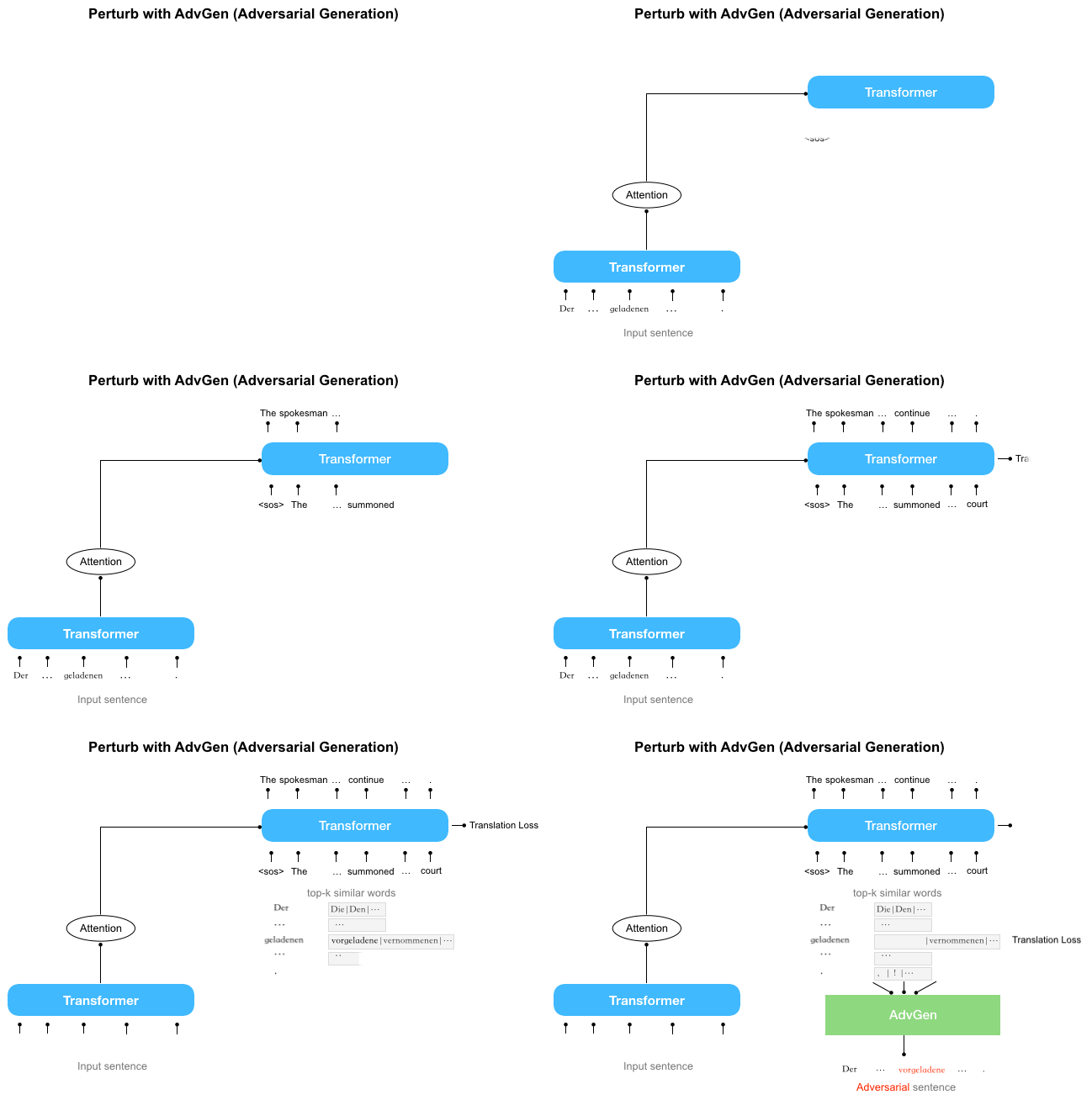
The first step is to perturb the model using AdvGen. We start by using Transformer to calculate the translation loss based on a source input sentence, a target input sentence and a target output sentence. Then AdvGen randomly selects some words in the source sentence, assuming a uniform distribution. Each word has an associated list of similar words, i.e., candidates that can be used for substitution, from which AdvGen selects the word that is most likely to introduce errors in Transformer output. Then, this generated adversarial sentence is fed back into Transformer, initiating the defense stage.

First, the Transformer model is applied to an input sentence (lower left) and, in conjunction with the target output sentence (above right) and target input sentence (middle right; beginning with the placeholder “<sos>”), the translation loss is calculated. The AdvGen function then takes the source sentence, word selection distribution, word candidates, and the translation loss as inputs to construct an adversarial source example.

During the defend stage, the adversarial sentence is fed back into the Transformer model. Again the translation loss is calculated, but this time using the adversarial source input. Using the same method as above, AdvGen uses the target input sentence, word replacement candidates, the word selection distribution calculated by the attention matrix, and the translation loss to construct an adversarial target example.

In the defense stage, the adversarial source example serves as input to the Transformer model, and the translation loss is calculated. AdvGen then uses the same method as above to generate an adversarial target example from the target input.

Finally, the adversarial sentence is fed back into Transformer and the robustness loss using the adversarial source example, the adversarial target input example and the target sentence is calculated. If the perturbation led to a significant loss, the loss is minimized so that when the model is confronted with similar perturbations, it will not repeat the same mistake. On the other hand, if the perturbation leads to a low loss, nothing happens, indicating that the model can already handle this perturbation.

Model Performance
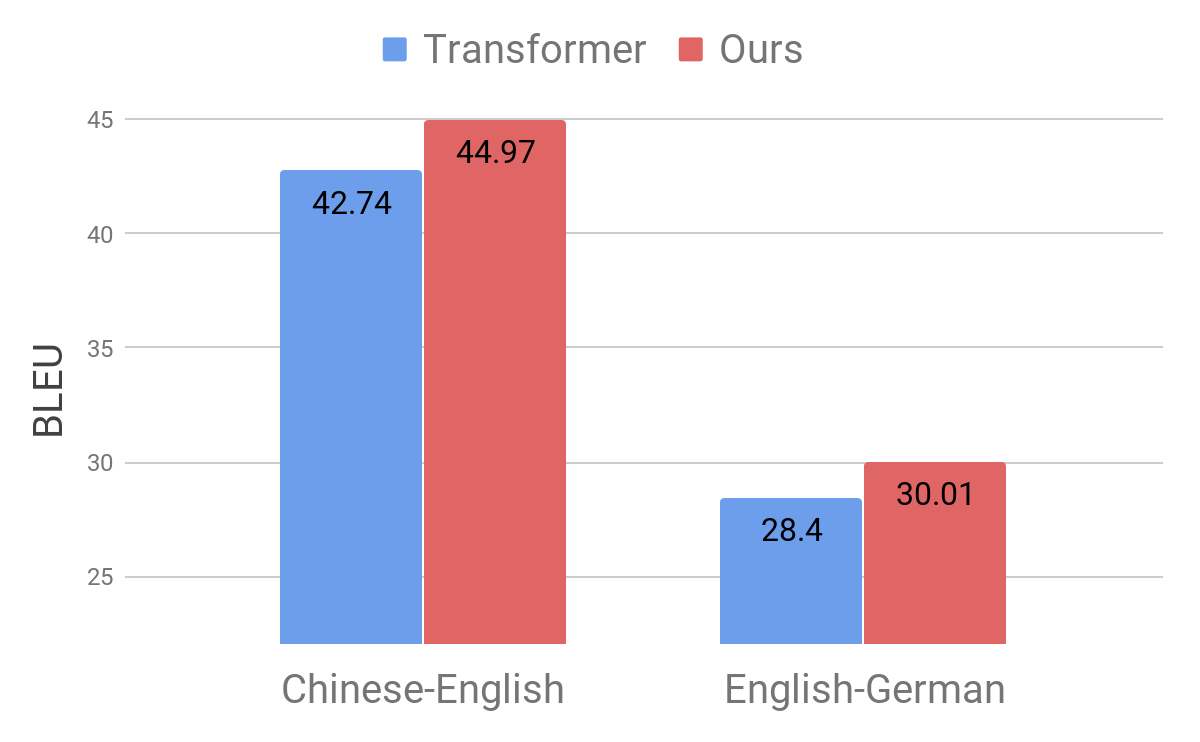
We demonstrate the effectiveness of our approach by applying it to the standard Chinese-English and English-German translation benchmarks. We observed a notable improvement of 2.8 and 1.6 BLEU points, respectively, compared to the competitive Transformer model, achieving a new state-of-the-art performance.

Comparison of Transformer model (Vaswani et al., 2017) on standard benchmarks.

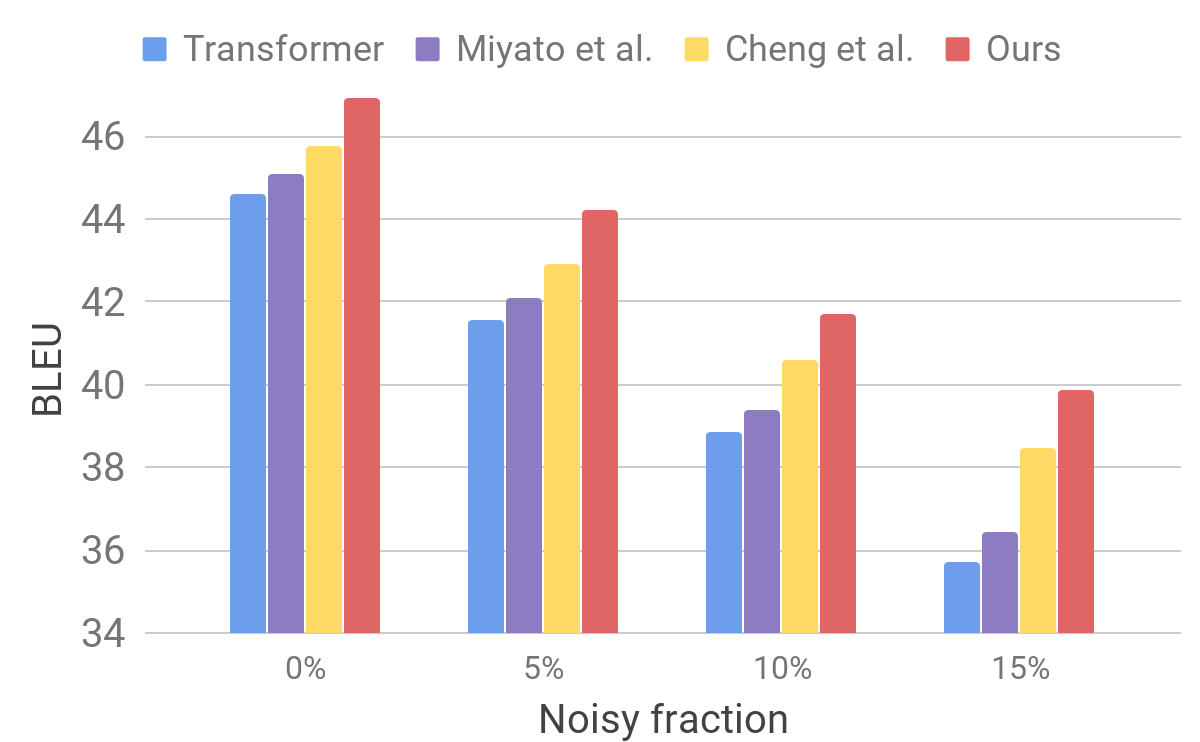
We then evaluate our model on a noisy dataset, generated using a procedure similar to that described for AdvGen. We take an input clean dataset, such as that used on standard translation benchmarks, and randomly select words for similar word substitution. We find that our model exhibits improved robustness compared to other recent models.

Comparison of Transformer, Miyao et al. and Cheng et al. on artificial noisy inputs.

These results show that our method is able to overcome small perturbations in the input sentence and improve the generalization performance. It outperforms competitive translation models and achieves state-of-the-art translation performance on standard benchmarks. We hope our translation model will serve as a robust building block for improving many downstream tasks, especially when those are sensitive or intolerant to imperfect translation input.

Acknowledgements
This research was conducted by Yong Cheng, Lu Jiang and Wolfgang Macherey. Additional thanks go to our leadership Andrew Moore and Julia (Wenli) Zhu‎.