Training and inference are crucial components of a machine learning (ML) development cycle. During the training phase, you teach a model to address a specific problem. Through this process, you obtain binary model files ready for use in production.
For inference, you can choose among several framework-specific solutions for model deployment, such as TensorFlow Serving or Model Server for Apache MXNet (MMS). PyTorch offers various ways to perform model serving in PyTorch. In this blog post, we demonstrate how to use MMS to serve PyTorch models.
MMS is an open-source model serving framework, designed to serve deep learning models for inference at scale. MMS fully manages the lifecycle of any ML model in production. Along with control-plane REST-based APIs, MMS also provides critical features required for a production-hosted service, such as logging and metrics generation.
In the following sections, we will see how to deploy a PyTorch model in production using MMS.
Serving a PyTorch model with MMS
MMS was designed to be ML framework–agnostic. In other words, MMS offers enough flexibility to serve as a backend engine for any framework. This post presents a robust, production-level inference using MMS with PyTorch.
Architecture
As shown in the following diagram, MMS consumes the model in form of a model archive:
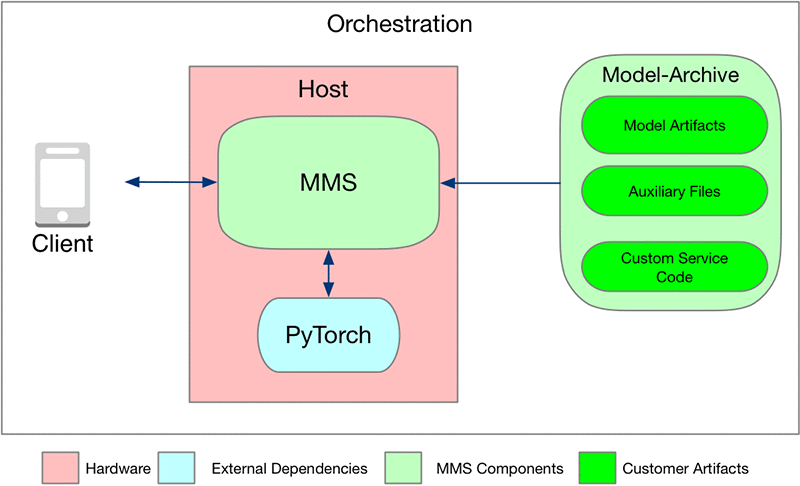
The model archive can be placed in an Amazon S3 bucket or put on the localhost where MMS is running. The model archive contains all the logic and artifacts to run the inference.
MMS also requires the prior installation of the ML framework and any other needed system libraries on the host. Because MMS is ML framework–agnostic, it doesn’t come with any ML/DL framework or system library. MMS is completely configurable. For a list of configurations available, see Advanced configuration.
Look back at the model archive in detail. The model archive is composed of the following:
- Custom service code: This code defines the mechanisms to initialize a model, pre-process incoming raw data into tensors, convert input tensors into predicted output tensors, and convert the output of the inference logic into a human-readable message.
- Model artifacts: PyTorch provides a utility to save your model or checkpoint. In this example, we save the model in the model.pth file. This file is the actual trained model binary, containing the model, optimizer, input, and output signature. For more information about how to save the model, see PyTorch Models.
- Auxiliary files: Any additional files and Python modules that are required to perform inference.
These files are bundled into a model archive using a tool that comes with the MMS, called model-archiver. In the following sections, we show how to create this model archive and run it with the model server.
Inference code
In this section, look at how to write your custom service code. In this example, we trained the densenet161 model using the PyTorch Image Classifier. This resource includes images of 102 flower species.
Prerequisites
Before proceeding, you should have the following resources:
- Model server package: MMS is currently distributed as a Python package and also pre-built containers hosted on DockerHub. In this post, we use the Python package to host PyTorch models. You can easily install MMS on your host by running the following command:
pip install mxnet-model-server
- Model archiver: This tool comes with the installation of the mxnet-model-server package. You can also install this by running the following command:
$ pip install model-archiver
Writing the inference code
MMS provides a useful inference template, which you can follow and extend with minimal coding. We extend the template methods for initialization, preprocess, and inference. This extension includes model initialization, input data conversion to tensor, and forward path to model, respectively. For more information, see the example model templates in the MMS repository. The following is example code for initialization, preprocess, and inference:
def initialize(self, context):
    """
       Initialize the model and auxiliary attributes.
    """
    super(PyTorchImageClassifier, self).initialize(context)

    # Extract the model from checkpoint
    checkpoint = torch.load(self.checkpoint_file_path, map_location='cpu')
        self.model = checkpoint['model']
In the pre-process function, you must transform the image:
def preprocess(self, data):
    """
       Preprocess the data, transform or convert to tensor, etc
    """
        image = data[0].get("data")
        if image is None:
            image = data[0].get("body")

        my_preprocess = transforms.Compose([
            transforms.Resize(256),
            transforms.CenterCrop(224),
            transforms.ToTensor(),
            transforms.Normalize(mean=[0.485, 0.456, 0.406],
                                 std=[0.229, 0.224, 0.225])
        ])
        image = Image.open(io.BytesIO(image))
        image = my_preprocess(image)
        return image
Then, in the inference function, take a tensor and do a forward pass to the model. You also get the top five possibilities of flower species.
def inference(self, image):
    """
       Predict the class of image
    """
    # Convert 2D image to 1D vector
    img = np.expand_dims(img, 0)
    img = torch.from_numpy(img)

    # Run forward pass
    self.model.eval()
    inputs = Variable(img).to(self.device)
    logits = self.model.forward(inputs)

    #Extract the top 5 species
    ps = F.softmax(logits,dim=1)
    topk = ps.cpu().topk(5)
    probs, classes = (e.data.numpy().squeeze().tolist() for e in topk)

    # Formulate the result
    results = []
    for i in range(len(probs)):
       tmp = dict()
       tmp[self.mapping[str(classes[i])]] = probs[i]
       results.append(tmp)
    return [results]
For more about the custom service code, see densenet_service.py in the PyTorch densenet example in the MMS GitHub repository.
Creating the model archive
Now that you have your inference code and trained model, you can package them into a model archive using the MMS model-archiver. Find all the code pieces and artifacts collected in /tmp/model-store.
We created a model archive of this model and made it publicly available in an S3 bucket. You can download and use that file for inference.
$ ls /tmp/model-store
index_to_name.json    model.pth    pytorch_service.py

# Run the model-archiver on this folder to get the model archive
$ model-archiver -f --model-name densenet161_pytorch --model-path /tmp/model-store --handler pytorch_service:handle --export-path /tmp

# Verify that the model archive was created in the "export-path"
$ ls /tmp
densenet161_pytorch.mar
Testing the model
Now that you have packaged the trained model along with the inference code into a model archive, you can use this artifact with MMS to serve inference. We have already created this artifact and have it on an S3 bucket. We will use this in our example below:
$ mxnet-model-server --start --models densenet=https://s3.amazonaws.com/model-server/model_archive_1.0/examples/PyTorch+models/densenet/densenet161_pytorch.mar
This binary creates an endpoint called densenet, hosting the densenet161_pytorch.mar model. The server is now ready to serve requests.
Now, download a flower image and send it to MMS to get an inference result that identifies the flower species:
# Download an image of the flower
$ curl -O https://s3.amazonaws.com/model-server/inputs/flower.jpg

Then run the inference:
$ curl -X POST http://127.0.0.1:8080/predictions/densenet -T flower.jpg

[
  {
    "canna lily": 0.01565943844616413
  },
  {
    "water lily": 0.015515935607254505
  },
  {
    "purple coneflower": 0.014358781278133392
  },
  {
    "globe thistle": 0.014226051047444344
  },
  {
    "ruby-lipped cattleya": 0.014212552458047867
  }
  ]
Conclusion
In this post, we showed how you can host a model trained with PyTorch on the MMS inference server. To host an inference server on GPU hosts, you can configure MMS to schedule models onto GPU. To learn more, head over to awslabs/mxnet-model-server.
About the authors
 Gautam Kumar is a Software Engineer with AWS AI Deep Learning. He has developed AWS Deep Learning Containers and AWS Deep Learning AMI. He is passionate about building tools and systems for AI. In his spare time, he enjoy biking and reading books.
 Vamshidhar Dantu is a Software Developer with AWS Deep Learning. He focuses on building scalable and easily deployable deep learning systems. In his spare time, he enjoy spending time with family and playing badminton.
![[P] Video traversing latent space of real and drawn faces in same model](https://b.thumbs.redditmedia.com/_cz_oULBPWcE3iMhqDQU12oX8Fw1JXN9ArpsMVYiLXw.jpg "[P] Video traversing latent space of real and drawn faces in same model")