Blog

Learn About Our Meetup

5000+ Members

MEETUPS

LEARN, CONNECT, SHARE

Join our meetup, learn, connect, share, and get to know your Toronto AI community. 

JOB POSTINGS

INDEED POSTINGS

Browse through the latest deep learning, ai, machine learning postings from Indeed for the GTA.

CONTACT

CONNECT WITH US

Are you looking to sponsor space, be a speaker, or volunteer, feel free to give us a shout.

Category: Global

Reducing deep learning inference cost with MXNet and Amazon Elastic Inference

Amazon Elastic Inference (Amazon EI) is a service that allows you to attach low-cost GPU-powered acceleration to Amazon EC2 and Amazon SageMaker instances. MXNet has supported Amazon EI since its initial release at AWS re:Invent 2018.

In this blog post, we’ll explore the cost and performance benefits of using Amazon EI with MXNet. We’ll walk you through an example that shows you how we improved our initial inference latency of 43ms by 1.69x, and how we improved cost efficiency by 75 percent.

The benefits of Amazon Elastic Inference

Amazon Elastic Inference can reduce the cost of running deep learning inference by up to 75 percent. First let’s take a look at how Elastic Inference compares to other Amazon EC2 options in terms of performance and cost.
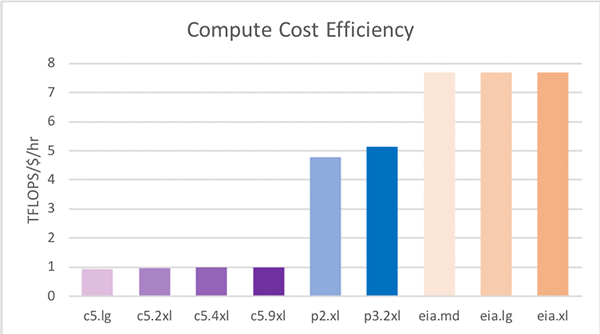
The table below lists the specific details for each EC2 option, in terms of resources, capacity and cost. Note that the c5.xlarge plus eia1.xlarge has a similar amount of compute capacity as a p2.xlarge (see the two highlighted rows in the table below).

Instance Type vCPUs CPU Memory (GB) GPU Memory (GB) FP32 TFLOPS $/hour TFLOPS/$/hr
C5.Large 2 4 0.08 $0.09 0.94
C5.XLarge 4 8 0.17 $0.17 1.00
C5.2XLarge 8 16 0.33 $0.34 0.97
C5.4XLarge 16 32 0.67 $0.68 0.99
C5.9XLarge 32 64 1.34 $1.36 0.99
P2.XLarge (K80) 4 61 12 4.30 $0.90 4.78
P3.2XLarge (V100) 8 61 16 15.70 $3.06 5.13
EIA1.Medium 1 1.00 $0.13 7.69
EIA1.Large 2 2.00 $0.26 7.69
EIA1.Xlarge 4 4.00 $0.52 7.69
C5.XL + EIA.XL 4 8 4 4.17 $0.69 6.04

If we look at the compute capability (Tera-Floating-point-Operations-Per-Second, or TFLOPS) a C5.4XLarge provides 0.67 TFLOPS of performance for $0.68 an hour, whereas an EIA1.Medium with 1.00 TFLOPS costs just $0.13 per hour. If pure performance (ignoring costs) is the goal, clearly leveraging a P3.2XLarge instance will provide the most compute at 15.7 TFLOPS. But in the last column showing TFLOPS per dollar we see that the EI accelerators (EIA) provide the most value. Since EI accelerators (EIA) must be attached to an EC2 instance, the last row shows one possible combination. The C5.XLarge plus the EIA1.XLarge has a similar amount of vCPUs and TFLOPS as a P2.XLarge, but the cost per hour of the C5XLarge plus the EIA1.XLarge is $0.69 per hour compared with $0.90 per hour for the P2.XLarge. That’s a $0.21 per hour discount. This highlights the other benefit of using Amazon EI which is being able to configure the amount of vCPUs, memory, and GPU compute to match your needs.

Using Apache MXNet with Amazon EI

Apache MXNet is an open source deep learning framework used to build, train, and deploy deep neural networks. MXNet abstracts much of the complexity involved in implementing neural networks, is highly performant and scalable, and offers APIs across popular programming languages such as Python, C++, Java, R, Scala, and more. Amazon EI enabled Apache MXNet is available in the AWS Deep Learning AMI. A ‘pip’ package is also available on Amazon S3 so you can build it in to your own Amazon Linux or Ubuntu AMIs, or Docker containers.

Now we’ll analyze the performance (latency) and cost efficiency trade-offs for a ResNet-152 model for various instances. We’ll start with this example code from AWS and modify it for this blog post. The changes required to measure inference performance are in blue below:

import time
import mxnet as mx
import numpy as np
from collections import namedtuple
Batch = namedtuple('Batch', ['data'])

#download model files and labels
path='http://data.mxnet.io/models/imagenet/'
[mx.test_utils.download(path+'resnet/152-layers/resnet-152-0000.params'),
mx.test_utils.download(path+'resnet/152-layers/resnet-152-symbol.json'),
mx.test_utils.download(path+'synset.txt')]

#set the context to run inference with
ctx = mx.eia()

#load the model from file and configure
sym, arg_params, aux_params = mx.model.load_checkpoint('resnet-152', 0)
mod = mx.mod.Module(symbol=sym, context=ctx, label_names=None)
mod.bind(for_training=False, data_shapes=[('data', (1,3,224,224))],
     label_shapes=mod._label_shapes)
mod.set_params(arg_params, aux_params, allow_missing=True)
with open('synset.txt', 'r') as f:
  labels = [l.rstrip() for l in f]

#download the image from file and convert into format (batch, RGB, width, height)
fname = mx.test_utils.download('https://github.com/dmlc/web-data/blob/master/mxnet/doc/tutorials/python/predict_image/cat.jpg?raw=true')
img = mx.image.imread(fname)
img = mx.image.imresize(img, 224, 224) # resize
img = img.transpose((2, 0, 1)) # Channel first
img = img.expand_dims(axis=0) # batchify

first = -1
sum = 0
runs = 100
for iter in range(runs):
    start = time.time()
    #run inference
    mod.forward(Batch([img]))
    prob = mod.get_outputs()[0].asnumpy()
    #time inference latency
    elapsed = (time.time() - start) * 1000
    if iter == 0:
        first = elapsed
    else:
        sum += elapsed
avg = sum / (runs-1)
print('First inference: %4.2f ms' % first)
print('Average inference: %4.2f ms' % avg)

You can see we added a loop around the inference call and timed the forward() and get_outputs() functions. MXNet uses lazy evaluation, so to force it to execute the forward call we need to use the outputs (by converting them to a numpy array). The first inference is abnormally slow due to initialization with the remote GPU on the EIA, so we stored the first inference time and summed the remaining inference latencies to compute an average.

Setting up an instance with an EI accelerator

We’ll launch an instance using the AWS Deep Learning AMI (DLAMI), which already provides support for Apache MXNet with Amazon EI. You can review Elastic Inference Prerequisites for the instructions related to Elastic Inference. You can review how to launch a DLAMI with an Elastic Inference Accelerator in the Elastic Inference documentation.

Testing on an instance with an EI accelerator

We launched a C5.4XLarge instance with the largest EI accelerator: EIA1.XLarge. This is probably more compute than we need but it will give us a good starting point from which to work backward from the best performance we can get with EI. Next, we activated the conda environment that was pre-installed for MXNet on EI with the following command:

source activate amazonei_mxnet_p36

Running our code on an instance with an EI accelerator produces this output:

[15:34:09] src/nnvm/legacy_json_util.cc:209: Loading symbol saved by previous version v0.8.0. Attempting to upgrade...
[15:34:09] src/nnvm/legacy_json_util.cc:217: Symbol successfully upgraded!
Using Amazon Elastic Inference Client Library Version: 1.2.12
Number of Elastic Inference Accelerators Available: 1
Elastic Inference Accelerator ID: eia-b774f0694b614549944c13dc0aa3ddc0
Elastic Inference Accelerator Type: eia1.xlarge

First inference: 2763.00 ms
Average inference: 20.34 ms

Notice that the larger first inference time is 2763.00 ms. After the first inference, the average for the other 99 iterations is 20.34 ms.

Testing on a C5 instance

We can use the same script with just one change to run inference using only the CPU on the same instance. Here MXNet won’t use the EI accelerator when we set the context to CPU:

# We’re commenting out EIA context, and instead use a CPU context
# ctx = mx.eia()
ctx = mx.cpu()

Running this code now produces this output:

[14:33:41] src/nnvm/legacy_json_util.cc:209: Loading symbol saved by previous version v0.8.0. Attempting to upgrade...
[14:33:41] src/nnvm/legacy_json_util.cc:217: Symbol successfully upgraded!
[14:33:42] src/operator/nn/mkldnn/mkldnn_base.cc:74: Allocate 147456 bytes with malloc directly
[14:33:42] src/operator/nn/mkldnn/mkldnn_base.cc:74: Allocate 589824 bytes with malloc directly
[14:33:42] src/operator/nn/mkldnn/mkldnn_base.cc:74: Allocate 2359296 bytes with malloc directly
[14:33:42] src/operator/nn/mkldnn/mkldnn_base.cc:74: Allocate 9437184 bytes with malloc directly
First inference: 1659.79 ms
Average inference: 44.61 ms

Notice that the average inference is 44.61 ms. Compared to our initial run using the EI accelerator, the CPU takes 2.19x longer for each inference call on average when using a standard C5 instance.

Testing on GPU instances

Next, we launched a separate P2.XLarge instance to compare the performance to. We used the same DLAMI version. After the instance was launched we activated the regular MXNet conda environment:

source activate mxnet_p36

Now we need to make two more tweaks to our script:

# We’re commenting out the CPU context as well, and instead use a GPU context
# ctx = mx.eia()
# ctx = mx.cpu()
ctx = mx.gpu()

...

img = img.transpose((2, 0, 1)) # Channel first
img = img.expand_dims(axis=0) # batchify
img = img.as_in_context(mx.gpu())

The first context that we change is the one used for binding, and the second context we change is the one that defines where our input data resides. For CPU and EIA instances, data must be allocated on a CPU context. It’s important to point out that typically you create your ndarrays on the same context that you bind the model to (CPU for CPU, and GPU for GPU). But for EIA you bind your model to the EIA context. You create your data with the CPU context. MXNet automatically copies the data over as needed for EIA.

Running this code on the P2.XLarge instance now produces this output:

[14:42:07] src/nnvm/legacy_json_util.cc:209: Loading symbol saved by previous version v0.8.0. Attempting to upgrade...
[14:42:07] src/nnvm/legacy_json_util.cc:217: Symbol successfully upgraded!
[14:42:09] src/operator/nn/./cudnn/./cudnn_algoreg-inl.h:97: Running performance tests to find the best convolution algorithm, this can take a while... (setting env variable MXNET_CUDNN_AUTOTUNE_DEFAULT to 0 to disable)
First inference: 7916.36 ms
Average inference: 41.10 ms

Before we draw any conclusions, let’s launch a separate P3.2XLarge instance to compare the performance to. We can reuse the same script, DLAMI, and conda environment that we used earlier for the P2.XLarge instance. Running the code now produces this output on the P3.2XLarge instance:

[14:59:33] src/nnvm/legacy_json_util.cc:209: Loading symbol saved by previous version v0.8.0. Attempting to upgrade...
[14:59:33] src/nnvm/legacy_json_util.cc:217: Symbol successfully upgraded!
[14:59:35] src/operator/nn/./cudnn/./cudnn_algoreg-inl.h:97: Running performance tests to find the best convolution algorithm, this can take a while... (setting env variable MXNET_CUDNN_AUTOTUNE_DEFAULT to 0 to disable)
First inference: 1911.22 ms
Average inference: 12.31 ms

Comparing C5, P2, P3, and EIA instances

Plotting the data we’ve collected thus far we can see that GPU performed better than CPU (as expected) and the V100 GPU in P3 instances is 3.34x faster than the K80 GPU in P2 instances. Where before you had to choose between P2 and P3, now EI gives you another choice in between with a 2.02x increase in speed over P2.

Based purely on instance cost per hour (in us-east-1 for EIA and EC2) we can see that the cost for the C5.4XL + EIA.XL is in between the costs for the P2 and P3 instances (see the following table). However, when factoring the cost to perform 100,000 inferences we can see that the P2 and P3 instances have similar costs, and the C5.4XL and the C5.4XL +EI instances are also within a penny of each other ($0.84 and $0.83). The big picture here is that by using EIA we get better than P2 performance at the cost of a C5 instance. What a deal!

Instance Type Cost per hour Infer latency [ms] Cost per 100k inferences
C5.4XLarge $0.68 44.61 $0.84
C5.4XL + EIA.XL $1.20 24.89 $0.83
P2.Xlarge $0.90 41.10 $1.03
P3.2XLarge $3.06 12.31 $1.05

Exploring all possibilities

Now, let’s do more investigation and try out additional instance combinations for EI. After rerunning the initial script we started with on combinations of C5.Large, C5.XLarge, C5.2XLarge, and C5.4XLarge with EI accelerators EIA1.Medium, EIA1.Large, and EIA1.XLarge we produced the latest table:

Host instance type EI Accelerator type Cost per hour Infer latency [ms] Cost per 100k inferences
C5.Large EIA1.Medium $0.22 39.00 $0.23
EIA1.Large $0.35 25.68 $0.25
EIA1.XLarge $0.61 20.29 $0.34
C5.XLarge EIA1.Medium $0.30 38.55 $0.32
EIA1.Large $0.43 25.99 $0.31
EIA1.XLarge $0.69 21.12 $0.40
C5.2XLarge EIA1.Medium $0.47 38.56 $0.50
EIA1.Large $0.60 26.45 $0.44
EIA1.XLarge $0.86 20.76 $0.50
C5.4XLarge EIA1.Medium $0.81 39.18 $0.88
EIA1.Large $0.94 25.90 $0.68
EIA1.XLarge $1.20 20.34 $0.68

In this table, when we look at the host instance types with the EIA1.Medium (yellow highlight) we see similar results. This means that there isn’t a lot of host-side processing, so going to a larger host instance doesn’t improve performance. This indicates to us that we can save on cost by choosing a smaller instance. Similarly, looking at host instances with all using the largest EIA1.XLarge accelerator (blue highlight) there isn’t a noticeable performance difference either. This confirms that EIA performance isn’t limited by the size of the host either. It also means that we can continue to use the C5.Large host instance type, achieve the same performance, and pay less.

Comparing inference latency

Now that we’ve decided on a C5.Large host instance type, we can look at the accelerator types. There is a progression from 39.18ms to 25.90ms and finally to 20.34ms in terms of inference latency. The following chart shows what we get if we add our new data points for the various accelerator sizes to our previous chart:
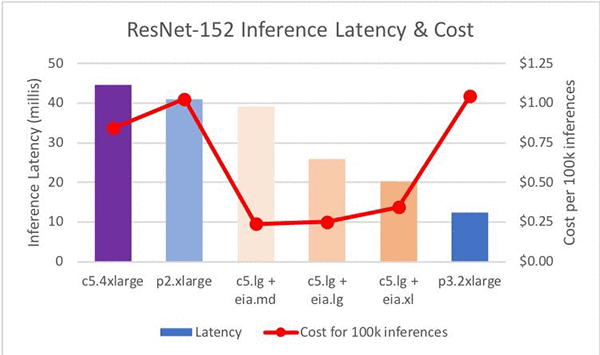
This chart shows that the EI accelerators provide a set of steps between P2 and P3 in terms of raw performance.

Comparing inference cost efficiency

The last column in the table shows the cost efficiency of the combination. Reviewing this column we see that the C5.Large + EIA1.Medium has the best cost efficiency. In a pure least-cost comparison, the C5.Large + EIA1.Medium combination provides the best cost efficiency when compared to the C5.4XL and the P2/P3 instances. Savings are  71 percent to 77 percent. And the C5.Large + EIA1.XLarge provides a 2.02x increase in speed over a P2 and a 2.19x speedup over the C5.4XL (CPU only). The savings are 66 percent and 59 percent, respectively.

Conclusions

Here’s what we’ve found so far:

  • Combining EI accelerators with any host instance type enables users to choose the amount of host compute, memory, etc. with a configurable amount of GPU memory and compute.
  • EI accelerators provide a range of memory and compute that is similar to P2 instances, but with a lower cost
  • EI accelerators can bridge the gap in terms of raw performance (inference latency) between P2 and P3 instance types.
  • EI accelerators can achieve a better cost efficiency than C5 and P2/P3 instances.

In our analysis we found that the ease of use in MXNet is as simple as changing the context for binding a model and ndarray creation. This allowed us to use largely the same test script on CPU, GPU, and EIA contexts in MXNet, and ease our testing and performance analysis.

We started with a Resnet-152 model running on a C5.4XLarge instance with a 44ms inference latency. We reduced it to 20ms by migrating to a C5.Large + EIA.XLarge.  This resulted in a 2.19x increase in speed with a $0.07 hourly cost savings to top it off. We also found that we could achieve a 71 percent cost savings ($0.84versus $0.24 per 100k inferences) with a C5.Large + EIA.Medium and still get better performance (44ms versus 39ms).

Call to Action

Try out MXNet on EI and see how much you can save while still improving performance for inference on your model. Here are the steps we went through to analyze the design space for deep learning inference, and you can follow these steps for your model:

  1. Write a test script to analyze inference performance for CPU context.
  2. Create copies of the script with tweaks for GPU and EIA contexts.
  3. Run scripts on C5, P2, and P3 instance types to get a baseline for performance.
  4. Analyze the performance of EIA.
    1. Start with largest EI accelerator type and a large host instance type.
    2. Work backward until you find a combo that is too small.
  5. Introduce cost efficiency to the analysis by computing the cost to perform 100k inferences.

How much can you save while still improving the performance of inference for your model? How fast can you improve the inference latency of your model without spending a single cent more? Share your results in the comments section.


About the Authors

Sam Skalicky is a Software Engineer with AWS Deep Learning and enjoys building heterogeneous high performance computing systems. He is an avid coffee enthusiast and avoids hiking at all costs.



Hagay Lupesko is an Engineering Manager for AWS Deep Learning. He focuses on building Deep Learning tools that enable developers and scientists to build intelligent applications. In his spare time he enjoys reading, hiking and spending time with his family.



Control root access to Amazon SageMaker notebook instances

Amazon SageMaker recently introduced the ability to enable and disable root access for notebook users. Before I give you a preview of how you can implement this new feature using the AWS Management Console and Amazon SageMaker API actions, I’ll explain why controlling root access for users is helpful.

Amazon SageMaker provides fully managed notebook instances that run industry-standard open-source interactive computing software, Jupyter Notebooks. You can use Jupyter Notebooks to clean and transform data, visualize data, run numerical simulations, build statistical and machine learning (ML) models, and much more.

Data science is an iterative process, which might require data scientists and developers to test and use different software and packages. During the planning and experimentation stages of projects having root access gives you the flexibility to modify Jupyter Notebook environments as needed.

However, for our customers who need to comply with specific security policies, it’s important to ensure a segregation between the notebook user and the root of the hosting computer. Since root access means having administrator privileges, users with root access can access and edit all files on the compute instance, including system-critical files. Removing root access prevents notebook users from deleting system-level software, installing new software, and modifying essential environment components.

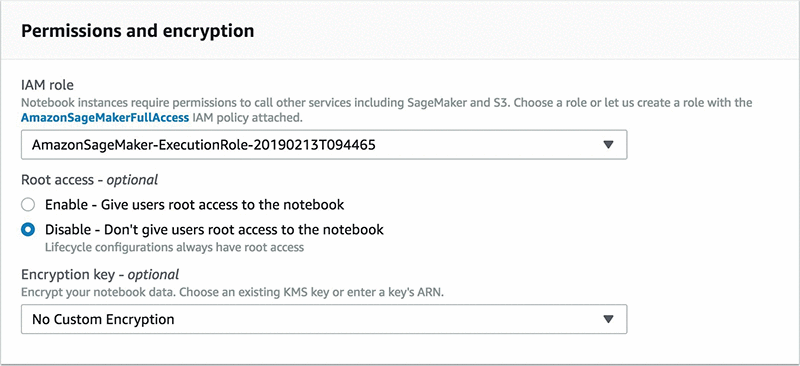
With the new option, Amazon SageMaker customers can now use the AWS Management Console and Amazon SageMaker API actions to enable or disable root access for their notebook instances.

Note: Lifecycle configurations, which are shell scripts you can use to set up and customize notebook instances, give administrators the ability to employ custom configurations even when the notebook instance is set up to have no root access for the user. That’s why lifecycle configurations always run as the root user for the associated notebook instances regardless of however root access permission is defined.

Control root access using the AWS Management Console

When creating new notebook instances or updating existing ones with the AWS Management Console, you can choose to enable or disable root access on the Permissions and encryption menu. For detailed instructions on how to create notebook instances with Amazon SageMaker, follow the steps provided in the Amazon SageMaker Developer Guide.

Control root access with Amazon SageMaker API actions

When you’re calling the CreateNotebookInstance and UpdateNotebookInstance API actions, you can use Enabled or Disabled as parameters to define the string value for ”RootAccess”. Here is an example JSON template to be passed with API actions:

{
   "AcceleratorTypes": [ "string" ],
   "AdditionalCodeRepositories": [ "string" ],
   "DefaultCodeRepository": "string",
   "DirectInternetAccess": "string",
   "InstanceType": "string",
   "KmsKeyId": "string",
   "LifecycleConfigName": "string",
   "NotebookInstanceName": "string",
   "RoleArn": "string",
   "RootAccess": "Disabled",
   "SecurityGroupIds": [ "string" ],
   "SubnetId": "string",
   "Tags": [ 
      { 
         "Key": "string",
         "Value": "string"
      }
   ],
   "VolumeSizeInGB": number
}

Conclusion

The ability to control root access for notebook instances adds flexibility and security to the administration of Jupyter Notebook environments. To learn more about Amazon SageMaker and start with Jupyter Notebooks, visit the Amazon SageMaker webpage. For more information about managing root access for notebook instances, see the Amazon SageMaker Developer Guide.


About the Author

Erkan Tas is a Sr. Product Manager for Amazon SageMaker. He is on a mission to make Artificial Intelligence easy, accessible, and scalable through cloud platforms. He is also a sailor, science and nature admirer, Go and Stratocaster player.

Unifying Physics and Deep Learning with TossingBot

Though considerable progress has been made in enabling robots to grasp objects efficiently, visually self adapt or even learn from real-world experiences, robotic operations still require careful consideration in how they pick up, handle, and place various objects — especially in unstructured settings. Consider for example, this picking robot which took 1st place in the stowing task of the Amazon Robotics Challenge:

It’s an impressive system, built with many design features that kinematically prevent it from dropping objects due to unforeseen dynamics: from its steady and deliberate movements, to its gripper fingers that mechanically constrain the momentum of the object so that it doesn’t slip.

This robot, like many others, is designed to tolerate the dynamics of the unstructured world. But instead of just tolerating dynamics, can robots learn to use them advantageously, developing an “intuition” of physics that would allow them to complete tasks more efficiently? Perhaps in doing so, robots can improve their capabilities and acquire complex athletic skills like tossing, sliding, spinning, swinging, or catching, potentially leading to many useful applications, such as more efficient debris clearing robots in disaster response scenarios — where time is of the essence.

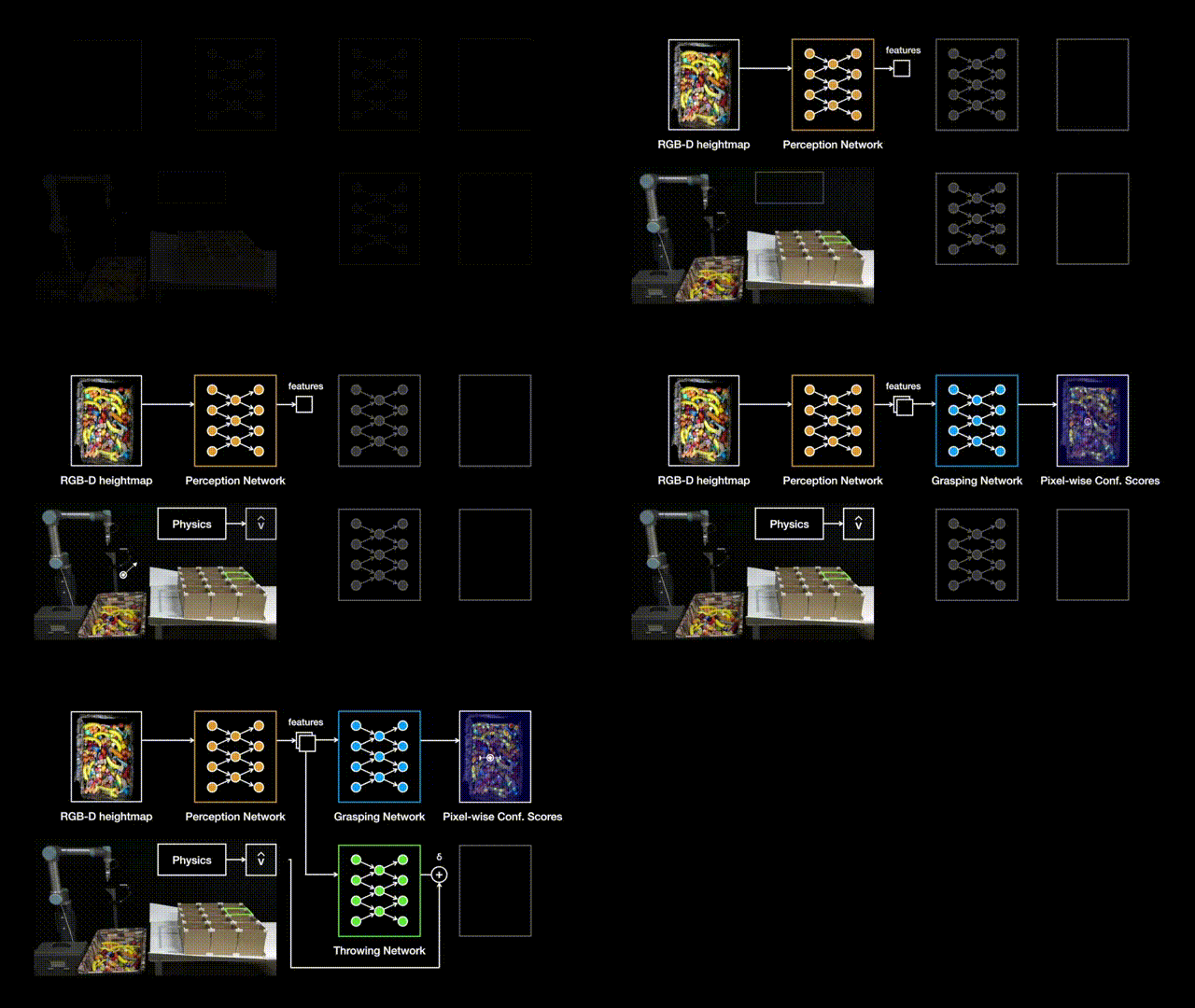
To explore this concept, we worked with researchers at Princeton, Columbia, and MIT to develop TossingBot: a picking robot for our real, random world that learns to grasp and throw objects into selected boxes outside its natural range. We find that by learning to throw, TossingBot is capable of achieving picking speeds that are twice as fast as previous systems, with twice the effective placing range. TossingBot jointly learns grasping and throwing policies using an end-to-end neural network that maps from visual observations (RGB-D images) to control parameters for motion primitives. Using overhead cameras to track where objects land, TossingBot improves itself over time through self-supervision. More technical details are available in an early preprint on arXiv.

The Challenges
Throwing is a particularly difficult task as it depends on many factors: from how the object is picked up (i.e., “pre-throw conditions”), to the object’s physical properties like mass, friction, aerodynamics, etc. For example, if you grasp a screwdriver by the handle near the center of mass and throw it, it would land much closer than if you had grasped it from the metal tip, which would swing forward and land much farther away. Regardless of how you grasped it though, tossing a screwdriver is incredibly different from tossing a ping pong ball, which would land closer due to air resistance. Manually designing a solution that explicitly handles these factors for every random object is nearly impossible.

Throwing depends on many factors: from how you picked it up, to object properties and dynamics.

Through deep learning, however, our robots can learn from experience rather than rely on manual case-by-case engineering. Previously we’ve shown that our robots can learn to push and grasp a large variety of objects, but accurately throwing objects requires a larger understanding of projectile physics. Acquiring this knowledge from scratch with only trial-and-error is not only time consuming and expensive, but also generally doesn’t work outside of very specific, and carefully set up training scenarios.

Unifying Physics and Deep Learning
A fundamental component of TossingBot is that it learns to throw by integrating simple physics and deep learning, which enables it to train quickly and generalize to new scenarios. Physics provides prior models of how the world works, and we can leverage these models to develop initial controllers for our robots. In the case of throwing, for example, we can use projectile ballistics to provide an estimate for the throwing velocity that is needed to get an object to land at a target location. We can then use neural networks to predict adjustments on top of that estimate from physics, in order to compensate for unknown dynamics as well as the noise and variability of the real world. We call this hybrid formulation Residual Physics, and it enables TossingBot to achieve throwing accuracies of 85%.

At the start of training with randomly initialized weights, TossingBot repeatedly attempts bad grasps. Over time, however, TossingBot learns better ways to grasp objects and simultaneously improves its ability to throw. Occasionally the robot randomly explores what happens if it throws an object at a velocity that it hasn’t tried before. When the bin is emptied, TossingBot lifts the boxes to allow objects to slide back into the bin. This way, human intervention is kept at a minimum during training. By 10,000 grasp and throw attempts (or 14 hours of training time), it is capable of achieving throwing accuracies of 85%, with a grasping reliability of 87% in clutter.

TossingBot starts out performing poorly (left), but progressively learns to grasp and toss overnight (right).

Generalizing to New Scenarios
By integrating physics and deep learning, TossingBot is capable of rapidly adapting to never-before-seen throwing locations and objects. For example, after training on objects with simple shapes like wooden blocks, balls, and markers, it can perform reasonably well on new objects such as fake fruit, decorative items, and office objects. On new objects, TossingBot starts out with lower performance, but quickly adapts within a few hundred training steps (i.e., an hour or two) to achieve similar performance as with training objects. We’ve found that combining physics and deep learning with Residual Physics yields better performance than baseline alternatives (e.g. deep learning without physics). We even tried this task ourselves, and we were pleasantly surprised to learn that TossingBot is more accurate than any of us engineers! Though take that with a grain of salt, as we’ve yet to test TossingBot against anyone with any actual athletic talent.

TossingBot can generalize to new objects, and is more accurate at throwing than the average Googler.

We also test our policies on their ability to generalize to new target locations previously unseen in training. To this end, we train on a set of boxes, then later test on a different set of boxes with entirely different landing areas. In this setting, we find that Residual Physics for throwing helps significantly, since the initial estimates of throwing velocities from projectile ballistics easily generalize to new target locations, while the residuals help make adjustments on top of those estimates to compensate for varying object properties in the real world. This is in contrast to the baseline alternative of using deep learning without physics, which can only handle target locations seen during training.

TossingBot uses Residual Physics to throw objects to unforeseen locations.

Emerging Semantics from Interaction
To explore what TossingBot learns, we place several objects in the bin, capture images, and feed them into TossingBot’s trained neural network to extract intermediate pixel-wise deep features. By clustering these features based on similarity and visualizing nearest neighbors as a heatmap (hotter regions indicate more similarity in feature space), we can localize all ping pong balls in the scene. Even though the orange block shares a similar color with the ping pong balls, its features are different enough for TossingBot to make a distinction. Likewise, we can also use the extracted features to localize all marker pens, which share similar shape and mass, but do not share color. These observations suggest that TossingBot likely learns to rely more on geometric cues (e.g. shape) to learn grasping and throwing. It is also possible that the learned features reflect second-order attributes such as physical properties, which can influence how the objects should be thrown.

TossingBot learns deep features that distinguish object categories without explicit supervision.

These emerging features were learned implicitly from scratch without any explicit supervision beyond task-level grasping and throwing. Yet, they seem to be sufficient for enabling the system to distinguish between object categories (i.e., ping pong balls and marker pens). As such, this experiment speaks out to a broader concept related to machine vision: how should robots learn the semantics of the visual world? From the perspective of classic computer vision, semantics are often pre-defined using human-fabricated image datasets and manually constructed class categories. However, our experiment suggests that it is possible to implicitly learn such object-level semantics from physical interactions alone, as long as they matter for the task at hand. The more complex these interactions, the higher the resolution of the semantics. Towards more generally intelligent robots — perhaps it is sufficient for them to develop their own notion of semantics through interaction, without requiring any human intervention.

Limitations and Future Work
Although TossingBot’s results are promising, it does have its limitations. For example, it assumes that objects are robust enough to withstand landing collisions after being thrown — further work is required to learn throws that account for fragile objects, or possibly train other robots to catch objects in ways that cushion the landing. Furthermore, TossingBot infers control parameters only from visual data — exploring additional senses (e.g. force-torque or tactile) may enable the system to better react to new objects.

The combination of physics and deep learning that made TossingBot possible naturally leads to an interesting question: what else could benefit from Residual Physics? Investigating how the idea generalizes to other types of tasks and interactions is a promising direction for future research.

You can learn more about this work in the summary video below.

Acknowledgements
This research was done by Andy Zeng, Shuran Song (faculty at Columbia University), Johnny Lee, Alberto Rodriguez (faculty at MIT), and Thomas Funkhouser (faculty at Princeton University), with special thanks to Ryan Hickman for valuable managerial support, Ivan Krasin and Stefan Welker for fruitful technical discussions, Brandon Hurd and Julian Salazar and Sean Snyder for hardware support, Chad Richards and Jason Freidenfelds for helpful feedback on writing, Erwin Coumans for advice on PyBullet, Laura Graesser for video narration, and Regina Hickman for photography. An early preprint is available on arXiv.

Finger on the Pulse: GTC Spotlights Startups Propelling AI in Healthcare

It can be hard to stay healthy in a convention center filled with thousands of people — unless, of course, you’re at the GPU Technology Conference, where healthcare players big and small are showcasing the latest innovations in AI and medicine.

GTC 2019, held last week in Silicon Valley, featured more than 40 healthcare sessions, four panels, several booth exhibits and a handful of meetups. More than a dozen healthcare startups from the NVIDIA Inception program were part of the packed lineup, with five delivering a series of lightning talks.

Share the Health: Inception Pavilion Features Demos, Booths, Meetups

One area of the GTC show floor was reserved for Inception startups, with nearly 50 setting up booths to show off their latest demos. An Inception Theater featured lightning talks, where crowds gathered to hear the companies give five-minute talks about their work.

In its booth, digital health startup DDH showed off its AI models for dental applications, full-body MRI screens, and disease diagnosis for Alzheimer’s and lung cancer. The company, a second-time GTC attendee, also had a poster accepted to this year’s poster session.

South Korean startup Lunit is using AI to provide better quantitative assessments of diseases from medical images, including mammograms and chest x-rays. The company’s goal is to reduce false positives, false negatives and unnecessary tests — particularly invasive ones like biopsies. In its GTC booth, Lunit demonstrated its latest chest x-ray AI.

InformAI CEO Jim Havelka speaks with a GTC attendee at the startup’s booth.

InformAI, a company developing AI-enabled 3D medical image classifiers and patient outcome predictors, showcased its sinus image classifier in the booth. Trained on NVIDIA V100 GPUs through the Microsoft Azure cloud platform and with an onsite NVIDIA DGX Station, the deep learning model can detect 23 medical conditions from 3D CT head scans.

Another Inception startup, doc.ai demonstrated its medical research platform that can run medical studies from a mobile phone. The company’s co-founder and CEO, Walter De Brouwer, spoke on a healthcare panel focused on “Healthcare in the AI Era: Innovating with Data and Its Implications.”

At the panel, De Brouwer discussed the trend of growing datasets in healthcare and addressed data privacy as one of the implications. Certain deep learning healthcare applications transfer data to the cloud, which increases concerns of privacy. Instead, he suggested, patients can be entrusted with their own data.

“You can store all your information on your smartphone, and you can do some local predictions. You don’t need Wi-Fi or the cloud, and it’s extremely fast,” he said.

Vyasa Analytics at Inception Showcase
The Inception Showcase featured presentations by eight top startups, including Vyasa Analytics (third from left).

“It’s our first GTC, but we’re looking forward to being here again many times over,” said Akshay Sharma, doc.ai’s chief technology officer. “As an Inception program member, this is an opportunity to showcase the AI we are building for medical research and learn from what others are doing in the space.”

And at an Inception Showcase held at the Fairmont Hotel in San Jose, eight of the hottest startups in the program presented in front of an audience that included investors, media and industry executives. Vyasa Analytics, which builds deep learning software for life sciences and healthcare companies, was one of the participants — all of which received an NVIDIA TITAN RTX GPU at the event.

GTC’s in Session: Startups Educate Attendees on Latest Innovations

For a deeper dive into their products and projects, a half-dozen Inception healthcare startups led sessions during the week. Subtle Medical CEO Enhao Gong spoke about data augmentation and GANs as tools to overcome the barrier of inadequate training data for medical imaging. Daniel Golden, director of machine learning at Arterys, led a session on neural networks used for volumetric assessment of liver lesions.

Another Inception startup, Innoplexus, gave two talks: one on GPU-powered applications for faster drug development, and another on parsing information from large, textual datasets in life sciences.

NE Scientific presented a session on how deep learning can be used for computerized surgical guidance in liver tumor ablation.

Richard Tobias, CEO of Santa Clara-based Cephasonics Ultrasound Solutions, spoke about the startup’s use of NVIDIA GPUs and the Jetson Xavier developer kit for powerful, AI-ready ultrasound hardware.

The vast majority of data collected during an ultrasound is thrown away before it can be stored and analyzed. But GPU-powered AI models can crunch that data and extract information that can help clinicians, he said. “We’ve got to move the math closer to the source.”

In a GTC session, Cephasonics CEO Richard Tobias spoke about the company’s use of NVIDIA GPUs to develop AI-enabled ultrasound solutions.

Unlike other medical imaging techniques, ultrasound is safe to be used in situations like surgery, where an AI model could help a surgeon gain visibility into an area of the body in real time before making an incision.

Cephasonics’ platform is used by Inception startup ImFusion, another GTC session presenter. Raphael Prevost, senior scientist at ImFusion, spoke about how deep learning algorithms can be used for ultrasound image enhancement, anatomy classification and 3D reconstruction of 2D video clips.

Medical Imaging Startups Accelerate Inference with T4 GPUs

NVIDIA T4 GPUs enable accelerated AI training and inference while using just 70 watts of power. These powerful GPUs are already being adopted into mainstream enterprise servers — and demonstrating their potential for medical imaging startups.

12 Sigma Technologies

San Diego-based startup 12 Sigma Technologies is using deep learning to examine lung CT scans, helping radiologists detect small, hard-to-spot lung nodules. Finding smaller malignant nodules can improve early detection of lung cancer, a condition that accounts for a quarter of all cancer deaths in the U.S. Using an NVIDIA T4 cluster, the company can run its lung cancer screening product 18x faster compared to using a CPU for inference.

InferVISION

InferVISION, one of China’s top medical imaging startups, is also focusing on lung nodule analysis and prediction from CT scans. When using T4 GPUs for inference, its team achieved speedups of around 4x over CPU. The startup’s product, InferRead CT Lung, automatically identifies and labels different types of lung nodules in under 30 seconds, which can help reduce radiologists’ workloads.

Subtle Medical

Silicon Valley-based Subtle Medical is developing a suite of medical imaging software applications powered by deep learning. Its first FDA-cleared product, Subtle PET, enhances scan images so clinicians can run up to 4x faster PET scans — improving patient comfort while speeding up the radiology workflow. Deployed on NVIDIA T4, SubtlePET inferencing is accelerated 3.5x over CPUs.

See the NVIDIA healthcare page for more.

The post Finger on the Pulse: GTC Spotlights Startups Propelling AI in Healthcare appeared first on The Official NVIDIA Blog.

JetBot, a $250 DIY Autonomous Robot Based on Jetson Nano Impresses at GTC

Even at a conference packed with sophisticated autonomous machines that walk, drive, fly and even slither, on their own, the $250 JetBot was a standout.

Based on the Jetson Nano, the small but mighty $99 AI computer introduced by NVIDIA CEO Jensen Huang at GTC last week, the JetBot drew a crowd of hundreds to a session where its creators explained how to build one of your own.

The bill of materials? Just $250, including the Jetson Nano. That includes a camera, motor and motor driver, and even a tiny PiOLED display.

Yet the dinky robot is capable. The Jetson Nano powering it supports high-resolution sensors, can process many sensors in parallel, and can even run modern neural networks on each sensor stream — giving the JetBot some amazing capabilities.

“With JetBot, you learn not only the training and deployment of deep learning models, but also how to collect a dataset,” said Chitoko Yato, the JetBot’s co-creator. “We run through the full workflow for teaching the robot to avoid collisions by labeling images captured using the onboard camera.”

Bot to You by Jetson Nano

The Jetson Nano that the JetBot is built around comes with out-of-the box support for full desktop Linux and is compatible with many popular peripherals and accessories. Its ready-to-use projects and tutorials help makers get started with AI fast. The small but powerful CUDA-X AI computer delivers 472 GFLOPS of compute performance. Yet it’s power efficient, consuming as little as 5 watts.

All the instructions to build the robot with Jetson Nano are shared on GitHub, so it’s easy to get started. Once you do, you’ll be able to enjoy education tutorials from basic motion to AI-based collision avoidance. And you can interactively control it all from your web browser.

At GTC, John Welsh, a JetBot co-creator, showed it off to hundreds of gawkers as it wound its way through a miniature Lego city.

“It’s all open source, the hardware, the software,” Welsh said. “Then you can take what you learned, take the components and you could build something new.”

Who knows where JetBot will take you.

The post JetBot, a $250 DIY Autonomous Robot Based on Jetson Nano Impresses at GTC appeared first on The Official NVIDIA Blog.

Simulated Policy Learning in Video Models

Deep reinforcement learning (RL) techniques can be used to learn policies for complex tasks from visual inputs, and have been applied with great success to classic Atari 2600 games. Recent work in this field has shown that it is possible to get super-human performance in many of them, even in challenging exploration regimes such as that exhibited by Montezuma’s Revenge. However, one of the limitations of many state-of-the-art approaches is that they require a very large number of interactions with the game environment, often much larger than what people would need to learn to play well. One plausible hypothesis explaining why people learn these tasks so much more efficiently is that they are able to predict the effect of their own actions, and thus implicitly learn a model of which action sequences will lead to desirable outcomes. This general idea—building a so-called model of the game and using it to learn a good policy for selecting actions—is the main premise of model-based reinforcement learning (MBRL).

In “Model-Based Reinforcement Learning for Atari“, we introduce the Simulated Policy Learning (SimPLe) algorithm, an MBRL framework to train agents for Atari gameplay that is significantly more efficient than current state-of-the-art techniques, and shows competitive results using only ~100K interactions with the game environment (equivalent to roughly two hours of real-time play by a person). In addition, we have open sourced our code as part of the tensor2tensor open source library. The release contains a pretrained world model that can be run with a simple command line and that can be played using an Atari-like interface.

Learning a SimPLe World Model
At a high-level, the idea behind SimPLe is to alternate between learning a world model of how the game behaves and using that model to optimize a policy (with model-free reinforcement learning) within the simulated game environment. The basic principles behind this algorithm are well established and have been employed in numerous recent model-based reinforcement learning methods.

Main loop of SimPLe. 1) The agent starts interacting with the real environment. 2) The collected observations are used to update the current world model. 3) The agent updates the policy by learning inside the world model.

To train an Atari game playing model we first need to generate plausible versions of the future in pixel space. In other words, we seek to predict what the next frame will look like, by taking as input a sequence of already observed frames and the commands given to the game, such as “left”, “right”, etc. One of the important reasons for training a world model in observation space is that it is, in effect, a form of self-supervision, where the observations—pixels, in our case—form a dense and rich supervision signal.

If successful in training such a model (e.g. a video predictor), one essentially has a learned simulator of the game environment that can be used to generate trajectories for training a good policy for a gaming agent, i.e. choosing a sequence of actions such that long-term reward of the agent is maximized. In other words, instead of having the policy be trained on sequences from the real game, which is prohibitively intensive in both time and computation, we train the policy on sequences coming from the world model / learned simulator.

Our world model is a feedforward convolutional network that takes in four frames and predicts the next frame as well as the reward (see figure above). However, in the case of Atari, the future is non-deterministic given only a horizon of the previous four frames. For example, a pause in the game longer than four frames, such as when the ball falls out of the frame in Pong, can lead to a failure of the model to predict subsequent frames successfully. We handle stochasticity problems such as these with a new video model architecture that does much better in this setting, inspired by previous work.

One example of an issue arising from stochasticity is seen when the SimPLe model is applied to Kung Fu Master. In the animation, the left is the output of the model, the middle is the groundtruth, and the right panel is the pixel-wise difference between the two. Here the model’s predictions deviate from the real game by spawning a different number of opponents.

At each iteration, after the world model is trained, we use this learned simulator to generate rollouts (i.e. sample sequences of actions, observations and outcomes) that are used to improve the game playing policy using the Proximal Policy Optimization (PPO) algorithm. One important detail for making SimPLe work is that the sampling of rollouts starts from the real dataset frames. Because prediction errors typically compound over time and make long-term predictions very difficult, SimPLe only uses medium-length rollouts. Luckily, the PPO algorithm can learn long-term effects between actions and rewards from its internal value function too, so rollouts of limited length are sufficient even for games with sparse rewards like Freeway.

SimPLe Efficiency
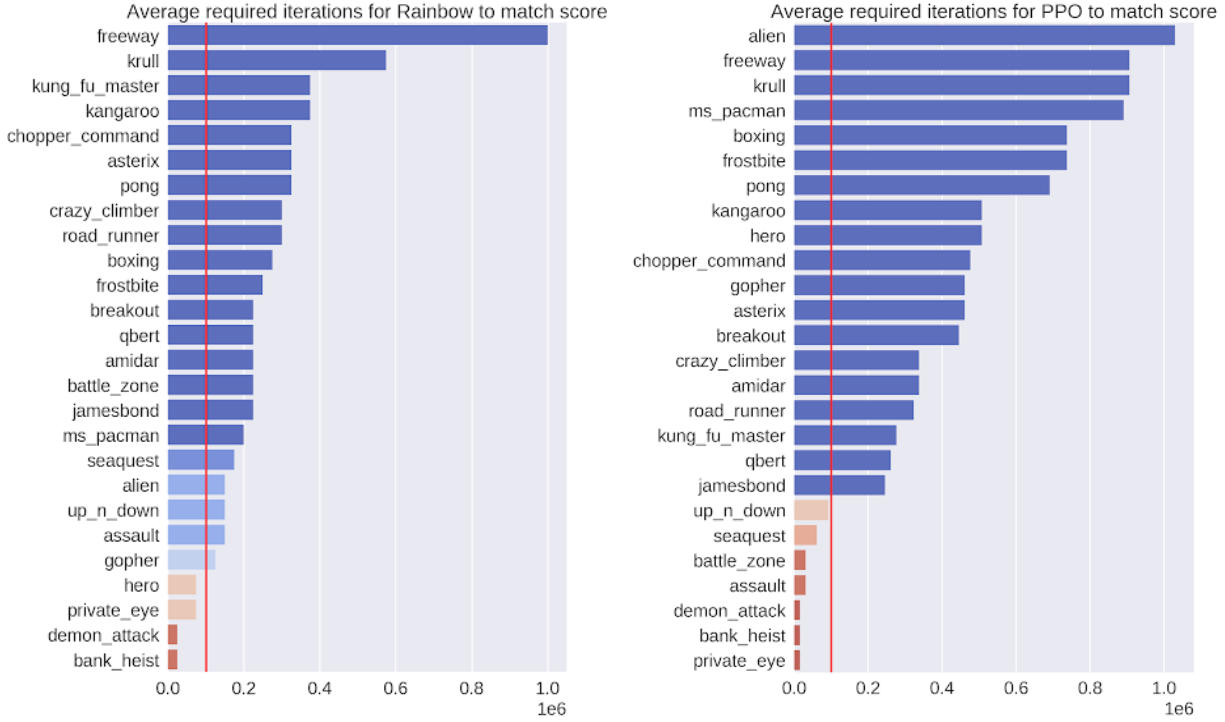
One measure of success is to demonstrate that the model is highly efficient. For this, we evaluated the output of our policies after 100K interactions with the environment, which corresponds to roughly two hours of real-time game play by a person. We compare our SimPLe method with two state of the art model-free RL methods, Rainbow and PPO, applied to 26 different games. In most cases, the SimPLe approach has a sample efficiency more than 2x better than the other methods.

The number of interactions needed by the respective model-free algorithms (left – Rainbow; right – PPO) to match the score achieved using our SimPLe training method. The red line indicates the number of interactions used by our method.

SimPLe Success
An exciting result of the SimPLe approach is that for two of the games, Pong and Freeway, an agent trained in the simulated environment is able to achieve the maximum score. Here is a video of our agent playing the game using the game model that we learned for Pong:

For Freeway, Pong and Breakout, SimPLe can generate nearly pixel-perfect predictions up to 50 steps into the future, as shown below.

Nearly pixel perfect predictions can be made by SimPLe, on Breakout (top) and Freeway (bottom). In each animation, the left is the output of the model, the middle is the groundtruth, and the right pane is the pixel-wise difference between the two.

SimPLe Surprises
SimPLe does not always make correct predictions, however. The most common failure is due to the world model not accurately capturing or predicting small but highly relevant objects. Some examples are: (1) in Atlantis and Battlezone bullets are so small that they tend to disappear, and (2) Private Eye, in which the agent traverses different scenes, teleporting from one to the other. We found that our model generally struggled to capture such large global changes.

In Battlezone, we find the model struggles with predicting small, relevant parts, such as the bullet.

Conclusion
The main promise of model-based reinforcement learning methods is in environments where interactions are either costly, slow or require human labeling, such as many robotics tasks. In such environments, a learned simulator would enable a better understanding of the agent’s environment and could lead to new, better and faster ways for doing multi-task reinforcement learning. While SimPLe does not yet match the performance of standard model-free RL methods, it is substantially more efficient, and we expect future work to further improve the performance of model-based techniques.

If you’d like to develop your own models and experiments, head to our repository and colab where you’ll find instructions on how to reproduce our work along with pre-trained world models.

Acknowledgements
This work was done in collaboration with the University of Illinois at Urbana-Champaign, the University of Warsaw and deepsense.ai. We would like to give special recognition to paper co-authors Mohammad Babaeizadeh, Piotr Miłos, Błażej Osiński, Roy H Campbell, Konrad Czechowski, Chelsea Finn, Piotr Kozakowski, Sergey Levine, Ryan Sepassi, George Tucker and Henryk Michalewski.

UK Government Aims to Tackle Insurance Fraud with AI

A bodybuilder, a cyclist and a student.

They didn’t walk into a bar. But they did raise some hair-raising fraudulent insurance claims.

In 2017, a cyclist claimed £135,000 compensation after he falsely stated that he fell off his bike following a collision with a pothole. A bodybuilder claimed £150,000 for a back injury that wasn’t hindering him from the press-up challenge he went on to film. And a student thought his luck was in when he tried to claim £14,000 for the “loss” of some of his more expensive personal items while on a jolly holiday in Venice.

Insurance fraud cases cost the U.K. billions of pounds every year. On average, it boils down to over £10,000 per fraudulent claim — and results in consumers having to spend an extra £50 per policy.

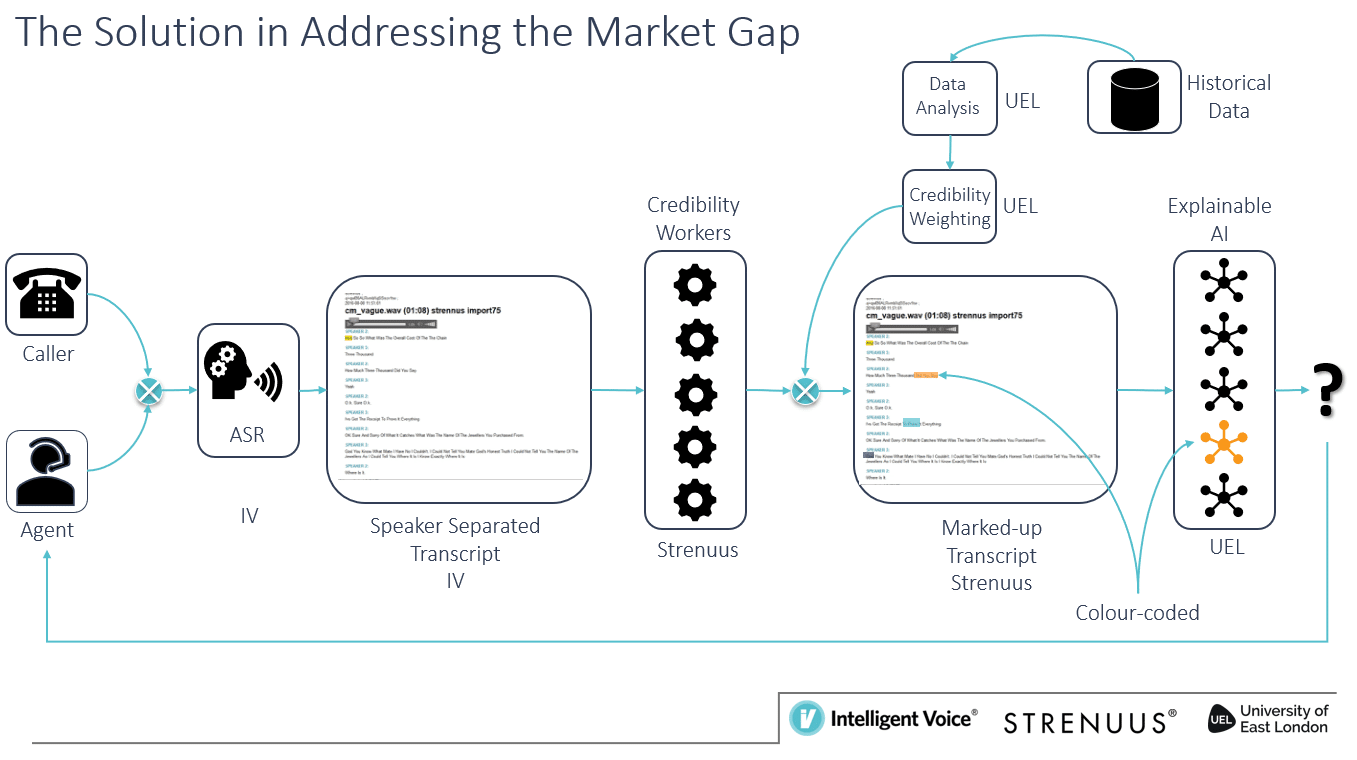
To drive these numbers down, Intelligent Voice, Strenuus and the University of East London are creating an AI and voice recognition technology that will help identify fraudulent claims.

Tackling the Big Issues

Insurance companies currently face two major challenges.

The first is the large number of calls they receive for fraudulent claims. The second is adapting to the recent GDPR law, which prohibits so-called black box policies. Instead, insurance companies have to be able to explain to their customers, as well as regulators, how decisions have been made.

In response, London-based Intelligent Voice has set out to develop a set of machine learning algorithms that can identify fraudulent behavior in real time. The goal is to make processes more efficient and effective, as well as reduce the fatigue experienced by call agents.

Intelligent Voice, Strenuus and the University of East London are using AI to tackle insurance fraud.

Intelligent Voice combines its machine learning and speech recognition skills with behavioral analytics knowledge from Strenuus, also based in London. The University of East London is working on adding an explainability layer to the technology that will determine how and when decisions were made in a particular case.

The team has shown that they can match human-level efforts in identifying potential fraud.

Their efforts are part of the U.K. government’s Next Generation Services Industrial Strategy Challenge Fund. The project will run for about two-and-a-half years.

Detecting Fraud Before the Payout

During calls to insurers, the system picks up signals of potential deception. These can take the form of specific words or phrases as well as tone of voice. A long short-term memory (LSTM) network has been trained to recognize the signals in real time, so call agents can respond to alerts immediately and change their responses accordingly.

Employee productivity gets a boost because calls flagged by the technology can be provided as a list noting potentially fraudulent markers. Call agents can jump directly to flagged sections for review.

Intelligent Voice’s machine learning algorithms are trained using hundreds of thousands of insurance calls, which have already been manually screened. To power this training, they use an assortment of NVIDIA GPUs and, in production, their software runs on NVIDIA Tensor Core V100 GPUs.

“From a technology perspective, we’ve not found anything which gives us the flexibility and performance that NVIDIA GPUs do,” said Nigel Cannings, CTO of Intelligent Voice. “The flexibility that CUDA offers, in particular, both on the programming side as well as supporting deep learning simultaneously, means that NVIDIA is the obvious choice for us.”

The post UK Government Aims to Tackle Insurance Fraud with AI appeared first on The Official NVIDIA Blog.

Betting on Monte Carlo: GPUs a ‘Game Changer’ for Nuking Noise in Nuclear Imaging

Andras Wirth is like many early AI researchers: His deep learning ambitions only turned into reality because of a sea change in technology.

A physicist, Wirth wanted to run Monte Carlo algorithms to make leaping advances in nuclear imaging, which was previously computationally impossible without massive supercomputers.

A decade ago, his breakthrough came when his lab began using GPUs and the first CUDA release on the computationally demanding algorithms.

On Thursday at the GPU Technology Conference in Silicon Valley, Wirth, who leads nuclear imaging at Mediso Medical, spoke about his company’s groundbreaking work.

Wirth’s team of CUDA programmers runs Monte Carlo method transport calculations on GPUs to enhance image quality. This helps to eliminate the usual degenerating effects that come from inaccuracies in physical modeling.

Monte Carlo transport methods rely on modeling the physical processes that contribute to acquiring the image of a patient. For maximum precision, the modeling consists of simulating billions of photon tracks. These photon tracks are random by nature, thus the simulation itself has to be random —  just like the games in the city of Monte Carlo.

Besides improving the image quality of scans, the main issue for nuclear medicine is the need to lower the dose of injected radioactive isotopes without impairing the diagnostic value of the acquired images. Neural networks help cope with the increasing noise level while also maintaining the useful information with a performance that is unrivaled by  conventional methods.

The lowered dosages are a boon to patients and the facilities that administer the radioactive substances, and the GPU-accelerated technique behind it holds great promise across the field.

“This is a complete game changer — it can have an effect on every type of nuclear medical procedure,” Wirth said.

Los Alamos to Budapest

The Monte Carlo method dates back to research at the Manhattan Project in the 1940s. But it wasn’t until recently that researchers and engineers applied GPUs to the computationally demanding algorithms.

Wirth’s work with GPUs on Monte Carlo methods have added to the capabilities of Budapest-based Mediso’s software used in its cameras for SPECT scans. SPECT (single-photon emission computerized tomography) scans rely on radioisotopes that are injected into the bloodstream of patients. Clinicians then use specialized cameras to capture 3D images of organs.

Mediso trained its U-Net convolutional neural network architecture on 1,000 images of bone scans. U-nets are used in medical imaging to bolster image segmentation so that different areas of details can be outlined.

It took a lot of computing power to do these types of calculations, Wirth said. “Traditionally, only supercomputers were able to do these type of calculations,” he said. “Until, GPUs appeared for general computing, it didn’t even make sense to try out Monte Carlo particle transport calculations in medical imaging.”

GPUs Lower Dose

Radioisotopes administered in medical imaging are low-level carcinogens for patients, expensive for imaging facilities to obtain and require special handling.

“Nobody likes to have nuclear isotopes in their body. That’s why we want to minimize the dose injected to the body — there are risks,” said Wirth.

However, when you lower a radioisotope dose, those lines are more difficult to decipher and blurring occurs that makes it difficult to spot lesions in bones.

Mediso used its neural network solutions running on GPUs to help to minimize that imaging “noise” while reducing the radioisotope dose administered to patients by one-eighth.

“It’s hard to imagine developing neural network-based products without the help of GPUs nowadays. It doesn’t stop there, however: since processing time is crucial in medical imaging, GPU technology has become a vital element of imaging products,” Wirth said.

The post Betting on Monte Carlo: GPUs a ‘Game Changer’ for Nuking Noise in Nuclear Imaging appeared first on The Official NVIDIA Blog.

Snack Shacks: Startup Shows Off Self-Service Stores

A credit card swipe gets you into the checkout-free miniature convenience store. After that, just grab Oreos, Pringles or other munchies, check your receipt and go.

Startup AiFi presented its automated retail store, dubbed the NanoStore, at the GPU Technology Conference this week.

The Silicon Valley-based company uses image recognition powered by a single NVIDIA T4 GPU to automatically capture customers’ shopping items and charge them.

AiFi — an NVIDIA Inception winner last year — is now in pilot tests with its NanoStores and offers its store technology to retailers of all sizes.

The NVIDIA Inception program is a virtual accelerator that helps startups get to market faster.

AiFi’s NanoStores are built into a shipping container that can hold more than 500 different products. The NanoStore concept fills a niche in the market between a vending machine and a convenience store, said co-founder and CEO Steve Gu.

“There’s a gap between vending machines and convenience stores. We believe this will be the next big thing,” said Gu.

Snack Tracking

NanoStores pack cameras inside to capture a customer’s merchandise choices, which are identified by AiFi’s image recognition algorithms and then put on the tab.

It’s not easy to recognize the merchandise and connect it with the customer, and the startup continues to work on this, Gu said.

Detecting more than 500 different products was made easier by using 3D simulations. That made it possible to create about thousands of images from different angles for each product to refine their training set.

Training time was accelerated by using workstations sporting NVIDIA TITAN series GPUs, Gu said.

NanoStore Pilots

AiFi’s NanoStore offers retailers an easy way to try out a fully automated store that is always open, extending hours and sales, Gu told attendees of his GTC talk.

“It creates a new line of business for convenience stores.”

The company is working with Valora, based in Switzerland, on a pilot of its NanoStores located at European railway stations. The startup is also working on a pilot with Carrefour, a French retail giant with more than 12,000 stores, for its technology.

Closer to home, AiFi is in discussions with some universities to place pilots of its NanoStores, which could operate 24/7 on their campuses.

“Students never sleep and neither does the NanoStore,” Gu said.

The post Snack Shacks: Startup Shows Off Self-Service Stores appeared first on The Official NVIDIA Blog.

AWS Deep Learning AMIs now come with TensorFlow 1.13, MXNet 1.4, and support Amazon Linux 2

The AWS Deep Learning AMIs now come with MXNet 1.4.0, Chainer 5.3.0, and TensorFlow 1.13.1, which is custom-built directly from source and tuned for high-performance training across Amazon EC2 instances.

AWS Deep Learning AMIs are now available on Amazon Linux 2

Developers can now use the AWS Deep Learning AMIs and Deep Learning Base AMI on Amazon Linux 2, the next generation of Amazon Linux. This version brings long term support (LTS) until June 30, 2023 and access to the latest innovations from the Linux ecosystem. The Deep Learning AMIs on Amazon Linux 2 have prebuilt and optimized virtual environments for TensorFlow (with Keras), MXNet, PyTorch, and Chainer on Python 3.6 and Python 2.7. Developers can continue using the AWS Deep Learning AMI and Deep Learning Base AMI on Ubuntu and Amazon Linux.

Amazon Linux 2 offers extended availability for software updates. The core operating system has 5 years of long-term support and provides access to the latest software packages through the Amazon Linux Extras repository. Amazon Linux 2 provides a modern execution environment with LTS Kernel (4.14) tuned for optimal performance on AWS, systemd support, and newer tooling (gcc 7.3.1, glibc 2.26, Binutils 2.29.1). Customers can also use Amazon Linux 2 virtual machine images for on-premises development and testing.

Faster training with TensorFlow 1.13

The Deep Learning AMI on Ubuntu, Amazon Linux, and Amazon Linux 2 now come with an optimized build of TensorFlow 1.13.1 and CUDA 10. On CPU instances, TensorFlow 1.13 is custom-built directly from source to accelerate performance on Intel Xeon Platinum processors that power EC2 C5 instances. Training a ResNet-50 model with synthetic ImageNet data using the Deep Learning AMI results in 9.4X faster throughput than stock TensorFlow 1.13 binaries. GPU instances come with an optimized build of TensorFlow 1.13 that is configured with NVIDIA CUDA 10 and cuDNN 7.4 to take advantage of mixed precision training on Volta V100 GPUs powering EC2 P3 instances. The Deep Learning AMI automatically deploys the most performant build of TensorFlow optimized for the EC2 instance of your choice when you activate the TensorFlow virtual environment for the first time.

For developers looking to scale their TensorFlow training to multiple GPUs, the Deep Learning AMIs come with the Horovod distributed training framework. The framework is fully optimized to efficiently use distributed training cluster topologies composed of Amazon EC2 P3 instances. Horovod is an open source distributed training framework based on the Message Passing Interface (MPI) model. This is a popular standard for passing messages and managing communication between nodes in a high-performance distributed computing environment. Training a ResNet-50 model using TensorFlow 1.13 and Horovod in the Deep Learning AMI results in 27% faster throughput than stock TensorFlow 1.13 on 8 nodes.

Better performance and ease-of-use with MXNet 1.4

AWS Deep Learning AMIs now come with the latest release of Apache MXNet 1.4 that bring improvements to performance and ease-of-use. MXNet 1.4 adds Java bindings for inference, Julia bindings, experimental control flow operators, JVM memory management, and many more under-the-hood enhancements. This release also improves MXNet support for Intel MKL-DNN with improved graph optimization and quantization. This feature reduces memory usage and improves inference time without a significant loss in accuracy.

Chainer 5.3

AWS Deep Learning AMIs now support Chainer 5.3.0. The Chainer define-by-run approach allows developers to modify computational graphs on the fly during training. This provides greater flexibility in implementing dynamic neural networks like recurrent neural networks (RNNs) used for natural language processing (NLP) tasks such as sequence-to-sequence translation and question answering systems. Chainer comes fully-configured to take advantage of CuPy with NVIDIA CUDA 9 and cuDNN 7 drivers for accelerating computations on NVIDIA Volta GPUs powering Amazon EC2 P3 instances. You can quickly get started with Chainer using our step-by-step tutorial.

Getting started with AWS Deep Learning AMIs

You can quickly get started with the AWS Deep Learning AMIs by using our getting started tutorial. For more tutorials, go to our developer guide for more resources and release notes. The latest AMIs are now available on the AWS Marketplace. You can also subscribe to our discussion forum to get new launch announcements and post your questions.


About the Authors

Aditya Bindal is a Senior Product Manager for AWS Deep Learning. He works on products that make it easier for customers to use deep learning engines. In his spare time, he enjoys playing tennis, reading historical fiction, and traveling.


Bhavin Thaker is a Software Development Manager in the AWS Deep Learning group, working on products that helps customers use deep learning tools efficiently, with a specific focus on the AWS Deep Learning AMI. He enjoys working with people and computers to make this happen. In his spare time, he enjoys reading and spending time with his family and friends.


Kalyanee Chendke is a Software Engineer for AWS Deep Learning. She works on products that make it easier for customers to get started with deep learning. Outside of work, she enjoys playing badminton, painting and spending time with friends and family.