
Blog

Learn About Our Meetup

5000+ Members

MEETUPS

LEARN, CONNECT, SHARE

Join our meetup, learn, connect, share, and get to know your Toronto AI community. 

JOB POSTINGS

INDEED POSTINGS

Browse through the latest deep learning, ai, machine learning postings from Indeed for the GTA.

CONTACT

CONNECT WITH US

Are you looking to sponsor space, be a speaker, or volunteer, feel free to give us a shout.

Category: Global

Introducing Translatotron: An End-to-End Speech-to-Speech Translation Model

Speech-to-speech translation systems have been developed over the past several decades with the goal of helping people who speak different languages to communicate with each other. Such systems have usually been broken into three separate components: automatic speech recognition to transcribe the source speech as text, machine translation to translate the transcribed text into the target language, and text-to-speech synthesis (TTS) to generate speech in the target language from the translated text. Dividing the task into such a cascade of systems has been very successful, powering many commercial speech-to-speech translation products, including Google Translate.

In “Direct speech-to-speech translation with a sequence-to-sequence model”, we propose an experimental new system that is based on a single attentive sequence-to-sequence model for direct speech-to-speech translation without relying on intermediate text representation. Dubbed Translatotron, this system avoids dividing the task into separate stages, providing a few advantages over cascaded systems, including faster inference speed, naturally avoiding compounding errors between recognition and translation, making it straightforward to retain the voice of the original speaker after translation, and better handling of words that do not need to be translated (e.g., names and proper nouns).

Translatotron
The emergence of end-to-end models on speech translation started in 2016, when researchers demonstrated the feasibility of using a single sequence-to-sequence model for speech-to-text translation. In 2017, we demonstrated that such end-to-end models can outperform cascade models. Many approaches to further improve end-to-end speech-to-text translation models have been proposed recently, including our effort on leveraging weakly supervised data. Translatotron goes a step further by demonstrating that a single sequence-to-sequence model can directly translate speech from one language into speech in another language, without relying on an intermediate text representation in either language, as is required in cascaded systems.

Translatotron is based on a sequence-to-sequence network which takes source spectrograms as input and generates spectrograms of the translated content in the target language. It also makes use of two other separately trained components: a neural vocoder that converts output spectrograms to time-domain waveforms, and, optionally, a speaker encoder that can be used to maintain the character of the source speaker’s voice in the synthesized translated speech. During training, the sequence-to-sequence model uses a multitask objective to predict source and target transcripts at the same time as generating target spectrograms. However, no transcripts or other intermediate text representations are used during inference.

Model architecture of Translatotron.

Performance
We validated Translatotron’s translation quality by measuring the BLEU score, computed with text transcribed by a speech recognition system. Though our results lag behind a conventional cascade system, we have demonstrated the feasibility of the end-to-end direct speech-to-speech translation.

Compared in the audio clips below are the direct speech-to-speech translation output from Translatotron to that of the baseline cascade method. In this case, both systems provide a suitable translation and speak naturally using the same canonical voice.

Input (Spanish)
Reference translation (English)
Baseline cascade translation
Translatotron translation

You can listen to more audio samples here.

Preserving Vocal Characteristics
By incorporating a speaker encoder network, Translatotron is also able to retain the original speaker’s vocal characteristics in the translated speech, which makes the translated speech sound more natural and less jarring. This feature leverages previous Google research on speaker verification and speaker adaptation for TTS. The speaker encoder is pretrained on the speaker verification task, learning to encode speaker characteristics from a short example utterance. Conditioning the spectrogram decoder on this encoding makes it possible to synthesize speech with similar speaker characteristics, even though the content is in a different language.

The audio clips below demonstrate the performance of Translatotron when transferring the original speaker’s voice to the translated speech. In this example, Translatotron gives more accurate translation than the baseline cascade model, while being able to retain the original speaker’s vocal characteristics. The Translatotron output that retains the original speaker’s voice is trained with less data than the one using the canonical voice, so that they yield slightly different translations.

Input (Spanish)
Reference translation (English)
Baseline cascade translation
Translatotron translation (canonical voice)
Translatotron translation (original speaker’s voice)

More audio samples are available here.

Conclusion
To the best of our knowledge, Translatotron is the first end-to-end model that can directly translate speech from one language into speech in another language. It is also able to retain the source speaker’s voice in the translated speech. We hope that this work can serve as a starting point for future research on end-to-end speech-to-speech translation systems.

Acknowledgments
This research was a joint work between the Google Brain, Google Translate, and Google Speech teams. Contributors include Ye Jia, Ron J. Weiss, Fadi Biadsy, Wolfgang Macherey, Melvin Johnson, Zhifeng Chen, Mengmeng Niu, Quan Wang, Jason Pelecanos, Ignacio Lopez Moreno, Tom Walters, Heiga Zen, Patrick Nguyen, Yu Zhang, Jonathan Shen, Orhan Firat, and Yonghui Wu. We also thank Jorge Pereira and Stella Laurenzo for verifying the quality of the translation from Translatotron.

Paige.AI Ramps Up Cancer Pathology Research Using NVIDIA Supercomputer

An accurate diagnosis is key to treating cancer — a disease that kills 600,000 people a year in the U.S. alone — and AI can help.

Common forms of the disease, like breast, lung and prostate cancer, can have good recovery rates when diagnosed early. But diagnosing the tumor, the work of pathologists, can be a very manual, challenging and time-consuming process.

Pathologists traditionally interpret dozens of slides per cancer case, searching for clues pointing to a cancer diagnosis. For example, there can be more than 60 slides for a single breast cancer case and, out of those, only a handful may contain important findings.

AI can help pathologists become more productive by accelerating and enhancing their workflow as they examine massive amounts of data. It gives the pathologists the tools to analyze images, provide insight based on previous cases and diagnose faster by pinpointing anomalies.

Paige.AI is applying AI to pathology to increase diagnostic accuracy and deliver better patient outcomes, starting with prostate and breast cancer. Earlier this year, Paige.AI was granted “Breakthrough Designation” by the U.S. Food and Drug Administration, the first such designation for AI in cancer diagnosis.

The FDA grants the designation for technologies that have the potential to provide for more effective diagnosis or treatment for life-threatening or irreversibly debilitating diseases, where timely availability is in the best interest of patients.

To find breakthroughs in cancer diagnosis, Paige.AI will access millions of pathology slides, providing the volume of data necessary to train and develop cutting-edge AI algorithms.

DGX-1 AI supercomputer
NVIDIA DGX-1 is proving to be an important research tool for many of the world’s leading AI researchers.

To make sense of all this data, Paige.AI uses an AI supercomputer made up of 10 interconnected NVIDIA DGX-1 systems. The supercomputer has the enormous computing power of over 10 petaflops necessary to develop a clinical-grade model for pathology and, for the first time, bridge the gap from research to a clinical setting that benefits future patients.

One example of how NVIDIA’s technology is already being used is a recent study by Paige.AI that used seven NVIDIA DGX-1 systems to train neural networks on a new dataset to detect prostate cancer. The dataset consisted of 12,160 slides, two orders of magnitude larger than previous datasets in pathology. The researchers achieved near perfect accuracy on a test set consisting of 1,824 real-world slides without any manual image-annotation.

By minimizing the time pathologists spend processing data, AI can help them focus their time on analyzing it. This is especially critical given the short supply of pathologists.

According to The Lancet medical journal, there is a single pathologist for every million people in sub-Saharan Africa and one for every 130,000 people in China. In the United States, there is one for rohly every 20,000 people, however, studies predict that number will shrink to one for about every 30,000 people by 2030.

AI gives a big boost to computational pathology by enabling quantitative analysis of the study of structures seen under a microscope and cell biology. This advancement is made possible by combining novel image analysis, computer vision and machine learning techniques.

“With the help of NVIDIA technology, Paige.AI is able to train deep neural networks from hundreds of thousands of gigapixel images of whole slides. The result is clinical-grade artificial intelligence for pathology,” said Dr. Thomas Fuchs, co-founder and chief scientific officer at Paige.AI. “Our vision is to help pathologists improve the efficiency of their work, for researchers to generate new insights, and clinicians to improve patient care.”


Feature image credit: Dr. Cecil Fox, National Cancer Institute, via Wikimedia Commons.

The post Paige.AI Ramps Up Cancer Pathology Research Using NVIDIA Supercomputer appeared first on The Official NVIDIA Blog.

As search needs evolve, Microsoft makes AI tools for better search available to researchers and developers

Only a few years ago, web search was simple. Users typed a few words and waded through pages of results.

Today, those same users may instead snap a picture on a phone and drop it into a search box or use an intelligent assistant to ask a question without physically touching a device at all. They may also type a question and expect an actual reply, not a list of pages with likely answers.

These tasks challenge traditional search engines, which are based around an inverted index system that relies on keyword matches to produce results.

“Keyword search algorithms just fail when people ask a question or take a picture and ask the search engine, ‘What is this?’” said Rangan Majumder, group program manager on Microsoft’s Bing search and AI team.

Of course, keeping up with users’ search preferences isn’t new — it’s been a struggle since web search’s inception. But now, it’s becoming easier to meet those evolving needs, thanks to advancements in artificial intelligence, including those pioneered by Bing’s search team and researchers at Microsoft’s Asia research lab.

“The AI is making the products we work with more natural,” said Majumder. “Before, people had to think, ‘I’m using a computer, so how do I type in my input in a way that won’t break the search?’”

Microsoft has made one of the most advanced AI tools it uses to better meet people’s evolving search needs available to anyone as an open source project on GitHub. On Wednesday, it also released user example techniques and an accompanying video for those tools via Microsoft’s AI lab.

The algorithm, called Space Partition Tree And Graph (SPTAG), allows users to take advantage of the intelligence from deep learning models to search through billions of pieces of information, called vectors, in milliseconds. That, in turn, means they can more quickly deliver more relevant results to users.

Vector search makes it easier to search by concept rather than keyword. For example, if a user types in “How tall is the tower in Paris?” Bing can return a natural language result telling the user the Eiffel Tower is 1,063 feet, even though the word “Eiffel” never appeared in the search query and the word “tall” never appears in the result.

Microsoft uses vector search for its own Bing search engine, and the technology is helping Bing better understand the intent behind billions of web searches and find the most relevant result among billions of web pages.


YouTube Video

Using vectors for better search

Essentially a numerical representation of a word, image pixel or other data point, a vector helps capture what a piece of data actually means. Thanks to advances in a branch of AI called deep learning, Microsoft said it can begin to understand and represent search intent using these vectors.

Once the numerical point has been assigned to a piece of data, vectors can be arranged, or mapped, with close numbers placed in proximity to one another to represent similarity. These proximal results get displayed to users, improving search outcomes.

The technology behind the vector search Bing uses got its start when company engineers began noticing unusual trends in users’ search patterns.

“In analyzing our logs, the team found that search queries were getting longer and longer,” said Majumder. This suggested that users were asking more questions, over-explaining because of past, poor experiences with keyword search, or were “trying to act like computers” when describing abstract things — all unnatural and inconvenient for users.

With Bing search, the vectorizing effort has extended to over 150 billion pieces of data indexed by the search engine to bring improvement over traditional keyword matching. These include single words, characters, web page snippets, full queries and other media. Once a user searches, Bing can scan the indexed vectors and deliver the best match.

Vector assignment is also trained using deep learning technology for ongoing improvement. The models consider inputs like end-user clicks after a search to get better at understanding the meaning of that search.

While the idea of vectorizing media and search data isn’t new, it’s only recently been possible to use it on the scale of a massive search engine such as Bing, Microsoft experts said.

“Bing processes billions of documents every day, and the idea now is that we can represent these entries as vectors and search through this giant index of 100 billion-plus vectors to find the most related results in 5 milliseconds,” said Jeffrey Zhu, program manager on Microsoft’s Bing team.

To put that in perspective, Majumder said, consider this: A stack of 150 billion business cards would stretch from here to the moon. Within a blink of an eye, Bing’s search using SPTAG can find 10 different business cards one after another within that stack of cards.

Uses for visual, audio search

The Bing team said they expect the open source offering could be used for enterprise or consumer-facing applications to identify a language being spoken based on an audio snippet, or for image-heavy services such as an app that lets people take pictures of flowers and identify what type of flower it is. For those types of applications, a slow or irrelevant search experience is frustrating.

“Even a couple seconds for a search can make an app unusable,” noted Majumder.

The team also is hoping that researchers and academics will use it to explore other areas of search breakthroughs.

“We’ve only started to explore what’s really possible around vector search at this depth,” he said.

Related links:

The post As search needs evolve, Microsoft makes AI tools for better search available to researchers and developers appeared first on The AI Blog.

Bird’s-AI View: Harnessing Drones to Improve Traffic Flow

Traffic. It’s one of the most commonly cited frustrations across the globe.

It consumed nearly 180 hours of productive time for the average U.K. driver last year. German drivers lost an average of 120 hours. U.S. drivers lost nearly 100 hours.

Because time is too precious to waste, RCE Systems — a Brno, Czech Republic-based startup and member of the NVIDIA Inception program — is taking its tech to the air to improve traffic flow.

Its DataFromSky platform combines trajectory analysis, computer vision and drones to ease congestion and improve road safety.

AI in the Sky

Traffic analysis has traditionally been based on video footage from fixed cameras, mounted at specific points along roads and highways.

This can severely limit the analysis of traffic which is, by nature, constantly moving and changing.

Capturing video from a bird’s-eye perspective via drones allows RCE Systems to gain deeper insights into traffic.

Beyond monitoring objects captured on video, the DataFromSky platform interprets movements using AI to provide highly accurate telemetric data about every object in the traffic flow.

RCE Systems trains its deep neural networks using thousands of hours of video footage from around the globe, shot in various weather conditions. The training takes place on NVIDIA GPUs using Caffe and TensorFlow.

These specialized neural networks can then recognize objects of interest and continually track them in video footage.

The data captured via this AI process is used in numerous research projects, enabling deeper analysis of object interaction and new behavioral models of drivers in specific traffic situations.

Ultimately, this kind of data will also be crucial for the development of autonomous vehicles.

Driving Impact

The DataFromSky platform is still in its early days, but its impact is already widespread.

RCE Systems is working on a system for analyzing safety at intersections, based on driver behavior. This includes detecting situations where accidents were narrowly avoided and then determining root causes.

By understanding these situations better, their occurrence can be avoided — making traffic flow easier and preventing vehicle damage as well as potential loss of life.

Toyota Europe used RCE Systems’ findings from the DataFromSky platform to create probabilistic models of driver behavior as well as deeper analysis of interactions with roundabouts.

Leidos used insights gathered by RCE Systems to calibrate traffic simulation models as part of its projects to examine narrowing freeway lanes and shoulders in Dallas, Seattle, San Antonio and Honolulu.

And the value of RCE Systems’ analysis is not limited to vehicles. The Technical University of Munich has used it to perform a behavioral study of cyclists and pedestrians.

Moving On

RCE Systems is looking to move to NVIDIA Jetson AGX Xavier in the future to accelerate their AI at the edge solution. They are currently developing a “monitoring drone” capable of evaluating image data in flight, in real time.

It could one day replace a police helicopter during high-speed chases or act as a mobile surveillance system for property protection.

The post Bird’s-AI View: Harnessing Drones to Improve Traffic Flow appeared first on The Official NVIDIA Blog.

The AWS DeepRacer League virtual circuit is underway—win a trip to re:Invent 2019!

The competition is heating up in the AWS DeepRacer League, the world’s first global autonomous racing league, open to anyone. The first round is almost halfway home, now that 9 of the 21 stops on the summit circuit schedule are complete. Developers continue to build new machine learning skills and post winning times to the leaderboards. Here’s a quick round-up of the news from all of this week’s action.

The AWS DeepRacer virtual circuit launched on April 29. Developers of all skill levels can enter the league from anywhere in the world via the AWS DeepRacer console.

The first of six monthly tracks is the London Loop, and racing is well underway. As of May 8, 2019, the are 346 participants on the leaderboard, competing to be crowned the first champion of the virtual circuit and advance on an all-expenses-paid trip to re:Invent. Our current leader is Holly, with a time of 12.48 seconds. Twenty-three days remain, so there’s still time to get rolling into the online competition. There are prizes for the Top 10, and plenty of chances to win!

Current leaderboard standings:

Time remaining on the London Loop race:

On the Summit Circuit this week, the AWS DeepRacer League made stops in Madrid and London and crowned two new champions. They both advance on an all-expenses-paid trip to re:Invent 2019 in Las Vegas, Nevada.

First up was Madrid, the third city in Europe to host the AWS DeepRacer League. The crowd was energetic and the competitors eager to win. The top 3 took to the tracks 14 times between them.

Pedro, Javier, and David arrived at the AWS Summit together, with 27 models that they had been training together in the AWS DeepRacer 3D racing simulator. They had seen some good results in the virtual world. However, the first couple of runs on the track didn’t seem to deliver in the same way, with our champion Pedro posting an opening time of 40 seconds. They pulled together as a team, tuning and trying the different models they had built at home, and eventually began to see much better results.

In the following video, David shares their thoughts on strategy during the day.

With about two hours of racing left, and on his fourth attempt, Pedro was the lucky team member who took the top spot with a winning time of 9.36 seconds. His colleagues were not far behind, claiming the second and third spot. Pedro advances to the finals and is excited to work with his teammates on a strategy to take home the AWS DeepRacer League Championship Cup. Don’t worry, they both join him to take on the rest of the field!

And on to London, the hometown of the reigning AWS DeepRacer Champion, Rick Fish. Developers came to the expo hall at the AWS Summit, for a full day of racing on two tracks and the chance to win their trip to re:Invent 2019.

The day started strong with our eventual third-place finisher “breadcentric,” with a 13-second lap. New to machine learning, he brought his model to the AWS Summit and was ready to race as soon as the tracks opened at 8AM. The competition came in strong as competitors quickly started logging lap times under 10 seconds, including our eventual champion, Matt Camp. Matt works at Jigsaw XYZ, whose cofounder happens to be Rick Fish! Rick’s team at Jigsaw XYZ had been preparing for the London race since re:Invent and knew that the pressure would be on to win.

Matt had been working on his model at home and was eager to see how well it could perform. Matt’s friend and colleague Tony joined him. With only 1 hour to go, they were in second and third position on the podium, behind Raul, who had spent most of the day on top with a 9.01-second lap. The Jigsaw XYZ team took to the tracks one more time. In his final 2 minutes of racing, Matt clinched the title with an 8.9-second lap. Matt had no experience with machine learning before re:Invent 2018. He now heads back in 2019 to take on Rick Fish and rest of the field to win the AWS DeepRacer League Championship Cup.

The competition and excitement are certainly building in the AWS DeepRacer League. Developers of all skill levels get hands-on, learn, and put their machine learning skills to the ultimate test. Get started in the AWS DeepRacer League, either virtually or at the next summit near you. We have all the tools to get you started even if you have no machine learning experience, as well as resources to help you take on the challenge and win!

Coming soon, we share our best tips from the AWS DeepRacer team, so stay tuned.


About the Author

Alexandra Bush is a Senior Product Marketing Manager for AWS AI. She is passionate about how technology impacts the world around us and enjoys being able to help make it accessible to all. Out of the office she loves to run, travel and stay active in the outdoors with family and friends.


An End-to-End AutoML Solution for Tabular Data at KaggleDays

Machine learning (ML) for tabular data (e.g. spreadsheet data) is one of the most active research areas in both ML research and business applications. Solutions to tabular data problems, such as fraud detection and inventory prediction, are critical for many business sectors, including retail, supply chain, finance, manufacturing, marketing and others. Current ML-based solutions to these problems can be achieved by those with significant ML expertise, including manual feature engineering and hyper-parameter tuning, to create a good model. However, the lack of broad availability of these skills limits the efficiency of business improvements through ML.

Google’s AutoML efforts aim to make ML more scalable and accelerate both research and industry applications. Our initial efforts of neural architecture search have enabled breakthroughs in computer vision with NasNet, and evolutionary methods such as AmoebaNet and hardware-aware mobile vision architecture MNasNet further show the benefit of these learning-to-learn methods. Recently, we applied a learning-based approach to tabular data, creating a scalable end-to-end AutoML solution that meets three key criteria:

  • Full automation: Data and computation resources are the only inputs, while a servable TensorFlow model is the output. The whole process requires no human intervention.
  • Extensive coverage: The solution is applicable to the majority of arbitrary tasks in the tabular data domain.
  • High quality: Models generated by AutoML has comparable quality to models manually crafted by top ML experts.

To benchmark our solution, we entered our algorithm in the KaggleDays SF Hackathon, an 8.5 hour competition of 74 teams with up to 3 members per team, as part of the KaggleDays event. The first time that AutoML has competed against Kaggle participants, the competition involved predicting manufacturing defects given information about the material properties and testing results for batches of automotive parts. Despite competing against participants thats were at the Kaggle progression system Master level, including many who were at the GrandMaster level, our team (“Google AutoML”) led for most of the day and ended up finishing second place by a narrow margin, as seen in the final leaderboard.

Our team’s AutoML solution was a multistage TensorFlow pipeline. The first stage is responsible for automatic feature engineering, architecture search, and hyperparameter tuning through search. The promising models from the first stage are fed into the second stage, where cross validation and bootstrap aggregating are applied for better model selection. The best models from the second stage are then combined in the final model.

The workflow for the “Google AutoML” team was quite different from that of other Kaggle competitors. While they were busy with analyzing data and experimenting with various feature engineering ideas, our team spent most of time monitoring jobs and and waiting for them to finish. Our solution for second place on the final leaderboard required 1 hour on 2500 CPUs to finish end-to-end.

After the competition, Kaggle published a public kernel to investigate winning solutions and found that augmenting the top hand-designed models with AutoML models, such as ours, could be a useful way for ML experts to create even better performing systems. As can be seen in the plot below, AutoML has the potential to enhance the efforts of human developers and address a broad range of ML problems.

Potential model quality improvement on final leaderboard if AutoML models were merged with other Kagglers’ models. “Erkut & Mark, Google AutoML”, includes the top winner “Erkut & Mark” and the second place “Google AutoML” models. Erkut Aykutlug and Mark Peng used XGBoost with creative feature engineering whereas AutoML uses both neural network and gradient boosting tree (TFBT) with automatic feature engineering and hyperparameter tuning.

Google Cloud AutoML Tables
The solution we presented at the competitions is the main algorithm in Google Cloud AutoML Tables, which was recently launched (beta) at Google Cloud Next ‘19. The AutoML Tables implementation regularly performs well in benchmark tests against Kaggle competitions as shown in the plot below, demonstrating state-of-the-art performance across the industry.

Third party benchmark of AutoML Tables on multiple Kaggle competitions

We are excited about the potential application of AutoML methods across a wide range of real business problems. Customers have already been leveraging their tabular enterprise data to tackle mission-critical tasks like supply chain management and lead conversion optimization using AutoML Tables, and we are excited to be providing our state-of-the-art models to solve tabular data problems.

Acknowledgements
This project was only possible thanks to Google Brain team members Ming Chen, Da Huang, Yifeng Lu, Quoc V. Le and Vishy Tirumalashetty. We also thank Dawei Jia, Chenyu Zhao and Tin-yun Ho from the Cloud AutoML Tables team for great infrastructure and product landing collaboration. Thanks to Walter Reade, Julia Elliott and Kaggle for organizing such an engaging competition.

Bringing a Critical AI to News: Extracting Insight from Coverage

In 2015, Sean Gourley penned an article called “Robot Propaganda” for Wired magazine.

It contained this then-bold prediction: “We are likely to see versions of these bots deployed on U.S. audiences as part of the 2016 presidential election campaigns.”

Well, we all know how that turned out.

Gourley recently joined the AI Podcast to talk about bots, propaganda and fake news and how they relate to the work his own company is doing in natural language understanding and generation.

Gourley — who holds a Ph.D. in physics from Oxford University — is founder and CEO of Primer, a San Francisco-based machine intelligence company.

It builds machines that can read and write, automating the analysis of very large datasets.

In short, it automates the job of wringing insights out of news and other sources of information.

As a result, it grapples with the problems created by “fake news” and propaganda in a very real way for customers that include government agencies, financial institutions and Fortune 500 companies.

“The big thing for us is building systems that can help us understand the world that we’re living in,” Gourley said.

The best way to do that: track current events, and the events detailed by reputable sources closely.

“That’s become a really important piece in starting to kind of navigate a world where there’s an increasing volume of fake information and increasingly sophisticated fake information that’s out there.”

For more from Gourley, tune into the AI Podcast.

How to Tune into the AI Podcast

Our AI Podcast is available through iTunes, Castbox, DoggCatcher, Google Play Music, Overcast, PlayerFM, Podbay, PodBean, Pocket Casts, PodCruncher, PodKicker, Stitcher, Soundcloud and TuneIn.

If your favorite isn’t listed here, email us at aipodcast [at] nvidia [dot] com.

The post Bringing a Critical AI to News: Extracting Insight from Coverage appeared first on The Official NVIDIA Blog.

Build end-to-end machine learning workflows with Amazon SageMaker and Apache Airflow

Machine learning (ML) workflows orchestrate and automate sequences of ML tasks by enabling data collection and transformation. This is followed by training, testing, and evaluating a ML model to achieve an outcome. For example, you might want to perform a query in Amazon Athena or aggregate and prepare data in AWS Glue before you train a model on Amazon SageMaker and deploy the model to production environment to make inference calls. Automating these tasks and orchestrating them across multiple services helps build repeatable, reproducible ML workflows. These workflows can be shared between data engineers and data scientists.

Introduction

ML workflows consist of tasks that are often cyclical and iterative to improve the accuracy of the model and achieve better results. We recently announced new integrations with Amazon SageMaker that allow you to build and manage these workflows:

  1. AWS Step Functions automates and orchestrates Amazon SageMaker related tasks in an end-to-end workflow.  You can automate publishing datasets to Amazon S3, training an ML model on your data with Amazon SageMaker, and deploying your model for prediction. AWS Step Functions will monitor Amazon SageMaker and other jobs until they succeed or fail, and either transition to the next step of the workflow or retry the job. It includes built-in error handling, parameter passing, state management, and a visual console that lets you monitor your ML workflows as they run.
  2. Many customers currently use Apache Airflow, a popular open source framework for authoring, scheduling, and monitoring multi-stage workflows. With this integration, multiple Amazon SageMaker operators are available with Airflow, including model training, hyperparameter tuning, model deployment, and batch transform. This allows you to use the same orchestration tool to manage ML workflows with tasks running on Amazon SageMaker.

This blog post shows how you can build and manage ML workflows using Amazon Sagemaker and Apache Airflow. We’ll build a recommender system to predict a customer’s rating for a certain video based on the customer’s historical ratings of similar videos, as well as the behavior of other similar customers. We’ll use historical star ratings from over 2 million Amazon customers on over 160,000 digital videos. Details on this dataset can be found at its AWS Open Data page.

High-level solution

We’ll start by exploring the data, transforming the data, and training a model on the data. We’ll fit the ML model using an Amazon SageMaker managed training cluster. We’ll then deploy to an endpoint to perform batch predictions on the test data set. All of these tasks will be plugged into a workflow that can be orchestrated and automated through Apache Airflow integration with Amazon SageMaker.

The following diagram shows the ML workflow we’ll implement for building the recommender system.

The workflow performs the following tasks:

  1. Data pre-processing: Extract and pre-process data from Amazon S3 to prepare the training data.
  2. Prepare training data: To build the recommender system, we’ll use the Amazon SageMaker built-in algorithm, Factorization machines. The algorithm expects training data only in recordIO-protobuf format with Float32 tensors. In this task, pre-processed data will be transformed to RecordIO Protobuf format.
  3. Training the model:Train the Amazon SageMaker built-in factorization machine model with the training data and generate model artifacts. The training job will be launched by the Airflow Amazon SageMaker operator.
  4. Tune the model hyperparameters:A conditional/optional task to tune the hyperparameters of the factorization machine to find the best model. The hyperparameter tuning job will be launched by the Amazon SageMaker Airflow operator.
  5. Batch inference:Using the trained model, get inferences on the test dataset stored in Amazon S3 using the Airflow Amazon SageMaker operator.

Note: You can clone this GitHub repo for the scripts, templates and notebook referred to in this blog post.

Airflow concepts and setup

Before implementing the solution, let’s get familiar with Airflow concepts. If you are already familiar with Airflow concepts, skip to the Airflow Amazon SageMaker operators section.

Apache Airflow is an open-source tool for orchestrating workflows and data processing pipelines. Airflow allows you to configure, schedule, and monitor data pipelines programmatically in Python to define all the stages of the lifecycle of a typical workflow management.

Airflow nomenclature

  • DAG (Directed Acyclic Graph): DAGs describe how to run a workflow by defining the pipeline in Python, that is configuration as code. Pipelines are designed as a directed acyclic graph by dividing a pipeline into tasks that can be executed independently. Then these tasks are combined logically as a graph.
  • Operators: Operators are atomic components in a DAG describing a single task in the pipeline. They determine what gets done in that task when a DAG runs. Airflow provides operators for common tasks. It is extensible, so you can define custom operators. Airflow Amazon SageMaker operators are one of these custom operators contributed by AWS to integrate Airflow with Amazon SageMaker.
  • Task: After an operator is instantiated, it’s referred to as a “task.”
  • Task instance: A task instance represents a specific run of a task characterized by a DAG, a task, and a point in time.
  • Scheduling: The DAGs and tasks can be run on demand or can be scheduled to be run at a certain frequency defined as a cron expression in the DAG.

Airflow architecture

The following diagram shows the typical components of Airflow architecture.
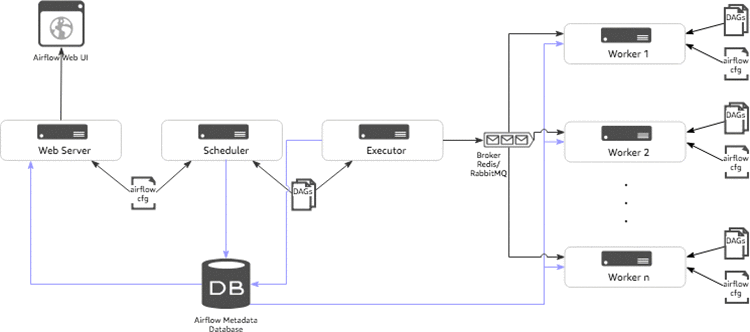
  • Scheduler: The scheduler is a persistent service that monitors DAGs and tasks, and triggers the task instances whose dependencies have been met. The scheduler is responsible for invoking the executor defined in the Airflow configuration.
  • Executor: Executors are the mechanism by which task instances get to run. Airflow by default provides different types of executors and you can define custom executors, such as a Kubernetes executor.
  • Broker: The broker queues the messages (task requests to be executed) and acts as a communicator between the executor and the workers.
  • Workers: The actual nodes where tasks are executed and that return the result of the task.
  • Web server: A web server to render the Airflow UI.
  • Configuration file: Configure settings such as executor to use, airflow metadata database connections, DAG, and repository location. You can also define concurrency and parallelism limits, etc.
  • Metadata database: Database to store all the metadata related to the DAGS, DAG runs, tasks, variables, and connections.

Airflow Amazon SageMaker operators

Amazon SageMaker operators are custom operators available with Airflow installation allowing Airflow to talk to Amazon SageMaker and perform the following ML tasks:

  • SageMakerTrainingOperator: Creates an Amazon SageMaker training job.
  • SageMakerTuningOperator: Creates an AmazonSageMaker hyperparameter tuning job.
  • SageMakerTransformOperator: Creates an Amazon SageMaker batch transform job.
  • SageMakerModelOperator: Creates an Amazon SageMaker model.
  • SageMakerEndpointConfigOperator: Creates an Amazon SageMaker endpoint config.
  • SageMakerEndpointOperator: Creates an Amazon SageMaker endpoint to make inference calls.

We’ll review usage of the operators in the Building a machine learning workflow section of this blog post.

Airflow setup

We will set up a simple Airflow architecture with a scheduler, worker, and web server running on a single instance. Typically, you will not use this setup for production workloads. We will use AWS CloudFormation to launch the AWS services required to create the components in this blog post. The following diagram shows the configuration of the architecture to be deployed.

The stack includes the following:

  • An Amazon Elastic Compute Cloud (EC2) instance to set up the Airflow components.
  • An Amazon Relational Database Service (RDS) Postgres instance to host the Airflow metadata database.
  • An Amazon Simple Storage Service (S3) bucket to store the Amazon SageMaker model artifacts, outputs, and Airflow DAG with ML workflow. The template will prompt for the S3 bucket name.
  • AWS Identity and Access Management (IAM) roles and Amazon EC2 security groups to allow Airflow components to interact with the metadata database, S3 bucket, and Amazon SageMaker.

The prerequisite for running this CloudFormation script is to set up an Amazon EC2 Key Pair to log in to manage Airflow, for example, if you want to troubleshoot or add custom operators.

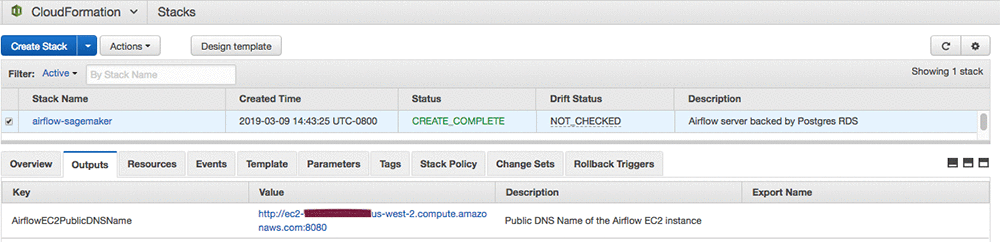
It might take up to 10 minutes for the CloudFormation stack to create the resources. After the resource creation is completed, you should be able to log in to Airflow web UI. The Airflow web server runs on port 8080 by default. To open the Airflow web UI, open any browser, and type in the http://ec2-public-dns-name:8080. The public DNS name of the EC2 instance can be found on the Outputs tab of CloudFormation stack on the AWS CloudFormation console.
Building a machine learning workflow

In this section, we’ll create a ML workflow using Airflow operators, including Amazon SageMaker operators to build the recommender. You can download the companion Jupyter notebook to look at individual tasks used in the ML workflow. We’ll highlight the most important pieces here.

Data preprocessing

  • As mentioned earlier, the dataset contains ratings from over 2 million Amazon customers on over 160,000 digital videos. More details on the dataset are here.
  • After analyzing the dataset, we see that there are only about 5 percent of customers who have rated 5 or more videos, and only 25 percent of videos have been rated by 9+ customers. We’ll clean this long tail by filtering the records.
  • After cleanup, we transform the data into sparse format by giving each customer and video their own sequential index indicating the row and column in our ratings matrix. We store this cleansed data in an S3 bucket for the next task to pick up and process.
  • The following PythonOperator snippet in the Airflow DAG calls the preprocessing function:
    # preprocess the data
    preprocess_task = PythonOperator(
        task_id='preprocessing',
        dag=dag,
        provide_context=False,
        python_callable=preprocess.preprocess,
        op_kwargs=config["preprocess_data"])

NOTE: For this blog post, the data preprocessing task is performed in Python using the Pandas package. The task gets executed on the Airflow worker node. This task can be replaced with the code running on AWS Glue or Amazon EMR when working with large data sets.

Data preparation

  • We are using the Amazon SageMaker implementation of Factorization Machines (FM) for building the recommender system. The algorithm expects Float32 tensors in recordIO protobuf format. The cleansed data set is a Pandas DataFrame on disk.
  • As part of data preparation, the Pandas DataFrame will be transformed to a sparse matrix with one-hot encoded feature vectors with customers and videos. Thus, each sample in the data set will be a wide Boolean vector with only two values set to 1 for the customer and the video.
    Cust 1 Cust 2 Cust N Video 1 Video 2 Video m
    1 0 0 0 1 0
  • The following steps are performed in the data preparation task:
    1. Split the cleaned data set into train and test data sets.
    2. Build a sparse matrix with one-hot encoded feature vectors (customer + videos) and a label vector with star ratings.
    3. Convert both the sets to protobuf encoded files.
    4. Copy the prepared files to an Amazon S3 bucket for training the model.
  • The following PythonOperator snippet in the Airflow DAG calls the data preparation function.
    # prepare the data for training
    prepare_task = PythonOperator(
        task_id='preparing',
        dag=dag,
        provide_context=False,
        python_callable=prepare.prepare,
        op_kwargs=config["prepare_data"]
    )

Model training and tuning

  • We’ll train the Amazon SageMaker Factorization Machine algorithm by launching a training job using Airflow Amazon SageMaker Operators. There are couple of ways we can train the model.
    • Use SageMakerTrainingOperator to run a training job by setting the hyperparameters known to work for your data.
      # train_config specifies SageMaker training configuration
      train_config = training_config(
          estimator=fm_estimator,
          inputs=config["train_model"]["inputs"])
      
      # launch sagemaker training job and wait until it completes
      train_model_task = SageMakerTrainingOperator(
          task_id='model_training',
          dag=dag,
          config=train_config,
          aws_conn_id='airflow-sagemaker',
          wait_for_completion=True,
          check_interval=30
      )

    • Use SageMakerTuningOperator to run a hyperparameter tuning job to find the best model by running many jobs that test a range of hyperparameters on your dataset.
      # create tuning config
      tuner_config = tuning_config(
          tuner=fm_tuner,
          inputs=config["tune_model"]["inputs"])
      
      tune_model_task = SageMakerTuningOperator(
          task_id='model_tuning',
          dag=dag,
          config=tuner_config,
          aws_conn_id='airflow-sagemaker',
          wait_for_completion=True,
          check_interval=30
      )

  • Conditional tasks can be created in the Airflow DAG that can decide whether to run the training job directly or run a hyperparameter tuning job to find the best model. These tasks can be run in synchronous or asynchronous mode.
    branching = BranchPythonOperator(
        task_id='branching',
        dag=dag,
        python_callable=lambda: "model_tuning" if hpo_enabled else "model_training")

  • The progress of the training or tuning job can be monitored in the Airflow Task Instance logs.

Model inference

  • Using the Airflow SageMakerTransformOperator, create an Amazon SageMaker batch transform job to perform batch inference on the test dataset to evaluate performance of the model.
    # create transform config
    transform_config = transform_config_from_estimator(
        estimator=fm_estimator,
        task_id="model_tuning" if hpo_enabled else "model_training",
        task_type="tuning" if hpo_enabled else "training",
        **config["batch_transform"]["transform_config"]
    )
    
    # launch sagemaker batch transform job and wait until it completes
    batch_transform_task = SageMakerTransformOperator(
        task_id='predicting',
        dag=dag,
        config=transform_config,
        aws_conn_id='airflow-sagemaker',
        wait_for_completion=True,
        check_interval=30,
        trigger_rule=TriggerRule.ONE_SUCCESS
    )

  • We can further extend the ML workflow by adding a task to validate model performance by comparing the actual and predicted customer ratings before deploying the model in production environment.

In the next section, we’ll see how all these tasks are stitched together to form a ML workflow in an Airflow DAG.

Putting it all together

Airflow DAG integrates all the tasks we’ve described as a ML workflow. Airflow DAG is a Python script where you express individual tasks with Airflow operators, set task dependencies, and associate the tasks to the DAG to run on demand or at a scheduled interval. The Airflow DAG script is divided into following sections.

  1. Set DAG with parameters such as schedule interval, concurrency, etc.
    dag = DAG(
        dag_id='sagemaker-ml-pipeline',
        default_args=args,
        schedule_interval=None,
        concurrency=1,
        max_active_runs=1,
        user_defined_filters={'tojson': lambda s: JSONEncoder().encode(s)}
    )

  2. Set up training, tuning, and inference configurations for each operator using Amazon SageMaker Python SDK for Airflow
  3. Create individual tasks with Airflow operators that define trigger rules and associate them with the DAG object. Refer to the previous section for defining these individual tasks.
  4. Specify task dependencies.
    init.set_downstream(preprocess_task)
    preprocess_task.set_downstream(prepare_task)
    prepare_task.set_downstream(branching)
    branching.set_downstream(tune_model_task)
    branching.set_downstream(train_model_task)
    tune_model_task.set_downstream(batch_transform_task)
    train_model_task.set_downstream(batch_transform_task)
    batch_transform_task.set_downstream(cleanup_task)

After the DAG is ready, deploy it to the Airflow DAG repository using CI/CD pipelines. If you followed the setup outlined in Airflow setup, the CloudFormation stack deployed to install Airflow components will add the Airflow DAG to the repository on the Airflow instance that has the ML workflow for building the recommender system. Download the Airflow DAG code from here.

After triggering the DAG on demand or on a schedule, you can monitor the DAG in multiple ways: tree view, graph view, Gantt chart, task instance logs, etc. Refer to the Airflow documentation for ways to author and monitor Airflow DAGs.

Clean up

Now to the final step, cleaning up the resources.

To avoid unnecessary charges on your AWS account do the following:

  1. Destroy all of the resources created by the CloudFormation stack in Airflow set up by deleting the stack after you’re done experimenting with it. You can follow the steps here to delete the stack.
  2. You have to manually delete the S3 bucket created by the CloudFormation stack because AWS CloudFormation can’t delete a non-empty Amazon S3 bucket.

Conclusion

In this blog post, you have seen that building an ML workflow involves quite a bit of preparation but it helps improve the rate of experimentation, engineering productivity, and maintenance of repetitive ML tasks. Airflow Amazon SageMaker Operators provide a convenient way to build ML workflows and integrate with Amazon SageMaker.

You can extend the workflows by customizing the Airflow DAGs with any tasks that better fit your ML workflows, such as feature engineering, creating an ensemble of training models, creating parallel training jobs, and retraining models to adapt to the data distribution changes.

References

  • Refer to the Amazon SageMaker SDK documentation and Airflow documentation for additional details on the Airflow Amazon SageMaker operators.
  • Refer to the Amazon SageMaker documentation to learn about the Factorization Machines algorithm used in this blog post.
  • Download the resources (Jupyter Notebooks, CloudFormation template, and Airflow DAG code) referred in this blog post from our GitHub repo.

If you have questions or suggestions, please leave them in the following comments section.


About the Author

Rajesh Thallam is a Professional Services Architect for AWS helping customers run Big Data and Machine Learning workloads on AWS. In his spare time he enjoys spending time with family, traveling and exploring ways to integrate technology into daily life. He would like to thank his colleagues David Ping and Shreyas Subramanian for helping with this blog post.

Announcing Open Images V5 and the ICCV 2019 Open Images Challenge

In 2016, we introduced Open Images, a collaborative release of ~9 million images annotated with labels spanning thousands of object categories. Since then we have rolled out several updates, culminating with Open Images V4 in 2018. In total, that release included 15.4M bounding-boxes for 600 object categories, making it the largest existing dataset with object location annotations, as well as over 300k visual relationship annotations.

Today we are happy to announce Open Images V5, which adds segmentation masks to the set of annotations, along with the second Open Images Challenge, which will feature a new instance segmentation track based on this data.

Open Images V5
Open Images V5 features segmentation masks for 2.8 million object instances in 350 categories. Unlike bounding-boxes, which only identify regions in which an object is located, segmentation masks mark the outline of objects, characterizing their spatial extent to a much higher level of detail. We have put particular effort into ensuring consistent annotations across different objects (e.g., all cat masks include their tail; bags carried by camels or persons are included in their mask). Importantly, these masks cover a broader range of object categories and a larger total number of instances than any previous dataset.

Example masks on the training set of Open Images V5. These have been produced by our interactive segmentation process. The first example also shows a bounding box, for comparison. From left to right, top to bottom: Tea and cake at the Fitzwilliam Museum by Tim Regan, Pilota II by Euskal kultur erakundea Institut culturel basque, Rheas by Dag Peak, Wuxi science park, 1995 by Gary Stevens, Cat Cafe Shinjuku calico by Ari Helminen, and Untitled by Todd Huffman. All images used under CC BY 2.0 license.

The segmentation masks on the training set (2.68M) have been produced by our state-of-the-art interactive segmentation process, where professional human annotators iteratively correct the output of a segmentation neural network. This is more efficient than manual drawing alone, while at the same time delivering accurate masks (intersection-over-union 84%). Additionally, we release 99k masks on the validation and test sets, which have been annotated manually with a strong focus on quality. These are near-perfect and capture even fine details of complex object boundaries (e.g. spiky flowers and thin structures in man-made objects). Both our training and validation+test annotations offer more accurate object boundaries than the polygon annotations provided by most existing datasets.

Example masks on the validation and test sets of Open Images V5, drawn completely manually. From left to right: thistle flowers by sophie, still life with ax by liz west, Fischkutter KOŁ-180 in Kolobrzeg (PL) by zeesenboot. All images used under CC BY 2.0 license.

In addition to the masks, we also added 6.4M new human-verified image-level labels, reaching a total of 36.5M over nearly 20,000 categories. Finally, we improved annotation density for 600 object categories on the validation and test sets, adding more than 400k bounding boxes to match the density in the training set. This ensures more precise evaluation of object detection models.

Open Images Challenge 2019
In conjunction with this release, we are also introducing the second Open Images Challenge, to be held at the 2019 International Conference on Computer Vision (ICCV 2019). This Challenge will have a new instance segmentation track based on the data above. Moreover, as in the 2018 edition, it will also feature a large-scale object detection track (500 categories with 12.2M training bounding-boxes), and a visual relationship detection track for detecting pairs of objects in particular relations (329 relationship triplets with 375k training samples, e.g., “woman playing guitar” or “beer on table”).

The training set with all annotations is available now. The test set has the same 100k images as the 2018 Challenge and will be launched again on June 3rd, 2019 by Kaggle. The evaluation servers will open on June 3rd for the object detection and visual relationship tracks, and on July 1st for the instance segmentation track. The deadline for submission of results is October 1st, 2019.

We hope that the exceptionally large and diverse training set will inspire research into more advanced instance segmentation models. The extremely accurate ground-truth masks we provide rewards subtle improvements in the output segmentations, and thus will encourage the development of higher-quality models that deliver precise boundaries. Finally, having a single dataset with unified annotations for image classification, object detection, visual relationship detection, and instance segmentation will enable researchers to study these tasks jointly and stimulate progress towards genuine scene understanding.