Blog

Learn About Our Meetup

5000+ Members

MEETUPS

LEARN, CONNECT, SHARE

Join our meetup, learn, connect, share, and get to know your Toronto AI community. 

JOB POSTINGS

INDEED POSTINGS

Browse through the latest deep learning, ai, machine learning postings from Indeed for the GTA.

CONTACT

CONNECT WITH US

Are you looking to sponsor space, be a speaker, or volunteer, feel free to give us a shout.

Category: Global

Japan’s Fastest Supercomputer Adopts NGC, Enabling Easy Access to Deep Learning Frameworks

From discovering drugs, to locating black holes, to finding safer nuclear energy sources, high performance computing systems around the world have enabled breakthroughs across all scientific domains.

Japan’s fastest supercomputer, ABCI, powered by NVIDIA Tensor Core GPUs, enables similar breakthroughs by taking advantage of AI. The system is the world’s first large-scale, open AI infrastructure serving researchers, engineers and industrial users to advance their science.

The software used to drive these advances is as critical as the servers the software runs on. However, installing an application on an HPC cluster is complex and time consuming. Researchers and engineers are unproductive as they wait to access the software, and their requests to have applications installed distract system admins from completing mission-critical tasks.

Containers — packages that contain software and relevant dependencies — allow users to pull and run the software on a system without actually installing the software. They’re a win-win for users and system admins.

NGC: Driving Ease of Use of AI, Machine Learning and HPC Software

NGC offers over 50 GPU-optimized containers for deep learning frameworks, machine learning algorithms and HPC applications that run on both Docker and Singularity.

The HPC applications provide scalable performance on GPUs within and across nodes. NVIDIA continuously optimizes key deep learning frameworks and libraries, with updates released monthly. This provides users access to top performance for training and inference for all their AI projects.

ABCI Runs NGC Containers

Researchers and industrial users are taking advantage of ABCI to run AI-powered scientific workloads across domains, from nuclear physics to manufacturing. Others are taking advantage of the system’s distributed computing to push the limits on speeding AI training.

To achieve this, the right set of software and hardware tools must be in place, which is why ABCI has adopted NGC.

“Installing deep learning frameworks from the source is complicated and upgrading the software to keep up with the frequent releases is a resource drain,” said Hirotaka Ogawa, team leader of the Artificial Intelligence Research Center at AIST. “NGC allows us to support our users with the latest AI frameworks and the users enjoy the best performance they can achieve on NVIDIA GPUs.”

ABCI has turned to containers to address another user need — portability.

“Most of our users are from industrial segments who are looking for portability between their on-prem systems and ABCI,” said Ogawa. “Thanks to NGC and Singularity, the users can develop, test, and deploy at scale across different platforms. Our sampling data showed that NGC containers were used by 80 percent of the over 100,000 jobs that ran on Singularity.”

NGC Container Replicator Simplifies Ease of Use for System Admins and Users

System admins managing HPC systems at supercomputing centers and universities can now download and save NGC containers on their clusters. This gives users faster access to the software, alleviates their network traffic, and saves storage space.

NVIDIA offers NGC Container Replicator, which automatically checks and downloads the latest versions of NGC containers.
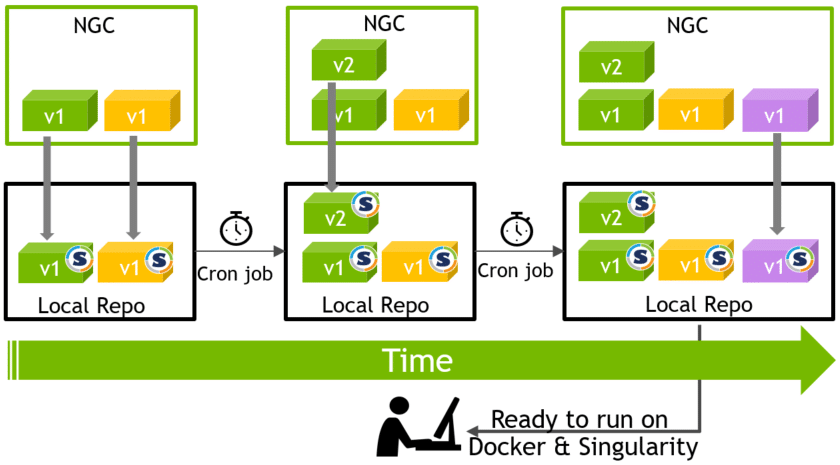
NGC container replicator chart

Without lifting a finger, system admins can ensure that their users benefit from the superior performance and newest features from the latest software.

More Than Application Containers

In addition to deep learning containers, NGC hosts 60 pre-trained models and 17 model scripts for popular use cases like object detection, natural language processing and text to speech.

It’s much faster to tune a pre-trained model for a use case than to start from scratch. The pre-trained models allow researchers to quickly fine-tune a neural network or build on top of an already optimized network for specific use-case needs.

The model training scripts follow best practices, have state-of-the-art accuracy and deliver superior performance. They’re ideal for researchers and data scientists planning to build a network from scratch and customize it to their liking.

The models and scripts take advantage of mixed precision powered by NVIDIA Tensor Core GPUs to deliver up to 3x deep learning performance speedups over previous generations.

Take NGC for a Spin

NGC containers are built and tested to run on-prem and in the cloud. They also support hybrid as well as multi-cloud deployments. Visit ngc.nvidia.com, pull your application container on any GPU-powered system or major cloud instance, and see how easy it is to get up and running for your next scientific research.

The post Japan’s Fastest Supercomputer Adopts NGC, Enabling Easy Access to Deep Learning Frameworks appeared first on The Official NVIDIA Blog.
Applying AutoML to Transformer Architectures

Since it was introduced a few years ago, Google’s Transformer architecture has been applied to challenges ranging from generating fantasy fiction to writing musical harmonies. Importantly, the Transformer’s high performance has demonstrated that feed forward neural networks can be as effective as recurrent neural networks when applied to sequence tasks, such as language modeling and translation. While the Transformer and other feed forward models used for sequence problems are rising in popularity, their architectures are almost exclusively manually designed, in contrast to the computer vision domain where AutoML approaches have found state-of-the-art models that outperform those that are designed by hand. Naturally, we wondered if the application of AutoML in the sequence domain could be equally successful.

After conducting an evolution-based neural architecture search (NAS), using translation as a proxy for sequence tasks in general, we found the Evolved Transformer, a new Transformer architecture that demonstrates promising improvements on a variety of natural language processing (NLP) tasks. Not only does the Evolved Transformer achieve state-of-the-art translation results, but it also demonstrates improved performance on language modeling when compared to the original Transformer. We are releasing this new model as part of Tensor2Tensor, where it can be used for any sequence problem.

Developing the Techniques
To begin the evolutionary NAS, it was necessary for us to develop new techniques, due to the fact that the task used to evaluate the “fitness” of each architecture, WMT’14 English-German translation, is computationally expensive. This makes the searches more expensive than similar searches executed in the vision domain, which can leverage smaller datasets, like CIFAR-10. The first of these techniques is warm starting—seeding the initial evolution population with the Transformer architecture instead of random models. This helps ground the search in an area of the search space we know is strong, thereby allowing it to find better models faster.

The second technique is a new method we developed called Progressive Dynamic Hurdles (PDH), an algorithm that augments the evolutionary search to allocate more resources to the strongest candidates, in contrast to previous works, where each candidate model of the NAS is allocated the same amount of resources when it is being evaluated. PDH allows us to terminate the evaluation of a model early if it is flagrantly bad, allowing promising architectures to be awarded more resources.

The Evolved Transformer
Using these methods, we conducted a large-scale NAS on our translation task and discovered the Evolved Transformer (ET). Like most sequence to sequence (seq2seq) neural network architectures, it has an encoder that encodes the input sequence into embeddings and a decoder that uses those embeddings to construct an output sequence; in the case of translation, the input sequence is the sentence to be translated and the output sequence is the translation.

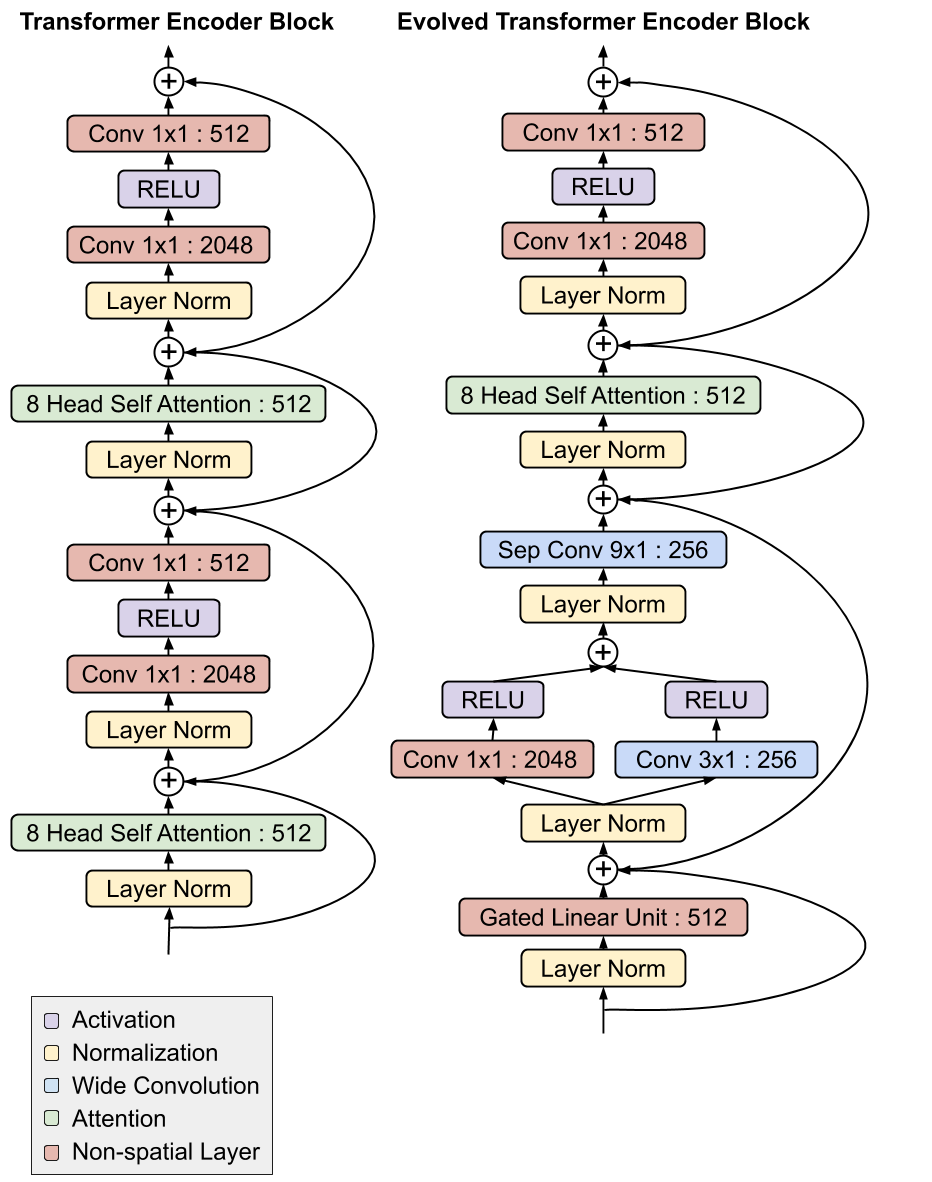
The most interesting feature of the Evolved Transformer is the convolutional layers at the bottom of both its encoder and decoder modules that were added in a similar branching pattern in both places (i.e. the inputs run through two separate convolutional layers before being added together).

A comparison between the Evolved Transformer and the original Transformer encoder architectures. Notice the branched convolution structure at the bottom of the module, which formed in both the encoder and decoder independently. See our paper for a description of the decoder.

This is particularly interesting because the encoder and decoder architectures are not shared during the NAS, so this architecture was independently discovered as being useful in both the encoder and decoder, speaking to the strength of this design. Whereas the original Transformer relied solely on self-attention, the Evolved Transformer is a hybrid, leveraging the strengths of both self-attention and wide convolution.

Evaluation of the Evolved Transformer
To test the effectiveness of this new architecture, we first compared it to the original Transformer on the English-German translation task we used during the search. We found that the Evolved Transformer had better BLEU and perplexity performance at all parameter sizes, with the biggest gain at the size compatible with mobile devices (~7 million parameters), demonstrating an efficient use of parameters. At a larger size, the Evolved Transformer reaches state-of-the-art performance on WMT’ 14 En-De with a BLEU score of 29.8 and a SacreBLEU score of 29.2.

Comparison between the Evolved Transformer and the original Transformer on WMT’14 En-De at varying sizes. The biggest gains in performance occur at smaller sizes, while ET also shows strength at larger sizes, outperforming the largest Transformer with 37.6% less parameters (models to compare are circled in green). See Table 3 in our paper for the exact numbers.

To test generalizability, we also compared ET to the Transformer on additional NLP tasks. First, we looked at translation using different language pairs, and found ET demonstrated improved performance, with margins similar to those seen on English-German; again, due to its efficient use of parameters, the biggest improvements were observed for medium sized models. We also compared the decoders of both models on language modeling using LM1B, and saw a performance improvement of nearly 2 perplexity.

Future Work
These results are the first step in exploring the application of architecture search to feed forward sequence models. The Evolved Transformer is being open sourced as part of Tensor2Tensor, where it can be used for any sequence problem. To promote reproducibility, we are also open sourcing the search space we used for our search and a Colab with an implementation of Progressive Dynamic Hurdles. We look forward to seeing what the research community does with the new model and hope that others are able to build off of these new search techniques!

Four Surprising Ways Inference Is Putting AI into Action

From voice assistants like Alexa and Google Maps navigation to Bing’s conversational search, AI has become a part of daily life for many.

These tasks are performing deep learning inference, which might be thought of as AI put into action.

The deep learning neural networks that power AI are trained on massive amounts of data. Putting this training to work in the digital world — to recognize spoken words, images or street signs, or to suggest the shirt you might want to buy or the next movie to watch — is inferencing.

And the breadth of inference applications on GPUs may surprise you. It’s pervasive in everything from the lumber industry to research that delves into reading ancient Japanese texts.

Below are four diverse ways inference running on GPUs is already making a difference.

Fighting Fraud

PayPal is using deep learning inference on GPUs to pinpoint fraudulent transactions — and help ensure they don’t happen again.

The company processes millions of transactions every day. Advances in AI — specifically logistic regression-powered neural network models — have allowed it to filter out deceptive merchants and crack down on sales of illegal products.

The deep learning models also help PayPal optimize its operations by identifying why some transactions fail and spotting opportunities to work more efficiently.

And since the models are always learning, they can personalize user experiences by serving up relevant advertisements based on people’s interests.

Weather Insight

Boston-based ClimaCell is working to bring unprecedented speed, precision and accuracy to weather forecasting by listening closely to a powerful voice: Mother Nature’s.

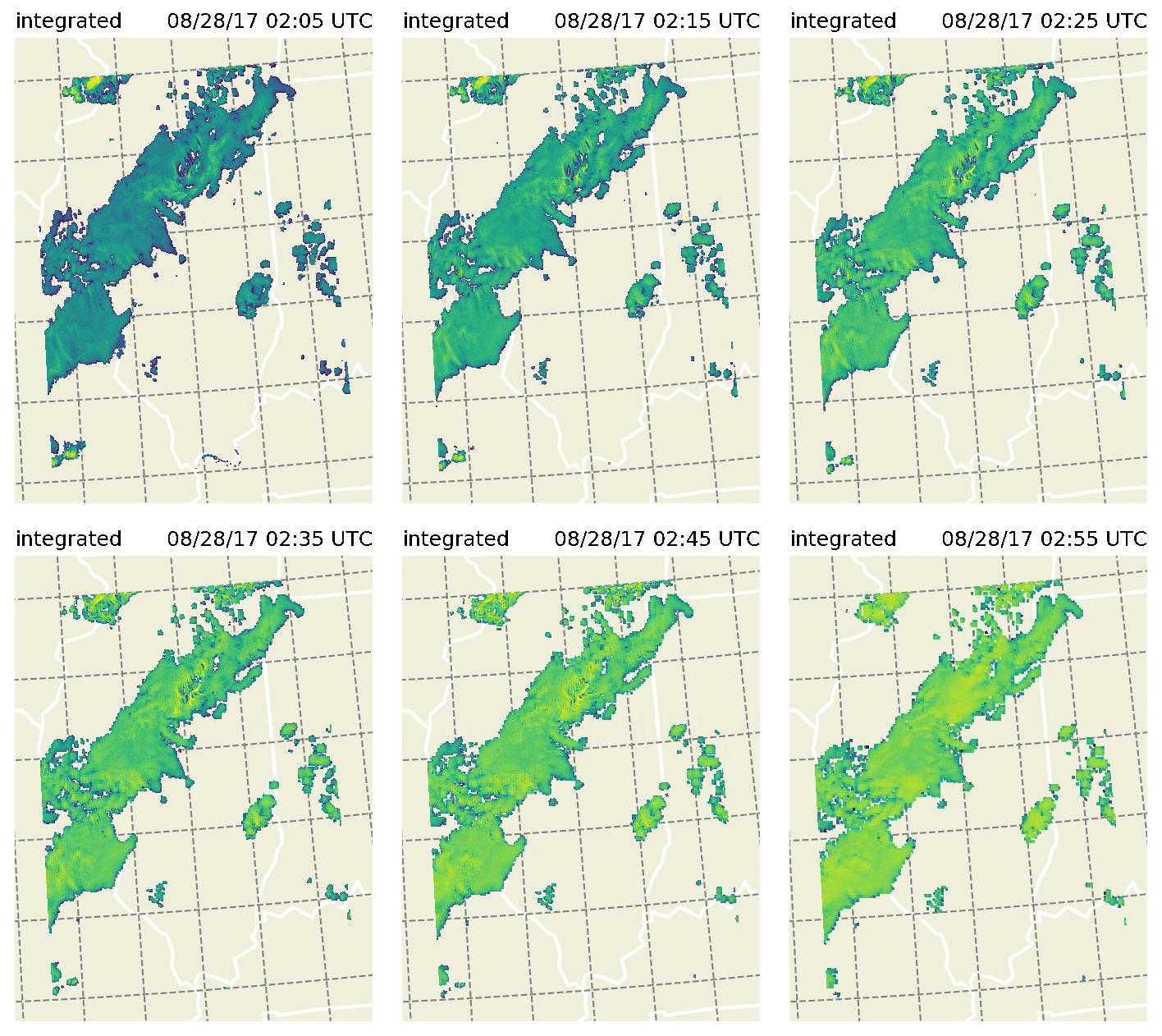
The company uses inference on GPUs to offer so-called “nowcasting” — hyper-local, high-resolution forecasts that can help businesses and people make better decisions about everything from paving projects to wind generation to planning a daily commute to avoid bad weather. The company also offers forecasting and historic data.

ClimaCell’s nowcasting GPU model in action.

To achieve this, the company writes software that turns the signals in existing communication networks into sensors that can analyze the surrounding environment and extract real-time weather data.

ClimaCell’s network quickly analyzes the signals, integrates them with data from the National Oceanic and Atmospheric Administration and then weaves it all together using predictive models run on NVIDIA GPU accelerators.

Detecting Cancer

Mammogram machines are effective at detecting breast cancer, but expensive. In many developing countries, this makes them rare outside of large cities.

Mayo Clinic researcher Viksit Kumar is leading an effort to use GPU-powered inferencing to more accurately classify breast cancer images using ultrasound machines, which are much cheaper and more accessible around the world.

Kumar and his team have been able to detect and segment breast cancer masses with very good accuracy and few false positives, according to their research paper.

Mayo Clinic ultrasound deep learning research
The red outline shows the manually segmented boundary of a carcinoma, while the deep learning-predicted boundaries are shown in blue, green and cyan.

The team does its local processing using the TensorFlow deep learning framework container from the NGC registry on NVIDIA GPUs. It also uses NVIDIA V100 Tensor Core GPUs on AWS using the same container.

Eventually, Kumar hopes to use ultrasound images for the early detection of other forms of the disease, such as thyroid and ovarian cancer.

Making Music

MuseNet is a deep learning algorithm demo from AI research organization OpenAI that automatically generates music using 10 kinds of instruments and a host of different styles — everything from pop to classical.

People can create entirely new tracks by applying different instruments and sounds to music the algorithm generates. The demo uses NVIDIA V100 Tensor Core GPUs for this inferencing task.

Using the demo, you can take spin up twists on your favorite songs. Add guitars, leave out the piano, go big on drums. Or change its style to sound like jazz or classic rock.

The algorithm wasn’t programmed to mimic the human understanding of music. Instead, it was trained on hundreds of thousands of songs so it could learn the patterns of harmony, rhythm and style prevalent within music.

Its 72-layer network was trained using NVIDIA V100 Tensor Core GPUs with the cuDNN-accelerated TensorFlow deep learning framework.

Read more stories about deep learning inferencing.

The post Four Surprising Ways Inference Is Putting AI into Action appeared first on The Official NVIDIA Blog.

Creating a recommendation engine using Amazon Personalize

This is a guest blog post by Phil Basford, lead AWS solutions architect, Inawisdom.

At re:Invent 2018, AWS announced Amazon Personalize, which allows you to get your first recommendation engine running quickly, to deliver immediate value to your end user or business. As your understanding increases (or if you are already familiar with data science), you can take advantage of the deep capabilities of Amazon Personalize to improve your recommendations.

Working at Inawisdom, I’ve noticed increasing diversity in the application of machine learning (ML) and deep learning. It seems that nearly every day I work on a new exciting use case, which is great!

The most well-known and successful ML use cases have been retail websites, music streaming apps, and social media platforms. For years, they’ve been embedding ML technologies into the heart of their user experience. They commonly provide each user with an individual personalized recommendation, based on both historic data points and real-time activity (such as click data).

Inawisdom was lucky enough to be given early access to try out Amazon Personalize while it was in preview release. Instead of giving it to data scientists or data engineers, the company gave it to me, an AWS solutions architect. With no prior knowledge, I was able to get a recommendation from Amazon Personalize in just a few hours. This post describes how I did so.

Overview

The most daunting aspect of building a recommendation engine is knowing where to start. This is even more difficult when you have limited or little experience with ML. However, you may be lucky enough to know what you don’t know (and what you should figure out), such as:

  • What data to use.
  • How to structure it.
  • What framework/recipe is needed.
  • How to train it with data.
  • How to know if it’s accurate.
  • How to use it within a real-time application.

Basically, Amazon Personalize provides a structure and supports you as it guides you through these topics. Or, if you’re a data scientist, it can act as an accelerator for your own implementation.

Creating an Amazon Personalize recommendation solution

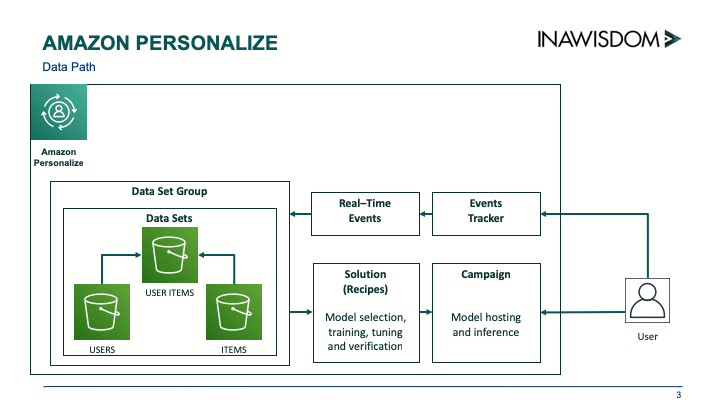
You can create your own custom Amazon Personalize recommendation solution in a few hours. Work through the process in the following diagram.

Creating dataset groups and datasets

When you open Amazon Personalize, the first step is to create a dataset group, which can be created from loading historic data or from data gathered from real-time events. In my evaluation of Amazon Personalize at Inawisdom, I used only historic data.

When using historic data, each dataset is imported data from a .csv file located on Amazon S3, and each dataset group can contain three datasets:

  • Users
  • Item
  • Interactions

For the purpose of this quick example, I only prepared the Interactions data file, because it’s required and the most important.

The Interactions dataset contains a many-to-many relationship (in old relational database terms) that maps USER_ID to ITEM_ID. Interactions can be enriched with optional User and Item datasets that contain additional data linked by their IDs. For example, for a film-streaming website, it can be valuable to know the age classification of a film and the age of the viewer and understand which films they watch.

When you have all your data files ready on S3, import them into your data group as datasets. To do this, define a schema for the data in the Apache Avro format for each dataset, which allows Amazon Personalize to understand the format of your data. Here is an example of a schema for Interactions:

{
    "type": "record",
    "name": "Interactions",
    "namespace": "com.amazonaws.personalize.schema",
    "fields": [
        {
            "name": "USER_ID",
            "type": "string"
        },
        {
            "name": "ITEM_ID",
            "type": "string"
        },
        {
            "name": "TIMESTAMP",
            "type": "long"
        }
    ],
    "version": "1.0"
}

In evaluating Amazon Personalize, you may find that you spend more time at this stage than the other stages. This is important and reflects that the quality of your data is the biggest factor in producing a usable and accurate model. This is where Amazon Personalize has an immediate effect—it’s both helping you and accelerating your progress.

Don’t worry about the format of the data, just the key fields being identified.  Don’t get caught up in worrying about what model to use or the data it needs. Your focus is just on making your data accessible. If you’re just starting out in ML, you can get a basic dataset group working quickly with minimal data. If you’re a data scientist, you probably come back to this stage again to improve and add more data points (data features).

Creating a solution

When you have your dataset group with data in it, the next step is to create a solution. A solution covers two areas—selecting the model (recipe) and then using your data to train it. You have recipes and a popularity baseline from which to choose. Some of the recipes on offer include the following:

  • Personalized reranking (search)
  • SIMS—related items
  • HRNN (Coldstart, Popularity-Baseline, and Metadata)—user personalization

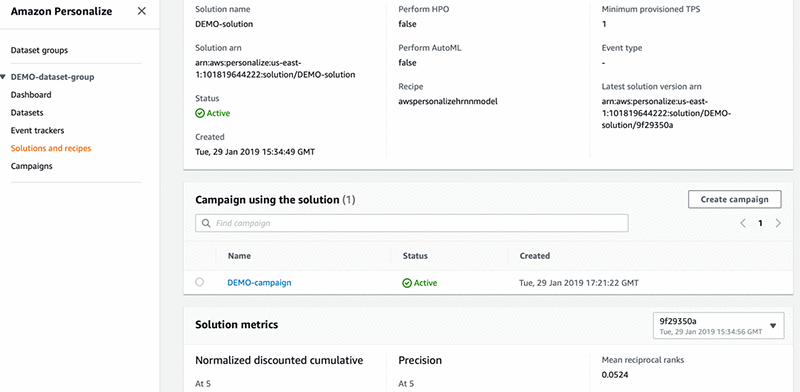
If you’re not a data scientist, don’t worry. You can use AutoML, which runs your data against each of the available recipes.  Amazon Personalize then judges the best recipe based on the accuracy results produced. This also covers changing some of the settings to get better results (hyperparameters).  The following image shows a solution with the metric section at the bottom showing accuracy:

Amazon Personalize allows you to get something up and running quickly, even if you’re not a data scientist. This includes not just model selection and training, but restructuring the data into what each recipe requires and hiding the hassle of spinning up servers to run training jobs. If you are a data scientist, this is also good news, because you can take full control of the process.

Creating a campaign

After you have a solution version (a confirmed recipe and trained artifacts), it’s time to put it into action. This isn’t easy, and there is a lot to consider in running ML at scale.

To get you started, Amazon Personalize allows you to deploy a campaign (an inference engine for your recipe and the trained artifacts) as a PaaS. The campaign returns a REST API that you can use to produce recommendations. Here is an example of calling your API from Python:

get_recommendations_response = personalize_runtime.get_recommendations(
    campaignArn = campaign_arn,
    userId = str(user_id),
    itemId = str(item_id)
)

item_list = get_recommendations_response['itemList']

The results:

Recommendations: [
  "Full Monty, The (1997)",
  "Chasing Amy (1997)",
  "Fifth Element, The (1997)",
  "Apt Pupil (1998)",
  "Grosse Pointe Blank (1997)",
  "My Best Friend's Wedding (1997)",
  "Leaving Las Vegas (1995)",
  "Contact (1997)",
  "Waiting for Guffman (1996)",
  "Donnie Brasco (1997)",
  "Fargo (1996)",
  "Liar (1997)",
  "Titanic (1997)",
  "English Patient, The (1996)",
  "Willy Wonka and the Chocolate Factory (1971)",
  "Chasing Amy (1997)",
  "Star Trek: First Contact (1996)",
  "Jerry Maguire (1996)",
  "Last Supper, The (1995)",
  "Hercules (1997)",
  "Kolya (1996)",
  "Toy Story (1995)",
  "Private Parts (1997)",
  "Citizen Ruth (1996)",
  "Boogie Nights (1997)"
]

Conclusion

Amazon Personalize is a great addition to the AWS set of machine learning services. Its two-track approach allows you to quickly and efficiently get your first recommendation engine running and deliver immediate value to your end user or business. Then you can harness the depth and raw power of Amazon Personalize, which will keep you coming back to improve your recommendations.

Amazon Personalize puts a recommendation engine in the hands of every company and is now available in US East (Ohio), US East (N. Virginia), US West (Oregon), Asia Pacific (Tokyo), Asia Pacific (Singapore) and EU (Ireland). Well done, AWS!​


Build your own real-time voice translator application with AWS services

Just imagine—you say something in one language, and a tool immediately translates it to another language. Wouldn’t it be even cooler to build your own real-time voice translator application using AWS services? It would be similar to the Babel fish in The Hitchhiker’s Guide to the Galaxy:

“The Babel fish is small, yellow, leech-like—and probably the oddest thing in the universe… If you stick one in your ear, you can instantly understand anything said to you in any form of language.”

Douglas Adams, The Hitchhiker’s Guide to the Galaxy

In this post, I show how you can connect multiple services in AWS to build your own application that works like a bit like the Babel fish.

About this blog post
Time to read 15 minutes
Time to complete 30 minutes
Cost to complete Under $1
Learning level Intermediate (200)
AWS services Amazon Polly, Amazon Transcribe, Amazon Translate, AWS Lambda, Amazon CloudFront, Amazon S3

Overview

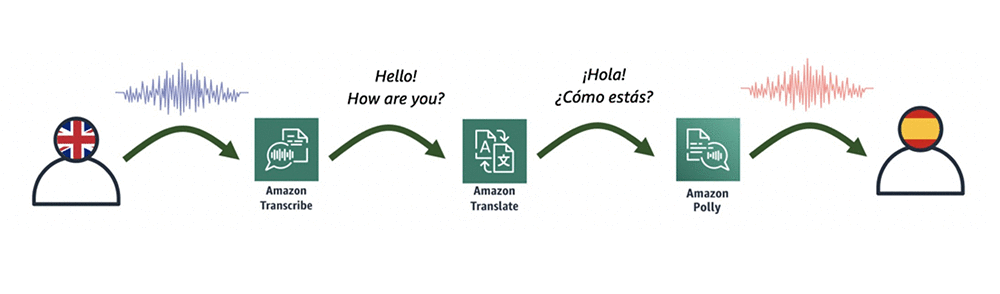
The heart of this application consists of an AWS Lambda function that connects the following three AI language services:

  • Amazon Transcribe — This fully managed and continuously trained automatic speech recognition (ASR) service takes in audio and automatically generates accurate transcripts. Amazon Transcribe supports real-time transcriptions, which help achieve near real-time conversion.
  • Amazon Translate — This neural machine-translation service delivers fast, high-quality, and affordable language translation.
  • Amazon Polly — This text-to-speech service uses advanced deep learning technologies to synthesize speech that sounds like a human voice.

A diagrammatic representation of how these three services relate is shown in the following illustration.

To make this process a bit easier, you can use an AWS CloudFormation template, which initiates the application. The following diagram shows all the components of this process, which I later describe in detail.

Here’s the flow of service interactions:

  1. Allow access to your site with Amazon CloudFront, which allows you to get an HTTPS link to your page and which is required by some browsers to record audio.
  2. Host your page on Amazon S3, which simplifies the whole solution. This is also the place to save the input audio file recorded in the browser.
  3. Gain secure access to S3 and Lambda from the browser with Amazon Cognito.
  4. Save the input audio file on S3 and invoke a Lambda function. In the input of the function, provide the name of audio file (that you saved earlier in Amazon S3), and pass the source and target language parameters.
  5. Convert audio into text with Amazon Transcribe.
  6. Translate the transcribed text from one language to another with Amazon Translate.
  7. Convert the new translated text into speech with Amazon Polly.
  8. Save the output audio file back to S3 with the Lambda function, and then return the file name to your page (JavaScript invocation). You could return the audio file itself, but for simplicity, save it on S3 and just return its name.
  9. Automatically play the translated audio to the user.
  10. Accelerate the speed of delivering the file with CloudFront.

Getting started

As I mentioned earlier, I created an AWS CloudFormation template to create all the necessary resources.

  1. Sign into the console, and then choose Launch Stack, which launches a CloudFormation stack in your AWS account. The stack launches in the US-East-1 (N. Virginia) Region.
  2. Go through the wizard and create the stack by accepting the default values. On the last step of the wizard, acknowledge that CloudFormation creates IAM After 10–15 minutes, the stack has been created.
  3. In the Outputs section of the stack shown in the following screenshot, you find the following four parameters:
    • VoiceTranslatorLink—The link to your webpage.
    • VoiceTranslatorLambda—The name of the Lambda function to be invoked from your web application.
    • VoiceTranslatorBucket—The S3 bucket where you host your application, and where audio files are stored.
    • IdentityPoolIdOutput—The identity pool ID, which allows you to securely connect to S3 and Lambda.
  4. Download the following zip file and then unzip it. There are three files inside.
  5. Open the downloaded file named voice-translator-config.js, and edit it based on the four output values in your stack (Step 3). It should then look similar to the following.
    var bucketName = 'voicetranslatorapp-voicetranslat……';
    var IdentityPoolId = 'us-east-1:535…….';
    var lambdaFunction = 'VoiceTranslatorApp-VoiceTranslatorLambda-….';

  6. In the S3 console, open the S3 bucket (created by the CloudFormation template). Upload all three files, including the modified version of voice-translator-config.js.

Testing

Open your application from the link provided in Step 3. In the Voice Translator App interface, perform the following steps to test the process:

  1. Choose a source language.
  2. Choose a target language.
  3. Think of something to say, choose START RECORDING, and start speaking.
  4. When you finish speaking, choose STOP RECORDING and wait a couple of seconds.

If everything worked fine, the application should automatically play the audio in the target language.

Conclusion

As you can see, it takes less than an hour to create your own unique voice translation application, based on the existing, integrated AI language services in AWS. Plus, the whole process is done without a server.

This application currently supports two input languages: US English and US Spanish. However, Amazon Transcribe recently started supporting real-time speech-to-text in British English, French, and Canadian French. Feel free to try to extend your application by using those languages.

To see the source code of the app (including the Lambda function written in JavaScript), you can find it in the voice-translator-app GitHub repo. In addition to using the browser to record your voice, I also used this recorder.js script by Matt Diamond.


About the Author

Tomasz Stachlewski is a Solutions Architect at AWS, where he helps companies of all sizes (from startups to enterprises) in their cloud journey. He is a big believer in innovative technology, such as serverless architecture, which allows companies to accelerate their digital transformation.



Announcing AWS DeepLens (2019 Edition): Now available for pre-order in seven new countries

We’re pleased to announce AWS DeepLens (2019 Edition), an update to the world’s first machine learning–enabled video camera. The new AWS DeepLens (2019 Edition) is available to purchase in the US and for the first time in seven new countries: UK, Germany, France, Spain, Italy, Japan, and Canada.

We have improved the hardware and software to make the device even easier to setup, allowing you to get started with machine learning more quickly. Many ML models run 2x faster on the device thanks to optimization with Amazon SageMaker Neo. We have also added new tutorials for construction worker safety (hard hat detection), coffee drinking detection, and sentiment analysis.

It’s been incredibly exciting to see so many of you get your start in machine learning using AWS DeepLens after we first launched the device in re:Invent 2017. The vast majority starts off with no machine learning experience at all, but quickly learn the basics using the pre-built models included with the device. Then, they move on to building their own deep learning models in Amazon SageMaker, which run directly on the device. Some have even gone on to get jobs as applied machine learning data scientists.

All the time, we hear from developers who have built cool projects using AWS DeepLens, from apps that read books to kids, to dog detectors, to yoga instructors. This one caught our eye. Ben Hamm —who had never even coded before—built an app called “Cats, Rats, A.I., Oh My!” Ben’s cat, Metric, is a keen hunter and so he needed a way to stop the cat from bringing his prey into the house. Ben built his own deep learning model in Amazon SageMaker that automatically identifies not only his cat, but whether it was carrying prey. He mounted an AWS DeepLens on his back porch. When it detected an incoming “gift” from his feline friend, it connected to an Arduino system that automatically locked the cat flap. Genius.

To see how AWS DeepLens helped, and how Ben built his own computer vision model in Amazon SageMaker, look at his five-minute Ignite presentation.

You can find 23 more AWS DeepLens projects that developers have shared with us, including American Sign Language interpretation. We’d love to hear about yours, too.

International pre-orders available now

We are excited to bring AWS DeepLens (2019 Edition) to customers around the world for the first time. We got the chance to show the device to our friends at the Japan AWS User Group (the largest cloud computing user group in the world).

Daisuke Nagao and Ryo Nakamaru, co-leads for the group commented: “We welcome the general availability of AWS DeepLens in Japan market. It will excite our developer community and developers in Japan to accelerate the adoption of deep learning technologies.” We couldn’t agree more.

AWS DeepLens (2019 Edition) is now available for pre-order on the following websites:

For more information about AWS DeepLens, look at the AWS DeepLens detail page, or browse posts on the AWS Machine Learning Blog.


About the Authors

Rick Mitchell is a Senior Product Marketing Manager with AWS AI. His goal is to help aspiring developers to get started with Artificial Intelligence. For fun outside of work, Rick likes to travel with his wife and two children, barbecue, and run outdoors.




AWS DeepLens (2019 edition) zooms out to more countries around the world

At re:Invent 2017, we launched the world’s first machine learning (ML)–enabled video camera, AWS DeepLens. This put ML in the hands of developers, literally, with a fully programmable video camera, tutorials, code, and pre-trained models designed to expand ML skills. With AWS DeepLens, it is possible to create useful ML projects without a PhD in computer sciences or math, and anyone with a decent development background can start using it.

Today, I’m pleased to announce that AWS DeepLens (2019 edition) is now available for pre-order for developers in Canada, Europe, and Japan on the following websites:

  • Amazon.ca
  • Amazon.de
  • Amazon.es
  • Amazon.fr
  • Amazon.it
  • Amazon.co.jp
  • Amazon.co.uk

We have made significant enhancements to the device to further improve your experience:

  • An optimized onboarding process that allows you to get started with ML quickly.
  • Support for the Intel RealSense depth sensor, which allows you to build advanced ML models with higher accuracy. You can use depth data in addition to 2-D image inputs.
  • Support for the Intel Movidius Neural Compute Stick for those who want to achieve additional AI performance using external Intel accelerators.

The 2019 edition comes integrated with SageMaker Neo, which lets customers train models one time and run them with up to 2X improvement in performance.

In addition to device improvements, we have invested significantly in the content development as well. We included guided instructions for building ML for interesting applications such as worker safety, sentiment analysis, who drinks the most coffee, and so on. We’re making ML available to all who want to learn and develop their skills while building fun applications.

Over the last year, we have had many requests from customers in Canada, Europe, and Japan, asking when we would launch AWS DeepLens in their Region. We were happy to announce today’s news.

“We welcome the general availability of AWS DeepLens in Japan market. It will excite our developer community and developers in Japan to accelerate the adoption of deep learning technologies” said Daisuke Nagao and Ryo Nakamaru, co-leads for Japan AWS User Group AI branch (JAWS-UG AI).

ML in the hands of everybody

Amazon and AWS have a long history with ML and DL tools around the world. In Europe, we opened an ML Development Center in Berlin back in 2013, where developers and engineers support our global ML and DL services such as Amazon SageMaker. This is in addition to the many customers, from startups to enterprises to the public sector, who are using our ML and DL tools in their Regions.

ML and DL have been a big part of our heritage over the last 20 years and the work we do around the world, is helping to democratize these technologies, making them accessible to everyone.

After we announced the general availability of AWS DeepLens in the US in June last year, thousands of devices shipped.  We have seen many interesting and inspirational applications. Two that we’re excited to highlight are the DeepLens Educating Entertainer, or “Dee” for short, and SafeHaven.

Dee—DeepLens Educating Entertainer

Created by Matthew Clark from Manchester, Dee is an example of how image recognition can be used to make a fun, interactive, and educational game for young or less able children.

The AWS DeepLens device asks children to answer questions by showing the device a picture of the answer. For example when the device asks, “What has wheels?”, the child is expected to show it an appropriate picture, such as a bicycle or bus. Right answers are praised and incorrect ones are given hints on how to get it right. Experiences like these help children learn through interaction and positive reinforcement.

Young children, and some older ones with special learning needs, can struggle to interact with electronic devices. They may not be able to read a tablet screen, use a computer keyboard, or speak clearly enough for voice recognition. With video recognition, this can change. Technology can now better understand the child’s world and observe when they do something, such as picking up an object or performing an action. This leads to many new ways of interaction.

AWS DeepLens is particularly appealing for children’s interactions because it can run its deep learning (DL) models offline. This means that the device can work anywhere, with no additional costs.

Before building Dee, Matthew had no experience working with ML technologies. However, after receiving an AWS DeepLens device at AWS re:Invent 2017, he soon got up to speed with DL concepts.  For more details, see Second Place Winner: Dee—DeepLens Educating Entertainer.

SafeHaven

SafeHaven is another AWS DeepLens application that came from developers getting an AWS DeepLens device at re:Invent 2017.

Built by Nathan Stone and Paul Miller from Ipswich, UK, SafeHaven is designed to protect vulnerable people by enabling them to identify “who is at the door?” using an Alexa Skill. AWS DeepLens acts as a sentry on the doorstep, storing the faces of every visitor. When a visitor is “recognized,” their name is stored in a DynamoDB table, ready to be retrieved by an Alexa Skill. Unknown visitors trigger SMS or email alerts to relatives or carers via an SNS subscription.

This has huge potential as an application for private homes, hospitals, and care facilities, where the door should only be opened to recognized visitors. For more details, see Third Place Winner: SafeHaven: Real-Time Reassurance. Re:invented.

Other applications

In Canada, a large Canadian discount retailer used AWS DeepLens as part of a complex loss prevention test pilot for its operations LATAM. A Calgary-based oil company tested out augmenting its sign-in process in its warehouse facilities, adding in facial recognition.

One of the world’s largest automotive manufacturers, headquartered in Canada, is building a use case at one of its plants to use AWS DeepLens for predictive maintenance as well as image classification. Additionally, an internal PoC for manufacturing has been built to show how AWS DeepLens could be used to track who takes and returns tools from a shop, and when.

The Northwestern University School of Professional Studies is developing a computer vision course for their data science graduate students, using AWS DeepLens provided by Amazon. Other universities have expressed interest in developing courses to use AWS DeepLens in the curriculum, such as artificial intelligence, information systems, and health analytics.

Summary

These are just a few examples, and we expect to see many more when we start shipping devices around the world. If you have an AWS DeepLens project that you think is cool and you would like us to check out, submit it to the AWS DeepLens Project Outline.

We look forward to seeing even more creative applications come from the launch in Europe, so check the AWS DeepLens Community Projects page often.


About the Authors

Rick Mitchell is a Senior Product Marketing Manager with AWS AI. His goal is to help aspiring developers to get started with Artificial Intelligence. For fun outside of work, Rick likes to travel with his wife and two children, barbecue, and run outdoors.


Amazon SageMaker Neo Helps Detect Objects and Classify Images on Edge Devices

Nomura Research Institute (NRI) is a leading global provider of system solutions and consulting services in Japan and an APN Premium Consulting Partner. NRI is increasingly getting requests to help customers optimize inventory and production plans, reduce costs, and create better customer experiences. To address these demands, NRI is turning to new sources of data, specifically videos and photos, to help customers better run their businesses.

For example, NRI is helping Japanese convenience stores use data from in-store cameras to monitor inventory. And, NRI is helping Japanese airports to optimize people flow based on traffic patterns observed inside the airport.

In these scenarios, NRI needed to create a machine learning models that detects objects. NRI needed to detect goods (drinks, snacks, paper products, etc.) and people that leave stores for retailers, and commuters for airports.

NRI turned to Acer and AWS to meet their goals. Acer aiSage, is an edge computing device that uses computer vision and AI to provide real-time insights.  Acer aiSage makes use of Amazon SageMaker Neo, a service that lets you train models that detect objects and classify images once and run them anywhere, and AWS IoT Greengrass, a service that brings local compute, messaging, data caching, sync, and machine learning inference capabilities to edge devices.

“One of our customers, Yamaha Motor Co., Ltd., is evaluating AI-based store analysis and smart store experience.” said Shigekazu Ohmoto, Senior Managing Director, NRI. “We knew that we had to build several computer vision models for such a solution. We built our models using MXNet GluonCV, compiled the models with Amazon SageMaker Neo, and then deployed the models on Acer’s aiSage through AWS IoT Greengrass.  Amazon SageMaker Neo reduced the footprint of the model by abstracting out the ML framework and optimized it to run faster on our edge devices. We leverage full AWS technology stacks including edge side for our AI solutions.”

Here is how object detection and image classification works at NRI.

Amazon SageMaker is used to train, build, and deploy the machine learning model. Amazon SageMaker Neo makes it possible to train machine learning models once and run them anywhere in the cloud and at the edge.

Amazon SageMaker Neo optimizes models to run up to twice as fast, with less than a tenth of the memory footprint, with no loss in accuracy. You start with a machine learning model built using MXNet, TensorFlow, PyTorch, or XGBoost and trained using Amazon SageMaker. Then, choose your target hardware platform. With a single click, Amazon SageMaker Neo compiles the trained model into an executable.

The compiler uses a neural network to discover and apply all of the specific performance optimizations to make your model run most efficiently on the target hardware platform. You can deploy the model to start making predictions in the cloud or at the edge.

At launch, Amazon SageMaker Neo was available in four AWS Regions: US East (N. Virginia), US West (Oregon), EU (Ireland), Asia Pacific (Seoul). As of May 2019, SageMaker Neo is now available in Asia Pacific (Tokyo), Japan.

To learn more about Amazon SageMaker Neo, see the Amazon SageMaker Neo webpage.


About the Authors

Satadal Bhattacharjee is Principal Product Manager with AWS AI. He leads the Machine Learning Engine PM team working on projects such as SageMaker Neo, AWS Deep Learning AMIs, and AWS Elastic Inference. For fun outside work, Satadal loves to hike, coach robotics teams, and spend time with his family and friends.


Kimberly Madia is a Principal Product Marketing Manager with AWS Machine Learning. Her goal is to make it easy for customers to build, train, and deploy machine learning models using Amazon SageMaker. For fun outside work, Kimberly likes to cook, read, and run on the San Francisco Bay Trail.