Blog

Learn About Our Meetup

5000+ Members

MEETUPS

LEARN, CONNECT, SHARE

Join our meetup, learn, connect, share, and get to know your Toronto AI community. 

JOB POSTINGS

INDEED POSTINGS

Browse through the latest deep learning, ai, machine learning postings from Indeed for the GTA.

CONTACT

CONNECT WITH US

Are you looking to sponsor space, be a speaker, or volunteer, feel free to give us a shout.

Category: Global

Generating searchable PDFs from scanned documents automatically with Amazon Textract

Amazon Textract is a machine learning service that makes it easy to extract text and data from virtually any document. Textract goes beyond simple optical character recognition (OCR) to also identify the contents of fields in forms and information stored in tables. This allows you to use Amazon Textract to instantly “read” virtually any type of document and accurately extract text and data without the need for any manual effort or custom code.

The blog post Automatically extract text and structured data from documents with Amazon Textract shows how to use Amazon Textract to automatically extract text and data from scanned documents without any machine learning (ML) experience. One of the use cases covered in the post is search and discovery. You can search through millions of documents by extracting text and structured data from documents with Amazon Textract and creating a smart index using Amazon ES.

This post demonstrates how to generate searchable PDF documents by extracting text from scanned documents using Amazon Textract. The solution allows you to download relevant documents, search within a document when it is stored offline, or select and copy text.

You can see an example of searchable PDF document that is generated using Amazon Textract from a scanned document. While text is locked in images in the scanned document, you can select, copy, and search text in the searchable PDF document.

To generate a searchable PDF, use Amazon Textract to extract text from documents and add the extracted text as a layer to the image in the PDF document. Amazon Textract detects and analyzes text input documents and returns information about detected items such as pages, words, lines, form data (key-value pairs), tables, and selection elements. It also provides bounding box information, which is an axis-aligned coarse representation of the location of the recognized item on the document page. You can use the detected text and its bounding box information to place text in the PDF page.

PDFDocument is a sample library in AWS Samples GitHub repo and provides the necessary logic to generate a searchable PDF document using Amazon Textract.  It also uses open-source Java library Apache PDFBox to create PDF documents, but there are similar PDF processing libraries available in other programming languages.

The following code example shows how to use sample library to generate a searchable PDF document from an image:

...

//Extract text using Amazon Textract
List<TextLine> lines = extractText(imageBytes);

//Generate searchable PDF with image and text
PDFDocument doc = new PDFDocument();
doc.addPage(image, imageType, lines);

//Save PDF to local disk
try(OutputStream outputStream = new FileOutputStream(outputDocumentName)) {
    doc.save(outputStream);
}

...

Generating a searchable PDF from an image document

The following code shows how to take an image document and generate a corresponding searchable PDF document. Extract the text using Amazon Textract and create a searchable PDF by adding the text as a layer with the image.

public class DemoPdfFromLocalImage {

    public static void run(String documentName, String outputDocumentName) throws IOException {

        System.out.println("Generating searchable pdf from: " + documentName);

        ImageType imageType = ImageType.JPEG;
        if(documentName.toLowerCase().endsWith(".png"))
            imageType = ImageType.PNG;

        //Get image bytes
        ByteBuffer imageBytes = null;
        try(InputStream in = new FileInputStream(documentName)) {
            imageBytes = ByteBuffer.wrap(IOUtils.toByteArray(in));
        }

        //Extract text
        List<TextLine> lines = extractText(imageBytes);

        //Get Image
        BufferedImage image = getImage(documentName);

        //Create new pdf document
        PDFDocument pdfDocument = new PDFDocument();

        //Add page with text layer and image in the pdf document
        pdfDocument.addPage(image, imageType, lines);

        //Save PDF to local disk
        try(OutputStream outputStream = new FileOutputStream(outputDocumentName)) {
            pdfDocument.save(outputStream);
            pdfDocument.close();
        }

        System.out.println("Generated searchable pdf: " + outputDocumentName);
    }
    
    private static BufferedImage getImage(String documentName) throws IOException {

        BufferedImage image = null;

        try(InputStream in = new FileInputStream(documentName)) {
            image = ImageIO.read(in);
        }

        return image;
    }

    private static List<TextLine> extractText(ByteBuffer imageBytes) {

        AmazonTextract client = AmazonTextractClientBuilder.defaultClient();

        DetectDocumentTextRequest request = new DetectDocumentTextRequest()
                .withDocument(new Document()
                        .withBytes(imageBytes));

        DetectDocumentTextResult result = client.detectDocumentText(request);

        List<TextLine> lines = new ArrayList<TextLine>();
        List<Block> blocks = result.getBlocks();
        BoundingBox boundingBox = null;
        for (Block block : blocks) {
            if ((block.getBlockType()).equals("LINE")) {
                boundingBox = block.getGeometry().getBoundingBox();
                lines.add(new TextLine(boundingBox.getLeft(),
                        boundingBox.getTop(),
                        boundingBox.getWidth(),
                        boundingBox.getHeight(),
                        block.getText()));
            }
        }

        return lines;
    }
}

Generating a searchable PDF from a PDF document

The following code example takes an input PDF document from an Amazon S3 bucket and generates the corresponding searchable PDF document. You extract text from the PDF document using Amazon Textract, and create a searchable PDF by adding text as a layer with an image for each page.

public class DemoPdfFromS3Pdf {
    public static void run(String bucketName, String documentName, String outputDocumentName) throws IOException, InterruptedException {

        System.out.println("Generating searchable pdf from: " + bucketName + "/" + documentName);

        //Extract text using Amazon Textract
        List<ArrayList<TextLine>> linesInPages = extractText(bucketName, documentName);

        //Get input pdf document from Amazon S3
        InputStream inputPdf = getPdfFromS3(bucketName, documentName);

        //Create new PDF document
        PDFDocument pdfDocument = new PDFDocument();

        //For each page add text layer and image in the pdf document
        PDDocument inputDocument = PDDocument.load(inputPdf);
        PDFRenderer pdfRenderer = new PDFRenderer(inputDocument);
        BufferedImage image = null;
        for (int page = 0; page < inputDocument.getNumberOfPages(); ++page) {
            image = pdfRenderer.renderImageWithDPI(page, 300, org.apache.pdfbox.rendering.ImageType.RGB);

            pdfDocument.addPage(image, ImageType.JPEG, linesInPages.get(page));

            System.out.println("Processed page index: " + page);
        }

        //Save PDF to stream
        ByteArrayOutputStream os = new ByteArrayOutputStream();
        pdfDocument.save(os);
        pdfDocument.close();
        inputDocument.close();

        //Upload PDF to S3
        UploadToS3(bucketName, outputDocumentName, "application/pdf", os.toByteArray());

        System.out.println("Generated searchable pdf: " + bucketName + "/" + outputDocumentName);
    }

    private static List<ArrayList<TextLine>> extractText(String bucketName, String documentName) throws InterruptedException {

        AmazonTextract client = AmazonTextractClientBuilder.defaultClient();

        StartDocumentTextDetectionRequest req = new StartDocumentTextDetectionRequest()
                .withDocumentLocation(new DocumentLocation()
                        .withS3Object(new S3Object()
                                .withBucket(bucketName)
                                .withName(documentName)))
                .withJobTag("DetectingText");

        StartDocumentTextDetectionResult startDocumentTextDetectionResult = client.startDocumentTextDetection(req);
        String startJobId = startDocumentTextDetectionResult.getJobId();

        System.out.println("Text detection job started with Id: " + startJobId);

        GetDocumentTextDetectionRequest documentTextDetectionRequest = null;
        GetDocumentTextDetectionResult response = null;

        String jobStatus = "IN_PROGRESS";

        while (jobStatus.equals("IN_PROGRESS")) {
            System.out.println("Waiting for job to complete...");
            TimeUnit.SECONDS.sleep(10);
            documentTextDetectionRequest = new GetDocumentTextDetectionRequest()
                    .withJobId(startJobId)
                    .withMaxResults(1);

            response = client.getDocumentTextDetection(documentTextDetectionRequest);
            jobStatus = response.getJobStatus();
        }

        int maxResults = 1000;
        String paginationToken = null;
        Boolean finished = false;

        List<ArrayList<TextLine>> pages = new ArrayList<ArrayList<TextLine>>();
        ArrayList<TextLine> page = null;
        BoundingBox boundingBox = null;

        while (finished == false) {
            documentTextDetectionRequest = new GetDocumentTextDetectionRequest()
                    .withJobId(startJobId)
                    .withMaxResults(maxResults)
                    .withNextToken(paginationToken);
            response = client.getDocumentTextDetection(documentTextDetectionRequest);

            //Show blocks information
            List<Block> blocks = response.getBlocks();
            for (Block block : blocks) {
                if (block.getBlockType().equals("PAGE")) {
                    page = new ArrayList<TextLine>();
                    pages.add(page);
                } else if (block.getBlockType().equals("LINE")) {
                    boundingBox = block.getGeometry().getBoundingBox();
                    page.add(new TextLine(boundingBox.getLeft(),
                            boundingBox.getTop(),
                            boundingBox.getWidth(),
                            boundingBox.getHeight(),
                            block.getText()));
                }
            }
            paginationToken = response.getNextToken();
            if (paginationToken == null)
                finished = true;
        }

        return pages;
    }

    private static InputStream getPdfFromS3(String bucketName, String documentName) throws IOException {

        AmazonS3 s3client = AmazonS3ClientBuilder.defaultClient();
        com.amazonaws.services.s3.model.S3Object fullObject = s3client.getObject(new GetObjectRequest(bucketName, documentName));
        InputStream in = fullObject.getObjectContent();
        return in;
    }

    private static void UploadToS3(String bucketName, String objectName, String contentType, byte[] bytes) {
        AmazonS3 s3client = AmazonS3ClientBuilder.defaultClient();
        ByteArrayInputStream baInputStream = new ByteArrayInputStream(bytes);
        ObjectMetadata metadata = new ObjectMetadata();
        metadata.setContentLength(bytes.length);
        metadata.setContentType(contentType);
        PutObjectRequest putRequest = new PutObjectRequest(bucketName, objectName, baInputStream, metadata);
        s3client.putObject(putRequest);
    }
}

Running code on a local machine

To run the code on a local machine, complete the following steps. The code examples are available on the GitHub repo.

  1. Set up your AWS Account and AWS CLI.

For more information, see Getting Started with Amazon Textract.

  1. Download and unzip searchablepdf.zip from the GitHub repo.
  2. Install Apache Maven if it is not already installed.
  3. In the project directory, run mvn package.
  4. Run java -cp target/searchable-pdf-1.0.jar Demo.

This runs the Java project with Demo as the main class.

By default, only the first example to create a searchable PDF from an image on a local drive is enabled. To run other examples, uncomment the relevant lines in Demo class.

Running code in Lambda

To run the code in Lambda, complete the following steps. The code examples are available on the GitHub repo.

  1. Download and unzip searchablepdf.zip from the GitHub repo.
  2. Install Apache Maven if it is not already installed.
  3. In the project directory, run mvn package.

The build creates a .jar in project-dir/target/searchable-pdf1.0.jar, using information in the pom.xml to do the necessary transforms. This is a standalone .jar (.zip file) that includes all the dependencies. This is your deployment package that you can upload to Lambda to create a function. For more information, see AWS Lambda Deployment Package in Java. DemoLambda has all the necessary code to read S3 events and take action based on the type of input document.

  1. Create a Lambda with Java 8 and IAM role that has read and write permissions to the S3 bucket you created earlier.
  2. Configure the IAM role to also have permissions to call Amazon Textract.
  3. Set handler to DemoLambda::handleRequest.
  4. Increase timeout to 5 minutes.
  5. Upload the .jar file you built earlier.
  6. Create an S3 bucket.
  7. In the S3 bucket, create a folder labeled documents.
  8. Add a trigger in the Lambda function such that when an object uploads to the documents folder, the Lambda function executes.

Make sure that you set a trigger for the documents folder. If you add a trigger for the whole bucket, the function also triggers every time an output PDF document generates.

  1. Upload an image (.jpeg or .png) or PDF document to the documents folder in your S3 bucket.

In a few seconds, you should see the searchable PDF document in your S3 bucket.

These steps show simple S3 and Lambda integration. For large-scale document processing, see the reference architecture at following GitHub repo.

Conclusion

This post showed how to use Amazon Textract to generate searchable PDF documents automatically. You can search across millions of documents to find the relevant file by creating a smart search index using Amazon ES. Searchable PDF documents then allows you to select and copy text and search within a document after downloading it for offline use.

To learn more about different text and data extraction features of Amazon Textract, see How Amazon Textract Works.


About the Authors

Kashif Imran is a Solutions Architect at Amazon Web Services. He works with some of the largest strategic AWS customers to provide technical guidance and design advice. His expertise spans application architecture, serverless, containers, NoSQL and machine learning.



GauGAN Rocket Man: Conceptual Artist Uses AI Tools for Sci-Fi Modeling

Have you ever wondered what it takes to produce the complex imagery in films like Star Wars or Transformers? The man behind the magic, Colie Wertz, is here to explain.

Wertz is a conceptual artist and modeler who works on film, television and video games. He sat down with AI Podcast host Noah Kravitz to explain his specialty in hard modeling, in which he produces digital models of objects with hard surfaces like vehicles, robots and computers.

To make these images, Wertz has taken to using AI art tools such as GauGAN, a real-time painting web app that allows users to create realistic landscapes using generative adversarial networks.

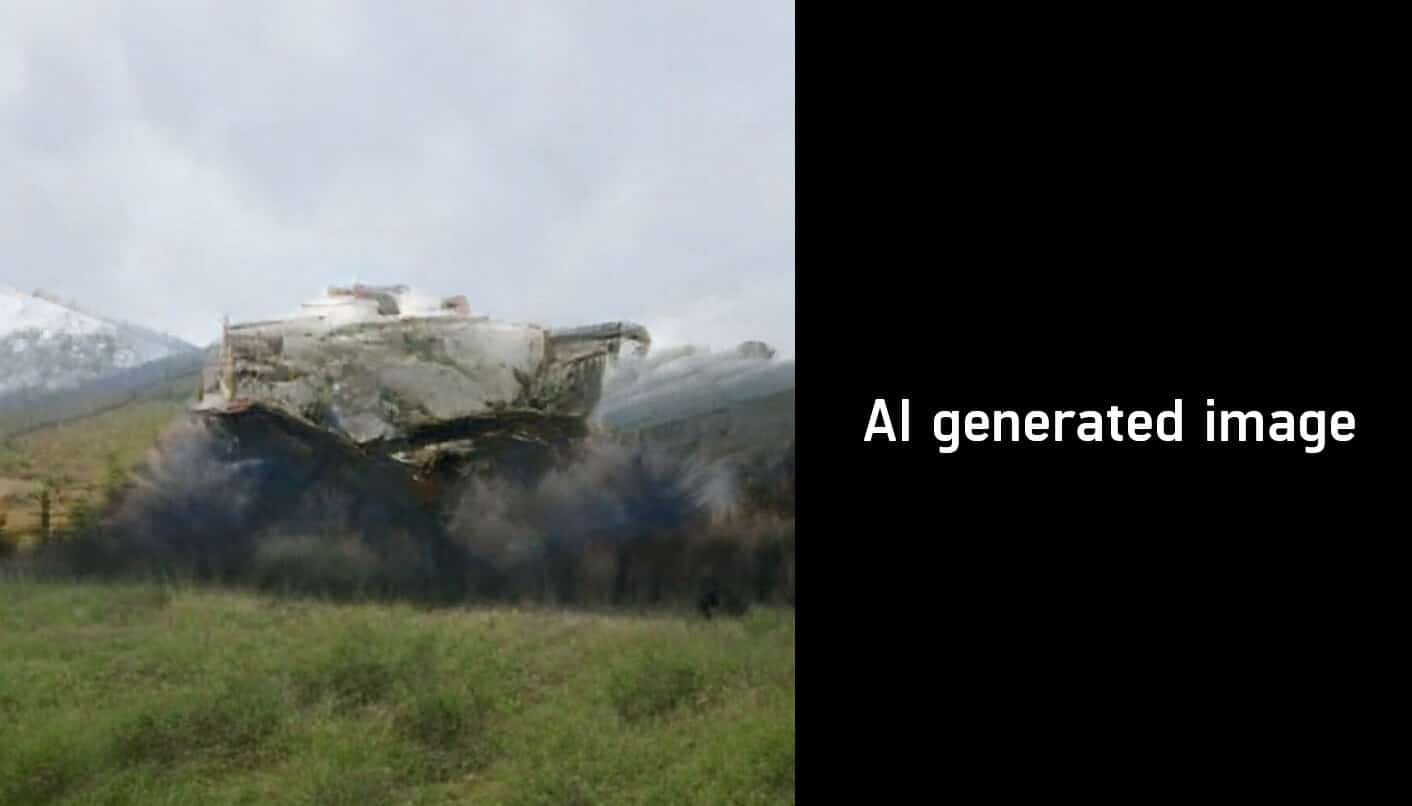
Rather than use GauGAN in the traditional manner, Wertz makes the tools “trick themselves” by putting a mountain in the sky, or snow falling at the bottom of the page, to create a unique image. Then he incorporates his signature spaceships into the scene.

Artist Colie Wertz uses the GauGAN landscape to inspire some of his ship designs.

Wertz appreciates how easily GauGAN builds a background. He says, “Coming from the hard surface world, that’s the kind of stuff that’s kind of always been a curveball for me, like matte painting and background composition.” Now, Wertz is able to focus on the ship and how to “integrate it into a background.”

For some of his creations, Wertz uses the GauGAN landscape to inspire his ship designs. He views AI art as a “creative partner” rather than a replacement for more traditional forms of art.

Wertz’s artistic career kickstarted after he left an architectural design firm in South Carolina and moved to Los Angeles to develop his digital art skills. There, he entered one of his spaceship models created with Photoshop into a contest put on by visual effects production company Electric Image.

Colie Wertz views AI art as a “creative partner” rather than a replacement for more traditional forms of art.

Caption: Wertz views AI art as a “creative partner” rather than a replacement for more traditional forms of art.

The judges were impressed, and Wertz ended up with a job at Industrial Light & Magic, a visual effects company founded by George Lucas. Wertz’s first job was working on the rerelease of Return of the Jedi, building digital models for matte painters.

For listeners curious about Wertz’s current work, they can look at his portfolio, visit his website or follow him on Instagram.

Help Make the AI Podcast Better

Have a few minutes to spare? Fill out this short listener survey. Your answers will help us make a better podcast.

How to Tune in to the AI Podcast

Get the AI Podcast through iTunes, Castbox, DoggCatcher, Overcast, PlayerFM, Pocket Casts, Podbay, PodBean, PodCruncher, Podkicker, Soundcloud, Stitcher and TuneIn. Your favorite not listed here? Email us at aipodcast [at] nvidia [dot] com.

Image credit: Colie Wertz

The post GauGAN Rocket Man: Conceptual Artist Uses AI Tools for Sci-Fi Modeling appeared first on The Official NVIDIA Blog.

Releasing PAWS and PAWS-X: Two New Datasets to Improve Natural Language Understanding Models

Word order and syntactic structure have a large impact on sentence meaning — even small perturbations in word order can completely change interpretation. For example, consider the following related sentences:

  1. Flights from New York to Florida.
  2. Flights to Florida from New York.
  3. Flights from Florida to New York.

All three have the same set of words. However, 1 and 2 have the same meaning — known as paraphrase pairs — while 1 and 3 have very different meanings — known as non-paraphrase pairs. The task of identifying whether pairs are paraphrase or not is called paraphrase identification, and this task is important to many real-world natural language understanding (NLU) applications such as question answering. Perhaps surprisingly, even state-of-the-art models, like BERT, would fail to correctly identify the difference between many non-paraphrase pairs like 1 and 3 above if trained only on existing NLU datasets. This is because existing datasets lack training pairs like this, so it is hard for machine learning models to learn this pattern even if they have the capability to understand complex contextual phrasings.

To address this, we are releasing two new datasets for use in the research community: Paraphrase Adversaries from Word Scrambling (PAWS) in English, and PAWS-X, an extension of the PAWS dataset to six typologically distinct languages: French, Spanish, German, Chinese, Japanese, and Korean. Both datasets contain well-formed sentence pairs with high lexical overlap, in which about half of the pairs are paraphrase and others are not. Including new pairs in training data for state-of-the-art models improves their accuracy on this problem from <50% to 85-90%. In contrast, models that do not capture non-local contextual information fail even with new training examples. The new datasets therefore provide an effective instrument for measuring the sensitivity of models to word order and structure.

The PAWS dataset contains 108,463 human-labeled pairs in English, sourced from Quora Question Pairs (QQP) and Wikipedia pages. PAWS-X contains 23,659 human translated PAWS evaluation pairs and 296,406 machine translated training pairs. The table below gives detailed statistics of the datasets.

PAWS PAWS-X
Language English English Chinese French German Japanese Korean Spanish
(QQP) (Wiki) (Wiki) (Wiki) (Wiki) (Wiki) (Wiki) (Wiki)
Training 11,988 79,798 49,401 49,401 49,401 49,401 49,401 49,401
Dev 677 8,000 1,984 1,992 1,932 1,980 1,965 1,962
Test 8,000 1,975 1,985 1,967 1,946 1,972 1,999
† The training set of PAWS-X is machine translated from a subset of the PAWS Wiki dataset in English.

Creating the PAWS Dataset in English
In “PAWS: Paraphrase Adversaries from Word Scrambling,” we introduce a workflow for generating pairs of sentences that have high word overlap, but which are balanced with respect to whether they are paraphrases or not. To generate examples, source sentences are first passed to a specialized language model that creates word-swapped variants that are still semantically meaningful, but ambiguous as to whether they are paraphrase pairs or not. These were then judged by human raters for grammaticality and then multiple raters judged whether they were paraphrases of each other. 

PAWS corpus creation workflow.

One problem with this swapping strategy is that it tends to produce pairs that aren’t paraphrases (e.g., “why do bad things happen to good people” != “why do good things happen to bad people“). In order to ensure balance between paraphrases and non-paraphrases, we added other examples based on back-translation. Back-translation has the opposite bias as it tends to preserve meaning while changing word order and word choice. These two strategies lead to PAWS being balanced overall, especially for the Wikipedia portion.

Creating the Multilingual PAWS-X Dataset
After creating PAWS, we extended it to six more languages: Chinese, French, German, Korean, Japanese, and Spanish. We hired human translators to translate the development and test sets, and used a neural machine translation (NMT) service to translate the training set.
We obtained human translations (native speakers) on a random sample of 4,000 sentence pairs from the PAWS development set for each of the six languages (48,000 translations). Each sentence in a pair is presented independently so that translation is not affected by context. A randomly sampled subset was validated by a second worker. The final dataset has less than 5% word level error rate.
Note, we allowed professionals to not translate a sentence if it was incomplete or ambiguous. On average, less than 2% of the pairs were not translated, and we simply excluded them. The final translated pairs are split then into new development and test sets, ~2,000 pairs for each.

Examples of human translated pairs for German(de) and Chinese(zh).

Language Understanding with PAWS and PAWS-X
We train multiple models on the created dataset and measure the classification accuracy on the eval set. When trained with PAWS, strong models, such as BERT and DIIN, show remarkable improvement over when they are trained on the existing Quora Question Pairs (QQP) dataset. For example, on the PAWS data sourced from QQP (PAWS-QQP), BERT gets only 33.5 accuracy if trained on existing QQP, but it recovers to 83.1 accuracy when given PAWS training examples. Unlike BERT, a simple Bag-of-Words (BOW) model fails to learn from PAWS training examples, demonstrating its weakness at capturing non-local contextual information. These results demonstrate that PAWS effectively measures sensitivity of models to word order and structure.

Accuracy on PAWS-QQP Eval Set (English).

The figure below shows the performance of the popular multilingual BERT model on PAWS-X using several common strategies:

  1. Zero Shot: The model is trained on the PAWS English training data, and then directly evaluated on all others. Machine translation is not involved in this strategy.
  2. Translate Test: Train a model using the English training data, and machine-translate all test examples to English for evaluation.
  3. Translate Train: The English training data is machine-translated into each target language to provide data to train each model.
  4. Merged: Train a multilingual model on all languages, including the original English pairs and machine-translated data in all other languages.

The results show that cross-lingual techniques help, while it also leaves considerable headroom to drive multilingual research on the problem of paraphrase identification

Accuracy of PAWS-X Test Set using BERT Models.

It is our hope that these datasets will be useful to the research community to drive further progress on multilingual models that better exploit structure, context, and pairwise comparisons.

Acknowledgements
The core team includes Luheng He, Jason Baldridge, Chris Tar. We would like to thank the Language team in Google Research, especially Emily Pitler, for the insightful comments that contributed to our papers. Many thanks also to Ashwin Kakarla, Henry Jicha, and Mengmeng Niu, for the help with the annotations.

Teen AI Developer Builds Early Detection Tool for Brain Disease

Some teens might feel the pressure of having an older sibling as accomplished as 19-year-old Kavya Kopparapu, a Harvard sophomore named last year a U.S. Presidential Scholar and one of TIME’s 25 Most Influential Teens.

But high school senior Neeyanth Kopparapu, 17, is holding his own. He’s making his own mark with PDGAN, a deep learning model to help medical professionals diagnose Parkinson’s disease from MRI scans.

It’s not even his first AI project — Kopparapu presented a poster at last year’s GPU Technology Conference on a natural language processing model that detects depression from tweets.

Together, the D.C.-area siblings have collaborated on a deep learning tool to diagnose diabetes-induced blindness in regions with limited healthcare access. They also founded in 2015 GirlsComputingLeague, a nonprofit working to improve diversity in computer science.

A GAN on a Mission

Parkinson’s disease — a neurodegenerative disorder causing tremors, stiffness and problems moving and balancing — affects more than 10 million people worldwide. When Kopparapu’s grandfather was diagnosed with it two years ago, his family was dismayed to find that it was too late to avail of many existing treatments for the symptoms.

“Like most Parkinson’s patients, he was diagnosed at a stage where a lot of the treatments out there become ineffective,” he said. “Originally, we thought it was a fluke that he was diagnosed later. But upon further research into treatments, we realized it’s not a fluke, it’s a problem with the system.”

It was a problem Kopparapu thought AI could help solve. Using an annotated dataset of around 1,000 brain MRI scans from the University of Southern California, he began training a neural network to spot signs of Parkinson’s. Due to the limited size of the dataset, the trained model’s accuracy hovered at around 90 percent.

That’s already a significant improvement over the current clinical accuracy of diagnosing Parkinson’s from brain scans. But Kopparapu wasn’t settling for an A-minus.

“The only way that I was going to be able to improve the model’s performance was by increasing the number of data points that I had,” he said. “I heard about GANs at the time and thought — what if I was able to use this tool to synthetically augment the dataset?”

Using generative adversarial networks, or GANs, helped Kopparapu boost the AI model’s accuracy to 96.5 percent, with an accuracy of around 98 percent on scans from later-stage patients. The deep learning networks were trained using an NVIDIA Tesla GPU on the Amazon Web Services cloud platform.

Parkinson’s is typically diagnosed when a patient starts showing physical symptoms, with scans taken as just one part of the diagnostic process. Kopparapu hopes that, once clinically validated, tools like PDGAN could be used to help confirm patient diagnoses earlier, giving them more options for treatments.

Learning Computer Science By Heart

Like many software engineers, Kopparapu can trace his passion for computer science back to an early love of video games. He once hoped to create his own version of the popular Pokémon series.

But gaming, he says, is “something I don’t have time for anymore.”

Instead, Kopparapu is focused on his passion for computer science and math. He started learning to code in middle school using online resources, and later took an AI class as a freshman at Thomas Jefferson High School for Science and Technology.

Kopparapu is most interested about the math that underlies AI (having taken multivariable calculus and linear algebra as a sophomore) and is considering a college major in applied math or computer science.

While he’s so far worked with NVIDIA GPUs in the cloud and in a server at his high school, Kopparapu set eyes on his dream AI system when he watched NVIDIA founder and CEO Jensen Huang unveil it live at GTC.

“If there was a DGX-2 system I could tap into,” he said, “that’d be the coolest thing in the world.”

Like Sister, Like Brother

Kopparapu owes his interest in AI-driven healthcare applications to having his older sister as a research and entrepreneurial partner.

“She was interested in biology and healthcare first, and picked up computer science when we started working together,” he said. “With me it was the other way around — I picked up healthcare from her.”

The siblings’ first AI tool, a smartphone app dubbed Eyeagnosis, has been tested as a screening tool for diabetic retinopathy by the Aditya Jyot Eye Hospital in Mumbai, India. And the nonprofit they started has grown to around two dozen student volunteers organizing events and workshops for fellow high schoolers who come from underrepresented communities.

Although the pair have a number of successful ventures under their belts already, school comes first.

“A lot of people have suggested we do a sibling-founded startup,” Kopparapu said, “but I really want to at least finish my undergrad before I look at that possibility.”

The post Teen AI Developer Builds Early Detection Tool for Brain Disease appeared first on The Official NVIDIA Blog.

Michigan Startup Gets Customer Traction for Conversational AI Research

In the wake of Amazon’s boffo Alexa voice debut, a University of Michigan team published pioneering research on building conversational AI, attracting a wave of customer interest.

Jason Mars, a professor advising them, suggested they form a startup. And with that, Ann Arbor, Michigan-based conversational AI startup Clinc was born.

Clinc’s conversational AI platform enables customers to build voice applications — like in-car voice features, fast-food restaurant order services or personal banking assistants.   

“What really tipped the scales to start something even bigger was that the industry was reaching out saying we want to commercialize it,” said Johann Hauswald, chief product officer and co-founder at Clinc, who recounted the company’s start five years ago.

Fast forward to today, and that’s turned into a big opportunity: Clinc has attracted a flood of customers and revenue.

The startup’s financial customers include Barclays, US Bank, S&P Global, and Turkey’s Ishbank, which taps Clinc to offer a personal finance assistant, dubbed Maxi, to 6 million users.

Large financial institutions are well-aware of Clinc, which has been “dominating the space,” said Mars, Clinc’s CEO, speaking on stage last year at TechCrunch Disrupt.

The company’s roster of customers doesn’t stop at finance. Clinc’s AI platform — built to handle voice assistants for any stage startup to a Fortune 500 company — can provide services for call centers, drive-thru restaurants, in-car systems, gaming and healthcare applications.

Breakthrough performance from NVIDIA’s AI platform has helped enable Clinc to push the boundaries on conversational AI to “deliver revolutionary services,” according to Mars.

Conversational AI Boom

To be sure, Clinc’s application-focused research stands out. It’s a mix of academic AI and how-to information for solving specific industry problems, which has attracted interest from some of the customers it’s landed to date.

Clinc raised a $52 million Series B round of funding earlier this year to help scale up to meet its customer demand.

Research firm Gartner forecasts that 15 percent of all customer service interactions will be handled by AI in 2021, a 400 percent jump from 2017.

Clinc: Talking Model Research

Academic discoveries are common launch pads for startups. But Clinc’s team at the University of Michigan built working models and provided the details for companies to develop their own voice models as well as spelled out the data center requirements to deliver the compute resources.

Clinc offers research, outlined in a published paper, on its Sirius voice personal assistant and an in-car assistant that it worked on with Ford aimed at applications for automakers.

Today it offers conversational AI in 80 languages and has production deployments on three continents.

Hardware to the Core

The Clinc team several years ago ran a cost-benefit analysis, finding that NVIDIA GPUs were the right choice for accelerated computing in the data center.

“GPUs were a big story in our research lab at the university,” said Hauswald.

Often times, complex applications require a multitude of complicated algorithms and optimizations to create the best performance possible, which is also the most compute intensive, he said.

“We want to be able to train our models in a way that doesn’t take days to train or then our customers are unable to iterate on the quality of them,” said Hauswald.

The post Michigan Startup Gets Customer Traction for Conversational AI Research appeared first on The Official NVIDIA Blog.

Large-Scale Multilingual Speech Recognition with a Streaming End-to-End Model

Google’s mission is not just to organize the world’s information but to make it universally accessible, which means ensuring that our products work in as many of the world’s languages as possible. When it comes to understanding human speech, which is a core capability of the Google Assistant, extending to more languages poses a challenge: high-quality automatic speech recognition (ASR) systems require large amounts of audio and text data — even more so as data-hungry neural models continue to revolutionize the field. Yet many languages have little data available.

We wondered how we could keep the quality of speech recognition high for speakers of data-scarce languages. A key insight from the research community was that much of the “knowledge” a neural network learns from audio data of a data-rich language is re-usable by data-scarce languages; we don’t need to learn everything from scratch. This led us to study multilingual speech recognition, in which a single model learns to transcribe multiple languages.

In “Large-Scale Multilingual Speech Recognition with a Streaming End-to-End Model”, published at Interspeech 2019, we present an end-to-end (E2E) system trained as a single model, which allows for real-time multilingual speech recognition. Using nine Indian languages, we demonstrated a dramatic improvement in the ASR quality on several data-scarce languages, while still improving performance for the data-rich languages.

India: A Land of Languages
For this study, we focused on India, an inherently multilingual society where there are more than thirty languages with at least a million native speakers. Many of these languages overlap in acoustic and lexical content due to the geographic proximity of the native speakers and shared cultural history. Additionally, many Indians are bilingual or trilingual, making the use of multiple languages within a conversation a common phenomenon, and a natural case for training a single multilingual model. In this work, we combined nine primary Indian languages, namely Hindi, Marathi, Urdu, Bengali, Tamil, Telugu, Kannada, Malayalam and Gujarati.

A Low-latency All-neural Multilingual Model
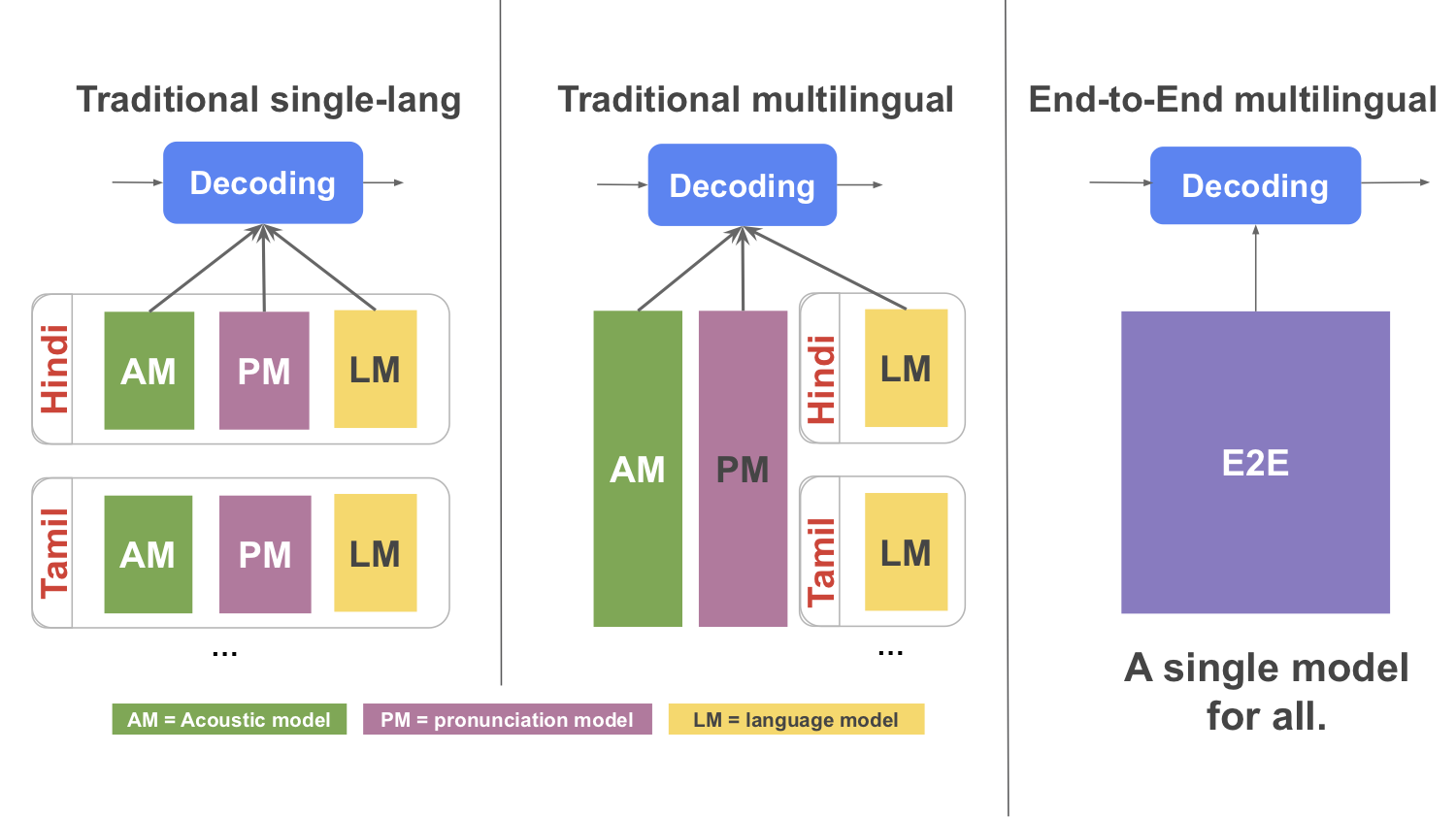
Traditional ASR systems contain separate components for acoustic, pronunciation, and language models. While there have been attempts to make some or all of the traditional ASR components multilingual [1,2,3,4], this approach can be complex and difficult to scale. E2E ASR models combine all three components into a single neural network and promise scalability and ease of parameter sharing. Recent works have extended E2E models to be multilingual [1,2], but they did not address the need for real-time speech recognition, a key requirement for applications such as the Assistant, Voice Search and GBoard dictation. For this, we turned to recent research at Google that used a Recurrent Neural Network Transducer (RNN-T) model to achieve streaming E2E ASR. The RNN-T system outputs words one character at a time, just as if someone was typing in real time, however this was not multilingual. We built upon this architecture to develop a low-latency model for multilingual speech recognition.

[Left] A traditional monolingual speech recognizer comprising of Acoustic, Pronunciation and Language Models for each language. [Middle] A traditional multilingual speech recognizer where the Acoustic and Pronunciation model is multilingual, while the Language model is language-specific. [Right] An E2E multilingual speech recognizer where the Acoustic, Pronunciation and Language Model is combined into a single multilingual model.

Large-Scale Data Challenges
Using large-scale, real-world data for training a multilingual model is complicated by data imbalance. Given the steep skew in the distribution of speakers across the languages and speech product maturity, it is not surprising to have varying amounts of transcribed data available per language. As a result, a multilingual model can tend to be more influenced by languages that are over-represented in the training set. This bias is more prominent in an E2E model, which unlike a traditional ASR system, does not have access to additional in-language text data and learns lexical characteristics of the languages solely from the audio training data.

Histogram of training data for the nine languages showing the steep skew in the data available.

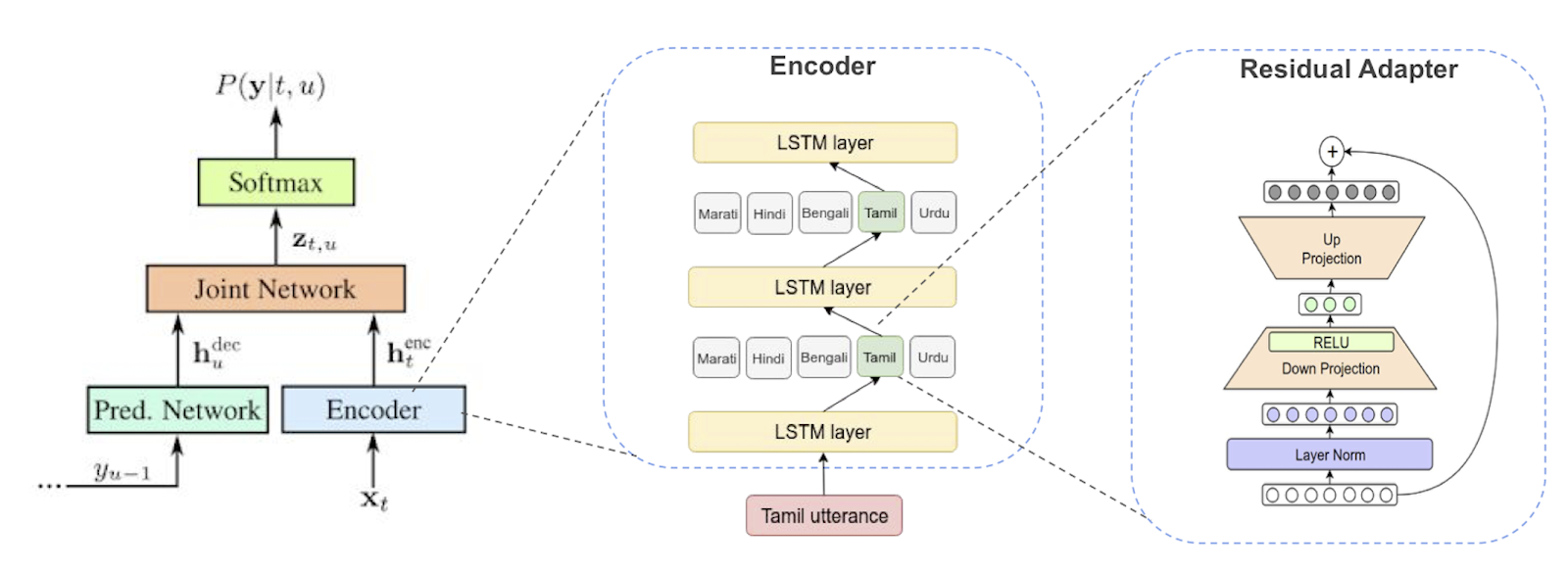
We addressed this issue with a few architectural modifications. First, we provided an extra language identifier input, which is an external signal derived from the language locale of the training data; i.e. the language preference set in an individual’s phone. This signal is combined with the audio input as a one-hot feature vector. We hypothesize that the model is able to use the language vector not only to disambiguate the language but also to learn separate features for separate languages, as needed, which helped with data imbalance.

Building on the idea of language-specific representations within the global model, we further augmented the network architecture by allocating extra parameters per language in the form of residual adapter modules. Adapters helped fine-tune a global model on each language while maintaining parameter efficiency of a single global model, and in turn, improved performance.

[Left] Multilingual RNN-T architecture with a language identifier. [Middle] Residual adapters inside the encoder. For a Tamil utterance, only the Tamil adapters are applied to each activation. [Right] Architecture details of the Residual Adapter modules. For more details please see our paper.

Putting all of these elements together, our multilingual model outperforms all the single-language recognizers, with especially large improvements in data-scarce languages like Kannada and Urdu. Moreover, since it is a streaming E2E model, it simplifies training and serving, and is also usable in low-latency applications like the Assistant. Building on this result, we hope to continue our research on multilingual ASRs for other language groups, to better assist our growing body of diverse users.

Acknowledgements
We would like to thank the following for their contribution to this research: Tara N. Sainath, Eugene Weinstein, Bo Li, Shubham Toshniwal, Ron Weiss, Bhuvana Ramabhadran, Yonghui Wu, Ankur Bapna, Zhifeng Chen, Seungji Lee, Meysam Bastani, Mikaela Grace, Pedro Moreno, Yanzhang (Ryan) He, Khe Chai Sim.

Transcribe speech to text in real time using Amazon Transcribe with WebSocket

Amazon Transcribe is an automatic speech recognition (ASR) service that makes it easy for developers to add speech-to-text capability to applications. In November 2018, we added streaming transcriptions over HTTP/2 to Amazon Transcribe. This enabled users to pass a live audio stream to our service and, in return, receive text transcripts in real time. We are excited to share that we recently started supporting real-time transcriptions over the WebSocket protocol. WebSocket support makes streaming speech-to-text through Amazon Transcribe more accessible to a wider user base, especially for those who want to build browser or mobile-based applications.

In this blog post, we assume that you are aware of our streaming transcription service running over HTTP/2, and focus on showing you how to use the real-time offering over WebSocket. However, for reference on using HTTP/2, you can read our previous blog post and tech documentation.

What is WebSocket?

WebSocket is a full-duplex communication protocol built over TCP. The protocol was standardized by the IETF as RFC 6455 in 2011. WebSocket is suitable for long-lived connectivity whereby both the server and the client can transmit data over the same connection at the same time. It is also practical for cross-domain usage. Voila! No need to worry about cross-origin resource sharing (CORS) as there would be when using HTTP.

Using Amazon Transcribe streaming with WebSocket

To use Amazon Transcribe’s StartStreamTranscriptionWebSocket API, you first need to authorize your IAM user to use the Amazon Transcribe Streaming WebSocket. Go to the AWS Management Console, navigate to Identity & Access Management (IAM), and attach the following inline policy to your user in the AWS IAM console. Please refer to “To embed an inline policy for a user or role” for instructions on how to add permissions.

{
    "Version": "2012-10-17",
    "Statement": [
        "Sid": "transcribestreaming",
        "Effect": "Allow",
        "Action": "transcribe:StartStreamTranscriptionWebSocket",
        "Resource": "*"
    ]
}

Your upgrade request should be pre-signed with your AWS credentials using the AWS Signature Version 4. The request should contain the required parameters, namely sample-rate, language code, and media-encoding. You could optionally supply vocabulary-name to use a custom vocabulary. The StartStreamTranscriptionWebSocket API supports all of the languages that Amazon Transcribe streaming supports today. After your connection is upgraded to WebSocket, you can send your audio chunks as an AudioEvent of the event-stream encoding in the binary WebSocket frame. The response you get is the transcript JSON, which would also be event-stream encoded. For more details, please refer to our tech docs.

To demonstrate how you can power your application with Amazon Transcribe in real time with WebSocket, we built a sample static website. On the website you can enter your account credentials, choose one of the preferred languages, and start streaming. The complete sample code is available on GitHub. JavaScript developers, among others, may find this to be a helpful start. We’d love to see what other cool applications you can build using Amazon Transcribe streaming with WebSocket!


About the authors

Bhaskar Bagchi is an engineer in the Amazon Transcribe service team. Outside of work, Bhaskar enjoys photography and singing.



Karan Grover is an engineer in the Amazon Transcribe service team. Outside of work, Karan enjoys hiking and is a photography enthusiast.



Paul Zhao is a Product Manager at AWS Machine Learning. He manages the Amazon Transcribe service. Outside of work, Paul is a motorcycle enthusiast and avid woodworker.