Understanding Amazon SageMaker notebook instance networking configurations and advanced routing options
An Amazon SageMaker notebook instance provides a Jupyter notebook app through a fully managed machine learning (ML) Amazon EC2 instance. Amazon SageMaker Jupyter notebooks are used to perform advanced data exploration, create training jobs, deploy models to Amazon SageMaker hosting, and test or validate your models.
The notebook instance has a variety of networking configurations available to it. In this blog post we’ll outline the different options and discuss a common scenario for customers.
The basics
Amazon SageMaker notebook instances can be launched with or without your Virtual Private Cloud (VPC) attached. When launched with your VPC attached, the notebook can either be configured with or without direct internet access.
IMPORTANT NOTE: Direct internet access means that the Amazon SageMaker service is providing a network interface that allows for the notebook to talk to the internet through a VPC managed by the service.
Using the Amazon SageMaker console, these are the three options:
- No customer VPC is attached.

- Customer VPC is attached with direct internet access.

- Customer VPC is attached without direct internet access.

What does it really mean?
Each of the three options automatically configures the network interfaces on the managed EC2 instance with a set of routing configurations. In certain situations, you might want to modify these settings to route specific IP address ranges to a different network interface. Next, we’ll step through each of these default configurations:
- No attached customer VPC (1 network interface)

In this configuration, all the traffic goes through the single network interface. The notebook instance is running in an Amazon SageMaker managed VPC as shown in the above diagram. - Customer attached VPC with direct internet access (2 network interfaces)

In this configuration, the notebook instance needs to decide which network traffic should go down either of the two network interfaces.
If we look at an example where we launched into a VPC with a 172.31.0.0/16 CIDR range and look at the OS-level route information, we see this.
Looking at this route table, we can see:- 172.31.0.0/16 traffic will use eth2 interface.
- Some Docker and metadata routes.
- All other traffic will use the eth0 interface.
For simplicity, we’ll focus on the eth0 and eth2 configurations and not the other Docker/ec2 metadata entries. This shows us the following configuration:

This default setting uses the internet network interface (eth0) for all traffic except for the CIDR range for the customer attached VPC (eth2). This setting sometimes needs to be overwritten when interacting with either on-premises or peered-VPC resources.
- Customer attached VPC without direct internet access.
IMPORTANT NOTE: In this configuration, the notebook instance can still be configured to access the internet. The network interface that gets launched only has a private IP address. What that means is that it needs to either be in a private subnet with a NAT or to access the internet back through a virtual private gateway. If launched into a public subnet, it won’t be able to speak to the internet through an internet gateway (IGW).
Common customer patterns
Accessing on-premises resources from an Amazon SageMaker instance with direct internet access:
Suppose we have the following configuration:
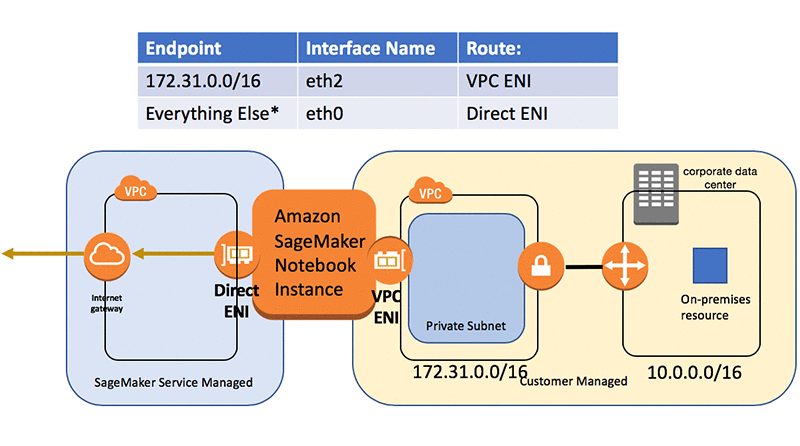
If we try to access the on-premises resource in the 10.0.0.0/16 CIDR range, it will get routed by the OS through the eth0 internet interface. This interface doesn’t have the connection back on-premises and won’t allow us to communicate with on-premises resources.
To route back on premises, we’ll want to update the route table to have the following:
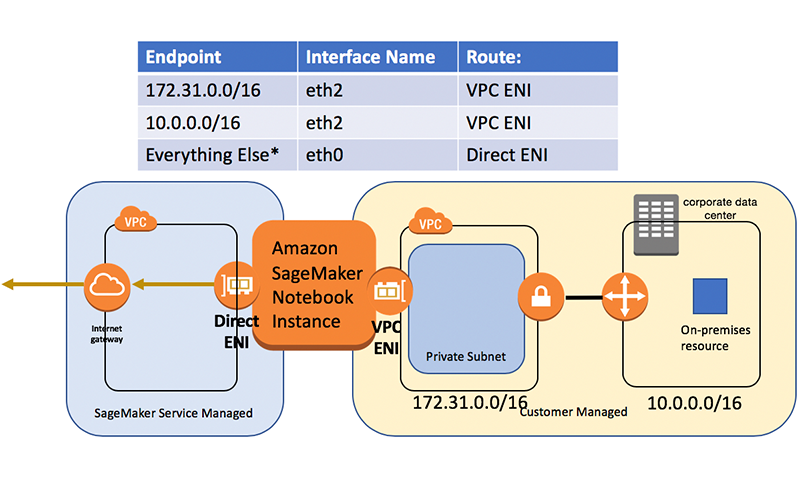
To do this, we can perform the following commands from a terminal on the Amazon SageMaker notebook instance:

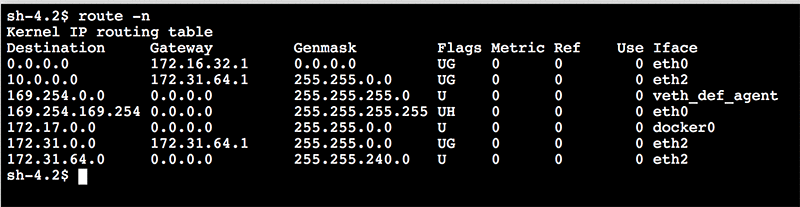
Now if we look at the route table by entering “route -n” we see the route:
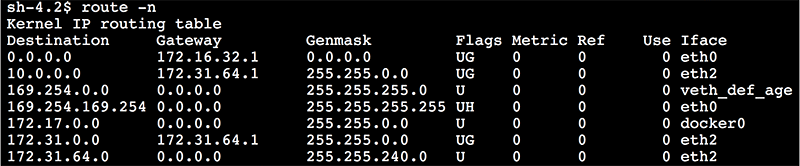
We see a route for 10.0.0.0 with mask 255.255.0.0 (which is the same as 10.0.0.0/16) going through the VPC routing IP address (172.31.64.1).
There is still one issue.
If we restart the notebook the changes won’t persist. Only the changes made to the ML storage volume are persisted with a stop/start. Generally, for the package and files to be persisted, they need to be under “/home/ec2-user/SageMaker”. In this case, we’ll use a different feature: lifecycle configuration to add the route any time the notebook starts.
We can create a lifecycle policy as shown in the following diagram:
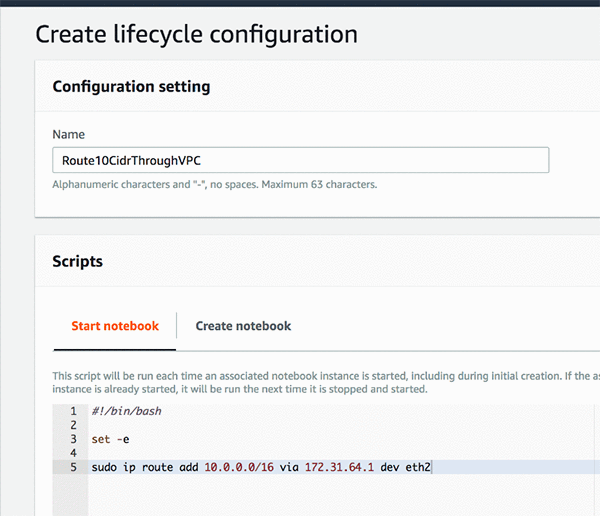
Now we can create our notebooks with this lifecycle configuration:

With this setup when the notebook gets created or when it’s stopped and restarted, we will have the networking configuration we expect:
Conclusion
Amazon SageMaker Jupyter notebooks are used to perform advanced data exploration, create model training jobs, deploy models to Amazon SageMaker hosting, and test or validate your models. This drives the need for the notebook instances to have various networking configurations available to it. Knowing how these configurations can be adapted allows you to integrate with existing resources in your organization and enterprise.
About the Author
 Ben Snively is an AWS Public Sector Specialist Solutions Architect. He works with government, non-profit, and education customers on big data/analytical and AI/ML projects, helping them build solutions using AWS.


 Urvashi Chowdhary is a Senior Product Manager for Amazon SageMaker. She is passionate about working with customers and making machine learning more accessible. In her spare time, she loves sailing, paddle boarding, and kayaking.
 Jeffrey Geevarghese is a Senior Engineer in Amazon AI where he’s passionate about building scalable infrastructure for deep learning. Prior to this he was working on machine learning algorithms and platforms and was part of the launch teams for both Amazon SageMaker and Amazon Machine Learning.


 Tristan Li is a Solutions Architect with Amazon Web Services. He works with enterprise customers in the US, helping them adopt cloud technology to build scalable and secure solutions on AWS.
 Grant McCarthy is an Enterprise Solutions Architect with Amazon Web Services, based in Charlotte, NC. His primary role is assisting his customers move workloads to the cloud securely and ensuring that the workloads are architected in way that aligns with AWS best practices.

 Woo Kim is a Product Marketing Manager for AWS machine learning services. He spent his childhood in South Korea and now lives in Seattle, WA. In his spare time, he enjoys playing volleyball and tennis.


 João Coelho is a Solutions Architect at Amazon Web Services in London. He helps customers leverage the AWS platform to build scalable and resilient architectures on the cloud and is especially interested in serverless technologies. Outside of work, he enjoys playing tennis and traveling.
 Laurynas Tumosa is a Technical Researcher at AWS in London. He enjoys building on the platform using AWS Machine Learning Services. He is passionate about making AI technologies accessible for everyone. Outside of work, Laurynas enjoys finding new interesting podcasts, playing guitar, and reading.
 Lalit Dayalani is a Solution Architect at Amazon Web Services based in London. He helps AWS customers to provide guidance and technical assistance helping them understand and improve the value of their solutions on AWS. In his spare time, he loves spending time with family, going on hikes and spends way too much time indulging in too much television.






 Bastien Leblanc is a Solutions Architect with AWS. He helps Retail customers adopt the AWS Platform, focusing on Data & Analytics workloads, he likes to work with customers helping to solve retail problems and drive innovation.
 Imran Dawood is a Solutions Architect with AWS. He works with Retail customers helping them build solutions on AWS with architectural guidance to achieve success in the AWS cloud. In his spare time, Imran enjoys playing table tennis and spending time with family.
 Ishaaq Chandy is a Senior Engineer in Amazon AI where he loves his work in building an innovative and massively scalable training platform for Amazon Sagemaker. Prior to this he was working on AWS ELB where he was part of the launch teams for both ALB as well as NLB.
 Sumit Thakur works on products that make it quick and easy for customers to get started with deep learning on cloud. He is product manager for Amazon SageMaker and AWS Deep Learning AMI. In his spare time, he likes connecting with nature and watching sci-fi TV series.


 David Ping is a Principal Solutions Architect with the AWS Solutions Architecture organization. He works with our customers to build cloud and machine learning solutions using AWS. He lives in the NY metro area and enjoys learning the latest machine learning technologies.
 Feng Nan is an Applied Scientist on the AWS AI Algorithms team, researching and developing machine learning algorithms in Amazon SageMaker. Before Amazon, Feng obtained his PhD in Systems Engineering from Boston University and his thesis focused on resource-constrained machine learning.
 Ran Ding is an Applied Scientist on the AWS AI Algorithms team, researching and developing machine learning algorithms in Amazon SageMaker. Before Amazon, Ran obtained his PhD in Electrical Engineering from the University of Washington and worked at a startup company making optical processors.
 Ramesh Nallapati is a Senior Applied Scientist in the AWS AI SageMaker team. He works on building novel deep neural networks at scale primarily in the natural language processing domain. He is very passionate about deep learning, and enjoys learning about latest developments in AI and is excited about contributing to this field to the best of his abilities.
 Patrick Ng is a Software Development Engineer on the AWS AI SageMaker Algorithms team. He works on building scalable distributed machine learning algorithms, with focus in the area of deep neural networks and natural language processing. Before Amazon, he obtained his PhD in Computer Science from the Cornell University and worked at startup companies building machine learning systems.