Blog

Learn About Our Meetup

5000+ Members

MEETUPS

LEARN, CONNECT, SHARE

Join our meetup, learn, connect, share, and get to know your Toronto AI community. 

JOB POSTINGS

INDEED POSTINGS

Browse through the latest deep learning, ai, machine learning postings from Indeed for the GTA.

CONTACT

CONNECT WITH US

Are you looking to sponsor space, be a speaker, or volunteer, feel free to give us a shout.

Author: torontoai

Understanding Word2vec Embedding in Practice
Word embedding, vector space model, Gensim

This post aims to explain the concept of Word2vec and the mathematics behind the concept in an intuitive way while implementing Word2vec embedding using Gensim in Python.

The basic idea of Word2vec is that instead of representing words as one-hot encoding (countvectorizer / tfidfvectorizer) in high dimensional space, we represent words in dense low dimensional space in a way that similar words get similar word vectors, so they are mapped to nearby points.

Word2vec is not deep neural network, it turns text into a numeric form that deep neural network can process as input.

How the word2vec model is trained

  • Move through the training corpus with a sliding window: Each word is a prediction problem.
  • The objective is to predict the current word using the neighboring words (or vice versa).
  • The outcome of the prediction determines whether we adjust the current word vector. Gradually, vectors converge to (hopefully) optimal values.

For example, we can use “artificial” to predict “intelligence”.
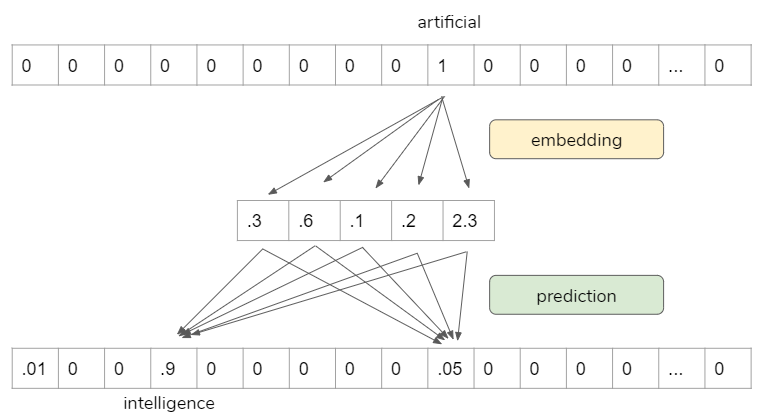
Source: https://www.infoq.com/presentations/nlp-practitioners/?itm_source=presentations_about_Natural-Language-Processing&itm_medium=link&itm_campaign=Natural-Language-Processing

However, the prediction itself is not our goal. It is a proxy to learn vector representations so that we can use it for other tasks.

Word2vec Skip-gram Network Architecture

This is one of word2vec models architectures. It is just a simple one hidden layer and one output layer.
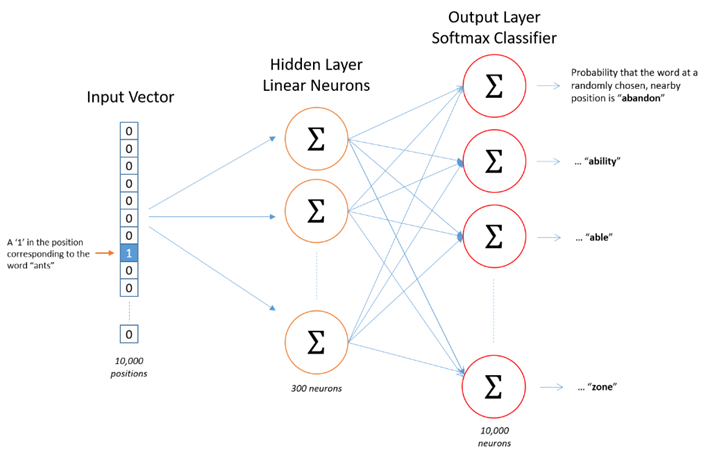
Source: http://mccormickml.com/2016/04/19/word2vec-tutorial-the-skip-gram-model/

The Math

The following is the math behind word2vec embedding. The input layer is the one-hot encoded vectors, so it gets “1” in that word index, “0” everywhere else. When we multiply this input vector by weight matrix, we are actually pulling out one row that is corresponding to that word index. The objective here is to pull out the important row(s), then, we toss the rest.
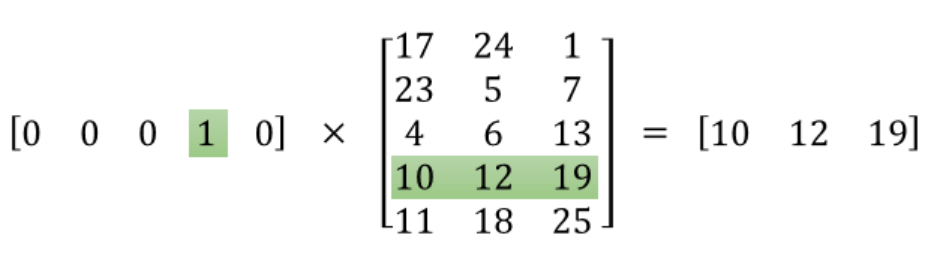
Source: http://mccormickml.com/2016/04/19/word2vec-tutorial-the-skip-gram-model/

This is the main mechanics on how word2vec works.

When we use Tensorflow / Keras or Pytorch to do this, they have a special layer for this process called “Embedding layer”. So, we are not going to do math by ourselves, we only need to pass one-hot encoded vectors, the “Embedding layer” does all the dirty works.

Pre-process the text

Now we are going to implement word2vec embedding for a BBC news data set.

  • We use Gensim to train word2vec embedding.
  • We use NLTK and spaCy to pre-process the text.
  • We use t-SNE to visualize high-dimensional data.

https://medium.com/media/18a345d97b747c8f1e6b1da2c040cc4c/href

  • We use spaCy for lemmatization.
  • Disabling Named Entity Recognition for speed.
  • Remove pronouns.

https://medium.com/media/b9cc027d08ca5cc7405113fac1e56640/href

  • Now we can have a look top 10 most frequent words.

https://medium.com/media/4323e4c7dfa425044b0a8bf300c310d2/href

Implementing Word2vec embedding in Gensim

  • min_count: Minimum number of occurrences of a word in the corpus to be included in the model. The higher the number, the less words we have in our corpus.
  • window: The maximum distance between the current and predicted word within a sentence.
  • size: The dimensionality of the feature vectors.
  • workers: I know my system is having 4 cores.
  • model.build_vocab: Prepare the model vocabulary.
  • model.train: Train word vectors.
  • model.init_sims(): When we do not plan to train the model any further, we use this line of code to make the model more memory-efficient.

https://medium.com/media/a1f70ba732dbe1f8d3df7e3c9827fe81/href

Explore the model

  • Find the most similar words for “economy”
w2v_model.wv.most_similar(positive=['economy'])
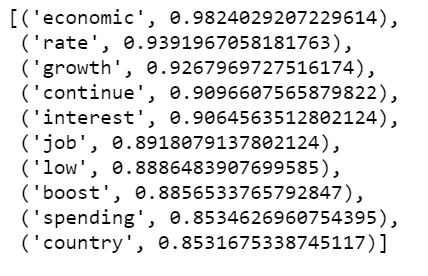
Figure 1
  • Find the most similar words for “president”
w2v_model.wv.most_similar(positive=['president'])
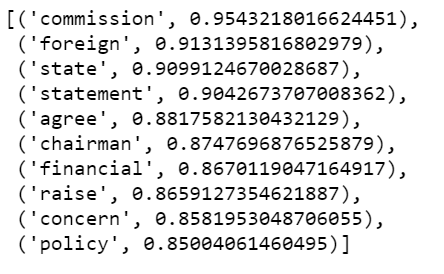
Figure 2
  • How similar are these two words to each other?
w2v_model.wv.similarity('company', 'business')
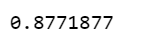
Please note, the above results could change if we change min_count. For example, if we set min_count=100, we will have more words to work with, some of them may be more similar to the target words than the above results; If we set min_count=300, some of the above results may disappear.

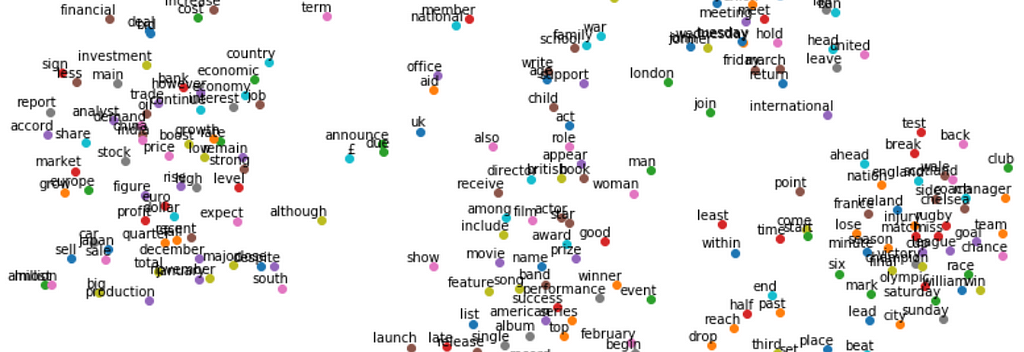
  • We Use t-SNE to represent high-dimensional data in a lower-dimensional space.

https://medium.com/media/dcc0ba898b2e4d11c9a1503608b690dc/href
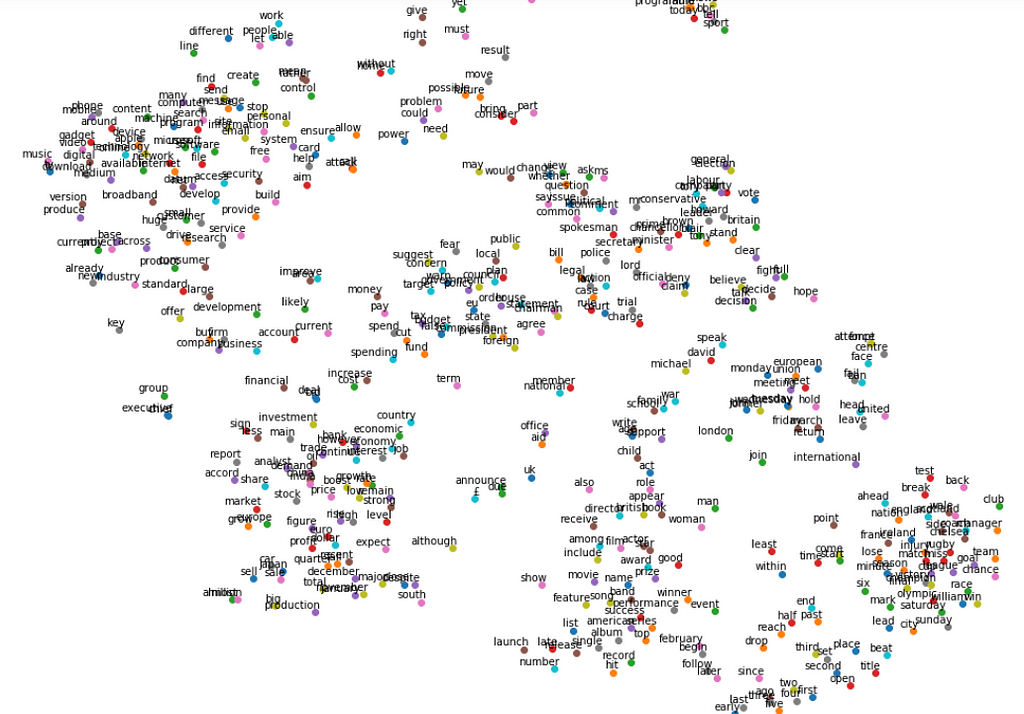
Figure 3
  • It is obvious that some words are close to each other, such as “team”, “goal”, “injury”, “olympic” and so on. And those words tend to be used in the sport related news articles.
  • Other words that cluster together such as “film”, “actor”, “award”, “prize” and so on, they are likely to be used in the news articles that talk about entertainment.
  • Again. How the plot looks like pretty much depends on how we set min_count.

The Jupyter notebook can be found on Github. Enjoy the rest of the week.

Reference: https://learning.oreilly.com/videos/oreilly-strata-data/9781492050681/9781492050681-video327451?autoplay=false


Understanding Word2vec Embedding in Practice was originally published in Towards Data Science on Medium, where people are continuing the conversation by highlighting and responding to this story.

[P] Learning Rate Dropout in PyTorch

https://github.com/noahgolmant/pytorch-lr-dropout

I just implemented learning rate dropout using PyTorch! This technique applies dropout to the weight update at each iteration instead of the weights themselves.

I welcome any and all feedback! I ran four trials with a ResNet34 model on CIFAR-10 using both the baseline optimizer (SGD with momentum) and this variant. I wasn’t able to achieve the numbers reported in the paper, though. Feel free to double-check the masking logic or hyperparameters in case that explains the difference.

submitted by /u/noahgolm
[link] [comments]

[P] What could cause this behavior?

Hi,

I’m making an LSTM that takes a list of same-size vectors as input. These vectors are encodings of frames in a video, and I want the LSTM to output an encoding of the entire video. To get this encoding, I am just taking the last hidden state and feeding it through a linear layer.

My issue is the hidden state seems to be converging on some fixed vector after a couple of time steps. It seems like the LSTM is forgetting previous states and entering a loop. What could cause this behavior? Is there a nice way to fix this?

Thanks

submitted by /u/jsonathan
[link] [comments]

[P] Simple hyperparameter management through dependency injection

[P] Simple hyperparameter management through dependency injection

What an unruly mess some hyperparameter configurations are… In many open source deep learning codebases, the hyperparameters are treated as global variables but it’s nothing new that global variables should be avoided. Yet, here we are.

3 years ago, I started as a junior deep learning engineer at Apple and I developed a similar approach to this one: https://www.reddit.com/r/MachineLearning/comments/e5jvhq/p_how_to_get_rid_of_boilerplate_ifstatements_and/. My team had to abondon it though because…. The solution required redundant boilerplate. Using YAML files was annoying too because YAML has little support for variables and YAML has no support for lambdas or Python objects. Lastly, it wasn’t an easy process to modularize YAML files as compared to Python functions.

Anywho, the above solutions just didn’t work.

3 year later, after tinkering and working at different companies as a deep learning engineer, I came up with this approach: https://github.com/PetrochukM/HParams. Here’s what it looks like:

Example Code

The approach has a couple of benefits:

  • There are no global variables.
  • The approach lends it’s self to automatic checks that ensure:
    • That no hyperparameters are overwritten.
    • All declared hyperparameters are set and used.
    • The hyperparameter type is correct.
  • It enables you to configure external functions.
  • The various hyperparameter dependencies are visable and intuitive.
  • The hyperparameters are easy to export and track.
  • It’s easy to add-on a CLI, like so: foo@bar:~$ u/ --torch.optim.adam.Adam.__init__ 'HParams(lr=0.1,betas=(0.999,0.99))'

Anywho, let me know what you think!

Lastly, it’s kinda cool, that similar approaches to mine were discovered and implemented by the AllenNLP library and Google’s gin-config. Does that mean I’m doing something right?

submitted by /u/Deepblue129
[link] [comments]

[Project] Open-source library + models for automatic speech recognition (ASR).

I strongly believe that there must be alternatives to Google, Amazon or Microsoft for speech recognition. I like the direction in which Common Voice (Mozilla foundation) is headed, but I’m yet to see any production quality models coming out of that.

For the past few months, I’ve been training ASR models on a lot of speech data collected from various sources. Today, I’m releasing a couple of trained models as an open-source library called at16k. The idea is to provide the developer community with production quality models for speech to text conversion.

Check out the following links for more info: Github repo and PyPI project

submitted by /u/platypusdoc
[link] [comments]

AWS Outposts Station a GPU Garrison in Your Data Center

All the goodness of GPU acceleration on Amazon Web Services can now also run inside your own data center.

AWS Outposts powered by NVIDIA T4 Tensor Core GPUs are generally available starting today. They bring cloud-based Amazon EC2 G4 instances inside your data center to meet user requirements for security and latency in a wide variety of AI and graphics applications.

With this new offering, AI is no longer a research project.

Most companies still keep their data inside their own walls because they see it as their core intellectual property. But for deep learning to transition from research into production, enterprises need the flexibility and ease of development the cloud offers — right beside their data. That’s a big part of what AWS Outposts with T4 GPUs now enables.

With this new offering, enterprises can install a fully managed rack-scale appliance next to the large data lakes stored securely in their data centers.

AI Acceleration Across the Enterprise

To train neural networks, every layer of software needs to be optimized, from NVIDIA drivers to container runtimes and application frameworks. AWS services like Sagemaker, Elastic MapReduce and many others designed on custom-built Amazon Machine Images require model development to start with the training on large datasets. With the introduction of NVIDIA-powered AWS Outposts, those services can now be run securely in enterprise data centers.

The GPUs in Outposts accelerate deep learning as well as high performance computing and other GPU applications. They all can access software in NGC, NVIDIA’s hub for GPU-accelerated software optimization, which is stocked with applications, frameworks, libraries and SDKs that include pre-trained models.

For AI inference, the NVIDIA EGX edge-computing platform also runs on AWS Outposts and works with the AWS Elastic Kubernetes Service. Backed by the power of NVIDIA T4 GPUs, these services are capable of processing orders of magnitudes more information than CPUs alone. They can quickly derive insights from vast amounts of data streamed in real time from sensors in an Internet of Things deployment whether it’s in manufacturing, healthcare, financial services, retail or any other industry.

On top of EGX, the NVIDIA Metropolis application framework provides building blocks for vision AI, geared for use in smart cities, retail, logistics and industrial inspection, as well as other AI and IoT use cases, now easily delivered on AWS Outposts.

Alternatively, the NVIDIA Clara application framework is tuned to bring AI to healthcare providers whether it’s for medical imaging, federated learning or AI-assisted data labeling.

The T4 GPU’s Turing architecture uses TensorRT to accelerate the industry’s widest set of AI models. Its Tensor Cores support multi-precision computing that delivers up to 40x more inference performance than CPUs.

Remote Graphics, Locally Hosted

Users of high-end graphics have choices, too. Remote designers, artists and technical professionals who need to access large datasets and models can now get both cloud convenience and GPU performance.

Graphics professionals can benefit from the same NVIDIA Quadro technology that powers most of the world’s professional workstations not only on the public AWS cloud, but on their own internal cloud now with AWS Outposts packing T4 GPUs.

Whether they’re working locally or in the cloud, Quadro users can access the same set of hundreds of graphics-intensive, GPU-accelerated third-party applications.

The Quadro Virtual Workstation AMI, available in AWS Marketplace, includes the same Quadro driver found on physical workstations. It supports hundreds of Quadro-certified applications such as Dassault Systèmes SOLIDWORKS and CATIA; Siemens NX; Autodesk AutoCAD and Maya; ESRI ArcGIS Pro; and ANSYS Fluent, Mechanical and Discovery Live.

Learn more about AWS and NVIDIA offerings and check out our booth 1237 and session talks at AWS re:Invent.

The post AWS Outposts Station a GPU Garrison in Your Data Center appeared first on The Official NVIDIA Blog.

Amazon Web Services achieves fastest training times for BERT and Mask R-CNN

Two of the most popular machine learning models used today are BERT, for natural language processing (NLP), and Mask R-CNN, for image recognition. Over the past several months, AWS has significantly improved the underlying infrastructure, network, machine learning (ML) framework, and model code to achieve the best training time for these two popular state-of-the-art models. Today, we are excited to share the world’s fastest model training times to date on the cloud on TensorFlow, MXNet, and PyTorch. You can now use these hardware and software optimizations to train your TensorFlow, MXNet, and PyTorch models with the same speed and efficiency.

Model training time directly impacts your ability to iterate and improve on the accuracy of your models quickly. The primary way to reduce training time is by distributing the training job across a large cluster of GPU instances, but this is hard to do efficiently. If you distribute a training job across a large number of workers, you often have rapidly diminishing returns because the overhead in communication between instances begins to cancel out the additional GPU computing power.

BERT

BERT, or Bidirectional Encoder Representations from Transformers, is a popular NLP model, which at the time it was published was state-of-the-art on several common NLP tasks.

On a single Amazon EC2 P3dn.24xlarge instance, which has 8 NVIDIA V100 GPUs, it takes approximately three days to train BERT from scratch with TensorFlow and PyTorch. We reduced training time from three days to slightly over 60 minutes by efficiently scaling out to more P3dn.24xlarge instances, using network improvements with Elastic Fabric Adapter (EFA), and optimizing how this complex model converges on larger clusters. As of this writing, this is the fastest time-to-train for BERT on the cloud while achieving state-of-the-art target accuracy (F1 score of 90.4 or higher on Squad v2 tasks after training on BooksCorpus and English Wikipedia).

With TensorFlow, we achieved unprecedented scale with 2,048 GPUs on 256 P3dn.24xlarge instances to train BERT in 62 minutes. With PyTorch, we reduced training time to 69 minutes by scaling out to 1,536 GPUs on 192 P3dn.24xlarge instances. With all our optimizations to the entire hardware and software stack for training BERT, we achieved an 85% scaling efficiency, which makes sure the frameworks can use most of the additional computation power from GPUs when scaling to more P3dn.24xlarge nodes. The following table summarizes these improvements.

P3DN.24xlarge Nodes NVIDIA GPUs Time to train (PyTorch) Time to train (TensorFlow)
1 8 3 days 3 days
192 1536 69 min
256 2048 62 min

Mask R-CNN

Mask R-CNN is a widely used instance segmentation model that is used for autonomous driving, motion capture, and other uses that require sophisticated object detection and segmentation capabilities.

It takes approximately 80 hours to train Mask R-CNN on a single P3dn.24xlarge instance (8 NVIDIA V100 GPUs) with MXNet, PyTorch, and TensorFlow. We reduced training time from 80 hours to approximately 25 minutes on MXNet, PyTorch, and TensorFlow. We scaled Mask R-CNN training on all three ML frameworks to 24 P3dn.24xlarge instances, which gave us 192 GPUs. You can now rapidly iterate and run several experiments daily instead of waiting several days for results. As of this writing, this is the fastest time-to-train for Mask R-CNN on the cloud, while achieving state-of-the-art target accuracy (0.377 Box min AP, 0.339 Mask min AP on COCO2017 dataset). The following table summarizes these improvements.

# of Nodes # of GPUs Time to train (MXNet) Time to train (PyTorch) Time to train (TensorFlow)
1 8 ~80 hrs ~80 hrs ~80 hrs
24 192 25 min 26 min 27 min

Technology stack

Achieving these results required optimizations to the underlying hardware, networking, and software stack . When training large models such as BERT, communication among the many GPUs in use becomes a bottleneck.

In distributed computing (large-scale training being one instance of it), AllReduce is an operation that reduces arrays (parameters of a neural network in this case) from different workers (GPUs) and returns the resultant array to all workers (GPUs). GPUs collectively perform an AllReduce operation after every iteration. Each iteration consists of one forward and backward pass through the network.

The most common approach to perform AllReduce on GPUs is to use NVIDIA Collective Communications Library (NCCL) or MPI libraries such as OpenMPI or Intel MPI Library. These libraries are designed for homogeneous clusters. AllReduce happens on the same instances that train the network. The AllReduce algorithm on homogeneous clusters involves each worker sending and receiving data approximately twice the size of the model for each AllReduce operation. For example, the AllReduce operation for BERT (which has 340 million parameters) involves sending approximately 650 MB of half-precision data twice and receiving the same amount of data twice. This communication needs to happen after every iteration and quickly becomes a bottleneck when training most models.

The choice of AllReduce algorithm usually depends on the network architecture. For example, Ring-AllReduce is a good choice for a network in which each node is connected to two neighbors, which forms a ring. Torus AllReduce algorithm is a good choice for a network in which each node is connected to four neighbors, which forms a 2D rectangular lattice. AWS uses a much more flexible interconnect, in which any node can communicate with any other node at full bandwidth. For example, in a cluster with 128 P3dn instances, any instance can communicate with any other instance at 100 Gbps.

Also, the 100 Gbps interconnect is not limited to P3dn instances. You can add CPU-optimized C5n instances to the cluster and still retain the 100 Gbps interconnect between any pair of nodes.

This high flexibility of the AWS interconnect begs for an AllReduce algorithm that makes full use of the unique capabilities of the AWS interconnect. We therefore developed a custom AllReduce algorithm optimized for the AWS network. The custom AllReduce algorithm exploits the 100 Gbps interconnect between any pair of nodes in a heterogeneous cluster and reduces the amount of data sent and received by each worker by half. The compute phase of the AllReduce algorithm is offloaded onto compute-optimized C5 instances, freeing up the GPUs to compute gradients faster. Because GPU instances don’t perform the reduction operation, sending gradients and receiving AllReduced gradients can happen in parallel. The number of hops required to AllReduce gradients is reduced to just two compared to homogeneous AllReduce algorithms, in which the number of network hops increases with the number of nodes. The total cost is also reduced because training completes much faster compared to training with only P3dn nodes.

Conclusion

When tested with BERT and Mask R-CNN, the results yielded significant improvements to single-node executions. Throughput scaled almost linearly as the number of P3dn nodes scaled from 1 to 16, 32, 64, 128, 192, and 256 instances, which ultimately helped to reduce model training times by scaling to additional P3dn.24xlarge instances without increasing cost. With these optimizations, AWS can now offer you the fastest model training times on the cloud for state-of-the-art computer vision and NLP models.

Get started with TensorFlow, MXNet, and PyTorch today on Amazon SageMaker.


About the authors

Aditya Bindal is a Senior Product Manager for AWS Deep Learning. He works on products that make it easier for customers to use deep learning engines. In his spare time, he enjoys playing tennis, reading historical fiction, and traveling.



Kevin Haas is the engineering leader for the AWS Deep Learning team, focusing on providing performance and usability improvements for AWS machine learning customers. Kevin is very passionate about lowering the friction for customers to adopt machine learning in their software applications. Outside of work, he can be found dabbling with open source software and volunteering for the Boy Scouts.



Indu Thangakrishnan is a Software Development Engineer at AWS. He works on training deep neural networks faster. In his spare time, he enjoys binge-listening Audible and playing table tennis.