Blog

Learn About Our Meetup

5000+ Members

MEETUPS

LEARN, CONNECT, SHARE

Join our meetup, learn, connect, share, and get to know your Toronto AI community. 

JOB POSTINGS

INDEED POSTINGS

Browse through the latest deep learning, ai, machine learning postings from Indeed for the GTA.

CONTACT

CONNECT WITH US

Are you looking to sponsor space, be a speaker, or volunteer, feel free to give us a shout.

Author: torontoai

Learning Preferences by Looking at the World

It would be great if we could all have household robots do our chores for us.
Chores are tasks that we want done to make our houses cater more to our
preferences; they are a way in which we want our house to be different from
the way it currently is. However, most “different” states are not very
desirable:

Surely our robot wouldn’t be so dumb as to go around breaking stuff when we ask
it to clean our house? Unfortunately, AI systems trained with reinforcement
learning
only optimize features specified in the reward function
and are
indifferent to anything we might’ve inadvertently left out. Generally, it is
easy to get the reward wrong by forgetting to include preferences for things
that should stay the same, since we are so used to having these preferences
satisfied, and there are so many of them. Consider the room below, and imagine
that we want a robot waiter that serves people at the dining table efficiently.
We might implement this using a reward function that provides 1 reward whenever
the robot serves a dish, and use discounting so that the robot is incentivized
to be efficient. What could go wrong with such a reward function? How would we
need to modify the reward function to take this into account? Take a minute to
think about it.

Continue reading

Some Thoughts on Facial Recognition Legislation

Facial recognition technology significantly reduces the amount of time it takes to identify people or objects in photos and video. This makes it a powerful tool for business purposes, but just as importantly, for law enforcement and government agencies to catch criminals, prevent crime, and find missing people. We’ve already seen the technology used to prevent human trafficking, reunite missing children with their parents, improve the physical security of a facility by automating access, and moderate offensive and illegal imagery posted online for removal. Our communities are safer and better equipped to help in emergencies when we have the latest technology, including facial recognition technology, in our toolkit.

In recent months, concerns have been raised about how facial recognition could be used to discriminate and violate civil rights. You may have read about some of the tests of Amazon Rekognition by outside groups attempting to show how the service could be used to discriminate. In each case, we’ve demonstrated that the service was not used properly; and when we’ve re-created their tests using the service correctly, we’ve shown that facial recognition is actually a very valuable tool for improving accuracy and removing bias when compared to manual, human processes. These groups have refused to make their training data and testing parameters publicly available, but we stand ready to collaborate on accurate testing and improvements to our algorithms, which the team continues to enhance every month.

In the two-plus years we’ve been offering Amazon Rekognition, we have not received a single report of misuse by law enforcement. Even with this strong track record to date, we understand why people want there to be oversight and guidelines put in place to make sure facial recognition technology cannot be used to discriminate. We support the calls for an appropriate national legislative framework that protects individual civil rights and ensures that governments are transparent in their use of facial recognition technology.

Over the past several months, we’ve talked to customers, researchers, academics, policymakers, and others to understand how to best balance the benefits of facial recognition with the potential risks. It’s critical that any legislation protect civil rights while also allowing for continued innovation and practical application of the technology. Those discussions led to the development of our proposed guidelines for the responsible use of the technology, which we’d like to share today. We encourage policymakers to consider these guidelines as potential legislation and rules are considered in the US and other countries.

1. Facial recognition should always be used in accordance with the law, including laws that protect civil rights.

The uses of facial recognition technology must comply with all laws, including laws that protect civil rights. There should be no ambiguity that existing laws (for example, the Civil Rights Act of 1964 and Fourth Amendment of the U.S. Constitution) apply to and may restrict the use of this technology in some circumstances.

Our customers are responsible for following the law in how they use the technology. The AWS Acceptable Use Policy (AUP) prohibits customers from using any AWS service, including Amazon Rekognition, to violate the law, and customers who violate our AUP will not be able to use our services. To the extent there may be ambiguities or uncertainties in how existing laws should apply to facial recognition technology, we have and will continue to offer our support to policymakers and legislators in identifying areas to develop guidance or legislation to clarify the proper application of those laws.

2. When facial recognition technology is used in law enforcement, human review is a necessary component to ensure that the use of a prediction to make a decision does not violate civil rights.

Facial recognition is often used to ‘narrow the field’ from hundreds of thousands of potential matches, to a handful; it is this capability that benefits society in many ways by making it easier and more efficient to complete tasks that would take humans far more time. However, facial recognition should not be used to make fully automated, final decisions that might result in a violation of a person’s civil rights. In these situations, human review of facial recognition results should be used to ensure rights are not violated.

For example, for any law enforcement use of facial recognition to identify a person of interest in a criminal investigation, law enforcement agents should manually review the match before making any decision to interview or detain the individual. In all cases, facial recognition matches should be viewed in the context of other compelling evidence, and not be used as the sole determinant for taking action. On the other hand, if facial recognition is used to unlock a phone, or to authenticate an employee’s identity to access a secure, private office building, these decisions would not require a manual audit because they would not impinge on an individual’s civil rights.

3. When facial recognition technology is used by law enforcement for identification, or in a way that could threaten civil liberties, a 99% confidence score threshold is recommended.

Confidence scores can be thought of as a measure of how much trust a facial recognition system places in its own results; the higher the confidence score, the more the results can be trusted. When using facial recognition to identify persons of interest in an investigation, law enforcement should use the recommended 99% confidence threshold, and only use those predictions as one element of the investigation (not the sole determinant).

4. Law enforcement agencies should be transparent in how they use facial recognition technology.

To create the greatest public confidence in responsible law enforcement use of facial recognition, we encourage law enforcement entities to be transparent about their use of the technology and to describe this use in regular transparency reports. Such reports should indicate if and how facial recognition technology is being used and detail safeguards that have been put into place to protect citizens’ privacy and civil rights.

This type of reporting can help balance public safety and civil rights concerns, and help enable effective oversight and accountability of law enforcement use of facial recognition technology. AWS will continue to engage with policymakers, civil society and local community groups, and our law enforcement customers to help define these reports and how they should be provided.

5. There should be notice when video surveillance and facial recognition technology are used together in public or commercial settings.

There have been concerns about facial recognition technology and its potential use in connection with video monitoring in public or commercial settings. In many cases, this has already been addressed by states that have laws regulating the use of video cameras in public or commercial premises, such as shopping centers and restaurants. AWS supports the use of written, visible notices at these premises where video surveillance, including facial recognition, is in use.

AWS also supports the creation of a national legislative framework covering facial recognition through video and photographic monitoring on public or commercial premises, and we encourage deeper public discussion and debate about whether the existing video surveillance laws should be reviewed and updated. Our view is that facial recognition technology and video/photo surveillance should be covered by the same notice framework.

Standardized Testing

AWS has always been, and will remain, supportive and committed to investing in the development of standardized testing methodologies that seek to improve accuracy by removing bias from facial recognition technology.

Technical standards that establish clear benchmarks and testing methodologies are a proven way to address design issues in software, and we believe they are equally applicable here. AWS encourages and supports the development of independent standards for facial recognition technology by entities like the National Institute of Standards and Technology (NIST), including efforts by NIST and other independent and recognized research organizations and standards bodies to develop tests that support cloud-based facial recognition software. We are engaging with the NIST and other stakeholders to offer our direct assistance towards this effort. We also support efforts by members of the academic community to establish independent and trusted criteria, benchmarks, and evaluation protocols around facial recognition services. We encourage other groups from the technology industry, government, and academia to support and participate in these initiatives. We also invite researchers interested in these topics to apply for AWS Machine Learning Research grants, with which we are funding many research initiatives in this space.

Moving Forward

New technology should not be banned or condemned because of its potential misuse. Instead, there should be open, honest, and earnest dialogue among all parties involved to ensure that the technology is applied appropriately and is continuously enhanced. AWS dedicates significant resources to ensuring our technology is highly accurate and reduces bias, including using training data sets that reflect gender, race, ethnic, cultural, and religious diversity. We’re also committed to educating customers on best practices, and ensuring diverse perspectives in our technology development teams. We will continue to work with partners across industry, government, academia, and community groups on this topic because we strongly believe that facial recognition is an important, even critical, tool for business, government, and law enforcement use.

– Michael Punke, VP, Global Public Policy, AWS

Bridgeman Images uses Amazon Translate to establish their business globally

Many businesses aspire to expand globally to reach new customer and accelerate growth. For Bridgeman Images, this meant engaging customers who spoke languages other than English. They needed a scalable solution to overcoming the language barrier since having everything translated manually wasn’t fast enough or cost efficient. Using Amazon Translate, they reduced the time needed to localize content from several months down to a few weeks, translating 570 million English characters into Italian, French, German, and Spanish.

Bridgeman Images is a rights-managed image licensing company that has nearly three million active assets in its archive. To be easily searchable on their site, each of these assets has a title, a description, and a set of keywords/mediums that they index into the Amazon Elasticsearch Service (Amazon ES). Their research showed that between 20 and 30 percent of customers aggregated across all platforms required the image data to appear in a language other than English—either Italian, French, German, or Spanish. Therefore, they decided to provide translations for all of their metadata to provide the best possible experience for their customers.

Bridgeman Images researched a number of different options and decided that machine translations would provide the best overall value for their business. When preparing for the new translations, they took the opportunity to overhaul their internal metadata structures and implement a robust workflow that would minimize duplication and save on translation costs.

First they updated their keyword system. It was originally created as a flat data structure with semi-colon delimited records. They de-duplicated these entries and created a relational structure that would allow multiple assets to share the same keyword alongside its translations. The keywords are stored on an Amazon RDS MySQL instance and are updated into Amazon Elasticsearch Service index whenever a change is triggered to a keyword or a new one is entered into the system.

To handle the translations of their keywords (and other data), their next task was to create a simple wrapper for the Amazon Translate service using Python, Boto3, and the Flask API deployed with Zappa onto AWS Lambda.

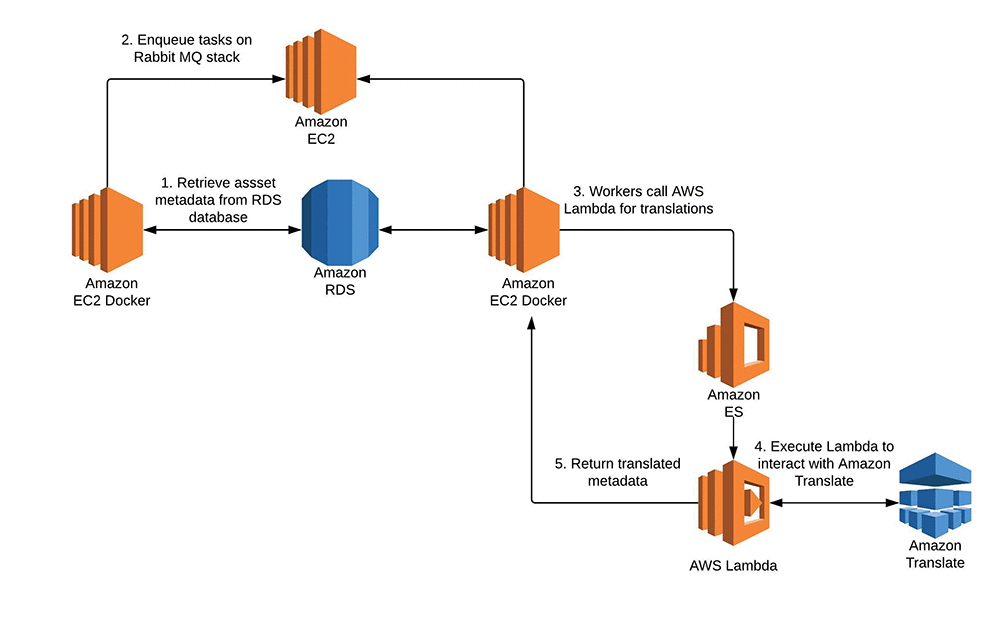
They then designed a trigger so that any time a new keyword was added to their system, a task was put into a queue to their RabbitMQ cluster, which would in turn call a worker to query an AWS Lambda function to grab the translation from Amazon Translate.

Next, they needed to bulk translate nearly 700 million characters of data, which consisted of their titles and descriptions, into four different languages. Some of the source metadata is in more than one language so they extended the Lambda translation function to detect the original language using Amazon Comprehend.

To efficiently process and translate this large volume of data, Bridgeman Images relied on a RabbitMQ cluster hosted on AWS and an AWS Auto Scaling stack of Amazon EC2 instances that ran worker listeners inside Docker containers deployed with AWS Elastic Beanstalk. This setup allowed them to process nearly 14,000 assets per hour, with each asset averaging approximately 100-300 characters per translation.

“We translated roughly 570 million characters per language in the aggregate span of about 15 days. The time saving was significant – likely on the magnitude of months vs a couple of weeks to build and easily integrate with our existing technology infrastructure that AWS provides. The development cycle was super short especially refactoring as it took one developer a week to deliver it and we didn’t need to pile resources or re-skill our developers” said Sean Chambers, IT Director of Bridgeman Images.

Finally, to support ongoing translations, Bridgeman Images designed a newly structured cataloguing interface where their team could input metadata. They simply enter the source language (English, for example) and let the system provide automatic translations for Italian, German, French, and Spanish. These are put into a queue similar to the queue for their keyword triggers. They are updated on a regular basis into an Amazon Elasticsearch Service index so that they become searchable.

Here’s a simple architecture that shows how Bridgeman Images uses Amazon Translate to provide real-time translation for their customers.

“For me one of the reasons for choosing Amazon Translate was cost – 40 percent less than the other competitor we were considering,” says Sean Chambers, IT Director of Bridgeman Images.

Here’s a sneak peek at the Bridgeman Images site in action:


About the Author

Shafreen Sayyed is an AWS Solutions Architect based in London. She helps customers across the UK and Ireland, supporting various industry verticals to transform their businesses and build industry-leading cloud solutions. She has a special interest in Machine Learning and Artificial Intelligence and is passionate about finding ways to help our customers integrate these new and exciting technologies into all aspects of their business.


Announcing the Second Workshop and Challenge on Learned Image Compression

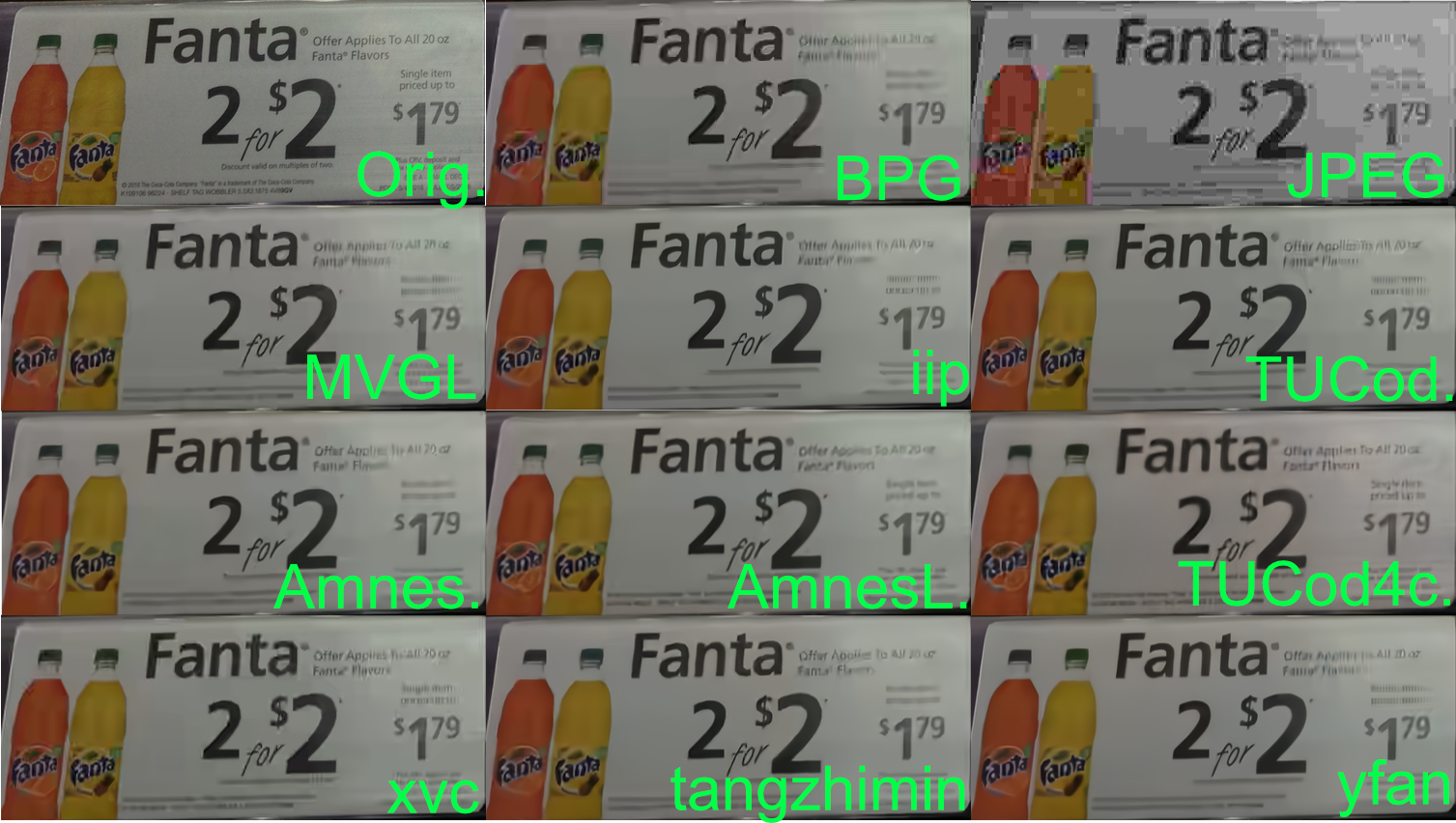
Last year, we announced the Workshop and Challenge on Learned Image Compression (CLIC), an event that aimed to advance the field of image compression with and without neural networks. Held during the 2018 Computer Vision and Pattern Recognition conference (CVPR 2018), CLIC was quite a success, with 23 accepted workshop papers, 95 authors and 41 entries into the competition. This spawned many new algorithms for image compression, domain specific applications to medical image compression and augmentations to existing methods based, with the winner Tucodec (abbreviated TUCod4c in the image below) achieving 13% better mean opinion score (MOS) than Better Portable Graphics (BPG) compression.

An example image from the 2018 test set, comparing the original image to BPG, JPEG and the results from nine competing teams. All the methods are better than JPEG in color reproduction and many of them are comparable to BPG in their ability to create legible text on the sign.

This year, we are again happy co-sponsor the second Workshop and Challenge on Learned Image Compression at CVPR 2019 in Long Beach, California.The half day workshop will feature talks from invited guests Anne Aaron (Netflix), Aaron Van Den Oord (DeepMind) and Jyrki Alakuijala (Google), along with presentations from five top performing teams in the 2019 competition, which is currently open for submissions.

This year’s competition features two tracks for participants to compete in. The first track remains the same as last year, in what we’re calling the “low-rate compression” track. The goal for low-rate compression is to compress an image dataset to 0.15 bits per pixel and maintaining the highest quality metrics as measured by PSNR, MS-SSIM and a human evaluated rating task.

The second track incorporates feedback from last year’s workshop, in which participants expressed interest in the inverse challenge of determining the amount an image could be compressed and still look good. In this “transparent compression” challenge, we set a relatively high quality threshold for the test dataset (in both PSNR and MS-SSIM) with the goal of compressing the dataset to the smallest file sizes.

If you’re doing research in the field of learned image compression, we encourage you to participate in CLIC during CVPR 2019. For more details on the competition and dates, please refer to compression.cc.

Acknowledgements
This workshop is being jointly hosted by researchers at Google, Twitter and ETH Zürich. We’d like to thank: George Toderici (Google), Michele Covell (Google), Johannes Ballé (Google), Nick Johnston (Google), Eirikur Agustsson (Google), Wenzhe Shi (Twitter), Lucas Theis (Twitter), Radu Timofte (ETH Zürich), Fabian Mentzer (ETH Zürich) for their contributions.

Annotate data for less with Amazon SageMaker Ground Truth and automated data labeling

With Amazon SageMaker Ground Truth, you can easily and inexpensively build more accurately labeled machine learning datasets. To decrease labeling costs, use Ground Truth machine learning to choose “difficult” images that require human annotation and “easy” images that can be automatically labeled with machine learning. This post explains how automated data labeling works and how to evaluate its results.

Run an object detection job with automated data labeling

In a previous blog post, Julien Simon described how to run a data labeling job using the AWS Management Console. For finer control over the process, you can use the API.  To show how, we use an Amazon SageMaker Jupyter notebook that uses the API to produce bounding box annotations for 1000 images of birds.

Note: The cost of running the demo notebook is about $200.

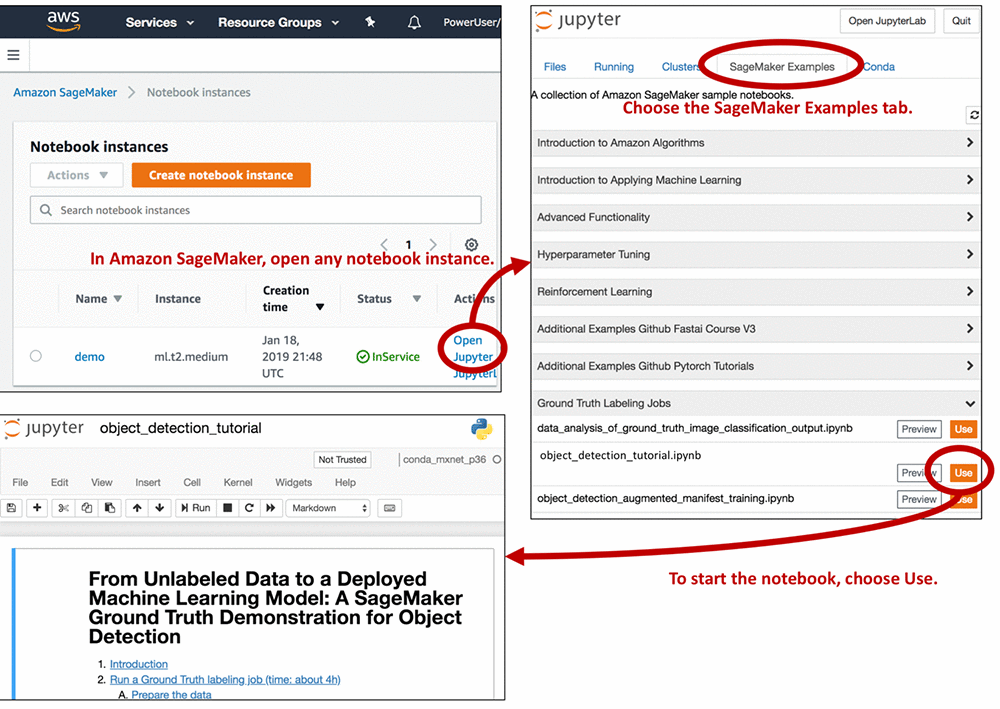
To access the demo notebook, start an Amazon SageMaker notebook instance using an ml.m4.xlarge instance type. You can follow this step-by-step tutorial to set up an instance. On Step 3, make sure to mark “Any S3 bucket” when you create the IAM role! Open the Jupyter notebook, choose the SageMaker Examples tab, and launch object_detection_tutorial.ipynb, as follows.

Run all of the cells in the “Introduction” and “Run a Ground Truth labeling job” sections of the notebook. You need to modify some of the cells, so read the notebook instructions carefully. Running these sections:

  1. Creates a dataset with 1,000 images of birds
  2. Creates object detection instructions for human annotators
  3. Creates an object detection annotation job request
  4. Submits the annotation job request to Ground Truth

The job should take about 4 hours. When it’s done, run all of the cells in the “Analyze Ground Truth labeling job results” and “Compare Ground Truth results to standard labels” sections. This produces a lot of information in plot form. To understand how Ground Truth annotates data, let’s look at some of the plots in detail.

Active learning and automated data labeling

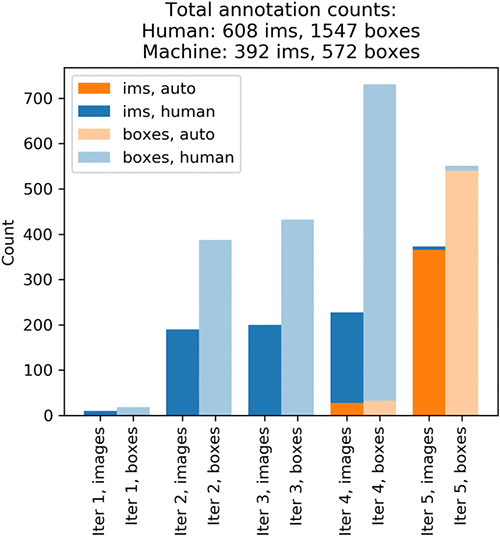
The plots show that annotating the whole dataset took five iterations. In each iteration, Ground Truth sent out a batch of images to Amazon Mechanical Turk annotators. The following graph shows the number of images (abbreviated ‘ims’ in the plot) produced on each iteration and the number of bounding boxes in these images. Your results might differ slightly.

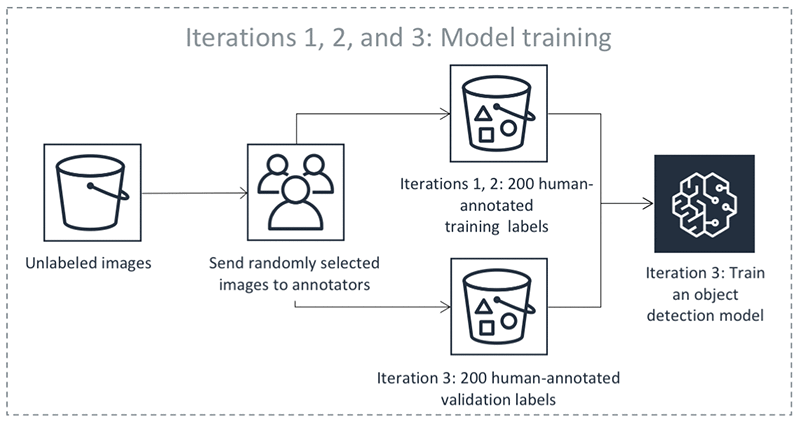
On iteration 1, Mechanical Turk workers annotated a small test batch of 10 randomly chosen images. This batch validates the end-to-end execution of the labeling task. On iteration 2, Mechanical Turk workers annotated another 190 randomly chosen images. This is the validation dataset. It’s used later by a supervised machine learning algorithm to produce automated labels. Iteration 3 created a training dataset by obtaining human-annotated labels on 200 more randomly chosen images. Throughout the process, Ground Truth consolidates each label from multiple human-annotated labels to avoid single-annotator bias. For more information, see the notebook and the Amazon SageMaker Developer Guide.

Now that it has small training and validation datasets, Ground Truth is ready to train the algorithm that later produces automated labels. The following diagram shows the process:

Because automated labeling involves comparing human-annotated labels to labels produced by machine learning, you need to choose a measure of bounding box quality. For this exercise, use the mean Intersection over Union (mIoU). An mIoU of 0 means that there is no overlap between two sets of bounding boxes. A mIoU of 1 means that the two sets of bounding boxes overlap perfectly. Your goal is to produce automated labels that would have an mIoU of at least 0.6 with the human-annotated labels, had you also gotten human annotations on corresponding images. This is slightly higher than 0.5, a threshold commonly used in computer vision to indicate a match between bounding boxes (see for example the “This is a break from tradition…” note here).

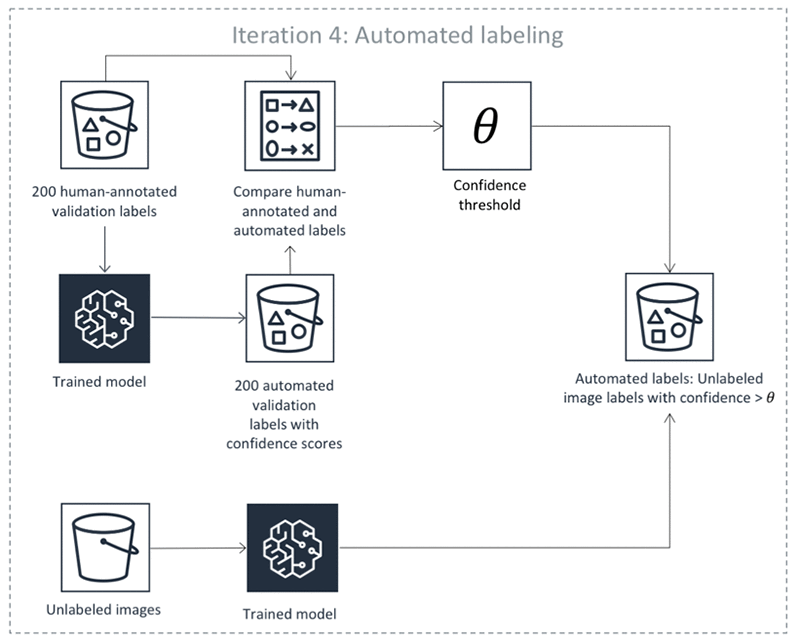
Equipped with a trained DL model and the mIoU measure, Ground Truth is ready to produce the first automated labels on iteration 4. There are four steps:

  1. Use the machine learning algorithm to predict the bounding boxes and their confidence scores on the validation dataset. Remember that you got human-annotated labels for this dataset on iterations 1 and 2. The algorithm assigns each bounding box a confidence score between 0 and 1. By averaging these scores for a particular image, the algorithm gets an image confidence score that tells you how confident the algorithm is in its prediction.
  2. For any image confidence threshold, we can compute how well the algorithm’s predictions on images that are scored above the threshold match human-annotated labels. Find a threshold so that the mIoU of above-threshold labels is at least 0.6. Let’s call the resulting threshold θ.
  3. Use the algorithm to predict bounding boxes and their confidence scores on the remaining unlabeled dataset, which contains 600 images.
  4. Take any unlabeled dataset predictions whose confidence scores exceed θ. In Steps 1 and 2, we made sure that on the human-annotated validation dataset these confidence scores indicate automated annotations that match human labels well. Now assume that the annotations also match what human annotators would have produced on unlabeled data. Ground Truth keeps these annotations as automated labels produced by the algorithm. There may be no need to send the images with automated labels with a high confidence score to human annotators, but that is subject to your specific use case. For example, you may want additional human review for certain use cases.

The following diagram illustrates the automatic labeling process:

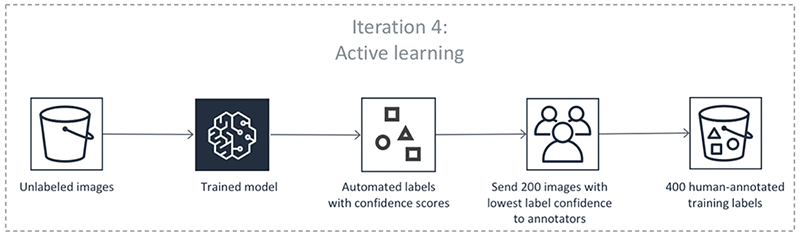
If you look at the first diagram, you can see that the yellow bar at iteration 4 shows that the algorithm was confident enough to automatically label only 27 images. To produce more accurate predictions, you need more human-labeled data. From now on, however, you won’t choose the images to label at random. Instead, you let the machine learning model choose images to show to human annotators:

In iteration 4, an additional 200 images were annotated to increase the training set size to 400. The first diagram shows that on iterations 1, 2, and 3, you got about 2 bounding boxes per image. On iteration 4, it’s almost 3.5 boxes per image! The algorithm figured out it’s best to ask humans to annotate images that contain many predicted objects. Before iteration 5 started, you retrained the algorithm using 400 training and 200 validation images. This completes one round of the Ground Truth annotation loop.

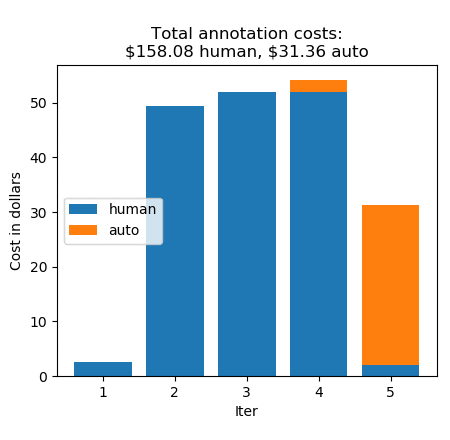
Thanks to Ground Truth active learning, the machine learning model learned quickly—iteration 5 automatically labeled 365 images! This leaves only 8 unlabeled images. Iteration 5 sent these images to human annotators to complete the task. Let’s look at the annotation costs iteration-by-iteration:

Without automatic data labeling, the annotations would have cost $0.26 * 1000, which equals $260. Instead, you paid $158.08 for 608 human labels, and $31.36 for 392 automated labels, for a total of $189.44. This is a cost saving of 27%. (For pricing details, see the Amazon SageMaker Ground Truth pricing page.)

Compare human-annotated and automated labels

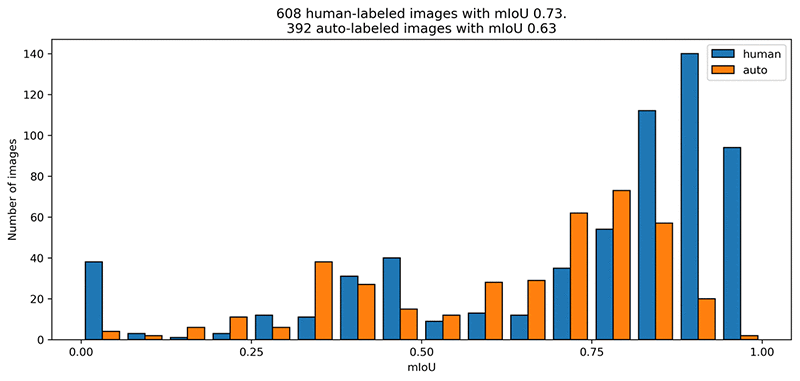
Automated labels are cheap, but how do they compare to human-annotated labels? The following mIoU graph shows how well the automated labels mirror the original annotations.

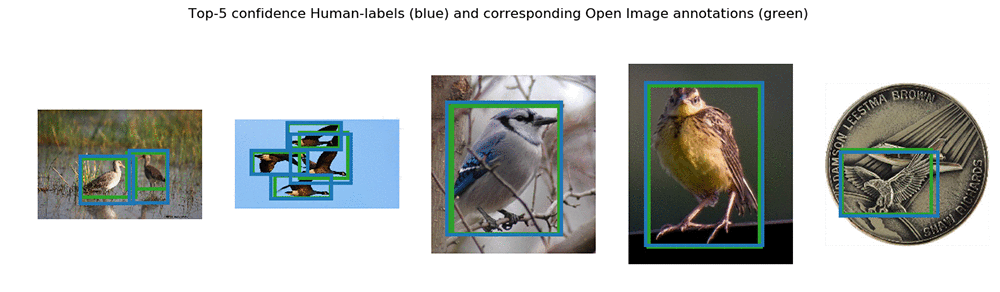
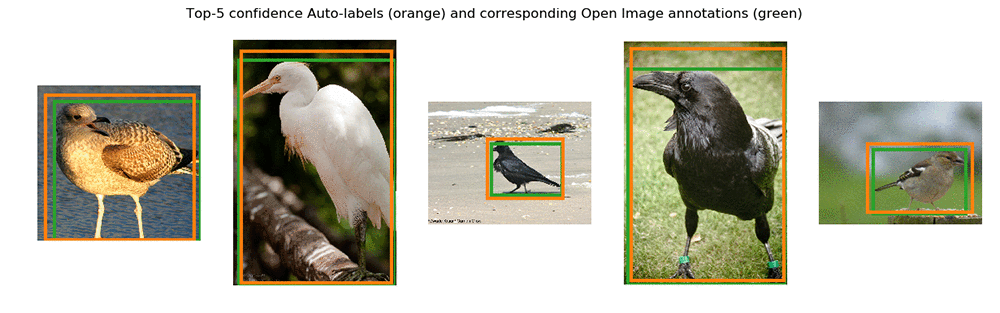
The human labelers performed slightly better on average. The automatically labeled images have an average mIoU of just above 0.6. This is the label quality that you asked the automatic labeler for. Let’s look at the top 5 images with the highest confidence scores annotated by humans and automatically labeled:


Conclusion

With automated data labeling, Ground Truth decreased bounding box annotation cost by 27%. This number will vary from dataset to dataset. It might decrease for image classification (where human annotation is cheap) and increase for semantic segmentation (where human annotation is expensive).

Feel free to experiment with or modify the Jupyter notebook. Check out our demos for other image annotation tasks – they can be accessed on any SageMaker instance, in the same way as the Jupyter notebook we just looked at!


About the authors

Krzysztof Chalupka is an applied scientist in the Amazon ML Solutions Lab. He has a PhD in causal inference and computer vision from Caltech. At Amazon, he figures out ways in which computer vision and deep learning can augment human intelligence. His free time is filled with family. He also loves forests, woodworking, and books (trees in all forms).


Tristan McKinney is an applied scientist in the Amazon ML Solutions Lab. He recently completed his PhD in theoretical physics at Caltech where he studied effective field theory and its application to high-T_c superconductors. As his father was in the US Army, he lived all over the place when growing up, including Germany and Albania. In his spare time, Tristan loves to ski and play soccer.


 Fedor Zhdanov is a Machine Learning Scientist at Amazon. He works on developing Machine Learning algorithms and tools for our internal and external customers.


DXC Technology automates triage of support tickets using AWS machine learning

DXC Technology is a global IT service leader providing end-to-end services on Digital Transformation to businesses and governments. They also provide service management to their clients on-premises and in the cloud.  The incident tickets raised as part of the process need to be resolved quickly to meet their service level agreements (SLA).  DXC has  goals to reduce human effort, reduce incident resolution time, enhance knowledge management, and enhance consistency of incident resolution.  With these goals in mind, DXC developed a  knowledge management (KM) article prediction mechanism.

In this blog post, we’ll discuss how DXC uses machine learning on AWS to automatically identify a KM article, which in turn can be automated with the orchestration runbook for ticket resolution to make IT support more efficient.

The DXC solution on AWS

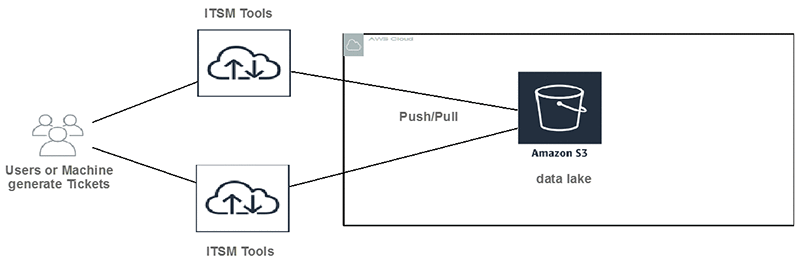
First: Build a data lake on Amazon S3

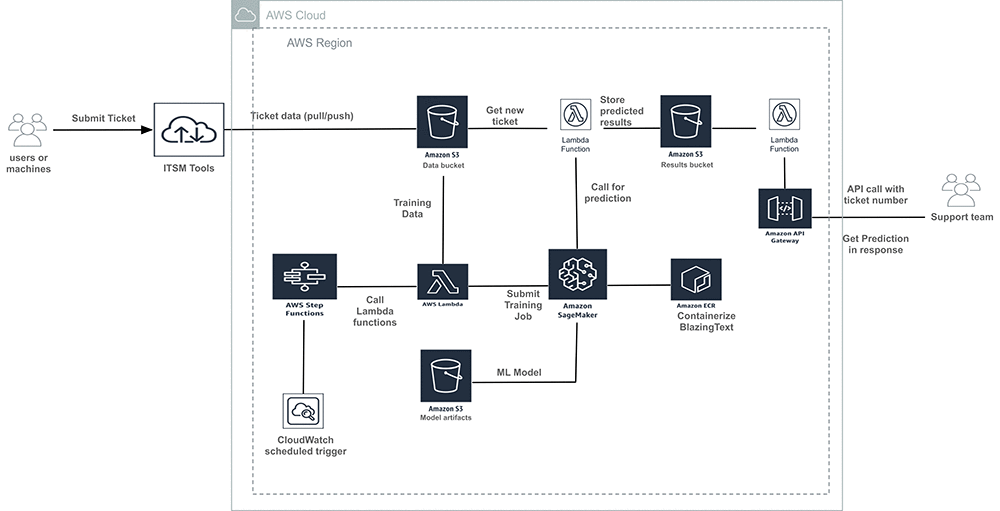
DXC customers submit incident tickets to IT Service Management Tools (ITSM). Tickets can be user generated or machine generated. Then data is pushed or pulled to Amazon S3 buckets. Amazon S3 provides low cost, highly durable object storage that can store any form or format of data.
Second: Choose the right machine learning tool and algorithm

Typically, the problem is how to classify text. AWS offers a variety of choices for customers to do text classifications. DXC evaluated the following AWS services.

  1. Amazon SageMaker with its built-in algorithm called BlazingText.
  2. Amazon Comprehend custom classification.

The Amazon Comprehend custom classification API was good choice since it is built ground-up for text classification. With Amazon Comprehend, we didn’t have to pick an algorithm, tune it and re-train our model looking for the highest accuracy – the API did this automatically. We plan to re-evaluate it when it supports synchronous calls (today it provide batch-mode classification).

Amazon SageMaker BlazingText implements the fastText algorithm and keep the right balance between scalability and accuracy.

Third: Train the model

Training data preparations:

Training the model is the most important part of the ML process.  Training of supervised models requires labeled data. The DXC team wanted to label a significant amount of historical data for this purpose. In the pre-processing step, the text data was tokenized using NLTK (Python library) and stored in CSV format in Amazon S3 for the training.  The training is done once a month with the historical data.

The tokenized training data looks like this. It is used  as input to the training job.

Training job with hyperparameter optimization (HPO)

We use the automatic model tuning feature of Amazon SageMaker to automate and accelerate the search of hyperparameters for the BlazingText algorithm.

Initially, we set static hyperparameters  that we don’t need to change across training jobs, and we also define ranges for the hyperparameters that need optimizations.

Note: All the parameter values mentioned in the code below are sample values. You need to test and use your own values based on your requirements.

# set static hyperparameters
hyperparameters = dict(mode="supervised",
                            early_stopping=True,
                            patience=5,
                            min_epochs=30) 

#Set ranges for hyperparameters
hyperparameter_ranges = {
                         'epochs': IntegerParameter(50, 300),
                         'learning_rate': ContinuousParameter(0.005, 0.05),
                         'min_count': IntegerParameter(10, 300),
                         'vector_dim': IntegerParameter(64, 500),
                         'buckets': IntegerParameter(1000000, 10000000),
                         'word_ngrams': IntegerParameter(2, 5)
                        }

Next, we instantiated the estimator and the HPO tuner. Then we triggered the training job using training data available on Amazon S3.

# Instantiating Estimator
bt_model = sagemaker.estimator.Estimator(container,
                                         role, 
                                         train_instance_count=1, 
                                         train_instance_type='ml.XXX',
                                         train_volume_size = 20,
                                         train_max_run = 360000,
                                         input_mode= 'File',
                                         output_path=s3_output_location,
                                         hyperparameters=hyperparameters,
                                         sagemaker_session=sess)


#Setting objective of HPO on maximizing validation accuracy
objective_metric_name = 'validation:accuracy'
objective_type = 'Maximize'

# Setting HPO tuner
tuner = HyperparameterTuner(bt_model,
                            objective_metric_name,
                            hyperparameter_ranges,
                            max_jobs=100,
                            max_parallel_jobs=2,
                            objective_type=objective_type)


# Triggering training using S3 training and validation data

train_data = sagemaker.session.s3_input(s3_train_data, distribution='FullyReplicated', 
                        content_type='text/plain', s3_data_type='S3Prefix')
validation_data = sagemaker.session.s3_input(s3_validation_data, distribution='FullyReplicated', 
                             content_type='text/plain', s3_data_type='S3Prefix')
data_channels = {'train': train_data, 'validation': validation_data}

tuner.fit(inputs=data_channels)

Fourth: Orchestrate data preparation, model training, and model deployment on Amazon SageMaker using AWS Step Functions

We orchestrated this ML workflow using AWS Step Functions, and we scheduled using an Amazon Cloud Watch Events rule.

AWS Step Functions performs the following steps:

  1. It checks that the Amazon S3 bucket exists where input data for training is present.
  2. It pre-processes the data set for model training.
  3. It starts the training job in Amazon SageMaker with the required parameters.
  4. It keeps checking the status of training job.
  5. After the training is successful, it validates the model.
  6. After the model validated, it deploys the model as Amazon SageMaker endpoints. (If the model endpoint exists, then it updates the model endpoint.)
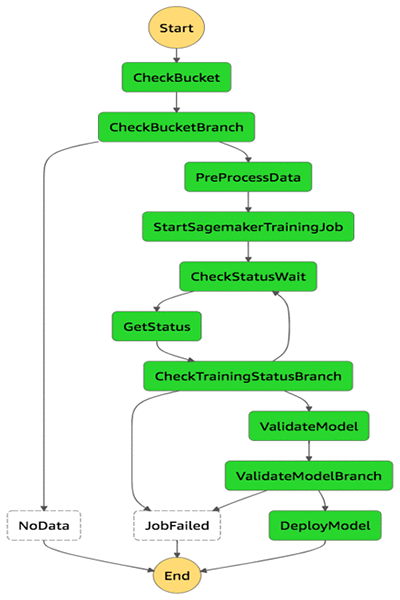
All o f these steps are developed as AWS Lambda functions.

Note: During AWS re:Invent 2018, a new feature was released that allowed Step Functions to be directly integrated with Amazon SageMaker. This feature can be used to develop some of the steps described earlier without writing Lambda functions. However, the feature was not available when DXC developed this solution.

Fifth: Call the inference

As soon as new ITSM tickets get ingested to an Amazon S3 bucket, an AWS Lambda function is triggered to call the inference using Amazon SageMaker endpoints.

The Lambda function reads the ticket number and description from incoming files and creates a payload like the following:

Then, it calls the Amazon SageMaker model endpoint with payload information:

import boto3
import json
#Sagemaker endpoints passed as Lambda Parameter
ENDPOINT_NAME= <SageMaker Model Endpoint>

#Call Endpoints
response=runtime.invoke_endpoint(EndpointName=ENDPOINT_NAME,ContentType='application/json',Body=payload)

It creates a CSV output and stores it on Amazon S3. The output looks like the following example. It stores the ticket number, the predicted KB document, and confidence level.

Sixth: Build a CI/CD pipeline to automate the solution deployment

DXC developed a CI/CD pipeline using Ansible, Jenkins, and AWS CloudFormation templates to automate the deployment of the whole solution.

Seventh: Enable it for the support team

After the predictions are generated, they can be accessed using API endpoints based on Incident Identifiers or Incident Descriptions.  Incident Descriptions are more suitable for real-time resolution of issues. It’s possible that you don’t even need to create a ticket. The description of an issue when checked against the Amazon SageMaker endpoint results in the output of a KM article identifier that can be referred offline, which might lead to the resolution of the issue. In this scenario, no ticket had to be created.

In the case where ticket has been created, a Service Desk Agent can use a chatbot that makes a call to the API or uses the API directly by providing the Incident Identifier. The output of the Incident Identifier is a KM article identifier. This can be quickly referred to offline for incident resolution, hence reducing the incident resolution time.

And further integration with runbook automation will result in the automation of ticket resolution with little or zero human effort.

The end-to-end solution

The overall architecture looks like this.
Conclusion – What did DXC achieve?

To summarize, the KM article prediction mechanism realized the following benefits:

  1. Improved the support team’s efficiency. The support team can almost instantly know which KM article to be looked at for solving the ticket.
  2. This prediction mechanism also can be used as a self-service tool where users can enter ticket descriptions and get back the KM article to solve their own issue. This will also reduce the number of tickets.
  3. Integration of this mechanism with runbook automation will help automate resolution of tickets too.

About the Authors

Sougata Biswas is a big data architect at AWS Professional Services. He helps AWS customers in architecting and implementing solutions on AWS to get business value out of data.



Sofian Hamiti is a data scientist at Amazon ML Solutions Lab. He helps AWS customers across different industries accelerate their AI and cloud adoption.


Thanks to DXC team who worked on the project. Special thanks to following leaders from DXC who encouraged and reviewed the blog post.

Niladri Chowdhury, Manager of Data Engineering and Analytics Mgr Operations Engineering and Excellence (OE&E) at DXC Tech. He leads a team of Analysts, Data Engineers and Data Scientists to design, build and deploy the best of the class Business Intelligence delivery solutions in cloud

William Giotto, Global Product Owner at DXC Tech. He aligns efforts towards a vision of Intelligent Automation. Full time father, data science enthusiastic and amateur astronomer (www.astrogiotto.com)

 

Real-time Continuous Transcription with Live Transcribe

The World Health Organization (WHO) estimates that there are 466 million people globally that are deaf and hard of hearing. A crucial technology in empowering communication and inclusive access to the world’s information to this population is automatic speech recognition (ASR), which enables computers to detect audible languages and transcribe them into text for reading. Google’s ASR is behind automated captions in Youtube, presentations in Slides and also phone calls. However, while ASR has seen multiple improvements in the past couple of years, the deaf and hard of hearing still mainly rely on manual-transcription services like CART in the US, Palantypist in the UK, or STTR in other countries. These services can be prohibitively expensive and often require to be scheduled far in advance, diminishing the opportunities for the deaf and hard of hearing to participate in impromptu conversations as well as social occasions. We believe that technology can bridge this gap and empower this community.

Today, we’re announcing Live Transcribe, a free Android service that makes real-world conversations more accessible by bringing the power of automatic captioning into everyday, conversational use. Powered by Google Cloud, Live Transcribe captions conversations in real-time, supporting over 70 languages and more than 80% of the world’s population. You can launch it with a single tap from within any app, directly from the accessibility icon on the system tray.

Building Live Transcribe
Previous ASR-based transcription systems have generally required compute-intensive models, exhaustive user research and expensive access to connectivity, all which hinder the adoption of automated continuous transcription. To address these issues and ensure reasonably accurate real-time transcription, Live Transcribe combines the results of extensive user experience (UX) research with seamless and sustainable connectivity to speech processing servers. Furthermore, we needed to ensure that connectivity to these servers didn’t cause our users excessive data usage.

Relying on cloud ASR provides us greater accuracy, but we wanted to reduce the network data consumption that Live Transcribe requires. To do this, we implemented an on-device neural network-based speech detector, built on our previous work with AudioSet. This network is an image-like model, similar to our published VGGish model, which detects speech and automatically manages network connections to the cloud ASR engine, minimizing data usage over long periods of use.

User Experience
To make Live Transcribe as intuitive as possible, we partnered with Gallaudet University to kickstart user experience research collaborations that would ensure core user needs were satisfied while maximizing the potential of our technologies. We considered several different modalities, computers, tablets, smartphones, and even small projectors, iterating ways to display auditory information and captions. In the end, we decided to focus on the smartphone form factor because of the sheer ubiquity of these devices and the increasing capabilities they have.

Once this was established, we needed to address another important issue: displaying transcription confidence. Traditionally considered to be helpful to the user, our research explored whether we actually needed to show word-level or phrase-level confidence.

Displaying confidence level of the transcription. Yellow is high confidence, green is medium and blue is low confidence. White is fresh text awaiting context before finalizing. On the left, the coloring is at a per-phrase level while on the right is at a per-word level.1 Research found them to be distracting to the user without providing conversational value.

Reinforcing previous UX research in this space, our research shows that a transcript is easiest to read when it is not layered with these signals. Instead, Live Transcribe focuses on better presentation of the text and supplementing it with other auditory signals besides speech.

Another useful UX signal is the noise level of their current environment. Known as the cocktail party problem, understanding a speaker in a noisy room is a major challenge for computers. To address this, we built an indicator that visualizes the volume of user speech relative to background noise. This also gives users instant feedback on how well the microphone is receiving the incoming speech from the speaker, allowing them to adjust the placement of the phone.

The loudness and noise indicator is made of two concentric circles. The inner brighter circle, indicating the noise floor, tells a deaf user how audibly noisy the current environment is. The outer circle shows how well the speaker’s voice is received.Together, the circles visually show the relative difference intuitively.

Future Work
Potential future improvements in mobile-based automatic speech transcription include on-device recognition, speaker-separation, and speech enhancement. Relying solely on transcription can have pitfalls that can lead to miscommunication. Our research with Gallaudet University shows that combining it with other auditory signals like speech detection and a loudness indicator, makes a tangibly meaningful change in communication options for our users.

Live Transcribe is now available in a staged rollout on the Play Store, and is pre-installed on all Pixel 3 devices with the latest update. Live Transcribe can then be enabled via the Accessibility Settings. You can also read more about it on The Keyword.

Acknowledgements
Live Transcribe was made by researchers Chet Gnegy, Dimitri Kanevsky, and Justin S. Paul in collaboration with Android Accessibility team members Brian Kemler, Thomas Lin, Alex Huang, Jacqueline Huang, Ben Chung, Richard Chang, I-ting Huang, Jessie Lin, Ausmus Chang, Weiwei Wei, Melissa Barnhart and Bingying Xia. We’d also like to thank our close partners from Gallaudet University, Christian Vogler, Norman Williams and Paula Tucker.


1 Eagle-eyed readers can see the phrase level confidence mode in use by Dr. Obeidat in the video above.

Vector Institute Offering Scholarships to Candidates Applying to AI Master’s Programs

The Vector Institute will award up to 115 scholarships to meritorious students who pursue a full-time AI-related master’s degree in the 2019-20 academic year. Scholarships will be awarded to students in both core technical programs and complementary fields such as business and health care. Graduates are highly sought after to work in leading startups and enterprises to help harness the full potential of AI to benefit the economy and our lives.

Canada, the birthplace of deep learning, has been at the forefront of AI advancements for decades thanks to pioneering researchers like Geoffrey HintonYoshua Bengio, and Richard Sutton. The new Vector Scholarship in Artificial Intelligence aims to attract top students to learn from some of the world’s best faculty based in Toronto, Ontario and across Canada.

To be considered for the 2019-20 Vector Scholarship in Artificial Intelligence students must:

  1. Apply and be accepted for full-time study in: A) an AI-related master’s program recognized by the Vector Institute or; B) a master’s program in Ontario, Canada in an AI-related discipline that offers individualized study paths that are demonstrably AI-focused;
  2. Submit a personal statement explaining their AI-related experience and aspirations;
  3. Acquire two references; and
  4. Have a GPA equivalent to first class standing.


Scholarships are valued at $17,500 for one full year. All scholarship winners and students enrolled in Vector-recognized master’s programs become part of the Vector Institute’s network of students, faculty, and employers who share a passion for collaborating to advance AI research and applications.

There has never been a better time to pursue an AI-related education and career. Leading global companies, promising AI startups and public institutions recognize that Canada is the best place to hire AI talent, with a growing workforce graduating in Ontario. Since its launch less than two years ago, the Vector Institute has been among a series of catalysts for over $1 billion of announced AI and tech-related investments, which will result in the creation of 25,000 jobs across Canada.

Candidates interested in pursuing a Vector Scholarship in Artificial Intelligence can find eligibility and application details online at vectorinstitute.ai/aimasters.

About the Vector Institute

The Vector Institute is an independent, not-for-profit corporation dedicated to advancing artificial intelligence, excelling in machine and deep learning. The Vector Institute’s vision is to drive excellence and leadership in Canada’s knowledge, creation, and use of AI to foster economic growth and improve the lives of Canadians.

The Vector Institute is funded by the Government of Ontario, the Government of Canada through the Pan-Canadian AI Strategy administered by the CIFAR, and industry sponsors.

Internships, networking, and the Vector Scholarship in Artificial Intelligence are core components of the Vector Institute’s RAISE initiative, supported by the Government of Ontario, to develop and connect Ontario’s AI workforce to fuel AI-based economic development and job creation.

Related links:

https://vectorinstitute.ai/AImasters/

For further information: Andrea Arbuthnot, Director, Communications & Engagement, Vector Institute, media@vectorinstitute.ai