
Blog

Learn About Our Meetup

5000+ Members

MEETUPS

LEARN, CONNECT, SHARE

Join our meetup, learn, connect, share, and get to know your Toronto AI community. 

JOB POSTINGS

INDEED POSTINGS

Browse through the latest deep learning, ai, machine learning postings from Indeed for the GTA.

CONTACT

CONNECT WITH US

Are you looking to sponsor space, be a speaker, or volunteer, feel free to give us a shout.

Author: torontoai

[D] Motion Estimation with Optical Flow

Most real-time video processing systems/techniques only address relationships of objects within the same frame, disregarding time information. Optical flow accounts for this temporal relationship between frames.

Advances in Optical Flow have changed the game in Object Tracking and Human Activity Recognition in videos.

Here’s a blog post explaining the fundamentals and giving you all the code you need to implement it: https://blog.nanonets.com/optical-flow/

submitted by /u/manneshiva
[link] [comments]

[D] Skills to focus on as a PhD student if you know you want to work in industry?

I’m in a similar situation as several of my third year PhD student friends–we’ve enjoyed doing research and have had various levels of success so far, enough to be able to (and want to) hopefully finish in the next two years, but we all realize that we’ll be doing industry roles and that it would be tough with our publication records to get into one of the top research groups that publishes pure research.

I’ve had some research-y internships in industry but I think a “research engineer”-type role would be best for me, (and it’s also much more common than research scientist positions in areas I’m interested in such as autonomy and robotics). However, those roles generally ask for someone who is equally well-versed in statistical machine learning theory, deep learning and Python (check) and software development in C/C++ (something I need to work on). Research code is almost exclusively in Python (aside from the ocassional CUDA kernel for a novel layer) so essentially no one I know does development in C++ aside from side projects.

How do you maintain your software chops while focusing on developing novel methods and writing research code in Python?

submitted by /u/harmonium1
[link] [comments]

Evaluating the Unsupervised Learning of Disentangled Representations

The ability to understand high-dimensional data, and to distill that knowledge into useful representations in an unsupervised manner, remains a key challenge in deep learning. One approach to solving these challenges is through disentangled representations, models that capture the independent features of a given scene in such a way that if one feature changes, the others remain unaffected. If done successfully, a machine learning system that is designed to navigate the real world, such as a self driving car or a robot, can disentangle the different factors and properties of objects and their surroundings, enabling the generalization of knowledge to previously unobserved situations. While, unsupervised disentanglement methods have already been used for curiosity driven exploration, abstract reasoning, visual concept learning and domain adaptation for reinforcement learning, recent progress in the field makes it difficult to know how well different approaches work and the extent of their limitations.

In “Challenging Common Assumptions in the Unsupervised Learning of Disentangled Representations” (to appear at ICML 2019), we perform a large-scale evaluation on recent unsupervised disentanglement methods, challenging some common assumptions in order to suggest several improvements to future work on disentanglement learning. This evaluation is the result of training more than 12,000 models covering most prominent methods and evaluation metrics in a reproducible large-scale experimental study on seven different data sets. Importantly, we have also released both the code used in this study as well as more than 10,000 pretrained disentanglement models. The resulting library, disentanglement_lib, allows researchers to bootstrap their own research in this field and to easily replicate and verify our empirical results.

Understanding Disentanglement
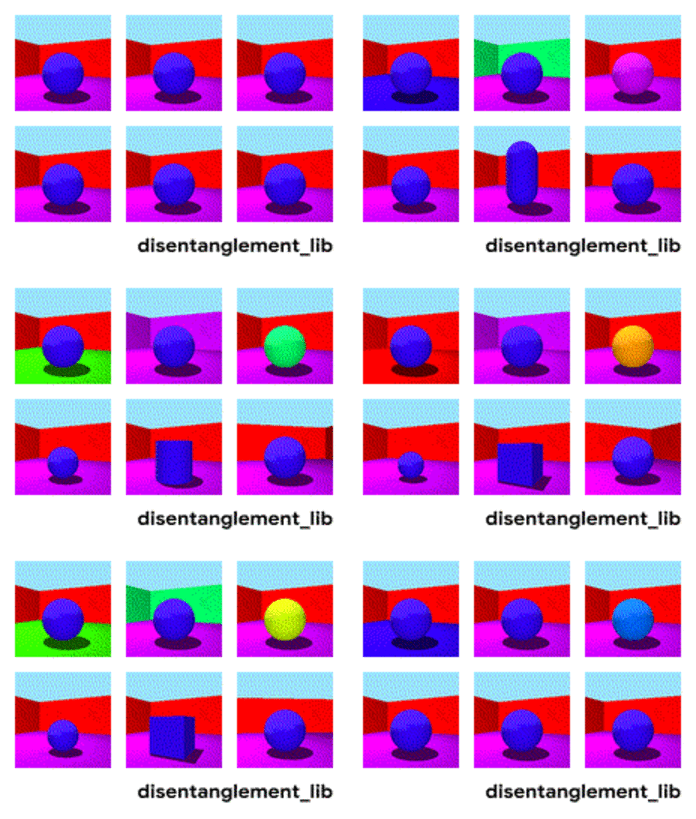
To better understand the ground-truth properties of an image that can be encoded in a disentangled representation, first consider the ground-truth factors of the data set Shapes3D. In this toy model, shown in the figure below, each panel represents one factor that could be encoded into a vector representation of the image. The model shown is defined by the shape of the object in the middle of the image, its size, the rotation of the camera and the color of the floor, the wall and the object.

Visualization of the ground-truth factors of the Shapes3D data set: Floor color (upper left), wall color (upper middle), object color (upper right), object size (bottom left), object shape (bottom middle), and camera angle (bottom right).

The goal of disentangled representations is to build models that can capture these explanatory factors in a vector. The figure below presents a model with a 10-dimensional representation vector. Each of the 10 panels visualizes what information is captured in one of the 10 different coordinates of the representation. From the top right and the top middle panel we see that the model has successfully disentangled floor color, while the two bottom left panels indicate that object color and size are still entangled.

Visualization of the latent dimensions learned by a FactorVAE model (see below). The ground-truth factors wall and floor color as well as rotation of the camera are disentangled (see top right, top center and bottom center panels), while the ground-truth factors object shape, size and color are entangled (see top left and the two bottom left images).

Key Results of this Reproducible Large-scale Study
While the research community has proposed a variety of unsupervised approaches to learn disentangled representations based on variational autoencoders and has devised different metrics to quantify their level of disentanglement, to our knowledge no large-scale empirical study has evaluated these approaches in a unified manner. We propose a fair, reproducible experimental protocol to benchmark the state of unsupervised disentanglement learning by implementing six different state-of-the-art models (BetaVAE, AnnealedVAE, FactorVAE, DIP-VAE I/II and Beta-TCVAE) and six disentanglement metrics (BetaVAE score, FactorVAE score, MIG, SAP, Modularity and DCI Disentanglement). In total, we train and evaluate 12,800 such models on seven data sets. Key findings of our study include:

  • We do not find any empirical evidence that the considered models can be used to reliably learn disentangled representations in an unsupervised way, since random seeds and hyperparameters seem to matter more than the model choice. In other words, even if one trains a large number of models and some of them are disentangled, these disentangled representations seemingly cannot be identified without access to ground-truth labels. Furthermore, good hyperparameter values do not appear to consistently transfer across the data sets in our study. These results are consistent with the theorem we present in the paper, which states that the unsupervised learning of disentangled representations is impossible without inductive biases on both the data set and the models (i.e., one has to make assumptions about the data set and incorporate those assumptions into the model).
  • For the considered models and data sets, we cannot validate the assumption that disentanglement is useful for downstream tasks, e.g., that with disentangled representations it is possible to learn with fewer labeled observations.

The figure below demonstrates some of these findings. The choice of random seed across different runs has a larger impact on disentanglement scores than the model choice and the strength of regularization (while naively one might expect that more regularization should always lead to more disentanglement). A good run with a bad hyperparameter can easily beat a bad run with a good hyperparameter.

The violin plots show the distribution of FactorVAE scores attained by different models on the Cars3D data set. The left plot shows how the distribution changes as different disentanglement models are considered while the right plot displays the different distributions as the regularization strength in a FactorVAE model is varied. The key observation is that the violin plots substantially overlap which indicates that all methods strongly depend on the random seed.

Based on these results, we make four observations relevant to future research:

  1. Given the theoretical result that the unsupervised learning of disentangled representations without inductive biases is impossible, future work should clearly describe the imposed inductive biases and the role of both implicit and explicit supervision.
  2. Finding good inductive biases for unsupervised model selection that work across multiple data sets persists as a key open problem.
  3. The concrete practical benefits of enforcing a specific notion of disentanglement of the learned representations should be demonstrated. Promising directions include robotics, abstract reasoning and fairness.
  4. Experiments should be conducted in a reproducible experimental setup on a diverse selection of data sets.

Open Sourcing disentanglement_lib
In order for others to verify our results, we have released disentanglement_lib, the library we used to create the experimental study. It contains open-source implementations of the considered disentanglement methods and metrics, a standardized training and evaluation protocol, as well as visualization tools to better understand trained models.

The advantages of this library are three-fold. First, with less than four shell commands disentanglement_lib can be used to reproduce any of the models in our study. Second, researchers may easily modify our study to test additional hypotheses. Third, disentanglement_lib is easily extendible and can be used to bootstrap research into the learning of disentangled representations—it is easy to implement new models and compare them to our reference implementation using a fair, reproducible experimental setup.

Reproducing all the models in our study requires a computational effort of approximately 2.5 GPU years, which can be prohibitive. So, we have also released >10,000 pretrained disentanglement_lib models from our study that can be used together with disentanglement_lib.

We hope that this will accelerate research in this field by allowing other researchers to benchmark their new models against our pretrained models and to test new disentanglement metrics and visualization approaches on a diverse set of models.

Acknowledgments
This research was done in collaboration with Francesco Locatello, Mario Lucic, Stefan Bauer, Gunnar Rätsch, Sylvain Gelly and Bernhard Schöpf at Google AI Zürich, ETH Zürich and the Max-Planck Institute for Intelligent Systems. We also wish to thank Josip Djolonga, Ilya Tolstikhin, Michael Tschannen, Sjoerd van Steenkiste, Joan Puigcerver, Marcin Michalski, Marvin Ritter, Irina Higgins and the rest of the Google Brain team for helpful discussions, comments, technical help and code contributions.

[D] Time series forecasting RNN fail

Here is full code

https://colab.research.google.com/drive/1gHkpsuSapDSUj3Q9kGwR6pWzVM1m1d8E

I took Bitcoin data, trained the model, if simply predict the test set, the result looks nice.

https://colab.research.google.com/drive/1gHkpsuSapDSUj3Q9kGwR6pWzVM1m1d8E#scrollTo=4r8XINzZUPxw

But when I tried to predict from the predicted values (its called stepwise?), the model fail and gives the same number.

Like here

https://colab.research.google.com/drive/1gHkpsuSapDSUj3Q9kGwR6pWzVM1m1d8E#scrollTo=7Q9xGm9MSjEB

Also i tried to make statefull copy of model (it suggested somewhere on stackoverflow), but it fail too:

https://colab.research.google.com/drive/1gHkpsuSapDSUj3Q9kGwR6pWzVM1m1d8E#scrollTo=-bsazaipc2LL

submitted by /u/hadaev
[link] [comments]

An introduction to reinforcement learning with AWS RoboMaker

Robotics often involves training complex sequences of behaviors. For example, consider a robot designed to follow or track another object. Although the goal is easy to describe (the closer the robot is to the object, the better), creating the logic that accomplishes the task is much more difficult. Reinforcement learning (RL), an emerging Machine Learning technique, can help develop solutions for exactly these kinds of problems.

This post is an introduction to RL and it explains how we used AWS RoboMaker to develop an application that trains a TurtleBot Waffle Pi to track and move toward a TurtleBot Burger. The AWS RoboMaker sample application, object tracker, uses the Intel Reinforcement Learning Coach and OpenAI’s Gym libraries. The Coach library is an easy-to-use RL framework written in Python. It was used to train the model that the TurtleBot uses for autonomous driving. OpenAI’s Gym is a toolkit that was used to develop and design RL agents that make autonomous decisions.

If you want to try using the sample object tracker application, see How to train a robot using reinforcement learning.

RL overview

In RL, training has two components:

  • An agent, which decides which actions the robot should take
  • The environment, which combines the action with the robot’s dynamics and physics of the world to determine the robot’s next state

In a nut shell, the agent uses a model to decide on an action. For the robot’s current state, the model maps possible actions to guesses of how good each action might be (in reinforcement learning, this is known as a reward). Initially, the model has no idea which actions are best, and its guesses are usually wrong. As the agent learns to maximize the potential rewards it can receive, the model improves and its guesses about which actions are good improve. The following graphic shows how this works.
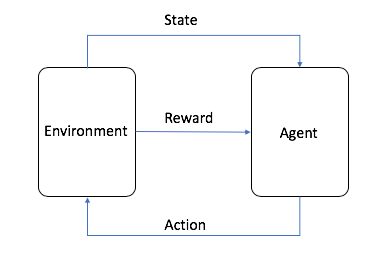
In the sample object tracker application, RL works like this:

  1. With the robot in some starting position, the agent guesses the best action to take.
  2. The environment calculates the new state and a reward. The reward lets the agent know how good its last action was.
  3. The agent and environment interact, deciding on new actions and calculating new states. The agent accumulates rewards for its good actions and punishments for its bad actions.
  4. When one round of training ends, the robot has a total reward that tells it how well it did overall.
  5. By taking many actions, the agent slowly learns which actions are better (have a greater reward), and favors those actions when making decisions.

Building an RL application with AWS RoboMaker

Now let’s look at the object tracker source code to see how the application is implemented. We recommend looking at the code as you read. If you haven’t already run the sample application, you can download the code from Github repo.

Training the robot

The application has the following main components:

  • Simulation workspace – This workspace contains the code that defines the RL agent and environment.
  • Robot workspace – After training the RL model, the robot workspace is built and the model is deployed to a real robot.
  • Robot Operation System (ROS) – The development framework for robot applications. ROS provides a simple abstraction for interacting with the robot’s camera and motors.
  • Gazebo – A simulator that takes the robot’s state and action and calculates its next state. Gazebo also simulates the camera images that is fed into the RL agent.
  • Intel Coach library – A Python RL framework that was used to train the model that the TurtleBot uses to drive itself.
  • Open AI Gym – A toolkit used to develop and design the RL agent that makes autonomous decisions about turning, speed control, and so on.
  • TensorFlow – A machine learning library written by Google that stores and trains the model that the agent uses to make decisions.

In the development environment, navigate to the simulation_ws folder. The code in the simulation workspace trains the RL model. The Python file called single_machine_training_worker.py is the application entry point. In this file, environment variables, such as MARKOV_PRESET_FILE, are passed to the application to execute.  The application begins by creating a new TensorFlow model and storing it in an Amazon Simple Storage Service (Amazon S3) bucket. If there’s already a trained model in Amazon S3, the application uses that model instead. That way, it doesn’t have to start from scratch every time you restart training. All of these parameters are then passed to create a graph manager object. The graph manager is responsible for training the model. Finally, training starts when the improve method of the graph manager object is called.

The object_tracker.py file contains the hyperparameters for configuring the RL environment. The application uses a learning strategy known as ClippedPPO (Proximal Policy Optimization). PPO is an algorithm recommended by Open AI as a good starting point for RL. It has fewer parameters to tune than other RL algorithms, but still provides good overall performance.  OpenAI Gym is also configured in this file with the custom-level RoboMaker-ObjectTraker-v0, as follows:

env_params = GymVectorEnvironment()
…
env_params.level = 'RoboMaker-ObjectTracker-v0'

The TurtleBot3ObjectTrackerAndFollowerDiscreteEnv class contains the other elements needed to perform RL, such as instructions on how to reset the environment when the robot completes a round of training, the reward function, and the set of actions that the robot can take.

You might have noticed that the application uses an image captured by the camera as the state. For this reason, the real world should be as similar as possible to the simulated world in Gazebo for optimal performance. For example, the current simulated world is dark gray. When the trained model is deployed to a physical TurtleBot Waffle Pi, it should operate in a similar environment. If you want to train in a simulation environment that is closer to the real world, such as your room, you can add more details. For example, you can take pictures of the walls in your room and import them as textures to match the real world as much as possible.

In this application, the Waffle Pi uses its camera to move around. For every action it takes, it takes an image from its camera as the current state for everyone action it takes. The code is defined in the infer_reward_state(self) method of the TurtleBot3ObjectTrackerAndFollowerEnv class.

image = Image.frombytes('RGB', (self.image.width, self.image.height),
                                self.image.data,'raw', 'BGR', 0, 1)
image = image.resize(TRAINING_IMAGE_SIZE)
state = np.array(image)

Remember that the goal is for the TurtleBot Waffle Pi to reach the stationary TurtleBot Burger. For each correct step that the TurtleBot Waffle Pi takes towards the stationary TurtleBot Burger, it should receive a large reward. The reward calculation code is defined in the infer_reward_state(self) method of the TurtleBot3ObjectTrackerAndFollowerEnv class. If the current distance between the TurtleBots is less than it was in the last state, the TurtleBot Waffle Pi is moving closer to the stationary TurtleBot Burger, so it gets a reward. The closer the TurtleBot Waffle Pi gets to the goal, the greater the reward. If the distance is longer than 5 meters, the TurtleBot Waffle Pi is too far from the stationary TurtleBot Burger, and the agent ends the episode and starts a new one.

distance_of_turtlebot = math.sqrt((x - self.burger_x) * (x - self.burger_x) + (y - self.burger_y) * (y - self.burger_y))

…

if distance_of_turtlebot < self.last_distance_of_turtlebot:
            self.last_distance_of_turtlebot = distance_of_turtlebot
            reward = REWARD_CONSTANT / (distance_of_turtlebot * distance_of_turtlebot)
            if distance_of_turtlebot < 0.2:
                done = True

        if distance_of_turtlebot > 5:
            done = True

You can try to optimize the logic of the reward function code so that the agent can train faster and more accurately. For example, you can try giving a negative reward if the Waffle Pi moves further from the stationary TurtleBot compared to its last state. You can also try to use computer vision techniques, such as object detection, to find the stationary TurtleBot and then calculate the distance for further optimization.

The actions that the robot can take are defined in the TurtleBot3ObjectTrackerAndFollowerDiscreteEnv class at the end of the object_tracker_env.py file.  The actions are labeled from 0 to 4, and each action is one steering and throttle command for the TurtleBot. For example, when the action is 0, the TurtleBot should turn left at a speed of 0.1 meters per second.

# Convert discrete to continuous
if action == 0:  # move left
      steering = 0.6
      throttle = 0.1
elif action == 1:  # move right
      steering = -0.6
      throttle = 0.1
elif action == 2:  # straight
      steering = 0
      throttle = 0.1
elif action == 3:  # move left
      steering = 0.3
      throttle = 0.1
elif action == 4:  # move right
      steering = -0.3
      throttle = 0.1

Using the trained model

Remember that the code trains the model in TensorFlow. When deploying to the TurtleBot Waffle Pi, it has to be able to download the TensorFlow model stored in Amazon S3 and load it on the Waffle Pi itself. The robot_ws workspace is used for deploying the model to the Waffle Pi. The download_model Python file in the robot_ws workspace downloads the trained model from Amazon S3. Code in the inference_worker Python file loads the model into a TensorFlow session and instructs the Waffle Pi to take actions (steering, throttle) based on the images fed from its camera.

self.graph = self.load_graph()
self.session = tf.Session(graph=self.graph, config=tf.ConfigProto(allow_soft_placement=True, log_device_placement=True))

Running the application

ROS uses launch files to start applications. The local_training.launch file contains details about all of the nodes (processes) that you want to start when you launch the application. The node element instructs the ROS runtime to launch the shell script run_local_rl_agent.sh at startup.

<launch>
…

    <node name="agent" pkg="object_tracker_simulation" type="run_local_rl_agent.sh" output="screen" required="true"/>
</launch>

In the run_local_rl_agent.sh script, ROS executes the single_machine_training_worker Python script.

#!/usr/bin/env bash
…

python3 -m markov.single_machine_training_worker

The roboMakerSettings.json file is specific to AWS RoboMaker. It defines which AWS resources and rules to use to start the application. For example, the file specified for the launchFile parameter in the simulation configuration that the ROS framework launches at runtime.

Environment variables can be passed in the settings file. For example, the MARKOV_PRESET_FILE environment variable is where the main application code resides. The application is loaded at runtime using this variable. One handy feature of the roboMakerSettings.json file is that it allows you to create and configure workflows to automatically build, bundle, and run a simulation job for the application. This saves you from performing the steps manually when you need to make a change.

"type": "simulation",
      "cfg": {
        "simulationApp": {
          "name": "RoboMakerObjectTrackerSimulation",
          …
          "launchConfig": {
            "packageName": "object_tracker_simulation",
            "launchFile": "local_training.launch",
            "environmentVariables": {
              "MARKOV_PRESET_FILE": "object_tracker.py",
              "MODEL_S3_BUCKET": "<bucket name of your trained model>",
              "MODEL_S3_PREFIX": "model-store",
              "ROS_AWS_REGION": "<the AWS Region of your S3 model bucket>"
            }
          },

Summary

We hope this blog helps you understand how the sample object tracker application works, and how easy it is to develop and deploy complex machine learning techniques, such as RL, in AWS RoboMaker. If you want to try using the sample object tracker application, see How to train a robot using reinforcement learning.


About the Author

Tristan Li is a Solutions Architect with Amazon Web Services. He works with enterprise customers in the US, helping them adopt cloud technology to build scalable and secure solutions on AWS.


Wayne Davis is an Enterprise Solutions Architect for Amazon Web Services. Over the last 24 months he has been helping customers to come up to speed on cloud technologies as fast as possible.


Robert Meagher is a software development engineer for AWS RoboMaker. He enjoys designing and tinkering with robotics systems, both in and out of the office.
 

[D] Jokes generated via GPT-2

Hi all, I have had a good play with finetuning the GPT-2 117M model on various datasets. I’m impressed with even this “dumbed-down” version’s ability to generate human-like text.

I got it to generate some Q&A style jokes, and a few have me scratching my head as to how these came about.

I’d love your input or feedback on what could be going on inside GPT-2 to make these associations?

I fine-tuned using this notebook but with a different dataset. The jokes below were generated using unconditional sampling during training.

The jokes generated were obviously not great, but there were some gems in there that seemed to be outside the norm of AI-generated humor.

In all of the below cases, the punchline words either didn’t appear in the fine-tuning corpus, or appeared only briefly in very different situations.

What do you call an obscure bird?

A falchion.

When I first read this, I thought it was funny because I assumed a falchion is actually an obscure bird. It’s not; it’s a sword. The main reference I could find on Google about a falchion bird is to the PPC wiki. That’s a super-obscure reference. Is GPT-2 actually referencing that page? And/or as a pun on “falcon”?

What do you get when you remove the battery of a car?

A carotid hemorrhage.

Again, no mention of carotid or hemorrhage in the fine-tuning set. Is this maybe a car-based pun? “Carotid hemorrhage” has about 3k results in Google but that is a pretty obscure reference. Any theories as to why GPT-2 selected this? Would GPT-2 use “carotid” as a response for “car” in a joke?

Did you know, the best thing about the Olympics is the smell of urine during them.

One of the very few one-liners produced in my samples. This one has some humor, but “the best thing about the Olympics is the” only returns 9 hits on Google and there’s nothing like this in the fine-tuning set. Any theories?

Who's the smartest game manager ever?

Eric B.

This appears to be an association to “Eric B.” (the rapper) and the idea of “the game” from rap? Again, no mention of Eric B in the fine-tuning set. This one blew my mind.

What does a cow say when it runs out of water?

You need a pump!

To a human, this joke sounds like it is anthropomorphizing the cow to be addressing its farmer. But how could GPT-2 get there? Again, nothing like this in the fine-tuning set (almost zero pump references, 17 “cow say” jokes but nothing of this nature), and nothing like the Q or A that I could find in Google.

Honestly my mind is really blown by these results and I’d love any ideas as to how the Transformer-based algorithm comes up with these types of associations.

These jokes are not prime-time-worthy, but they are among the best I’ve seen from AI and I’m really scratching my head as to how they got generated. Any theories or discussion would be much appreciated!

submitted by /u/simiansays
[link] [comments]

[N] Biweekly newsletter for Machine Learning Engineers

Hello, reddit! I’m reading a lot of ML related news/posts/tutorials as part of my daily activities right now. I thought it might be interesting for others if I share what I found the most important in the format of a biweekly newsletter. Subscribe at https://www.getrevue.co/profile/ML-Engineering-Digest Expect to see materials about ML frameworks, data engineering, model deployment and scaling techniques.

submitted by /u/yegortokmakov
[link] [comments]