Blog

Learn About Our Meetup

5000+ Members

MEETUPS

LEARN, CONNECT, SHARE

Join our meetup, learn, connect, share, and get to know your Toronto AI community. 

JOB POSTINGS

INDEED POSTINGS

Browse through the latest deep learning, ai, machine learning postings from Indeed for the GTA.

CONTACT

CONNECT WITH US

Are you looking to sponsor space, be a speaker, or volunteer, feel free to give us a shout.

Category: Global

Introducing TensorNetwork, an Open Source Library for Efficient Tensor Calculations

Many of the world’s toughest scientific challenges, like developing high-temperature superconductors and understanding the true nature of space and time, involve dealing with the complexity of quantum systems. What makes these challenges difficult is that the number of quantum states in these systems is exponentially large, making brute-force computation infeasible. To deal with this, data structures called tensor networks are used. Tensor networks let one focus on the quantum states that are most relevant for real-world problems—the states of low energy, say—while ignoring other states that aren’t relevant. Tensor networks are also increasingly finding applications in machine learning (ML). However, there remain difficulties that prohibit them from widespread use in the ML community: 1) a production-level tensor network library for accelerated hardware has not been available to run tensor network algorithms at scale, and 2) most of the tensor network literature is geared toward physics applications and creates the false impression that expertise in quantum mechanics is required to understand the algorithms.

In order to address these issues, we are releasing TensorNetwork, a brand new open source library to improve the efficiency of tensor calculations, developed in collaboration with the Perimeter Institute for Theoretical Physics and X. TensorNetwork uses TensorFlow as a backend and is optimized for GPU processing, which can enable speedups of up to 100x when compared to work on a CPU. We introduce TensorNetwork in a series of papers, the first of which presents the new library and its API, and provides an overview of tensor networks for a non-physics audience. In our second paper we focus on a particular use case in physics, demonstrating the speedup that one gets using GPUs.

How are Tensor Networks Useful?
Tensors are multidimensional arrays, categorized in a hierarchy according to their order: e.g., an ordinary number is a tensor of order zero (also known as a scalar), a vector is an order-one tensor, a matrix is an order-two tensor, and so on. While low-order tensors can easily be represented by an explicit array of numbers or with a mathematical symbol such as Tijnklm (where the number of indices represents the order of the tensor), that notation becomes very cumbersome once we start talking about high-order tensors. At that point it’s useful to start using diagrammatic notation, where one simply draws a circle (or some other shape) with a number of lines, or legs, coming out of it—the number of legs being the same as the order of the tensor. In this notation, a scalar is just a circle, a vector has a single leg, a matrix has two legs, etc. Each leg of the tensor also has a dimension, which is the size of that leg. For example, a vector representing an object’s velocity through space would be a three-dimensional, order-one tensor.

Diagrammatic notation for tensors.

The benefit of representing tensors in this way is to succinctly encode mathematical operations, e.g., multiplying a matrix by a vector to produce another vector, or multiplying two vectors to make a scalar. These are all examples of a more general concept called tensor contraction.

Diagrammatic notation for tensor contraction. Vector and matrix multiplication, as well as the matrix trace (i.e., the sum of the diagonal elements of a matrix), are all examples.

These are also simple examples of tensor networks, which are graphical ways of encoding the pattern of tensor contractions of several constituent tensors to form a new one. Each constituent tensor has an order determined by its own number of legs. Legs that are connected, forming an edge in the diagram, represent contraction, while the number of remaining dangling legs determines the order of the resultant tensor.

Left: The trace of the product of four matrices, tr(ABCD), which is a scalar. You can see that it has no dangling legs. Right: Three order-three tensors being contracted with three legs dangling, resulting in a new order-three tensor.

While these examples are very simple, the tensor networks of interest often represent hundreds of tensors contracted in a variety of ways. Describing such a thing would be very obscure using traditional notation, which is why the diagrammatic notation was invented by Roger Penrose in 1971.

Tensor Networks in Practice
Consider a collection of black-and-white images, each of which can be thought of as a list of N pixel values. A single pixel of a single image can be one-hot-encoded into a two-dimensional vector, and by combining these pixel encodings together we can make a 2N-dimensional one-hot encoding of the entire image. We can reshape that high-dimensional vector into an order-N tensor, and then add up all of the tensors in our collection of images to get a total tensor Ti1,i2,…,iN encapsulating the collection.

This sounds like a very wasteful thing to do: encoding images with about 50 pixels in this way would already take petabytes of memory. That’s where tensor networks come in. Rather than storing or manipulating the tensor T directly, we instead represent T as the contraction of many smaller constituent tensors in the shape of a tensor network. That turns out to be much more efficient. For instance, the popular matrix product state (MPS) network would write T in terms of N much smaller tensors, so that the total number of parameters is only linear in N, rather than exponential.

The high-order tensor T is represented in terms of many low-order tensors in a matrix product state tensor network.

It’s not obvious that large tensor networks can be efficiently created or manipulated while consistently avoiding the need for a huge amount of memory. But it turns out that this is possible in many cases, which is why tensor networks have been used extensively in quantum physics and, now, in machine learning. Stoudenmire and Schwab used the encoding just described to make an image classification model, demonstrating a new use for tensor networks. The TensorNetwork library is designed to facilitate exactly that kind of work, and our first paper describes how the library functions for general tensor network manipulations.

Performance in Physics Use-Cases
TensorNetwork is a general-purpose library for tensor network algorithms, and so it should prove useful for physicists as well. Approximating quantum states is a typical use-case for tensor networks in physics, and is well-suited to illustrate the capabilities of the TensorNetwork library. In our second paper, we describe a tree tensor network (TTN) algorithm for approximating the ground state of either a periodic quantum spin chain (1D) or a lattice model on a thin torus (2D), and implement the algorithm using TensorNetwork. We compare the use of CPUs with GPUs and observe significant computational speed-ups, up to a factor of 100, when using a GPU and the TensorNetwork library.

Computational time as a function of the bond dimension, χ. The bond dimension determines the size of the constituent tensors of the tensor network. A larger bond dimension means the tensor network is more powerful, but requires more computational resources to manipulate.

Conclusion and Future Work
These are the first in a series of planned papers to illustrate the power of TensorNetwork in real-world applications. In our next paper we will use TensorNetwork to classify images in the MNIST and Fashion-MNIST datasets. Future plans include time series analysis on the ML side, and quantum circuit simulation on the physics side. With the open source community, we are also always adding new features to TensorNetwork itself. We hope that TensorNetwork will become a valuable tool for physicists and machine learning practitioners.

Acknowledgements
The TensorNetwork library was developed by Chase Roberts, Adam Zalcman, and Bruce Fontaine of Google AI; Ashley Milsted, Martin Ganahl, and Guifre Vidal of the Perimeter Institute; and Jack Hidary and Stefan Leichenauer of X. We’d also like to thank Stavros Efthymiou at X for valuable contributions.

Creating neural time series models with Gluon Time Series

We are excited to announce the open source release of Gluon Time Series (GluonTS), a Python toolkit developed by Amazon scientists for building, evaluating, and comparing deep learning–based time series models. GluonTS is based on the Gluon interface to Apache MXNet and provides components that make building time series models simple and efficient.

In this post, I describe the key functionality of the toolkit and demonstrate how to apply GluonTS to a time series forecasting problem.

Time series modeling use cases

Time series, as the name suggests, are collections of data points that are indexed by time. Time series arise naturally in many different applications, typically by measuring the value of some underlying process at a fixed time interval.

For example, a retailer might calculate and store the number of units sold for each product at the end of each business day. For each product, this leads to a time series of daily sales. An electricity company might measure the amount of electricity consumed by each household in a fixed interval, such as every hour. This leads to a collection of time series of electricity consumption. AWS customers might use Amazon CloudWatch to record various metrics relating to their resources and services, leading to a collection of metrics time series.

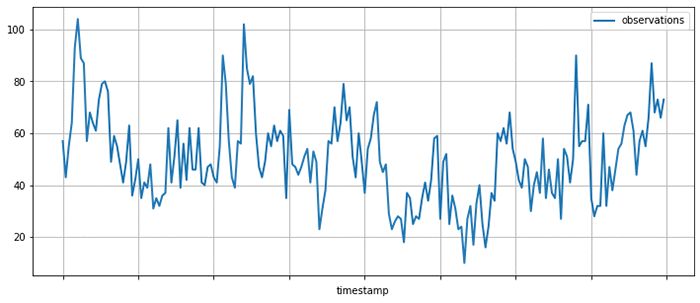
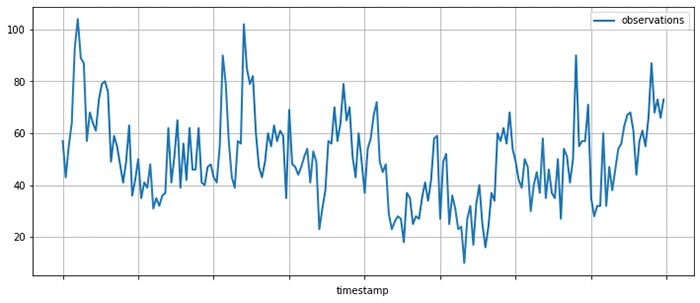
A typical time series may look like the following, where the measured amount is shown on the vertical axis and the horizontal axis is time:

Given a set of time series, you might ask various kinds of questions:

  • How will the time series evolve in the future? Forecasting
  • Is the behavior of the time series in a given period abnormal? Anomaly detection
  • Which group does a given time series belong to? Time series classification
  • Some measurements are missing, what were their values? Imputation

GluonTS allows you to address these questions by simplifying the process of building time series models, that is, mathematical descriptions of the process underlying the time series data. Numerous kinds of time series models have been proposed, and GluonTS focuses on a particular subset of these techniques based on deep learning.

GluonTS key functionality and components

GluonTS provides various components that make building deep learning-based, time series models simple and efficient. These models use many of the same building blocks as models that are used in other domains, such as natural language processing or computer vision.

Deep learning models for time series modeling commonly include components such as recurrent neural networks based on Long Short-Term Memory (LSTM) cells, convolutions, and attention mechanisms. This makes using a modern deep-learning framework, such as Apache MXNet, a convenient basis for developing and experimenting with such models.

However, time series modeling also often requires components that are specific to this application domain. GluonTS provides these time series modeling-specific components on top of the Gluon interface to MXNet. In particular, GluonTS contains:

  • Higher-level components for building new models, including generic neural network structures like sequence-to-sequence models and components for modeling and transforming probability distributions
  • Data loading and iterators for time series data, including a mechanism for transforming the data before it is supplied to the model
  • Reference implementations of several state-of-the-art neural forecasting models
  • Tooling for evaluating and comparing forecasting models

Most of the building blocks in GluonTS can be used for any of the time series modeling use cases mentioned earlier, while the model implementations and some of the surrounding tooling are currently focused on the forecasting use case.

GluonTS for time series forecasting

To make things more concrete, look at how to use one of time series models that comes bundled in GluonTS, for making forecasts on a real-world time series dataset.

For this example, use the DeepAREstimator, which implements the DeepAR model proposed in the DeepAR: Probabilistic Forecasting with Autoregressive Recurrent Networks paper. Given one or more time series, the model is trained to predict the next prediction_length values given the preceding context_length values. Instead of predicting single best values for each position in the prediction range, the model parametrizes a parametric probability distribution for each output position.

To encapsulate models and trained model artifacts, GluonTS uses an Estimator/Predictor pair of abstractions that should be familiar to users of other machine learning frameworks. An Estimator represents a model that can be trained on a dataset to yield a Predictor, which can later be used to make predictions on unseen data.

Instantiate a DeepAREstimator object by providing a few hyperparameters:

  • The time series frequency (for this example, I use 5 minutes, so freq="5min")
  • The prediction length (36 time points, which makes it span 3 hours)

You can also provide a Trainer object that can be used to configure the details of the training process. You could configure more aspects of the model by providing more hyperparameters as arguments, but stick with the default values for now, which usually provide a good starting point.

from gluonts.model.deepar import DeepAREstimator
from gluonts.trainer import Trainer

estimator = DeepAREstimator(freq="5min", 
                            prediction_length=36, 
                            trainer=Trainer(epochs=10))

Model training on a real dataset

Having specified the Estimator, you are now ready to train the model on some data. Use a freely available dataset on the volume of tweets mentioning the AMZN ticker symbol. This can be obtained and displayed using Pandas, as follows:

import pandas as pd
import matplotlib.pyplot as plt

url = "https://raw.githubusercontent.com/numenta/NAB/master/data/realTweets/Twitter_volume_AMZN.csv"
df = pd.read_csv(url, header=0, index_col=0)

df[:200].plot(figsize=(12, 5), linewidth=2)
plt.grid()
plt.legend(["observations"])
plt.show()

GluonTS provides a Dataset abstraction for providing uniform access to data across different input formats. Here, use ListDataset to access data stored in memory as a list of dictionaries. In GluonTS, any Dataset is just an Iterable over dictionaries mapping string keys to arbitrary values.

To train your model, truncate the data up to April 5, 2015. Data past this date is used later for testing the model.

from gluonts.dataset.common import ListDataset

training_data = ListDataset(
    [{"start": df.index[0], "target": df.value[:"2015-04-05 00:00:00"]}],
    freq = "5min"
)

With the dataset in hand, you can now use your estimator and call its train method. When the training process is finished, you have a Predictor that can be used for making forecasts.

predictor = estimator.train(training_data=training_data)

Model evaluation

Now use the predictor to plot the model’s forecasts on a few time ranges that start after the last time point seen during training. This is useful for getting a qualitative feel for the quality of the outputs produced by this model.

Using the same base dataset as before, create a few test instances by taking data past the time range previously used for training.

test_data = ListDataset(
    [
        {"start": df.index[0], "target": df.value[:"2015-04-10 03:00:00"]},
        {"start": df.index[0], "target": df.value[:"2015-04-15 18:00:00"]},
        {"start": df.index[0], "target": df.value[:"2015-04-20 12:00:00"]}
    ],
    freq = "5min"
)

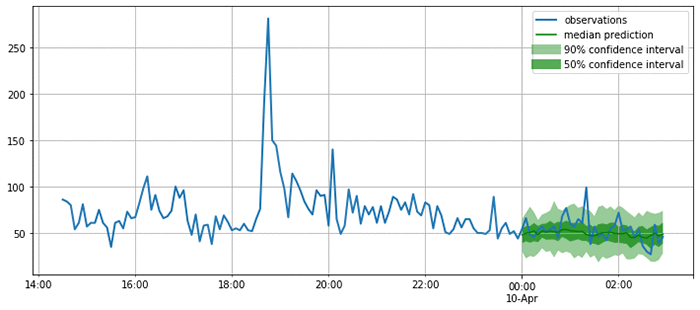
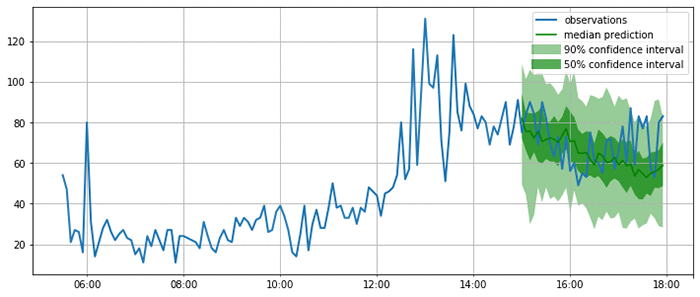
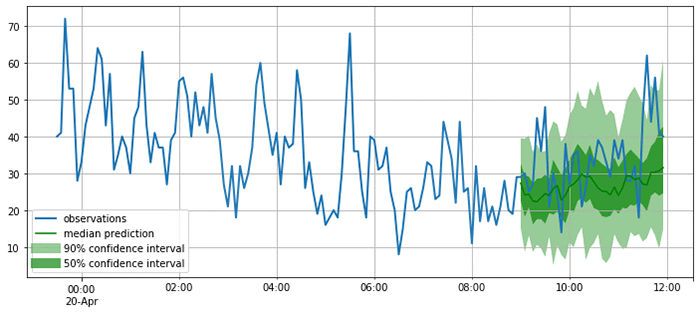
As you can see from the following plots, the model produces probabilistic predictions. This is important because it provides an estimate of how confident the model is, and allows downstream decisions based on these forecasts to account for this uncertainty.

from itertools import islice
from gluonts.evaluation.backtest import make_evaluation_predictions

def plot_forecasts(tss, forecasts, past_length, num_plots):
    for target, forecast in islice(zip(tss, forecasts), num_plots):
        ax = target[-past_length:].plot(figsize=(12, 5), linewidth=2)
        forecast.plot(color='g')
        plt.grid(which='both')
        plt.legend(["observations", "median prediction", "90% confidence interval", "50% confidence interval"])
        plt.show()

forecast_it, ts_it = make_evaluation_predictions(test_data, predictor=predictor, num_eval_samples=100)
forecasts = list(forecast_it)
tss = list(ts_it)
plot_forecasts(tss, forecasts, past_length=150, num_plots=3)

Now that you are satisfied that the forecasts look reasonable, you can compute a quantitative evaluation of the forecasts for all the time series in the test set using a variety of metrics. GluonTS provides an Evaluator component, which performs this model evaluation. It produces some commonly used error metrics such as MSE, MASE, symmetric MAPE, RMSE, and (weighted) quantile losses.

rom gluonts.evaluation import Evaluator

evaluator = Evaluator(quantiles=[0.5], seasonality=2016)

agg_metrics, item_metrics = evaluator(iter(tss), iter(forecasts), num_series=len(test_data))
agg_metrics

{'MSE': 163.59102376302084,
 'abs_error': 1090.9220886230469,
 'abs_target_sum': 5658.0,
 'abs_target_mean': 52.38888888888889,
 'seasonal_error': 18.833625618877182,
 'MASE': 0.5361500323952336,
 'sMAPE': 0.21201368270827592,
 'MSIS': 21.446000940010823,
 'QuantileLoss[0.5]': 1090.9221000671387,
 'Coverage[0.5]': 0.34259259259259256,
 'RMSE': 12.790270668090681,
 'NRMSE': 0.24414090352665138,
 'ND': 0.19281054942082837,
 'wQuantileLoss[0.5]': 0.19281055144346743,
 'mean_wQuantileLoss': 0.19281055144346743,
 'MAE_Coverage': 0.15740740740740744}

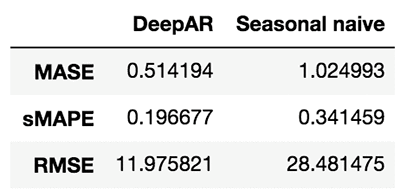
You can now compare these metrics against those produced by other models, or to the business requirements for your forecasting application. For example, you can produce forecasts using the seasonal naive method. This model assumes that the data has a fixed seasonality (in this case, 2016 time steps correspond to a week), and produces forecasts by copying past observations based on it.

from gluonts.model.seasonal_naive import SeasonalNaivePredictor

seasonal_predictor_1W = SeasonalNaivePredictor(freq="5min", prediction_length=36, season_length=2016)

forecast_it, ts_it = make_evaluation_predictions(test_data, predictor=seasonal_predictor_1W, num_eval_samples=100)
forecasts = list(forecast_it)
tss = list(ts_it)

agg_metrics_seasonal, item_metrics_seasonal = evaluator(iter(tss), iter(forecasts), num_series=len(test_data))

df_metrics = pd.DataFrame.join(
    pd.DataFrame.from_dict(agg_metrics, orient='index').rename(columns={0: "DeepAR"}),
    pd.DataFrame.from_dict(agg_metrics_seasonal, orient='index').rename(columns={0: "Seasonal naive"})
)
df_metrics.loc[["MASE", "sMAPE", "RMSE"]]

By looking at these metrics, you can get an idea of how your model compares to baselines or other advanced models. To improve the results, tweak the architecture or the hyperparameters.

Help make GluonTS better!

In this post, I only touched on a small subset of functionality provided by GluonTS. If you would like to dive deeper, I encourage you to check out tutorials and further examples.

GluonTS is open source under the Apache license. We welcome and encourage contributions from the community as bug reports and pull requests. Head over to the GluonTS GitHub repo now!


About the Authors

Jan Gasthaus is a Senior Machine Learning Scientist with AWS AI Labs where his passion is designing machine learning models, algorithms, and systems, and deploying them at scale.


Lorenzo Stella is an Applied Scientist on the AWS AI Labs team. His research interests are in machine learning and optimization. He has worked on probabilistic and deep models for forecasting.


Tim Januschowski is a Machine Learning Science Manager at AWS AI Labs. He has worked on forecasting and has produced end-to-end solutions for a wide variety of forecasting problems, from demand forecasting to server capacity forecasting over the course of his tenure at Amazon.


Richard Lee is a Product Manager at AWS AI Labs. He is passionate about how Artificial Intelligence impacts the worlds around us, and is on a mission to make it accessible to all. He is also a pilot, science and nature admirer, and beginner cook.


Syama Sundar Rangapuram is a Machine Learning Scientist at AWS AI Labs. His research interests are in machine learning and optimization. In forecasting, he has worked on probabilistic models and data-driven models in particular for the cold-start problem.


Konstantinos Benidis is an Applied Scientist at AWS AI Labs. His research interests are in machine learning, optimization and financial engineering. He has worked on probabilistic and deep models for forecasting.


Alexander Alexandrov is a Post-Doc on the AWS AI Labs team and TU-Berlin. He is passionate about scalable data management, data analytics applications, and optimizing DSLs. 


David Salinas is a Senior Applied Scientist in the AWS AI Labs team. He is working on applying deep-learning to various application such as forecasting or NLP.


Danielle Robinson is an Applied Scientist in the AWS AI Labs team. She is working on combining deep learning methods with classical statiscal methods for forecasting. Her interests also include numerical linear algebra, numerical optimization and numerical PDEs.


Yuyang (Bernie) Wang is a Senior Machine Learning Scientist in Amazon AI Labs, working mainly on large-scale probabilistic machine learning with its application in Forecasting. His research interests span statistical machine learning, numerical linear algebra, and random matrix theory. In forecasting, Yuyang has worked on all aspects ranging from practical applications to theoretical foundations.


Valentin Flunkert is a Senior Machine Learning Scientist at AWS AI Labs. He is passionate about building machine learning systems for solving business problems. He has worked on a variety of machine learning and forecasting problems at Amazon. 


Michael Bohlke-Schneider is a Data Scientist in AWS AI Labs/Fulfillment Technology, researching and developing forecasting algorithms in SageMaker and applying forecasting to business problems.


Jasper Schulz is a software development engineer in the AWS AI Labs team.


Capturing memories: GeoSnapShot uses Amazon Rekognition to identify athletes

If you’ve ever competed in a sporting event and painstakingly sifted through event photos to find yourself later, you’ll appreciate GeoSnapShot’s innovative solution powered by Amazon Rekognition.

GeoSnapShot founder Andy Edwards was first introduced to the world of sports photography when he started accompanying his wife, a competitive equestrian, to her riding events and photographing her and her friends.While he enjoyed taking great photos of everyone, he was frustrated by the manual, time-intensive process required post-event to identify each rider and distribute the photos to them. He noticed many other photographers in the same situation, and the sad consequence was a loss of the special memories they captured simply because the sorting process was too hard.

Setting out to solve this challenge – and indeed, multiple related challenges for photographers and sports organizations worldwide – Andy started GeoSnapShot in 2013. The company partners with event organizers to enable any athlete who opts in and uploads a selfie to find images of themselves quickly and easily. It does this by using Amazon Rekognition in two ways: for direct comparisons of users’ selfies to the photos from an event, and for optical character recognition to identify their competition bib numbers. With those inputs, GeoSnapShot is able to process thousands of event photos in near real-time, expediting an effort that used to require event organizers to spend many hours manually matching bib numbers to athlete names and sorting the photos by athlete.

This heavy lifting meant that athletes used to wait days or weeks for their photos to be available. Now, GeoSnapShot’s unique solution for sports photography makes it possible for athletes to start reviewing their photos before the sweat has even dried. As a result, photography sales for event organizers have increased by almost 30 percent, and customer satisfaction has increased substantially.

GeoSnapShot’s solutions are being used across 92 countries, where amateur photographers and professionals alike laud the user-friendly solution built on AWS. Perhaps the truest testimony of the power of the technology is that the popular global endurance event company Tough Mudder recently started using GeoSnapShot. Tough Mudder participants are often barely recognizable due to the unavoidable head-toe coating of mud inherent to the competition, and yet GeoSnapShot’s participant identification is successful. (No, competitors don’t need to upload a mud-covered selfie for it to work either; a more glamorous image works fine too!)

Tough Mudder’s VP of Live Events, Johnny Little, comments, “Reliving the memories made is vital to our participants and GeoSnapShot have an outstanding global photography platform that provides the best solution for every Tough Mudder event worldwide.”

Andy lauds AWS AI as the underpinning of that solution. “AWS provided us with the most flexible technology platform as we started building our business. As GeoSnapShot is a platform, it’s important we use leading technology to deliver the very best experience for all our customers. AWS continues to provide us with a world-leading technology. We are delighted with the access we have to the technology and business teams to drive future solutions.”

GeoSnapShot has chosen AWS as their primary AI/ML platform, and the company’s tech stack will get even deeper in the coming months, as the company is currently in the process of implementing a video solution in addition to the still photos. GeoSnapShot believes that providing athletes with memories of their achievements in stills and video, all using recognition technology, is the future of sports media.

Ultimately, GeoSnapShot wants every event and every photographer globally to have the opportunity to use its platform. Andy comments, “After all, memories of our lives and those of our loved ones are very precious and should be captured.”

To learn more about Amazon Rekognition, visit https://aws.amazon.com/rekognition/.


About the Author

Marisa Messina is on the AWS AI marketing team, where her job includes identifying the most innovative AWS-using customers and showcasing their inspiring stories. Prior to AWS, she worked on consumer-facing hardware and then university-facing cloud offerings at Microsoft. Outside of work, she enjoys exploring the Pacific Northwest hiking trails, cooking without recipes, and dancing in the rain.


Automatically extract text and structured data from documents with Amazon Textract

Documents are a primary tool for record keeping, communication, collaboration, and transactions across many industries, including financial, medical, legal, and real estate. The millions of mortgage applications and hundreds of millions of W2 tax forms processed each year are just a few examples of such documents. A lot of information is locked in unstructured documents. It usually requires time-consuming and complex processes to enable search and discovery, business process automation, and compliance control for these documents.

In this post, I show how you can take advantage of Amazon Textract to automatically extract text and data from scanned documents without any machine learning (ML) experience. While AWS takes care of building, training, and deploying advanced ML models in a highly available and scalable environment, you take advantage of these models with simple-to-use API actions. Here are the use cases that I cover in this post:

  • Text detection from documents
  • Multi-column detection and reading order
  • Natural language processing and document classification
  • Natural language processing for medical documents
  • Document translation
  • Search and discovery
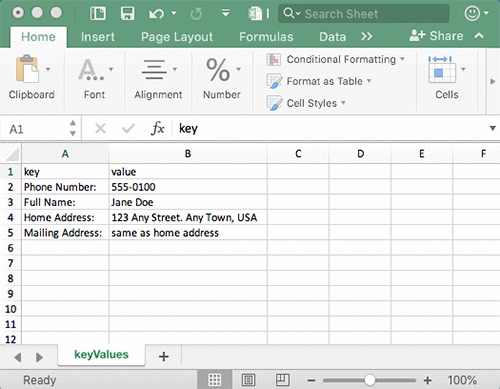
  • Form extraction and processing
  • Compliance control with document redaction
  • Table extraction and processing
  • PDF document processing

Amazon Textract

Before I get started with the use cases, let me review and introduce some of the core features. Amazon Textract goes beyond simple optical character recognition (OCR) to also identify the contents of fields in forms and information stored in tables. This allows you to use Amazon Textract to instantly “read” virtually any type of document and accurately extract text and data without the need for any manual effort or custom code.

The following images show an example document and corresponding extracted text, form, and table data using Amazon Textract in the AWS Management Console.
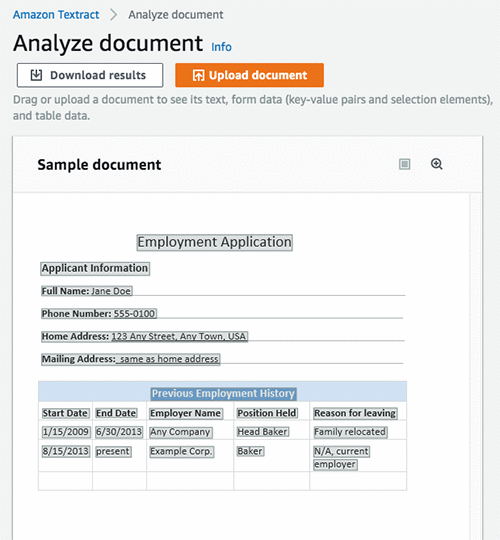
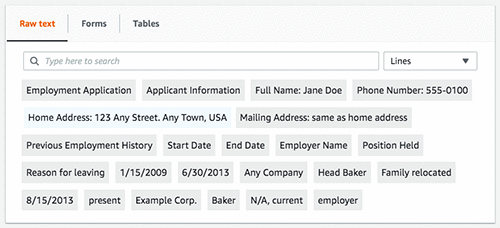
The following image shows the lines extracted as raw text from the document.
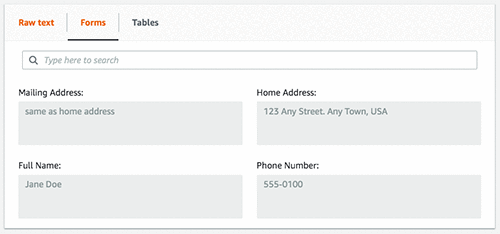
The following image shows the extracted form fields and their corresponding values.
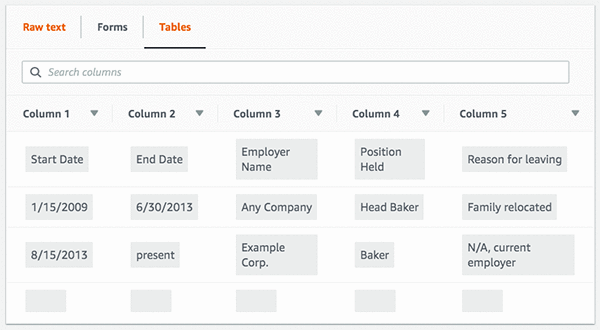
The following image shows the extracted table, cells, and the text in those cells.
To quickly download a zip file containing the output, choose Download results. You can choose various formats, including raw JSON, text, and CSV files for forms and tables.
In addition to the detected content, Amazon Textract provides additional information, like confidence scores and bounded boxes for detected elements. It gives you control on how you consume extracted content and integrate it into various business applications.

Amazon Textract provides both synchronous and asynchronous API actions to extract document text and analyze the document text data. Synchronous APIs can be used for single-page documents and low latency use cases such as mobile capture. Asynchronous APIs can be used for multi-page documents such as PDF documents with thousands of pages. For more information, see the Amazon Textract API Reference.

Use cases

Now, write some code to take advantage of Amazon Textract API operations using the AWS SDK and see how easy it is to build power-smart applications. I will also use the JSON Parser Library for some of the below use cases.

Text detection from documents

I start with a simple example on how to detect text from a document. Use the following image as an input document to Amazon Textract. As you can see, the sample image is not of good quality, but Amazon Textract can still detect the text with accuracy.
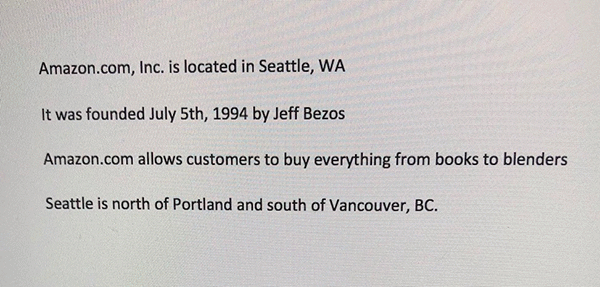
The following code example shows how to use a few lines of code to send this sample image to Amazon Textract and get a JSON response back. You then iterate over the blocks in JSON and print the detected text, as shown below.

import boto3

# Document
s3BucketName = "ki-textract-demo-docs"
documentName = "simple-document-image.jpg"

# Amazon Textract client
textract = boto3.client('textract')

# Call Amazon Textract
response = textract.detect_document_text(
    Document={
        'S3Object': {
            'Bucket': s3BucketName,
            'Name': documentName
        }
    })

#print(response)

# Print detected text
for item in response["Blocks"]:
    if item["BlockType"] == "LINE":
        print ('33[94m' +  item["Text"] + '33[0m')

The following JSON response is what you receive from Amazon Textract, with blocks representing detected text in the document.

{
    "Blocks": [
        {
            "Geometry": {
                "BoundingBox": {
                    "Width": 1.0, 
                    "Top": 0.0, 
                    "Left": 0.0, 
                    "Height": 1.0
                }, 
                "Polygon": [
                    {
                        "Y": 0.0, 
                        "X": 0.0
                    }, 
                    {
                        "Y": 0.0, 
                        "X": 1.0
                    }, 
                    {
                        "Y": 1.0, 
                        "X": 1.0
                    }, 
                    {
                        "Y": 1.0, 
                        "X": 0.0
                    }
                ]
            }, 
            "Relationships": [
                {
                    "Type": "CHILD", 
                    "Ids": [
                        "2602b0a6-20e3-4e6e-9e46-3be57fd0844b", 
                        "82aedd57-187f-43dd-9eb1-4f312ca30042", 
                        "52be1777-53f7-42f6-a7cf-6d09bdc15a30", 
                        "7ca7caa6-00ef-4cda-b1aa-5571dfed1a7c"
                    ]
                }
            ], 
            "BlockType": "PAGE", 
            "Id": "8136b2dc-37c1-4300-a9da-6ed8b276ea97"
        }..... 
        
    ], 
    "DocumentMetadata": {
        "Pages": 1
    }
}

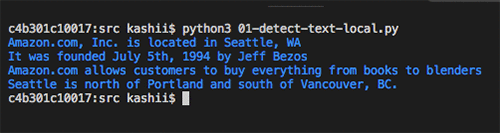
The following image shows the output of the detected text.
Multi-column detection and reading order

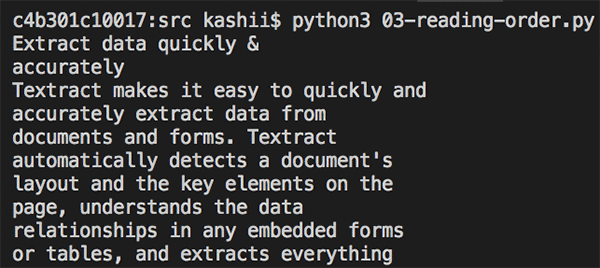
Traditional OCR solutions read left to right, do not detect multiple columns, and end up generating incorrect reading order for multi-column documents. In addition to detecting text, Amazon Textract provides additional geometry information that can be used to detect multiple columns and print the text in reading order.

The following image is a two-column document. Similar to the earlier example, the image is not good quality but Amazon Textract still performs well.
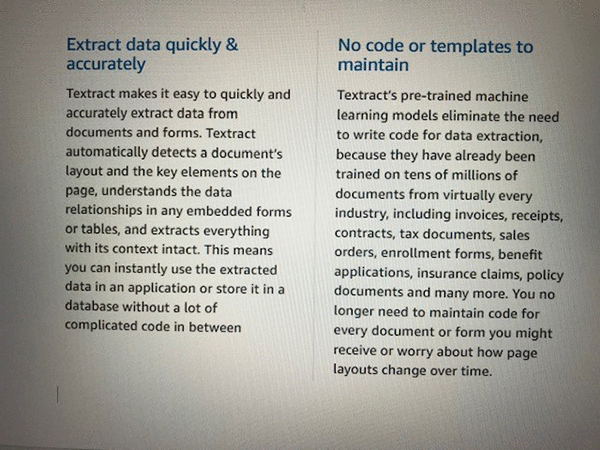
The following example code shows processing the document with Amazon Textract and taking advantage of geometry information to print the text in reading order.

import boto3

# Document
s3BucketName = "ki-textract-demo-docs"
documentName = "two-column-image.jpg"

# Amazon Textract client
textract = boto3.client('textract')

# Call Amazon Textract
response = textract.detect_document_text(
    Document={
        'S3Object': {
            'Bucket': s3BucketName,
            'Name': documentName
        }
    })

#print(response)

# Detect columns and print lines
columns = []
lines = []
for item in response["Blocks"]:
      if item["BlockType"] == "LINE":
        column_found=False
        for index, column in enumerate(columns):
            bbox_left = item["Geometry"]["BoundingBox"]["Left"]
            bbox_right = item["Geometry"]["BoundingBox"]["Left"] + item["Geometry"]["BoundingBox"]["Width"]
            bbox_centre = item["Geometry"]["BoundingBox"]["Left"] + item["Geometry"]["BoundingBox"]["Width"]/2
            column_centre = column['left'] + column['right']/2

            if (bbox_centre > column['left'] and bbox_centre < column['right']) or (column_centre > bbox_left and column_centre < bbox_right):
                #Bbox appears inside the column
                lines.append([index, item["Text"]])
                column_found=True
                break
        if not column_found:
            columns.append({'left':item["Geometry"]["BoundingBox"]["Left"], 'right':item["Geometry"]["BoundingBox"]["Left"] + item["Geometry"]["BoundingBox"]["Width"]})
            lines.append([len(columns)-1, item["Text"]])

lines.sort(key=lambda x: x[0])
for line in lines:
    print (line[1])

The following image shows the output of the detected text in the correct reading order.
Natural language processing and document classification

Customer emails, support tickets, product reviews, social media, even advertising copy all represent insights into customer sentiment that can be put to work for your business. A lot of such content contains images or scanned versions of documents. After text is extracted from these documents, you can use Amazon Comprehend to detect sentiment, entities, key phrases, syntax and topics. You can also train Amazon Comprehend to detect custom entities based on your business domain. These insights can then be used to classify documents, automate business process workflows, and ensure compliance.

The following example code shows processing the first image sample used earlier with Amazon Textract to extract text and then using Amazon Comprehend to detect sentiment and entities.

import boto3

# Document
s3BucketName = "ki-textract-demo-docs"
documentName = "simple-document-image.jpg"

# Amazon Textract client
textract = boto3.client('textract')

# Call Amazon Textract
response = textract.detect_document_text(
    Document={
        'S3Object': {
            'Bucket': s3BucketName,
            'Name': documentName
        }
    })

#print(response)

# Print text
print("nTextn========")
text = ""
for item in response["Blocks"]:
    if item["BlockType"] == "LINE":
        print ('33[94m' +  item["Text"] + '33[0m')
        text = text + " " + item["Text"]

# Amazon Comprehend client
comprehend = boto3.client('comprehend')

# Detect sentiment
sentiment =  comprehend.detect_sentiment(LanguageCode="en", Text=text)
print ("nSentimentn========n{}".format(sentiment.get('Sentiment')))

# Detect entities
entities =  comprehend.detect_entities(LanguageCode="en", Text=text)
print("nEntitiesn========")
for entity in entities["Entities"]:
    print ("{}t=>t{}".format(entity["Type"], entity["Text"]))

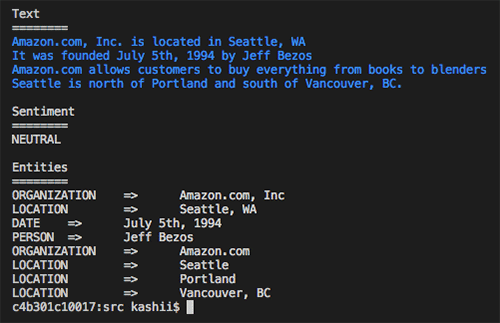
The following image shows the output text along with the text analysis from Amazon Comprehend. You can see that it found the sentiment to be “Neutral” and detected “Amazon” as an organization, “Seattle, WA” as a location and “July 5th, 1994” as a date, along with other entities.
Natural language processing for medical documents

One of the important ways to improve patient care and accelerate clinical research is by understanding and analyzing the insights and relationships that are “trapped” in free-form medical text. These can include hospital admission notes and a patient’s medical history.

In this example, use the following document to extract text using Amazon Textract. You then use Amazon Comprehend Medical to extract medical entities, such as medical condition, medication, dosage, strength, and protected health information (PHI).
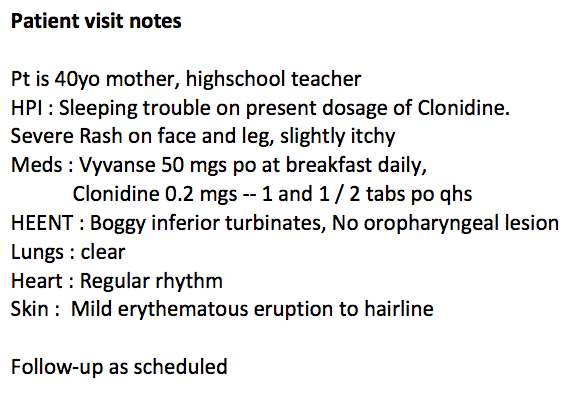
The following example code shows how different medical entities are detected.

import boto3

# Document
s3BucketName = "ki-textract-demo-docs"
documentName = "medical-notes.png"

# Amazon Textract client
textract = boto3.client('textract')

# Call Amazon Textract
response = textract.detect_document_text(
    Document={
        'S3Object': {
            'Bucket': s3BucketName,
            'Name': documentName
        }
    })

#print(response)

# Print text
print("nTextn========")
text = ""
for item in response["Blocks"]:
    if item["BlockType"] == "LINE":
        print ('33[94m' +  item["Text"] + '33[0m')
        text = text + " " + item["Text"]

# Amazon Comprehend client
comprehend = boto3.client('comprehendmedical')

# Detect medical entities
entities =  comprehend.detect_entities(Text=text)
print("nMidical Entitiesn========")
for entity in entities["Entities"]:
    print("- {}".format(entity["Text"]))
    print ("   Type: {}".format(entity["Type"]))
    print ("   Category: {}".format(entity["Category"]))
    if(entity["Traits"]):
        print("   Traits:")
        for trait in entity["Traits"]:
            print ("    - {}".format(trait["Name"]))
    print("n")

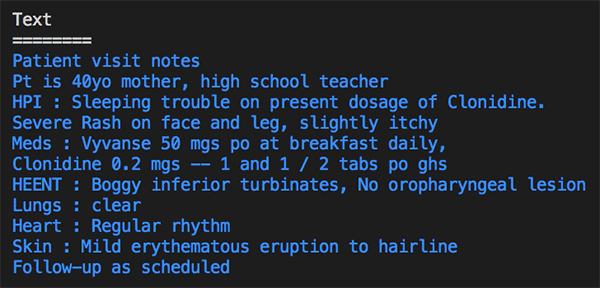
The following image and text block shows the output of the detected text with information categorized by type. It detected “40yo” as the age with category “Protected Health Information”. It also detected different medical conditions, including sleeping trouble, rash, inferior turbinates, erythematous eruption, and others. It recognized different medications and anatomy information.
Medical Entities
========
- 40yo
   Type: AGE
   Category: PROTECTED_HEALTH_INFORMATION
- Sleeping trouble
   Type: DX_NAME
   Category: MEDICAL_CONDITION
   Traits:
    - SYMPTOM
- Clonidine
   Type: GENERIC_NAME
   Category: MEDICATION
- Rash
   Type: DX_NAME
   Category: MEDICAL_CONDITION
   Traits:
    - SYMPTOM
- face
   Type: SYSTEM_ORGAN_SITE
   Category: ANATOMY
- leg
   Type: SYSTEM_ORGAN_SITE
   Category: ANATOMY
- Vyvanse
   Type: BRAND_NAME
   Category: MEDICATION
- Clonidine
   Type: GENERIC_NAME
   Category: MEDICATION
- HEENT
   Type: SYSTEM_ORGAN_SITE
   Category: ANATOMY
- Boggy inferior turbinates
   Type: DX_NAME
   Category: MEDICAL_CONDITION
   Traits:
    - SIGN
- inferior
   Type: DIRECTION
   Category: ANATOMY
- turbinates
   Type: SYSTEM_ORGAN_SITE
   Category: ANATOMY
- oropharyngeal lesion
   Type: DX_NAME
   Category: MEDICAL_CONDITION
   Traits:
    - SIGN
    - NEGATION
- Lungs
   Type: SYSTEM_ORGAN_SITE
   Category: ANATOMY
- clear Heart
   Type: DX_NAME
   Category: MEDICAL_CONDITION
   Traits:
    - SIGN
- Heart
   Type: SYSTEM_ORGAN_SITE
   Category: ANATOMY
- Regular rhythm
   Type: DX_NAME
   Category: MEDICAL_CONDITION
   Traits:
    - SIGN
- Skin
   Type: SYSTEM_ORGAN_SITE
   Category: ANATOMY
- erythematous eruption
   Type: DX_NAME
   Category: MEDICAL_CONDITION
   Traits:
    - SIGN
- hairline
   Type: SYSTEM_ORGAN_SITE
   Category: ANATOMY

Document translation

Many organizations localize content for international users, such as websites and applications. They must translate large volumes of documents efficiently. You can use Amazon Textract along with Amazon Translate to extract text and data and then translate them into other languages.

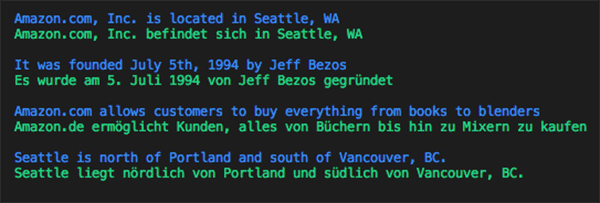
The following code example shows translating the text in the first image to German.

import boto3

# Document
s3BucketName = "ki-textract-demo-docs"
documentName = "simple-document-image.jpg"

# Amazon Textract client
textract = boto3.client('textract')

# Call Amazon Textract
response = textract.detect_document_text(
    Document={
        'S3Object': {
            'Bucket': s3BucketName,
            'Name': documentName
        }
    })

#print(response)

# Amazon Translate client
translate = boto3.client('translate')

print ('')
for item in response["Blocks"]:
    if item["BlockType"] == "LINE":
        print ('33[94m' +  item["Text"] + '33[0m')
        result = translate.translate_text(Text=item["Text"], SourceLanguageCode="en", TargetLanguageCode="de")
        print ('33[92m' + result.get('TranslatedText') + '33[0m')
    print ('')

The following image shows the output of the detected text, translated to German line by line.
Search and discovery

Extracting structured data from documents and creating a smart index using Amazon Elasticsearch Service (Amazon ES) allows you to search through millions of documents quickly. For example, a mortgage company could use Amazon Textract to process millions of scanned loan applications in a matter of hours and have the extracted data indexed in Amazon ES. This would allow them to create search experiences like searching for loan applications where the applicant name is John Doe, or searching for contracts where the interest rate is 2 percent.

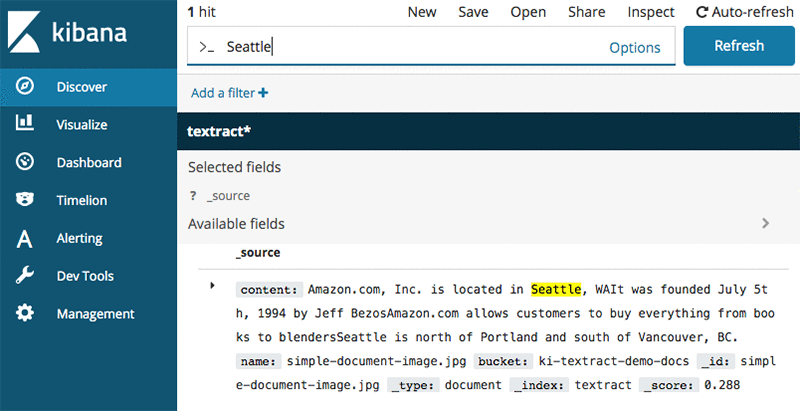
The following code example shows how you can extract text from the first image, store it in Amazon ES, and then search it using Kibana. You can also build a custom UI experience by taking advantage of the Amazon ES APIs. Later in the post, as you learn how to extract forms and tables, that structured data can then be indexed similarly to enable smart search.

import boto3
from elasticsearch import Elasticsearch, RequestsHttpConnection
from requests_aws4auth import AWS4Auth

def indexDocument(bucketName, objectName, text):

    # Update host with endpoint of your Elasticsearch cluster
    #host = "search--xxxxxxxxxxxxxx.us-east-1.es.amazonaws.com
    host = "searchxxxxxxxxxxxxxxxx.us-east-1.es.amazonaws.com"
    region = 'us-east-1'

    if(text):
        service = 'es'
        ss = boto3.Session()
        credentials = ss.get_credentials()
        region = ss.region_name

        awsauth = AWS4Auth(credentials.access_key, credentials.secret_key, region, service, session_token=credentials.token)

        es = Elasticsearch(
            hosts = [{'host': host, 'port': 443}],
            http_auth = awsauth,
            use_ssl = True,
            verify_certs = True,
            connection_class = RequestsHttpConnection
        )

        document = {
            "name": "{}".format(objectName),
            "bucket" : "{}".format(bucketName),
            "content" : text
        }

        es.index(index="textract", doc_type="document", id=objectName, body=document)

        print("Indexed document: {}".format(objectName))

# Document
s3BucketName = "ki-textract-demo-docs"
documentName = "simple-document-image.jpg"

# Amazon Textract client
textract = boto3.client('textract')

# Call Amazon Textract
response = textract.detect_document_text(
    Document={
        'S3Object': {
            'Bucket': s3BucketName,
            'Name': documentName
        }
    })

#print(response)

# Print detected text
text = ""
for item in response["Blocks"]:
    if item["BlockType"] == "LINE":
        print ('33[94m' +  item["Text"] + '33[0m')
        text += item["Text"]

indexDocument(s3BucketName, documentName, text)

# You can view index documents in Kibana Dashboard

The following image shows the output of extracted text in Kibana search results.
Form extraction and processing

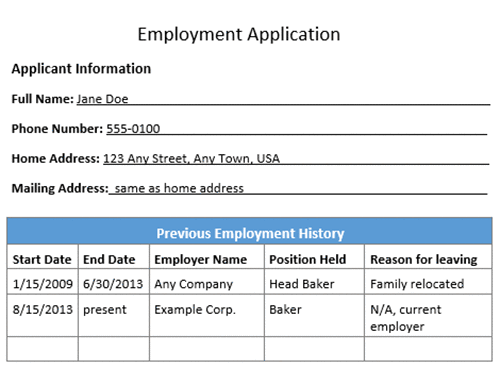
Amazon Textract can provide the inputs required to automatically process forms without human intervention. For example, a bank could write code to read PDFs of loan applications. The information contained in the document could be used to initiate all of the necessary background and credit checks to approve the loan so that customers can get instant results for their application rather than having to wait several days for manual review and validation.

The following image is an employment application with form fields and a table.
The following code example shows how to extract forms from the employment application and process different fields.

import boto3
from trp import Document

# Document
s3BucketName = "ki-textract-demo-docs"
documentName = "employmentapp.png"

# Amazon Textract client
textract = boto3.client('textract')

# Call Amazon Textract
response = textract.analyze_document(
    Document={
        'S3Object': {
            'Bucket': s3BucketName,
            'Name': documentName
        }
    },
    FeatureTypes=["FORMS"])

#print(response)

doc = Document(response)

for page in doc.pages:
    # Print fields
    print("Fields:")
    for field in page.form.fields:
        print("Key: {}, Value: {}".format(field.key, field.value))

    # Get field by key
    print("nGet Field by Key:")
    key = "Phone Number:"
    field = page.form.getFieldByKey(key)
    if(field):
        print("Key: {}, Value: {}".format(field.key, field.value))

    # Search fields by key
    print("nSearch Fields:")
    key = "address"
    fields = page.form.searchFieldsByKey(key)
    for field in fields:
        print("Key: {}, Value: {}".format(field.key, field.value))

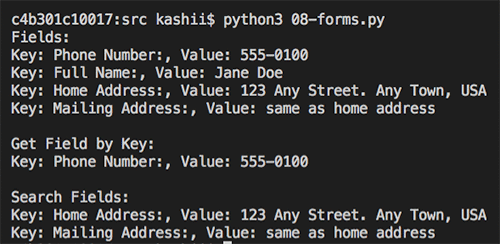
The following image is the output of detected form for the employment application.
Compliance control with document redaction

Because Amazon Textract identifies data types and form labels automatically, AWS helps secure infrastructure so that you can maintain compliance with information controls. For example, an insurer could use Amazon Textract to feed a workflow that automatically redacts personally identifiable information (PII) for review before archiving claim forms. Amazon Textract recognizes the important fields that require protection.

The following code example shows extracting all the form fields in the employment application used earlier, and then redacting all the address fields.

import boto3
from trp import Document
from PIL import Image, ImageDraw

# Document
s3BucketName = "ki-textract-demo-docs"
documentName = "employmentapp.png"

# Amazon Textract client
textract = boto3.client('textract')

# Call Amazon Textract
response = textract.analyze_document(
    Document={
        'S3Object': {
            'Bucket': s3BucketName,
            'Name': documentName
        }
    },
    FeatureTypes=["FORMS"])

#print(response)

doc = Document(response)

# Redact document
img = Image.open(documentName)

width, height = img.size

if(doc.pages):
    page = doc.pages[0]
    for field in page.form.fields:
        if(field.key and field.value and "address" in field.key.text.lower()):
        #if(field.key and field.value):
            print("Redacting => Key: {}, Value: {}".format(field.key.text, field.value.text))
            
            x1 = field.value.geometry.boundingBox.left*width
            y1 = field.value.geometry.boundingBox.top*height-2
            x2 = x1 + (field.value.geometry.boundingBox.width*width)+5
            y2 = y1 + (field.value.geometry.boundingBox.height*height)+2

            draw = ImageDraw.Draw(img)
            draw.rectangle([x1, y1, x2, y2], fill="Black")

img.save("redacted-{}".format(documentName))

The following image is the output redacted version of employment application.
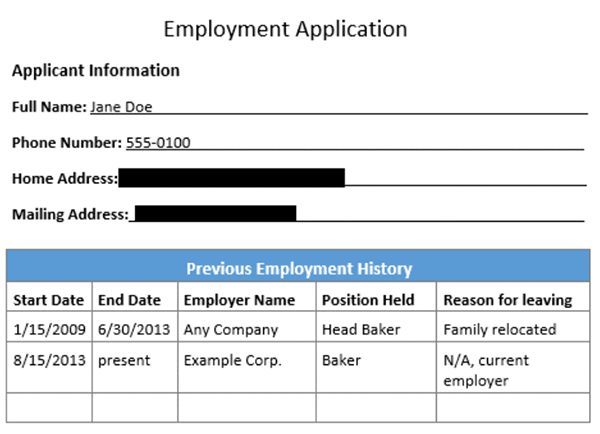
Table extraction and processing

Amazon Textract can detect tables and their content. A company can extract all the amounts from an expense report and apply rules, such as any expense more than $1000 needs extra review.
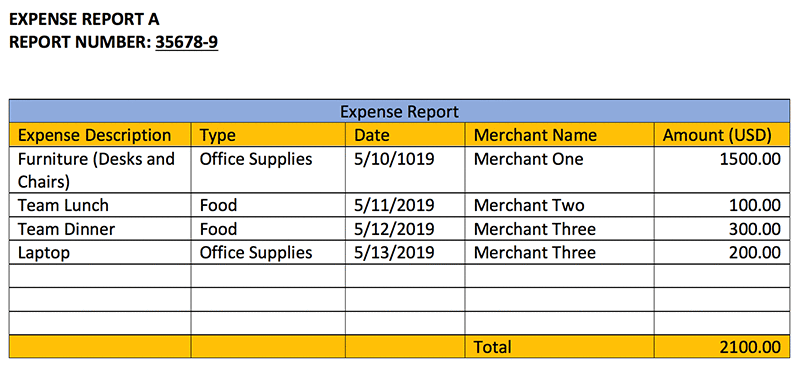
The following code example uses the expense report sample document and prints the content of each cell, along with a warning message if any expense is more than $1000.

import boto3
from trp import Document

# Document
s3BucketName = "ki-textract-demo-docs"
documentName = "expense.png"

# Amazon Textract client
textract = boto3.client('textract')

# Call Amazon Textract
response = textract.analyze_document(
    Document={
        'S3Object': {
            'Bucket': s3BucketName,
            'Name': documentName
        }
    },
    FeatureTypes=["TABLES"])

#print(response)

doc = Document(response)

def isFloat(input):
  try:
    float(input)
  except ValueError:
    return False
  return True

warning = ""
for page in doc.pages:
     # Print tables
    for table in page.tables:
        for r, row in enumerate(table.rows):
            itemName  = ""
            for c, cell in enumerate(row.cells):
                print("Table[{}][{}] = {}".format(r, c, cell.text))
                if(c == 0):
                    itemName = cell.text
                elif(c == 4 and isFloat(cell.text)):
                    value = float(cell.text)
                    if(value > 1000):
                        warning += "{} is greater than $1000.".format(itemName)
if(warning):
    print("nReview needed:n====================n" + warning)

The following text is the output of the table cells and the text within.

Table[0][0] = Expense Description 
Table[0][1] = Type 
Table[0][2] = Date 
Table[0][3] = Merchant Name 
Table[0][4] = Amount (USD) 
Table[1][0] = Furniture (Desks and Chairs) 
Table[1][1] = Office Supplies 
Table[1][2] = 5/10/1019 
Table[1][3] = Merchant One 
Table[1][4] = 1500.00 
Table[2][0] = Team Lunch 
Table[2][1] = Food 
Table[2][2] = 5/11/2019 
Table[2][3] = Merchant Two 
Table[2][4] = 100.00 
Table[3][0] = Team Dinner 
Table[3][1] = Food 
Table[3][2] = 5/12/2019 
Table[3][3] = Merchant Three 
Table[3][4] = 300.00 
Table[4][0] = Laptop 
Table[4][1] = Office Supplies 
Table[4][2] = 5/13/2019 
Table[4][3] = Merchant Three 
Table[4][4] = 200.00 
Table[5][0] = 
Table[5][1] = 
Table[5][2] = 
Table[5][3] = 
Table[5][4] = 
Table[6][0] = 
Table[6][1] = 
Table[6][2] = 
Table[6][3] = 
Table[6][4] = 
Table[7][0] = 
Table[7][1] = 
Table[7][2] = 
Table[7][3] = 
Table[7][4] = 
Table[8][0] = 
Table[8][1] = 
Table[8][2] = 
Table[8][3] = Total 
Table[8][4] = 2100.00 

Review needed:
====================
Furniture (Desks and Chairs) is greater than $1000.

PDF document processing (async API operations)

For the earlier examples, you used images with the sync API operations. Now, see how you can process PDF files using the async API operations.

First, use StartDocumentTextDetection or StartDocumentAnalysis to start an Amazon Textract job. As the job completes, Amazon Textract publishes the results of an Amazon Textract request, including completion status, to Amazon SNS. You can then use GetDocumentTextDetection or GetDocumentAnalysis to get the results from Amazon Textract.

The following code example shows how to start a job, get job status, and then process the results. Click here for the sample PDF document. For more information, see Calling Amazon Textract Asynchronous Operations.

import boto3
import time

def startJob(s3BucketName, objectName):
    response = None
    client = boto3.client('textract')
    response = client.start_document_text_detection(
    DocumentLocation={
        'S3Object': {
            'Bucket': s3BucketName,
            'Name': objectName
        }
    })

    return response["JobId"]

def isJobComplete(jobId):
    # For production use cases, use SNS based notification 
    # Details at: https://docs.aws.amazon.com/textract/latest/dg/api-async.html
    time.sleep(5)
    client = boto3.client('textract')
    response = client.get_document_text_detection(JobId=jobId)
    status = response["JobStatus"]
    print("Job status: {}".format(status))

    while(status == "IN_PROGRESS"):
        time.sleep(5)
        response = client.get_document_text_detection(JobId=jobId)
        status = response["JobStatus"]
        print("Job status: {}".format(status))

    return status

def getJobResults(jobId):

    pages = []

    client = boto3.client('textract')
    response = client.get_document_text_detection(JobId=jobId)
    
    pages.append(response)
    print("Resultset page recieved: {}".format(len(pages)))
    nextToken = None
    if('NextToken' in response):
        nextToken = response['NextToken']

    while(nextToken):

        response = client.get_document_text_detection(JobId=jobId, NextToken=nextToken)

        pages.append(response)
        print("Resultset page recieved: {}".format(len(pages)))
        nextToken = None
        if('NextToken' in response):
            nextToken = response['NextToken']

    return pages

# Document
s3BucketName = "ki-textract-demo-docs"
documentName = "Amazon-Textract-Pdf.pdf"

jobId = startJob(s3BucketName, documentName)
print("Started job with id: {}".format(jobId))
if(isJobComplete(jobId)):
    response = getJobResults(jobId)

#print(response)

# Print detected text
for resultPage in response:
    for item in resultPage["Blocks"]:
        if item["BlockType"] == "LINE":
            print ('33[94m' +  item["Text"] + '33[0m')

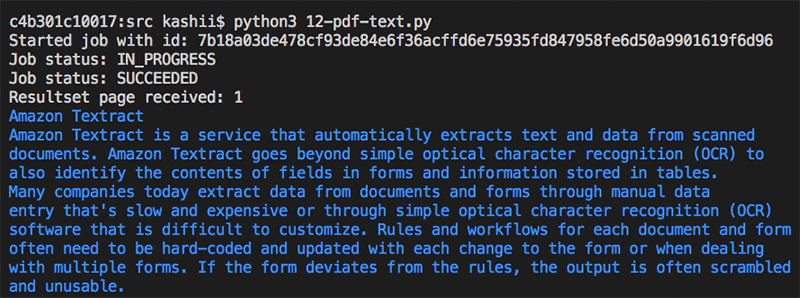
The following image shows the job status as the API call proceeds.
Conclusion

In this post, I showed you how to use Amazon Textract to automatically extract text and data from scanned documents without any machine learning (ML) experience. I covered use cases in fields such as finance, healthcare, and HR, but there are many other opportunities where the ability to unlock text and data from unstructured documents could be most useful. To learn more about Amazon Textract, read about processing single-page and multi-page documents, working with block objects, and code samples.

You can start using Amazon Textract in US East (N. Virginia), US East (Ohio), US West (Oregon), and EU (Ireland) today.


About the Authors

Kashif Imran is a Solutions Architect at Amazon Web Services. He works with some of the largest strategic AWS customers to provide technical guidance and design advice. His expertise spans application architecture, serverless, containers, NoSQL and machine learning.


EfficientNet: Improving Accuracy and Efficiency through AutoML and Model Scaling

Convolutional neural networks (CNNs) are commonly developed at a fixed resource cost, and then scaled up in order to achieve better accuracy when more resources are made available. For example, ResNet can be scaled up from ResNet-18 to ResNet-200 by increasing the number of layers, and recently, GPipe achieved 84.3% ImageNet top-1 accuracy by scaling up a baseline CNN by a factor of four. The conventional practice for model scaling is to arbitrarily increase the CNN depth or width, or to use larger input image resolution for training and evaluation. While these methods do improve accuracy, they usually require tedious manual tuning, and still often yield suboptimal performance. What if, instead, we could find a more principled method to scale up a CNN to obtain better accuracy and efficiency?

In our ICML 2019 paper, “EfficientNet: Rethinking Model Scaling for Convolutional Neural Networks”, we propose a novel model scaling method that uses a simple yet highly effective compound coefficient to scale up CNNs in a more structured manner. Unlike conventional approaches that arbitrarily scale network dimensions, such as width, depth and resolution, our method uniformly scales each dimension with a fixed set of scaling coefficients. Powered by this novel scaling method and recent progress on AutoML, we have developed a family of models, called EfficientNets, which superpass state-of-the-art accuracy with up to 10x better efficiency (smaller and faster).

Compound Model Scaling: A Better Way to Scale Up CNNs
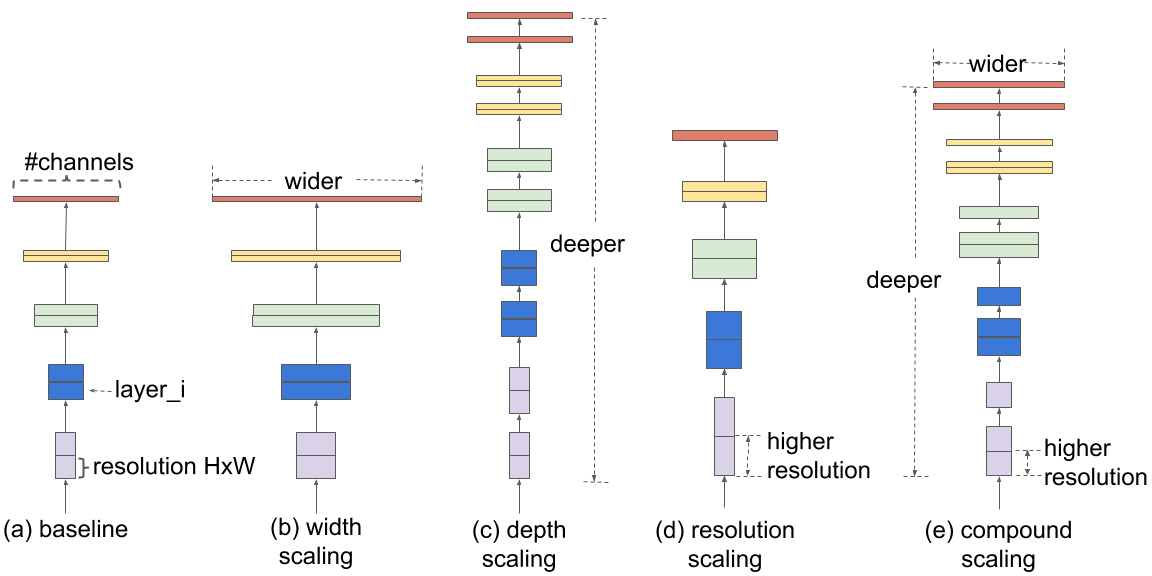
In order to understand the effect of scaling the network, we systematically studied the impact of scaling different dimensions of the model. While scaling individual dimensions improves model performance, we observed that balancing all dimensions of the network—width, depth, and image resolution—against the available resources would best improve overall performance.

The first step in the compound scaling method is to perform a grid search to find the relationship between different scaling dimensions of the baseline network under a fixed resource constraint (e.g., 2x more FLOPS).This determines the appropriate scaling coefficient for each of the dimensions mentioned above. We then apply those coefficients to scale up the baseline network to the desired target model size or computational budget.

Comparison of different scaling methods. Unlike conventional scaling methods (b)-(d) that arbitrary scale a single dimension of the network, our compound scaling method uniformly scales up all dimensions in a principled way.

This compound scaling method consistently improves model accuracy and efficiency for scaling up existing models such as MobileNet (+1.4% imagenet accuracy), and ResNet (+0.7%), compared to conventional scaling methods.

EfficientNet Architecture
The effectiveness of model scaling also relies heavily on the baseline network. So, to further improve performance, we have also developed a new baseline network by performing a neural architecture search using the AutoML MNAS framework, which optimizes both accuracy and efficiency (FLOPS). The resulting architecture uses mobile inverted bottleneck convolution (MBConv), similar to MobileNetV2 and MnasNet, but is slightly larger due to an increased FLOP budget. We then scale up the baseline network to obtain a family of models, called EfficientNets.

The architecture for our baseline network EfficientNet-B0 is simple and clean, making it easier to scale and generalize.

EfficientNet Performance
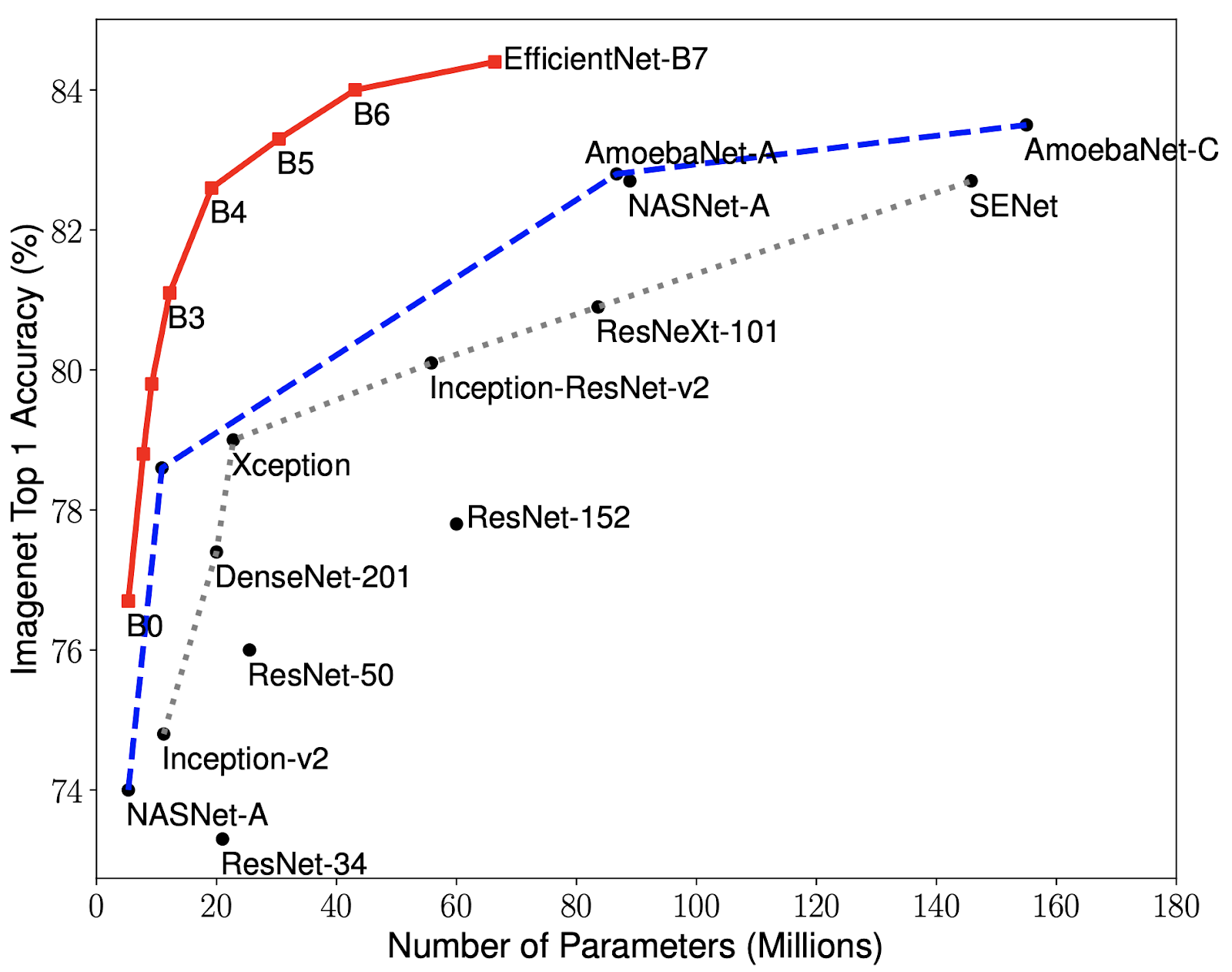
We have compared our EfficientNets with other existing CNNs on ImageNet. In general, the EfficientNet models achieve both higher accuracy and better efficiency over existing CNNs, reducing parameter size and FLOPS by an order of magnitude. For example, in the high-accuracy regime, our EfficientNet-B7 reaches state-of-the-art 84.4% top-1 / 97.1% top-5 accuracy on ImageNet, while being 8.4x smaller and 6.1x faster on CPU inference than the previous Gpipe. Compared with the widely used ResNet-50, our EfficientNet-B4 uses similar FLOPS, while improving the top-1 accuracy from 76.3% of ResNet-50 to 82.6% (+6.3%).

Model Size vs. Accuracy Comparison. EfficientNet-B0 is the baseline network developed by AutoML MNAS, while Efficient-B1 to B7 are obtained by scaling up the baseline network. In particular, our EfficientNet-B7 achieves new state-of-the-art 84.4% top-1 / 97.1% top-5 accuracy, while being 8.4x smaller than the best existing CNN.

Though EfficientNets perform well on ImageNet, to be most useful, they should also transfer to other datasets. To evaluate this, we tested EfficientNets on eight widely used transfer learning datasets. EfficientNets achieved state-of-the-art accuracy in 5 out of the 8 datasets, such as CIFAR-100 (91.7%) and Flowers (98.8%), with an order of magnitude fewer parameters (up to 21x parameter reduction), suggesting that our EfficientNets also transfer well.

By providing significant improvements to model efficiency, we expect EfficientNets could potentially serve as a new foundation for future computer vision tasks. Therefore, we have open-sourced all EfficientNet models, which we hope can benefit the larger machine learning community. You can find the EfficientNet source code and TPU training scripts here.

Acknowledgements:
Special thanks to Hongkun Yu, Ruoming Pang, Vijay Vasudevan, Alok Aggarwal, Barret Zoph, Xianzhi Du, Xiaodan Song, Samy Bengio, Jeff Dean, and the Google Brain team.

Powering a search engine with Amazon SageMaker

This is a guest post by Evan Harris, Manager of Machine Learning at Ibotta. In their own words, “Ibotta is transforming the shopping experience by making it easy for consumers to earn cash back on everyday purchases through a single smartphone app. The company partners with leading brands and retailers to offer offers on groceries, electronics, clothing, gifts, home and office supplies, restaurant dining, and more.”

The technical divisions within high-growth, mid-stage companies are prone to a unique set of challenges.  High on the list for many such companies is building quality applications quickly and effectively.

On the machine learning (ML) team at Ibotta—a mobile app that offers cash back on everyday purchases for millions of users—we have done a good deal of thinking and experimentation on this topic.  I would like to share how we leverage AWS to achieve core functionality, such as search with Amazon SageMaker.

In this post, I discuss the architecture of Ibotta’s search engine and how we use Amazon SageMaker with other AWS services to integrate real-time ML into the search experience of our mobile application. I hope that this post can shorten your search for a feasible solution to the comparable challenges in your organization, no matter the organization size.

Creating a streamlined mobile app experience, complete with a comprehensive and user-friendly search flow, is crucial for our business. Customers searching for deals before shopping must find useful content quickly or they’re liable to give up.

With a dedicated team of search relevancy engineers, ML engineers, designers, and mobile developers, we use as much modern technology as possible to rapidly develop and test new, creative improvements to our search relevancy. We prioritize the use of ML to inject data-driven intelligence into our search engine, pushing us beyond traditional information retrieval techniques.

Foundational search infrastructure

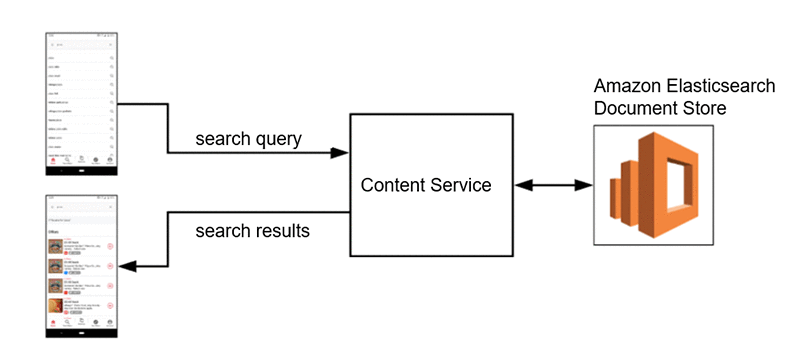
Our core infrastructure for search at Ibotta rests on our app’s array of microservices. Indexed documents live in Amazon Elasticsearch Service, which contains all of the content available to the mobile client at a given point in time. An internal content service talks to this document store on request and provides additional rules-based filtering functionality to ensure that only content available to the user making the request is returned.

The content service can receive input search queries and respond with relevant content, taking other contextual considerations into account. The service uses textbook lucene-style search relevancy techniques to retrieve appropriate content in the Elasticsearch document store.

ML-enhanced search infrastructure

The foundational search infrastructure leaves substantial room for improvement. Ibotta’s search problem space has unique challenges, particularly revolving content. One week, there might be an offer for certain brands in the app and another week they are gone. This is driven by the retailers with whom we partner, as they often want to promote an item only for a limited time.

Additionally, some brands and product categories are not available in the app at all, as we have yet to work with those retailers. We still want to show related content to users when their search queries don’t match exact content in the app. For example, a search for a non-carried brand of coffee should return other coffee brands that match across important attributes (flavor, size, price, etc.).

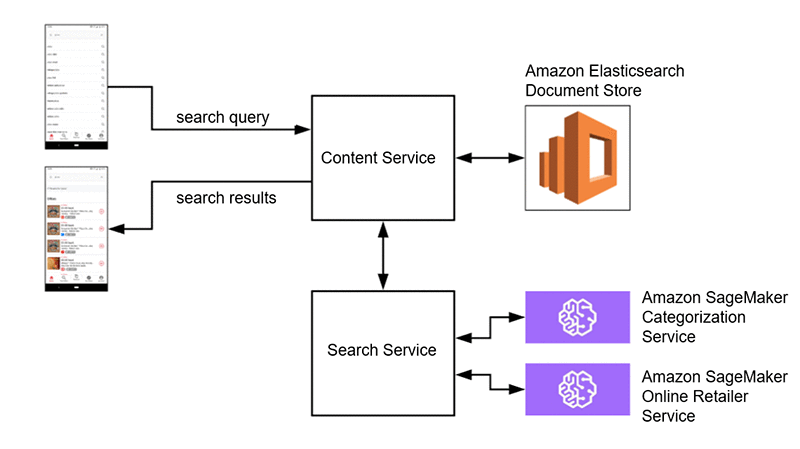
The solution here is query expansion. This is a common search technique that takes the user’s search query and adds context to it before querying the data store. In one case, we can add value by categorizing the search query in real time, enhancing the content retrieval and sorting algorithm. In other cases, after categorization, we’d like to look up and sort online retailers that specialize in the predicted category and return those as suggestions to the user.

To make these category inferences on-demand in real time, we use Amazon SageMaker. We can easily train models and deploy them as fully managed REST APIs to which internal microservices can make requests. An example request and response looks something like the following code:

Request Response
{
    "term": "organic prepared horseradish"
}

{
    "categories": [
        "Condiments, Sauces & Seasonings",    
        "Sauces"
    ],
    "score": 0.901242
}

We use BlazingText, an algorithm built in to Amazon SageMaker. The supervised version of BlazingText is a powerful, flexible, and easy to use text classification model. Out of the box, we get scalable distributed training, Bayesian hyperparameter optimization, and real-time inference endpoint deployment. We’ve spent substantial time training and deploying our own text classification models for other use cases. We found a lot to like using the built-in Amazon SageMaker model and managed training and deployment service.

In one view, below is the architecture of our ML-enhanced search services architecture. As you’ll see, the querying and retrieval mechanism described above (and captured here as well) is complemented by SageMaker, which provides two distinct value-adds. First, it enables us to categorize the search query to deliver more relevant results, and second, it enables us to provide online retailers whose offerings are relevant to the query.

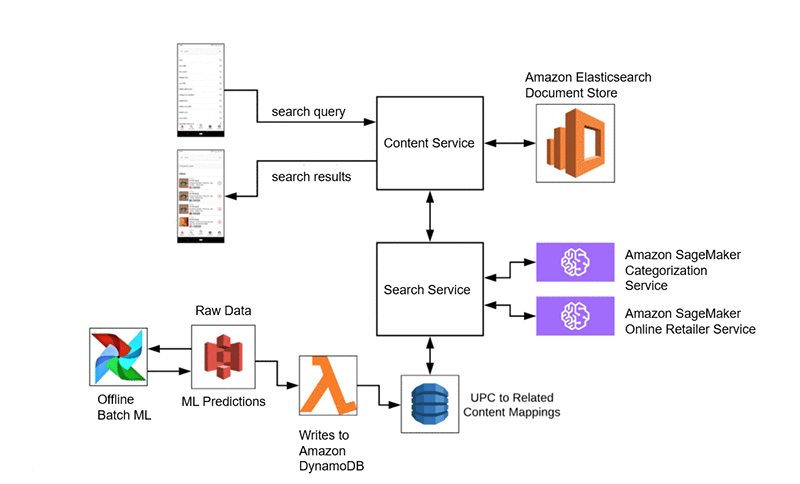
An additional ML value-add is our UPC barcode scan feature. Users can scan barcodes of consumer products with our app. If purchasing that UPC satisfies an offer, we return exact matches. If there isn’t an exact match, we use an unsupervised text similarity algorithm to find related offers to suggest to the user. If they can get cash back with our app, perhaps they will consider an alternative to the product that they scanned.

With the UPC feature, we know upfront the universe of UPCs for which we potentially have a similarity suggestion. Predictions can be made offline and written to an online data store, from which our services can make low-latency requests in real time. We use a combination of Amazon S3, AWS Lambda, Apache Airflow, and Amazon DynamoDB for this process. We see that addition to our architecture in the following diagram, in which the UPC input becomes a search query against which we execute.

We then get a mix of on-demand and batch ML models used as needed to enhance our search experience. With a broad services toolset, we are able to select the right tool for the job. Our production environment consists of fully managed AWS services, including offline data storage, online data storage, data transfer, and ML services.

Building to scale

When technologists talk about building to scale, they are often referring to horizontal scalability—perhaps something like Amazon S3 for storage or managed Kubernetes for compute. With these services, horizontal scaling is effectively infinite.

However, it’s often also useful to talk about scalability in terms of our ability to add new functionality to our services without overcomplicating any individual service or code base. Using microservices built on top of AWS, we are able to add or upgrade features while imposing minimal risk to the existing ecosystem.

We are also able to compartmentalize ownership, particularly allowing ML engineers to own their own services end-to-end. As long as the API contract doesn’t change, the ML team can iterate on their models independent of any contact with the owners of dependent services. Amazon SageMaker enables developers with basic Python skills and ML knowledge to support production microservices that integrate directly into our stack.

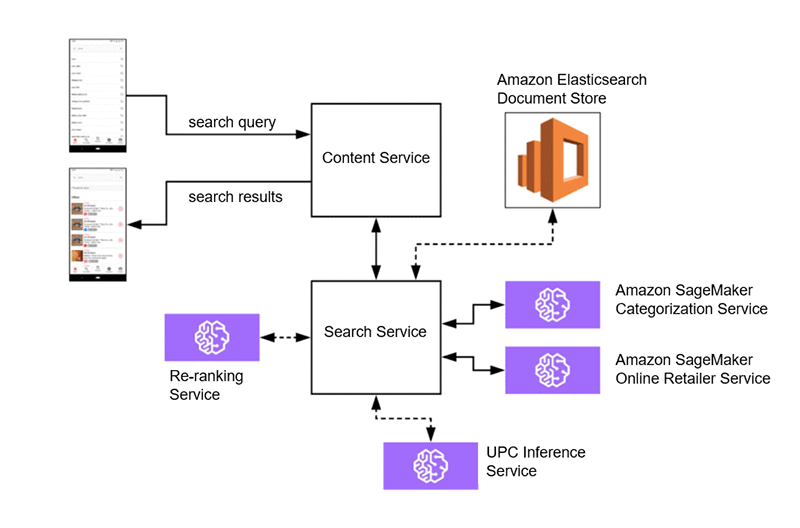
This sets us up for future iterations of our search service architecture that don’t require substantial cross functional efforts:

In this setup, perhaps we migrate our UPC prediction pipeline to an Amazon SageMaker service capable of more advanced feature extraction and inference from UPCs to predict related content. We can also migrate our Elasticsearch document store to sit directly behind the search service for more specialized search-oriented document indexing. Then we solely rely on the content service for rules-based user level filtering.

Finally, an exciting ML use case is learning to rank. After the search service retrieves a candidate set of content, we can use an Amazon SageMaker service to dynamically re-rank content in real time. This can factor in known features about content, personalization, as well as trends and seasonality.

Thanks to AWS, we have architecture that sets us up for success. We compartmentalize project work with simple integration points and ownership is clear and straightforward. ML teams can build simple services that integrate directly with our backend platform, all on top of managed infrastructure.

Conclusion

We study how the tech giants like Airbnb, Etsy, Linkedin, Wayfair, and Pinterest operate their search engines and strive to do the same at Ibotta. We regularly think about how our engineering team is comparatively fractional in size. Yet we are well-equipped to deliver similar experiences with the setup we have: our own microservices on top of AWS. The AWS services that we rely on enable us to do rapid iteration and testing that would otherwise be out of reach or impossibly slow to implement. With AWS as our preferred AI/ML provider and the underpinning of our tech stack, we’re excited about what’s next.

AI Potcast: A Joint Discussion on AI, Agtech with Grownetics CEO

The grass really is greener on the AI side. Grownetics CEO and co-founder Vince Harkiewicz would know. He helps grow it.

AI isn’t new to agtech, of course. But Grownetics, an intelligent cultivation management system for indoor farms and greenhouses, has a very specific focus: cannabis.

“We’ve specifically targeted the cannabis industry because there’s a lack of tools built for them and indoor agriculture as a whole,” Harkiewicz explained in a conversation with AI Podcast host Noah Kravitz.

Grownetics handles every step of the cultivation process, Harkiewicz says.  Using harvest data, an open sensor network and a deep learning recommendation engine, the company provides a “specific recipe leading to an ideal yield for that particular variety” of cannabis, or any crop.

While he’s focused cannabis, for now, Harkiewicz believes Grownetics’ work in the industry will support growth in the broader indoor agriculture market.

“I’d argue that [the cannabis industry is] leading the indoor-ag field,” Harkiewicz said. “The two industries don’t really communicate too much yet, and that’s really what we’re striving to do, is to bridge precision agriculture, indoor agriculture with what’s been going on in the cannabis space.”

Based in Boulder, Colo., Grownetics began running beta tests at the end of last year. Since then, the company has gained eight clients and hopes to commercially launch at the end of this year.

“It’s been intense,” Harkiewicz said. “Not only are we a startup, but we’re a startup in a startup industry.”

The cannabis industry has seen immense growth in recent years as multiple countries and U.S. states have legalized cannabis for medicinal and recreational use. However, for Grownetics’ operations in the U.S., the federal legal status of the crop poses an extra hurdle.

“Because of the federal legality, or illegality of the cannabis industry, it’s artificially suppressing the market and making it extremely hard for our customers to grow and scale great businesses,” Harkiewicz said.

Even with these legal challenges, Harkiewicz is optimistic about the future of the cannabis industry and its influence on agriculture.

“This is a systemic evolution that we’re looking at, from producing the unique medicinal product in cannabis, and doing it in a pharmaceutical high-quality, clean way,” Harkiewicz said.

“And then taking those same traits to leafy greens and produce to be growing them indoors without any pesticides, and very, very efficiently.”

Help Make the AI Podcast Better

Have a few minutes to spare? It’d help us if you fill out this short listener survey.

Your answers will help us learn more about our audience, which will help us deliver podcasts that meet your needs, what we can do better, and what we’re doing right.

How to Tune into the AI Podcast

Our AI Podcast is available through iTunesCastbox, DoggCatcher, Google Play MusicOvercastPlayerFMPodbayPodBean, Pocket Casts, PodCruncher, PodKicker, Stitcher, Soundcloud and TuneIn.

If your favorite isn’t listed here, email us at aipodcast [at] nvidia [dot] com.

The post AI Potcast: A Joint Discussion on AI, Agtech with Grownetics CEO appeared first on The Official NVIDIA Blog.