Blog

Learn About Our Meetup

5000+ Members

MEETUPS

LEARN, CONNECT, SHARE

Join our meetup, learn, connect, share, and get to know your Toronto AI community. 

JOB POSTINGS

INDEED POSTINGS

Browse through the latest deep learning, ai, machine learning postings from Indeed for the GTA.

CONTACT

CONNECT WITH US

Are you looking to sponsor space, be a speaker, or volunteer, feel free to give us a shout.

Category: Global

The Buck Starts Here: NVIDIA’s Ian Buck on What’s Next for the AI Revolution

AI is still young, but software is available to help even relatively unsophisticated users harness it.

That’s according to Ian Buck, general manager of NVIDIA’s accelerated computing group, who shared his views in our latest AI Podcast.

Buck, who helped lay the foundation for GPU computing as a Stanford doctoral candidate, will deliver the keynote address at GTC DC on Nov. 5. His talk will give an audience inside the Beltway a software-flavored update on the status and outlook of AI.

Like the tech industry, the U.S. government is embracing deep learning. “A few years ago, there was still some skepticism, but today that’s not the case,” said Buck.

Federal planners have “gotten the message for sure. You can see from the executive orders coming out and the work of the Office of Science and Technology Policy that they are putting out mandates and putting money into budgets — it’s great to see that literally billions of dollars are being invested,” he said.

The next steps will include nurturing a wide variety of AI projects to come.

“We have the mandate and budget, now we have to help all the agencies and parts of the government down to state and local levels help take advantage of this disruptive technology in areas like predictive maintenance, traffic congestion, power-grid management and disaster relief,” Buck said.

From Computer Vision to Tougher Challenges

On the commercial horizon, users already deeply engaged in AI are moving from work in computer vision to tougher challenges in natural language processing. The neural network models needed to understand human speech can be hundreds of thousands of times larger than the early models used, for example, to identify breeds of cats in the seminal 2012 ImageNet contest.

“Conversational AI represents a new level of complexity and a new level of opportunity with new use cases,” Buck said.

AI is definitely hard, he said. The good news is that companies like NVIDIA are bundling 80 percent of the software modules users need to get started into packages tailored for specific markets such as Clara for healthcare or Metropolis for smart cities.

Unleashing GPUs

Software is a field close to Ian Buck’s heart. As part of his PhD work, he developed the Brook language to harness the power of GPUs for parallel computing. His efforts evolved into CUDA, GPU programming tools at the foundation of offerings such as Clara, Metropolis and NVIDIA DRIVE software for automated vehicles.

Users “can program down at the CUDA level” or at the higher level of frameworks such as Pytorch and TensorFlow, “or go up the stack to work with our vertical market solutions,” Buck said.

It’s a journey that’s just getting started.

“AI will be pervasive all the way down to the doorbell and thermostat. NVIDIA’s mission is to help enable that future,” Buck said.

To hear our full conversation with Buck and other AI luminaries, tune into our AI Podcast wherever you download your podcasts.

(You can see Buck’s keynote live by attending GTC DC. Use the promotional code GMPOD for a 20 percent discount.) 

Help Make the AI Podcast Better

Have a few minutes to spare? Fill out this short listener survey. Your answers will help us make a better podcast.

How to Tune in to the AI Podcast

Get the AI Podcast through iTunes, Castbox, DoggCatcher, Overcast, PlayerFM, Pocket Casts, Podbay, PodBean, PodCruncher, PodKicker, Soundcloud, Stitcher and TuneIn. Your favorite not listed here? Email us at aipodcast [at] nvidia [dot] com.

The post The Buck Starts Here: NVIDIA’s Ian Buck on What’s Next for the AI Revolution appeared first on The Official NVIDIA Blog.

The AWS DeepRacer League and countdown to the re:Invent Championship Cup 2019

The AWS DeepRacer League is the world’s first autonomous racing league, open to anyone. Announced at re:Invent 2018, it puts machine learning in the hands of every developer in a fun and exciting way. Throughout 2019, developers of all skill levels have competed in the League at 21 Amazon events globally, including Amazon re:MARS and select AWS Summits, and put their skills to the test in the League’s virtual circuit via the AWS DeepRacer console. The League concludes at re:Invent 2019. Log in today and start racing—time is running out to win an expenses paid trip to re:Invent!

The final AWS Summit race in Toronto

In the eight months since the League kicked off in Santa Clara, the League has visited 17 countries, with thousands of developers completing over 13,000 laps and 165 miles of track. Each city has crowned its champion, and we will see each of them at re:Invent 2019!

On October 3, 2019, the 21st and final AWS DeepRacer Summit race took place in Toronto, Canada. The event concluded in-person racing for the AWS DeepRacer League, and not one, but four expenses paid trips were up for grabs.

First was the crowning of our Toronto champion Mohammad Al Ansari, with a winning time of 7.85 seconds, just 0.4 seconds away from beating the current world record of 7.44 seconds. Mohammad came to the AWS Summit with his colleague from Myplanet, where they took part in an AWS-led workshop for AWS DeepRacer to learn more about machine learning. They then made connections with AWS DeepRacer communities and received support from AWS DeepRacer enthusiasts such as Lyndon Leggate, a recently announced AWS ML Hero.

The re:Invent line up is shaping up

Once the racing concluded, it was time to tally up the scores for the overall competition and name the top three overall Summit participants. Foreign Exchange IT specialist Ray Goh traveled from Singapore to compete in his fourth race in his quest to top the overall leaderboard. Ray previously attended the Singapore, Hong Kong, and re:Mars races, and has steadily improved his models all year. He closed out the season with his fastest time of 8.15 seconds at the Toronto race. The other two spots went to ryan@ACloudGuru and Raycha@Kakao, who have also secured their place in the knockouts at re:Invent along with the 21 Summit Champions.

It could be you that lifts the Championship Cup

The Championship Cup at re:Invent is sure to be filled with fun and surprises, so watch this space for more information. There is still time for developers of all skill levels to advance to the knockouts. Compete now in the final AWS DeepRacer League Virtual Circuit, and it could be you who is the Champion of the 2019 AWS DeepRacer League!


About the Author

Alexandra Bush is a Senior Product Marketing Manager for AWS AI. She is passionate about how technology impacts the world around us and enjoys being able to help make it accessible to all. Out of the office she loves to run, travel and stay active in the outdoors with family and friends.


Calculating new stats in Major League Baseball with Amazon SageMaker

The 2019 Major League Baseball (MLB) postseason is here after an exhilarating regular season in which fans saw many exciting new developments. MLB and Amazon Web Services (AWS) teamed up to develop and deliver three new, real-time machine learning (ML) stats to MLB games: Stolen Base Success Probability, Shift Impact, and Pitcher Similarity Match-up Analysis. These features are giving fans a deeper understanding of America’s pastime through Statcast AI, MLB’s state-of-the-art technology for collecting massive amounts of baseball data and delivering more insights, perspectives, and context to fans in every way they’re consuming baseball games.

This post looks at the role machine learning plays in providing fans with deeper insights into the game. We also provide code snippets that show the training and deployment process behind these insights on Amazon SageMaker.

Machine learning steals second

Stolen Base Success Probability provides viewers with a new depth of understanding of the cat and mouse game between the pitcher and the baserunner.

To calculate the Stolen Base Success Probability, AWS used MLB data to train, test, and deploy an ML model that analyzes thousands of data points covering 37 variables that, together, determine whether or not a player safely arrives at second if he attempts to steal. Those variables include the runner’s speed and burst, the catcher’s average pop time to second base, the pitcher’s velocity and handedness, historical stolen base success rates for the runner, batter, and pitcher, along with relevant data about the game context.

We took a 10-fold cross-validation approach to explore a range of classification algorithms, such as logistic regression, support vector machines, random forests, and neural networks, by using historical play data from 2015 to 2018 provided by MLB that corresponds to ~7.3K stolen base attempts with ~5.5K successful stolen bases and ~1.8K runners caught stealing. We applied numerous strategies to deal with the class imbalance, including class weights, custom loss functions, and sampling strategies, and found that the best performing model for predicting the probability of stolen base success was a deep neural network trained on an Amazon Deep Learning (DL) AMI, pre-configured with popular DL frameworks. The trained model was deployed using Amazon SageMaker, which provided the subsecond response times required for integrating predictions into in-game graphics in real-time, and on ML instances that auto-scaled across multiple Availability Zones. For more information, see Deploy trained Keras or TensorFlow models using Amazon SageMaker.

As the player on first base contemplates stealing second, viewers can see his Stolen Base Success Probability score in real-time right on their screens.

MLB offered fans a pilot test and preview of Stolen Base Success Probability during the 2018 postseason. Thanks to feedback from broadcasters and fans, MLB and AWS collaborated during the past offseason to develop an enhanced version with new graphics, improved latency of real-time stats for replays, and a cleaner look. One particular enhancement is the “Go Zone,” the point along the baseline where the player’s chances of successfully making the steal reaches a minimum of 85%.

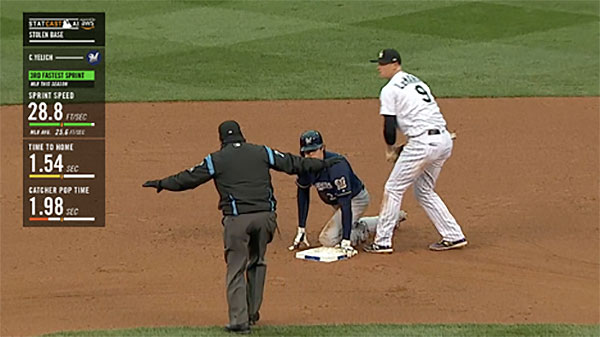
As the player extends his lead towards second, viewers can now see the probability changing dynamically and a jump in his chances of success when he hits the “Go Zone.” After the runner reaches second base, whether he gets called “safe” or “out,” viewers have the opportunity during a replay to see data generated from a variety of factors that may have determined the ultimate outcome, like the runner’s sprint speed and the catcher’s pop time. Plus, that data is color-coded in green, yellow, and red to help fans visualize the factors that played the most significant roles in determining whether or not the player successfully made it to second.
Predicting impact of infield defensive strategies

Over the last decade, there have been few changes in MLB as dramatic as the rise of the infield shift, a “situational defensive realignment of fielders away from their traditional starting points.” Teams use the shift to exploit batted-ball patterns, such as a batter’s tendency to pull batted balls (right field for left-handed hitters and left field for right-handed hitters). As a batter steps up to the plate, the defensive infielders adjust their positions to cover the area where the batter has historically hit the ball into play.

Using Statcast AI data, teams can give their defense an advantage by shifting players to prevent base hits—and teams are employing this strategy more often now than at any other time in baseball history. League-wide shifting rates have increased by 86% over the last three years, up to 25.6% in 2019 from 13.8% in 2016.

AWS and MLB teamed up to employ machine learning to give baseball fans insight into the effectiveness of a shifting strategy. We developed a model to estimate the Shift Impact—the change in a hitter’s expected batting average on ground balls—as he steps up to the plate, using historical data and Amazon SageMaker. As infielders move around the field, the Shift Impact dynamically updates by re-computing the expected batting average with the changing positions of the defenders. This provides a real-time experience for fans.

Using data to quantify the Shift Impact

A spray chart can illustrate the tendency batters have in hitting balls towards a particular direction. The chart indicates the percentage at which a player’s batted balls are hit through various sections of the field. The following chart shows the 2018 spray distribution of Joey Gallo’s (from the Texas Rangers) batted balls hit within the infielders’ reach, defined as having a projected distance of less than 200 feet away from home plate. For more information, see Joey Gallo’s current stats on Baseball Savant.
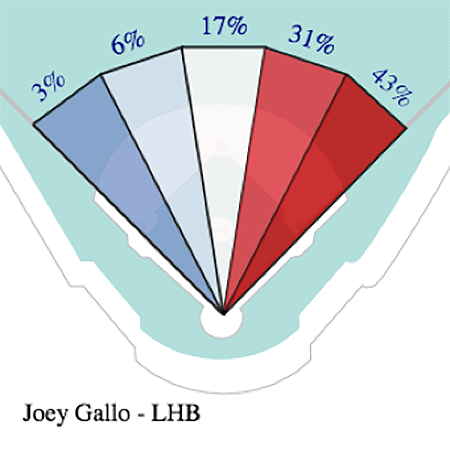
The preceding chart shows the tendency to pull the ball toward right field for Joey Gallo, who hit 74% of his balls to the right of second base in 2018. A prepared defense can take advantage of this observation by overloading the right side of the infield, cutting short the trajectory of the ball and increasing the chance of converting the batted ball into an out.

We estimated the value of specific infield alignments against batters based on their historical batted-ball distribution by taking into account the last three seasons of play, or approximately 60,000 batted balls in the infield. For each of these at-bats, we gathered the launch angle and exit velocity of the batted ball and infielder positions during the pitch, while looking up the known sprint speed and handedness of the batter. While there are many metrics for offensive production in baseball, we chose to use batting average on balls in play—that is, the probability of a ball in play resulting in a base hit.

We calculated how effective a shift might be by estimating the amount by which a specific alignment decreases our offensive measure. After deriving new features, such as the projected landing path of the ball and one-hot encoding the categorical variables, the data was ready for ingestion into various ML frameworks to estimate the probability that a ball in play results in a base hit. From that, we could compute the changes to the probability due to changing infielder alignments.

Using Amazon SageMaker to calculate Shift Impact

We trained ML models on more than 50,000 at-bat samples. We found that the results of a Bayesian search through a hyperparameter optimization (HPO) job using Amazon SageMaker’s Automatic Model Tuning feature over the pre-built XGBoost algorithm on Amazon SageMaker returned the most performant predictions with overall precision of 88%, recall of 88%, and an f1 score of 88% on the validation set of nearly 10,000 events. Launching an HPO job on Amazon SageMaker is as simple as defining the parameters to describe the job, then firing it off to the backend services that manage the core infrastructure (Amazon EC2, Amazon S3, Amazon ECS) to iterate through the defined hyperparameter space efficiently and find the optimal model.

The code snippets shown utilize boto3, the Python API for AWS products and tools. Amazon SageMaker also offers the SageMaker Python SDK, an open source library with several high-level abstractions for working with Amazon SageMaker and popular deep learning frameworks.

Defining the HPO job

We started by setting up the Amazon SageMaker client and defining the tuning job. This specifies which parameters to vary during tuning, along with the evaluation metric we wish to optimize towards. In the following code, we set it to minimize the log loss on the validation set:

import boto3
from sagemaker import get_execution_role
from sagemaker.amazon.amazon_estimator import get_image_uri

sm_client = boto3.Session().client('sagemaker')
xgboost_image = get_image_uri(boto3.Session().region_name, 'xgboost')
role = get_execution_role()

tuning_job_config = {
    "ParameterRanges": {
      "CategoricalParameterRanges": [],
      "ContinuousParameterRanges": [
        {
          "MaxValue": "1",
          "MinValue": "0",
          "Name": "eta"
        },
        {
          "MaxValue": "2",
          "MinValue": "0",
          "Name": "alpha"
        },
      ],
      "IntegerParameterRanges": [
        {
          "MaxValue": "10",
          "MinValue": "1",
          "Name": "max_depth"
        },
      ]
    },
    "ResourceLimits": {
      "MaxNumberOfTrainingJobs": 100,
      "MaxParallelTrainingJobs": 10
    },
    "Strategy": "Bayesian",
    "HyperParameterTuningJobObjective": {
      "MetricName": "validation:logloss",
      "Type": "Minimize"
    }
  }
 
training_job_definition = {
    "AlgorithmSpecification": {
      "TrainingImage": xgboost_image,
      "TrainingInputMode": "File"
    },
    "InputDataConfig": [
      {
        "ChannelName": "train",
        "CompressionType": "None",
        "ContentType": "csv",
        "DataSource": {
          "S3DataSource": {
            "S3DataDistributionType": "FullyReplicated",
            "S3DataType": "S3Prefix",
            "S3Uri": s3_input_train # path to training data
          }
        }
      },
      {
        "ChannelName": "validation",
        "CompressionType": "None",
        "ContentType": "csv",
        "DataSource": {
          "S3DataSource": {
            "S3DataDistributionType": "FullyReplicated",
            "S3DataType": "S3Prefix",
            "S3Uri": s3_input_validation # path to validation data
          }
        }
      }
    ],
    "OutputDataConfig": {
      "S3OutputPath": s3_output # outpath path for model artifacts
    },
    "ResourceConfig": {
      "InstanceCount": 2,
      "InstanceType": "ml.c4.2xlarge",
      "VolumeSizeInGB": 10
    },
    "RoleArn": role,
    "StaticHyperParameters": {
      "eval_metric": "logloss",
      "objective": "binary:logistic",
      "rate_drop": "0.3",
      "tweedie_variance_power": "1.4",
    },
    "StoppingCondition": {
      "MaxRuntimeInSeconds": 43200
    }
}

Launching the HPO job

With the tuning job defined in the Python dictionary above, we now submit it to the Amazon SageMaker client, which then automates the process of launching EC2 instances with containers optimized to run XGBoost from ECS. See the following code:

sm_client.create_hyper_parameter_tuning_job(HyperParameterTuningJobName = "tuning_job_name",
                                            HyperParameterTuningJobConfig = tuning_job_config,
                                            TrainingJobDefinition = training_job_definition)

During the game, we can analyze a given batter with his most recent at-bats and run those events through the model for all infielder positions as laid out on a grid. Since the amount of compute required for inference increases geometrically as the size of each grid cell is reduced, we adjusted the size to reach a balance between the resolution required for meaningful predictions and compute time. For example, consider a shortstop that shifts over to his left. If he moves over by only one foot, there will be a negligible effect on the outcome of a batted ball. However, if he repositions himself 10 feet to his left, that can very well put himself in a better position to field a ground ball pulled to right field. Examining all at-bats in our dataset, we found such a balance on a grid composed of 10-foot by 10-foot cells, accounting for more than 10,000 infielder configurations.

The process of obtaining the best performing model from the HPO job and deploying to production follows in the next section. Due to the large number of calls required for real-time inference, the results of the model are prepopulated into a lookup table that provides the relevant predictions during a live game.

Deploying the most performant model

Each tuning job launches a number of training jobs, from which the best model is selected according to the criteria defined earlier when configuring the HPO. From Amazon SageMaker, we first pull the best training job and its model artifacts. These are stored in the S3 bucket from which the training and validation datasets were pulled. See the following code:

# get best model from HPO job
best_training_job = smclient.describe_hyper_parameter_tuning_job(
    HyperParameterTuningJobName=tuning_job_name)['BestTrainingJob']
info = smclient.describe_training_job(TrainingJobName=best_training_job['TrainingJobName'])
model_name = best_training_job['TrainingJobName'] + '-model'
model_data = info['ModelArtifacts']['S3ModelArtifacts']

Next, we refer to the pre-configured container optimized to run XGBoost models and link it to the model artifacts of the best-trained model. Once this model-container pair is created on our account, we can configure an endpoint with the instance type, number of instances, and traffic splits (for A/B testing) of our choice:

create_model_response = sm_client.create_model(
    ModelName = model_name,
    ExecutionRoleArn = role,
    PrimaryContainer = {
        'Image': xgboost_image,
        'ModelDataUrl': model_data})

# create endpoint configuration
endpoint_config_name = model_name+'-endpointconfig'
create_endpoint_config_response = sm_client.create_endpoint_config(
    EndpointConfigName = endpoint_config_name,
    ProductionVariants=[{
        'InstanceType':'ml.m5.2xlarge',
        'InitialVariantWeight':1,
        'InitialInstanceCount':1,
        'ModelName':model_name,
        'VariantName':'AllTraffic'}])

# create endpoint
endpoint_name = model_name+'-endpoint'
create_endpoint_response = smclient.create_endpoint(
EndpointName=endpoint_name,
EndpointConfigName=endpoint_config_name)
resp = sm_client.describe_endpoint(EndpointName=endpoint_name)
status = resp['EndpointStatus']

print("Arn: " + resp['EndpointArn'])
print(create_endpoint_response['EndpointArn'])

Inference from the endpoint

The Amazon SageMaker runtime client makes predictions from the model, and sends a request to the endpoint hosting the model container on an EC2 instance and returns the output. We can configure entry points of the endpoint for custom models and data processing steps:

# invoke endpoint
runtime_client = boto3.client('runtime.sagemaker')
random_payload = np.array2string(np.random.random(num_features), separator=',', max_line_width=np.inf)[1:-1]
response = runtime_client.invoke_endpoint(EndpointName=endpoint_name, Body=random_payload)
prediction = response['Body'].read().decode("utf-8")
print(prediction) 

With all of the predictions for a given batter and infielder configurations, we then average the probability of a base hit returned from the model stored in the lookup table and subtract the expected batting average for the same sample of batted balls. The resulting metric is the Shift Impact.

Matchup Analysis

In interleague games, where teams from the American and National leagues compete against each other, many batters face pitchers they have never seen before. Estimating outcomes in interleague games is difficult because there is limited relevant historical data. AWS worked with MLB to group similar pitchers together to gain insight on how the batter has historically performed against similar pitchers. We took a machine learning approach, which allowed us to combine the domain knowledge of experts with data comprised of hundreds of thousands of pitches to find additional patterns we could use to identify similar pitchers.

Modeling

Taking inspiration from the field of recommendation systems, in which the matching problem is typically solved by computing a user’s inclination towards a product, here we seek to determine the interaction between a pitcher and batter. There are many algorithms appropriate to building recommenders, but few that allow us to then cluster like items that are put into the algorithm. Neural networks shine in this area. End layers in a neural network architecture can be interpreted as numerical representations of the input data, whether it be an image or a pitcher ID. Given input data, its associated numerical representation–or embedding–can be compared against the embeddings of other input items. Those embeddings that lie near each other are similar, not just in this embedding space, but also in interpretable characteristics. For example, we expect handedness to play a role in defining which pitchers are similar. This approach to recommendation systems and clustering items is known as deep matrix factorization.

Deep matrix factorization accounts for nonlinear interactions between a pair of entities, while also mixing in the techniques of content-based and collaborative filtering. Rather than working solely with a pitcher-batter matrix, as in matrix factorization, we build a neural network that aligns each pitcher and batter with their own embedding and then pass them through a series of hidden layers that are trained towards predicting the outcome of a pitch. In addition to the collaborative nature of this architecture, additional contextual data is included for each pitch such as the count, number of runners on base, and the score.

The model is optimized against the predicted outcome of each pitch, including both the pitch characteristics (slider, changeup, fastball, etc.) and the outcome (ball, single, strike, swinging strike, etc.). After training a model on this classification problem, the end layer of the pitcher ID input is extracted as the embedding for that particular pitcher.

Results

As a batter steps up to the plate against a pitcher he hasn’t faced before, we search for the nearest embeddings to that of the opposing pitcher and calculate the on-base plus slugging percentage (OPS) against that group of pitchers. To see the results in action, see 9/11/19: FSN-Ohio executes OPS comparison.

Summary

MLB uses cloud computing to create innovative experiences that introduce additional ways for fans to experience baseball. With Stolen Base Success Probability, Shift Impact, and Pitcher Similarity Match-up Analysis, MLB provides compelling, real-time insight into what’s happening on the field and a greater connection to the context that builds the unique drama of the game that fans love.

This postseason, fans will have many opportunities to see stolen base probability in action, the potential effects of infield alignments, and launch into debates with friends about what makes pitchers similar.

Fans can expect to see these new stats in live game broadcasts with partners such as ESPN and MLB Network. Plus, other professional sports leagues including the NFL and Formula 1 have selected AWS as their cloud and machine learning provider of choice.

You can find full, end-to-end examples of implementing an HPO job on Amazon SageMaker at the AWSLabs GitHub repo. If you’d like help accelerating your use of machine learning in your products and processes, please contact the Amazon ML Solutions Lab program.


About the Authors

Hussain Karimi is a data scientist at the Amazon ML Solutions Lab, where he works with AWS customers to develop machine learning models that uncover unique insights in various domains.


Travis Petersen is a Senior Data Scientist at MLB Advanced Media and an adjunct professor at Fordham University.



Priya Ponnapalli is a principal scientist and manager at Amazon ML Solutions Lab, where she helps AWS customers across different industries accelerate their AI and cloud adoption.

Heard Mentality: AI Voice Startup Helps Hear Customer Pain Points

Eleven years ago, Carnegie Mellon University alumni Anthony Gadient, Edward Lin and Rob Rutenbar were hunkered down in a garage, chowing pizza over late nights of coding. Eighteen months later, voice startup Voci emerged as a spinout from CMU.

Voci, like that of many early AI researchers, became a reality as a startup because of breakthroughs in deep neural networks paired with advances in GPU computing.

“Our academic roots are based in this idea that you can do better by taking advantage of application-specific hardware such as NVIDIA GPUs,” said Gadient, Voci’s chief strategy officer and co-founder.

Automated Speech Recognition 

Voci’s V-Blaze automated speech recognition offers real-time speech-to-text and audio analytics to analyze conversations between customers and call center representatives. The data can be used by customers to understand the sentiment and emotion of speakers.

Voci can provide customers with an open API to pipe the data into customer experience and sales applications.

Companies can use Voci to track what customers are saying about competitive products and different features offered elsewhere.

“There’s valuable data in those call center communications,” said Gadient.

AI Closes Deal

Voci’s automated speech recognition provides data to indicate how well sales representatives are handling calls, allowing companies to improve interactions with real-time feedback on best practices drawn from Voci’s metadata that drives products from analytics companies.

“Sales is very interesting in terms of understanding what message is effective and what is the reaction emotionally on the part of the potential buyer to different messaging,” he said.

Understanding the underlying emotion and sentiment is valuable for a number of these applications, said Gadient.

Voci’s customers include analytics companies such as Clairabridge, Call Journey and EpiAnalytics, which tap into the startup’s API for metadata that can highlight issues for customers.

Biometrics for Voice 

Voci is also addressing a problem that plagues automated customer service systems: caller verification. Many of these systems ask callers a handful of verification questions and then ask those same questions again if live support is required or if the call gets transferred.

Instead, Voci has developed an API for “voiceprints” that can identify people by voice, bypassing the maze of verification questions.

“Biometrics for voice is a problem worth solving, if only for our collective sanity. It enables machine verification of callers in the background instead of those maddening repeated questions you can face when handed off from operator to operator in a call center,” said Gadient.

GPU-Accelerated NLP 

Voci uses a multitude of neural networks and techniques to offer its natural language processing services. The service is offered either on premises or in the cloud and taps into NVIDIA V100 Tensor Core GPUs for inference.

For example, the company uses convolutional neural networks to process audio data and recurrent neural networks for language modeling to make predictions about text.

Developers at Voci trained their networks on more than 20,000 hours of audio from customers seeking results for their businesses.

“It took approximately one month to train the neural nets on a network of machines running a combination of NVIDIA P100 and V100 GPUs,” said Gadient.

Voci is a member of NVIDIA Inception, a virtual accelerator program that helps startups get to market faster.


The post Heard Mentality: AI Voice Startup Helps Hear Customer Pain Points appeared first on The Official NVIDIA Blog.

Exploring Massively Multilingual, Massive Neural Machine Translation

“… perhaps the way [of translation] is to descend, from each language, down to the common base of human communication — the real but as yet undiscovered universal language — and then re-emerge by whatever particular route is convenient.”Warren Weaver, 1949

Over the last few years there has been enormous progress in the quality of machine translation (MT) systems, breaking language barriers around the world thanks to the developments in neural machine translation (NMT). The success of NMT however, owes largely to the great amounts of supervised training data. But what about languages where data is scarce, or even absent? Multilingual NMT, with the inductive bias that “the learning signal from one language should benefit the quality of translation to other languages”, is a potential remedy.

Multilingual machine translation processes multiple languages using a single translation model. The success of multilingual training for data-scarce languages has been demonstrated for automatic speech recognition and text-to-speech systems, and by prior research on multilingual translation [1,2,3]. We previously studied the effect of scaling up the number of languages that can be learned in a single neural network, while controlling the amount of training data per language. But what happens once all constraints are removed? Can we train a single model using all of the available data, despite the huge differences across languages in data size, scripts, complexity and domains?

In “Massively Multilingual Neural Machine Translation in the Wild: Findings and Challenges” and follow-up papers [4,5,6,7], we push the limits of research on multilingual NMT by training a single NMT model on 25+ billion sentence pairs, from 100+ languages to and from English, with 50+ billion parameters. The result is an approach for massively multilingual, massive neural machine translation (M4) that demonstrates large quality improvements on both low- and high-resource languages and can be easily adapted to individual domains/languages, while showing great efficacy on cross-lingual downstream transfer tasks.

Massively Multilingual Machine Translation
Though data skew across language-pairs is a great challenge in NMT, it also creates an ideal scenario in which to study transfer, where insights gained through training on one language can be applied to the translation of other languages. On one end of the distribution, there are high-resource languages like French, German and Spanish where there are billions of parallel examples, while on the other end, supervised data for low-resource languages such as Yoruba, Sindhi and Hawaiian, is limited to a few tens of thousands.

The data distribution over all language pairs (in log scale) and the relative translation quality (BLEU score) of the bilingual baselines trained on each one of these specific language pairs.

Once trained using all of the available data (25+ billion examples from 103 languages), we observe strong positive transfer towards low-resource languages, dramatically improving the translation quality of 30+ languages at the tail of the distribution by an average of 5 BLEU points. This effect is already known, but surprisingly encouraging, considering the comparison is between bilingual baselines (i.e., models trained only on specific language pairs) and a single multilingual model with representational capacity similar to a single bilingual model. This finding hints that massively multilingual models are effective at generalization, and capable of capturing the representational similarity across a large body of languages.

Translation quality comparison of a single massively multilingual model against bilingual baselines that are trained for each one of the 103 language pairs.

In our EMNLP’19 paper [5], we compare the representations of multilingual models across different languages. We find that multilingual models learn shared representations for linguistically similar languages without the need for external constraints, validating long-standing intuitions and empirical results that exploit these similarities. In [6], we further demonstrate the effectiveness of these learned representations on cross-lingual transfer on downstream tasks.

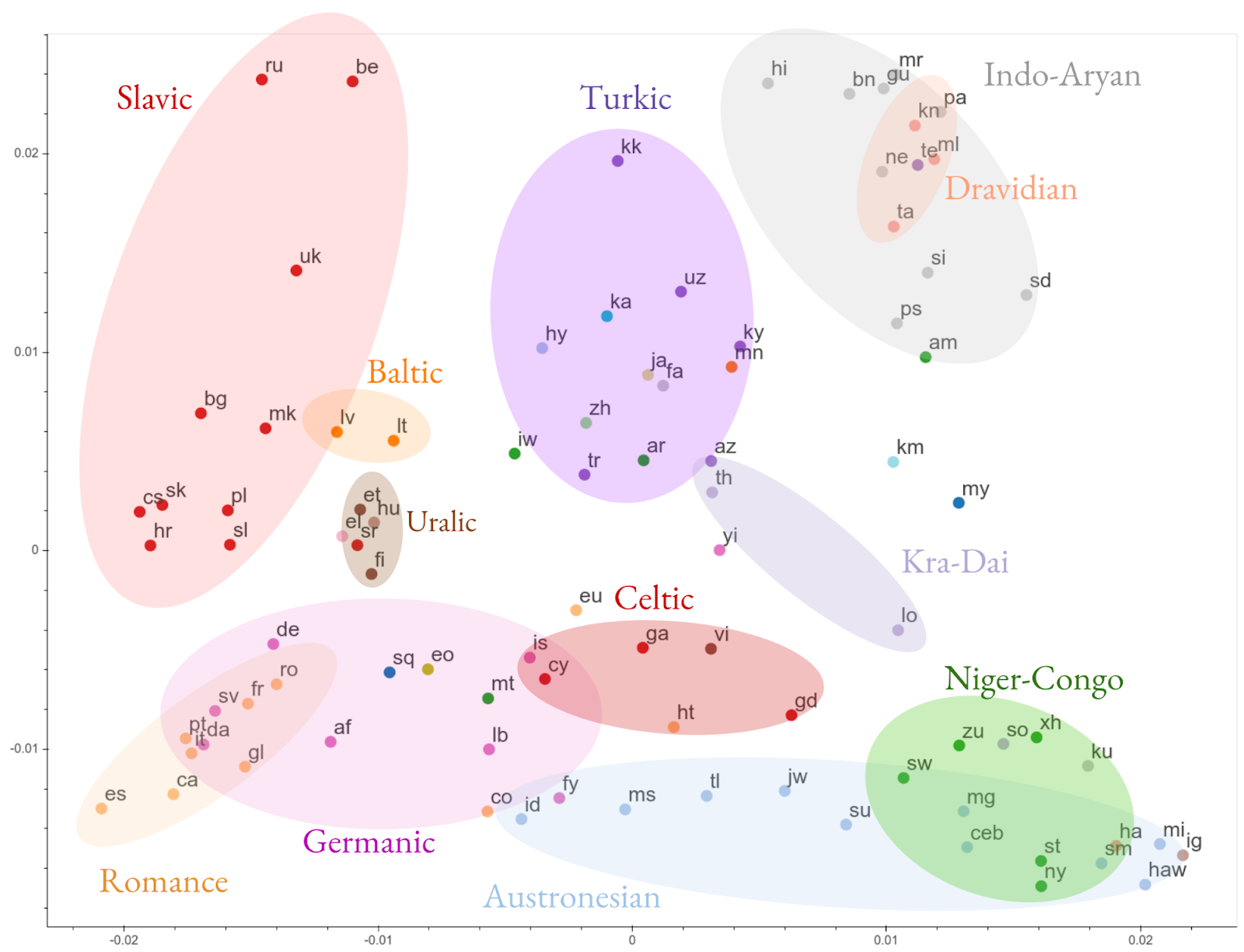
Visualization of the clustering of the encoded representations of all 103 languages, based on representational similarity. Languages are color-coded by their linguistic family.

Building Massive Neural Networks
As we increase the number of low-resource languages in the model, the quality of high-resource language translations starts to decline. This regression is recognized in multi-task setups, arising from inter-task competition and the unidirectional nature of transfer (i.e., from high- to low-resource). While working on better learning and capacity control algorithms to mitigate this negative transfer, we also extend the representational capacity of our neural networks by making them bigger by increasing the number of model parameters to improve the quality of translation for high-resource languages.

Numerous design choices can be made to scale neural network capacity, including adding more layers or making the hidden representations wider. Continuing our study on training deeper networks for translation, we utilized GPipe [4] to train 128-layer Transformers with over 6 billion parameters. Increasing the model capacity resulted in significantly improved performance across all languages by an average of 5 BLEU points. We also studied other properties of very deep networks, including the depth-width trade-off, trainability challenges and design choices for scaling Transformers to over 1500 layers with 84 billion parameters.

While scaling depth is one approach to increasing model capacity, exploring architectures that can exploit the multi-task nature of the problem is a very plausible complementary way forward. By modifying the Transformer architecture through the substitution of the vanilla feed-forward layers with sparsely-gated mixture of experts, we drastically scale up the model capacity, allowing us to successfully train and pass 50 billion parameters, which further improved translation quality across the board.

Translation quality improvement of a single massively multilingual model as we increase the capacity (number of parameters) compared to 103 individual bilingual baselines.

Making M4 Practical
It is inefficient to train large models with extremely high computational costs for every individual language, domain or transfer task. Instead, we present methods [7] to make these models more practical by using capacity tunable layers to adapt a new model to specific languages or domains, without altering the original.

Next Steps
At least half of the 7,000 languages currently spoken will no longer exist by the end of this century*. Can multilingual machine translation come to the rescue? We see the M4 approach as a stepping stone towards serving the next 1,000 languages; starting from such multilingual models will allow us to easily extend to new languages, domains and down-stream tasks, even when parallel data is unavailable. Indeed the path is rocky, and on the road to universal MT many promising solutions appear to be interdisciplinary. This makes multilingual NMT a plausible test bed for machine learning practitioners and theoreticians interested in exploring the annals of multi-task learning, meta-learning, training dynamics of deep nets and much more. We still have a long way to go.

Acknowledgements
This effort is built on contributions from Naveen Arivazhagan, Dmitry Lepikhin, Melvin Johnson, Maxim Krikun, Mia Chen, Yuan Cao, Yanping Huang, Sneha Kudugunta, Isaac Caswell, Aditya Siddhant, Wei Wang, Roee Aharoni, Sébastien Jean, George Foster, Colin Cherry, Wolfgang Macherey, Zhifeng Chen and Yonghui Wu. We would also like to acknowledge support from the Google Translate, Brain, and Lingvo development teams, Jakob Uszkoreit, Noam Shazeer, Hyouk Joong Lee, Dehao Chen, Youlong Cheng, David Grangier, Colin Raffel, Katherine Lee, Thang Luong, Geoffrey Hinton, Manisha Jain, Pendar Yousefi and Macduff Hughes.


* The Cambridge Handbook of Endangered Languages (Austin and Sallabank, 2011).

NVIDIA Collaborates with UCSF on AI Center for Radiology

University of California, San Francisco, one of the world’s top medical schools for research, unveiled today a center to develop AI tools for clinical radiology — leveraging the NVIDIA Clara healthcare toolkit and the powerful NVIDIA DGX-2 AI system.

As a founding partner of the Center for Intelligent Imaging, known as ci2, NVIDIA is working with UCSF to foster an ecosystem of industry and academic collaboration in healthcare. In addition to contributing technology tools, NVIDIA developers will work with UCSF researchers on several AI projects, including brain tumor segmentation, liver segmentation and clinical deployment.

Integrating AI into the radiology workflow can help medical institutions keep pace with an ever-growing stream of medical imaging data. The number of images acquired during common studies like MRI and CT scans has swelled in recent years from tens of images each to hundreds or thousands. It’s a challenge compounded by a rise in the number of patients being imaged.

“It makes for an absolutely overwhelming volume of information to digest,” said Christopher Hess, chair of the UCSF Department of Radiology and Biomedical Imaging. “We’re hoping to use AI to help radiologists better navigate and interact with data, to derive more meaning out of images, and to improve the value of medical imaging for the individual patient.”

Hess says the university also plans to use AI for quantitative imaging, predictive analytics and resource scheduling — giving medical professionals access to insights that were once too time-consuming to calculate or impossible to find without deep learning methods.

UCSF Adopts NVIDIA Clara and DGX Systems

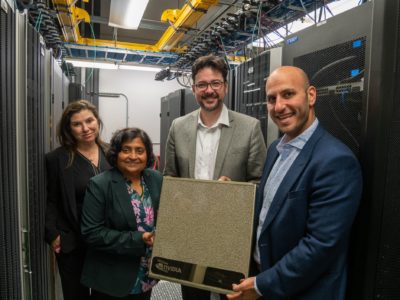
DGX-2 at UCSF AI for radiology center
UCSF’s Center for Intelligent Imaging will use the NVIDIA DGX-2 AI system to power several radiology tools. From right to left: the author, UCSF’s Hess, Sharmila Majumdar, a professor and vice chair of the radiology department at UCSF, and Mona Flores, global lead for hospitals and clinical partnerships at NVIDIA.

A leading healthcare institution with more than a century of work in radiology, UCSF has long been an innovator in medical imaging. Its radiology department collaborated with industry partners in the 1970s to develop the first MRI systems,now used worldwide to diagnose a variety of conditions, including spinal fractures and brain and heart diseases.

Close to half a million imaging studies are performed at UCSF annually. The medical center has amassed at least a petabyte of imaging data over the years — ranging from small X-ray images to much larger PET/MRI studies. These bigger files can take up gigabytes or now even terabytes of data storage.

Training deep learning models on these massive datasets requires immense computational power. By adopting the high-performance NVIDIA DGX-2, Hess estimates UCSF researchers could cut the time to train AI models from months or days down to hours or even minutes.

The DGX-2 will also enable UCSF to harness multimodal data sources to develop more sophisticated deep learning models to accelerate the radiology workflow.

“We’re interested in integrating data from not only imaging, but also from medical records, genetics and other information sources in the healthcare system,” said Hess. “When we talk about computation at scale, we need access to a high-throughput, highly efficient and computationally sophisticated platform like DGX-2 to accelerate our development cycle.”

UCSF has also adopted the NVIDIA Clara developer toolkit for medical imaging. Its researchers are using the Clara Train SDK to train deep learning models that reconstruct and analyze CT and MRI scans, and the Clara Deploy SDK to optimize integration with the center’s clinical infrastructure.

“We’re really focusing on developing ways in which to implement algorithms from the modality to the reading room,” said Hess. “NVIDIA Clara will be an essential platform to create this ecosystem to implement, validate and use AI algorithms.”

Weaving AI Into the Clinical Workflow 

NVIDIA and UCSF are working together to develop AI models that can be deployed into the medical center’s imaging workflow, starting with deep learning models to analyze scans of the brain and liver.

When doctors treat brain cancer patients, MRI scans provide critical information about how a tumor is responding to radiation treatment and chemotherapy. Today, radiologists analyze scans visually with manual tools. AI can instead provide a quantitative measurement, calculating the precise volume of a tumor. By tracking how a tumor’s volume changes from scan to scan, clinicians can better assess how a patient is responding to treatment over time.

The team is also developing an AI model that can segment and measure the left and right lobes of an organ donor’s liver from CT images. These metrics are critical for doctors planning liver transplants from a living donor to a patient, and take up to two hours to delineate and compute by hand. With deep learning, Hess estimates, it could be done in seconds.

UCSF and NVIDIA will also collaborate on tools that could improve the quality, efficiency and reproducibility of medical imaging exams. AI can be used to denoise medical images so that scans can be taken faster and are less susceptible to patient motion during scanning.

Beyond the day-to-day medical imaging workflow, the collaboration will explore predictive analytics tools to provide radiologists and other physicians insights from imaging scans, medical records and even patient sensors.

Additional deep learning algorithms will be created to improve operational efficiency at UCSF, helping its technologists optimize how the medical center’s fleet of imaging scanners is used.

The post NVIDIA Collaborates with UCSF on AI Center for Radiology appeared first on The Official NVIDIA Blog.

Managing multi-topic conversation flows with Amazon Lex Session API checkpoints

In daily conversations, you often jump back and forth between multiple topics. For example, when discussing a home improvement project related to new windows and curtains, you might have questions like, “How about closing out on curtain styles and then revisiting colors?” When AWS launched Amazon Lex Session API, you learned how to address such digressions in the conversation. You can use Session API actions to switch an intent and continue the conversation. But in everyday interactions, you might have to deal with multiple digressions: “Let’s finish selecting windows before we get to curtains.”

How do you design conversation flows that contain a series of digressions? If you are like me, you’d have a dozen questions before even considering a specific product in a home improvement project.

With session checkpoints, you can easily design a conversation to support a switch to one of many topics. You can model the home improvement conversation as two intents: OrderWindows and OrderCurtains.  Now it is easy to switch topics. The flows for OrderWindows would have a checkpoint. If the user is ordering curtains but wants to complete selecting windows first, you could move the conversation back to the OrderWindows using “windowSelection” checkpoint.

Managing session checkpoints

The Amazon Lex runtime API provides operations that enable you to manage session checkpoints for a conversation. The PutSession and GetSession calls enable you to define and retrieve checkpoints.  Here’s how you can use the APIs to manage the conversation flows described earlier. Please review the bot schema for bot details.

Follow these steps to manage the conversation flow:

  1. Store the current state of the conversation
  2. Retrieve the previously stored state and continue the conversation

Store the current state of the conversation

Call the GetSession API with no filters to retrieve the current state of the conversation between your bot and the user. The GetSession API call is followed by a PutSession API call, which applies a checkpoint ‘windowSelection’ onto the OrderWindows intent. The PutSession call is shown in the code example:

PutSession Request:  Applying 'windowSelection' checkpoint on 'OrderWindows' intent

response = client.put_session (
	botName='HomeImprovementBot',
	botAlias='Prod',
	userId='abc1234',
	recentIntentSummaryView=[
	  {
	    "intentName": "OrderCurtains",
	    "slots": {
	      "curtainSize": "None",
	      "curtainStyle": "None"
	    },
	    "confirmationStatus": "None",
	    "dialogActionType": "ElicitSlot",
	    "slotToElicit": "curtainSize",
	    "checkpointLabel": "None"
	  },
	  {
	    "intentName": "OrderWindows",
	    "slots": {
	      "windowSize": "large",
	      "windowStyle": "None"
	    },
	    "confirmationStatus": "None",
	    "dialogActionType": "ElicitSlot",
	    "slotToElicit": "windowStyle",
	    "checkpointLabel": "windowSelection"
	  }
	]
)

Retrieve the previously stored state

At this point, the OrderCurtains intent has completed. Issue a GetSession API call, while passing a ‘windowSelection’ checkpointLabelFilter. This call results with the matching intent (OrderWindows), which received the checkpoint label in the previous step.

Continue with the conversation

Finally, issue a PutSession API call, setting the next step in the conversation to be continued where the user left off in OrderWindows. The following code example lists the details for GetSession:


GetSession Request:  Filtering on 'windowSelection' CheckpointLabel

--- GetSession Request with filter: ---
 
response = client.get_session(
	botName='HomeImprovementBot',
	botAlias='Prod',
	userId='abc123',
	checkpointLabelFilter='windowSelection'
)

--- Filtered GetSession Response: --- 
{
  "recentIntentSummaryView": [
    {
      "intentName": "OrderWindows",
      "slots": {
        "windowSize": "large",
        "windowStyle": "None"
      },
      "confirmationStatus": "None",
      "dialogActionType": "ElicitSlot",
      "slotToElicit": "windowStyle",
      "checkpointLabel": "windowSelection"
    }
  ],
  "sessionAttributes": {},
  "sessionId": "XXX",
  "dialogAction": {
    "type": "ElicitSlot",
    "intentName": "OrderCurtains",
    "slots": {
      "curtainSize": "None",
      "curtainStyle": "None"
    },
    "slotToElicit": "curtainSize"
  }
}

Getting started with Session API checkpoints

In this post, you learned how to use Session API checkpoints to manage multiple digressions. You can define Session API checkpoints using the AWS SDK. You can download the bot schema for the conversation in this post to implement a quick application. For more information, see the Amazon Lex documentation.


About the Author

Shahab Shekari works as a Software Development Engineer at Amazon AI. He works on scalable distributed systems and enhancing Lex user experiences. Outside of work, he can be found traveling and enjoying the Pacific Northwest with his dogs, friends and family.


Verifying and adjusting your data labels to create higher quality training datasets with Amazon SageMaker Ground Truth

Building a highly accurate training dataset for your machine learning (ML) algorithm is an iterative process. It is common to review and continuously adjust your labels until you are satisfied that the labels accurately represent the ground truth, or what is directly observable in the real world. ML practitioners often built custom systems to review and update data labels because accurately labeled data is critical to ML model quality. If there are issues with the labels, the ML model can’t effectively learn the ground truth, which leads to inaccurate predictions.

One way that ML practitioners have improved the accuracy of their labeled data is through using audit workflows. Audit workflows enable a group of reviewers to verify the accuracy of labels (a process called label verification) or adjust them (a process called label adjustment) if needed.

Amazon SageMaker Ground Truth now features built-in workflows for label verification, and label adjustment for bounding boxes and semantic segmentation. With these new workflows, you can chain an existing Amazon SageMaker Ground Truth labeling job to a verification or adjustment job, or you can import your existing labels for a verification or adjustment job.

This post walks you through both options for bounding boxes labels. The walkthrough assumes that you are familiar with running a labeling job or have existing labels. For more information, see Amazon SageMarker Ground Truth – Build Highly Accurate Datasets and Reduce Labeling Costs by up to 70%.

Chaining a completed Amazon SageMaker Ground Truth labeling job

To chain a completed labeling job, complete the following steps.

  1. From the Amazon SageMaker Ground Truth console, choose Labeling jobs.
  2. Select your desired job.
  3. From the Actions drop-down menu, choose Chain.

The following screenshot shows the Labeling jobs page:

For more information, see Chaining labeling jobs.

The Job Overview page carries forward the configurations you used for your chained job. If there are no changes, you can move to the next section Task Type.

Configuring label verification

To use label verification, from Task type, choose Label verification.

See the following screenshot of the Task type page:

The Workers section is preconfigured to the selections you made for the chained labeling job. You can opt to choose a different workforce or stick with the same configurations for your label verification job. For more information, see Managing Your Workforce.

You can define your verification labels, for example, Label Correct, Label Incorrect – Object(s) Missed, and Label Incorrect – Box(es) Not Tightly Drawn.

You can also specify the instructions in the left-hand panel to guide reviewers on how to verify the labels.

See the following screenshot of the Label verification tool page:

Configuring label adjustment

To perform label adjustment, from the Task type section, choose Bounding box. See the following screenshot of the Task type page:

The following steps for configuring the Workers section and setting up the labeling tool are similar to creating a verification job. The one exception is that you must opt into displaying existing labels in the Existing-labels display options section. See the following screenshot:

Uploading your existing labels from outside Amazon SageMaker Ground Truth

If you labeled your data outside of Amazon SageMaker Ground Truth, you can still use the service to verify or adjust your labels. Import your existing labels by following these steps.

  1. Create an augmented manifest with both your data and existing labels.For example, in the following example code, the source-ref points to the images that were labeled, and the “bound-box” attribute is the label.
    {"source-ref": "<S3 location of image 1>", "bound-box": <bounding box label>}
    {"source-ref": "<S3 location of image 2>", "bound-box": <bounding box label>}

  2. Save your augmented manifest in Amazon S3.You should save the manifest in the same S3 bucket as your images. Also, remember the attribute name of your labels (in this post, bound-box) because you need to point to this when you set up your jobs.Additionally, make sure that the labels conform to the label format prescribed by Amazon SageMaker Ground Truth. For example, you can see the label format for bounding boxes in Bounding Box Job Output.You are now ready to create verification and adjustment jobs.
  3. From the Amazon SageMaker Ground Truth console, create a new labeling job.
  4. In Job overview, for Input dataset location, point to the S3 path of the augmented manifest that you created.See the following screenshot of the Job overview page:
  5. Follow the steps previously outlined to configure Task Type, Workers, and the labeling tool when setting up your verification or adjustment job.
  6. In Existing-labels display option, for Label attribute name, select the name of your augmented manifest from the drop-down menu.See the following screenshot of Existing-labels display options:

Conclusion

A highly accurate training dataset is critical for achieving your ML initiatives, and you now have built-in workflows to perform label verification and adjustment through Amazon SageMaker Ground Truth. This post walked you through how to use the new label verification and adjustment features. You can chain a completed labeling job, or you can upload labels. Visit the Amazon SageMaker Ground Truth console to get started.

As always, AWS welcomes feedback. Please submit any comments or questions.


About the Authors

Sifan Wang is a Software Development Engineer for AWS AI. His focus is on building scalable systems to process big data and intelligent systems to learn from the data. In his spare time, he enjoys traveling and hitting the gym.


Carter Williams is a Web Development Engineer on the Mechanical Turk Requester CX team with a focus in Computer Vision UIs. He strives to learn and develop new ways to gather accurate annotation data in intuitive ways using web technologies. In his free time, he enjoys paintball, hockey, and snowboarding.



Vikram Madan is the Product Manager for Amazon SageMaker Ground Truth. He focusing on delivering products that make it easier to build machine learning solutions. In his spare time, he enjoys running long distances and watching documentaries.


Amazon Textract is now HIPAA eligible

Today, Amazon Web Services (AWS) announced that Amazon Textract, a machine learning service that quickly and easily extracts text and data from scanned documents, is now eligible for healthcare workloads that require HIPAA certification. This launch builds upon the existing portfolio of AWS artificial intelligence services that are HIPAA-eligible, including Amazon Translate, Amazon Comprehend, Amazon Transcribe, Amazon Polly, Amazon SageMaker and Amazon Rekognition – that help deliver better healthcare outcomes.

Healthcare providers routinely extract text and data from documents such as medical records and forms through manual data entry or simple optical character recognition (OCR) software. This is a time-consuming and often inaccurate process that produces outputs requiring extensive post-processing before it can be used by other applications. What organizations want instead is the ability to accurately identify and extract text and data from forms and tables in documents of any format and from a variety of file types and templates.

Amazon Textract analyzes virtually any type of document, automatically generating highly accurate text, form, and table data. Amazon Textract identifies text and data from tables and forms in documents – such as patient information from an insurance claim or values from a table in a scanned medical chart – and recognizes a range of document formats, including those specific to healthcare and insurance, without requiring any customization or human intervention. Amazon Textract makes it easy for customers to accurately process millions of document pages in a matter of hours, significantly lowering document processing costs, and allowing customers to focus on deriving business value from their text and data instead of wasting time and effort on post-processing. Results are delivered via an API that can be easily accessed and used without requiring any machine learning experience.

Starting today, Amazon Textract is now a HIPAA-eligible service, which means healthcare customers can take full advantage of it. Many healthcare customers like Cerner, Fred Hutchinson Cancer Research Center, and The American Heart Association, are already exploring new ways use the power of ML to automate their current workloads and transform how they provide care to patients, all while meeting the security and privacy requirements required by HIPAA.

Change Healthcare is a leading independent healthcare technology company that provides data and analytics-driven solutions to improve clinical, financial, and patient engagement outcomes in the U.S. healthcare system. “At Change Healthcare, we believe that we can make healthcare affordable and accessible to all by improving the timeliness and quality of financial and administrative decisions.  This can be achieved by the power of machine learning technology to understand more from our data. But unlocking the potential of this information can often be difficult as it’s siloed in tables and forms that traditional optical character recognition hasn’t been able to analyze,” said Nick Giannasi, EVP and Chief AI Officer at Change Healthcare. “Amazon Textract further advances document understanding with the ability to retrieve structured data in addition to text, and now with the service becoming HIPAA eligible, we’ll be able to liberate the information from millions of documents and create even more value for patients, payers, and providers.”

Cambia Health Solutions is a total health solutions company and the parent company of six regional health plans, including Regence, an insurer serving 2.6 million members in Oregon, Idaho, Utah, and Washington. Cambia is transforming the health care system to be more economically sustainable and efficient for people and their families. “Over the past 100 years Cambia has been dedicated to improving health care for people and their families. To help us achieve that goal, we’re always evaluating new innovations and opportunities to optimize care coordination. One area of focus is streamlining administrative processes that are time and labor intensive. We’re excited to explore Amazon Textract to help us automate the process of extracting valuable data from paper forms accurately and efficiently. The powerful combination of data science, A.I., and a person-focused approach is key to our mission of transforming the health care system” said Faraz Shafiq, Cambia Health Solutions Chief Artificial Intelligence Officer.

ClearDATA is a HITRUST certified AWS Managed Service Provider trusted by customers across the globe to safeguard their sensitive data and power their critical applications. Matt Ferrari, Chief Technology Officer at ClearDATA, says “It’s exciting to see AWS add their optical character recognition service powered by machine learning, Amazon Textract, to their list of HIPAA eligible services. A lot of medical data that is shared among payers and providers is locked in image-based files like PDFs. Instead of manually processing that kind of data, healthcare organizations can now use Amazon Textract service to extract medical data from files that previously have been non-machine readable. This brings an opportunity to integrate this data with their electronic health records, or other cloud technologies like Amazon Comprehend Medical that can identify protected health information in the dataset.This is just another step forward in increasing the opportunity to use these emerging technologies to improve access to data, get better insights, lower costs, and improve patient and member experiences”. ClearDATA offers solutions and services that protect healthcare organizations from data privacy risks, improves their data management, and scales their healthcare IT infrastructure, along with one of the most comprehensive Business Associate Agreements in the healthcare industry.

For additional information on Amazon Machine Learning services and how healthcare and life sciences companies can run HIPAA-eligible workloads on AWS please reference the following materials:

To get started with Amazon Textract, you can click the “Get Started with Amazon Textract”, button on the Amazon Textract page. You must have an Amazon Web Services account; if you do not already have one, you will be prompted to create one during the process. Once you are signed in to your AWS account, try out Amazon Textract with your own images or PDF documents using the Amazon Textract Management Console. You can also download the Amazon Textract SDKs to start creating your own applications. Please refer to our step-by-step Getting Started Guide for more information.


About the author

Kriti Bharti is the Product Lead for Amazon Textract. Kriti has over 15 years’ experience in Product Management, Program Management, and Technology Management across multiple industries such as Healthcare, Banking and Finance, and Retail. In her time at AWS, she has helped launch a number of new services including AWS IoT Device Management and AWS IoT Device Defender. In her spare time, you can find Kriti having a pawsome time with Fifi and her cousins, reading, or learning different dance forms.