
Blog

Learn About Our Meetup

5000+ Members

MEETUPS

LEARN, CONNECT, SHARE

Join our meetup, learn, connect, share, and get to know your Toronto AI community. 

JOB POSTINGS

INDEED POSTINGS

Browse through the latest deep learning, ai, machine learning postings from Indeed for the GTA.

CONTACT

CONNECT WITH US

Are you looking to sponsor space, be a speaker, or volunteer, feel free to give us a shout.

Author: torontoai

A-Z Learning curriculum for Data Science to follow in 2019.

I’ve been learning and applying end to end data science concepts from past 2 and half years, Below is the list of resources and MOOC’s which I used to learn. If you work fast paced you can complete this in 4 months(investing 3–4 hours everyday), 2 points you need to consider for completing this course is discipline and consistency. I recommend you to watch the videos at 1.5x – 2x(try different speeds and see what suits you best).

Month 1 — Python basics and its implementation in data science

Week 1– Learn python: There are 2 learning resources very useful to learn python for data science, I recommend you to browse both in the below sequence. https://automatetheboringstuff.com/ https://www.codecademy.com/learn/learn-python

Week 2– This week will be more aggressive for python and you have to learn data science aspects of python. https://www.edx.org/course/introduction-python-data-science-2 — watch at 1.5x , if you’re new to python invest time on first 3 topics (basics , data structures , functions & packages) otherwise directly jump to section 4 i.e. Numpy , plotting with matplotlib and pandas basics. This course will give you basic idea about these libraries and its usage, if you want to explore the advance part you can refer the book by Chris Albon(https://www.amazon.ca/Machine-Learning-Python-Cookbook-Preprocessing/dp/1491989386/ref=sr_1_1?ie=UTF8&qid=1546373714&sr=8-1&keywords=chris+albon)

Week 3– By this week you’ve attained much knowledge to understand the code presented in this series https://www.youtube.com/watch?v=T5pRlIbr6gg&list=PL2-dafEMk2A6QKz1mrk1uIGfHkC1zZ6UU do replicate the code by yourself shown in these videos by Siraj and add it to your online github profile.

Week 4– This week you’ll learn the intermediate by below course provided by university of Michigan https://www.coursera.org/specializations/data-science-python. Suggestion for this course restore your browser and python editor such both are visible on the screen at a time so that you can listen to the course and do the coding side by side.

Month 2— Mathematics basics and its implementation in data science.

This whole month we are on a journey of understanding mathematics. Will divide this month learn 4 main mathematics concepts. Linear Algebra, Calculus, Probability & Statistics. Divide your study hours in such a way that you’ll visit one lecture from Math of Intelligence by Siraj( https://www.youtube.com/watch?v=xRJCOz3AfYY&list=PL2-dafEMk2A7mu0bSksCGMJEmeddU_H4D) everyday as you progress on this journey.

Week 1– Linear Algebra course by MIT, I recommend to listen it on 2.5x-3x. First listen all the concepts from the video then write it on a paper(I’ll share those concepts in my next post). 3blue1brown should be on your subscription list, Essence of Linear Algebra ( https://www.youtube.com/watch?v=kjBOesZCoqc&index=1&list=PLZHQObOWTQDPD3MizzM2xVFitgF8hE_ab) should be your next course, prefer a weekend for this course and spend 4–5 hours to finish it in one go.

Week 2– For Calculus(uni-variate and multi-variate), Essence of Calculus should be your next course.
https://www.youtube.com/playlist?list=PLZHQObOWTQDMsr9K-rj53DwVRMYO3t5Yr Consider single or 2 days to complete this course.

Week 3– Introduction to Probability, this course will take more than a week(utilize remaining calculus week 2) https://courses.edx.org/courses/course-v1:MITx+6.041x_4+1T2017/course/ By this time you may be frustrated but do not loose your cool and do not apply to any job as you have not achieve what is required for the post of Machine learning engineer or a Data Scientist.

Week 4– Introduction to statistics by Khan academy is best course for statistics (https://www.khanacademy.org/math/statistics-probability) but there is other good course as well that include whole mathematics for machine learning from Imperial college London by coursera (https://www.coursera.org/learn/pca-machine-learning/lecture/QCWpn/variance-of-higher-dimensional-datasets). Naked Statistics by Charles Wheelan is a must read by the end of this week(https://www.amazon.ca/Naked-Statistics-Stripping-Dread-Data/dp/1480590185).

Month 3- Machine Learning basics and related algorithms.

This month you will learn all the machine learning algorithms.

Week 1– This course by Udemy will help you understanding machine learning line by line, it is designed using scikit-learn and Keras (both best libraries for academia) https://www.udemy.com/machinelearning/, you will find implementation in both R and Python, i suggest keep R videos for later as you’ve already invested learning python so in each section you can skip half videos and excel this course. Also this course contains deep- learning lectures as one separate section park that aside too.

Week 2– You may not be able to complete the above mentioned course in a week and need few more days, utilize this week along with auditing a nice one from EDx ( https://courses.edx.org/courses/course-v1:ColumbiaX+DS102X+2T2018/course/) don’t revisit the concept which you’ve already covered.

Week 3– Now there is something which may seem unfair to you and let you think why do I need to repeat the same course from a different provider. but believe me as both black and white pawns are important in a chess game as they complement each other being in opposite team the below mentioned course will also complement the one you’ve learnt in week 2 and you will learn all the missing components that too using TensorFlow. (https://classroom.udacity.com/courses/ud120). Believe you can easily skim through this course and you already know the concepts but order of doing these course is important.

Week 4– Now its the time to apply your knowledge to some real world problem and create you resume. Take part in any kaggle competition which involves categorization or regression and complete it till end and submit your solution(the confidence you’ll get by doing this is something no univ. degree can give you).

Month 4- Deep Learning basics from beginner to advance.

This month you’ll be applying all your knowledge to learn advance concepts, taking part in kaggle competitions and start applying for the jobs.

Week 1– Again, I’ll ask you to revisit Udemy for A-Z Deep Leaning course (https://www.udemy.com/deeplearning), don’t forget to add each code to your github profile as you keep progressing throughout this month.

Week 2 & 3 – Revisiting the same concept again will reinforce that concept and you’ll never forget it as it will be imprinted on your brain. Udacity’s deep learning nanodegree is such course (take its certificate that will help you finding new career opportunities)

Week 4– This week you’ll be finalizing your concepts and start fulfilling your dreams. I recommend to go through fast.ai course (http://course.fast.ai/) and a brilliant course and story telling by Edx (https://www.edx.org/course/analytics-storytelling-impact-1) . Genuinely both can’t be completed in a week’s time but try to complete as soon as you can.

Conclusion : Till this point you’ve learnt enough concepts and have a good github profile to showcase potential recruiters. Keep posting your work on github as you proceed throughout the course. I’ll post detailed concepts in my next posts so that you don’t have to carry your notes. All the best and keep learning till you die.

Use AWS Machine Learning to Analyze Customer Calls from Contact Centers (Part 2): Automate, Deploy, and Visualize Analytics using Amazon Transcribe, Amazon Comprehend, AWS CloudFormation, and Amazon QuickSight

In the previous blog post, we showed you how to string together Amazon Transcribe and Amazon Comprehend to be able to conduct sentiment analysis on call conversations from contact centers. Here, we demonstrate how to leverage AWS CloudFormation to automate the process and deploy your solution at scale.

Solution Architecture

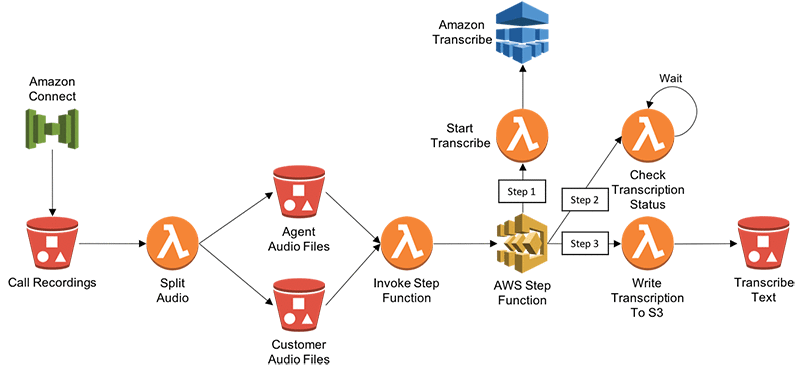
The following diagram illustrates architecture that takes uses Amazon Transcribe to create text transcripts of call recordings from contact centers. In this example, we refer to Amazon Connect (cloud-based contact center service), but the architecture could work for any contact center.
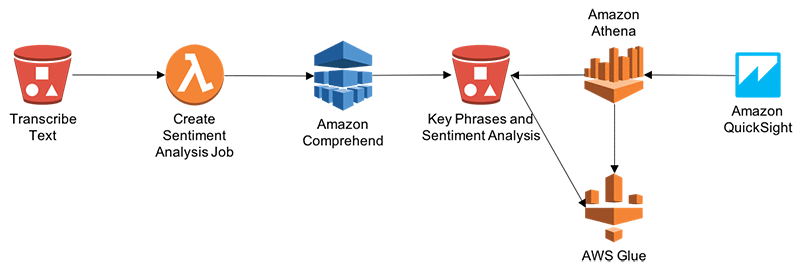
The following diagram describes the architecture for processing transcribed text by using Amazon Comprehend to conduct Entity, Sentiment and Key Phrases analysis. Finally, we can visualize the analysis using a combination of Athena and QuickSight.
Automate and Deploy using AWS CloudFormation

Here, we will use AWS CloudFormation to automate and deploy the above solution.

First, login to AWS Console and Click on this link to launch the template in CloudFormation.

In the console, provide the following parameters:

  • RecordingsPrefix: S3 prefix where split recordings will be stored
  • TranscriptsPrefix: S3 prefix where transcribed text will be stored
  • TranscriptionJobCheckWaitTime: Time in seconds to wait between transcription wait checks

Leave all other default values. Select both “I acknowledge that AWS CloudFormation might create IAM resources” checkboxes, click on “Create Change Set”, and then choose Execute.

This solution follows below steps:

  1. Amazon Connect drops call recording and CTR records into Amazon S3
  2. S3 Put request triggers AWS Lambda function to split call recording into two media channels – One for Agent and other for Customer. It drops two output audio files into different folders.
  3. Audio drop into S3 folder triggers Lambda function to invoke AWS Step Function.
  4. Step function is used here for scheduling Lambda Functions, which invokes APIs for Amazon Transcribe.
    1. Step 1 from Step Function starts Transcriptions of Audio files.
    2. Step 2 checks status of Transcription Job at regular intervals. Once job status is complete then it goes to Step 3.
    3. Step 3 – Once Transcription Job Status is complete, it writes Transcribed output into S3 Folder.
  5. Transcribed text drop into S3 triggers Lambda, which invokes Amazon Comprehend APIs and writes Entity, Sentiment, Key Phrases and Language output into S3 folder. If you need to write output into Amazon Data Warehouse – Redshift then you can leverage Kinesis Firehose.
  6. AWS Glue is used to maintain database catalogue and database table structure. Amazon Athena to query data out of S3 using Glue database catalogue. This completes the CloudFormation template.
  7. Amazon QuickSight is used to analyze call recordings and performs sentiment, Key Phrases analysis of caller and Agent’s interactions.

Visualize Analysis using Amazon QuickSight

We can visualize Amazon Comprehend’s sentiment analysis by using Amazon QuickSight. First, we must grant Amazon QuickSight access to Amazon Athena and the associated S3 buckets in the account. For more information on doing this, see Managing Amazon QuickSight Permissions. We can then create a new data set in Amazon QuickSight based on the Athena table that was created during deployment.

After setting up permissions, we can create a new analysis in Amazon QuickSight by choosing New analysis.

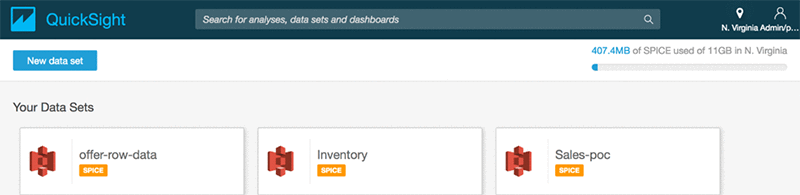
Then we add a new data set.
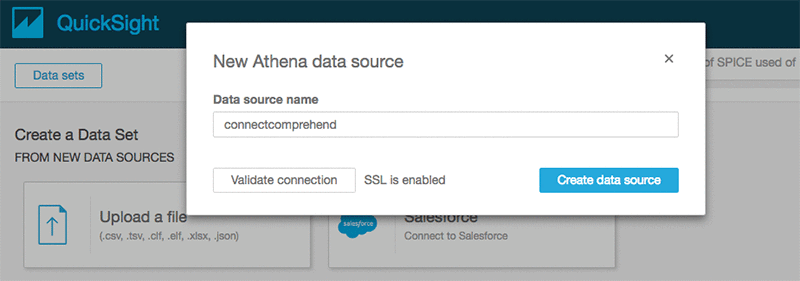
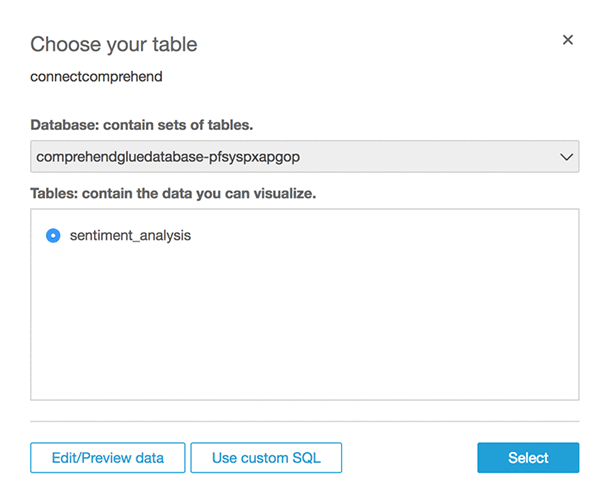
We choose Athena as the source and give the data source a name such as connectcomprehend.
Choose the name of the database and the Use Customer SQL
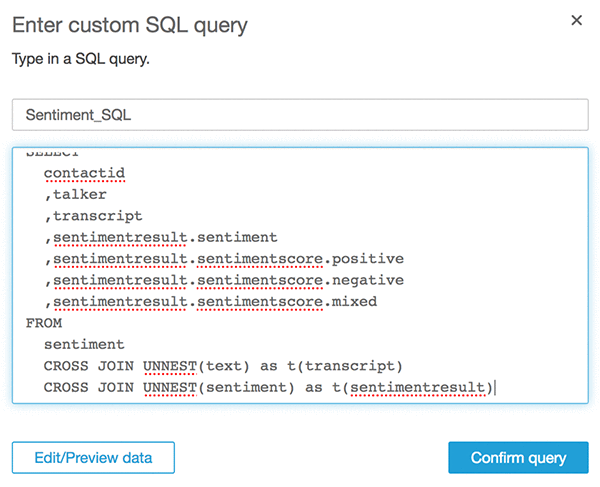
Give a Name to Custom SQL such as “Sentiment_SQL” and enter below SQL. Replace Database name <YOUR DATABASE NAME> with your one.

WITH sentiment AS (
  SELECT
    contactid
    ,talker
    ,text
    ,sentiment
  FROM
    "<YOUR DATABASE NAME>"."sentiment_analysis"
)
SELECT
  contactid
  ,talker
  ,transcript
  ,sentimentresult.sentiment
  ,sentimentresult.sentimentscore.positive
  ,sentimentresult.sentimentscore.negative
  ,sentimentresult.sentimentscore.mixed
FROM
  sentiment
  CROSS JOIN UNNEST(text) as t(transcript)
  CROSS JOIN UNNEST(sentiment) as t(sentimentresult)

Choose Confirm query.
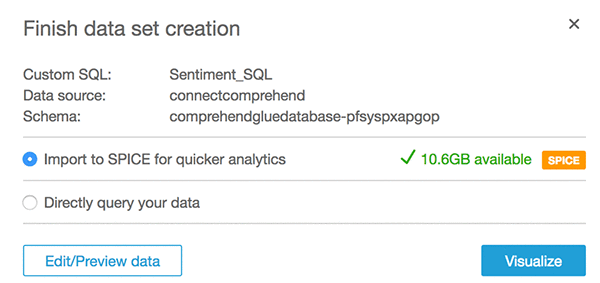
Select Import to SPICE option and then choose Visualize
After that, we should see the following screen.
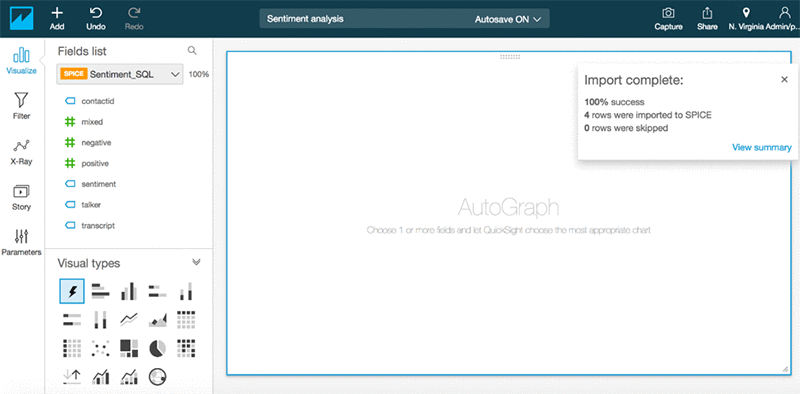
Now we can create some visualizations by adding Sentiment Analysis into visualization.
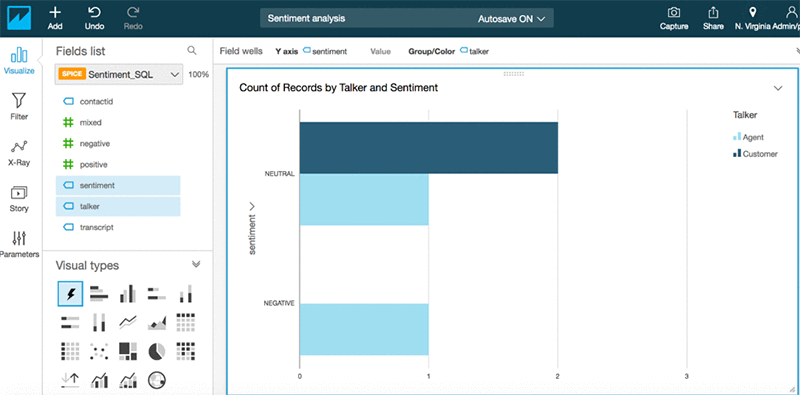
Similarly, you can analyze other Comprehend output such as Entity, Key Phrases, and Language. If you have Amazon Connect CTR records available on S3 then you can blend data between comprehend output with CTR records.

Conclusion

Amazon AI services such as Amazon Transcribe and Amazon Comprehend make it easy to analyze contact center recordings by blending it with other data sources such as CTR (Call Details), Call Flow Logs, and business-specific attributes. Enterprises can reap significant benefits by realizing the hidden value in the massive amounts of caller-agent audio recordings from their contact centers. By deriving meaningful insights, enterprises can enhance both efficiency and performance of call centers and improve their overall service quality to end customers. So far, we’ve used Amazon Transcribe to transform audio data into text transcripts and then used Amazon Comprehend to run text analysis. Along the way, we’ve also used Lambda and Step Functions to string together the solution. And finally, AWS Glue, Amazon Athena, and Amazon Quicksight to visualize the analysis.


About the Authors

Deenadayaalan Thirugnanasambandam is a Senior Cloud Architect in the Professional Services team in Australia.



Piyush Patel is a big data consultant with AWS.



Paul Zhao is a Sr. Product Manager at AWS Machine Learning. He manages the Amazon Transcribe service. Outside of work, Paul is a motorcycle enthusiast and avid woodworker.



Revanth Anireddy is a professional services consultant with AWS.



Loc Trinh is a Solutions Architect for AWS Database and Analytics services. In his spare time, he captures data from his eating and fitness habits and uses analytical modeling to determine why he is still out of shape.


Transcribe speech in three new languages: French, Italian, and Brazilian Portuguese

We’re excited to announce that Amazon Transcribe now supports automatic speech recognition in three new languages: French, Italian, and Brazilian Portuguese. These new languages expand upon the 5 languages already available in Amazon Transcribe: US English, US Spanish, Australian English, British English, and Canadian French.

Using the Amazon Transcribe API, you can analyze audio files stored in Amazon S3 and have the service return a text file of the transcribed speech. You can also send a live audio stream to Amazon Transcribe and receive a stream of transcripts in real time. Automatic transcription is proving to be an extremely useful tool for many developers, across many domains (such as subtitles for videos, contact center call analytics and compliance, court depositions, and generally improving accessibility to any application).

You can learn more about how to use transcription in contact centers (including Amazon Connect) from this recent re:Invent breakout session:

French, Italian, and Brazilian Portuguese transcription is available at the same price, and in the same Regions, as other languages in Amazon Transcribe. You can try the new set of languages through the AWS Management Console, the AWS Command Line Interface, and the AWS SDKs.


About the Author

Paul Zhao is a Sr. Product Manager at AWS Machine Learning. He manages the Amazon Transcribe service. Outside of work, Paul is a motorcycle enthusiast and avid woodworker.