Posted by Paul Dille, Senior Software Developer, Carnegie Mellon University CREATE Lab, and Chris Herwig, Geo Data Engineer, Google Earth Outreach 
Six years ago, we first introduced
Google Earth Timelapse, a global, zoomable time-lapse video that lets anyone explore our changing planet’s surface—from the global scale to the local scale. Earth Timelapse consists of 83 million multi-resolution overlapping video tiles, which are made interactively explorable through the open-source
Time Machine client software developed at Carnegie Mellon University’s
CREATE Lab. At its core, Google Earth Timelapse is an example of how organizing information can make it more accessible and useful, turning petabytes of satellite imagery into an interactive experience that shows the dynamic changes occurring across space and time.
In April, we introduced several updates to Timelapse, including two additional years of imagery to the time-series visualization, which now spans from 1984 to 2018, with visual upgrades that make exploring more accessible and intuitive. We are especially excited that this update includes support for mobile and tablet devices, which are quickly overtaking desktop computers as the dominant source of app traffic.
Building the Global Visualization
Making a planetary-sized time-lapse video required a significant amount of pixel crunching in Earth Engine, Google’s cloud platform for petabyte-scale geospatial analysis. The new release followed a process similar to what we did in 2013, but at a significantly greater scale—turning 15 million satellite images acquired over the last three and a half decades from the USGS/NASA Landsat and European Sentinel programs into 35 cloud-free 4-terapixel images of the planet—one for each year from 1984 to 2018.
At its native resolution, the Timelapse visualization is a 4 terapixel video (that’s four trillion pixels), which would take about 12 days to download on a 95 Mb/s internet connection. Most computers would have difficulty playing a video of this size, let alone with an interactive, zoomable interface. The problem is even more severe for a mobile device.
A solution was pioneered by Google Maps in 2004 with the map pyramiding technique. Before that time, navigating a map required the use of directional arrows to pan and zoom, with each step requiring the page to reload. The map pyramiding technique assembles the full map image displayed on-screen from tens of small 256×256 pixel non-overlapping image tiles in an array, with new tiles fetched as needed at an appropriate resolution as the user pans and zooms across the map.
 |
| A traditional Mercator map pyramid contains non-overlapping image tiles. |
This works very well for maps made of static images, but less so for pyramids of video tiles, such as those used by Timelapse, since it requires a web browser to keep up to 16 videos in sync while interacting with the visualization. The solution is embodied in CREATE Lab’s open source Time Machine software: create much larger video tiles that can cover the entire screen and only show one whole-screen tile at a time. The tiles create a pyramid, where sibling tiles overlap with their neighbors to provide a seamless transition between tiles while panning and zooming. Though the overlapping tiles require the use of about 16x more videos, this pyramid structure enables the use of Timelapse on mobile devices by minimizing the amount of data required for visualization.
In our newest release, the global video pyramid consists of 83 million videos across 13 zoom levels, which required about 2 million CPU hours distributed across thousands of machines in Google Cloud to generate.
 |
| Earth Timelapse uses a pyramid of overlapping video tiles. |
Time Travel, Wherever You Are
Prior to April’s update, ~30% of visitors to the Timelapse visualization were on mobile devices and didn’t actually experience the visualization; instead they saw a YouTube playlist of locations in Timelapse. Until recently, the hardware and CPUs for phones and tablets could not decode videos fast enough without significant delays when someone attempted to zoom in or pan across a video, making mobile exploration unpleasant, if not impossible. In addition, in order for the visualization to be smooth as you pan and zoom, each video that is loaded must sync to the previously playing video and begin playing automatically. But, until only recently, mobile browser vendors had disabled video autoplay at the browser level for bandwidth reasons.
Now that mobile browser vendors have re-enabled video autoplay, we are able to take advantage of current mobile hardware and CPU capabilities, while leveraging the pyramid mapping technique’s efficient use of data, to enable Timelapse on mobile.
Redesigning Timelapse for Exploration Across Devices
Timelapse is a tool for exploration, so we designed for immersiveness, devoting as much real estate as possible to the map. On the other hand, it’s not just a map, but a map of videos. So we kept controls visible, like pausing and restarting the timeline or choosing highlights, by leveraging Material Design with simple, clean lines and clear focal areas.
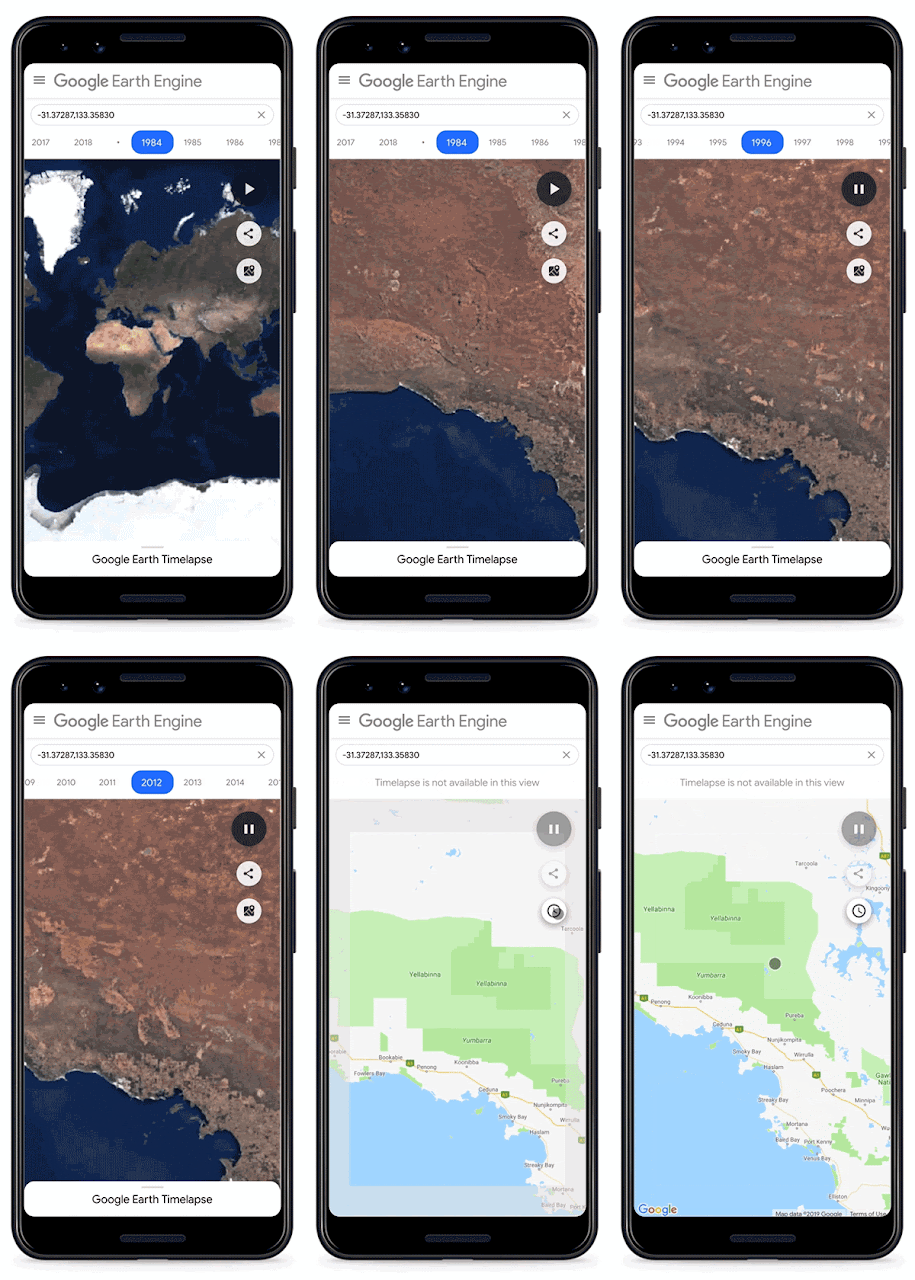 |
| Navigate with Google Maps using the new “Maps Mode” toggle. |
To explore, you need to know where you are or where somewhere else is, so the new interface includes a new “Maps Mode” toggle that lets the user navigate with Google Maps. We also built in scalability to the timeline element of the UI, so that new features added in the future, such as lengthening the time-lapse or adding options for different time increments, won’t break the design. The timeline also allows the user to go backwards in time—an interesting way to compare the present with the past.
For desktop browsers supporting WebGL, we also added a new WebGL viewer to the open source project, which loads and synchronizes multiple videos to fill the screen at optimal resolution. The aesthetic improvement of this is nontrivial, with >4x better resolution.
What’s next
We’re excited about the abundance of freely available, openly licensed satellite imagery and remote sensing data available, enabling new visualizations across time, space, and the visual and non-visual spectrum. We’ve found it’s often the data combined with supplemental layers, such as the World Database on Protected Areas (WDPA) boundaries, that can spark new insights. For example, seeing the visual connection between declining home ownership and shifts in the city of Pittsburgh’s racial makeup tells a story about inequality that numbers on a page simply cannot. Visual evidence can transcend language and cultural barriers and, we hope, generate productive conversations about our global challenges.
Acknowledgements
Randy Sargent, Senior Systems Scientist, Carnegie Mellon University CREATE Lab and the Google Earth Engine team


