Author: torontoai
Creating a recommendation engine using Amazon Personalize
This is a guest blog post by Phil Basford, lead AWS solutions architect, Inawisdom.
At re:Invent 2018, AWS announced Amazon Personalize, which allows you to get your first recommendation engine running quickly, to deliver immediate value to your end user or business. As your understanding increases (or if you are already familiar with data science), you can take advantage of the deep capabilities of Amazon Personalize to improve your recommendations.
Working at Inawisdom, I’ve noticed increasing diversity in the application of machine learning (ML) and deep learning. It seems that nearly every day I work on a new exciting use case, which is great!
The most well-known and successful ML use cases have been retail websites, music streaming apps, and social media platforms. For years, they’ve been embedding ML technologies into the heart of their user experience. They commonly provide each user with an individual personalized recommendation, based on both historic data points and real-time activity (such as click data).
Inawisdom was lucky enough to be given early access to try out Amazon Personalize while it was in preview release. Instead of giving it to data scientists or data engineers, the company gave it to me, an AWS solutions architect. With no prior knowledge, I was able to get a recommendation from Amazon Personalize in just a few hours. This post describes how I did so.
Overview
The most daunting aspect of building a recommendation engine is knowing where to start. This is even more difficult when you have limited or little experience with ML. However, you may be lucky enough to know what you don’t know (and what you should figure out), such as:
- What data to use.
- How to structure it.
- What framework/recipe is needed.
- How to train it with data.
- How to know if it’s accurate.
- How to use it within a real-time application.
Basically, Amazon Personalize provides a structure and supports you as it guides you through these topics. Or, if you’re a data scientist, it can act as an accelerator for your own implementation.
Creating an Amazon Personalize recommendation solution
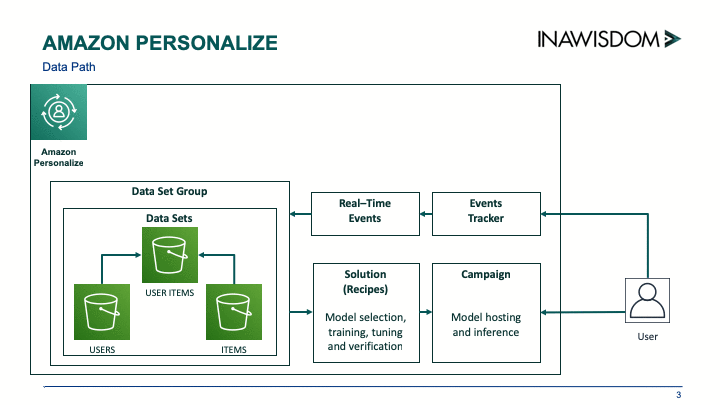
You can create your own custom Amazon Personalize recommendation solution in a few hours. Work through the process in the following diagram.
Creating dataset groups and datasets
When you open Amazon Personalize, the first step is to create a dataset group, which can be created from loading historic data or from data gathered from real-time events. In my evaluation of Amazon Personalize at Inawisdom, I used only historic data.
When using historic data, each dataset is imported data from a .csv file located on Amazon S3, and each dataset group can contain three datasets:
- Users
- Item
- Interactions
For the purpose of this quick example, I only prepared the Interactions data file, because it’s required and the most important.
The Interactions dataset contains a many-to-many relationship (in old relational database terms) that maps USER_ID to ITEM_ID. Interactions can be enriched with optional User and Item datasets that contain additional data linked by their IDs. For example, for a film-streaming website, it can be valuable to know the age classification of a film and the age of the viewer and understand which films they watch.
When you have all your data files ready on S3, import them into your data group as datasets. To do this, define a schema for the data in the Apache Avro format for each dataset, which allows Amazon Personalize to understand the format of your data. Here is an example of a schema for Interactions:
In evaluating Amazon Personalize, you may find that you spend more time at this stage than the other stages. This is important and reflects that the quality of your data is the biggest factor in producing a usable and accurate model. This is where Amazon Personalize has an immediate effect—it’s both helping you and accelerating your progress.
Don’t worry about the format of the data, just the key fields being identified. Don’t get caught up in worrying about what model to use or the data it needs. Your focus is just on making your data accessible. If you’re just starting out in ML, you can get a basic dataset group working quickly with minimal data. If you’re a data scientist, you probably come back to this stage again to improve and add more data points (data features).
Creating a solution
When you have your dataset group with data in it, the next step is to create a solution. A solution covers two areas—selecting the model (recipe) and then using your data to train it. You have recipes and a popularity baseline from which to choose. Some of the recipes on offer include the following:
- Personalized reranking (search)
- SIMS—related items
- HRNN (Coldstart, Popularity-Baseline, and Metadata)—user personalization
If you’re not a data scientist, don’t worry. You can use AutoML, which runs your data against each of the available recipes. Amazon Personalize then judges the best recipe based on the accuracy results produced. This also covers changing some of the settings to get better results (hyperparameters). The following image shows a solution with the metric section at the bottom showing accuracy:
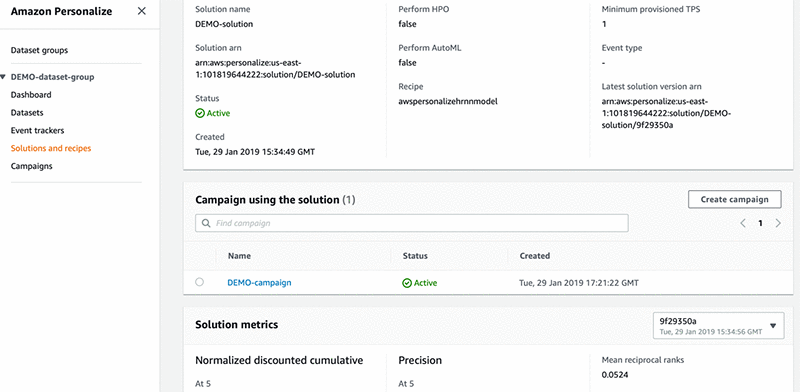
Amazon Personalize allows you to get something up and running quickly, even if you’re not a data scientist. This includes not just model selection and training, but restructuring the data into what each recipe requires and hiding the hassle of spinning up servers to run training jobs. If you are a data scientist, this is also good news, because you can take full control of the process.
Creating a campaign
After you have a solution version (a confirmed recipe and trained artifacts), it’s time to put it into action. This isn’t easy, and there is a lot to consider in running ML at scale.
To get you started, Amazon Personalize allows you to deploy a campaign (an inference engine for your recipe and the trained artifacts) as a PaaS. The campaign returns a REST API that you can use to produce recommendations. Here is an example of calling your API from Python:
The results:
Conclusion
Amazon Personalize is a great addition to the AWS set of machine learning services. Its two-track approach allows you to quickly and efficiently get your first recommendation engine running and deliver immediate value to your end user or business. Then you can harness the depth and raw power of Amazon Personalize, which will keep you coming back to improve your recommendations.
Amazon Personalize puts a recommendation engine in the hands of every company and is now available in US East (Ohio), US East (N. Virginia), US West (Oregon), Asia Pacific (Tokyo), Asia Pacific (Singapore) and EU (Ireland). Well done, AWS!
[P] Write with Transformer
HuggingFace has published a new web interface for the small (117M parameter) and medium (345M parameter) versions of GPT-2 that let you interact directly with the model, by writing a prompt, asking for several completions using a customizable decoder, editing the completions if needed and asking further completions.
It’s a great way to test how the model reacts to various probing patterns and content, investigate what kind of common sense is stored in the model and to test future interfaces of creative writing in which a human and a language model could collaborate together.
It can be accessed here: https://transformer.huggingface.co
submitted by /u/Thomjazz
[link] [comments]
[N] Deep Graph Library v0.3 release
Graph Neural Network has become the new fashion in many graph-based learning problems. Deep Graph Library (DGL) is a Python package built for easy implementation of graph neural network model family, on top of existing DL frameworks (e.g. PyTorch, MXNet, Gluon etc.). As the team behind this library, we want to share with you the new release of DGL (v0.3) that is much faster (up to 19x faster) and more scalable for training GNNs on large graphs (up to 8x larger). Checkout our full release note here: https://www.dgl.ai/release/2019/06/12/release.html .
For whom have never heard of DGL or Graph Neural Network, maybe it is worth to take a look at this new trend of geometric deep learning. Some links here:
- Checkout this 10-minute tutorial about how to use Graph Neural Network to predict community membership (https://docs.dgl.ai/tutorials/basics/1_first.html).
- Checkout more about how a variety of models can be unified under the message passing framework and can be implemented in DGL (https://docs.dgl.ai/tutorials/models/index.html).
- Our github repo: https://github.com/dmlc/dgl
- Our project site: https://www.dgl.ai/ . We publish many blogs about the new findings in this area.
submitted by /u/jermainewang
[link] [comments]
[D] Quoc Le is silently killing it in 2019
Over the past 6 months, he’s been an author on
- EfficientNet: Rethinking Model Scaling for Convolutional Neural Networks
- Attention Augmented Convolutional Networks
- Transformer-XL: Attentive language models beyond a fixed-length context
- The Effect of Network Width on Stochastic Gradient Descent and Generalization
- Unsupervised Data Augmentation
- Soft Conditional Computation
- Selfie: Self-supervised Pretraining for Image Embedding
- NAS-FPN: Learning Scalable Feature Pyramid Architecture for Object Detection
- Specaugment: A simple data augmentation method for automatic speech recognition
- Using videos to evaluate image model robustness
- Searching for MobileNetV3
- The Evolved Transformer
I know he always does great research, but is there anyone else who’s had this much impact recently? That list of papers is impressive, and for them all to have come out in a six month period with contributions from the same author is almost ridiculous.
I figured he should get a shout out. If there’s discussion to be had, I’d love to know who else has been moving the field (maybe in other areas like RL or NLP) as much recently.
submitted by /u/thatguydr
[link] [comments]
[D] Best Of AI articles of May 2019
I just came across a Best Of AI articles of May 2019. What do you think of this selection? What are your favorite AI articles of the past month?
submitted by /u/__yannickw__
[link] [comments]
[P] Scaling DeepSpeech using Mixed Precision and KubeFlow
An overview of changes we’ve made to our PyTorch ASR training to integrate KubeFlow and mixed-precision to speed up and scale our ASR training pipeline:
https://medium.com/@seannaren/scaling-deepspeech-using-mixed-precision-and-kubeflow-b83965e79173
Code: https://github.com/SeanNaren/deepspeech.pytorch
KubeFlow branch coming very soon (need to update our scripts since KubeFlow has improved since).
Would love to hear any feedback or questions!
submitted by /u/Stormfreek
[link] [comments]
[P] CURL: How to learn better sentence embeddings
Hi there,
I’ve been working on a project about SOTA methods in learning sentence embeddings. In particular I took a look at Quickthoughts, which uses a word2vec-like objective, seeking to identify “related” sentences.
As such I’ve produced an open PyTorch implementation of QuickThoughts here: https://github.com/jcaip/quickthoughts
In adddition I tried to use the theoretical framework described by Arora et al. about contrastive unsupervised representation learning, to examine the effect of changing the context_size of Quickthoughts, and offer a possible modification that should increase performance. Unfortunately this was unsuccessful, but hopefully you’ll still find the work interesting.
Post: https://jcaip.github.io/Quickthoughts/
Please lmk if you have any questions/comments, thanks for reading!
submitted by /u/kingcai
[link] [comments]
[D] Using embeddings to improve upon NER
I’m currently using Spacy (CRF-based) and updating/training it with my own tags for a data set. However, the results aren’t too great. I was wondering if there was a simple way use embeddings like word2vec or the like and just improve the approach.
Thanks!
submitted by /u/throwawat2312
[link] [comments]