Amazon SageMaker supports all the popular deep learning frameworks, including TensorFlow. Over 85% of TensorFlow projects in the cloud run on AWS. Many of these projects already run in Amazon SageMaker. This is due to the many conveniences Amazon SageMaker provides for TensorFlow model hosting and training, including fully managed distributed training with Horovod and parameter servers.
Customers are increasingly interested in training models on large datasets, which can take a week or more. In these cases, you might be able to speed the process by distributing training on multiple machines or processes in a cluster. This post discusses how Amazon SageMaker helps you set up and launch distributed training with TensorFlow quickly, without the expense and difficulty of directly managing your training clusters.
Starting with TensorFlow version 1.11, you can use Amazon SageMaker prebuilt TensorFlow containers: Simply provide a Python training script, specify hyperparameters, and indicate your training hardware configuration. Amazon SageMaker does the rest, including spinning up a training cluster and tearing down the cluster when training ends. This feature is called “script mode.” Script mode currently supports two distributed training approaches out-of-the-box:
- Option #1: TensorFlow’s native parameter server (TensorFlow versions 1.11 and above)
- Option #2: Horovod (TensorFlow versions 1.12 and above)
In the following sections, we provide an overview of the steps required to enable these TensorFlow distributed training options in Amazon SageMaker script mode.
Option #1: Parameter servers
One common pattern in distributed training is to use one or more dedicated processes to collect gradients computed by “worker” processes, then aggregate them and distribute the updated gradients back to the workers in an asynchronous manner. These processes are known as parameter servers.
In a TensorFlow parameter server cluster in Amazon SageMaker script mode, each instance in the cluster runs one parameter server process and one worker process. Each parameter server communicates with all workers (“all-to-all”), as shown in the following diagram (from Meet Horovod: Uber’s Open Source Distributed Deep Learning Framework for TensorFlow):
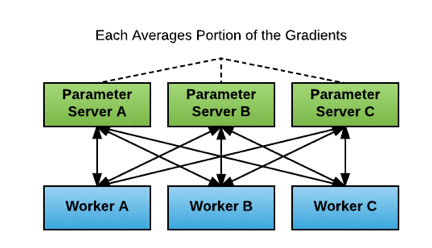
In Amazon SageMaker script mode, the implementation of parameter servers is asynchronous: each worker computes gradients and submits gradient updates to the parameter servers independently, without waiting for the other workers’ updates.
In practice, asynchronous updates usually don’t have an overly adverse impact. Workers that fall behind might submit stale gradients, which can negatively affect training convergence. Generally, this can be managed by reducing the learning rate. On the plus side, because there is no waiting for other workers, asynchronous updates can result in faster training.
If you use Amazon SageMaker script mode, you don’t have to set up and manage the parameter server cluster yourself. The Amazon SageMaker prebuilt TensorFlow container comes with a built-in script mode option for use with parameter servers. Using this option saves time and spares you the complexities of cluster management.
The following code example shows how to set up a parameter server cluster with script mode. Specify “parameter_server” as the value in the distributions parameter of an Amazon SageMaker TensorFlow Estimator object. Amazon SageMaker script mode then launches a parameter server thread on each instance in the training cluster and executes your training code in a separate worker thread on each instance. To run a distributed training job with multiple instances, set train_instance_count to a number larger than 1.
from sagemaker.tensorflow import TensorFlow

ps_instance_type = 'ml.p3.2xlarge'
ps_instance_count = 2

distributions = {'parameter_server': {
                    'enabled': True}
                }

hyperparameters = {'epochs': 60, 'batch-size' : 256}

estimator_ps = TensorFlow( base_job_name='ps-cifar10-tf',
                           source_dir='code',
                           entry_point='train_ps.py',
                           role=role,
                           framework_version='1.13',
                           py_version='py3',
                           hyperparameters=hyperparameters,
                           train_instance_count=ps_instance_count,
                           train_instance_type=ps_instance_type,
                           model_dir=model_dir,
                           distributions=distributions )

# start training; inputs can be in Amazon S3, Amazon EFS, or Amazon FSx for Lustre
estimator_ps.fit(inputs)
For an example of how to use parameter server-based distributed training with script mode, see our TensorFlow Distributed Training Options example on GitHub.
Option #2: Horovod
Horovod is an open source framework for distributed deep learning. It is available for use with TensorFlow and several other deep learning frameworks. As with parameter servers, Amazon SageMaker automates Horovod cluster setup and runs the appropriate commands to make sure that training goes smoothly without the need for you to manage clusters directly yourself.
Horovod’s cluster architecture differs from the parameter server architecture. Recall that the parameter server architecture uses the all-to-all communication model, where the amount of data sent is proportional to the number of processes. By contrast, Horovod uses Ring-AllReduce, where the amount of data sent is more nearly proportional to the number of cluster nodes, which can be more efficient when training with a cluster where each node has multiple GPUs (and thus multiple worker processes).
Additionally, whereas the parameter server update process described above is asynchronous, in Horovod updates are synchronous. After all processes have completed their calculations for the current batch, gradients calculated by each process circulate around the ring until every process has a complete set of gradients for the batch from all processes.
At that time, each process updates its local model weights, so every process has the same model weights before starting work on the next batch. The following diagram shows how Ring-AllReduce works (from Meet Horovod: Uber’s Open Source Distributed Deep Learning Framework for TensorFlow):

Horovod employs Message Passing Interface (MPI), a popular standard for managing communication between nodes in a high-performance cluster, and uses NVIDIA’s NCCL library for GPU-level communication.
The Horovod framework eliminates many of the difficulties of Ring-AllReduce cluster setup and works with several popular deep learning frameworks and APIs. For example, if you are using the popular Keras API, you can use either the reference Keras implementation or tf.keras directly with Horovod without converting to an intermediate API such as tf.Estimator.
In Amazon SageMaker script mode, Horovod is available for TensorFlow version 1.12 or newer. When you use Horovod in script mode, the Amazon SageMaker TensorFlow container sets up the MPI environment and executes the mpirun command to start jobs on the cluster nodes. To enable Horovod in script mode, you must change the Amazon SageMaker TensorFlow Estimator and your training script. To configure training with Horovod, specify the following fields in the distributions parameter of the Estimator:
- enabled (bool): If set to
True, MPI is set up and the mpirun command executes.
- processes_per_host (int): Number of processes MPI should launch on each host. Set this flag for multi-GPU training.
- custom_mpi_options (str): Any
mpirun flags passed in this field are added to the mpirun command and executed by Amazon SageMaker for Horovod training.
The number of processes MPI launches on each host should not be greater than the available slots on the selected instance type.
For example, here’s how to create an Estimator object to launch Horovod distributed training on two hosts with one GPU/process each:
from sagemaker.tensorflow import TensorFlow

hvd_instance_type = 'ml.p3.2xlarge'
hvd_processes_per_host = 1
hvd_instance_count = 2

distributions = {'mpi': {
                    'enabled': True,
                    'processes_per_host': hvd_processes_per_host,
                    'custom_mpi_options': '-verbose --NCCL_DEBUG=INFO -x OMPI_MCA_btl_vader_single_copy_mechanism=none'
                        }
                }

hyperparameters = {'epochs': 60, 'batch-size' : 256}

estimator_hvd = TensorFlow(base_job_name='hvd-cifar10-tf',
                           source_dir='code',
                           entry_point='train_hvd.py',
                           role=role,
                           framework_version='1.13',
                           py_version='py3',
                           hyperparameters=hyperparameters,
                           train_instance_count=hvd_instance_count,
                           train_instance_type=hvd_instance_type,
                           distributions=distributions)

# start training; inputs can be in Amazon S3, Amazon EFS, or Amazon FSx for Lustre
estimator_hvd.fit(inputs)
Besides modifying the Estimator object, you also must make the following additions to the training script. You can make these changes conditional based on whether MPI is enabled.
- Run
hvd.init().
- Pin a server GPU to be used by this process using
config.gpu_options.visible_device_list. With the typical setup of one GPU per process, you can set this to local rank. In that case, the first process on the server allocates the first GPU, second process allocates the second GPU, and so forth.
- Scale the learning rate by number of workers. Effective batch size in synchronous distributed training should scale by the number of workers. An increase in learning rate compensates for the increased batch size.
- Wrap the optimizer in
hvd.DistributedOptimizer. The distributed optimizer delegates gradient computation to the original optimizer, averages gradients using allreduce, and then applies those averaged gradients.
- Add the code
hvd.BroadcastGlobalVariablesHook(0) to broadcast initial variable states from rank 0 to all other processes. This initial broadcast makes sure that all workers receive consistent initialization (with random weights or restored from a checkpoint) when training starts. Alternatively, if you’re not using MonitoredTrainingSession, you can execute the hvd.broadcast_global_variables op after global variables initialize.
- Modify your code to save checkpoints only on worker 0 to prevent other workers from corrupting them. To do this, pass
checkpoint_dir=None to tf.train.MonitoredTrainingSession if hvd.rank() != 0.
Find more details about Horovod at the Horovod GitHub Repository. For an example of Horovod usage with script mode, see our TensorFlow Distributed Training Options example on GitHub.
Choosing a distributed training option
Before moving to distributed training in a cluster, make sure that you have first tried scaling up on a single machine with multiple GPUs. Communication between multiple GPUs on a single machine is faster than communicating across a network between multiple machines. For more details, see the AWS whitepaper Power Machine Learning at Scale.
If you must scale out to a cluster instead of scaling up with more GPUs within a single machine, the next consideration is whether to choose the parameter server option or Horovod. This choice partly depends on the version of TensorFlow that you are using.
- For TensorFlow versions 1.11 and newer in Amazon SageMaker script mode, you can use parameter servers.
- To use Horovod, you must use TensorFlow versions 1.12 or newer.
The following chart summarizes some general guidelines regarding performance for each option. These rules aren’t absolute, and ultimately, the best choice depends on the specific use case. Typically, the performance significantly depends on how long it takes to share gradient updates during training. In turn, this is affected by the model size, gradients size, GPU specifications, and network speed.
|
Better CPU performance |
Better GPU performance |
|
Relatively long time to share gradients
(larger number of gradients / bigger model size)
|
Parameter server |
Parameter server, OR Horovod on a single instance with multi-GPUs |
|
Relatively short time to share gradients
(smaller number of gradients / lesser model size)
|
Parameter server |
Horovod |
Complexity is another consideration. Parameter servers are straightforward to use for one GPU per instance. However, to use multi-GPU instances, you must set up multiple towers, with each tower assigned to a different GPU. A “tower” is a function for computing inference and gradients for a single model replica, which in turn is a copy of a model training on a subset of the complete dataset. Towers involve a form of data parallelism. Horovod also employs data parallelism but abstracts away the implementation details.
Finally, cluster size makes a difference. Given larger clusters with many GPUs, parameter server all-to-all communication can overwhelm network bandwidth. Reduced scaling efficiency can result, among other adverse effects. In such situations, you might find Horovod a better option.
Additional considerations
The example code for this post consists of one large TFRecord file containing the CIFAR-10 dataset, which is relatively small. However, larger datasets might require that you shard the data into multiple files, particularly if Pipe Mode is used (see the second bullet following). Sharding may be accomplished by specifying an Amazon S3 data source as a manifest file or ShardedByS3Key. Also, Amazon SageMaker provides other ways to make distributed training more efficient for very large datasets:
- VPC training: Performing Horovod training inside a VPC improves the network latency between nodes, leading to higher performance and stability of Horovod training jobs. To learn how to conduct distributed training within a VPC, see the example notebook Horovod Distributed Training with Amazon SageMaker TensorFlow script mode.
- Pipe Mode: For large datasets, using Pipe Mode reduces startup and training times. Pipe Mode streams training data from Amazon S3 directly to the algorithm (as a Linux FIFO), without saving to disk. For details about using Pipe Mode with TensorFlow in Amazon SageMaker, see Training with Pipe Mode using PipeModeDataset.
- Amazon FSx for Lustre and Amazon EFS: performance on large datasets in File Mode may be improved in some circumstances using either Amazon FSx for Lustre or Amazon EFS. For more details, please refer to the related blog post.
Conclusion
Amazon SageMaker provides multiple tools to make distributed training quicker and easier to use. If neither parameter server nor Horovod fit your needs, you can always provide another distributed training option using a Bring Your Own Container (BYOC) approach. Amazon SageMaker gives you the flexibility to mix and match the tools best suited for your use case and dataset.
To get started with Tensorflow distributed training in script mode, go to Amazon SageMaker console. Either create a new Amazon SageMaker notebook instance or open an existing one. Then, simply import the distributed training example referenced in this blog post, and compare and contrast the parameter server option and the Horovod option.
About the authors
 Rama Thamman is R&D Manager on the AWS R&D and Innovation Solutions Architecture team. He works with customers to build scalable cloud and machine learning solutions on AWS.
 Brent Rabowsky focuses on data science at AWS and uses his expertise to help AWS customers with their data science projects.