In the previous blog post, we showed you how to string together Amazon Transcribe and Amazon Comprehend to be able to conduct sentiment analysis on call conversations from contact centers. Here, we demonstrate how to leverage AWS CloudFormation to automate the process and deploy your solution at scale.
Solution Architecture
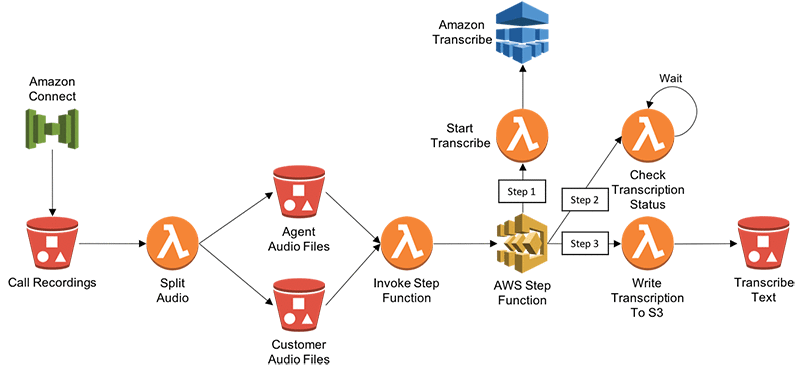
The following diagram illustrates architecture that takes uses Amazon Transcribe to create text transcripts of call recordings from contact centers. In this example, we refer to Amazon Connect (cloud-based contact center service), but the architecture could work for any contact center.
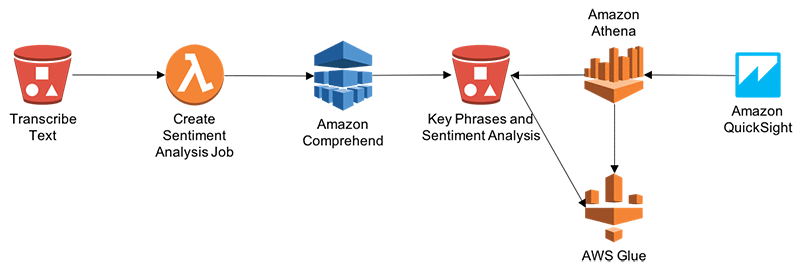
The following diagram describes the architecture for processing transcribed text by using Amazon Comprehend to conduct Entity, Sentiment and Key Phrases analysis. Finally, we can visualize the analysis using a combination of Athena and QuickSight.
Automate and Deploy using AWS CloudFormation
Here, we will use AWS CloudFormation to automate and deploy the above solution.
First, login to AWS Console and Click on this link to launch the template in CloudFormation.
In the console, provide the following parameters:
- RecordingsPrefix: S3 prefix where split recordings will be stored
- TranscriptsPrefix: S3 prefix where transcribed text will be stored
- TranscriptionJobCheckWaitTime: Time in seconds to wait between transcription wait checks
Leave all other default values. Select both “I acknowledge that AWS CloudFormation might create IAM resources” checkboxes, click on “Create Change Set”, and then choose Execute.
This solution follows below steps:
- Amazon Connect drops call recording and CTR records into Amazon S3
- S3 Put request triggers AWS Lambda function to split call recording into two media channels – One for Agent and other for Customer. It drops two output audio files into different folders.
- Audio drop into S3 folder triggers Lambda function to invoke AWS Step Function.
- Step function is used here for scheduling Lambda Functions, which invokes APIs for Amazon Transcribe.
- Step 1 from Step Function starts Transcriptions of Audio files.
- Step 2 checks status of Transcription Job at regular intervals. Once job status is complete then it goes to Step 3.
- Step 3 – Once Transcription Job Status is complete, it writes Transcribed output into S3 Folder.
- Transcribed text drop into S3 triggers Lambda, which invokes Amazon Comprehend APIs and writes Entity, Sentiment, Key Phrases and Language output into S3 folder. If you need to write output into Amazon Data Warehouse – Redshift then you can leverage Kinesis Firehose.
- AWS Glue is used to maintain database catalogue and database table structure. Amazon Athena to query data out of S3 using Glue database catalogue. This completes the CloudFormation template.
- Amazon QuickSight is used to analyze call recordings and performs sentiment, Key Phrases analysis of caller and Agent’s interactions.
Visualize Analysis using Amazon QuickSight
We can visualize Amazon Comprehend’s sentiment analysis by using Amazon QuickSight. First, we must grant Amazon QuickSight access to Amazon Athena and the associated S3 buckets in the account. For more information on doing this, see Managing Amazon QuickSight Permissions. We can then create a new data set in Amazon QuickSight based on the Athena table that was created during deployment.
After setting up permissions, we can create a new analysis in Amazon QuickSight by choosing New analysis.

Then we add a new data set.
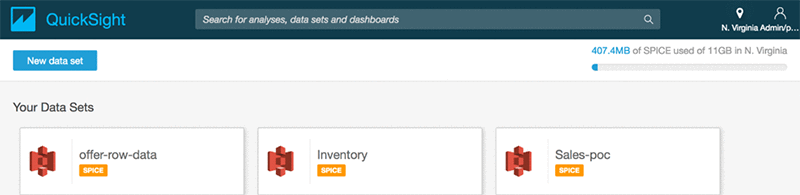
We choose Athena as the source and give the data source a name such as connectcomprehend.
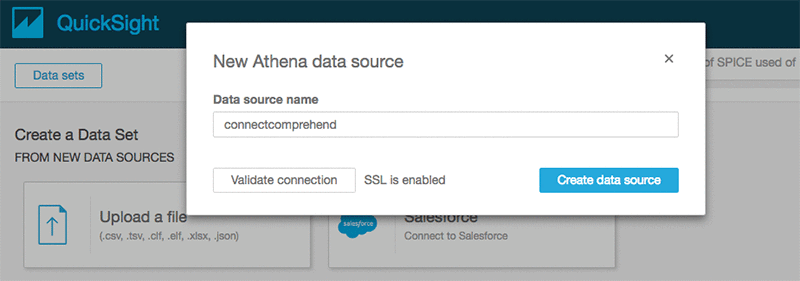
Choose the name of the database and the Use Customer SQL
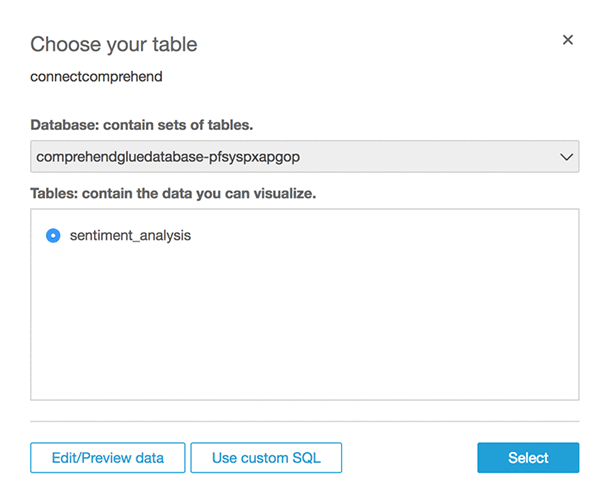
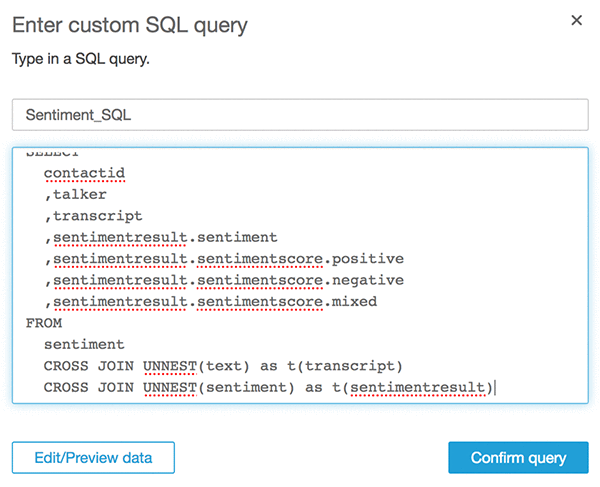
Give a Name to Custom SQL such as “Sentiment_SQL” and enter below SQL. Replace Database name <YOUR DATABASE NAME> with your one.
WITH sentiment AS (
  SELECT
    contactid
    ,talker
    ,text
    ,sentiment
  FROM
    "<YOUR DATABASE NAME>"."sentiment_analysis"
)
SELECT
  contactid
  ,talker
  ,transcript
  ,sentimentresult.sentiment
  ,sentimentresult.sentimentscore.positive
  ,sentimentresult.sentimentscore.negative
  ,sentimentresult.sentimentscore.mixed
FROM
  sentiment
  CROSS JOIN UNNEST(text) as t(transcript)
  CROSS JOIN UNNEST(sentiment) as t(sentimentresult)
Choose Confirm query.
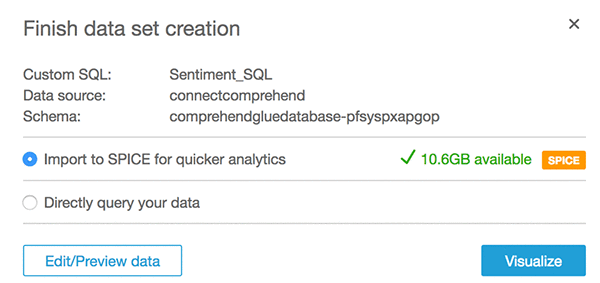
Select Import to SPICE option and then choose Visualize
After that, we should see the following screen.
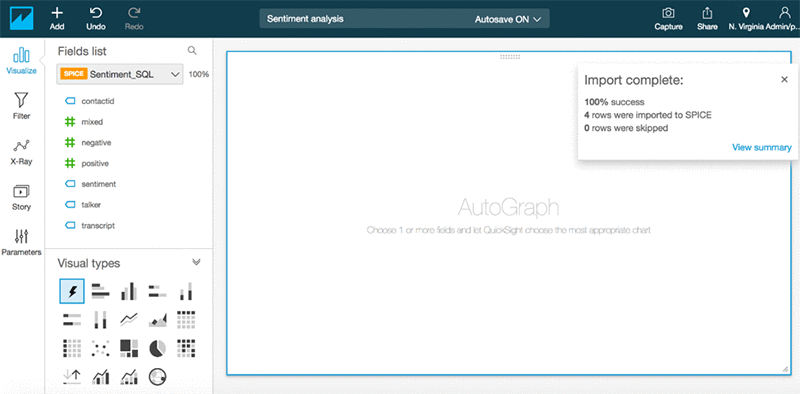
Now we can create some visualizations by adding Sentiment Analysis into visualization.
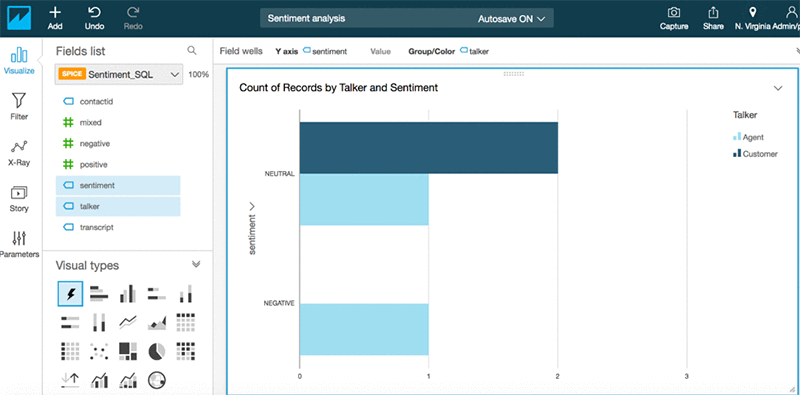
Similarly, you can analyze other Comprehend output such as Entity, Key Phrases, and Language. If you have Amazon Connect CTR records available on S3 then you can blend data between comprehend output with CTR records.
Conclusion
Amazon AI services such as Amazon Transcribe and Amazon Comprehend make it easy to analyze contact center recordings by blending it with other data sources such as CTR (Call Details), Call Flow Logs, and business-specific attributes. Enterprises can reap significant benefits by realizing the hidden value in the massive amounts of caller-agent audio recordings from their contact centers. By deriving meaningful insights, enterprises can enhance both efficiency and performance of call centers and improve their overall service quality to end customers. So far, we’ve used Amazon Transcribe to transform audio data into text transcripts and then used Amazon Comprehend to run text analysis. Along the way, we’ve also used Lambda and Step Functions to string together the solution. And finally, AWS Glue, Amazon Athena, and Amazon Quicksight to visualize the analysis.
About the Authors
 Deenadayaalan Thirugnanasambandam is a Senior Cloud Architect in the Professional Services team in Australia.
 Piyush Patel is a big data consultant with AWS.
 Paul Zhao is a Sr. Product Manager at AWS Machine Learning. He manages the Amazon Transcribe service. Outside of work, Paul is a motorcycle enthusiast and avid woodworker.
 Revanth Anireddy is a professional services consultant with AWS.
 Loc Trinh is a Solutions Architect for AWS Database and Analytics services. In his spare time, he captures data from his eating and fitness habits and uses analytical modeling to determine why he is still out of shape.