Just imagine—you say something in one language, and a tool immediately translates it to another language. Wouldn’t it be even cooler to build your own real-time voice translator application using AWS services? It would be similar to the Babel fish in The Hitchhiker’s Guide to the Galaxy:
“The Babel fish is small, yellow, leech-like—and probably the oddest thing in the universe… If you stick one in your ear, you can instantly understand anything said to you in any form of language.”
Douglas Adams, The Hitchhiker’s Guide to the Galaxy
In this post, I show how you can connect multiple services in AWS to build your own application that works like a bit like the Babel fish.
| About this blog post |
| Time to read |
15 minutes |
| Time to complete |
30 minutes |
| Cost to complete |
Under $1 |
| Learning level |
Intermediate (200) |
| AWS services |
Amazon Polly, Amazon Transcribe, Amazon Translate, AWS Lambda, Amazon CloudFront, Amazon S3 |
Overview
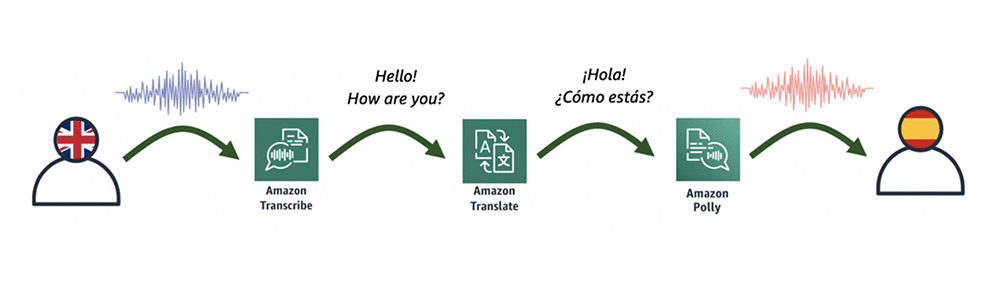
The heart of this application consists of an AWS Lambda function that connects the following three AI language services:
- Amazon Transcribe — This fully managed and continuously trained automatic speech recognition (ASR) service takes in audio and automatically generates accurate transcripts. Amazon Transcribe supports real-time transcriptions, which help achieve near real-time conversion.
- Amazon Translate — This neural machine-translation service delivers fast, high-quality, and affordable language translation.
- Amazon Polly — This text-to-speech service uses advanced deep learning technologies to synthesize speech that sounds like a human voice.
A diagrammatic representation of how these three services relate is shown in the following illustration.
To make this process a bit easier, you can use an AWS CloudFormation template, which initiates the application. The following diagram shows all the components of this process, which I later describe in detail.

Here’s the flow of service interactions:
- Allow access to your site with Amazon CloudFront, which allows you to get an HTTPS link to your page and which is required by some browsers to record audio.
- Host your page on Amazon S3, which simplifies the whole solution. This is also the place to save the input audio file recorded in the browser.
- Gain secure access to S3 and Lambda from the browser with Amazon Cognito.
- Save the input audio file on S3 and invoke a Lambda function. In the input of the function, provide the name of audio file (that you saved earlier in Amazon S3), and pass the source and target language parameters.
- Convert audio into text with Amazon Transcribe.
- Translate the transcribed text from one language to another with Amazon Translate.
- Convert the new translated text into speech with Amazon Polly.
- Save the output audio file back to S3 with the Lambda function, and then return the file name to your page (JavaScript invocation). You could return the audio file itself, but for simplicity, save it on S3 and just return its name.
- Automatically play the translated audio to the user.
- Accelerate the speed of delivering the file with CloudFront.
Getting started
As I mentioned earlier, I created an AWS CloudFormation template to create all the necessary resources.
- Sign into the console, and then choose Launch Stack, which launches a CloudFormation stack in your AWS account. The stack launches in the US-East-1 (N. Virginia) Region.

- Go through the wizard and create the stack by accepting the default values. On the last step of the wizard, acknowledge that CloudFormation creates IAM After 10–15 minutes, the stack has been created.
- In the Outputs section of the stack shown in the following screenshot, you find the following four parameters:
- VoiceTranslatorLink—The link to your webpage.
- VoiceTranslatorLambda—The name of the Lambda function to be invoked from your web application.
- VoiceTranslatorBucket—The S3 bucket where you host your application, and where audio files are stored.
- IdentityPoolIdOutput—The identity pool ID, which allows you to securely connect to S3 and Lambda.

- Download the following zip file and then unzip it. There are three files inside.

- Open the downloaded file named voice-translator-config.js, and edit it based on the four output values in your stack (Step 3). It should then look similar to the following.
var bucketName = 'voicetranslatorapp-voicetranslat……';
var IdentityPoolId = 'us-east-1:535…….';
var lambdaFunction = 'VoiceTranslatorApp-VoiceTranslatorLambda-….';
- In the S3 console, open the S3 bucket (created by the CloudFormation template). Upload all three files, including the modified version of voice-translator-config.js.
Testing
Open your application from the link provided in Step 3. In the Voice Translator App interface, perform the following steps to test the process:
- Choose a source language.
- Choose a target language.
- Think of something to say, choose START RECORDING, and start speaking.
- When you finish speaking, choose STOP RECORDING and wait a couple of seconds.
If everything worked fine, the application should automatically play the audio in the target language.

Conclusion
As you can see, it takes less than an hour to create your own unique voice translation application, based on the existing, integrated AI language services in AWS. Plus, the whole process is done without a server.
This application currently supports two input languages: US English and US Spanish. However, Amazon Transcribe recently started supporting real-time speech-to-text in British English, French, and Canadian French. Feel free to try to extend your application by using those languages.
To see the source code of the app (including the Lambda function written in JavaScript), you can find it in the voice-translator-app GitHub repo. In addition to using the browser to record your voice, I also used this recorder.js script by Matt Diamond.
About the Author
 Tomasz Stachlewski is a Solutions Architect at AWS, where he helps companies of all sizes (from startups to enterprises) in their cloud journey. He is a big believer in innovative technology, such as serverless architecture, which allows companies to accelerate their digital transformation.