Author: torontoai
Removing blob artifact from StyleGAN generations without retraining. Inspired by StyleGAN2
 |
Got StyleGAN generator working without producing the blob artifact using the same architecture/weights. This might be useful for those, who have already trained a model using the initial version of StyleGAN, but still want to produce generations without the blob artifacts. https://reddit.com/link/ecji6v/video/h4m9fryurg541/player The idea is pretty simple. I observed, that the artifact appears right after 64×64 resolution. Network tries to fool the instance normalization layer and creates one or two entries in a tensor that have the same order of magnitude as the sum of the rest of the tensor. I simply zero out those entries. However, doing just that would ruing the generation. Instead, starting from resolution 64×64 I execute two branches: one with original tensor and the second one with pruned tensor. The original one is used to compute coefficients for the instance normalization, that are later applied to the pruned branch. https://twitter.com/StasPodgorskiy/status/1207369489676996614 submitted by /u/stpidhorskyi |
[D] LSTM – Constant Error Carrousel
In his award-winning Neural Network overview (yes, he won the first best paper award of this journal), Schmidhuber discusses the LSTM here (https://arxiv.org/pdf/1404.7828.pdf, p. 19) as follows:
“The basic LSTM idea is very simple. Some of the units are called Constant Error Carousels (CECs). Each CEC uses as an activation function f, the identity function, and has a connection to itself with fixed weight of 1.0. Due to f’s constant derivative of 1.0, errors backpropagated through a CEC cannot vanish or explode (Sec. 5.9) but stay as they are (unless they “flow out” of the CEC to other, typically adaptive parts of the NN).”
What does Schmidhuber mean there? Where is the fixed weight 1.0 and the identity function as the activation function? Can somebody relate this to the common LSTM equations, for example in https://colah.github.io/posts/2015-08-Understanding-LSTMs/ ?
submitted by /u/ManiacMalcko
[link] [comments]
[R] Simple trick to double deep learning speed + CNN and GPU Benchmarks
![[R] Simple trick to double deep learning speed + CNN and GPU Benchmarks](https://b.thumbs.redditmedia.com/-saZHSHb43Gw7yTxkcwLyh-VuUby4YK8A4lk0awI-jA.jpg "[R] Simple trick to double deep learning speed + CNN and GPU Benchmarks") |
With NeurIPS behind us and ICML ahead, maybe you want to do some deep learning. Inspired by Justin Johnson’s original work benchmarking the older GTX GPUs, I extended this work to the new RTX GPUs with benchmarks for most ResNet architectures on ImageNet and CIFAR. Along the way, I discovered a dramatic difference in performance based on how you position your GPUs. Enjoy, and please comment if you have questions or feedback 🙂
The 4-gpu deep learning workstation used for these benchmarks. submitted by /u/cgnorthcutt |
Data Scientist (1 year contract) – Nestle Canada – North York, ON
From Nestle Canada – Wed, 18 Dec 2019 21:28:00 GMT – View all North York, ON jobs
[D] Looking for papers on “filling in” parts of images (inpainting)
Collecting research for a project similar to this paper. Having a hard time finding more resources. TYIA
submitted by /u/seiqooq
[link] [comments]
The On-Device Machine Learning Behind Recorder
Over the past two decades, Google has made information widely accessible through search — from textual information, photos and videos, to maps and jobs. But much of the world’s information is conveyed through speech. Yet even though many people use audio recording devices to capture important information in conversations, interviews, lectures and more, it can be very difficult to later parse through hours of recordings to identify and extract information of interest. But what if there was the ability to automatically transcribe and tag long recordings in real-time, enabling you to intuitively find the relevant information you need, when you need it?
For this reason, we launched Recorder, a new kind of audio recording app for Pixel phones that leverages recent developments in on-device machine learning (ML) to transcribe conversations, to detect and identify the type of audio recorded (from broad categories like music or speech to particular sounds, such as applause, laughter and whistling), and to index recordings so users can quickly find and extract segments of interest. All of these features run entirely on-device, without the need for an internet connection.
Transcription
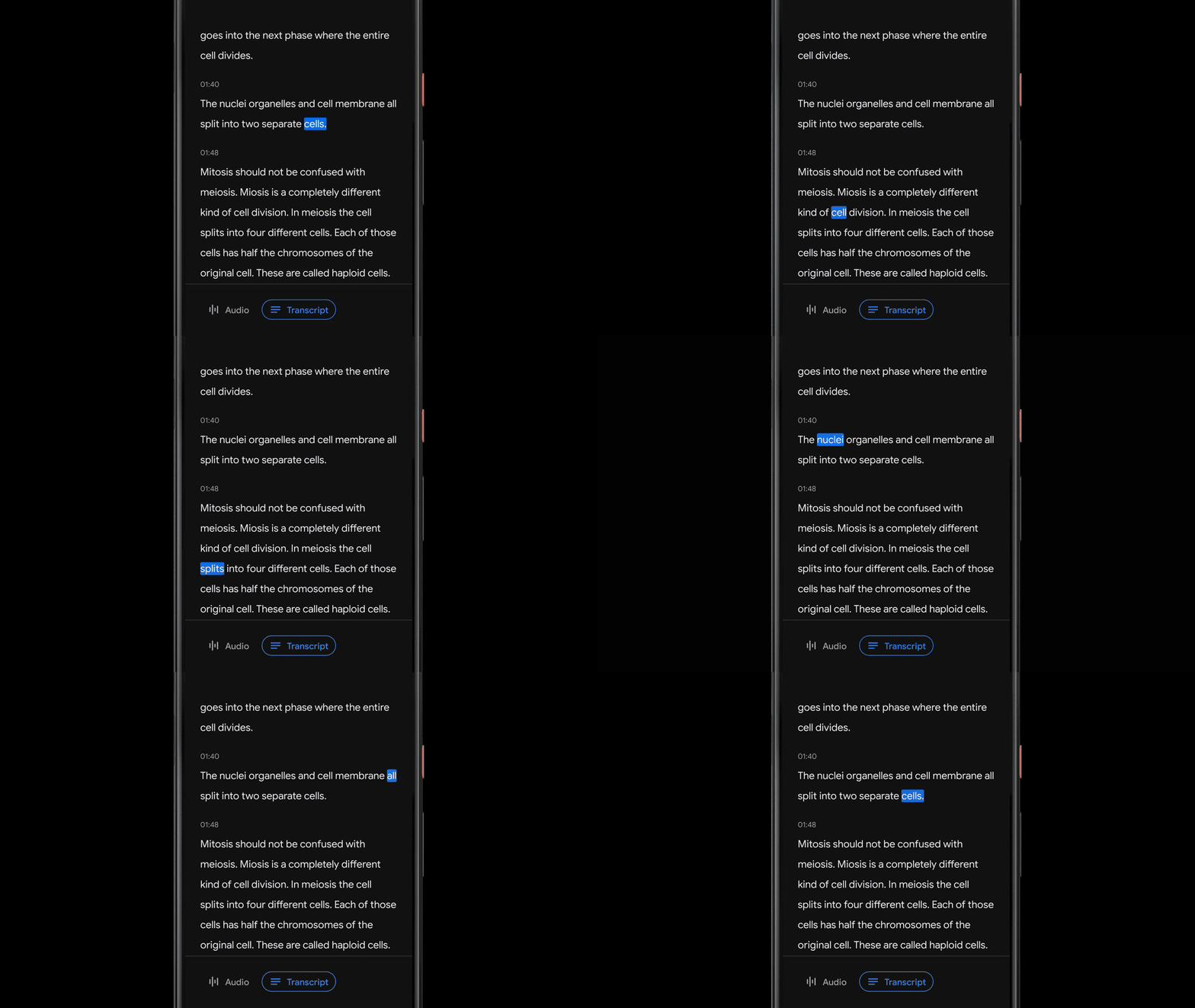
Recorder transcribes speech in real-time using an on-device automatic speech recognition model based on improvements announced earlier this year. Being a key component to many of Recorder’s smart features, we made sure that this model can transcribe long audio recordings (a few hours) reliably, while also indexing conversation by mapping words to timestamps as computed by the speech recognition model. This enables the user to click on a word in the transcription and initiate playback starting from that point in the recording, or to search for a word and jump to the exact point in the recording where it was being said.
Recording Content Visualization via Sound Classification
While presenting a transcript for a recording is useful and allows one to search for specific words, sometimes (especially for very long recordings) it’s more useful to visually search for sections of a recording based on specific moments or sounds. To enable this, Recorder additionally represents audio visually as a colored waveform where each color is associated with a different sound category. This is done by combining research into using CNNs to classify audio sounds (e.g., identifying a dog barking or a musical instrument playing) with previously published datasets for audio event detection to classify apparent sound events in individual audio frames.
Of course, in most situations many sounds can appear at the same time. In order to visualize the audio in a very clear way, we decided to color each waveform bar in a single color that represents the most dominant sound in a given time frame (in our case, 50ms bars). The colorized waveform lets users understand what type of content was captured in a specific recording and navigate along an ever-growing audio library more easily. This brings a visual representation of the audio recordings to the users, and also enables them to search over audio events in their recordings.
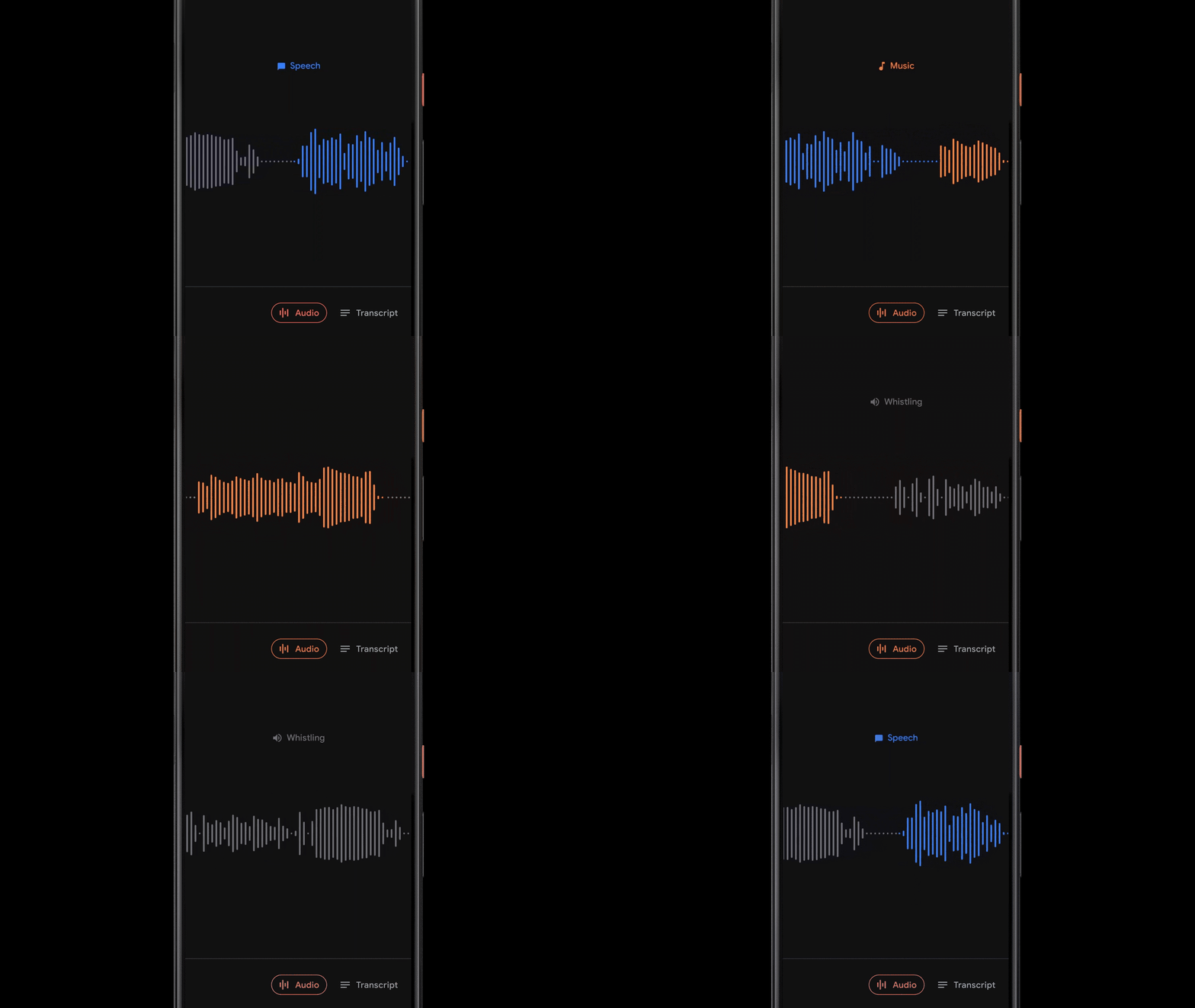
Recorder implements a sliding window capability that processes partially overlapping 960ms audio frames at 50ms intervals and outputs a sigmoid scores vector, representing the probability for each supported audio class within the frame. We apply a linearization process on the sigmoid scores in combination with a thresholding mechanism, in order to maximize the system precision and report the correct sound classification. This process of analyzing the content of the 960ms window with small 50ms offsets makes it possible to pinpoint exact start and end times in a manner that is less prone to mistakes than analyzing consecutive large 960ms window slices on their own.

Since the model analyzes each audio frame independently, it can be prone to quick jittering between audio classes. This is solved with an adaptive-size median filtering technique applied to the most recent model audio class outputs, thus providing a smoothed consecutive output. The process runs continuously in real-time, requiring it to meet very strict power consumption limitations.
Suggesting Tags for Titles
Once a recording is done, Recorder suggests three tags that the app deems to represent the most memorable content, enabling the user to quickly compose a meaningful title.
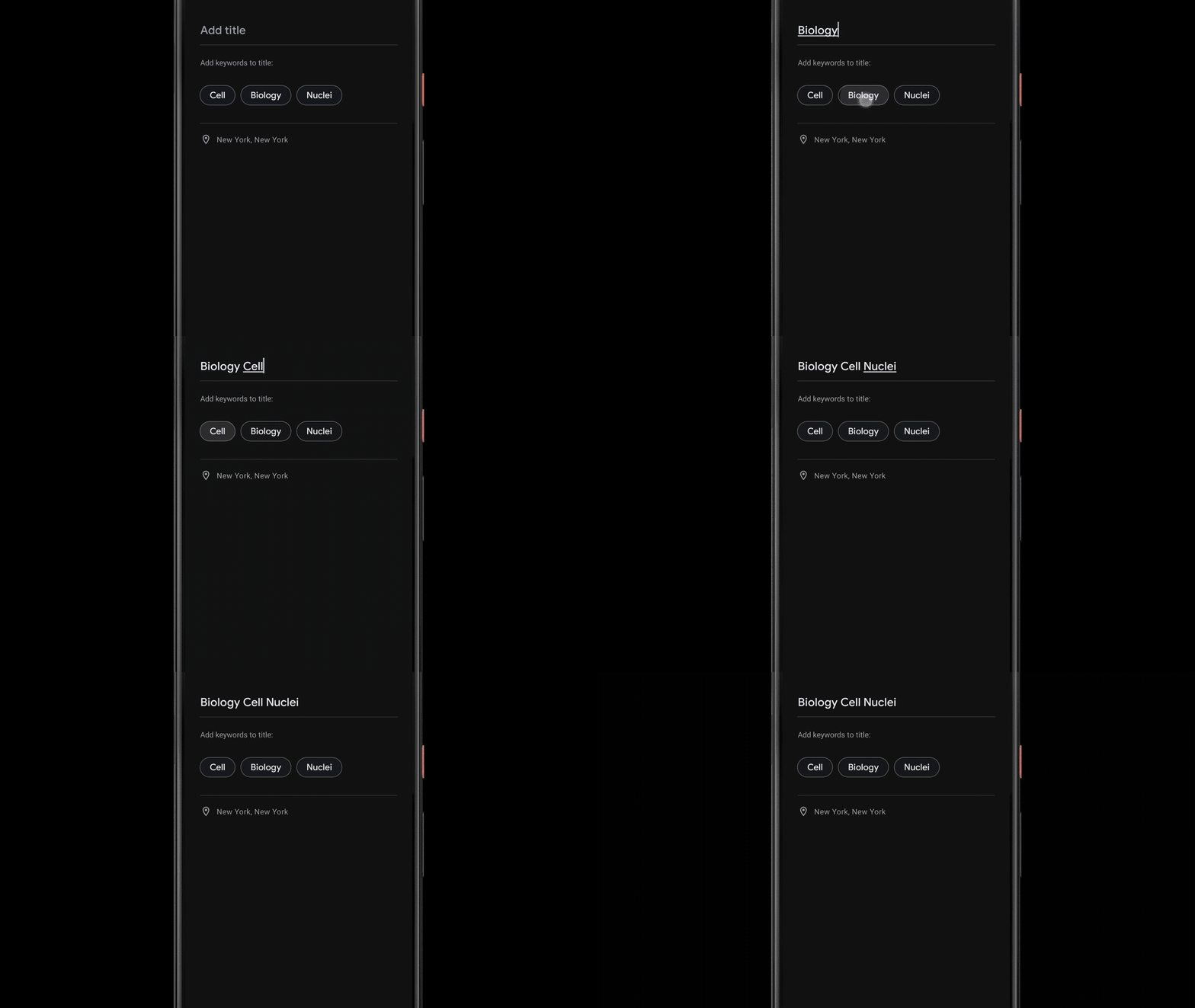
To be able to suggest these tags immediately when the recording ends, Recorder analyzes the content of the recording as it is being transcribed. First, Recorder counts term occurrences as well as their grammatical role in the sentence. The terms identified as entities are capitalized. Then, we utilize an on-device part-of-speech-tagger — a model that labels each word in the sentence according to its grammatical role — to detect common nouns and proper nouns, which appear to be more memorable by users. Recorder utilizes a prior scores table supporting both unigram and bigram terms extraction. To generate the scores, we trained a boosted decision tree with conversational data and utilized textual features like document words frequency and specificity. Last, filtering of stop words and swear words is applied and the top tags are outputted.
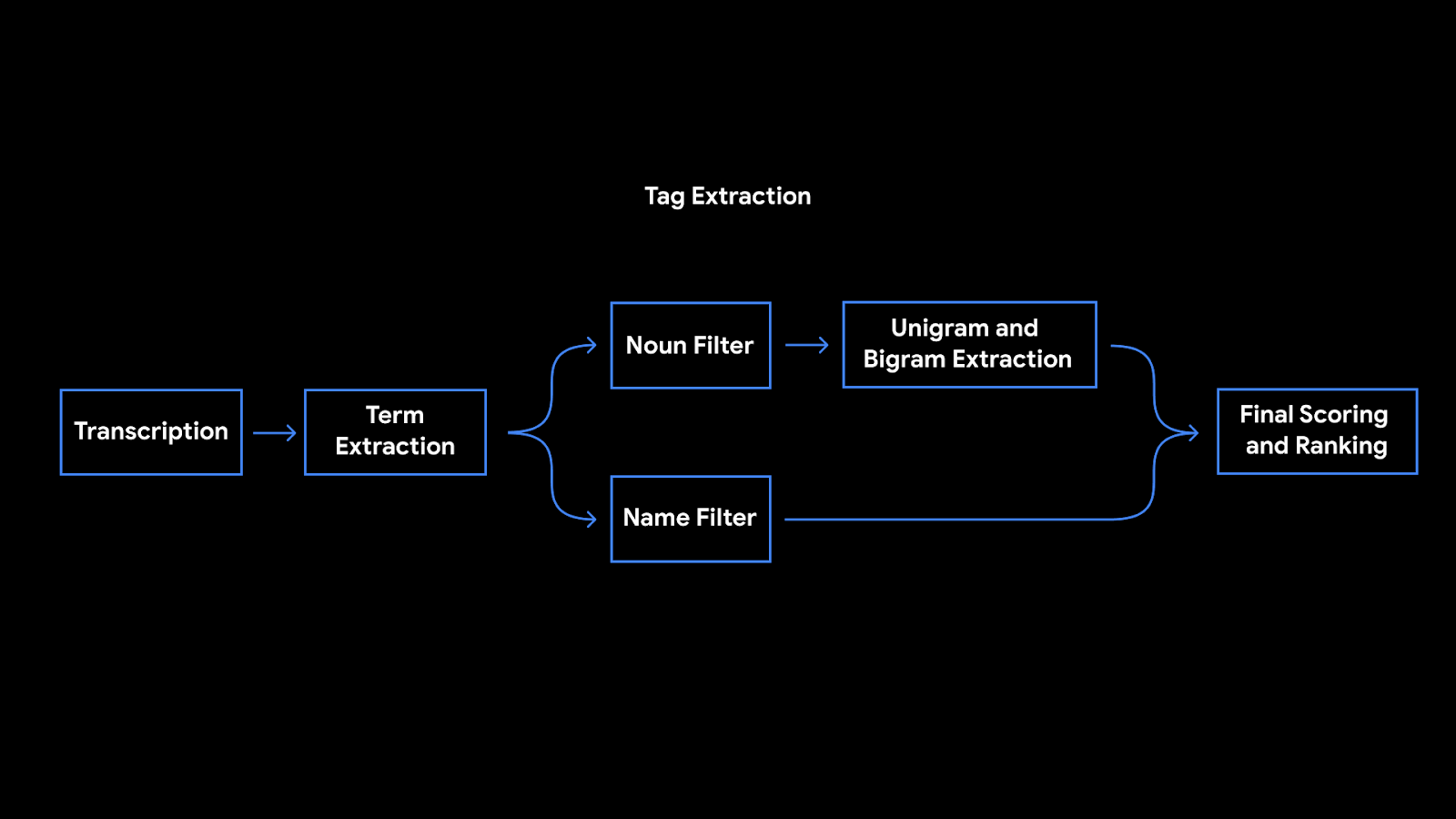 |
| Tags extraction pipeline architecture |
Conclusion
Recorder galvanized some of our most recent on-device ML research efforts into helpful features, running models on-device to ensure user privacy. The positive feedback loop between machine learning investigations and user needs revealed exciting opportunities to make our software even more useful. We’re excited for future research that will make everyone’s ideas and conversations even more easily accessible and searchable.
Acknowledgments
Special thanks to Dror Ayalon who played a key role in developing and forming the above features and without whom this blog post wouldn’t have been possible. We would also want to thank all our team members and collaborators who worked on this project with us: Amit Pitaru, Kelsie Van Deman, Isaac Blankensmith, Teo Soares, John Watkinson, Matt Hall, Josh Deitel, Benny Schlesinger, Yoni Tsafir, Michelle Tadmor Ramanovich, Danielle Cohen, Sushant Prakash, Renat Aksitov, Ed West, Max Gubin, Tiantian Zhang, Aaron Cohen, Yunhsuan Sung, Chung-Ching Chang, Nathan Dass, Amin Ahmad, Tiago Camolesi, Guilherme Santos, Julio da Silva, Dan Ellis, Qiao Liang, Arun Narayanan, Rohit Prabhavalkar, Benyah Shaparenko, Alex Salcianu, Mike Tsao, Shenaz Zak, Sherry Lin, James Lemieux, Jason Cho, Thomas Hall, Brian Chen, Allen Su, Vincent Peng, Richard Chou, Henry Liu, Edward Chen, Yitong Lin, Tracy Wu, Yvonne Yang.


Amazon Textract becomes PCI DSS certified, and retrieves even more data from tables and forms
Amazon Textract automatically extracts text and data from scanned documents, and goes beyond simple optical character recognition (OCR) to also identify the contents of fields and information in tables, without templates, configuration, or machine learning experience required. Customers such as Intuit, PitchBook, Change Healthcare, Alfresco, and more are already using Amazon Textract to automate their document processing workflows so that they can accurately process millions of pages in hours. Additionally, you can create smart search indexes, build automated approval workflows, and better maintain compliance with document archival rules by flagging data that may require redaction.
Today, Amazon Web Services (AWS) announced that Amazon Textract is now PCI DSS certified. This means that you can now use Amazon Textract for all workloads that require Payment Card Industry Data Security Standard (PCI DSS) information security standard, such as cardholder data (CHD) or sensitive authentication data (SAD). You can also process protected health information (PHI) workloads on Amazon Textract, because it is a HIPAA eligible service. Also starting today, AWS has also launched new quality enhancements so you can retrieve even more data from tables (structured data organized into rigid rows and columns) and forms (structured data represented as key-value pairs and selectable elements such as check boxes and radio buttons).
Amazon Textract now retrieves more data with more accuracy from complex tables that contain split cells and merged cells. Amazon Textract also identifies rows and columns for cells with wrapped text (text present across multiple lines) with more accuracy, even for tables without explicitly drawn borders. Amazon Textract also more accurately retrieves form data from documents that also contain tables on the same page and key-value pairs that are nested within a table. These enhancements build upon an update launched in October 2019 to improve the accuracy of text retrieval, and to more accurately correct the rotation and deformation present in documents with imperfect scans.
Customers using Amazon Textract
PitchBook, MSP Recovery, and Filevine are customers using Amazon Textract, and have shared their experiences with AWS.
PitchBook is the leading provider of data in the private capital markets, specifically VC, PE, and M&A. As a part of that market, a portion of their data comes from surveys, particularly in PDF. PitchBook started using Amazon Textract to improve this part of their research process. “Before using Amazon Textract, this process took hundreds of manual hours going through PDFs and manually entering information as it came in,” says Tyler Martinez, Director of Data Science and Software Engineering at PitchBook. “With Amazon Textract, we have seen gains as high as 60% in our process. We’re hoping to use Amazon Textract in other areas that may improve our data collection processes as well.”
MSP Recovery offers a comprehensive healthcare claims platform to determine primary payment responsibility among multiple insurance carriers. “Amazon Textract is very impressive,” said Franklin Perez, Head of Software Development at MSP Recovery. “We decided to use Amazon Textract to detect different document formats to process information and data properly and efficiently. The feature is designed to have the ability to recognize the various different formats it’s pulling text from, whether this is tables or forms, which is an AI dream come true for us. We needed a solution that would be scalable to various documents, as we receive different document types on a regular basis and need to be efficient at reading them. With a lean team, we are able to allow the machine learning to handle the heavy lifting by automating reading thousands of documents, allowing our team to focus on higher-order assignments.”
Filevine is the operating core for legal professionals, including cloud-based case and matter management, document management, and in-depth reporting analytics. From its launch in 2015, Filevine focused on rapid innovation and award-winning design, and earned the highest ratings from independent review sites. “Millions of matters and case files are handled in Filevine every day,” says Ryan Anderson, Chief Executive Officer at Filevine. “We chose Amazon Web Services because we wanted to deliver best-in-class document search solutions for our customers. Amazon Textract is fast, accurate, and scalable—it helps Filevine meet the exacting requirements of the world’s largest and most sophisticated legal organizations. With Filevine and Amazon, finding the proverbial needle in the haystack has never been easier for legal professionals.”
Summary
With the newest improvements to Amazon Textract, you can retrieve more information from the same document, with more accuracy. And Amazon Textract continues to improve; at AWS re:Invent 2019, AWS announced a public preview of Amazon Textract’s integration with the Amazon Augmented Artificial Intelligence service for the forms features. This enables you to apply human validation on your AI inference output from Amazon Textract. Amazon Textract has also increased the file size limit for synchronous APIs to 10 MB. You can also continue to use asynchronous APIs to process files up to 500 MB each. For more information, see the video AWS re:Invent 2019: [REPEAT] AI document processing for business automation On YouTube.
You can get started with Amazon Textract today. Try Amazon Textract with your images or PDF documents and get high-quality results in seconds.
About the Author
 Kriti Bharti is the Product Lead for Amazon Textract. Kriti has over 15 years’ experience in Product Management, Program Management, and Technology Management across multiple industries such as Healthcare, Banking and Finance, and Retail. In her spare time, you can find Kriti spending pawsome time with Fifi and her cousins, reading, or learning different dance forms.
[D] AMA Interview with the CEO of Kaggle: Anthony Goldbloom | Chai Time Data Science Show
Hi Everyone,
I’m really excited to be interviewing someone from the Otherside of Kaggle this time: The CEO of Kaggle: Anthony Goldbloom and he’s also said yes to an AMA interview!
Please feel free to post any/all questions, if you like here or as replies to this Kaggle thread: https://www.kaggle.com/getting-started/122215
And I’ll try my best to include them, This interview will be released on the Chai Time Data Science Podcast, available both as Video, Audio.
Thank You in Advance for the Questions!
submitted by /u/init__27
[link] [comments]
[News] Safe sexting app does not withstand AI
![[News] Safe sexting app does not withstand AI](https://b.thumbs.redditmedia.com/pEwlLrgH8gwS_JjrM3w4x_PDMiz2LOR1V4uTl4Y94OA.jpg "[News] Safe sexting app does not withstand AI") |
A few weeks ago, the .comdom app was released by Telenet, a large Belgian telecom provider. The app aims to make sexting safer, by overlaying a private picture with a visible watermark that contains the receiver’s name and phone number. As such, a receiver is discouraged to leak nude pictures. The .comdom app claims to provide a safer alternative than apps such as Snapchat and Confide, which have functions such as screenshot-proofing and self-destructing messages or images. These functions only provide the illusion of security. For example, it’s simple to capture the screen of your smartphone using another camera, and thus cirumventing the screenshot-proofing and self-destruction of the private images. However, we found that the .comdom app only increases the illusion of security. In a matter of days, we (IDLab-MEDIA from Ghent University) were able to automatically remove these visible watermarks from images. We watermarked thousands of random pictures in the same way that the .comdom app does, and provided those to a simple convolutional neural network with these images. As such, the AI algorithm learns to perform some form of image inpainting. Unwatermarked image, using our machine learning algorithm Thus, the developers of the .comdom have underestimated the power of modern AI technologies. More info on the website of our research group: http://media.idlab.ugent.be/2019/12/05/safe-sexting-in-a-world-of-ai/ submitted by /u/idlab-media |