
Blog

Learn About Our Meetup

5000+ Members

MEETUPS

LEARN, CONNECT, SHARE

Join our meetup, learn, connect, share, and get to know your Toronto AI community. 

JOB POSTINGS

INDEED POSTINGS

Browse through the latest deep learning, ai, machine learning postings from Indeed for the GTA.

CONTACT

CONNECT WITH US

Are you looking to sponsor space, be a speaker, or volunteer, feel free to give us a shout.

Author: torontoai

[P] Deploy models to AWS

Hi everyone,

I posted here ~4 months ago about an open source ML platform I’m working on. The main feedback I got from the community is to add support for more frameworks besides TensorFlow and to focus on making model deployment as simple as possible.

The latest version connects TF Serving, ONNX Runtime, and Flask to automatically deploy TensorFlow, PyTorch, XGBoost, and other models as web APIs. It also uses Docker and Kubernetes behind the scenes to autoscale endpoints, run rolling updates, and support CPU and GPU inference.

Your feedback was really useful to me last time so I’d love to hear your thoughts about this version.

https://github.com/cortexlabs/cortex

submitted by /u/ospillinger
[link] [comments]

Optimizing costs in Amazon Elastic Inference with Amazon TensorFlow

Amazon Elastic Inference allows you to attach low-cost GPU-powered acceleration to Amazon EC2 and Amazon SageMaker instances, and reduce the cost of running deep learning inference by up to 75 percent. The EIPredictorAPI makes it easy to use Elastic Inference.

In this post, we use the EIPredictor and describe a step-by-step example for using TensorFlow with Elastic Inference. Additionally, we explore the cost and performance benefits of using Elastic Inference with TensorFlow. We walk you through how we improved total inference time for FasterRCNN-ResNet50 over 40 video frames from ~113.699 seconds to ~8.883 seconds, and how we improved cost efficiency by 78.5 percent.

The EIPredictor is based on the TensorFlow Predictor API. The EIPredictor is designed to be consistent with the TensorFlow Predictor API to make code portable between the two data structures. The EIPredictor is meant to be an easy way to use Elastic Inference within a single Python script or notebook. A flow that’s already using the TensorFlow Predictor only needs one code change: importing and specifying theEIPredictor. This procedure is shown later.

Benefits of Elastic Inference

Look at how Elastic Inference compares to other EC2 options in terms of performance and cost.

Instance Type vCPUs CPU Memory (GB) GPU Memory (GB) FP32 TFLOPS $/hour TFLOPS/$/hr
1 m5.large 2 8 0.07 $0.10 0.73
2 m5.xlarge 4 16 0.14 $0.19 0.73
3 m5.2xlarge 8 32 0.28 $0.38 0.73
4 m5.4xlarge 16 64 0.56 $0.77 0.73
5 c5.4xlarge 16 32 0.67 $0.68 0.99
6 p2.xlarge (K80) 4 61 12 4.30 $0.90 4.78
7 p3.2xlarge (V100) 8 61 16 15.70 $3.06 5.13
8 eia.medium 1 1.00 $0.13 7.69
9 eia.large 2 2.00 $0.26 7.69
10 eia.xlarge 4 4.00 $0.52 7.69
11 m5.xlarge + eia.xlarge 4 16 4 4.14 $0.71 5.83

If you look at compute capability (teraFLOPS or floating point operations per second), m5.4xlarge provides 0.56 TFLOPS for $0.77/hour, whereas an eia.medium with 1.00 TFLOPS costs just $0.13/hour. If pure performance (ignoring costs) is the goal, it’s clear that a p3.2xlarge instance provides the most compute at 15.7 TFLOPS.

However, in the last column for TFLOPS per dollar, you can see that Elastic Inference provides the most value. Elastic Inference accelerators (EIA) must be attached to an EC2 instance. The last row shows one possible combination. The m5.xlarge + eia.xlarge has a similar amount of vCPUs and TFLOPS as a p2.xlarge, but at a $0.19/hour discount. With Elastic Inference, you can right-size your compute needs by choosing your compute instance, memory and GPU compute. With this approach, you can realize the maximum value per $ spent. The GPU attachments to your CPU are abstracted by framework libraries, which makes it easy to make inference calls without worrying about the underlying GPU hardware.

Video object detection example using the EIPredictor

Here is a step-by-step example of using Elastic Inference with the EIPredictor. For this example, we use a FasterRCNN-ResNet50 model, an m5.large CPU instance, and an eia.large accelerator.

Prerequisites

  • Launch Elastic Inference with a setup script.
  • An m5.large instance and attached eia.large accelerator.
  • An AMI with Docker installed. In this post, we use DLAMI. You may choose an AMI without Docker, but install Docker first before proceeding.
  • Your IAM role has ECRFullAccess.
  • Your VPC security group has ports 80 and 443 open for both inbound and outbound traffic and port 22 open for inbound traffic.

Using Elastic Inference with TensorFlow

  1. SSH to your instance with port forwarding for the Jupyter notebook. For Ubuntu AMIs:
    ssh -i {/path/to/keypair} -L 8888:localhost:8888 ubuntu@{ec2 instance public DNS name}

    For Amazon Linux AMIs:

    ssh -i {/path/to/keypair} -L 8888:localhost:8888 ec2-user@{ec2 instance public DNS name} 

  2. Copy the code locally.
    git clone https://github.com/aws-samples/aws-elastic-inference-tensorflow-examples   

  3. Run and connect to your Jupyter notebook.
    cd aws-elastic-inference-tensorflow-examples; ./build_run_ei_container.sh

    Wait until the Jupyter notebook starts up. Go to localhost:8888 and supply the token that is given in the terminal.

  4. Run benchmarked versions of Object Detection examples.
    1. Open elastic_inference_video_object_detection_tutorial.ipynb and run the notebook.
    2. Take note of the session runtimes produced. The following two examples show without Elastic Inference, then with Elastic Inference.
      1. The first is TensorFlow running your model on your instance’s CPU, without Elastic Inference:
        Model load time (seconds): 8.36566710472
        Number of video frames: 40
        Average inference time (seconds): 2.86271090508
        Total inference time (seconds): 114.508436203

      2. The second reporting is using an Elastic Inference accelerator:
        Model load time (seconds): 21.4445838928
        Number of video frames: 40
        Average inference time (seconds): 0.23773444891
        Total inference time (seconds): 9.50937795639

    3. Compare the results, performance, and cost between the two runs.
      • In the screenshots posted above, Elastic Inference gives an average inference speedup of ~12x.
      • With this video of 340 frames of shape (1, 1080, 1920, 3) simulating streaming frames, about 44 of these full videos can be inferred in one hour using the m5.large+eia.large, considering one loading of the model.
      • With the same environment excluding the eia.large Elastic Inference accelerator, only three or four of these videos can be inferred in one hour. Thus, it would take 12–15 hours to complete the same task.
      • An m5.large costs $0.096/hour, and an eia.large slot type costs $0.26/hour. Comparing costs for inferring 44 replicas of this video, you would spend $0.356 to run inference on 44 videos in an hour using the Elastic Inference set up in this example. You’d spend between $1.152 and $1.44 to run the same inference job in 12–15 hours without the eia.large accelerator.
      • Using the numbers above, if you use an eia.large accelerator, you would run the same task in between a 1/12th and a 1/15th of the time and at ~27.5% of the cost. The eia.large accelerator allows for about 4.2 frames per second.
      • The complete video is 340 frames. To run object detection on the complete video, remove  and count < 40 from the def extract_video_frames function.
    4. Finally, you should produce a video like this one: annotated_dog_park.mp4.
    5. Also note the usage of the EIPredictor for using an accelerator (use_ei=True) and running the same task locally (use_ei=False).
      ei_predictor = EIPredictor(
                      model_dir=PATH_TO_FROZEN_GRAPH,
                      input_names={"inputs":"image_tensor:0"},
                      output_names={"detections_scores":"detection_scores:0",
                                    "detection_classes":"detection_classes:0",
                                    "detection_boxes":"detection_boxes:0",
                                    "num_detections":"num_detections:0"},
                      use_ei=True)
      

Exploring all possibilities

Now, we’ve done more investigation and tried out a few more instance combinations for Elastic Inference. We experimented with FasterRCNN-ResNet50, batch size of 1, and input image dimensions of (1080, 1920, 3).

The model is loaded into memory with an initial inference using a random input of shape (1, 100, 100, 3). After rerunning the initial notebook, we started with combinations of m5.large, m5.xlarge, m5.2xlarge, and m5.4xlarge with Elastic Inference accelerators eia.medium, eia.large, and eia.xlarge. We produced the following table:

A B C D E
1 Client instance type Elastic Inference accelerator type Cost per hour Infer latency [ms] Cost per 100k inferences
2 m5.large eia.medium $0.23 353.53 $2.22
3 eia.large $0.36 222.78 $2.20
4 eia.xlarge $0.62 140.96 $2.41
5 m5.xlarge eia.medium $0.32 357.70 $3.20
6 eia.large $0.45 224.81 $2.82
7 eia.xlarge $0.71 150.29 $2.97
8 m5.2xlarge eia.medium $0.51 350.38 $5.00
9 eia.large $0.64 229.65 $4.11
10 eia.xlarge $0.90 142.55 $3.58
11 m5.4xlarge eia.medium $0.90 355.53 $8.87
12 eia.large $1.03 222.53 6.35
13 eia.xlarge $1.29 149.17 $5.34

Looking at the client instance types with the eia.medium (highlighted in yellow in the table above), you see similar results. This means that there isn’t much client-side processing, so going to a larger client instance does not improve performance. You can save on cost by choosing a smaller instance.

Similarly, looking at client instances using the largest eia.xlarge accelerator (highlighted in blue), there isn’t a noticeable performance difference. This means that you can stick with the m5.large client instance type, achieve similar performance, and pay less. For information about setting up different client instance types, see Launch accelerators in minutes with the Amazon Elastic Inference setup tool for Amazon EC2.

Comparing M5, P2, P3, and EIA instances

Plotting the data that you’ve collected from runs on different instance types, you can see that GPU performed better than CPU (as expected). EC2 P3 instances are 3.34x faster than EC2 P2 instances. Before this, you had to choose between P2 and P3. Now, Elastic Inference gives you another choice, with more granularity at a lower cost.

Based on instance cost per hour (us-west-2 for EIA and EC2), the m5.2xlarge + eia.medium costs in between the P2 and P3 instance costs (see the following table) for the TensorFlow EIPredictor example. When factoring the cost to perform 100,000 inferences, you can see that the P2 and P3 have a similar cost, while with m5.large+eia.large, you achieve nearly P2 performance at less than half the price!

A B C D
1 Instance Type Cost per hour Infer latency [ms] Cost per 100k inferences
2 m5.4xlarge $0.77 415.87 $8.87
3 c5.4xlarge $0.68 363.45 $6.87
4 p2.xlarge $0.90 197.68 $4.94
5 p3.2xlarge $3.06 61.04 $5.19
6 m5.large+eia.large $0.36 222.78 $2.20
7 m5.large+eia.xlarge $0.62 140.96 $2.41

Comparing inference latency

Now that you’ve decided on an m5.large client instance type, you can look at the accelerator types (the orange bars). There is a progression from 222.78 ms and 140.96 ms in terms of inference latency. This shows that the Elastic Inference accelerators provide options between P2 and P3 in terms of latency, at a lower cost.

Comparing inference cost efficiency

The last column in the preceding table, Cost per 100k inferences, shows the cost efficiency of the combination. m5.large and eia.large have the best cost efficiency. The m5.large + eia.large combo provides the best cost efficiency compared to the m5.4xlarge and P2/P3 instances with 55% to 75% savings.

The m5.large and eia.xlarge provides a 2.95x speed increase over m5.4xlarge (CPU only) with 73% savings and a 1.4x speedup over p2.xlarge with 51% savings.

Results

Here’s what we’ve found so far:

  • Combining Elastic Inference accelerators with any client EC2 instance type enables users to choose the amount of client compute, memory, etc. with a configurable amount of GPU memory and compute.
  • Elastic Inference accelerators provide a range of memory and GPU acceleration options at a lower cost.
  • Elastic Inference accelerators can achieve a better cost efficiency than M5, C5, and P2/P3 instances.

In our analysis, we found that increasing ease of use within TensorFlow is as simple as creating and calling an EIPredictor object. This allowed you to use largely the same test notebook on CPU, GPU, and CPU+EIA environments with TensorFlow, and ease testing and performance analysis.

We started with a FasterRCNN-ResNet50 model running on an m5.4xlarge instance with a 415.87 ms inference latency. We were able to reduce it to 140.96 ms by migrating to an m5.large and eia.xlarge, resulting in a 2.95x increase in speed with a $0.15 hourly cost savings to top it off. We also found that we could achieve a $0.41 hourly cost savings with an m5.large and eia.large and still get better performance (416 ms vs. 223 ms).

Conclusion

Try out TensorFlow on Elastic Inference and see how much you can save while still improving performance for inference on your model. Here are the steps we went through to analyze the design space for deep learning inference, and you too can follow for your model:

  1. Write a test script or notebook to analyze inference performance for CPU context.
  2. Create copies of the script with tweaks for GPU and EIA.
  3. Run scripts on M5, P2, and P3 instance types and get a baseline for performance.
  4. Analyze the performance.
    1. Start with the largest Elastic Inference accelerator type and large client instance type.
    2. Work backwards until you find a combo that is too small.
  5. Introduce cost efficiency to the analysis by computing cost to perform 100k inferences. 

About the author

Cory Pruce is a Software Development Engineer with AWS AI TensorFlow. He works on building AWS services in AI space, specifically using TensorFlow. In his free time, he likes participating in Data Science/Machine Learning competitions, learning about state-of-the-art techniques, and working on projects.


Srinivas Hanabe is a Principal Product Manager with AWS AI for Elastic Inference. Prior to this role, he was the PM lead for Amazon VPC. Srinivas loves running long distance, reading books on a variety of topics, spending time with his family, and is a career mentor.


Optimizing costs in Amazon Elastic Inference with TensorFlow

Amazon Elastic Inference allows you to attach low-cost GPU-powered acceleration to Amazon EC2 and Amazon SageMaker instances, and reduce the cost of running deep learning inference by up to 75 percent. The EIPredictorAPI makes it easy to use Elastic Inference.

In this post, we use the EIPredictor and describe a step-by-step example for using TensorFlow with Elastic Inference. Additionally, we explore the cost and performance benefits of using Elastic Inference with TensorFlow. We walk you through how we improved total inference time for FasterRCNN-ResNet50 over 40 video frames from ~113.699 seconds to ~8.883 seconds, and how we improved cost efficiency by 78.5 percent.

The EIPredictor is based on the TensorFlow Predictor API. The EIPredictor is designed to be consistent with the TensorFlow Predictor API to make code portable between the two data structures. The EIPredictor is meant to be an easy way to use Elastic Inference within a single Python script or notebook. A flow that’s already using the TensorFlow Predictor only needs one code change: importing and specifying theEIPredictor. This procedure is shown later.

Benefits of Amazon Elastic Inference

Look at how Elastic Inference compares to other EC2 options in terms of performance and cost.

Instance Type vCPUs CPU Memory (GB) GPU Memory (GB) FP32 TFLOPS $/hour TFLOPS/$/hr
1 m5.large 2 8 0.07 $0.10 0.73
2 m5.xlarge 4 16 0.14 $0.19 0.73
3 m5.2xlarge 8 32 0.28 $0.38 0.73
4 m5.4xlarge 16 64 0.56 $0.77 0.73
5 c5.4xlarge 16 32 0.67 $0.68 0.99
6 p2.xlarge (K80) 4 61 12 4.30 $0.90 4.78
7 p3.2xlarge (V100) 8 61 16 15.70 $3.06 5.13
8 eia.medium 1 1.00 $0.13 7.69
9 eia.large 2 2.00 $0.26 7.69
10 eia.xlarge 4 4.00 $0.52 7.69
11 m5.xlarge + eia.xlarge 4 16 4 4.14 $0.71 5.83

If you look at compute capability (teraFLOPS or floating point operations per second), m5.4xlarge provides 0.56 TFLOPS for $0.77/hour, whereas an eia.medium with 1.00 TFLOPS costs just $0.13/hour. If pure performance (ignoring costs) is the goal, it’s clear that a p3.2xlarge instance provides the most compute at 15.7 TFLOPS.

However, in the last column for TFLOPS per dollar, you can see that Elastic Inference provides the most value. Elastic Inference accelerators (EIA) must be attached to an EC2 instance. The last row shows one possible combination. The m5.xlarge + eia.xlarge has a similar amount of vCPUs and TFLOPS as a p2.xlarge, but at a $0.19/hour discount. With Elastic Inference, you can right-size your compute needs by choosing your compute instance, memory and GPU compute. With this approach, you can realize the maximum value per $ spent. The GPU attachments to your CPU are abstracted by framework libraries, which makes it easy to make inference calls without worrying about the underlying GPU hardware.

Video object detection example using the EIPredictor

Here is a step-by-step example of using Elastic Inference with the EIPredictor. For this example, we use a FasterRCNN-ResNet50 model, an m5.large CPU instance, and an eia.large accelerator.

Prerequisites

  • Launch Elastic Inference with a setup script.
  • An m5.large instance and attached eia.large accelerator.
  • An AMI with Docker installed. In this post, we use DLAMI. You may choose an AMI without Docker, but install Docker first before proceeding.
  • Your IAM role has ECRFullAccess.
  • Your VPC security group has ports 80 and 443 open for both inbound and outbound traffic and port 22 open for inbound traffic.

Using Elastic Inference with TensorFlow

  1. SSH to your instance with port forwarding for the Jupyter notebook. For Ubuntu AMIs:
    ssh -i {/path/to/keypair} -L 8888:localhost:8888 ubuntu@{ec2 instance public DNS name}

    For Amazon Linux AMIs:

    ssh -i {/path/to/keypair} -L 8888:localhost:8888 ec2-user@{ec2 instance public DNS name} 

  2. Copy the code locally.
    git clone https://github.com/aws-samples/aws-elastic-inference-tensorflow-examples   

  3. Run and connect to your Jupyter notebook.
    cd aws-elastic-inference-tensorflow-examples; ./build_run_ei_container.sh

    Wait until the Jupyter notebook starts up. Go to localhost:8888 and supply the token that is given in the terminal.

  4. Run benchmarked versions of Object Detection examples.
    1. Open elastic_inference_video_object_detection_tutorial.ipynb and run the notebook.
    2. Take note of the session runtimes produced. The following two examples show without Elastic Inference, then with Elastic Inference.
      1. The first is TensorFlow running your model on your instance’s CPU, without Elastic Inference:
        Model load time (seconds): 8.36566710472
        Number of video frames: 40
        Average inference time (seconds): 2.86271090508
        Total inference time (seconds): 114.508436203

      2. The second reporting is using an Elastic Inference accelerator:
        Model load time (seconds): 21.4445838928
        Number of video frames: 40
        Average inference time (seconds): 0.23773444891
        Total inference time (seconds): 9.50937795639

    3. Compare the results, performance, and cost between the two runs.
      • In the screenshots posted above, Elastic Inference gives an average inference speedup of ~12x.
      • With this video of 340 frames of shape (1, 1080, 1920, 3) simulating streaming frames, about 44 of these full videos can be inferred in one hour using the m5.large+eia.large, considering one loading of the model.
      • With the same environment excluding the eia.large Elastic Inference accelerator, only three or four of these videos can be inferred in one hour. Thus, it would take 12–15 hours to complete the same task.
      • An m5.large costs $0.096/hour, and an eia.large slot type costs $0.26/hour. Comparing costs for inferring 44 replicas of this video, you would spend $0.356 to run inference on 44 videos in an hour using the Elastic Inference set up in this example. You’d spend between $1.152 and $1.44 to run the same inference job in 12–15 hours without the eia.large accelerator.
      • Using the numbers above, if you use an eia.large accelerator, you would run the same task in between a 1/12th and a 1/15th of the time and at ~27.5% of the cost. The eia.large accelerator allows for about 4.2 frames per second.
      • The complete video is 340 frames. To run object detection on the complete video, remove  and count < 40 from the def extract_video_frames function.
    4. Finally, you should produce a video like this one: annotated_dog_park.mp4.
    5. Also note the usage of the EIPredictor for using an accelerator (use_ei=True) and running the same task locally (use_ei=False).
      ei_predictor = EIPredictor(
                      model_dir=PATH_TO_FROZEN_GRAPH,
                      input_names={"inputs":"image_tensor:0"},
                      output_names={"detections_scores":"detection_scores:0",
                                    "detection_classes":"detection_classes:0",
                                    "detection_boxes":"detection_boxes:0",
                                    "num_detections":"num_detections:0"},
                      use_ei=True)
      

Exploring all possibilities

Now, we’ve done more investigation and tried out a few more instance combinations for Elastic Inference. We experimented with FasterRCNN-ResNet50, batch size of 1, and input image dimensions of (1080, 1920, 3).

The model is loaded into memory with an initial inference using a random input of shape (1, 100, 100, 3). After rerunning the initial notebook, we started with combinations of m5.large, m5.xlarge, m5.2xlarge, and m5.4xlarge with Elastic Inference accelerators eia.medium, eia.large, and eia.xlarge. We produced the following table:

A B C D E
1 Client instance type Elastic Inference accelerator type Cost per hour Infer latency [ms] Cost per 100k inferences
2 m5.large eia.medium $0.23 353.53 $2.22
3 eia.large $0.36 222.78 $2.20
4 eia.xlarge $0.62 140.96 $2.41
5 m5.xlarge eia.medium $0.32 357.70 $3.20
6 eia.large $0.45 224.81 $2.82
7 eia.xlarge $0.71 150.29 $2.97
8 m5.2xlarge eia.medium $0.51 350.38 $5.00
9 eia.large $0.64 229.65 $4.11
10 eia.xlarge $0.90 142.55 $3.58
11 m5.4xlarge eia.medium $0.90 355.53 $8.87
12 eia.large $1.03 222.53 6.35
13 eia.xlarge $1.29 149.17 $5.34

Looking at the client instance types with the eia.medium (highlighted in yellow in the table above), you see similar results. This means that there isn’t much client-side processing, so going to a larger client instance does not improve performance. You can save on cost by choosing a smaller instance.

Similarly, looking at client instances using the largest eia.xlarge accelerator (highlighted in blue), there isn’t a noticeable performance difference. This means that you can stick with the m5.large client instance type, achieve similar performance, and pay less. For information about setting up different client instance types, see Launch accelerators in minutes with the Amazon Elastic Inference setup tool for Amazon EC2.

Comparing M5, P2, P3, and EIA instances

Plotting the data that you’ve collected from runs on different instance types, you can see that GPU performed better than CPU (as expected). EC2 P3 instances are 3.34x faster than EC2 P2 instances. Before this, you had to choose between P2 and P3. Now, Elastic Inference gives you another choice, with more granularity at a lower cost.

Based on instance cost per hour (us-west-2 for EIA and EC2), the m5.2xlarge + eia.medium costs in between the P2 and P3 instance costs (see the following table) for the TensorFlow EIPredictor example. When factoring the cost to perform 100,000 inferences, you can see that the P2 and P3 have a similar cost, while with m5.large+eia.large, you achieve nearly P2 performance at less than half the price!

A B C D
1 Instance Type Cost per hour Infer latency [ms] Cost per 100k inferences
2 m5.4xlarge $0.77 415.87 $8.87
3 c5.4xlarge $0.68 363.45 $6.87
4 p2.xlarge $0.90 197.68 $4.94
5 p3.2xlarge $3.06 61.04 $5.19
6 m5.large+eia.large $0.36 222.78 $2.20
7 m5.large+eia.xlarge $0.62 140.96 $2.41

Comparing inference latency

Now that you’ve decided on an m5.large client instance type, you can look at the accelerator types (the orange bars). There is a progression from 222.78 ms and 140.96 ms in terms of inference latency. This shows that the Elastic Inference accelerators provide options between P2 and P3 in terms of latency, at a lower cost.

Comparing inference cost efficiency

The last column in the preceding table, Cost per 100k inferences, shows the cost efficiency of the combination. m5.large and eia.large have the best cost efficiency. The m5.large + eia.large combo provides the best cost efficiency compared to the m5.4xlarge and P2/P3 instances with 55% to 75% savings.

The m5.large and eia.xlarge provides a 2.95x speed increase over m5.4xlarge (CPU only) with 73% savings and a 1.4x speedup over p2.xlarge with 51% savings.

Results

Here’s what we’ve found so far:

  • Combining Elastic Inference accelerators with any client EC2 instance type enables users to choose the amount of client compute, memory, etc. with a configurable amount of GPU memory and compute.
  • Elastic Inference accelerators provide a range of memory and GPU acceleration options at a lower cost.
  • Elastic Inference accelerators can achieve a better cost efficiency than M5, C5, and P2/P3 instances.

In our analysis, we found that increasing ease of use within TensorFlow is as simple as creating and calling an EIPredictor object. This allowed you to use largely the same test notebook on CPU, GPU, and CPU+EIA environments with TensorFlow, and ease testing and performance analysis.

We started with a FasterRCNN-ResNet50 model running on an m5.4xlarge instance with a 415.87 ms inference latency. We were able to reduce it to 140.96 ms by migrating to an m5.large and eia.xlarge, resulting in a 2.95x increase in speed with a $0.15 hourly cost savings to top it off. We also found that we could achieve a $0.41 hourly cost savings with an m5.large and eia.large and still get better performance (416 ms vs. 223 ms).

Conclusion

Try out TensorFlow on Elastic Inference and see how much you can save while still improving performance for inference on your model. Here are the steps we went through to analyze the design space for deep learning inference, and you too can follow for your model:

  1. Write a test script or notebook to analyze inference performance for CPU context.
  2. Create copies of the script with tweaks for GPU and EIA.
  3. Run scripts on M5, P2, and P3 instance types and get a baseline for performance.
  4. Analyze the performance.
    1. Start with the largest Elastic Inference accelerator type and large client instance type.
    2. Work backwards until you find a combo that is too small.
  5. Introduce cost efficiency to the analysis by computing cost to perform 100k inferences. 

About the author

Cory Pruce is a Software Development Engineer with AWS. He works on building AWS services in AI space, specifically using TensorFlow. In his free time, he likes participating in Data Science/Machine Learning competitions, learning about state-of-the-art techniques, and working on projects.


Srinivas Hanabe is a Principal Product Manager with AWS AI for Elastic Inference. Prior to this role, he was the PM lead for Amazon VPC. Srinivas loves running long distance, reading books on a variety of topics, spending time with his family, and is a career mentor.


[D] Deploying Deep Learning in Real-Time Video Chat

I’m working on a video chat application that modifies each image in real-time with deep learning. I’m fairly new to backend web development and deploying models, so I’ve been struggling to find the most efficient way to do this. The options I’ve come up with are:

  1. Run inference in the browser with TensorflowJs, and stream video with WebRTC. As long as TensorflowJs is fast enough, this seems to be the simplest solution. But I’m not sure if TensorflowJs running on a CPU will be able to run in real-time.
  2. Run inference on a server. This would give me control over the hardware the model was being run on, so the performance would be more consistent. However, it wouldn’t be P2P, which might slow things down, and make it harder to scale.

Is there another solution that I’m missing? So far I’ve been just trying everything to see what works, which is quite time-consuming. If you have some experience deploying deep learning models, please let me know what you would suggest.

submitted by /u/Juggling_Rick
[link] [comments]

[D] Most important papers in deep recommender systems?

I’ve been googling around and I can’t find an up to date list for the most important papers to read for deep recommender systems. Does anyone have recommendations for what is considered to be the most important papers to read in this field? I want an overview and a general understanding of what is SoTA right now, and why it is (ie, how did the field build up to what it is now).

submitted by /u/EveningAlgae
[link] [comments]

[R] Towards Robust Monocular Depth Estimation: Mixing Datasets for Zero-Shot Cross-Dataset Transfer

The success of monocular depth estimation relies on large and diverse training sets. Due to the challenges associated with acquiring dense ground-truth depth across different environments at scale, a number of datasets with distinct characteristics and biases have emerged. We develop tools that enable mixing multiple datasets during training, even if their annotations are incompatible. In particular, we propose a training objective that is invariant to changes in depth range and scale. Armed with this objective, we explore an abundant source of training data: 3D films. We demonstrate that despite pervasive inaccuracies, 3D films constitute a useful source of data that is complementary to existing training sets. We evaluate the presented approach on diverse datasets, focusing on zero-shot cross-dataset transfer: testing the generality of the learned model by evaluating it on datasets that were not seen during training. The experiments confirm that mixing data from complementary sources yields improved depth estimates, particularly on previously unseen datasets.

Video: https://www.youtube.com/watch?v=ITI0YS6IrUQ

Paper: https://arxiv.org/abs/1907.01341

Code: https://github.com/intel-isl/MiDaS

submitted by /u/downtownslim
[link] [comments]

[News] MLPerf Training v0.6 results released

Press release: https://mlperf.org/press#mlperf-training-v0.6-results

Results page: https://mlperf.org/training-results-0-6

Superficial analysis: Results come from Google’s TPUs and NVIDIA GPUs for ResNet50, SSD w/ ResNet-34, Mask-R-CNN, NMT, and Transformer. Intel and Nvidia submitted results for the “Mini Go” reinforcement learning task, including a result from the upcoming Cascade Lake 9282. Alibaba also submitted a result in the “Research” category for ResNet-50 with custom software on 64 Tesla V100s.

I don’t feel qualified to do detailed analysis of these results; looking forward to what people can see in these.

submitted by /u/riking27
[link] [comments]

NVIDIA Breaks Eight AI Performance Records

You can’t be first if you’re not fast.

Inside the world’s top companies, teams of researchers and data scientists are creating ever more complex AI models, which need to be trained, fast.

That’s why leadership in AI demands leadership in AI infrastructure. And that’s why the AI training results released today by MLPerf matter.

Across all six of six MLPerf categories, NVIDIA demonstrated world-class performance and versatility. Our AI platform set eight records in training performance, including three in overall performance at scale and five on a per-accelerator basis.

Record Type Benchmark Record
Max Scale
(Minutes to Train)
Object Detection (Heavy Weight) – Mask R-CNN 18.47 mins
Translation (Recurrent) – GNMT 1.8 mins
Reinforcement Learning – MiniGo 13.57 mins
Per Accelerator
(Hours to Train)
Object Detection (Heavy Weight) – Mask R-CNN 25.39 hrs
Object Detection (Light Weight) – SSD 3.04 hrs
Translation (Recurrent) – GNMT 2.63 hrs
Translation (Non-recurrent) – Transformer 2.61 hrs
Reinforcement Learning – MiniGo 3.65 hrs

Table 1: NVIDIA MLPerf AI Records

Per accelerator comparison derived from reported performance for MLPerf 0.6 on a single NVIDIA DGX-2H (16 V100 GPUs) compared to other submissions at same scale except for MiniGo, where NVIDIA DGX-1 (8 V100 GPUs) submission was used | MLPerf ID Max Scale: Mask R-CNN: 0.6-23, GNMT: 0.6-26, MiniGo: 0.6-11 | MLPerf ID Per Accelerator: Mask R-CNN, SSD, GNMT, Transformer: all use 0.6-20, MiniGo: 0.6-10 

These numbers — backed by Google, Intel, Baidu, NVIDIA and the dozens of other top technology companies and universities behind the creation of MLPerf’s suite of AI benchmarks — translate into innovation where it counts.

Simply put, our AI platform now slashes through models that once took a whole workday to train in less than two minutes.

Companies know unlocking that kind of productivity is key. Supercomputers are now the essential instruments of AI, and AI leadership requires strong AI computing infrastructure.

Our latest MLPerf results bring all these strands together, demonstrating the benefits of weaving our NVIDIA V100 Tensor Core GPUs into supercomputing-class infrastructure.

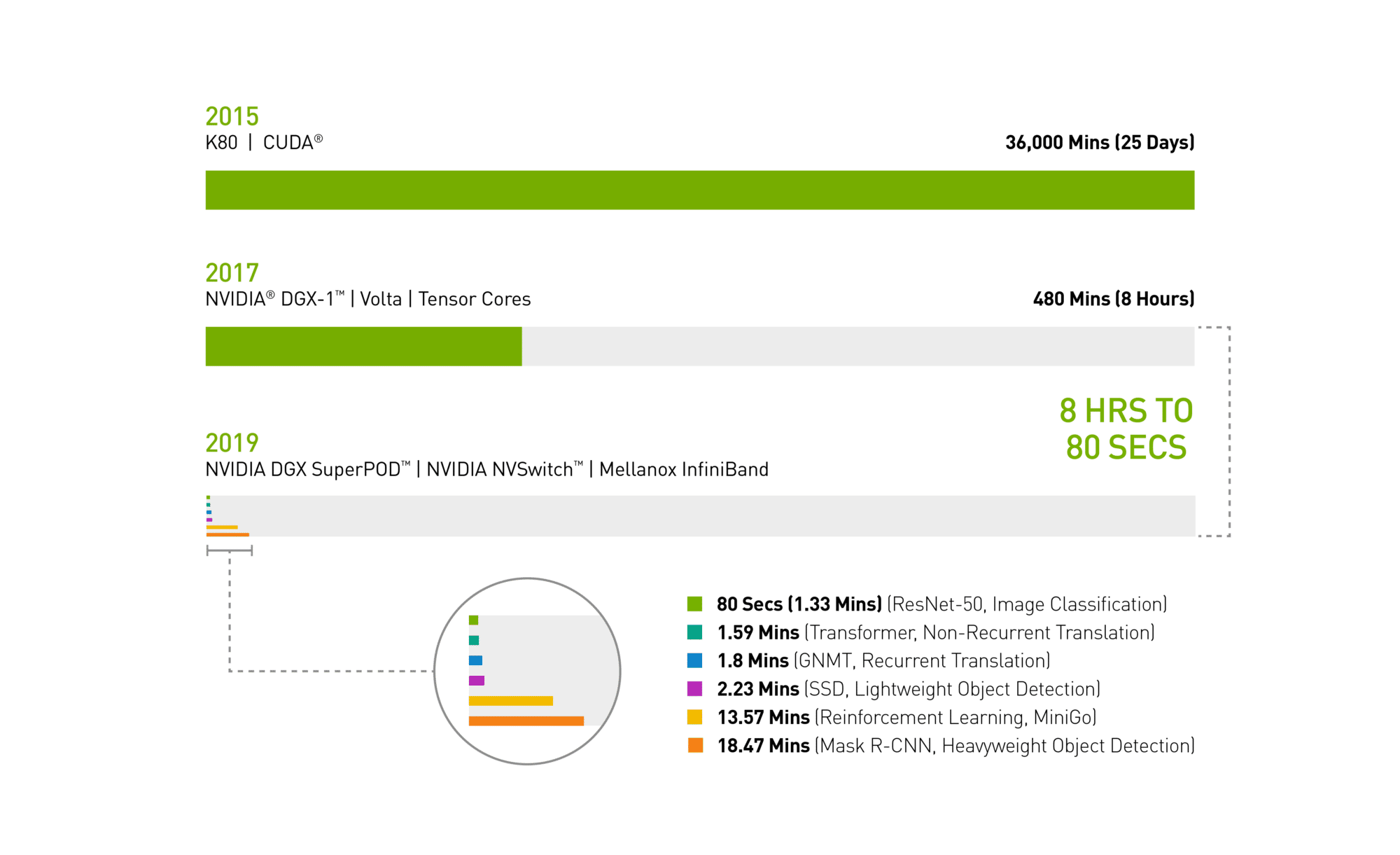
In spring 2017, it took a full workday — eight hours — for an NVIDIA DGX-1 system loaded with V100 GPUs to train the image recognition model ResNet-50.

Today an NVIDIA DGX SuperPOD — using the same V100 GPUs, now interconnected with Mellanox InfiniBand and the latest NVIDIA-optimized AI software for distributed AI training — completed the task in just 80 seconds.

That’s less time than it takes to get a cup of coffee.

MLPerf infographic
Chart 1: Time Machine for AI
2019 MLPerf ID (in order from top to bottom of chart): ResNet-50: 0.6-30 | Transformer: 0.6-28 | GNMT: 0.6-14 | SSD: 0.6-27 | MiniGo: 0.6-11 | Mask R-CNN: 0.6-23

The Essential Instrument of AI: DGX SuperPOD Masters Workloads Faster 

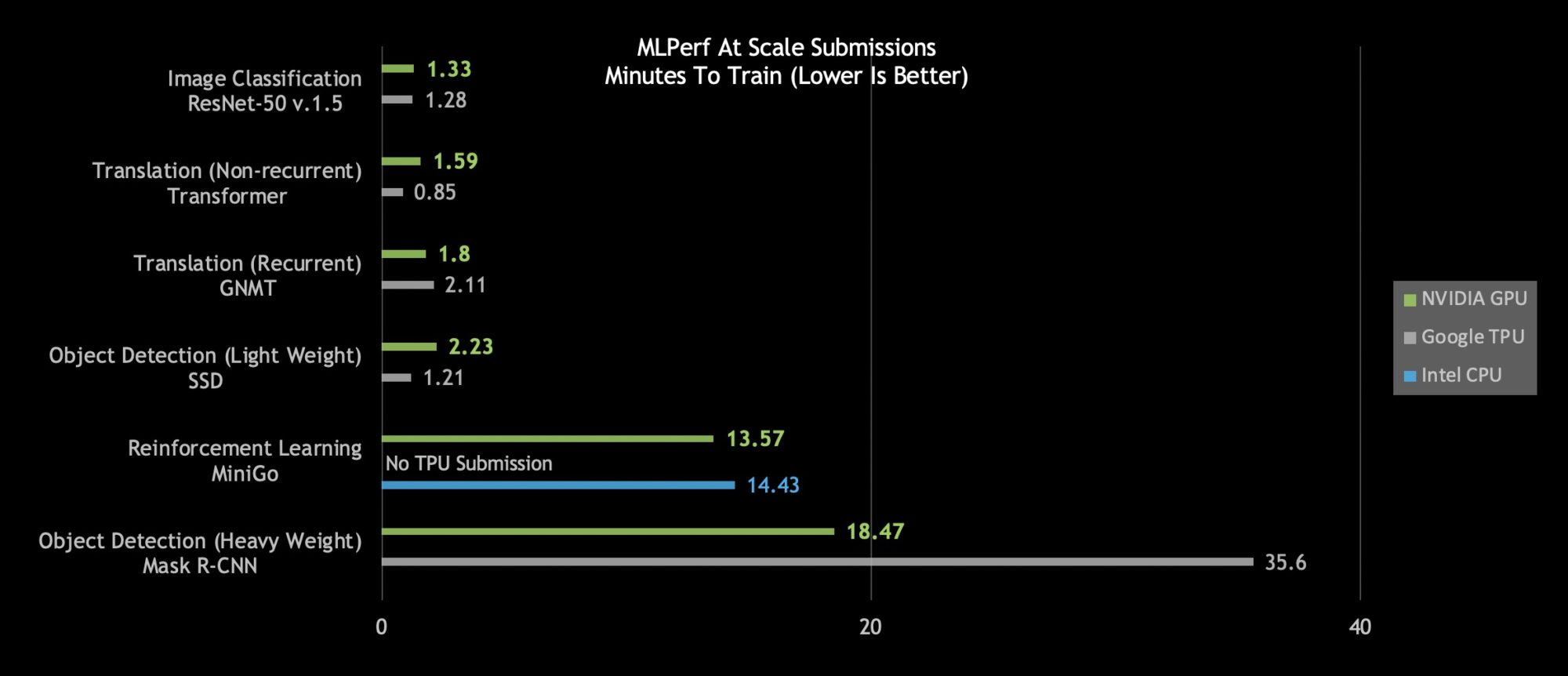
A close look at today’s MLPerf results shows the NVIDIA DGX SuperPOD is the only AI platform able to complete each of the six MLPerf categories in less than 20 minutes:

MLPerf at scale submissions
Chart 2: DGX SuperPOD Breaks At Scale AI Records MLPerf 0.6 Performance at Max Scale | MLPerf ID at Scale: RN50 v1.5: 0.6-30, 0.6-6 | Transformer: 0.6-28, 0.6-6 | GNMT: 0.6-26, 0.6-5 | SSD: 0.6-27, 0.6-6 | MiniGo: 0.6-11, 0.6-7 | Mask R-CNN: 0.6-23, 0.6-3

An even closer look reveals NVIDIA’s AI platform stands out on the hardest AI problems as measured by total time to train: heavyweight object detection and reinforcement learning.

Heavyweight object detection using the Mask R-CNN deep neural network provides users with advanced instance segmentation. Its uses include combining it with multiple data sources — cameras, sensors, lidar, ultrasound and more — to precisely identify and locate specific objects.

This type of AI workload helps train autonomous vehicles, providing precise locations of pedestrians and other objects to self-driving cars. Another real-life application helps doctors find and identify tumors in medical scans. Critical stuff.

NVIDIA’s heavyweight object detection submission, which came in at just under 19 minutes, delivers nearly twice the performance as the next best submission.

Reinforcement learning is another difficult category. This AI method trains robots working on factory floors to streamline production. It’s also used in cities to control traffic lights to reduce congestion. Using an NVIDIA DGX SuperPOD, NVIDIA trained the MiniGo AI reinforcement training model in a record-setting 13.57 minutes.

No More Time for Coffee: Instant AI Infrastructure Delivers World-Leading Performance

Speeding innovation, however, is about more than beating benchmarks. That’s why we made DGX SuperPOD not only powerful, but easy to set up.

Fully configured with optimized CUDA-X AI software freely available from our NGC container registry, DGX SuperPODs deliver world-leading AI performance out of the box.

They plug into an ecosystem of more than 1.3 million CUDA developers we work with to support every AI framework and development environment.

We’ve helped optimize millions of lines of code so our customers can bring their AI projects to life everywhere you can find NVIDIA GPUs: on the cloud, in data centers and at the edge.

AI Infrastructure That’s Fast Now, Faster Tomorrow 

Better still, this is a platform that’s always getting faster. We publish new optimizations and performance improvements to CUDA-X AI software every month, with integrated software stacks freely available for download on our NGC container registry. That includes containerized frameworks, pre-trained models and scripts.

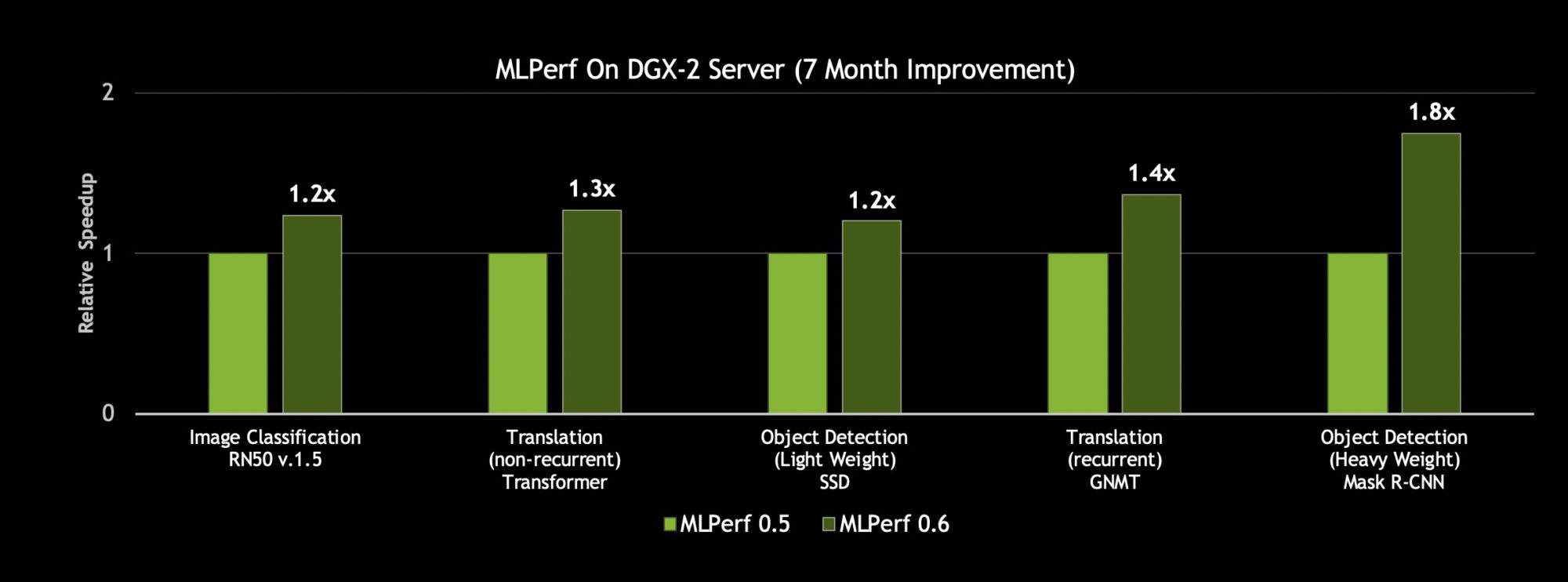
With such innovation to the CUDA-X AI software stack, an NVIDIA DGX-2H server gained up to 80 percent more throughput on our MLPerf 0.6 submissions than what we posted just seven months ago.

MLPerf on DGX-2 server
Chart 3: Up to 80 Percent More Performance on the Same Server Comparing the throughput of a single DGX-2H server on a single epoch (Single pass of the dataset through the neural network) | MLPerf ID 0.5/0.6 comparison: ResNet-50 v1.5: 0.5-20/0.6-30 | Transformer: 0.5-21/0.6-20 | SSD: 0.5-21/0.6-20 | GNMT: 0.5-19/0.6-20 | Mask R-CNN: 0.5-21/0.6-20

Add it up and these efforts represent an investment of tens of billions of dollars. All so you can get your work done fast today. And faster tomorrow.

The post NVIDIA Breaks Eight AI Performance Records appeared first on The Official NVIDIA Blog.