Blog

Learn About Our Meetup

5000+ Members

MEETUPS

LEARN, CONNECT, SHARE

Join our meetup, learn, connect, share, and get to know your Toronto AI community. 

JOB POSTINGS

INDEED POSTINGS

Browse through the latest deep learning, ai, machine learning postings from Indeed for the GTA.

CONTACT

CONNECT WITH US

Are you looking to sponsor space, be a speaker, or volunteer, feel free to give us a shout.

Category: Global

Introducing PlaNet: A Deep Planning Network for Reinforcement Learning

Research into how artificial agents can improve their decisions over time is progressing rapidly via reinforcement learning (RL). For this technique, an agent observes a stream of sensory inputs (e.g. camera images) while choosing actions (e.g. motor commands), and sometimes receives a reward for achieving a specified goal. Model-free approaches to RL aim to directly predict good actions from the sensory observations, enabling DeepMind’s DQN to play Atari and other agents to control robots. However, this blackbox approach often requires several weeks of simulated interaction to learn through trial and error, limiting its usefulness in practice.

Model-based RL, in contrast, attempts to have agents learn how the world behaves in general. Instead of directly mapping observations to actions, this allows an agent to explicitly plan ahead, to more carefully select actions by “imagining” their long-term outcomes. Model-based approaches have achieved substantial successes, including AlphaGo, which imagines taking sequences of moves on a fictitious board with the known rules of the game. However, to leverage planning in unknown environments (such as controlling a robot given only pixels as input), the agent must learn the rules or dynamics from experience. Because such dynamics models in principle allow for higher efficiency and natural multi-task learning, creating models that are accurate enough for successful planning is a long-standing goal of RL.

To spur progress on this research challenge and in collaboration with DeepMind, we present the Deep Planning Network (PlaNet) agent, which learns a world model from image inputs only and successfully leverages it for planning. PlaNet solves a variety of image-based control tasks, competing with advanced model-free agents in terms of final performance while being 5000% more data efficient on average. We are additionally releasing the source code for the research community to build upon.

The PlaNet agent learning to solve a variety of continuous control tasks from images in 2000 attempts. Previous agents that do not learn a model of the environment often require 50 times as many attempts to reach comparable performance.

How PlaNet Works
In short, PlaNet learns a dynamics model given image inputs and efficiently plans with it to gather new experience. In contrast to previous methods that plan over images, we rely on a compact sequence of hidden or latent states. This is called a latent dynamics model: instead of directly predicting from one image to the next image, we predict the latent state forward. The image and reward at each step is then generated from the corresponding latent state. By compressing the images in this way, the agent can automatically learn more abstract representations, such as positions and velocities of objects, making it easier to predict forward without having to generate images along the way.

Learned Latent Dynamics Model: In a latent dynamics model, the information of the input images is integrated into the hidden states (green) using the encoder network (grey trapezoids). The hidden state is then projected forward in time to predict future images (blue trapezoids) and rewards (blue rectangle).

To learn an accurate latent dynamics model, we introduce:

  • A Recurrent State Space Model: A latent dynamics model with both deterministic and stochastic components, allowing to predict a variety of possible futures as needed for robust planning, while remembering information over many time steps. Our experiments indicate both components to be crucial for high planning performance.
  • A Latent Overshooting Objective: We generalize the standard training objective for latent dynamics models to train multi-step predictions, by enforcing consistency between one-step and multi-step predictions in latent space. This yields a fast and effective objective that improves long-term predictions and is compatible with any latent sequence model.

While predicting future images allows us teach the model, encoding and decoding images (trapezoids in the figure above) requires significant computation, which would slow down planning. However, planning in the compact latent state space is fast since we only need to predict future rewards, and not images, to evaluate an action sequence. For example, the agent can imagine how the position of a ball and its distance to the goal will change for certain actions, without having to visualize the scenario. This allows us to compare 10,000 imagined action sequences with a large batch size every time the agent chooses an action. We then execute the first action of the best sequence found and replan at the next step.
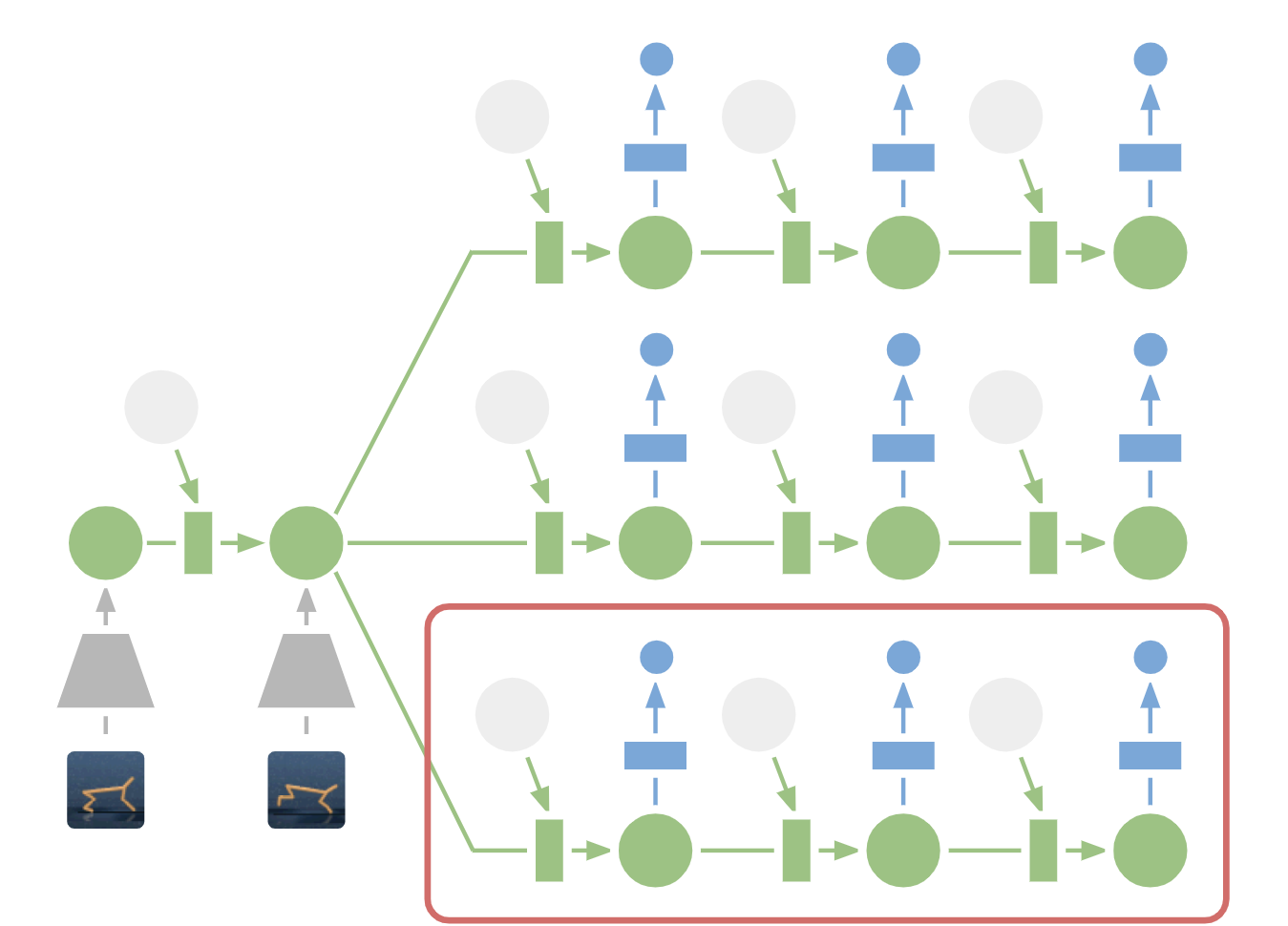
Planning in Latent Space: For planning, we encode past images (gray trapezoid) into the current hidden state (green). From there, we efficiently predict future rewards for multiple action sequences. Note how the expensive image decoder (blue trapezoid) from the previous figure is gone. We then execute the first action of the best sequence found (red box).

Compared to our preceding work on world models, PlaNet works without a policy network — it chooses actions purely by planning, so it benefits from model improvements on the spot. For the technical details, check out our online research paper or the PDF version.

PlaNet vs. Model-Free Methods
We evaluate PlaNet on continuous control tasks. The agent is only given image observations and rewards. We consider tasks that pose a variety of different challenges:

  • A cartpole swing-up task, with a fixed camera, so the cart can move out of sight. The agent thus must absorb and remember information over multiple frames.
  • A finger spin task that requires predicting two separate objects, as well as the interactions between them.
  • A cheetah running task that includes contacts with the ground that are difficult to predict precisely, calling for a model that can predict multiple possible futures.
  • A cup task, which only provides a sparse reward signal once a ball is caught. This demands accurate predictions far into the future to plan a precise sequence of actions.
  • A walker task, in which a simulated robot starts off by lying on the ground, and must first learn to stand up and then walk.
PlaNet agents trained on a variety of image-based control tasks. The animation shows the input images as the agent is solving the tasks. The tasks pose different challenges: partial observability, contacts with the ground, sparse rewards for catching a ball, and controlling a challenging bipedal robot.

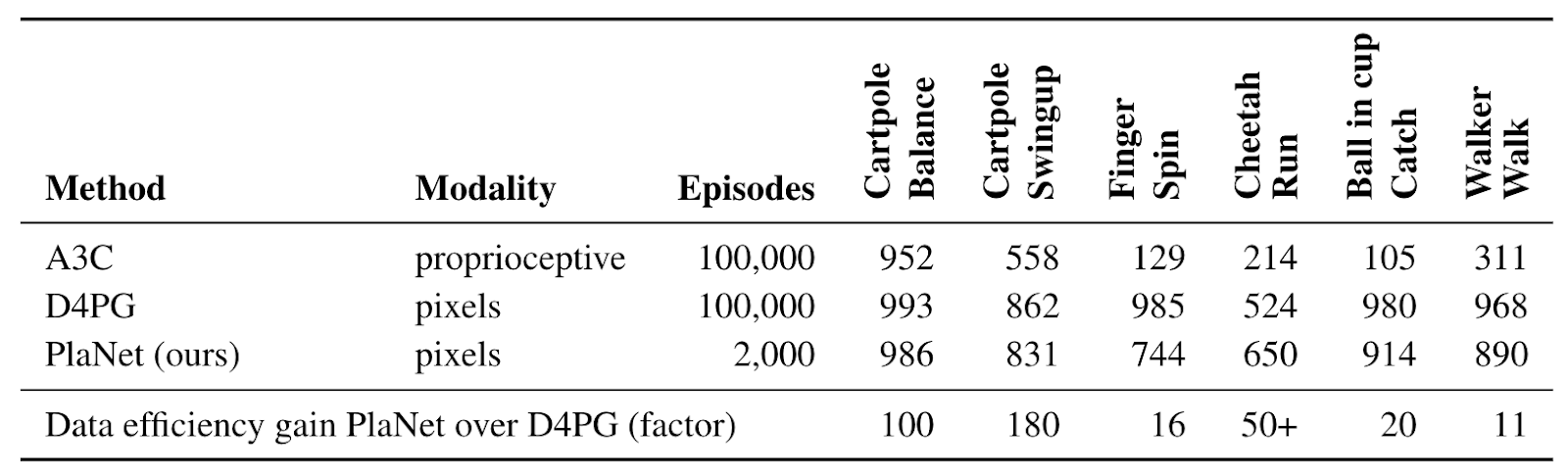
Our work constitutes one of the first examples where planning with a learned model outperforms model-free methods on image-based tasks. The table below compares PlaNet to the well-known A3C agent and the D4PG agent, that combines recent advances in model-free RL. The numbers for these baselines are taken from the DeepMind Control Suite. PlaNet clearly outperforms A3C on all tasks and reaches final performance close to D4PG while, using 5000% less interaction with the environment on average.
One Agent for All Tasks
Additionally, we train a single PlaNet agent to solve all six tasks. The agent is randomly placed into different environments without knowing the task, so it needs to infer the task from its image observations. Without changes to the hyper parameters, the multi-task agent achieves the same mean performance as individual agents. While learning slower on the cartpole tasks, it learns substantially faster and reaches a higher final performance on the challenging walker task that requires exploration.

Video predictions of the PlaNet agent trained on multiple tasks. Holdout episodes collected with the trained agent are shown above and open-loop agent hallucinations below. The agent observes the first 5 frames as context to infer the task and state and accurately predicts ahead for 50 steps given a sequence of actions.

Conclusion
Our results showcase the promise of learning dynamics models for building autonomous RL agents. We advocate for further research that focuses on learning accurate dynamics models on tasks of even higher difficulty, such as 3D environments and real-world robotics tasks. A possible ingredient for scaling up is the processing power of TPUs. We are excited about the possibilities that model-based reinforcement learning opens up, including multi-task learning, hierarchical planning and active exploration using uncertainty estimates.

Acknowledgements
This project is a collaboration with Timothy Lillicrap, Ian Fischer, Ruben Villegas, Honglak Lee, David Ha and James Davidson. We further thank everybody who commented on our paper draft and provided feedback at any point throughout the project.

Using TensorFlow eager execution with Amazon SageMaker script mode

In this blog post, I’ll discuss how to use Amazon SageMaker script mode to train models with TensorFlow’s eager execution mode. Eager execution is the future of TensorFlow; although it is available now as an option in recent versions of TensorFlow 1.x, it will become the default mode of TensorFlow 2. I’ll provide a brief overview of script mode and eager execution, and then present a typical regression task scenario. Next, I’ll describe a workflow that solves this task using script mode and eager execution together. The notebook and related code for this blog post is available on GitHub. Let’s begin with a look at script mode.

Amazon SageMaker script mode

Amazon SageMaker provides APIs and prebuilt containers that make it easy to train and deploy models using several popular machine learning (ML) and deep learning frameworks such as TensorFlow. You can use Amazon SageMaker to train and deploy models using custom TensorFlow code without having to worry about building containers or managing the underlying infrastructure. The Amazon SageMaker Python SDK TensorFlow estimators, and the Amazon SageMaker open source TensorFlow container, make it easy to write a TensorFlow script and then simply run it in Amazon SageMaker. The preferred way to leverage these capabilities is to use script mode.

Amazon SageMaker script mode was launched around AWS re:Invent 2018. It replaces the previous legacy mode, which requires structuring training code around a defined interface of specific functions and the TensorFlow Estimator API. Starting with TensorFlow version 1.11, you can use script mode with Amazon SageMaker prebuilt TensorFlow containers to train TensorFlow models with the same kind of training script you would use outside SageMaker. Your script mode code does not need to comply with any specific Amazon SageMaker-defined interface or use any specific TensorFlow API.

Although a script mode training script is very similar to a training script you might use outside of Amazon SageMaker, you also can access useful properties about the Amazon SageMaker training environment through various environment variables you set. For example, these environment variables are used to specify the dataset location (local or in Amazon S3) and hyperparameters for the algorithm. As shown in the following code snippet, if your code is written in Python, typically the code that does that actual training is placed in a main guard (if __name__ == “__main__”) since Amazon SageMaker imports the script. The main guard prevents the code from being run until Amazon SageMaker is ready to do so.


if __name__ == "__main__":
        
    args, _ = parse_args()
    
    x_train, y_train = get_train_data(args.train)
    x_test, y_test = get_test_data(args.test)
    
    device = '/cpu:0' 
    print(device)
    batch_size = args.batch_size
    epochs = args.epochs
    print('batch_size = {}, epochs = {}'.format(batch_size, epochs))

    with tf.device(device):
        
        model = get_model()
        optimizer = tf.train.GradientDescentOptimizer(0.1)
        model.compile(optimizer=optimizer, loss='mse')    
        model.fit(x_train, y_train, batch_size=batch_size, epochs=epochs,
                  validation_data=(x_test, y_test))

        # evaluate on test set
        scores = model.evaluate(x_test, y_test, batch_size, verbose=2)
        print("Test MSE :", scores)

        # save checkpoint for locally loading in notebook
        saver = tfe.Saver(model.variables)
        saver.save(args.model_dir + '/weights.ckpt')
        # create a separate SavedModel for deployment to a SageMaker endpoint with TensorFlow Serving
        tf.contrib.saved_model.save_keras_model(model, args.model_dir)

In the flow of a typical script mode script, first the command line arguments are fetched, then the data is loaded, and then the model is set up. Next is the actual training, either using convenience methods supplied by tf.keras, or using a training loop that you define. Saved models should go into the /opt/ml/model directory of the container, from which they will be automatically uploaded to Amazon S3 prior to teardown of the container when training is completed.

 TensorFlow eager execution

Eager execution is the future of TensorFlow, and it’s a major paradigm shift. Recently introduced as a more intuitive and dynamic alternative to the original graph mode of TensorFlow, eager execution will become the default mode of TensorFlow 2.

The interface of eager execution is imperative:  Operations are executed immediately, rather than being used to build a static computational graph. Advantages of eager execution include a more intuitive interface with natural control flow and less boilerplate, simplified debugging, and support for dynamic models and almost all of the available TensorFlow operations. Another key difference between eager execution and graph mode is that for graph mode, program state such as variables is globally stored, and a state object’s lifetime is managed by a tf.Session object. By contrast, for eager execution the lifetime of state objects is determined by the lifetime of their corresponding Python objects. This makes it easier to reason about how your code will work, as well as debug it.

In addition to these advantages, eager execution also works with the tf.keras API to make rapid prototyping even easier. If tf.keras is used, the model can be built using the tf.keras functional API or using a subclass from tf.Keras.Model. After model setup with tf.keras, you can simply compile it, call the fit method to train, evaluate on a test set, and save the model. If you’re not using tf.keras, you define your own training loop, and use tf.GradientTape to record operations for later automatic differentiation. Whether you use tf.keras or not, you can now use eager execution with Amazon SageMaker’s prebuilt TensorFlow containers, which was not possible with legacy mode but is now enabled by script mode.

 Workflow initial steps:  Data preprocessing and local mode

To demonstrate how eager execution works with script mode, we’ll focus on presenting a relatively complete workflow within Amazon SageMaker. The workflow includes local and hosted training, as well as inference, in the context of a straightforward regression task. The task involves predicting house prices based on the well-known, public Boston Housing dataset. This dataset contains 13 features that apply to the housing stock of towns in the Boston area, including average number of rooms, accessibility to radial highways, adjacency to the Charles River, etc. To follow along with this blog post, we recommend that you set up an Amazon SageMaker notebook instance. If you don’t have one already see the Amazon SageMaker Developer Guide for instructions. You can upload the notebook and related code from the GitHub repository for this blog post.

After preprocessing the data and writing a training script, the next step is to make sure your code is working as expected. For example, you might train the model for only a few epochs, or train the model on only small sample of the dataset rather than the full dataset. A convenient way to do this is to use Amazon SageMaker local mode training. To train in local mode, it is necessary to have Docker Compose or NVIDIA-Docker-Compose (for GPU) installed in the notebook instance. The example code has a setup shell script you can run to check this and install missing software, if any.

The following code snippet shows how to set up a TensorFlow Estimator and then starts a training job for only a few epochs to confirm that the code is working. One of the key parameters for an Estimator is the train_instance_type, which is the kind of hardware on which the training will run. In the case of local mode, we simply set this parameter to ‘local’ to invoke local mode training on the CPU, or to ‘local_gpu’ if the instance has a GPU. Other parameters of note are the algorithm’s hyperparameters, which are passed in as a dictionary, and a Boolean parameter, which indicates that we are using script mode.

import sagemaker
from sagemaker.tensorflow import TensorFlow

model_dir = '/opt/ml/model'
train_instance_type = 'local'
hyperparameters = {'epochs': 10, 'batch_size': 128}
local_estimator = TensorFlow(entry_point='train.py',
                       model_dir=model_dir,
                       train_instance_type=train_instance_type,
                       train_instance_count=1,
                       hyperparameters=hyperparameters,
                       role=sagemaker.get_execution_role(),
                       base_job_name='tf-eager-scriptmode-bostonhousing',
                       framework_version='1.12.0',
                       py_version='py3',
                       script_mode=True)

inputs = {'train': f'file://{train_dir}',
          'test': f'file://{test_dir}'}

local_estimator.fit(inputs)

To start a training job, we call local_estimator.fit(inputs), where inputs is a dictionary where the keys and named channels have values pointing to the dataset’s location. The local_estimator.fit(inputs) invocation downloads locally to the notebook instance a prebuilt TensorFlow container with TensorFlow for Python 3, CPU version. It then simulates an Amazon SageMaker training job. When training starts, the TensorFlow container executes the train.py script, passing hyperparameters as command line script arguments. You can confirm that the script is working by viewing the logs that are output in the notebook cell, including metrics for each epoch of training.

After we’ve confirmed with local mode that the code is working, we also have a model checkpoint saved in Amazon S3 that we can retrieve and load anywhere, including our notebook instance. As a further sanity check, we can then use the model to make predictions and compare them with the test set. If you do so for the Boston Housing dataset, keep in mind that the housing values are in units of $1000s. (In case you’re wondering why the actual values seem relatively low compared to today’s big city housing prices: the paper referencing the dataset was originally published in 1978.) After we confirm that our code is working, let’s move on to hosted training.

Hosted training in Amazon SageMaker

Hosted training is preferred for doing complete training on the full dataset, especially for large-scale, distributed training. When we did the local mode training, the data was accessed from local directories. Keep in mind that Amazon S3 also can be used to hold training data for local mode if you would prefer to keep all of your data in one place. However, before starting hosted training, the data must be uploaded to an Amazon S3 bucket, as shown in the notebook.

After uploading the data, we’re ready to set up an Amazon SageMaker Estimator object. It is similar to the local mode Estimator, except (1) the train_instance_type has been set to a specific instance type instead of ‘local’ for local mode, and (2) the inputs argument to the fit invocation are set to Amazon S3 locations. Also, since we’re ready to do full-scale training, the number of epochs has been increased. With these changes, we simply call the fit method again to start the actual hosted training.

train_instance_type = 'ml.c4.xlarge'
hyperparameters = {'epochs': 30, 'batch_size': 128}

estimator = TensorFlow(entry_point='train.py',
                       model_dir=model_dir,
                       train_instance_type=train_instance_type,
                       train_instance_count=1,
                       hyperparameters=hyperparameters,
                       role=sagemaker.get_execution_role(),
                       base_job_name='tf-eager-scriptmode-bostonhousing',
                       framework_version='1.12.0',
                       py_version='py3',
                       script_mode=True)

estimator.fit(inputs)

predictor = estimator.deploy(initial_instance_count=1,instance_type='ml.m4.xlarge')
results = predictor.predict(x_test[:10])['predictions'] 

As with local mode training, hosted training produces a model saved in Amazon S3 that we can retrieve and load. We can then make predictions and compare them with the test set. This also demonstrates the modularity of Amazon SageMaker. Having trained the model in Amazon SageMaker, you can now take the model out of Amazon SageMaker and run it anywhere.

Alternatively, you can deploy the model using the Amazon SageMaker hosted endpoints functionality. To do so with TensorFlow, the model must be saved in the TensorFlow SavedModel format rather than a model checkpoint format, as required by TensorFlow Serving. As shown in the last code snippet above, deployment to a hosted endpoint is simply accomplished with one line of code by calling the Estimator’s deploy method.

Conclusion

One of the goals of Amazon SageMaker is to enable data scientists and developers to quickly and easily build, train, and deploy ML models. When script mode is combined with TensorFlow eager execution mode, it’s easy to set up a workflow for rapid prototyping to large-scale training and deployment you can use for a wide variety of data science projects. If you prefer the TensorFlow original static computational graph mode, you also can use script mode. It’s your choice, and it’s just one of the many flexible options provided by Amazon SageMaker.


About the Author

Brent Rabowsky focuses on data science at AWS, and leverages his expertise to help AWS customers with their own data science projects.


Read WordPress sites through Amazon Alexa devices

At the beginning of last year we announced an Amazon Polly plugin for WordPress. This plugin allows blog and website creators who are using WordPress to quickly and easily create audio versions of their posts, articles and websites. A few months later, we updated the plugin with the ability to quickly translate the content of websites to other languages using the Amazon Translate service. This functionality, together with the ability to create audio versions, allows you to voice the content of sites in translated languages. We want to allow creators and authors to reach more readers/listeners around the world using the latest AI services offered by AWS. Today we are happy to announce another extension of the plugin, which allows you to extend WordPress websites and blogs through Alexa devices. This opens new possibilities for the creators and authors of websites to reach an even broader audience. It also makes it easier for people to listen to their favorite blogs by just asking Alexa to read them! So let’s dive deep, and I’ll show you how to integrate your WordPress website with Alexa.

In addition, today we’re announcing that the official name for the plugin is changing to Amazon AI Plugin for WordPress to better reflect the broad integration with the AWS AI ecosystem.

The following diagram presents the flow of interactions and components that are required to expose your website through Alexa.

Let’s step through the process that we are going to implement:

  1. The user invokes a new Alexa skill, for example by saying: Alexa, ask Demo Blog for the latest update.
    1. The skill itself is created using one of the Alexa Skill Blueprints. This allows you to expose your skill through Alexa devices even if you don’t have deep technical knowledge.
  2. The Alexa skill analyzes the call and RSS feed that was generated by the Amazon AI plugin for WordPress, and then returns the link to the audio version of the latest article.
  3. Based on the link provided by the feed, Alexa reads the article by playing the audio file saved on Amazon S3.

The diagram illustrates that AWS services, such as Amazon Polly and Amazon Translate, are used by the WordPress plugin to generate audio versions.

So let’s go into details, and let’s expose our site using Alexa! We won’t be describing the process of installing the plugin on your WordPress website in this blog post. You can read about it in this post, or follow the instructions that are provided on the WordPress plugin website. In general, it should take just around 15 minutes to do this phase. Remember that after enabling the plugin, you should enable the text-to-speech functionality and Amazon Pollycast functionality – which will then generate an RSS feed on your WordPress site which we will be consuming in next phase. Enable Amazon S3 as the default storage for your files. It’s important that your website uses a secure HTTPS connection to expose its feed to Alexa.

After completing these steps, you should note the Amazon Pollycast link that is displayed on the podcast tab of the plugin.

If you open the feed link you should be able to see information about the posts you have published.

The next step is to create an actual skill. As I have already mentioned before, it will be really easy, because we will be using existing Alexa Skill Blueprints. Open the Alexa Skill Blueprints page, and look for the Blog blueprint.

After you find it, choose Make Your Own. After this a three-step wizard opens, which will allow you to create your skill. On the first page provide the link to your RSS feed that you have copied before, and then choose Next: Experience.

Next, you could customize your skill. For this blog post, we’ll leave it as it is, and choose Next: Name.

The next step is choosing the right name for your skill. This is the name that will be used by your readers/listeners to activate the skill and ask Alexa to read a new article. In my example I will use the name Demo Blog. Next, choose Next: Create Skill.

It will take a couple of minutes for the skill to be created, you can grab a quick coffee meanwhile.

Now, when you click the Skills you’ve made link on the top of the page, you should see your own Alexa Skill. Congratulations!

The following short video presents what the solution should look like:

Conclusion

At this stage, your skill is only available from devices that are registered on the Amazon account which you have used to build your skill. The next step would be to publish it as an official skill on the skill store. To do this, open the details page of your skill, where you will find a Publish to  Skill Store button. Just follow those instructions.

You can review the process of publishing the skill in this video:

When you are finished, you’ll be able to announce the world that your website is available on Alexa! Congratulations!


About the Author

Tomasz Stachlewski is a Solutions Architect at AWS, where he helps companies of all sizes (from startups to enterprises) in their cloud journey. He is a big believer in innovative technology, such as serverless architecture, which allows companies to accelerate their digital transformation.

Gubagoo uses Amazon Translate to build translated live chat for automotive dealers

Gubagoo is the leading provider of advanced communication solutions for automotive dealers. Gubagoo understands that automotive customers want a personalized experience and helpful information whenever they purchase a car or book a service appointment. In addition, customers want to be communicated with in their native language. However, dealerships in the US have a difficult time crafting these communications since their staff typically speaks English only. To address this problem, Gubagoo offers a live chat solution called ChatSmart. A dealership can integrate ChatSmart with its website to manage initial customer conversations in multiple languages in real-time. To accomplish this ChatSmart uses Amazon Translate, a neural machine translation service that delivers fast, high-quality, and affordable language translations.

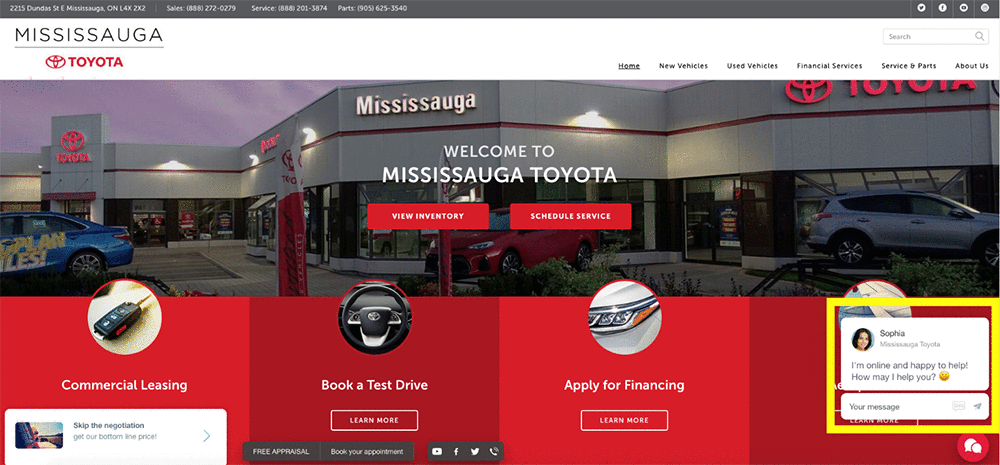
The ChatSmart solution looks like this:

As more dealerships adopted ChatSmart, Gubagoo realized that more than 10 percent of conversations were in a language other than English. “By giving car shoppers the ability to communicate in their language of choice, we are able to reach more consumers and generate more leads for dealers,” said Ilia Alshanetsky, CTO of Gubagoo. “We realized that the most efficient way to do so is by seamlessly integrating our solution to a neural machine translation services provider.” Gubagoo tested a few different machine translation services and chose Amazon Translate because it consistently provided translation two times faster at 25 percent less cost than other solutions.

“With Amazon Translate, we can now successfully serve dealerships that sell to non-English speaking consumers,” continued Alshanetsky. “For example, we serve our dealership clients in Puerto Rico by managing any conversations initiated by Spanish speaking customers using Amazon Translate, of which 48 percent have converted into leads. The translation is so natural that it is difficult for consumers to tell that they are chatting with a non-Spanish speaker.”

When a customer initiates a conversation using the live chat, the Amazon Comprehend Language Detection API recognizes the language used by the customer. When texts are in English, no translations are required. If these texts are in a language other than English, the Amazon Translate API will translate the texts into English and deliver them to the chat specialist. When the chat specialist types back in English, the Translate API will translate these responses and provide the texts in customer’s preferred language.

Here is an illustration of this workflow:

Example: ChatSmart and Amazon Translate work together

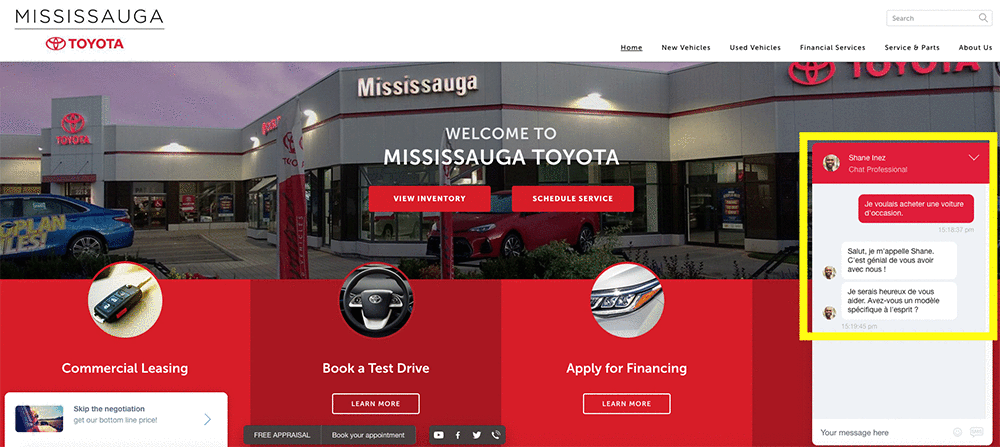
For example, here is how the family-owned-and-operated Mississauga Toyota dealership is using ChatSmart integrated with Amazon Translate. As soon as I enter their online site, I’m greeted by Sophia. See the bottom-right corner of the following screenshot.

I decided to ask, “I want to buy a used car” in French. Within a few seconds, I got two replies back in French from Shane! See Shane’s responses in the bottom-right corner of the following screenshot.

  • “Salut, je m’appelle Shane. C’est génial de vous avoir avec nous!”, which means Hi, my name is Shane. It’s great to have you with us!” in English.
  • “Je serais heureux de vous aider. Avez-vous un modèle spécifique à l’esprit?”, which means, I would be happy to help you. Do you have a specific model in mind?” in English.

“To us the ROI is clear. The amount we spend on Amazon Translate is recouped many times over in terms of the revenue and flexibility we can offer to our customers,” stated Alshanetsky. “This is also just the beginning. Amazon Translate is opening the door to new business opportunities both locally and abroad allowing us to connect with a wider range of customers, which are in some cases underserved.”


About the Author

Woo Kim is a Product Marketing Manager for AWS machine learning services. He spent his childhood in South Korea and now lives in Seattle, WA. In his spare time, he enjoys playing volleyball and tennis.



Using Global Localization to Improve Navigation

One of the consistent challenges when navigating with Google Maps is figuring out the right direction to go: sure, the app tells you to go north – but many times you’re left wondering, “Where exactly am I, and which way is north?” Over the years, we’ve attempted to improve the accuracy of the blue dot with tools like GPS and compass, but found that both have physical limitations that make solving this challenge difficult, especially in urban environments.

We’re experimenting with a way to solve this problem using a technique we call global localization, which combines Visual Positioning Service (VPS), Street View, and machine learning to more accurately identify position and orientation. Using the smartphone camera as a sensor, this technology enables a more powerful and intuitive way to help people quickly determine which way to go.

Due to limitations with accuracy and orientation, guidance via GPS alone is limited in urban environments. Using VPS, Street View and machine learning, Global Localization can provide better context on where you are relative to where you’re going.

In this post, we’ll discuss some of the limitations of navigation in urban environments and how global localization can help overcome them.

Where GPS Falls Short
The process of identifying the position and orientation of a device relative to some reference point is referred to as localization. Various techniques approach localization in different ways. GPS relies on measuring the delay of radio signals from multiple dedicated satellites to determine a precise location. However, in dense urban environments like New York or San Francisco, it can be incredibly hard to pinpoint a geographic location due to low visibility to the sky and signals reflecting off of buildings. This can result in highly inaccurate placements on the map, meaning that your location could appear on the wrong side of the street, or even a few blocks away.

GPS signals bouncing off facades in an urban environment.

GPS has another technical shortcoming: it can only determine the location of the device, not the orientation. Sometimes, sensors in your mobile device can remedy the situation by measuring the magnetic and gravity field of the earth and the relative motion of the device in order to give rough estimates of your orientation. But these sensors are easily skewed by magnetic objects such as cars, pipes, buildings, and even electrical wires inside the phone, resulting in errors that can be inaccurate by up to 180 degrees.

A New Approach to Localization
To improve the precision position and orientation of the blue dot on the map, a new complementary technology is necessary. When walking down the street, you orient yourself by comparing what you see with what you expect to see. Global localization uses a combination of techniques that enable the camera on your mobile device to orient itself much as you would.

VPS determines the location of a device based on imagery rather than GPS signals. VPS first creates a map by taking a series of images which have a known location and analyzing them for key visual features, such as the outline of buildings or bridges, to create a large scale and fast searchable index of those visual features. To localize the device, VPS compares the features in imagery from the phone to those in the VPS index. However, the accuracy of localization through VPS is greatly affected by the quality of the both the imagery and the location associated with it. And that poses another question—where does one find an extensive source of high-quality global imagery?

Enter Street View
Over 10 years ago we launched Street View in Google Maps in order to help people explore the world more deeply. In that time, Street View has continued to expand its coverage of the world, empowering people to not only preview their route, but also step inside famous landmarks and museums, no matter where they are. To deliver global localization with VPS, we connected it with Street View data, making use of information gathered and tested from over 93 countries across the globe. This rich dataset provides trillions of strong reference points to apply triangulation, helping more accurately determine the position of a device and guide people towards their destination.

Features matched from multiple images.

Although this approach works well in theory, making it work well in practice is a challenge. The problem is that the imagery from the phone at the time of localization may differ from what the scene looked like when the Street View imagery was collected, perhaps months earlier. For example, trees have lots of rich detail, but change as the seasons change and even as the wind blows. To get a good match, we need to filter out temporary parts of the scene and focus on permanent structure that doesn’t change over time. That’s why a core ingredient in this new approach is applying machine learning to automatically decide which features to pay attention to, prioritizing features that are likely to be permanent parts of the scene and ignoring things like trees, dynamic light movement, and construction that are likely transient. This is just one of the many ways in which we use machine learning to improve accuracy.

Combining Global Localization with Augmented Reality
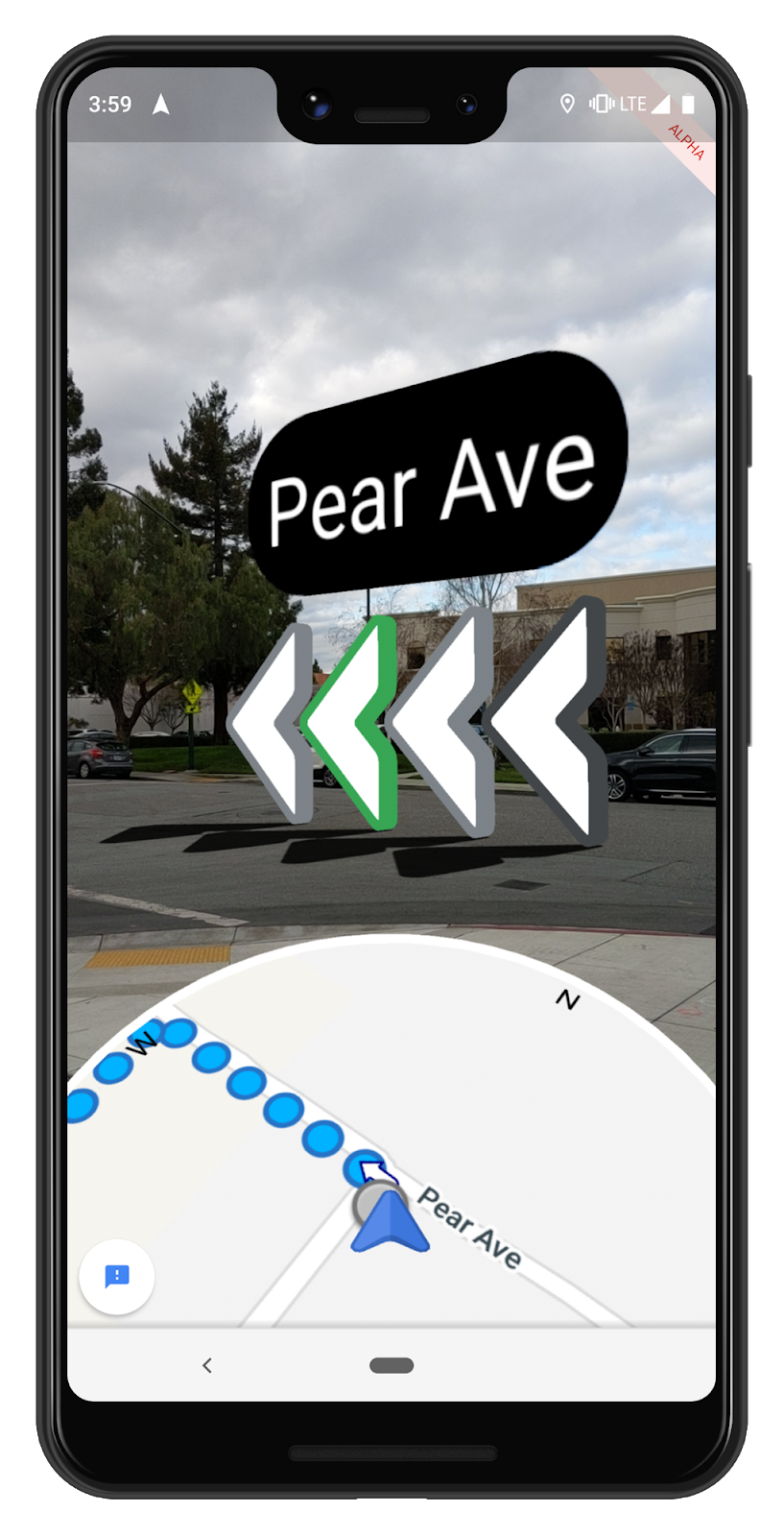
Global localization is an additional option that users can enable when they most need accuracy. And, this increased precision has enabled the possibility of a number of new experiences. One of the newest features we’re testing is the ability to use ARCore, Google’s platform for building augmented reality experiences, to overlay directions right on top of Google Maps when someone is in walking navigation mode. With this feature, a quick glance at your phone shows you exactly which direction you need to go.

Although early results are promising, there’s significant work to be done. One outstanding challenge is making this technology work everywhere, in all types of conditions—think late at night, in a snowstorm, or in torrential downpour. To make sure we’re building something that’s truly useful, we’re starting to test this feature with select Local Guides, a small group of Google Maps enthusiasts around the world who we know will offer us the feedback about how this approach can be most helpful.

Like other AI-driven camera experiences such as Google Lens (which uses the camera to let you search what you see), we believe the ability to overlay directions over the real world environment offers an exciting and useful way to use the technology that already exists in your pocket. We look forward to continuing to develop this technology, and the potential for smartphone cameras to add new types of valuable experiences.

Some Thoughts on Facial Recognition Legislation

Facial recognition technology significantly reduces the amount of time it takes to identify people or objects in photos and video. This makes it a powerful tool for business purposes, but just as importantly, for law enforcement and government agencies to catch criminals, prevent crime, and find missing people. We’ve already seen the technology used to prevent human trafficking, reunite missing children with their parents, improve the physical security of a facility by automating access, and moderate offensive and illegal imagery posted online for removal. Our communities are safer and better equipped to help in emergencies when we have the latest technology, including facial recognition technology, in our toolkit.

In recent months, concerns have been raised about how facial recognition could be used to discriminate and violate civil rights. You may have read about some of the tests of Amazon Rekognition by outside groups attempting to show how the service could be used to discriminate. In each case, we’ve demonstrated that the service was not used properly; and when we’ve re-created their tests using the service correctly, we’ve shown that facial recognition is actually a very valuable tool for improving accuracy and removing bias when compared to manual, human processes. These groups have refused to make their training data and testing parameters publicly available, but we stand ready to collaborate on accurate testing and improvements to our algorithms, which the team continues to enhance every month.

In the two-plus years we’ve been offering Amazon Rekognition, we have not received a single report of misuse by law enforcement. Even with this strong track record to date, we understand why people want there to be oversight and guidelines put in place to make sure facial recognition technology cannot be used to discriminate. We support the calls for an appropriate national legislative framework that protects individual civil rights and ensures that governments are transparent in their use of facial recognition technology.

Over the past several months, we’ve talked to customers, researchers, academics, policymakers, and others to understand how to best balance the benefits of facial recognition with the potential risks. It’s critical that any legislation protect civil rights while also allowing for continued innovation and practical application of the technology. Those discussions led to the development of our proposed guidelines for the responsible use of the technology, which we’d like to share today. We encourage policymakers to consider these guidelines as potential legislation and rules are considered in the US and other countries.

1. Facial recognition should always be used in accordance with the law, including laws that protect civil rights.

The uses of facial recognition technology must comply with all laws, including laws that protect civil rights. There should be no ambiguity that existing laws (for example, the Civil Rights Act of 1964 and Fourth Amendment of the U.S. Constitution) apply to and may restrict the use of this technology in some circumstances.

Our customers are responsible for following the law in how they use the technology. The AWS Acceptable Use Policy (AUP) prohibits customers from using any AWS service, including Amazon Rekognition, to violate the law, and customers who violate our AUP will not be able to use our services. To the extent there may be ambiguities or uncertainties in how existing laws should apply to facial recognition technology, we have and will continue to offer our support to policymakers and legislators in identifying areas to develop guidance or legislation to clarify the proper application of those laws.

2. When facial recognition technology is used in law enforcement, human review is a necessary component to ensure that the use of a prediction to make a decision does not violate civil rights.

Facial recognition is often used to ‘narrow the field’ from hundreds of thousands of potential matches, to a handful; it is this capability that benefits society in many ways by making it easier and more efficient to complete tasks that would take humans far more time. However, facial recognition should not be used to make fully automated, final decisions that might result in a violation of a person’s civil rights. In these situations, human review of facial recognition results should be used to ensure rights are not violated.

For example, for any law enforcement use of facial recognition to identify a person of interest in a criminal investigation, law enforcement agents should manually review the match before making any decision to interview or detain the individual. In all cases, facial recognition matches should be viewed in the context of other compelling evidence, and not be used as the sole determinant for taking action. On the other hand, if facial recognition is used to unlock a phone, or to authenticate an employee’s identity to access a secure, private office building, these decisions would not require a manual audit because they would not impinge on an individual’s civil rights.

3. When facial recognition technology is used by law enforcement for identification, or in a way that could threaten civil liberties, a 99% confidence score threshold is recommended.

Confidence scores can be thought of as a measure of how much trust a facial recognition system places in its own results; the higher the confidence score, the more the results can be trusted. When using facial recognition to identify persons of interest in an investigation, law enforcement should use the recommended 99% confidence threshold, and only use those predictions as one element of the investigation (not the sole determinant).

4. Law enforcement agencies should be transparent in how they use facial recognition technology.

To create the greatest public confidence in responsible law enforcement use of facial recognition, we encourage law enforcement entities to be transparent about their use of the technology and to describe this use in regular transparency reports. Such reports should indicate if and how facial recognition technology is being used and detail safeguards that have been put into place to protect citizens’ privacy and civil rights.

This type of reporting can help balance public safety and civil rights concerns, and help enable effective oversight and accountability of law enforcement use of facial recognition technology. AWS will continue to engage with policymakers, civil society and local community groups, and our law enforcement customers to help define these reports and how they should be provided.

5. There should be notice when video surveillance and facial recognition technology are used together in public or commercial settings.

There have been concerns about facial recognition technology and its potential use in connection with video monitoring in public or commercial settings. In many cases, this has already been addressed by states that have laws regulating the use of video cameras in public or commercial premises, such as shopping centers and restaurants. AWS supports the use of written, visible notices at these premises where video surveillance, including facial recognition, is in use.

AWS also supports the creation of a national legislative framework covering facial recognition through video and photographic monitoring on public or commercial premises, and we encourage deeper public discussion and debate about whether the existing video surveillance laws should be reviewed and updated. Our view is that facial recognition technology and video/photo surveillance should be covered by the same notice framework.

Standardized Testing

AWS has always been, and will remain, supportive and committed to investing in the development of standardized testing methodologies that seek to improve accuracy by removing bias from facial recognition technology.

Technical standards that establish clear benchmarks and testing methodologies are a proven way to address design issues in software, and we believe they are equally applicable here. AWS encourages and supports the development of independent standards for facial recognition technology by entities like the National Institute of Standards and Technology (NIST), including efforts by NIST and other independent and recognized research organizations and standards bodies to develop tests that support cloud-based facial recognition software. We are engaging with the NIST and other stakeholders to offer our direct assistance towards this effort. We also support efforts by members of the academic community to establish independent and trusted criteria, benchmarks, and evaluation protocols around facial recognition services. We encourage other groups from the technology industry, government, and academia to support and participate in these initiatives. We also invite researchers interested in these topics to apply for AWS Machine Learning Research grants, with which we are funding many research initiatives in this space.

Moving Forward

New technology should not be banned or condemned because of its potential misuse. Instead, there should be open, honest, and earnest dialogue among all parties involved to ensure that the technology is applied appropriately and is continuously enhanced. AWS dedicates significant resources to ensuring our technology is highly accurate and reduces bias, including using training data sets that reflect gender, race, ethnic, cultural, and religious diversity. We’re also committed to educating customers on best practices, and ensuring diverse perspectives in our technology development teams. We will continue to work with partners across industry, government, academia, and community groups on this topic because we strongly believe that facial recognition is an important, even critical, tool for business, government, and law enforcement use.

– Michael Punke, VP, Global Public Policy, AWS

Bridgeman Images uses Amazon Translate to establish their business globally

Many businesses aspire to expand globally to reach new customer and accelerate growth. For Bridgeman Images, this meant engaging customers who spoke languages other than English. They needed a scalable solution to overcoming the language barrier since having everything translated manually wasn’t fast enough or cost efficient. Using Amazon Translate, they reduced the time needed to localize content from several months down to a few weeks, translating 570 million English characters into Italian, French, German, and Spanish.

Bridgeman Images is a rights-managed image licensing company that has nearly three million active assets in its archive. To be easily searchable on their site, each of these assets has a title, a description, and a set of keywords/mediums that they index into the Amazon Elasticsearch Service (Amazon ES). Their research showed that between 20 and 30 percent of customers aggregated across all platforms required the image data to appear in a language other than English—either Italian, French, German, or Spanish. Therefore, they decided to provide translations for all of their metadata to provide the best possible experience for their customers.

Bridgeman Images researched a number of different options and decided that machine translations would provide the best overall value for their business. When preparing for the new translations, they took the opportunity to overhaul their internal metadata structures and implement a robust workflow that would minimize duplication and save on translation costs.

First they updated their keyword system. It was originally created as a flat data structure with semi-colon delimited records. They de-duplicated these entries and created a relational structure that would allow multiple assets to share the same keyword alongside its translations. The keywords are stored on an Amazon RDS MySQL instance and are updated into Amazon Elasticsearch Service index whenever a change is triggered to a keyword or a new one is entered into the system.

To handle the translations of their keywords (and other data), their next task was to create a simple wrapper for the Amazon Translate service using Python, Boto3, and the Flask API deployed with Zappa onto AWS Lambda.

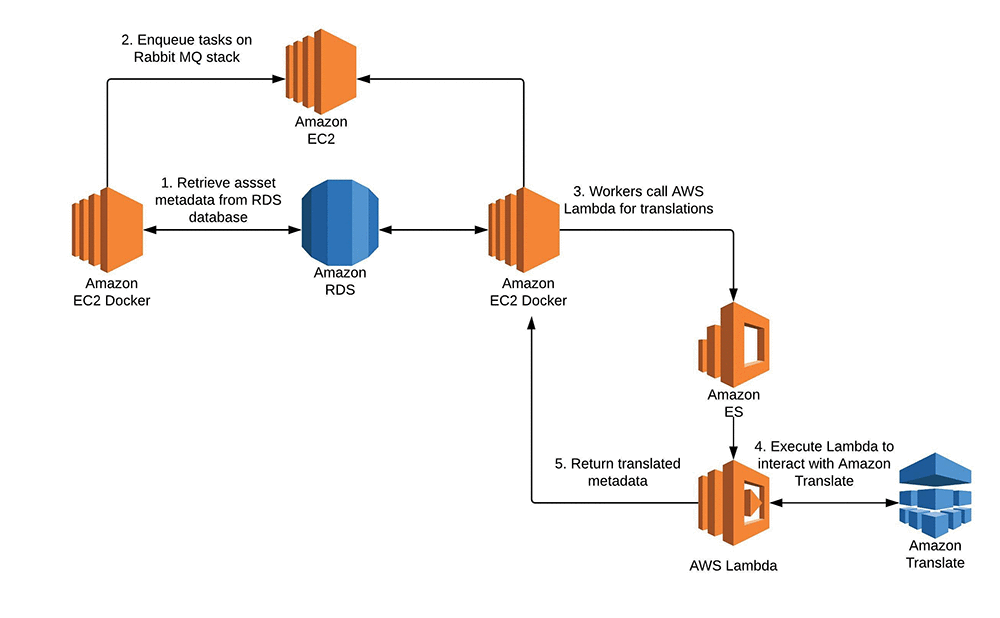
They then designed a trigger so that any time a new keyword was added to their system, a task was put into a queue to their RabbitMQ cluster, which would in turn call a worker to query an AWS Lambda function to grab the translation from Amazon Translate.

Next, they needed to bulk translate nearly 700 million characters of data, which consisted of their titles and descriptions, into four different languages. Some of the source metadata is in more than one language so they extended the Lambda translation function to detect the original language using Amazon Comprehend.

To efficiently process and translate this large volume of data, Bridgeman Images relied on a RabbitMQ cluster hosted on AWS and an AWS Auto Scaling stack of Amazon EC2 instances that ran worker listeners inside Docker containers deployed with AWS Elastic Beanstalk. This setup allowed them to process nearly 14,000 assets per hour, with each asset averaging approximately 100-300 characters per translation.

“We translated roughly 570 million characters per language in the aggregate span of about 15 days. The time saving was significant – likely on the magnitude of months vs a couple of weeks to build and easily integrate with our existing technology infrastructure that AWS provides. The development cycle was super short especially refactoring as it took one developer a week to deliver it and we didn’t need to pile resources or re-skill our developers” said Sean Chambers, IT Director of Bridgeman Images.

Finally, to support ongoing translations, Bridgeman Images designed a newly structured cataloguing interface where their team could input metadata. They simply enter the source language (English, for example) and let the system provide automatic translations for Italian, German, French, and Spanish. These are put into a queue similar to the queue for their keyword triggers. They are updated on a regular basis into an Amazon Elasticsearch Service index so that they become searchable.

Here’s a simple architecture that shows how Bridgeman Images uses Amazon Translate to provide real-time translation for their customers.

“For me one of the reasons for choosing Amazon Translate was cost – 40 percent less than the other competitor we were considering,” says Sean Chambers, IT Director of Bridgeman Images.

Here’s a sneak peek at the Bridgeman Images site in action:


About the Author

Shafreen Sayyed is an AWS Solutions Architect based in London. She helps customers across the UK and Ireland, supporting various industry verticals to transform their businesses and build industry-leading cloud solutions. She has a special interest in Machine Learning and Artificial Intelligence and is passionate about finding ways to help our customers integrate these new and exciting technologies into all aspects of their business.


Announcing the Second Workshop and Challenge on Learned Image Compression

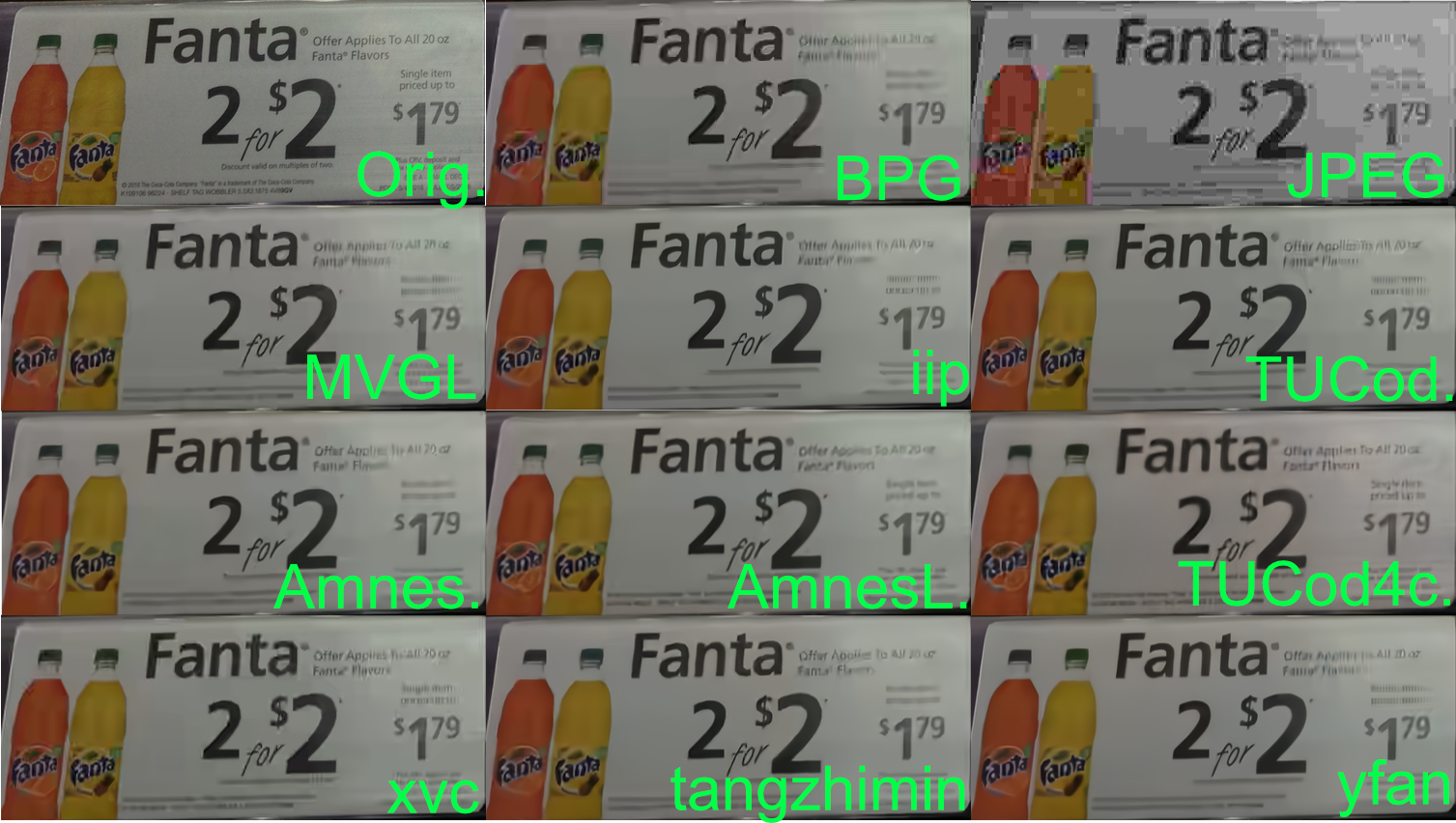
Last year, we announced the Workshop and Challenge on Learned Image Compression (CLIC), an event that aimed to advance the field of image compression with and without neural networks. Held during the 2018 Computer Vision and Pattern Recognition conference (CVPR 2018), CLIC was quite a success, with 23 accepted workshop papers, 95 authors and 41 entries into the competition. This spawned many new algorithms for image compression, domain specific applications to medical image compression and augmentations to existing methods based, with the winner Tucodec (abbreviated TUCod4c in the image below) achieving 13% better mean opinion score (MOS) than Better Portable Graphics (BPG) compression.

An example image from the 2018 test set, comparing the original image to BPG, JPEG and the results from nine competing teams. All the methods are better than JPEG in color reproduction and many of them are comparable to BPG in their ability to create legible text on the sign.

This year, we are again happy co-sponsor the second Workshop and Challenge on Learned Image Compression at CVPR 2019 in Long Beach, California.The half day workshop will feature talks from invited guests Anne Aaron (Netflix), Aaron Van Den Oord (DeepMind) and Jyrki Alakuijala (Google), along with presentations from five top performing teams in the 2019 competition, which is currently open for submissions.

This year’s competition features two tracks for participants to compete in. The first track remains the same as last year, in what we’re calling the “low-rate compression” track. The goal for low-rate compression is to compress an image dataset to 0.15 bits per pixel and maintaining the highest quality metrics as measured by PSNR, MS-SSIM and a human evaluated rating task.

The second track incorporates feedback from last year’s workshop, in which participants expressed interest in the inverse challenge of determining the amount an image could be compressed and still look good. In this “transparent compression” challenge, we set a relatively high quality threshold for the test dataset (in both PSNR and MS-SSIM) with the goal of compressing the dataset to the smallest file sizes.

If you’re doing research in the field of learned image compression, we encourage you to participate in CLIC during CVPR 2019. For more details on the competition and dates, please refer to compression.cc.

Acknowledgements
This workshop is being jointly hosted by researchers at Google, Twitter and ETH Zürich. We’d like to thank: George Toderici (Google), Michele Covell (Google), Johannes Ballé (Google), Nick Johnston (Google), Eirikur Agustsson (Google), Wenzhe Shi (Twitter), Lucas Theis (Twitter), Radu Timofte (ETH Zürich), Fabian Mentzer (ETH Zürich) for their contributions.

Annotate data for less with Amazon SageMaker Ground Truth and automated data labeling

With Amazon SageMaker Ground Truth, you can easily and inexpensively build more accurately labeled machine learning datasets. To decrease labeling costs, use Ground Truth machine learning to choose “difficult” images that require human annotation and “easy” images that can be automatically labeled with machine learning. This post explains how automated data labeling works and how to evaluate its results.

Run an object detection job with automated data labeling

In a previous blog post, Julien Simon described how to run a data labeling job using the AWS Management Console. For finer control over the process, you can use the API.  To show how, we use an Amazon SageMaker Jupyter notebook that uses the API to produce bounding box annotations for 1000 images of birds.

Note: The cost of running the demo notebook is about $200.

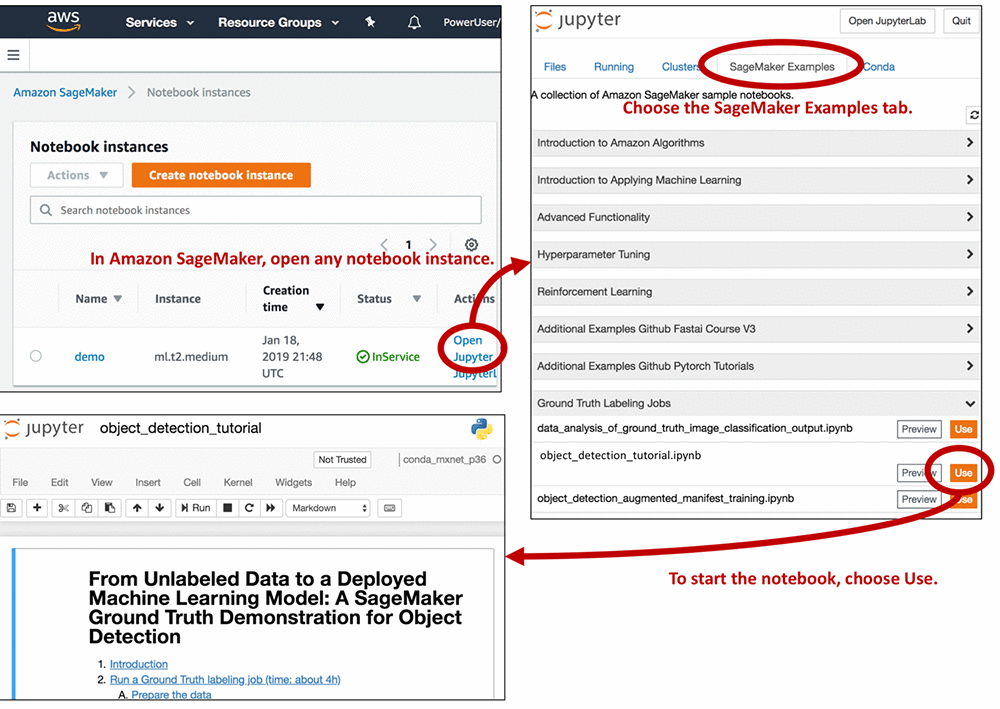
To access the demo notebook, start an Amazon SageMaker notebook instance using an ml.m4.xlarge instance type. You can follow this step-by-step tutorial to set up an instance. On Step 3, make sure to mark “Any S3 bucket” when you create the IAM role! Open the Jupyter notebook, choose the SageMaker Examples tab, and launch object_detection_tutorial.ipynb, as follows.

Run all of the cells in the “Introduction” and “Run a Ground Truth labeling job” sections of the notebook. You need to modify some of the cells, so read the notebook instructions carefully. Running these sections:

  1. Creates a dataset with 1,000 images of birds
  2. Creates object detection instructions for human annotators
  3. Creates an object detection annotation job request
  4. Submits the annotation job request to Ground Truth

The job should take about 4 hours. When it’s done, run all of the cells in the “Analyze Ground Truth labeling job results” and “Compare Ground Truth results to standard labels” sections. This produces a lot of information in plot form. To understand how Ground Truth annotates data, let’s look at some of the plots in detail.

Active learning and automated data labeling

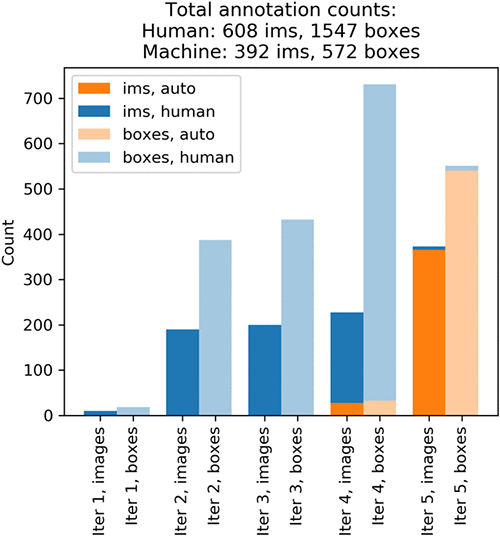
The plots show that annotating the whole dataset took five iterations. In each iteration, Ground Truth sent out a batch of images to Amazon Mechanical Turk annotators. The following graph shows the number of images (abbreviated ‘ims’ in the plot) produced on each iteration and the number of bounding boxes in these images. Your results might differ slightly.

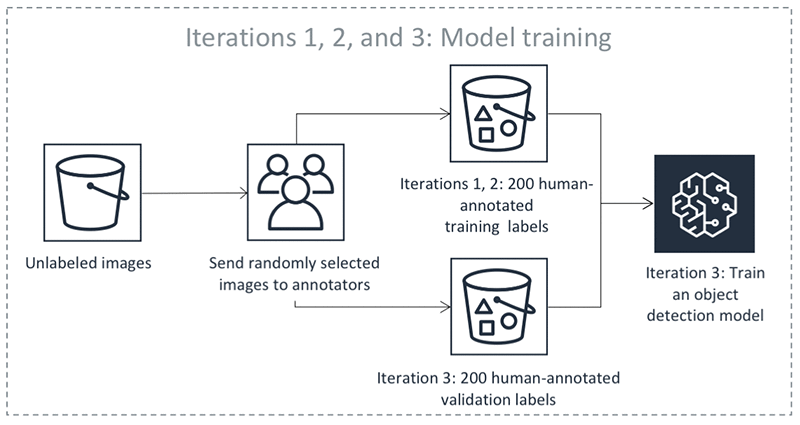
On iteration 1, Mechanical Turk workers annotated a small test batch of 10 randomly chosen images. This batch validates the end-to-end execution of the labeling task. On iteration 2, Mechanical Turk workers annotated another 190 randomly chosen images. This is the validation dataset. It’s used later by a supervised machine learning algorithm to produce automated labels. Iteration 3 created a training dataset by obtaining human-annotated labels on 200 more randomly chosen images. Throughout the process, Ground Truth consolidates each label from multiple human-annotated labels to avoid single-annotator bias. For more information, see the notebook and the Amazon SageMaker Developer Guide.

Now that it has small training and validation datasets, Ground Truth is ready to train the algorithm that later produces automated labels. The following diagram shows the process:

Because automated labeling involves comparing human-annotated labels to labels produced by machine learning, you need to choose a measure of bounding box quality. For this exercise, use the mean Intersection over Union (mIoU). An mIoU of 0 means that there is no overlap between two sets of bounding boxes. A mIoU of 1 means that the two sets of bounding boxes overlap perfectly. Your goal is to produce automated labels that would have an mIoU of at least 0.6 with the human-annotated labels, had you also gotten human annotations on corresponding images. This is slightly higher than 0.5, a threshold commonly used in computer vision to indicate a match between bounding boxes (see for example the “This is a break from tradition…” note here).

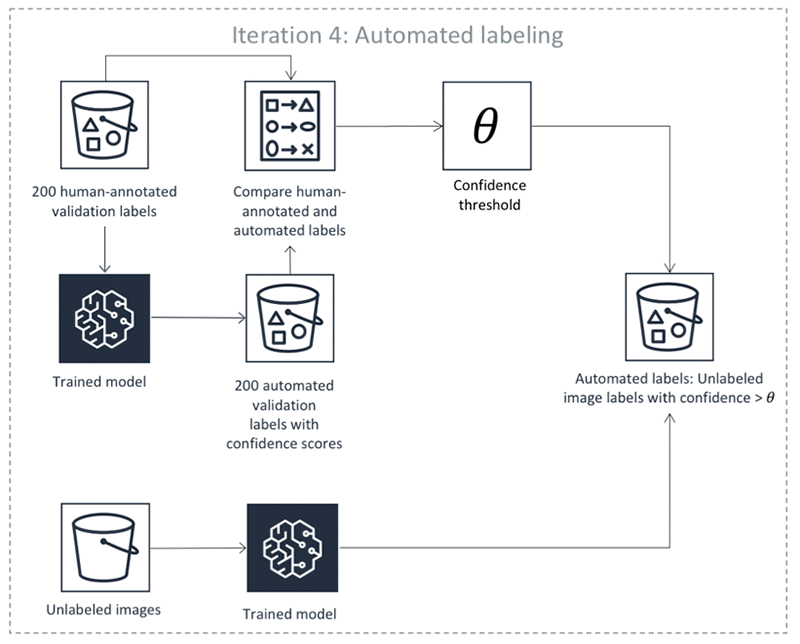
Equipped with a trained DL model and the mIoU measure, Ground Truth is ready to produce the first automated labels on iteration 4. There are four steps:

  1. Use the machine learning algorithm to predict the bounding boxes and their confidence scores on the validation dataset. Remember that you got human-annotated labels for this dataset on iterations 1 and 2. The algorithm assigns each bounding box a confidence score between 0 and 1. By averaging these scores for a particular image, the algorithm gets an image confidence score that tells you how confident the algorithm is in its prediction.
  2. For any image confidence threshold, we can compute how well the algorithm’s predictions on images that are scored above the threshold match human-annotated labels. Find a threshold so that the mIoU of above-threshold labels is at least 0.6. Let’s call the resulting threshold θ.
  3. Use the algorithm to predict bounding boxes and their confidence scores on the remaining unlabeled dataset, which contains 600 images.
  4. Take any unlabeled dataset predictions whose confidence scores exceed θ. In Steps 1 and 2, we made sure that on the human-annotated validation dataset these confidence scores indicate automated annotations that match human labels well. Now assume that the annotations also match what human annotators would have produced on unlabeled data. Ground Truth keeps these annotations as automated labels produced by the algorithm. There may be no need to send the images with automated labels with a high confidence score to human annotators, but that is subject to your specific use case. For example, you may want additional human review for certain use cases.

The following diagram illustrates the automatic labeling process:

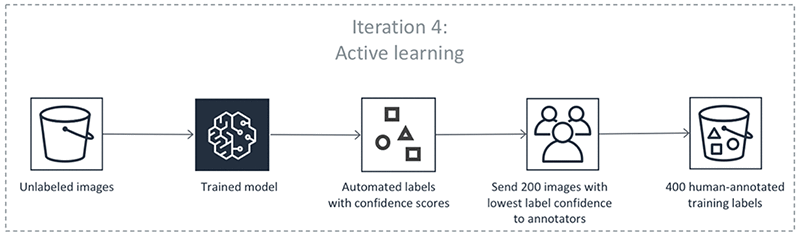
If you look at the first diagram, you can see that the yellow bar at iteration 4 shows that the algorithm was confident enough to automatically label only 27 images. To produce more accurate predictions, you need more human-labeled data. From now on, however, you won’t choose the images to label at random. Instead, you let the machine learning model choose images to show to human annotators:

In iteration 4, an additional 200 images were annotated to increase the training set size to 400. The first diagram shows that on iterations 1, 2, and 3, you got about 2 bounding boxes per image. On iteration 4, it’s almost 3.5 boxes per image! The algorithm figured out it’s best to ask humans to annotate images that contain many predicted objects. Before iteration 5 started, you retrained the algorithm using 400 training and 200 validation images. This completes one round of the Ground Truth annotation loop.

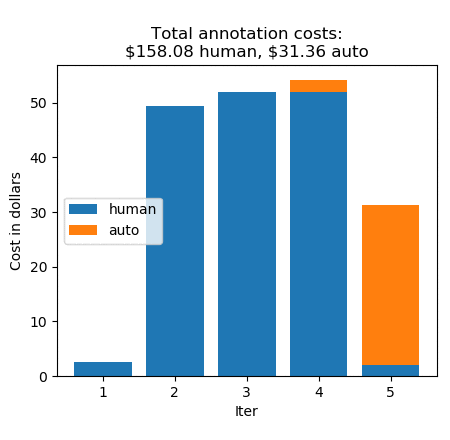
Thanks to Ground Truth active learning, the machine learning model learned quickly—iteration 5 automatically labeled 365 images! This leaves only 8 unlabeled images. Iteration 5 sent these images to human annotators to complete the task. Let’s look at the annotation costs iteration-by-iteration:

Without automatic data labeling, the annotations would have cost $0.26 * 1000, which equals $260. Instead, you paid $158.08 for 608 human labels, and $31.36 for 392 automated labels, for a total of $189.44. This is a cost saving of 27%. (For pricing details, see the Amazon SageMaker Ground Truth pricing page.)

Compare human-annotated and automated labels

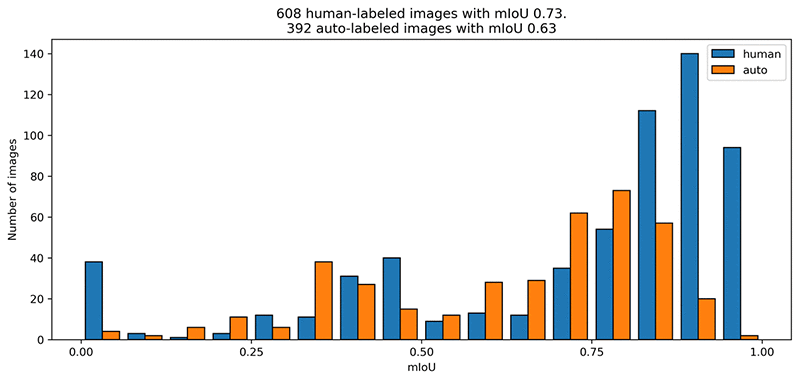
Automated labels are cheap, but how do they compare to human-annotated labels? The following mIoU graph shows how well the automated labels mirror the original annotations.

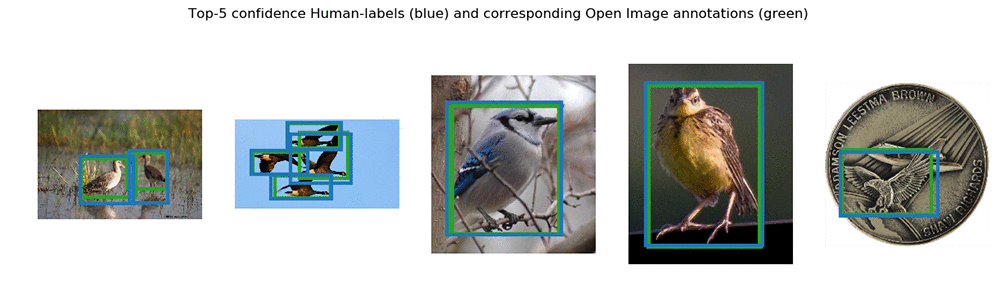
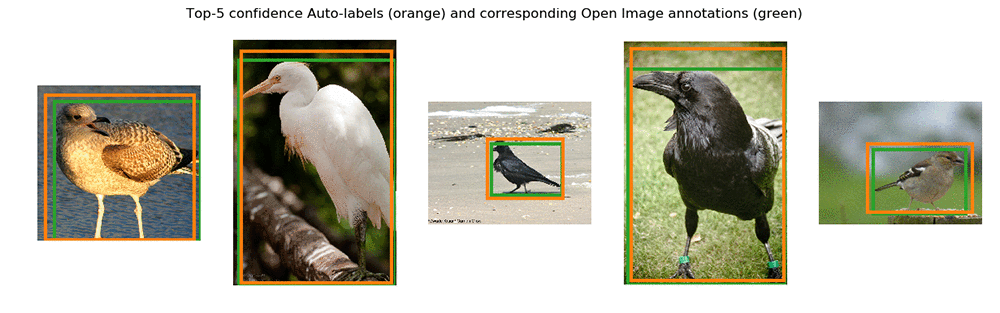
The human labelers performed slightly better on average. The automatically labeled images have an average mIoU of just above 0.6. This is the label quality that you asked the automatic labeler for. Let’s look at the top 5 images with the highest confidence scores annotated by humans and automatically labeled:


Conclusion

With automated data labeling, Ground Truth decreased bounding box annotation cost by 27%. This number will vary from dataset to dataset. It might decrease for image classification (where human annotation is cheap) and increase for semantic segmentation (where human annotation is expensive).

Feel free to experiment with or modify the Jupyter notebook. Check out our demos for other image annotation tasks – they can be accessed on any SageMaker instance, in the same way as the Jupyter notebook we just looked at!


About the authors

Krzysztof Chalupka is an applied scientist in the Amazon ML Solutions Lab. He has a PhD in causal inference and computer vision from Caltech. At Amazon, he figures out ways in which computer vision and deep learning can augment human intelligence. His free time is filled with family. He also loves forests, woodworking, and books (trees in all forms).



Tristan McKinney is an applied scientist in the Amazon ML Solutions Lab. He recently completed his PhD in theoretical physics at Caltech where he studied effective field theory and its application to high-T_c superconductors. As his father was in the US Army, he lived all over the place when growing up, including Germany and Albania. In his spare time, Tristan loves to ski and play soccer.



 Fedor Zhdanov is a Machine Learning Scientist at Amazon. He works on developing Machine Learning algorithms and tools for our internal and external customers.


DXC Technology automates triage of support tickets using AWS machine learning

DXC Technology is a global IT service leader providing end-to-end services on Digital Transformation to businesses and governments. They also provide service management to their clients on-premises and in the cloud.  The incident tickets raised as part of the process need to be resolved quickly to meet their service level agreements (SLA).  DXC has  goals to reduce human effort, reduce incident resolution time, enhance knowledge management, and enhance consistency of incident resolution.  With these goals in mind, DXC developed a  knowledge management (KM) article prediction mechanism.

In this blog post, we’ll discuss how DXC uses machine learning on AWS to automatically identify a KM article, which in turn can be automated with the orchestration runbook for ticket resolution to make IT support more efficient.

The DXC solution on AWS

First: Build a data lake on Amazon S3

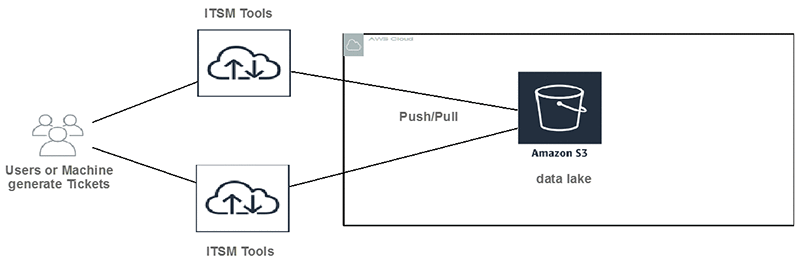
DXC customers submit incident tickets to IT Service Management Tools (ITSM). Tickets can be user generated or machine generated. Then data is pushed or pulled to Amazon S3 buckets. Amazon S3 provides low cost, highly durable object storage that can store any form or format of data.

Second: Choose the right machine learning tool and algorithm

Typically, the problem is how to classify text. AWS offers a variety of choices for customers to do text classifications. DXC evaluated the following AWS services.

  1. Amazon SageMaker with its built-in algorithm called BlazingText.
  2. Amazon Comprehend custom classification.

The Amazon Comprehend custom classification API was good choice since it is built ground-up for text classification. With Amazon Comprehend, we didn’t have to pick an algorithm, tune it and re-train our model looking for the highest accuracy – the API did this automatically. We plan to re-evaluate it when it supports synchronous calls (today it provide batch-mode classification).

Amazon SageMaker BlazingText implements the fastText algorithm and keep the right balance between scalability and accuracy.

Third: Train the model

Training data preparations:

Training the model is the most important part of the ML process.  Training of supervised models requires labeled data. The DXC team wanted to label a significant amount of historical data for this purpose. In the pre-processing step, the text data was tokenized using NLTK (Python library) and stored in CSV format in Amazon S3 for the training.  The training is done once a month with the historical data.

The tokenized training data looks like this. It is used  as input to the training job.

Training job with hyperparameter optimization (HPO)

We use the automatic model tuning feature of Amazon SageMaker to automate and accelerate the search of hyperparameters for the BlazingText algorithm.

Initially, we set static hyperparameters  that we don’t need to change across training jobs, and we also define ranges for the hyperparameters that need optimizations.

Note: All the parameter values mentioned in the code below are sample values. You need to test and use your own values based on your requirements.

# set static hyperparameters
hyperparameters = dict(mode="supervised",
                            early_stopping=True,
                            patience=5,
                            min_epochs=30) 

#Set ranges for hyperparameters
hyperparameter_ranges = {
                         'epochs': IntegerParameter(50, 300),
                         'learning_rate': ContinuousParameter(0.005, 0.05),
                         'min_count': IntegerParameter(10, 300),
                         'vector_dim': IntegerParameter(64, 500),
                         'buckets': IntegerParameter(1000000, 10000000),
                         'word_ngrams': IntegerParameter(2, 5)
                        }

Next, we instantiated the estimator and the HPO tuner. Then we triggered the training job using training data available on Amazon S3.

# Instantiating Estimator
bt_model = sagemaker.estimator.Estimator(container,
                                         role, 
                                         train_instance_count=1, 
                                         train_instance_type='ml.XXX',
                                         train_volume_size = 20,
                                         train_max_run = 360000,
                                         input_mode= 'File',
                                         output_path=s3_output_location,
                                         hyperparameters=hyperparameters,
                                         sagemaker_session=sess)


#Setting objective of HPO on maximizing validation accuracy
objective_metric_name = 'validation:accuracy'
objective_type = 'Maximize'

# Setting HPO tuner
tuner = HyperparameterTuner(bt_model,
                            objective_metric_name,
                            hyperparameter_ranges,
                            max_jobs=100,
                            max_parallel_jobs=2,
                            objective_type=objective_type)


# Triggering training using S3 training and validation data

train_data = sagemaker.session.s3_input(s3_train_data, distribution='FullyReplicated', 
                        content_type='text/plain', s3_data_type='S3Prefix')
validation_data = sagemaker.session.s3_input(s3_validation_data, distribution='FullyReplicated', 
                             content_type='text/plain', s3_data_type='S3Prefix')
data_channels = {'train': train_data, 'validation': validation_data}

tuner.fit(inputs=data_channels)

Fourth: Orchestrate data preparation, model training, and model deployment on Amazon SageMaker using AWS Step Functions

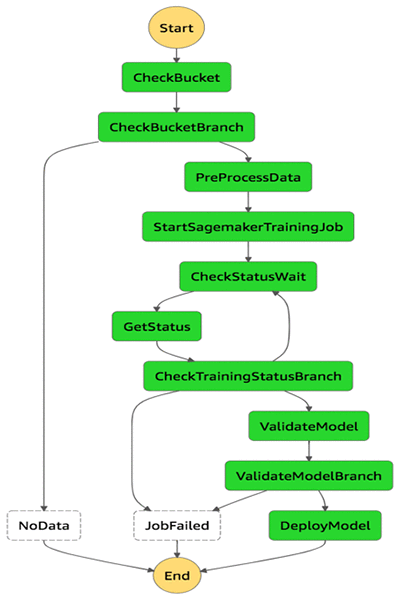
We orchestrated this ML workflow using AWS Step Functions, and we scheduled using an Amazon Cloud Watch Events rule.

AWS Step Functions performs the following steps:

  1. It checks that the Amazon S3 bucket exists where input data for training is present.
  2. It pre-processes the data set for model training.
  3. It starts the training job in Amazon SageMaker with the required parameters.
  4. It keeps checking the status of training job.
  5. After the training is successful, it validates the model.
  6. After the model validated, it deploys the model as Amazon SageMaker endpoints. (If the model endpoint exists, then it updates the model endpoint.)

All o f these steps are developed as AWS Lambda functions.

Note: During AWS re:Invent 2018, a new feature was released that allowed Step Functions to be directly integrated with Amazon SageMaker. This feature can be used to develop some of the steps described earlier without writing Lambda functions. However, the feature was not available when DXC developed this solution.

Fifth: Call the inference

As soon as new ITSM tickets get ingested to an Amazon S3 bucket, an AWS Lambda function is triggered to call the inference using Amazon SageMaker endpoints.

The Lambda function reads the ticket number and description from incoming files and creates a payload like the following:

Then, it calls the Amazon SageMaker model endpoint with payload information:

import boto3
import json
#Sagemaker endpoints passed as Lambda Parameter
ENDPOINT_NAME= <SageMaker Model Endpoint>

#Call Endpoints
response=runtime.invoke_endpoint(EndpointName=ENDPOINT_NAME,ContentType='application/json',Body=payload)

It creates a CSV output and stores it on Amazon S3. The output looks like the following example. It stores the ticket number, the predicted KB document, and confidence level.

Sixth: Build a CI/CD pipeline to automate the solution deployment

DXC developed a CI/CD pipeline using Ansible, Jenkins, and AWS CloudFormation templates to automate the deployment of the whole solution.

Seventh: Enable it for the support team

After the predictions are generated, they can be accessed using API endpoints based on Incident Identifiers or Incident Descriptions.  Incident Descriptions are more suitable for real-time resolution of issues. It’s possible that you don’t even need to create a ticket. The description of an issue when checked against the Amazon SageMaker endpoint results in the output of a KM article identifier that can be referred offline, which might lead to the resolution of the issue. In this scenario, no ticket had to be created.

In the case where ticket has been created, a Service Desk Agent can use a chatbot that makes a call to the API or uses the API directly by providing the Incident Identifier. The output of the Incident Identifier is a KM article identifier. This can be quickly referred to offline for incident resolution, hence reducing the incident resolution time.

And further integration with runbook automation will result in the automation of ticket resolution with little or zero human effort.

The end-to-end solution

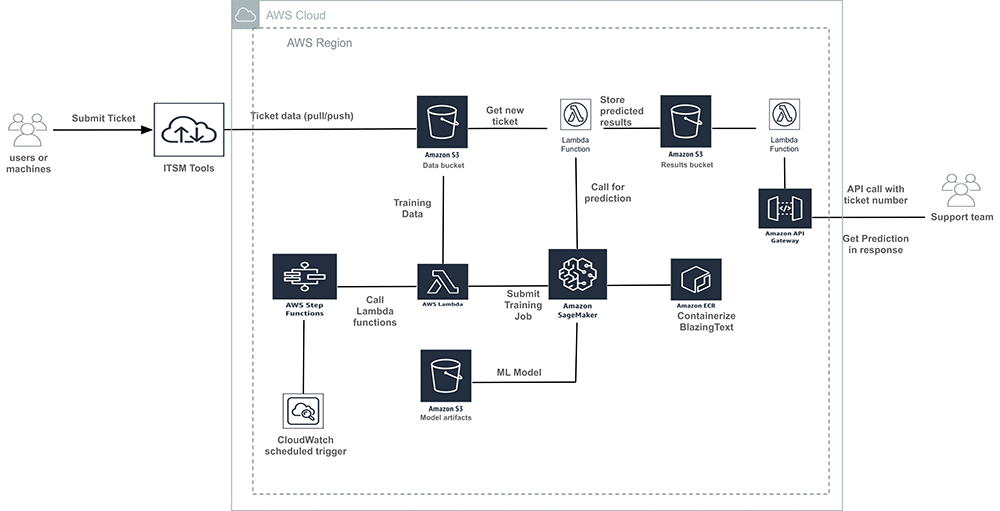
The overall architecture looks like this.

Conclusion – What did DXC achieve?

To summarize, the KM article prediction mechanism realized the following benefits:

  1. Improved the support team’s efficiency. The support team can almost instantly know which KM article to be looked at for solving the ticket.
  2. This prediction mechanism also can be used as a self-service tool where users can enter ticket descriptions and get back the KM article to solve their own issue. This will also reduce the number of tickets.
  3. Integration of this mechanism with runbook automation will help automate resolution of tickets too.

About the Authors

Sougata Biswas is a big data architect at AWS Professional Services. He helps AWS customers in architecting and implementing solutions on AWS to get business value out of data.


Sofian Hamiti is a data scientist at Amazon ML Solutions Lab. He helps AWS customers across different industries accelerate their AI and cloud adoption.


Thanks to DXC team who worked on the project. Special thanks to following leaders from DXC who encouraged and reviewed the blog post.

Niladri Chowdhury, Manager of Data Engineering and Analytics Mgr Operations Engineering and Excellence (OE&E) at DXC Tech. He leads a team of Analysts, Data Engineers and Data Scientists to design, build and deploy the best of the class Business Intelligence delivery solutions in cloud

William Giotto, Global Product Owner at DXC Tech. He aligns efforts towards a vision of Intelligent Automation. Full time father, data science enthusiastic and amateur astronomer (www.astrogiotto.com)