AWS customers often choose to run machine learning (ML) inferences at the edge to minimize latency. In many of these situations, ML predictions must be run on a large number of inputs independently. For example, running an object detection model on each frame of a video. In these cases, parallelizing ML inferences across all available CPU/GPUs on the edge device offers the potential to reduce the overall inference time.
Recently, my team recognized a need for this optimization while helping a customer to build an industrial anomaly detection system. In this use case, a set of cameras took and uploaded images of passing machines (about 3,000 images per machine). The customer needed each image fed into a deep learning-based object detection model they had deployed to an edge device at their site. The edge hardware at each site had two GPUs and several CPUs. Initially, we implemented a long-running Lambda function (more on this later in the post) deployed to an AWS IoT Greengrass core. This configuration would process each image sequentially on the edge device.
However, this configuration runs deep learning inference on a single CPU and a single GPU core of the edge device. To reduce inference time, we considered how to take advantage of the available hardware’s full capacity. After some research, I found documentation (for various deep learning frameworks) on many ways to distribute training among multiple CPU/GPUs (such as TensorFlow, MXNet, and PyTorch). However, I did not find material on how to parallelize inference on a given host.
In this post, I will show you several ways to parallelize inference, providing example code snippets and performance benchmark results.
This post focuses exclusively on data parallelism. This means dividing the list of input data into equal parts and having each CPU/GPU core process one such part. This approach differs from model parallelism, which entails splitting an ML model into different parts and loading each part into a different processor. Data parallelism is much more common and practical due to its simplicity.
What’s hard about parallelizing ML inference on a single machine?
If you are a software engineer familiar with writing multi-threaded code, you might read the preceding and wonder: What’s challenging about parallelizing ML inferences on a single machine? To better understand this, let’s quickly review the process of doing a single ML inference end-to-end, assuming that your device has at least one GPU:

Here are some considerations when you think about optimizing inference performance on a machine with multiple CPU/GPUs:
- Heavy initialization: In the diagrammed process, Step 1 (loading the neural net), often takes a significant amount of time—loading times of a few hundred milliseconds or multiple seconds are typical. Given the timing, I recommend that you perform initialization once per process/thread and reuse the process/thread for running inference.
- Either CPU or GPU can be the bottleneck: Step 2 (data transformation), and Step 4 (forward pass on the neural net) are the two most computationally intensive steps. Depending on the complexity of the code and the available hardware, you might find that one use case utilizes 100% of your CPU core while underutilizing your GPU, while another use case does the opposite.
- Explicitly assigning GPUs to process/threads: When using deep learning frameworks for inference on a GPU, your code must specify the GPU ID onto which you want the model to load. For example, if you have two GPUs on a machine and two processes to run inferences in parallel, your code should explicitly assign one process GPU-0 and the other GPU-1.
- Ordering outputs: Do you need the output ordered before being consumed by downstream processing? When you parallelize different inputs for simultaneous processing by different threads, First-In-First-Out guarantees no longer apply. For example, in a real-time object tracking system, the tracking algorithm must process the prediction of the previous video frame before processing the prediction of the next frame. In such cases, you must implement additional indexing and reordering after the parallelized inference takes place. In other use cases, out-of-order results might not be an issue.
Summary of parallelization approaches
In this post, I show you three options for parallelizing inference on a single machine. Here’s a quick glimpse of their pros and cons.
| Option |
Pros |
Cons |
Recommended? |
| 1A: Using multiple long-lived AWS Lambda functions in AWS IoT Greengrass |
- Simple. No change required to inference code
- Can rely on AWS IoT Greengrass to maintain the desired concurrency and decouple component
|
- Load balancing inputs between multiple Lambda functions adds complexity
- Requires running AWS IoT Greengrass
- Has potential to exceed the concurrent container limit of Greengrass
- Requires hardcoding configuration
|
Yes |
| 1B: Using on-demand Lambda functions in AWS IoT Greengrass |
- The level of concurrency dynamically scales based on requests
|
- “Cold Start” latency
- Lack of control on level of concurrency
- Difficult to assign different GPUs to each Lambda container
|
No |
| 2: Using Python multiprocessing |
- Doesn’t require AWS IoT Greengrass (but can also run inside a Greengrass Lambda function)
- Most flexible. You can determine the level of concurrency at runtime based on available hardware
|
- Code complexity rises if you want to decouple the CPU and GPU processing components
|
Yes |
Parallelization option 1: Using multiple Lambda containers in AWS IoT Greengrass
AWS IoT Greengrass is a great option for running ML inference at the edge. It enables devices to run Lambda functions locally on the edge device and respond to events, even during disrupted cloud connectivity. When the device reconnects to the internet, the AWS IoT Greengrass software can seamlessly synchronize any data you want to upload to the cloud for further analytics and durable storage. As a result, you enjoy the benefits of both running ML inferences locally at the edge (that is, lower latency, network bandwidth savings, and potentially lower cost) and scalable analytics and storage capabilities of the cloud for the data that must persist.
AWS IoT Greengrass also includes a feature to help you manage machine learning resources while deploying ML inference at the edge. Use this feature to specify where on Amazon S3 you want the ML model parameter files stored. AWS IoT Greengrass downloads and extracts the files to a designated location on the edge device during deployment. This feature simplifies ML model updates. When you have a new ML model, point the ML resource to the new artifact’s S3 location and trigger a new deployment of the Greengrass group. Any changes to the source ML artifact on S3 automatically redeploy to the edge device.
If you run your inference code with AWS IoT Greengrass, you can also parallelize inferences by running multiple inference Lambda function instances in parallel. You can do this in two ways in AWS IoT Greengrass: Using multiple, long-lived Lambda functions or on-demand Lambda.
Option 1A: Using multiple long-lived Greengrass Lambda functions (recommended)
A long-lived (or pinned) Greengrass Lambda function resembles a daemon process. Unlike AWS Lambda functions in the cloud, the long-lived Greengrass Lambda function creates a single container for each function. The same container queues and processes requests to that Lambda function, one by one.
Using a long-lived Greengrass Lambda function for ML minimizes the impact of the initialization latency. Within a long-lived Greengrass Lambda function, you load the ML model once during initialization. Any subsequent request reuses the same container without having to load the ML model again.
In this paradigm, you can parallelize inferences by defining multiple, long-lived Greengrass Lambda functions running the same source code. Configuring two long-lived Greengrass Lambda functions on one AWS IoT Greengrass core results in two long-running containers, each with the ML model initialized and ready to run inferences concurrently. Some pros and cons of this approach:
Pros of using long-lived Greengrass Lambda functions
- Keep the inference code simple. You don’t need to change your single-threaded inference code.
- You can assign different GPUs to each of the Greengrass Lambda functions by specifying different environment variables for them.
- You can rely on AWS IoT Greengrass to maintain the desired number of concurrent inference containers. Even if one container crashes due to some unhandled exception, the AWS IoT Greengrass core software launches a new, replacement container.
- You can also rely on Greengrass constructs to decouple the CPU-intensive input transformation computation and the GPU-intensive forward-pass portion into separate Lambda functions, further optimizing resource use. For example, assume that the data transformation code is the bottleneck in the inference, and there are four CPU cores and two GPU cores on the machine. In that case, you can have four long-running Lambda functions for data transformation (one for each CPU core) and pass the results into two long-running Lambda functions (one for each GPU core).
Cons of using long-lived Greengrass Lambda functions
- Each long-lived Lambda function processes inputs one-by-one. As a result, you should implement load balancing logic to split the inputs into distinct topics to which separate Lambda functions subscribe.For example, if you have two concurrent inference Lambda functions, you can write a preprocessing Lambda function splitting the inputs in half and assigning each half on a separate IoT topic in AWS IoT Greengrass. The following diagram illustrates this workflow:

- As of May 2019, AWS IoT Greengrass limits the number of Lambda containers that can run concurrently to 20. All Lambda functions on the AWS IoT Greengrass core device share this hard limit, including on-demand containers. If you have other Lambda functions performing processing tasks on the same device, this limit might prevent you from running multiple Lambda instances for each inference task.
- This approach requires hardcoding configurations for an AWS IoT Greengrass deployment, such as the number of long-running inference Lambda functions, the GPU IDs to which they are assigned, and the corresponding input subscriptions. You must know the hardware specs of each device that you plan to use before deployment. If you operate a heterogeneous fleet of devices with different numbers of cores, you must provide specific AWS IoT Greengrass configurations mapping to the CPU/GPU resources of each device model.
Option 1B: Using on-demand Greengrass Lambda functions (not recommended)
On-demand Greengrass Lambda functions work similarly to AWS Lambda functions in the cloud. When multiple requests come in, AWS IoT Greengrass can dynamically spin up multiple containers (or sandboxes). Any container can process any invocation, and they can run in parallel.
When no tasks are left to execute, the containers (or sandboxes) can persist, and future invocations can reuse them. Alternatively, they can be terminated to make room for other Lambda function executions. You cannot control the number of containers that get spun up nor how many of them persist. A heuristic internal to AWS IoT Greengrass determines the number of containers based on the queue size. In short, using the on-demand Lambda configuration, AWS IoT Greengrass dynamically scales the number of containers that execute your code, based on traffic.
This configuration fits data processing use cases with low initialization overhead. However, there are several disadvantages when using the on-demand configuration for deep learning inference code:
- “Cold Start” latency: As mentioned previously, deep learning models take a while to load into memory. While AWS IoT Greengrass dynamically spins up and destroys containers, incoming requests might require new container creation and incur initialization latency. Such delays could negate the performance gains from parallelization.
- Lack of control on the number of concurrent containers: Controlling the number of concurrent inference Lambda function executions helps optimize resource use. For example, imagine you have two GPUs, and each forward pass process of the ML model uses 100% of the GPU. In that scenario, two concurrent Greengrass Lambda containers would represent the ideal use of your resources. Creating more than two containers would only result in more context-switching and queueing for CPU/GPU resources. The on-demand Lambda configuration doesn’t permit you to control the number of concurrent executions.
- Difficulty in coordination between concurrent Lambda containers: Usually, the on-demand model assumes that each concurrent Lambda container instance is independent and configured in the same way. However, when you use multiple GPUs, you must explicitly assign each Lambda container to use a different GPU. These GPU assignments require some coordination among containers, as AWS IoT Greengrass dynamically spins them up and destroys them.
Parallelization option 2: Using Python multiprocessing (recommended)
The previously discussed option 1A might not be appropriate for those who:
- Prefer not to use AWS IoT Greengrass
- Need to run many Lambda functions, and having multiple instances of each would exceed the concurrent container limit of Greengrass
- Want to flexibly determine the level of parallelization at runtime, based on available hardware resources
An alternative for those users would be to change your inference code to take advantage of multiple cores. I discuss this option in the following section, focusing on Python, given the language’s unmatched popularity in the ML and data science space.
Python multiprocessing
Programming languages like Java or C++ let you use multiple threads to take advantage of multiple CPU cores. Unfortunately, Python’s global interpreter lock (GIL) prevents you from parallelizing inference in this way. However, you can use Python’s multiprocessing module to achieve parallelism by running ML inference concurrently on multiple CPU and GPUs. Supported in both Python 2 and Python 3, the Python multiprocessing module lets you spawn multiple processes that run concurrently on multiple processor cores.
Using process pools to parallelize inference
The Python multiprocessing module offers process pools. Using process pools, you can spawn multiple long-lived processes and load a copy of the ML model in each process during initialization. You can then use the pool.Map () function to submit a list of inputs to be processed by the pool. See the following code snippet example:
# This model object contains the loaded ML model.
# Each Python child process will have its independent copy of the Model object
model = None

def init_worker(GPUs, model_param_path):
    """ This gets called when the worker process is created
    Here we initialize the worker process by loading the ML model into GPU memory.
    Each worker process will pull a GPU ID from a queue of available IDs (e.g. [0, 1, 2, 3]) and load the ML model to that GPU
    This ensures that multiple GPUs are consumed evenly."""
    global model
    if not gpus.empty():
        gpu_id = gpus.get()
        logger.info("Using GPU {} on pid {}".format(gpu_id, os.getpid()))
        ctx = mx.gpu(gpu_id)
    else:
        logger.info("Using CPU only on pid {}".format(os.getpid()))
        ctx = mx.cpu()
    model = MXNetModel(param_path=model_param_path,
                       input_shapes=INPUT_SHAPE,
                       context=ctx)


def process_input_by_worker_process(input_file_path):
    """ The work to be done by one worker for one input.
    Performs input transformation then runs inference with the ML model local to the worker process. """
    # input transformation (read from file, resize, swap axis, etc.) this happens on CPU
    transformed_input = transform_input(input_file_path, reshape=(IMAGE_DIM, IMAGE_DIM))
    # run inference (forward pass on neural net) on the ML model loaded on GPU
    output = model.infer(transformed_input)
    return {"file": input_file_path,
            "result": output }


def run_inference_in_process_pool(model_param_path, input_paths, num_process, output_path):
    """ Create a process pool and submit inference tasks to be processed by the pool """
    # If GPUs are available, create a queue that loops through the GPU IDs.
    # For example, if there are four worker processes and 4 GPUs, the queue contains [0, 1, 2, 3]
    # If there are four worker processes and 2 GPUs the queue contains [0, 1, 0, 1]
    # This can be done when GPU is underutilized, and there's enough memory to hold multiple copies of the model.
    gpus = detect_cores() # If there are n GPUs, this returns list [0,1,...,n-1].
    gpu_ids = multiprocessing.Queue()
    if len(gpus) > 0:
        gpu_id_cycle_iterator = cycle(gpus)
        for i in range(num_process):
            gpu_ids.put(next(gpu_id_cycle_iterator))

    # Initialize process pool
    process_pool = multiprocessing.Pool(processes=num_process, initializer=init_worker, initargs=(gpu_ids, model_param_path))

    # Feed inputs process pool to do transform and inference
    pool_output = process_pool.map(process_input_by_worker_process, input_paths)
You can read the rest of the inference script in the parallelize-ml-inference GitHub repo. This multiprocessing code can run inside a single Greengrass Lambda function as well.
An example benchmark using Python multiprocessing process pools
How much does this parallelization improve performance? Using the cited multiprocessing pool code, I ran an object detection MXNet model on a p3.8xlarge instance (which has four NVIDIA Tesla V100 GPUs) to see how different process pool sizes affect the total time needed to process 3000 images. The object detection model I used (a model trained with the Amazon SageMaker built-in SSD algorithm) produced the following results:

A few observations about this experiment:
- For this combination of input transformation code, inference code, dataset, and hardware spec, total inference time improved from 153 seconds using a single process to about 40 seconds by parallelizing the task across CPU/GPUS in multiple processes (almost 1/4 of the time).
- In this experiment, the bottleneck appears to be the CPU and input transformation. The GPU is under-utilized both from a memory and processing perspective. See the following snapshot of GPU utilization when the script run with two worker processes. (The p3.8xlarge instance has four GPUs. Therefore, you can see two of them idle when I ran the script with only two processes).
$ nvidia-smi
Thu May 30 23:35:05 2019
+-----------------------------------------------------------------------------+
| NVIDIA-SMI 418.40.04    Driver Version: 418.40.04    CUDA Version: 10.1     |
|-------------------------------+----------------------+----------------------+
| GPU  Name        Persistence-M| Bus-Id        Disp.A | Volatile Uncorr. ECC |
| Fan  Temp  Perf  Pwr:Usage/Cap|         Memory-Usage | GPU-Util  Compute M. |
|===============================+======================+======================|
|   0  Tesla V100-SXM2...  On   | 00000000:00:1B.0 Off |                    0 |
| N/A   50C    P0    56W / 300W |   1074MiB / 16130MiB |     24%      Default |
+-------------------------------+----------------------+----------------------+
|   1  Tesla V100-SXM2...  On   | 00000000:00:1C.0 Off |                    0 |
| N/A   52C    P0    75W / 300W |   1074MiB / 16130MiB |     18%      Default |
+-------------------------------+----------------------+----------------------+
|   2  Tesla V100-SXM2...  On   | 00000000:00:1D.0 Off |                    0 |
| N/A   49C    P0    42W / 300W |     11MiB / 16130MiB |      0%      Default |
+-------------------------------+----------------------+----------------------+
|   3  Tesla V100-SXM2...  On   | 00000000:00:1E.0 Off |                    0 |
| N/A   47C    P0    41W / 300W |     11MiB / 16130MiB |      0%      Default |
+-------------------------------+----------------------+----------------------+

+-----------------------------------------------------------------------------+
| Processes:                                                       GPU Memory |
|  GPU       PID   Type   Process name                             Usage      |
|=============================================================================|
|    0      3911      C   python                                      1063MiB |
|    1      3920      C   python                                      1063MiB |
+-----------------------------------------------------------------------------+
As the utilization metric above shows, one loaded ML model used about 1 GB of memory from the 16 GB available on each GPU. So in this case, you can actually load more than one model per GPU, with each performing inference independently on a separate set of inputs. The script above supports more processes than the number of GPUs by assigning each process a looping list of GPU IDs.
So, when I tested with eight processes, the script assigns one GPU ID from the list [0, 1, 2, 3, 0, 1, 2, 3] to load the ML model to each process. Keep in mind that the two ML models loaded on the same GPU are independent copies of the same model. Each model can perform inferences independently on separate inputs. If I try to load more model copies than the GPU memory can accommodate, an out-of-memory error occurs.
On the CPU side, because a p3.8xlarge instance included 32 vCPUs and I ran fewer than 32 processes, each process could run on a dedicated vCPU. You can confirm CPU utilization during the experiment by running htop. See the following illustration for how this worked on the processors:

Using outputs from htop and nvidia-smi commands, I could confirm that the bottleneck in this particular experiment was the input transformation step on the CPUs. (The CPUs in use were 100% utilized while the GPUs were not).
We can gain additional insight into the impact of parallelization by measuring the duration of processing a single input. The following graph compares the p50 (median) timings for the two processing steps, as recorded by the worker processes. As the graph shows, the GPU inference time increases only slightly as I packed multiple ML models onto each GPU. However, input transformation time per image continues to climb up as more worker processes were used (thus vCPUs), implying some contention that require further code optimization.
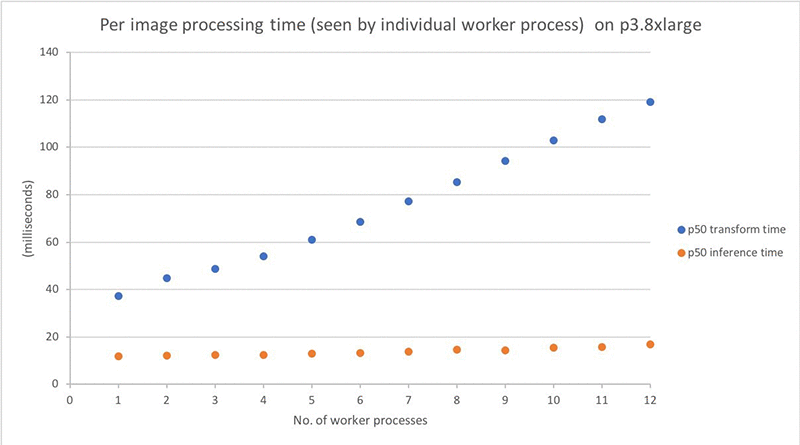
The processing time graph might make you wonder why the per-image processing time increases with the number of processes, while the total process time decreases. Remember: per-image timing graph above is measured from each worker process as they run in parallel. The total processing time roughly equals the following:

General learning and considerations
In addition to the described experiment, I also tried to run similar tests with different frameworks, models, and hardware. Here are some takeaways from those experiments:
Not all deep learning frameworks support multiprocessing inference equally. The process pool script runs smoothly with an MXNet model. By contrast, the Caffe2 framework crashes when I try to load a second model to a second process. Others have reported similar issues on GitHub for Caffe2. I found little or no documentation on multithreading/multiprocessing inference support from the major frameworks. So, you should test this yourself with your framework of choice.
Different hardware and inference code require different multiprocessing strategy. In my experiment, the model is relatively small compared to the GPU capacity. I could load multiple ML models to run inference simultaneously on a single GPU.
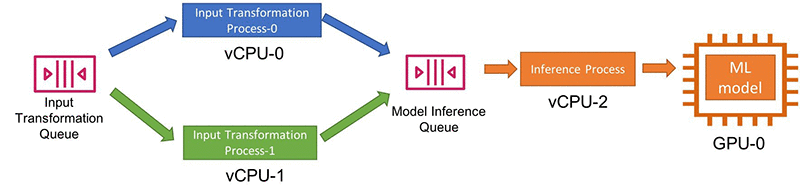
By contrast, less powerful devices and more heavyweight models might restrict you to one model per GPU, with a single inference task using 100% of the GPU. If the input transformation remains slow compared to the model inference, and if you have more CPUs than GPUs, you can also decouple them and use a different number of processes for each step using Python multiprocessing queues.
In the provided benchmarking code, I used process pools and pool.map() for code simplicity. In contrast, a publisher-consumer model with queues between processes offers a lot more flexibility (if some added code complexity):
There are other ways to improve inference performance. Many other available approaches also offer improved inference performance. For example, you can use Amazon SageMaker Neo to convert your trained model to an efficient format optimized for the underlying hardware, achieving faster performance while lowering memory footprint.
Another approach to explore is batching. In the cited test, I perform object detection inference for one image at a time. Batching multiple images for simultaneous processing offers to speed up total inference through matrix math efficiencies implemented by the underlying libraries and hardware optimizations. However, if you are trying to obtain results in real time, batching might not always be an option.
Try enabling NVIDIA Multi-Process Service (MPS). If you use an NVIDIA GPU device, you can enable Multi-Process Service (MPS) on each GPU. MPS offers an alternative GPU configuration to support running multiple ML models, submitted simultaneously from multiple CPU processes, on a single GPU. You can use either of the AWS IoT Greengrass or pure Python approach with MPS enabled or disabled.
I completed the example benchmark results described earlier on the p3.8xlarge instance without enabling MPS. I found the GPU on the p3.8xlarge supported running multiple independent ML models out of the box. When I tested the same setup with MPS turned on, the results showed an almost-negligible performance improvement (that is, by 0.2 milliseconds per image). However, I recommend that you try enabling MPS for your specific hardware and use case. You might find that it significantly improves performance.
Conclusion
In this post, I discussed two approaches for parallelizing inference on a single device at the edge across multiple CPU/GPUs:
- Run multiple Lambda containers (long-lived or on-demand) inside the AWS IoT Greengrass core
- Use Python multiprocessing
The former offers code simplicity, while the latter can run within or without Greengrass and provides the maximum flexibility. I also showed an example benchmark test highlighting the performance improvement you can obtain using multiple CPU/GPUs for inference. If your inference hardware is underutilized, give these options a try!
To start using AWS IoT Greengrass, click here. To start exporing SageMaker Neo, click here. You can find the code used in this post in the parallelize-ml-inference GitHub repo.
About the author
 Angela Wang is an R&D Engineer on the AWS Solutions Architecture team based in New York city. She helps AWS customers build out innovative ideas by rapid prototyping using the AWS platform. Outside of work, she loves reading, climbing, backcountry skiing and traveling.