Author: torontoai
[R] Learning without feedback: Direct random target projection as a feedback-alignment algorithm with layerwise feedforward training
As there have been some interesting discussions on the alternatives to backpropagation lately (e.g. this reddit thread), I am sharing our latest work just made available on arXiv:
Learning without feedback: Direct random target projection as a feedback-alignment algorithm with layerwise feedforward training
Summary: Building on feedback-alignment algorithms, we show how to train multi-layer neural networks using random projections of the target vector, which enables layerwise weight updates using only local and feedforward information. The proposed algorithm is called direct random target projection (DRTP). While backpropagation (BP) requires forward and backward weight symmetry (i.e. weight transport problem) and implies update locking before forward and backward passes have been completed, DRTP solves both problems toward higher biological plausibility and low-cost hardware implementation. Indeed, estimating the layerwise loss gradients only requires a label-dependent random vector selection, making adaptive smart sensors and edge computing the ideal applications due to limited power and computing resources. Despite its simplicity, we demonstrate on the MNIST and CIFAR-10 datasets that DRTP performs close to BP, feedback alignment (FA), direct feedback alignment (DFA) algorithms.
The PyTorch code (link above) also includes implementations of FA and DFA.
Feedback is welcome!
submitted by /u/Neurom0rph
[link] [comments]
[N] Major Release for mlfinlab
The latest version of mlfinlab (Github) has been released.
A package based on the book: Advances in Financial Machine Learning by Marcos Lopez de Prado.
“`pip install mlfinlab“`
This new release is our biggest to date and includes code for:
- Sequentially Bootstrapped Ensembles (Regression & Classification)
- Purged Cross-Validation
- Feature Importance
- Bet Sizing (+ EF3M)
- ML Asset Allocation (HRP, CLA, IVP)
Documentation can be found on Read-the-Docs.
submitted by /u/Jackal008
[link] [comments]
Build a custom entity recognizer using Amazon Comprehend
Amazon Comprehend is a natural language processing service that can extract key phrases, places, names, organizations, events, and even sentiment from unstructured text, and more. Customers usually want to add their own entity types unique to their business, like proprietary part codes or industry-specific terms. In November 2018, enhancements to Amazon Comprehend added the ability to extend the default entity types to custom entities. In addition, a custom classification feature allows you to group documents into named categories. For example, you can now group support emails by department, social media posts by product, and analyst reports by business unit.
Overview
In this post, I cover how to build a custom entity recognizer. No prior machine learning knowledge is required. I demonstrate an example that requires you to wrangle, filter, and clean the data before you can train the custom entity recognizer. Otherwise, you can just adhere to the following step-by-step instructions. These instructions begin with the dataset already prepared.
In this example, I use the following dataset: Customer Support on Twitter hosted on Kaggle. The dataset is chiefly comprised of short utterances. This is a typical and common illustration of chat conversations between a customer and a support representative. Here are some sample utterances from the Twitter dataset:
@AppleSupport causing the reply to be disregarded and the tapped notification under the keyboard is opened
@SpotifyCares Thanks! Version 8.4.22.857 armv7 on anker bluetooth speaker on Samsung Galaxy Tab A (2016) Model SM-T280 Does distance from speaker matter?

I filtered the data and kept only the tweets that contain “TMobileHelp” and “sprintcare” so that you can focus on one particular domain and context. Download and unzip the dataset onto your computer from comprehend_blog_data.zip file.
Walkthrough
In this example, you create a custom entity recognizer to extract information regarding iPhones and Samsung Galaxy phones. Currently, Amazon Comprehend recognizes both devices as “commercial items.” In this use case, you should be more specific.
Because you must be able to extract smartphone devices in particular, it would be counterproductive to limit the extracted data to generic commercial items. With this capability, a service provider can then easily extract device information from a tweet and route the problem to the relevant technical support team.
In the Amazon Comprehend console, create a custom entity recognizer for devices. Choose Train Recognizer.
Provide a name and an Entity type label, such as DEVICE.
To train a custom entity recognition model, you can choose one of two ways to provide data to Amazon Comprehend:
- Annotations: Uses an annotation list, which provides the location of your entities within a large number of documents. Amazon Comprehend can train from both the entity itself and its context.
- Entity lists: Provides only a limited context. It only uses a selection from the specific entities list so that Amazon Comprehend can train on identifying the custom entity.
For simplicity, use the entity list method. The Annotation method can often lead to more refined results.
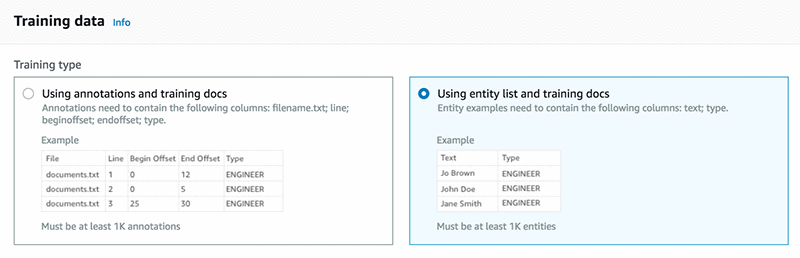
Provide a list of unique entities that have at least 1000 matches within a training dataset. Here is a list of devices included in the entity_list.csv file:
Split the initial dataset and hold out about 1000 records for testing purposes. This sample of records is used to test the model in a later step.
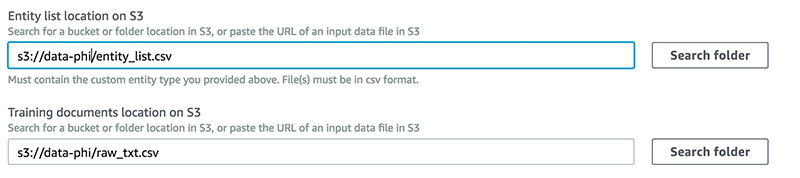
The rest of the data constitutes the training dataset (raw_txt.csv). As a general rule, you should include as much relevant data as possible. The more data that you add, the more context the model can have on which to train itself.
Upload the entity_list.csv and the raw_txt.csv files to an S3 bucket and provide the path for the entity list and training dataset locations.
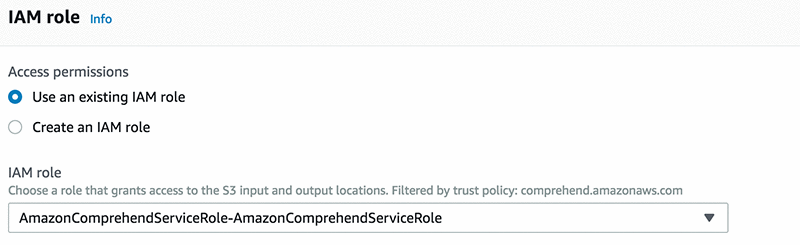
To grant permissions to Amazon Comprehend to access your S3 bucket, create an IAM service-linked role, as shown in the screenshot below. Use AmazonComprehendServiceRole-role.
Choose Train. This command allows you to submit your custom entity recognizer, go through a number of models, tune your hyperparameter, and check for cross validation to make sure that your model is robust. These are all the activities that data scientists perform to ensure that their models are robust.
Test your model
Next, create a job and test your model, as shown in the screenshot below.
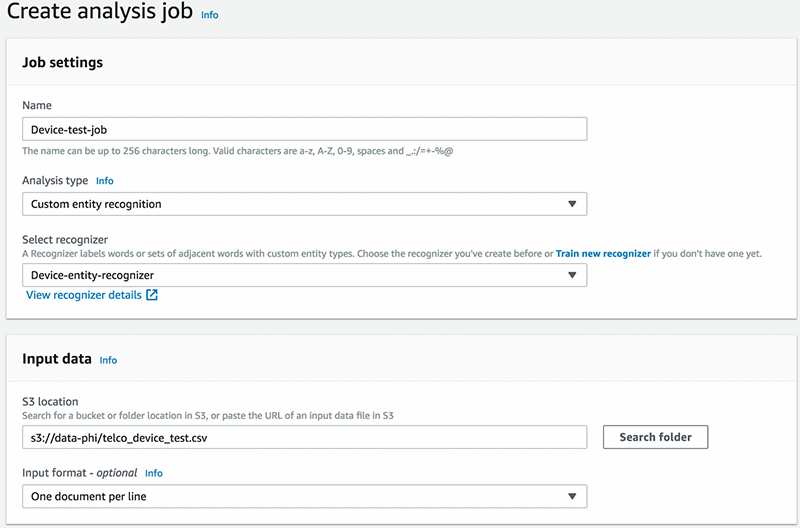
Provide an output folder where Amazon Comprehend saves the results.

Select the IAM role that you created in the previous step, and choose Create Job.
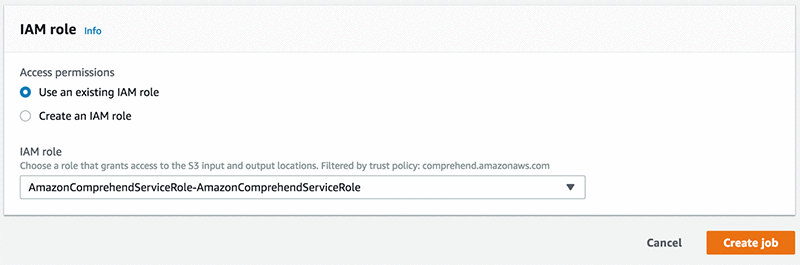
When your job analysis is complete, you have JSON files in your output S3 bucket path.

Now, to create a schema and to query your data, use AWS Glue and Amazon Athena, respectively. Follow the steps, provide the output path of your results, and create a database in AWS Glue. My AWS Glue crawler is shown in the following screenshot.
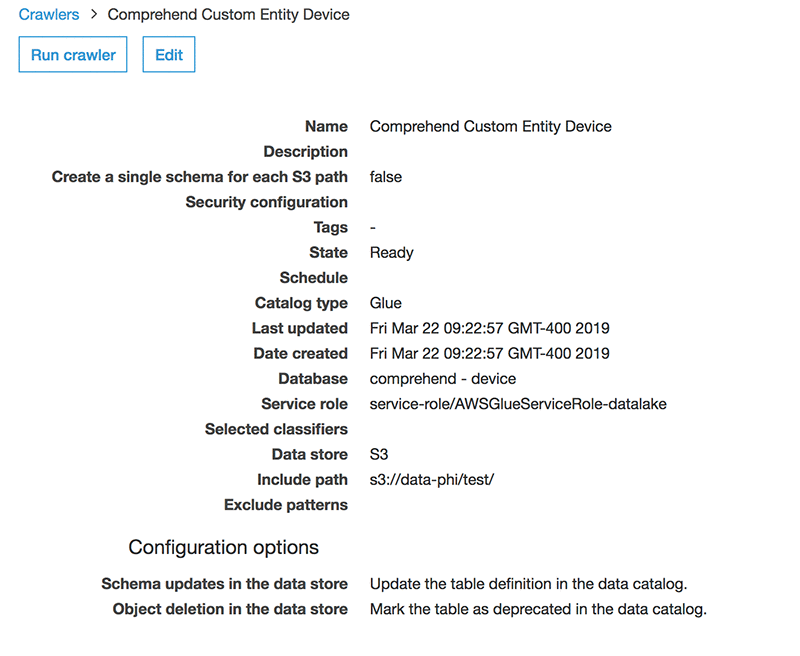
Next, run some queries in Athena and see which entities your custom annotator picks up.
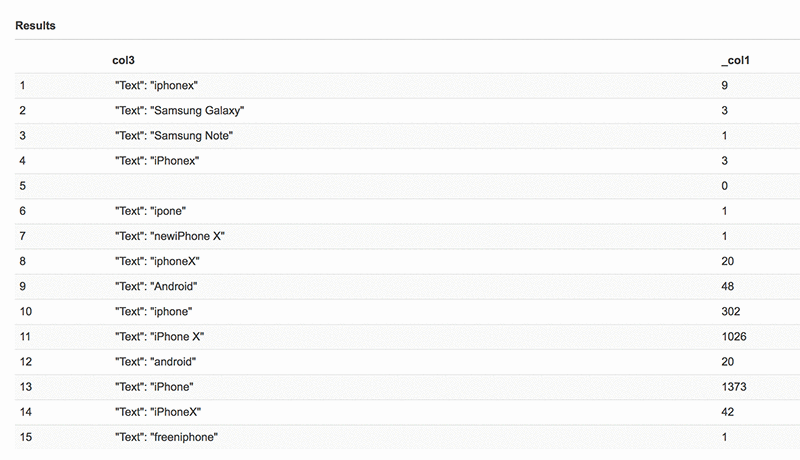
You might now notice that Amazon Comprehend has picked up additional words with varying spellings, which is something that can be expected when analyzing social media data, which has typos and abbreviated spellings.
Conclusion
In this post, I demonstrated how to build a custom entity recognition model, run some validation, and query the results. You could follow this post without having to know any of the complex and intricate procedures that must be mastered to build an NLP model.
In a real-life scenario, a service provider monitoring these tweets could leverage the custom entity recognition capabilities of Amazon Comprehend to extract information about the types of device mentioned in the tweet. They might also extract and assess the tone or sentiment of the tweet using Amazon Comprehend’s built-in sentiment analysis API.
This machine learning application can provide important context and assessment of a customer’s intent, which then enables Amazon Comprehend to make intelligent routing and remediation decisions. Overall, this process improves service and increases customer satisfaction.
Try custom entities now from the Amazon Comprehend console and get detailed instructions in the Amazon Comprehend documentation. This solution is available in all Regions where Amazon Comprehend is available. Please refer to the AWS Region Table for more information.
About the Authors
 Phi Nguyen is a solution architect at AWS helping customers with their cloud journey with a special focus on data lake, analytics, semantics technologies and machine learning. In his spare time, you can find him biking to work, coaching his son’s soccer team or enjoying nature walk with his family.
 Ro Mullier is a Sr. Solutions Architect at AWS helping customers run a variety of applications on AWS and machine learning workloads in particular. In his spare time, he enjoy spending time with family and friends, playing soccer and competing in machine learning competitions.
Audit Manager, Audit Analytics – Data Scientist – BMO Financial Group – Toronto, ON
From BMO Financial Group – Tue, 03 Sep 2019 20:43:22 GMT – View all Toronto, ON jobs
[D] looking for subjective evaluation tools or web service
Some of us work in image synthesis / translation problems where we can’t use Amazon Mturk.
We need to show people some images and we want them to score / rank each picture or pair or panel etc
Our current approach to this is to create a stack of images or PDF and share it along with an excel etc.
Question 1: is there a tool that we can use to have users see a panel of images and rank/score from a drop down etc? I know we can write our own gui / interface but seems a bit redundant. Is there a simpler way?
Question 2: you can see how the above won’t scale to many different users . Are you aware of any web service / tool instead? (*)
- one time I did this as a Google form and send it to our specialist pool and worked out wonders but I had to hand do it. It seems that Google api has a scripting language to automate things (which means we may be able to automate part) but Google forms has restrictions in the width of images that can be shown so it affects the range of applications.
submitted by /u/da_g_prof
[link] [comments]
[D] are multiclass unconditional GANs an open problem?
When reading the Progressive growing of gans by Karras at Nvidia they claim that they get good representations on an cifar10 unconditionally trained. I thought mode collapse for multiclass datasets was still mostly unsolved for gans. Is this partially solved with their models or am I missing something? Why is this considered such a hard problem and how does their results relate to the area?
submitted by /u/mesmer_adama
[link] [comments]
[D] python ide similar to sublime?
Hi! I have been learning and working on machine learning with python for a few months alredy. Since the beginning I have been using spyder, but I find it ugly and non aesthetic at all. I really like the ide itself, just dislike its appearance. I would like to find something like sublime text but with a command terminal. Do you know any? Thanks in advance
submitted by /u/marloquemegusta
[link] [comments]