Blog

Learn About Our Meetup

5000+ Members

MEETUPS

LEARN, CONNECT, SHARE

Join our meetup, learn, connect, share, and get to know your Toronto AI community. 

JOB POSTINGS

INDEED POSTINGS

Browse through the latest deep learning, ai, machine learning postings from Indeed for the GTA.

CONTACT

CONNECT WITH US

Are you looking to sponsor space, be a speaker, or volunteer, feel free to give us a shout.

Author: torontoai

[D] Neurips 2019 Registration Lottery

Just received the email:

“””

We are pleased to announce the opening of Registration for NeurIPS 2019:

Register:

Check pricing here. Registration opens Sept 6th at 8 a.m. Pacific. Please see below for more information about our new lottery registration system.

What’s new in 2019:

  • The old first-come-first-served registration has been replaced with a lottery. It is no longer necessary register in the first few minutes after registration opens. Add yourself to the lottery between Sept 6th and Sept 20th for a chance to be randomly chosen to register. Click the green “Register Starting Sept 6th” button on the home page after registration opens for more inforrmation. If you are in an Asian, African or Middle Eastern timezone, there is no longer a need to wake up in the night to register. Take your time; it won’t hurt your chances of getting a ticket.
  • NeurIPS 2019 will be held at the Vancouver Convention Center, Vancouver CANADA Sun Dec 8th through Sat the 14th. The check-in desk opens Sunday morning at 8:00 am in the West building of the VCC.
  • Students must upload a scan of their student IDs to qualify for student pricing and financial support. Students must present their valid student ID at the check-in desk to pick up their badge.
  • The entire meeting will be live-streamed.

“””

Thoughts? Seems like this may increase the pool of competing attendees as a side effect due to the time barrier removal. Any way to roughly estimate the % chance of getting a ticket?

submitted by /u/AeronByHermanMiller
[link] [comments]

Enable smart text analytics using Amazon Elasticsearch Search and Amazon Comprehend

We’re excited to announce an end-to-end solution that leverages natural language processing to analyze and visualize unstructured text in your Amazon Elasticsearch Service domain with Amazon Comprehend in the AWS Cloud. You can deploy this solution in minutes with an AWS CloudFormation template and visualize your data in a Kibana dashboard.

Amazon Elasticsearch Service (Amazon ES) is a fully managed service that delivers Elasticsearch’s easy-to-use APIs and real-time capabilities along with the availability, scalability, and security required by production workloads. Amazon Comprehend is a fully managed natural language processing (NLP) service that enables text analytics to extract insights from the content of documents. Customers can now leverage Amazon ES and Amazon Comprehend to index and analyze unstructured text, and deploy a pre-configured Kibana dashboard to visualize extracted entities, key phrases, syntax, and sentiment from their documents.

As an example, a company might have large volumes of online customer feedback or transcribed customer calls. With this solution, you can visualize a time series of the sentiment of customer contacts, analyze a word cloud of the entities or key phrases in those contacts, search contacts for a specific product by sentiment, and much more. In this blog post, let’s look at an example Kibana dashboard that you can deploy to draw insights from your text data with Amazon ES and Amazon Comprehend. For detailed instructions, please visit the solution implementation guide.

This solution uses AWS CloudFormation to automate the deployment on the AWS Cloud. You can learn more about the solution by clicking this link and download the template here:

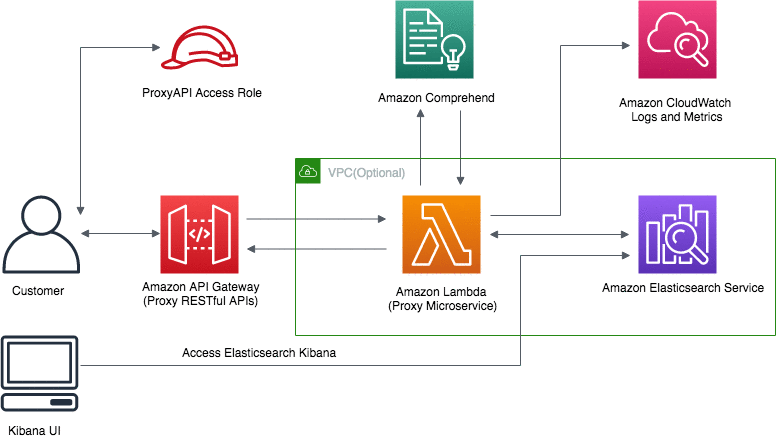
You can use this template to launch the solution and all associated components. Deploying this solution with the default parameters builds the following environment in the AWS Cloud.

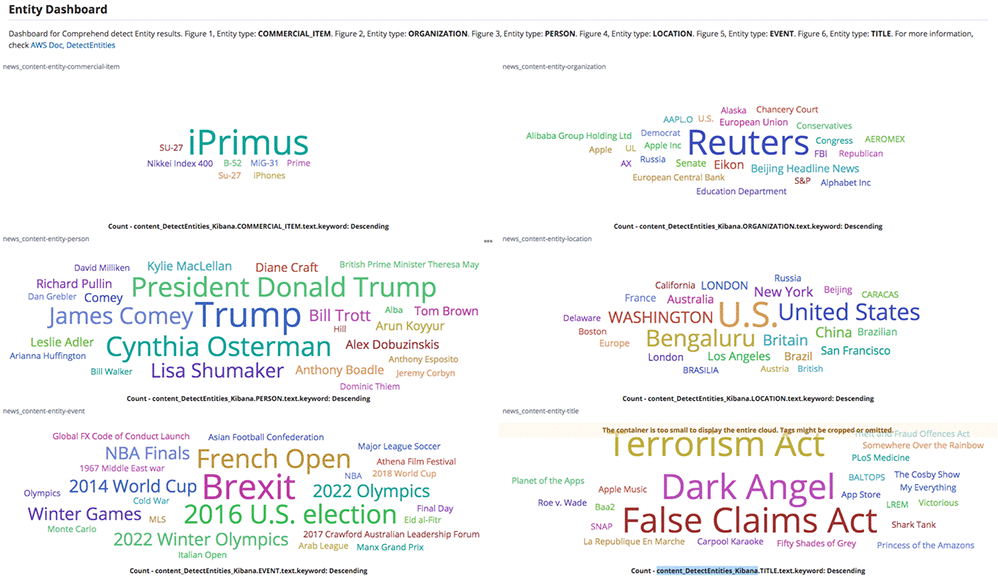
The default configuration deploys Amazon API Gateway, AWS Lambda, Amazon Elasticsearch Service, and AWS Identity and Access Management roles and policies, but you can also customize the template based on your specific network needs. Once the solution is deployed, you get a fully compatible Amazon ES RESTful API that you can use to ingest documents to Amazon ES and automatically tag the documents with NLP-based text analytics from Amazon Comprehend. You can then use the pre-configured Kibana dashboard to visualize these insights. In the example below, the entity dashboard below shows the word cloud for commercial items, organizations, people, locations, events, and titles from news content.

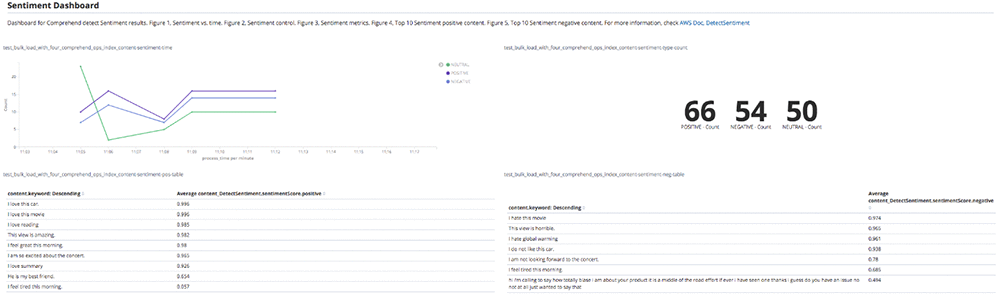
The sentiment dashboard below shows the sentiment over time, total counts of each sentiment and the top documents with positive and negative sentiment from unstructured text.

The Kibana dashboard is interactive and user-friendly, allowing you to dive deep into your unstructured text data. Try this solution now:

This solution is available in all Regions where Amazon ES and Amazon Comprehend is available. Please refer to the AWS Region Table for more information about Amazon Elasticsearch Service and Amazon Comprehend availability.


About the Author

Sameer Karnik is a Sr. Product Manager leading product for Amazon Comprehend, AWS’s natural language processing service.


Enable smart text analytics using Amazon Elasticsearch Service and Amazon Comprehend

We’re excited to announce an end-to-end solution that leverages natural language processing to analyze and visualize unstructured text in your Amazon Elasticsearch Service domain with Amazon Comprehend in the AWS Cloud. You can deploy this solution in minutes with an AWS CloudFormation template and visualize your data in a Kibana dashboard.

Amazon Elasticsearch Service (Amazon ES) is a fully managed service that delivers Elasticsearch’s easy-to-use APIs and real-time capabilities along with the availability, scalability, and security required by production workloads. Amazon Comprehend is a fully managed natural language processing (NLP) service that enables text analytics to extract insights from the content of documents. Customers can now leverage Amazon ES and Amazon Comprehend to index and analyze unstructured text, and deploy a pre-configured Kibana dashboard to visualize extracted entities, key phrases, syntax, and sentiment from their documents.

As an example, a company might have large volumes of online customer feedback or transcribed customer calls. With this solution, you can visualize a time series of the sentiment of customer contacts, analyze a word cloud of the entities or key phrases in those contacts, search contacts for a specific product by sentiment, and much more. In this blog post, let’s look at an example Kibana dashboard that you can deploy to draw insights from your text data with Amazon ES and Amazon Comprehend. For detailed instructions, please visit the solution implementation guide.

This solution uses AWS CloudFormation to automate the deployment on the AWS Cloud. You can learn more about the solution by clicking this link and download the template here:

You can use this template to launch the solution and all associated components. Deploying this solution with the default parameters builds the following environment in the AWS Cloud.

The default configuration deploys Amazon API Gateway, AWS Lambda, Amazon Elasticsearch Service, and AWS Identity and Access Management roles and policies, but you can also customize the template based on your specific network needs. Once the solution is deployed, you get a fully compatible Amazon ES RESTful API that you can use to ingest documents to Amazon ES and automatically tag the documents with NLP-based text analytics from Amazon Comprehend. You can then use the pre-configured Kibana dashboard to visualize these insights. In the example below, the entity dashboard below shows the word cloud for commercial items, organizations, people, locations, events, and titles from news content.

The sentiment dashboard below shows the sentiment over time, total counts of each sentiment and the top documents with positive and negative sentiment from unstructured text.

The Kibana dashboard is interactive and user-friendly, allowing you to dive deep into your unstructured text data. Try this solution now:

This solution is available in all Regions where Amazon ES and Amazon Comprehend is available. Please refer to the AWS Region Table for more information about Amazon Elasticsearch Service and Amazon Comprehend availability.


About the Author

Sameer Karnik is a Sr. Product Manager leading product for Amazon Comprehend, AWS’s natural language processing service.


Giving Lens New Reading Capabilities in Google Go

Around the world, millions of people are coming online for the first time, and many of them are among the 800 million adults worldwide who are unable to read or write, or those who are migrating to towns and cities where they are not able to speak the predominant language. As a smartphone camera-based tool, Google Lens has great potential for helping people who struggle with reading and other language-based challenges. Lens uses computer vision, machine learning and Google’s Knowledge Graph to let people turn the things they see in the real world into a visual search box, enabling them to identify objects like plants and animals, or to copy and paste text from the real world into their phone.

However, in order for Lens to be able to help the greatest number of people, we needed to create a special version that can work on even the most basic smartphones. So at I/O 2019, we announced a new version of Lens designed specifically for use in Google Go—our Search app for entry level devices—and we included a new set of features designed to help people who face reading and other language-based challenges. When users point their camera at text they don’t understand, Lens in Google Go can translate and read it out loud. It even highlights each word as it’s being read so users can follow along. If you want to try out these features for yourself, they are available today via Lens in Google Go. While Google Go was initially available only on Android Go devices and on the Google Play Store in select markets, recently, we made it available globally in the Google Play Store.
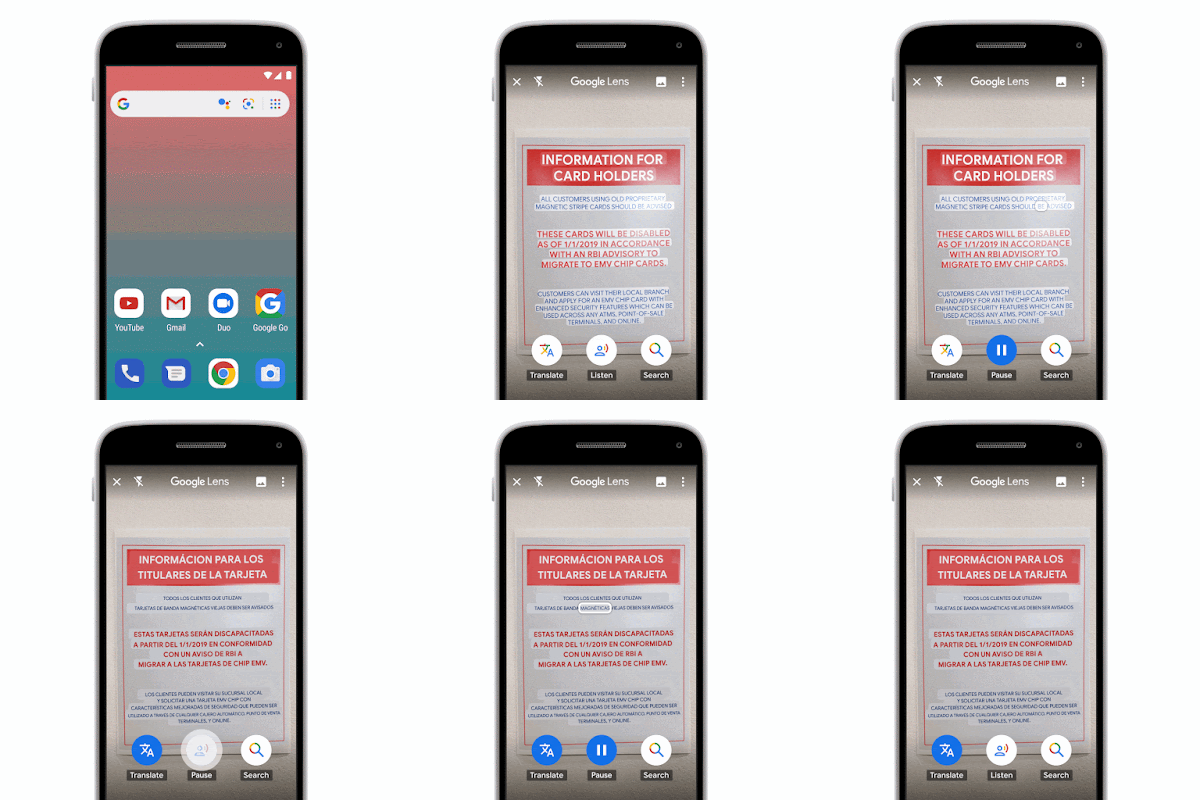
To make these reading features work, the Google Go version of Lens needs to be able to capture high quality images on a wide variety of devices, then identify the text, understand its structure, translate and overlay it in context, and finally, read it out loud.

Image Capture
Image capture on entry-level devices, like those that run Android Go, is tricky since it must work on a wide variety of devices, many of which are more resource constrained than flagship phones. To build a universal tool that can reliably capture high-quality images with minimal lag, we made Lens in Google Go an early adopter of a new Android support library called CameraX. Available in Jetpack—a suite of libraries, tools, and guidance for Android developers—CameraX is an abstraction layer over the Android Camera2 API that resolves device compatibility issues so developers don’t have to write their own device-specific code.

Using CameraX, we implemented two capture strategies to balance capture latency against performance impact. On higher-end phones, which are powerful enough to provide a constant stream of high-resolution frames from which to select an image, we’ve made capture instantaneous. On less advanced devices, streaming these frames could cause camera lag since the CPU is less powerful, so we process the frame when the user taps capture to produce a single, on-demand high-resolution image.

Text Recognition
After Lens in Google Go captures an image, it needs to make sense of the shapes and letters that constitute the words, sentences and paragraphs. To do this, the image is scaled down and transferred to the Lens server, where the processing will be performed. Next, optical character recognition (OCR) is applied, which utilizes a region proposal network to detect character level bounding boxes that can be merged into lines for text recognition.

Merging these character boxes into words is a two-step, sequential process. The first step is to apply the Hough Transform, which assumes the text is distributed across parallel lines. The second step uses Text Flow, which instead traces text that may follow a curve by finding the shortest path through a graph of detected text boxes. This ensures that text with a variety of distributions, be they straight, curved or mixed, can be identified and processed.

Because the images captured by Lens in Google Go may include sources such as signage, handwriting or documents, a slew of additional challenges can arise. For example, the text can be obscured, scripts can be uniquely stylized, and images can be blurry. All of these issues can cause the OCR engine to misunderstand various characters within each word. To correct mistakes and improve word accuracy, Lens in Google Go uses the context of surrounding words to make corrections. It also utilizes the Knowledge Graph to provide contextual clues, such as whether a word is likely a proper noun and should not be spell-corrected.

All of these steps, from script detection and direction identification to text recognition, are performed by separable convolutional neural networks (CNNs) with an additional quantized long short-term memory (LSTM) network. And the models are trained on data from a variety of sources, ranging from ReCaptcha to scanned images from Google Books.

Left: Image with bounding box around recognized text. The raw OCR output from this image reads, “Cise is beauti640”. Right: By applying Knowledge Graph in addition to context from nearby words, Lens in Google Go recognizes the words, “life is beautiful”.

Understanding Structure
Once the individual words have been recognized, Lens must determine how to fit them together. The text that people come across in the real world is laid out in many different ways. A newspaper, for example, is laid out into columns, with headlines, article text, and advertisements. Meanwhile, a bus schedule, has one column for destinations and another with times. While understanding text structure comes very naturally to people, computers need to be taught how to comprehend it. Lens uses CNNs to detect coherent text blocks like columns, or text in a consistent style or color. And then, within each block, it uses signals like text-alignment, language, and the geometric relationship of the paragraphs to determine their final reading order.

One of the other challenges in detecting document structure is that people take pictures of text from different angles, often with a warped perspective. This means we cannot revert to off-the-shelf detectors that rely on axis aligned boxes, but must generalize our systems to be able to deal with homographic distortions.

Paragraph segmentation on the front page of a newspaper. Notice how “News Analysis”, which is embedded in the middle of a column, has been identified separately due to its distinct style features.

Translations in Context
To provide users with the most helpful information, translations must be both accurate and contextual. Lens uses Google Translate’s neural machine translation (NMT) algorithms, to translate entire sentences at a time, rather than going word-by-word, in order to preserve proper grammar and diction.

For the translation to be most useful, it needs to be placed in the context of the original text. For example, when translating instructions on an ATM, it is important to know which buttons correspond to which instructions. Part of the challenge is accounting for the fact that the translated text can be much shorter or longer than the original. For example, German sentences tend to be longer than English ones. To accomplish this seamless overlay, Lens redistributes the translation into lines of similar length, and chooses an appropriate font size to match. It also matches the color of the translation and its background with the original text through the use of a heuristic that assumes the background and the text differ in luminosity, and that the background takes up the majority of the space. This allows Lens to classify whether a pixel represents background or text, and then sample the average color from these two regions to ensure the translated text matches the original text.

Reading the Text Out Loud
The final challenge in delivering information in the most helpful way with Lens in Google Go is reading the text aloud. High-fidelity audio is generated using Google Text-to-Speech (TTS), a service that applies machine learning to disambiguate and detected entities such as dates, phone numbers and addresses, and uses that to generate realistic speech based on DeepMind’s WaveNet.

These reading features become more contextual and useful when they are paired with display. Lens utilizes timing annotations from the TTS service that mark the beginning of each word in order to highlight each word on screen as it’s being read, similar to a karaoke machine. Say for example, a user takes a picture of an ATM screen with different labels next to different buttons. This karaoke effect allows users to know which label applies to which button. It may also help users learn how to pronounce the words being translated.

Looking Ahead
Taken together, it is our hope that these features will have a positive impact on the day-to-day lives of millions of people. Moving forward, we will continue to work on further updates to these reading features to make the OCR more precise, including improvements to text structure understanding (e.g. multi-column text) and recognition of Indic scripts. As we address these text challenges, we continue to look for new ways that the combination of machine learning and the smartphone camera can help people as they go about their lives.

[D] How To Make Custom AI-Generated Text With GPT-2

I’ve seen a few posts on this subreddit and /r/learnmachinelearning asking how to finetune GPT-2 and generate text from it. As the creator of gpt-2-simple, I’ve had a lot of experience working with GPT-2, so here’s a (lengthy!) blog post on how to finetune GPT-2 and generate text using gpt-2-simple, along with a history of GPT-2 finetuning and its future:

https://minimaxir.com/2019/09/howto-gpt2/

Let me know if you have any questions!

submitted by /u/minimaxir
[link] [comments]

[P] Realtime Stereo Vision (toy project)

[P] Realtime Stereo Vision (toy project)

Sup. I happened across one of the projects I was working on a few years ago, and I thought I would share it here in case you guys wanted to play with it.

Sample video of script in action

tl;dr summary of the code is it does a shitty implementation of a few layers of lstm to process a live video feed from a webcam or two, and it tries to predict some configurable number of frames into the future, conditioned on its own action space also. Also, since I happen to have two identical webcams lying around, I adapted the code to also handle concurrent stereoscopic video feeds for the fun of it. It wasn’t really meant to be a super rigorous implementation (ie, I used lstm instead of cnn layers), but I still think it had some mildly interesting outcomes.

Also, imho the video feed of the loss makes for some fun visual effects.

Anyways, here’s a link to the eye-bleedingly bad (but mostly functional) code: https://github.com/Miej/online-deep-learning

enjoy!

submitted by /u/Miejuib
[link] [comments]

[D] AAAI 2020: is it worth it?

I submitted the abstract for AAAI 2020, roughly 3 days before the final deadline. One of my colleagues did the same 2 days before me, and got a submission number less than 100. I got a submission number higher than 4k. Now I’m reading on Twitter that they got more than 10k submissions.

Now, I also believe they are going to have several issues with the reviewers, as they’re asking reviewers to review 5 to 10 papers, with no chance of load reduction. It is my understanding that many people are simply bailing out, for obvious reasons.

What you your experience so far? Are you still submitting the final paper, or may decide to submit somewhere else? I was considering submitting my work to IAAI instead, which is more application focused and is not on the way to implode as AAAI.

submitted by /u/b3by
[link] [comments]