Author: torontoai
[D] Help with fine-tuning for text classification task
Testing out fine-tuning BERT and ULMFit for text classification. I’ve followed various tutorials using FastAI and PyTorch, but haven’t yet gotten good results at all – would love to get some input and see if my approach to this problem is reasonable.
My problem is take a short snippet of text – anywhere from 10 – 200 characters and predict one from 2,510 categories that represent words (one-hot vector). I’m using CrossEntropyLoss for the problem and both BERT and ULMFit do not seem to be doing great after fine-tuning – I can’t even get BERT begin to make non-naive predictions. I believe this is due to the large number of classes, but I had thought there would be enough signal in the text for BERT to make a guess at one of the categories after seeing some examples. It ends up just predicting the most common class.
I have ~10MM samples for the data and I’ve been testing to hopefully see some basic results on ~500K examples. Is this reasonable? Should I just try throwing all of the data in there and see what happens?
My data is fairly messy as well since it’s raw text, should I be cleaning it much? Haven’t found many recommendations on this front yet and all of the SOTA metrics appear to be on clean text afaik. As far as spelling goes as well wondering if that’s an issue.
Any comments/thoughts on the approach? If it would help I can post the code (can’t post the data unfortunately), but it’s mostly copied from some tutorials with a few modifications so don’t know how much that will help.
Thanks in advance for the help.
submitted by /u/snowcrashed617
[link] [comments]
[R] Robust Lane detection and tracking framework for Autonomous Vehicles(Indian Roads) using Deep CNN, Ext. Hough Transform and Kalman Filter.
Being part of the perception team at an Autonomous Vehicle research lab I had been working on the development of the lane detection and tracking module for the vehicle catering to Indian road scenario. What made the project challenging were many factors unique to the Indian landscape like highly weathered lanes and unusually congested traffic problems which took the project close to 8 months to complete.The framework is trained and evaluated on the data collected by our experimental vehicle on Indian roads. The dataset consists of a total of 4500 frames with varying driving scenarios, including highways, urban roads, traffic, shadowed lanes, partially visible lanes and curved lanes.
Project Page/Github link : https://github.com/ayush1997/Robust-Lane-Detection-and-Tracking
submitted by /u/ayush0016
[link] [comments]
Language Data Specialist (Toronto) – SoundHound Inc. – Toronto, ON
From SoundHound Inc. – Wed, 07 Aug 2019 20:22:43 GMT – View all Toronto, ON jobs
Adding a data labeling workflow for named entity recognition with Amazon SageMaker Ground Truth
Launched at AWS re:Invent 2018, Amazon SageMaker Ground Truth enables you to efficiently and accurately label the datasets required to train machine learning (ML) systems. Ground Truth provides built-in labeling workflows that take human labelers step-by-step through tasks and provide tools to help them produce good results. Built-in workflows are currently available for object detection, image classification, text classification, and semantic segmentation labeling jobs.
Today, AWS launched support for a new use case: named entity recognition (NER). NER involves sifting through text data to locate noun phrases called named entities, and categorizing each with a label, such as “person,” “organization,” or “brand.” So, in the statement “I recently subscribed to Amazon Prime,” “Amazon Prime” would be the named entity and could be categorized as a “brand.”
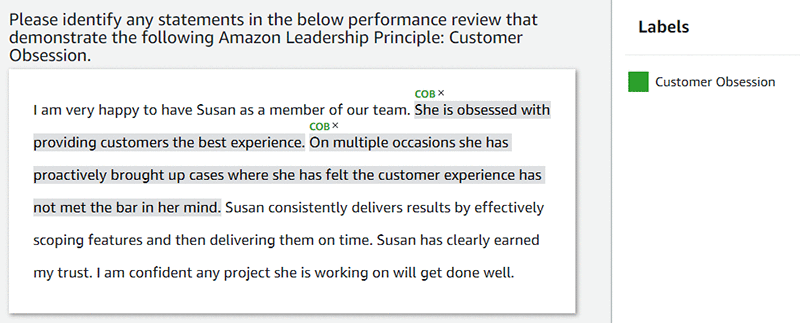
You can broaden this use case to label longer spans of text and categorize those sequences with any pre-specified labels. For example, the following screenshot identifies spans of text in a performance review that demonstrate the Amazon leadership principle “Customer Obsession.”
Overview
In this post, I walk you through the creation of a NER labeling job:
- Gather a dataset.
- Create the labeling job.
- Select a workforce.
- Create task instructions.
For this exercise, your NER labeling task is to identify brand names from a dataset. I have provided a sample dataset of ten tweets from the Amazon Twitter account. Alternatively, feel free to bring your own dataset, and define a specific NER labeling task that is relevant to your use case.
Prerequisites
To follow the steps outlined in this post, you need an AWS account and access to AWS services.
Step 1: Gather your dataset and store data in Amazon S3
Gather the dataset to label, save it to a text file, and upload the file to Amazon S3. For example, I gathered 10 tweets, saved them to a text file with one tweet per return-separated line, and uploaded the text file to an S3 bucket called “ner-blog.” For your reference, the following box contains the uploaded tweets from the text file.
Step 2: Create a labeling job
- In the Amazon SageMaker console, choose Labeling jobs, Create labeling job.
- To set up the input dataset location, choose Create manifest file.
- Point to the S3 location of the text file that you uploaded in Step 1, and select Text, Create.
- After the creation process finishes, choose Use this manifest, and complete the following fields:
- Job name—Custom value.
- Input dataset location—S3 location of the text file to label. (The previous step should have populated this field.)
- Output dataset location—S3 location to which Amazon SageMaker sends labels and job metadata.
- IAM Role—A role that has read and write permissions for this task’s Input dataset and Output dataset locations in S3.
- Under Task type, for Task Category, choose Text.
- For Task selection, select Named entity recognition.
Step 3: Selecting a labeling workforce
The Workers interface offers three Worker types:
- Public—Amazon Mechanical Turk, an on-demand, 24/7, crowdsourced workforce.
- Private—Your workforce.
- Vendor—A third-party workforce equipped to process confidential data.
The console includes other Workers settings, including Price per task and the optional Number of workers per dataset.
For this demo, use Public. Set Price per task at $0.024. Mechanical Turk workers should complete the relatively straightforward task of identifying brands in a tweet in 5–7 seconds.
Use the default value for Number of workers per dataset object (in this case, a single tweet), which is 3. SageMaker Ground Truth asks three workers to label each tweet and then consolidates those three workers’ responses into one high-fidelity label. To learn more about consolidation approaches, see Annotation Consolidation.
Step 4: Creating the labeling task instructions
While critically important, effective labeling instructions often require significant iteration and experimentation. To learn about best practices for creating high-quality instructions, see Create high-quality instructions for Amazon SageMaker Ground Truth labeling jobs. Our exercise focuses on identifying brand names in tweets. If there are no brand names in a specific tweet, the labeler has the option of indicating there are no brands in the tweet.
An example of labeling instructions is shown on the following screenshot.

Conclusion
In this post, I introduced Amazon SageMaker Ground Truth data labeling. I showed you how to gather a dataset, create a NER labeling job, select a workforce, create instructions, and launch the job. This is a small labeling job with only 10 tweets and should be completed within one hour by Mechanical Turk workers. Visit the AWS Management Console to get started.
As always, AWS welcomes feedback. Please submit comments or questions below.
About the Author
 Vikram Madan is the Product Manager for Amazon SageMaker Ground Truth. He focusing on delivering products that make it easier to build machine learning solutions. In his spare time, he enjoys running long distances and watching documentaries.
Data Science – AI Analytics Consultant – Toronto – Capgemini – Toronto, ON
From Capgemini – Wed, 07 Aug 2019 19:31:08 GMT – View all Toronto, ON jobs
[P] Self-hosted ML deployment platform
Hi everyone,
I’m building a platform for deploying machine learning in production. It takes exported models (TensorFlow, PyTorch, XGBoost, etc), deploys them as web APIs, and handles things like autoscaling, log streaming, and inference on CPUs or GPUs. It’s open source and designed to be self-hosted on AWS (GitHub / website).
I’d love to hear your feedback!
submitted by /u/ospillinger
[link] [comments]
[Research] Temporal Attentive Alignment for Large-Scale Video Domain Adaptation (ICCV 2019 Oral)
Hello,
It’s my pleasure to share our recent work on Video Domain Adaptation with you!
We proposed large-scale cross-domain action datasets, and developed an attention-based spatio-temporal DA mechanism to achieve effective domain alignment.
Temporal Attentive Alignment for Large-Scale Video Domain Adaptation (ICCV 2019 Oral)
[GitHub] https://github.com/cmhungsteve/TA3N
[arXiv] https://arxiv.org/abs/1907.12743
Feel free to share with others 🙂
submitted by /u/cmhung34
[link] [comments]
Researchers reveal AI weaknesses by developing more than 1,200 questions that, while easy for people to answer, stump the best computer answering systems today. The system that learns to master these questions will have a better understanding of language. Videos of human-computer matches available.
 |
submitted by /u/ezubaric [link] [comments] |